Outline ·
[ Standard ] ·
Linear+
Review ASUS RT-AC86U, Feature-packed advanced wireless router
|
thamch
|
 Aug 16 2018, 05:18 PM Aug 16 2018, 05:18 PM
|
Getting Started


|
QUOTE(deathninjax @ Aug 13 2018, 08:32 PM) got this router after researching about it to replace tp link archer c7. had to return the first unit after 5Ghz wifi became unusable after one day. so far the 2nd unit is fine except for one problem. its hard for the hypptv stb to connect to the service. it has the error code 108005. switching the stb off and on will get it working if lucky. already set the iptv service to unifi home in the settings using lan4. if it does connect, hypptv is usable without any errors. just hard to connect once it is switched on from off state. even archer c7 is better as it is instant connected. regret spending so much to buy this router with this kind of problem. the seller said to reset the router when i mentioned this problem. same problem after resetting. wondering if anyone have any fix for this problem. Maybe you can try the Merlin firmware? |
|
|
|
|
|
thamch
|
Aug 16 2018, 05:19 PM
|
Getting Started
|
Router had reached China and getting a replacement unit.
Awaiting China to ship back to Malaysia.
|
|
|
|
|
|
thamch
|
Aug 21 2018, 01:42 PM
|
Getting Started
|
QUOTE(stinky @ Aug 20 2018, 08:31 AM) Hi How much is it to send back to China? Do you need to deal in mandarin? Shipping RM45. And you need write address in Chinese. |
|
|
|
|
|
thamch
|
Aug 21 2018, 06:49 PM
|
Getting Started
|
QUOTE(llk @ Aug 21 2018, 02:32 PM) What courier service are you using? I asked few the cheapest is Yunda but still RM89. Sending from M'sia to China for warranty claim is PosMalaysia RM45. From China to Malaysia is one of the China Logistic company. Around RM40 also by Air. This post has been edited by thamch: Aug 21 2018, 06:49 PM |
|
|
|
|
|
thamch
|
Sep 17 2018, 09:34 AM
|
Getting Started
|
QUOTE(wakhaiha @ Sep 16 2018, 10:31 PM) I had turned off QoS, but it just the same. tried iperf, max can get ~230Mbps. also tried move router to other area (without wan access) for wifi testing purpose, to avoid interference. but the result just the same. wireles log: CODE
SSID: "xxxx@unifi"
RSSI: 0 dBm SNR: 0 dB noise: -92 dBm Channel: 4
BSSID: 4C:ED:FB:AA:3E:E0 Capability: ESS ShortSlot
Supported Rates: [ 1(b) 2(b) 5.5(b) 6 9 11(b) 12 18 24 36 48 54 ]
VHT Capable:
Chanspec: 2.4GHz channel 4 20MHz (0x1004)
Primary channel: 4
HT Capabilities:
Supported MCS : [ 0 1 2 3 4 5 6 7 8 9 10 11 12 13 14 15 16 17 18 19 20 21 22 23 ]
VHT Capabilities:
Supported VHT (tx) Rates:
NSS: 1 MCS: 0-11
NSS: 2 MCS: 0-11
NSS: 3 MCS: 0-11
Supported VHT (rx) Rates:
NSS: 1 MCS: 0-11
NSS: 2 MCS: 0-11
NSS: 3 MCS: 0-11
Interference Level: Acceptable
Mode : AP Only
Stations List
----------------------------------------
idx MAC Associated Authorized RSSI PSM SGI STBC MUBF Tx rate Rx rate Connect Time
SSID: "xxxx@unifi_5G"
RSSI: 0 dBm SNR: 0 dB noise: -87 dBm Channel: 44/80
BSSID: 4C:ED:FB:AA:3E:E4 Capability: ESS
Supported Rates: [ 6(b) 9 12(b) 18 24(b) 36 48 54 ]
VHT Capable:
Chanspec: 5GHz channel 42 80MHz (0xe22a)
Primary channel: 44
HT Capabilities:
Supported MCS : [ 0 1 2 3 4 5 6 7 8 9 10 11 12 13 14 15 16 17 18 19 20 21 22 23 24 25 26 27 28 29 30 31 ]
VHT Capabilities:
Supported VHT (tx) Rates:
NSS: 1 MCS: 0-11
NSS: 2 MCS: 0-11
NSS: 3 MCS: 0-11
NSS: 4 MCS: 0-11
Supported VHT (rx) Rates:
NSS: 1 MCS: 0-11
NSS: 2 MCS: 0-11
NSS: 3 MCS: 0-11
NSS: 4 MCS: 0-11
Interference Level: Acceptable
Mode : AP Only
Stations List
----------------------------------------
idx MAC Associated Authorized RSSI PSM SGI STBC MUBF Tx rate Rx rate Connect Time
D4:25:8B:DA:0A:B6 Yes Yes -38dBm No Yes Yes No 433.3M 433.3M 00:00:41
iperf result (iperf server run from PC with Gigabit wired LAN): CODE
C:\iperf-3.1.3-win64>iperf3 -c 192.168.50.166
Connecting to host 192.168.50.166, port 5201
[ 4] local 192.168.50.146 port 57009 connected to 192.168.50.166 port 5201
[ ID] Interval Transfer Bandwidth
[ 4] 0.00-1.00 sec 24.2 MBytes 203 Mbits/sec
[ 4] 1.00-2.00 sec 26.5 MBytes 222 Mbits/sec
[ 4] 2.00-3.00 sec 26.6 MBytes 223 Mbits/sec
[ 4] 3.00-4.00 sec 25.6 MBytes 215 Mbits/sec
[ 4] 4.00-5.00 sec 26.2 MBytes 220 Mbits/sec
[ 4] 5.00-6.00 sec 26.1 MBytes 219 Mbits/sec
[ 4] 6.00-7.00 sec 26.5 MBytes 222 Mbits/sec
[ 4] 7.00-8.00 sec 26.5 MBytes 223 Mbits/sec
[ 4] 8.00-9.00 sec 26.4 MBytes 221 Mbits/sec
[ 4] 9.00-10.00 sec 26.6 MBytes 223 Mbits/sec
- - - - - - - - - - - - - - - - - - - - - - - - -
[ ID] Interval Transfer Bandwidth
[ 4] 0.00-10.00 sec 261 MBytes 219 Mbits/sec sender
[ 4] 0.00-10.00 sec 261 MBytes 219 Mbits/sec receiver
iperf Done.
Try open a support case with Asus. |
|
|
|
|
|
thamch
|
Sep 27 2018, 01:12 PM
|
Getting Started
|
QUOTE(thamch @ Jul 22 2018, 10:23 PM) Confirmed the 5Ghz faulty even with Asus Stock Firmware. Opening a support case with Asus and see how to RMA China unit. Received the unit and installed 2 x 70mm 12V fan connected to the USB 2.0 port. So far running well. Attached thumbnail(s)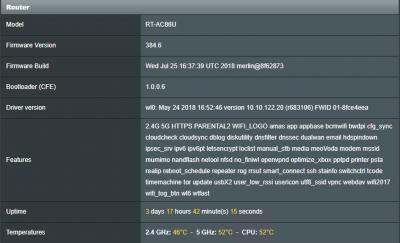
|
|
|
|
|
|
thamch
|
Sep 28 2018, 07:33 AM
|
Getting Started
|
QUOTE(CAL V @ Sep 27 2018, 10:10 PM) You sent the unit back to China right? Yes |
|
|
|
|
|
thamch
|
Sep 28 2018, 06:29 PM
|
Getting Started
|
QUOTE(sunflower21 @ Sep 28 2018, 01:00 PM) Are there any additional benefits using merlin firmware? More features. |
|
|
|
|
|
thamch
|
Nov 28 2018, 09:10 AM
|
Getting Started
|
QUOTE(coo|dude @ Nov 26 2018, 09:26 AM) Hi, I know this thread is all about AC86U, but I just want to "tumpang" this thread considering the lively and responsiveness this thread has been. I have an AC5300 unit - just wondering: 1. Are there better antennas out there to increase the range? Or is there a setting to do this? I saw a power saving feature to decrease the range though but nothing on increasing it. 2. Any "accessories" for this beast? Is a cooling fan really needed? Is it noisy? 1. I'm using stock antenna. What kind of problem that you are facing? 2. Just mod a 12v 120mm computer fan and plug it to 5V USB port on the router. It will be near zero noise. |
|
|
|
|
|
thamch
|
Nov 29 2018, 10:10 PM
|
Getting Started
|
QUOTE(coo|dude @ Nov 28 2018, 09:14 AM) No problem, just thought of extending the range so that my far kitchen signal is stronger.. Wouldn't the modded fan be causing more harm, i.e. blowing dust into the router? My fan is blowing out instead of blowing into the router. |
|
|
|
|
|
thamch
|
Dec 18 2018, 11:47 PM
|
Getting Started
|
QUOTE(Trrienty @ Dec 18 2018, 12:28 PM) How much is the courier fees, pos laju quoted me RM160 Just send the unit only. Keep the antenna, power adapter, boxes, etc... My shipping fees if I remember correctly is less than RM50. Using poslaju. |
|
|
|
|
|
thamch
|
Dec 31 2018, 10:22 AM
|
Getting Started
|
QUOTE(naturalfool @ Dec 30 2018, 10:45 PM) Guys, need advice. I got turboed to 800Mbps. Manage to blunder through my AC86U setup so internet is up but speedtest upload and download only about 95Mbps. So I assume my ethernet cable is the problem cos it seems like cat5 only. Shopping now for new ethernet. Thing is, should I get cat6 or just cat5e will be sufficient? Update: AC86U came with cat5e cable  but now download is about 430 and upload is 200. So what else need I do to get better speed? Cat 5E is capable upto 1000Mbps. So could be some other limitation. Try change to another SpeedTest server? |
|
|
|
|
|
thamch
|
Jan 18 2019, 12:53 AM
|
Getting Started
|
QUOTE(milky @ Jan 17 2019, 09:33 PM) anybody faced a problem with 5ghz can't connect? detected but can't connect the 5ghz keep popping up and disappear Hardware problem. RMA for a new unit, get fans to cool it down. |
|
|
|
|
|
thamch
|
Jan 22 2019, 11:09 AM
|
Getting Started
|
QUOTE(milky @ Jan 22 2019, 10:00 AM) what logistics(courier) u guys using to send stuff back to china? poslaju ? airpak? I'm using Poslaju. |
|
|
|
|
|
thamch
|
Jan 22 2019, 10:49 PM
|
Getting Started
|
QUOTE(milky @ Jan 22 2019, 11:20 AM) ok thank you.. btw what do you write on the return receipt to return it for rma? Yes |
|
|
|
|
|
thamch
|
Jan 24 2019, 10:26 PM
|
Getting Started
|
QUOTE(milky @ Jan 24 2019, 10:20 AM) btw u wrote chinese address on POSLAJU consignment note? can ah?? how they understand? Yes in Chinese. As long as the country is China. Then ok already. |
|
|
|
|
|
thamch
|
Feb 3 2019, 09:40 AM
|
Getting Started
|
1st time encounter 5Ghz wifi missing even with fan attached to the router. Temperature is 51C. Rebooted the router and everything working fine again.
|
|
|
|
|
|
thamch
|
Apr 7 2019, 07:29 PM
|
Getting Started
|
QUOTE(llk @ Apr 7 2019, 07:15 PM) I will not recommend this router, 2 of my friends' unit completely die, mine unit the 2.4ghz completely death, can't connect totally, all our units not even one year. My friend tried to send back to China twice but was hold by China customs and returned back. Fully agreed. Great router with defective cooling design. |
|
|
|
|
|
thamch
|
Jun 5 2019, 05:32 PM
|
Getting Started
|
QUOTE(ludsliew @ Jun 5 2019, 02:28 PM) Hi Sifus, I have just the fans for the router. Should the wind blow in or blow out from the router? Thanks Mine blowing out. |
|
|
|
|
|
thamch
|
Jun 16 2019, 09:57 AM
|
Getting Started
|
QUOTE(JayceOoi @ Jun 15 2019, 05:25 PM) AX88U is the next upgrade from AC86U. Much better too. :thumbsup: Please monitor for it’s reliability. Thanks. |
|
|
|
|



 Quote
Quote
 0.0717sec
 0.35
0.35
 7 queries
 GZIP Disabled