Welcome Guest ( Log In | Register )

Outline · [ Standard ] · Linear+

 Vista Tips and Tricks, Plus plus!!!

views
     
TSadriankhoo153
post Apr 10 2007, 09:58 AM, updated 19y ago

So many star for what?
*******
Senior Member
4,808 posts

Joined: Sep 2006
1.) Enable Hidden Aurora BootScreen in Windows Vista
user posted image
Microsoft decided to hide a more visually appealing boot screen that can easily be enabled with very little trouble.
Here's the hidden one, called "Aurora"
user posted image

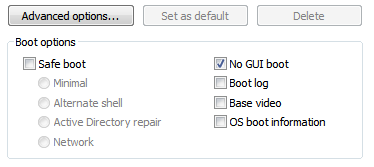
All you have to do is type msconfig into the start menu search box, and hit enter.
Click the Boot tab, and then check the "No GUI boot" checkbox.
user posted image

Hit OK and reboot the computer. You should see the new boot screen immediately. rclxms.gif

Source @ Wincustomise

2.)Sidebar Styler

Wan a stylish sidebar? Here u go Sidebar Styler tongue.gif

3.)Make Vista Notification Balloon Tips Transparent
Notification balloon tips or pop-ups from Windows Vista notification area or system tray has a solid background just like in previous version of Windows XP. The solid background color balloon tip looks so ugly and 'unVista', especially when desktop theme is set as Windows Aero with glass transparency effect, just like shown in figure below.
user posted image
How about turning the balloon tip popup to looks like something like figure below, with transparent background and blur effect, which once also appeared in Windows Longhorn Server beta.
Glass Toast for Vista is a small utility to display notification messages in transparent glass effect with masking and blurring ability.

Features of Glass Toast include:

* Intercept notification balloons and replace the pop-ups with a glass toast (style as how it's displayed in Windows Server LongHorn build 4000 series). Only mouse over popups in taskbar will be left untouched.
* Glass toast notifications give the same response as real balloons (eg. click here on ballon will initiate the same action with glass toasts).
* Make stuff a bit prettier.
* Support skins - skinnable for different balloon style.
* Skin picker.
* Silence command line argument.
* Support dropshadow (unshadowed PNG image file is included).
* Customization options.
* Masking the blur.
* Works in Windows XP too, beside Windows Vista.

Glass Toast is skinnable, where users can customize how the transparent balloon tips will look like. Here're some points to note if you intends to create your own skin for Glass Toast. Currently in Glass Toast, all offset values are hardcoded, and all others are derived from bitmap sizes. There is also inefficiency in DWM blurring, as such, mask.bmp is used for masking out the blur on parts that should be 100% transparent, with white for invisible and black for visible in the mask.bmp. Beside, in some applications that does not use the correct flags, there will be compatible problems with GlassToast.

Download Glass Toast (version 3) Here
To run GlassToast.exe everytime when Windows starts, simply add it to the Startup program group. It can be used with "-silence" switch that will make the starting balloon not popup. It comes with some default skins style such as Longhorn, Longhorn with no shadow and beta1 style toasts.
user posted imageuser posted image

and now.. rclxm9.gif

4.)Make Vista Home dreamscene thumbup.gif

Now a days all of you look excited about Windows Vista Ultimate DreamScene which will allow you to play high-definition video content as your wallpaper. But do you know that, you can play video as a wallpaper on your Vista Premium or Basic version or even on Windows XP also?

Download VLC Playerand open any video in it.
Right click on the video and click on "Wallpaper"
That's it. You have an animated wallpapers now

For removing it from the taskbar, go to Preferences -> Interface -> Main Interface -> wxWidgets and uncheck Taskbar and enable Systray icon whistling.gif

This post has been edited by adriankhoo153: Apr 10 2007, 10:24 AM
coolmast3r
post Apr 10 2007, 12:55 PM

Enthusiast
*****
Senior Member
740 posts

Joined: Jan 2003
From: Langkawi


wow. thanx alot.
btw, the sidebar thingy, how can we change the style of the sidebar?


Added on April 10, 2007, 1:25 pmok i got it.
For Windows SideBar Styler download, here's the address:

Windows SideBar Styler

The link in Adrian's post are referring to a gallery of Windows Sidebar styles.

This post has been edited by coolmast3r: Apr 10 2007, 01:27 PM
ben3003
post Apr 10 2007, 02:03 PM

10k Club
********
All Stars
10,859 posts

Joined: Jan 2003
From: Sarawak


wa... run vista oleidi need aroun 70% of 1gb ram.. still wan run this thing... swtness..
toughnut
post Apr 10 2007, 02:06 PM

Look at all my stars!!
*******
Senior Member
3,239 posts

Joined: Jun 2005
and don't forget to repeat the playlist for vlc player.

i tried changing the boot GUI before but only got corrupted screen. i have dozen of different gui's but never successful using them. d@mn...
wewa25
post Apr 10 2007, 02:06 PM

Getting Started
**
Junior Member
134 posts

Joined: Jul 2005
From: Subang/Sunway


it is much more efficient...thats y at 70..its like buying a ferrari but running it 30km/h...

what vista does is it tries to give the ferrari a more efficient 200km/h..

thats y the load is higher..no wasted additional memory space..
-------------------------------------------------------------------------------------
FORCE slow USB drives to work with READYBOOST in VISTA , best tweak yet!!

Windows ReadyBoost is a great technology, caching things on USB drives to improve system performance, but Windows Vista insists on checking the drives for certain speed requirements before enabling the feature. If you have a USB drive that is just a hair to slow to beat the test, or you want to use an external hard drive (slower speed, loads of cache space), Matt Rajca posts at Channel 9 how you can force Vista to let you use ReadyBoost on an unsupported device, whether it wants to or not:

1. Plug in the device.
2. Open the Readyboost tab on the device properties.
3. Select "Do not retest this device"
4. Unplug the device
5. Open regedit (start->run->regedit)
6. Expand - HKLM (Local Machine)->SOFTWARE->Microsoft->Windows NT->CurrentVersion->EMDgmt
7. Find your device.
8. Change Device Status to 2
9. Change ReadSpeedKBs to 1000
10. Change WriteSpeedKBs to 1000
11. Plug in the device.
12. Enable Readyboost!!!!


Added on April 10, 2007, 2:07 pmcredit me n the Matt fella..readyboost..how slow oso still a boost..LOLz

This post has been edited by wewa25: Apr 10 2007, 02:07 PM
TSadriankhoo153
post Apr 10 2007, 02:11 PM

So many star for what?
*******
Senior Member
4,808 posts

Joined: Sep 2006
Anyone know why Microsoft disable aurora?? Any reasan? The start up time with aurora are more or less the same


Added on April 10, 2007, 2:24 pmMore tricks and tips rclxms.gif

1.) Keyboard shortcuts

Windows logo key+1-0 -> Launch the shortcuts on the Quick Launch toolbar
Windows logo key+T -> Cycle through programs on the taskbar
Windows logo key+TAB -> Cycle through programs on the taskbar by using Windows Flip 3-D
CTRL+Windows logo key+TAB -> Use the arrow keys to cycle through programs on the taskbar by using Windows Flip 3-D
Windows logo key+SPACEBAR -> Bring all gadgets to the front and select Windows Sidebar
Windows logo key+G -> Cycle through Sidebar gadgets
Windows logo key+X -> Open Windows Mobility Center

2.) Hidden Open Command Window Here Context Menu item

Open a folder, press Shift + Right Click -> Open Command Window Here

3.) Nameless Recycle Bin

Everybody can see, by looking at the icon, that it's the Recycle Bin right?.., so why name it?!
Merge RecycleBin_NoName.reg and Refresh your Desktop and the name is gone.
Merge RecycleBin_Default.reg and Refresh your Desktop to restore the name.

4.) Menu Bar Keyboard Shortcut

Show Menu Bar -> Open a folder and press & release Alt (also works in Internet Explorer).

5.) Huuuuuuuge Icons on your Desktop

Click on your Desktop, press Ctrl + Scroll Up (this works in any folder).
You can make them larger then when you select Large Icons from the menu (Right Click -> View -> Large Icons).


6.) Use Snipping Tool to capture screen shots

Start Menu -> All Programs -> Accessories -> Snipping Tool
You can use Snipping Tool to capture a screen shot, or snip, of any object on your screen and then annotate, save, or share the image. Simply use the mouse to capture any of the following types of snips:
. Free-form Snip: Draw an irregular line, such as a circle or a triangle, around an object.
. Rectangular Snip: Draw a precise line by dragging the cursor around an object to form a rectangle.
. Window Snip: Select a window, such as a browser window or dialog box, that you want to capture.
. Full-screen Snip: Capture the entire screen when you select this type of snip.
After you capture a snip, it's automatically copied to the mark-up window, where you can annotate, save, or share the snip.

7.) Launch Chess Titans Fullscreen (like when you start it from Windows Media Center)

Edit the shortcut and add -mce behind the command.
Example: "%ProgramFiles%\Microsoft Games\chess\chess.exe" -mce
Also works with Freecell, Hearts, Mahjong Titans, Purble Place & (Spider) Solitaire.
Con: Windows Media Center starts when you exit the game.

8.) Vista Orb Clock for Windows Sidebar


user posted image

This gadget contains several "Vista-Orb" clocks, you can change the skin, toggle the second hand and change the Time Zone in the Options dialog box (right click on the gadget and select Options).

Tip: You can drag the gadgets to you desktop and use them as Desktop Gadgets (like AveDesk & Samurize).
When you right click on the Sidebar and select close, the Sidebar minimizes to the system tray & the Desktop Gadgets are still on the desktop.

Download Here


This post has been edited by adriankhoo153: Apr 10 2007, 02:24 PM
pipedream
post Apr 10 2007, 03:33 PM

Look at all my stars!!
*******
Senior Member
2,353 posts

Joined: Dec 2006
about the aurora boot screen, can it be enable on all types of vista or some only? and will it take longer time to boot?
xin
post Apr 10 2007, 03:56 PM

Maisonducat Storekeeper
*******
Senior Member
6,549 posts

Joined: Jan 2003
all type of vista ..dunno wht they disable it..and also din show at previews ..
TSadriankhoo153
post Apr 10 2007, 04:17 PM

So many star for what?
*******
Senior Member
4,808 posts

Joined: Sep 2006
QUOTE(pipedream @ Apr 10 2007, 03:33 PM)
about the aurora boot screen, can it be enable on all types of vista or some only? and will it take longer time to boot?
*
I also duno why. It take alomost the same time to load on normal one without Aurora GUI. I wonder why they took disable it rclxub.gif
pipedream
post Apr 10 2007, 04:22 PM

Look at all my stars!!
*******
Senior Member
2,353 posts

Joined: Dec 2006
looks much better than the current anyway.. maybe its a beta launch screen
TSadriankhoo153
post Apr 10 2007, 04:31 PM

So many star for what?
*******
Senior Member
4,808 posts

Joined: Sep 2006
QUOTE(pipedream @ Apr 10 2007, 04:22 PM)
looks much better than the current anyway.. maybe its a beta launch screen
*
So did you notice any slower than the previous one?
xin
post Apr 10 2007, 04:31 PM

Maisonducat Storekeeper
*******
Senior Member
6,549 posts

Joined: Jan 2003
mayb its an easter egg in the os hehe ..just like how some softwares like office got easter eggs that has neat functions ..
V3000
post Apr 10 2007, 05:00 PM

CLICK REPORT LAH!
*******
Senior Member
3,074 posts

Joined: Jul 2006


Thanks alot bro! Nice find! smile.gif
samurai1337
post Apr 11 2007, 06:58 AM

@_@
Group Icon
VIP
11,594 posts

Joined: Jan 2003
From: Area 51

Moving this thread the Essential Guides and Reviews

For further discussion, kindly proceed to this official thread
http://forum.lowyat.net/topic/433820


Change to:
| Lo-Fi Version
0.0178sec    0.67    5 queries    GZIP Disabled
Time is now: 19th December 2025 - 12:30 PM