Welcome Guest ( Log In | Register )

Bump Topic Topic Closed RSS Feed

Outline · [ Standard ] · Linear+

 The SSD Thread V6, Solid State Drive, Continued.

views
     
SkyHermit
post Dec 31 2018, 02:38 AM

Regular
******
Senior Member
1,799 posts

Joined: Nov 2009


Just want to make sure that SSD can be used on both desktop and laptop?

Gonna buy one SSD for my desktop (probably ssd kingston 240gb) and then in the next few months buy a new laptop and use this SSD on my laptop
SkyHermit
post Dec 31 2018, 06:20 PM

Regular
******
Senior Member
1,799 posts

Joined: Nov 2009


QUOTE(TristanX @ Dec 31 2018, 12:45 PM)
Kingston A400 240GB is trash. Look for Seagate Barracuda 250GB. Should be around RM150ish from shopee.
*
Ok will look into it. So it is compatible with both laptop and desktop right? Might swap into laptop in future
SkyHermit
post Jan 6 2019, 07:34 PM

Regular
******
Senior Member
1,799 posts

Joined: Nov 2009


QUOTE(sHawTY @ Jan 6 2019, 03:37 PM)
Add an extra RM19 for a better SSD

Samsung 860 EVO 250GB for RM219
https://shopee.com.my/Samsung-860-EVO-SSD-S...9596.1265119613
*
Say If I buy this SSD for my desktop use as OS. In the future if I buy a laptop can I somehow put this SSD internally so it works as OS? Can't right?

I notice there is Sata and M.2 version for SSD. Only M.2 can be assembled inside laptop (internally). Correct me if I am wrong.
SkyHermit
post Apr 24 2020, 07:27 PM

Regular
******
Senior Member
1,799 posts

Joined: Nov 2009


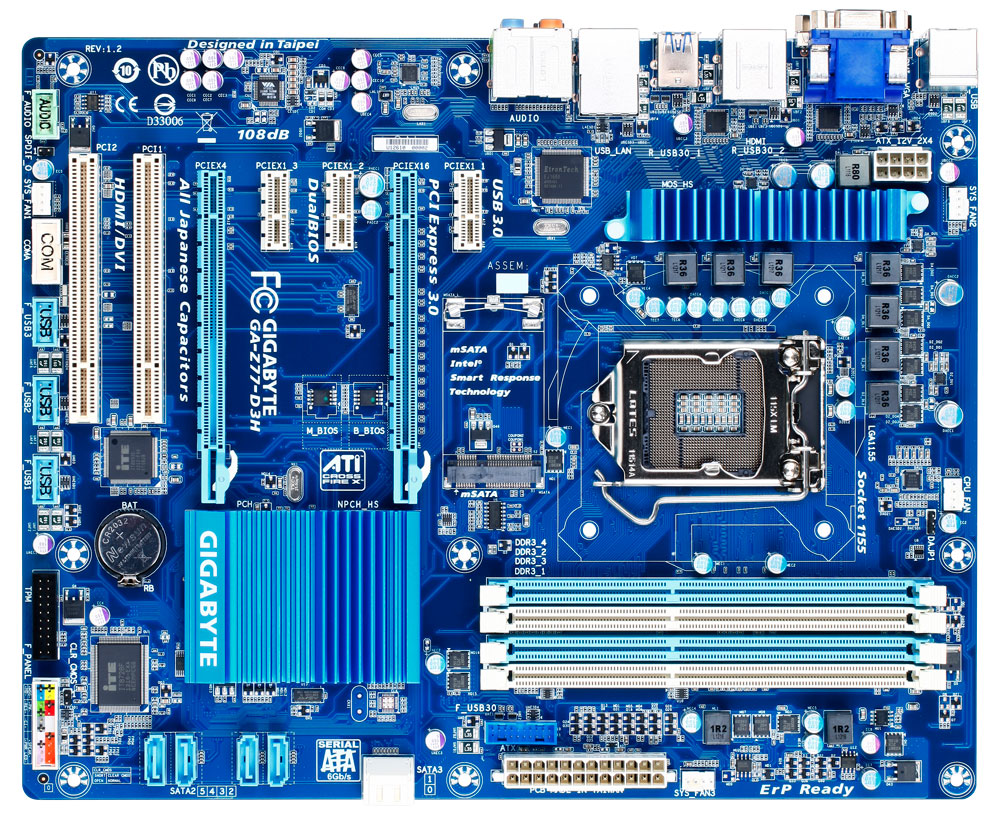
Currently I am having 1 SSD (WD Green 240GB) and 2 HDD on my desktop using Z77-D3H motherboard. All 3 are connected using SATA cables.

I am planning to buy a new 1TB SSD to install as my main OS and also play games on here.

But then I just realised that it looks like M.2 SSD doesn't work on my MOBO. So my choice is to remove one of my old HDD and buy a new SATA HDD. (only max 3 SATA slots)

I am looking at WD Blue 3D NAND (WDS100T2B0A). What do you guys think about this?

This post has been edited by SkyHermit: Apr 24 2020, 07:27 PM
SkyHermit
post Apr 25 2020, 07:26 PM

Regular
******
Senior Member
1,799 posts

Joined: Nov 2009


QUOTE(EBBattlefield @ Apr 25 2020, 02:50 PM)
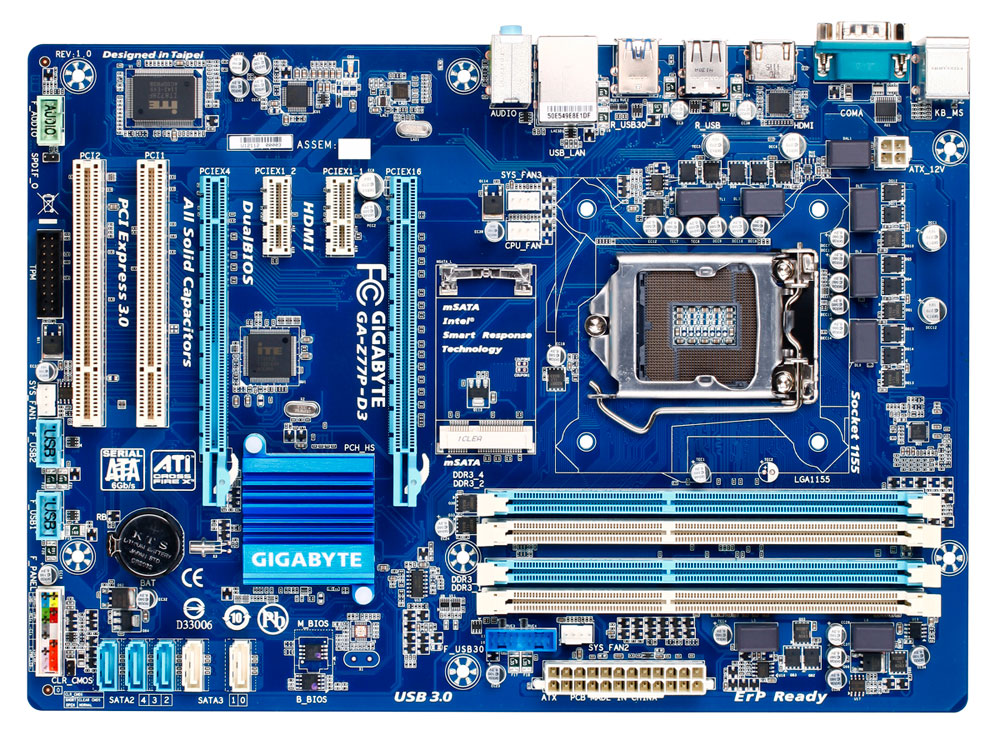
I count 5 SATA slots, 1 mSATA slot.
Should be standard 2+4 config, so it shouldnt disable anything with mSATA plugged in.

Maybe TS buta, maybe TS SATA 3 slots kaput already.
IIRC, SATA III is by chipset and SATA II is by 2nd controller.

but IMO, mSATA is more obsolete than M.2 or SATA already.
might as well go for SATA since speed is same and you dont be able to use mSATA on any future systems anyway.
user posted image
*
Thanks for this pic. It is 99% same except my SATA2 shows (5,4,3,2) and SATA3 (1,0) is on top of each other and not side by side like in picture

Yes I was buta and quite newbie on this.

So the SATA2 (2,3,4,5) is Sata 2.0
And SATA3 (1,0) is Sata 3.0 which is faster?

Anyway I just bought Crucial MX500 1TB SSD, which I will be installing OS on it soon. So this should go to the SATA3 (white colour) one while all remaining for storage is connected to SATA2 (blue). Correct me if I am wrong

This post has been edited by SkyHermit: Apr 25 2020, 07:37 PM

SkyHermit
post Apr 26 2020, 01:08 AM

Regular
******
Senior Member
1,799 posts

Joined: Nov 2009


QUOTE(puifah @ Apr 25 2020, 11:04 PM)
what the owner have is Z77-D3H which is have 6 SATA ports

user posted image

spec is below :

Chipset:

  1. 2 x SATA 6Gb/s connectors (SATA3 0/SATA3 1) supporting up to 2 SATA 6Gb/s devices
  2. 4 x SATA 3Gb/s connectors (SATA2 2~SATA2 5) supporting up to 4 SATA 3Gb/s devices
  3. 1 x mSATA connector
      * The SATA2 5 connector will become unavailable when the mSATA connector is installed with a solid state drive.
  4. Support for RAID 0, RAID 1, RAID 5, and RAID 10
      * When a RAID set is built across the SATA 6Gb/s and SATA 3Gb/s channels, the system performance of the RAID set may vary depending on the devices being connected.
*
Thanks. Now it is all good.

My newly bought Corsair 500MX 1TB SSD is connected to SATA3 0 as my main OS, and the 250GB WD SSD is connected to SATA3 1.

The remaining 2 HDD connected to SATA2.


Anyway, just used HD Tune Pro to check the health of this new SSD (Corsair MX500).

C7 (interface CRC Error Count) shows attention.
Status : There were communication errors. This may be caused by a damaged cable.

Since I am using old SATA cable. Should I be worried about this? Or just normal cable problem.

screenshot
SkyHermit
post Apr 27 2020, 09:40 AM

Regular
******
Senior Member
1,799 posts

Joined: Nov 2009


QUOTE(sHawTY @ Apr 26 2020, 11:46 PM)
You're doing it wrongly
The 250GB SSD should be used for Windows & programs
The 1TB SSD should be used as games installation and what not

This way when you want to format Windows, you just format the 250GB SSD, not the 1TB SSD
Aiyah, this one also need to ask meh? Just replace the cable lor sweat.gif
*
Based on this comparison,

https://ssd.userbenchmark.com/Compare/WD-Bl...191455vsm406099

It seems like MX500 1TB SSD performs faster than my WD Blue, so I am using my MX500 1TB as my main OS with games in it. If I want to format my OS, then i just moved the game to the 250GB SSD.


Ya, I will just buy a new cable for that issue. biggrin.gif

This post has been edited by SkyHermit: Apr 27 2020, 09:42 AM

Topic ClosedOptions
 

Change to:
| Lo-Fi Version
0.0917sec    0.57    7 queries    GZIP Disabled
Time is now: 7th December 2025 - 10:17 PM