Welcome Guest ( Log In | Register )

Outline · [ Standard ] · Linear+

 Merging Emsisoft Internet Security with EAM

views
     
TSperfectgrowwell
post Aug 10 2017, 09:09 PM, updated 9y ago

Getting Started
**
Junior Member
178 posts

Joined: Nov 2015
From: Muar
user posted image

Starting 1 October 2017, Emsisoft Internet Security will be merged with Emsisoft Anti-Malware. While this may come as a bit of a surprise, there are many factors that have prompted this decision, and I would like to use this as an opportunity to share our reasoning:

A common base
Technically, both products have shared the same code base and even the same file feeds for online updates for the last couple of years. From a branding perspective, Emsisoft Internet Security has kind of been framed as an extended feature set edition of Emsisoft Anti-Malware. The only difference between the two products is Emsisoft Internet Security’s built-in firewall component, which is responsible for its slightly higher price tag. While Emsisoft Internet Security was definitely a valuable product in years gone by, we believe that whatever protective advantages desktop firewalls once had over Windows Firewall are now minimal, if not negligible.

The job of firewalls
The main purpose of a desktop firewall is to shield your computer from attacks from the Internet. It does so by interrupting network communications initiated by foreign computers when they attempt to connect to a program that listens for input on your computer.

However, there are two things to consider here:

Most attack attempts from the outside are made impossible by the use of NAT routers (which includes just about every modern DSL modem), as they separate your inside network (LAN) from the Internet.
The built-in Firewall in Windows 7, 8 and 10 already does a pretty good job of blocking connection attempts from potentially dangerous computers that reside in the same network (e.g. in public WiFi) or on the Internet.
Malware and firewalls
We see our main job as protecting your computer from malware – and today’s malware is generally quite unimpressed by firewalls. Connection attempts from the outside in are blocked by the Windows Firewall by default, and connections from the inside out are prevented by Emsisoft’s multi-layer real time protection, and the Behavior Blocker in particular.

Emsisoft Firewall vs Windows Firewall
When Microsoft introduced the Windows Firewall in a late Windows XP Service Pack update, it was a bit of an embarrassing performance and the software could not be taken too seriously, which led us to build a stronger alternative. But with the release of Windows 7, the Windows Firewall started to do its job much more effectively, and the latest Windows 10 version pretty much does everything you could expect from a desktop firewall. Its only architectural flaw is that its settings (and firewall rules) can be freely edited by anyone or anything that attains the required permission level. In other words, if malware manages to run on the PC, it’s able to allow itself to get through the firewall. That was one of the main reasons for us to maintain our own firewall component.

A better approach: Fortifying the Windows Firewall
Emsisoft Internet Security has always been highly configurable. While some of our more technically minded users might have appreciated the freedom to tweak settings to their heart’s content, it has to be said the majority of our customers are (understandably!) not familiar with the technical intricacies of firewalls and were not always confident when using the software. This was problematic given the fact that a wrong configuration can potentially cause a lot of damage when it comes to malware protection. So, in the interests of protecting our customers, we thought it would be most beneficial if, moving forward, we simply rely on the Windows Firewall and use our software to cover its blind spot and ensure its settings can’t be manipulated by malware from the inside.

How are we going to do that?

Well, one of Emsisoft’s key strengths is creating Behavior Blocking technology that works. It allows us to detect and intercept malicious actions from active programs in real time before they can cause any damage. This technology now allows us to define behavior patterns that indicate illegitimate manipulations of Windows Firewall rules. We make sure Windows Firewall is as safe to use as our own firewall, so we can remove the redundancy of building and maintaining our own firewall code.

Therefore, we decided to end the product life-cycle of Emsisoft Internet Security and merge it with Emsisoft Anti-Malware, which receives the Windows Firewall fortifying enhancements in the version 2017.8 release.

Timeline

September 1st, 2017:
The new Windows Firewall Fortify feature will be part of the version 2017.8 release of Emsisoft Anti-Malware.

October 1st, 2017:
Existing Emsisoft Internet Security software will directly update to Emsisoft Anti-Malware version 2017.9 and the remaining license period will be extended as described below. No manual actions required.

Advantages for Emsisoft Internet Security customers
We appreciate that the decision and swift merging will come as a surprise to our loyal customers, so apart from the additional features already mentioned that ensure capable and secure firewall protection, we are sweetening the transition for existing Emsisoft Internet Security license holders:

By switching to Emsisoft Anti-Malware, your annual software license fee gets about 20% cheaper.
To compensate for the already paid higher product price, we will extend all active Emsisoft Internet Security license periods by 50%. E.g. if you have 1 year left on your license, it will change to 1.5 years for free.
Malware protection capabilities of Emsisoft Anti-Malware will be improved due to less interference with firewall code.
Your Emsisoft protection software will get lighter on the system and there will be fewer incompatibilities with other products.
Less risk of misconfiguring the protection features.
We hope you think this is a fair deal and will make the transition to our flagship product as smooth as possible. Should you still be unhappy with the upcoming changes, we’re happy to do partial refunds for your remaining license period.

As the cybersecurity landscape continues to evolve, we are continuing our mission towards a safer digital world for everyone. Today we have taken an important step in this journey, and we are excited to continue to improve our protection services for our customers.

Have a great, malware-free day!

source: http://blog.emsisoft.com/2017/08/10/mergin...t-anti-malware/

This post has been edited by perfectgrowwell: Aug 10 2017, 09:22 PM
TSperfectgrowwell
post Sep 2 2017, 08:04 PM

Getting Started
**
Junior Member
178 posts

Joined: Nov 2015
From: Muar
New in 2017.8: Windows Firewall Fortification
user posted image
As announced earlier, we are changing our firewall strategy and will soon merge Emsisoft Internet Security with Emsisoft Anti-Malware, effective as of our next release in October. Instead of developing our own firewall module, we’re going to rely on the built-in Windows Firewall core that has proven to be powerful and reliable. Its only weak point is the fact that anyone can freely change the firewall configuration. In other words, if malware manages to run on the PC with sufficient administrator permissions, it’s able to allow itself to get through the firewall.

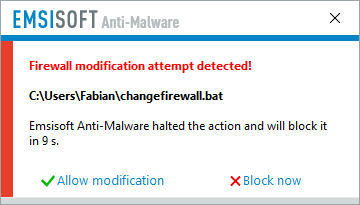
To resolve this vulnerability, we’ve developed a new Firewall Fortification feature for Emsisoft Anti-Malware’s Behavior Blocker as part of our 2017.8 release. Firewall Fortification detects and intercepts malicious actions from non-trustworthy programs in real time before they can cause any damage.
user posted image

All 2017.8 improvements in a nutshell

Emsisoft Anti-Malware
New: Firewall Fortification feature that blocks illegitimate manipulations of Windows Firewall rules.
Improved: Forensics logging.
Fixed: Rare program freezes on opening the forensics log, confirming of surf protection notifications and during malware detection.
Fixed: Computer restart instead of computer shutdown executed, when set for a silent scan.
Several minor tweaks and fixes.

Emsisoft Enterprise Console
Improved certificate handling to avoid connectivity issues.
Several minor user interface improvements.
Several minor tweaks and fixes.

Emsisoft Emergency Kit
New: Forensic Log: A condensed timeline that shows all events and user actions in an easy to read form.
Several minor tweaks and fixes.
How to obtain the new version

As always, so long as you have auto-updates enabled in the software, you will receive the latest version automatically during your regularly scheduled updates, which are hourly by default. New users please download the full installer from our product pages.

Note to Enterprise users: If you have chosen to receive “Delayed” updates in the Update settings for your clients, they will receive the new software version no earlier than 30 days after the regular “Stable” availability. This gives you time to perform internal compatibility tests before a new version gets rolled out to your clients automatically.

Have a great, well-protected day!

source: New in 2017.8: Windows Firewall Fortification
TSperfectgrowwell
post Sep 22 2017, 05:44 PM

Getting Started
**
Junior Member
178 posts

Joined: Nov 2015
From: Muar
user posted image
From (very) humble beginnings in a Windows XP Service Pack update, the Windows Firewall has evolved into a capable security tool. Today, its performance is on par with – if not better than – any modern third-party desktop firewall on the market.

In light of this, and after a lot of careful consideration, the Emsisoft team made a very conscious decision to rely on the Windows Firewall moving forward, which ultimately led to us merging Emsisoft Internet Security with Emsisoft Anti-Malware. This will allow us to concentrate our efforts on building a bulletproof product while using our Behavior Blocker technology to further strengthen the already rock-solid Windows Firewall.

To put it simply, using Windows Firewall in conjunction with Emsisoft Anti-Malware will provide better protection for our users, and that is our number one objective above all else.

Since our announcement of the Emsisoft Internet Security and Emsisoft Anti-Malware merger, we have received a lot of positive feedback. However, we also got a lot of questions. We want to take the time to answer the most frequently asked questions in a bit more detail:

So are you going to remove the firewall completely?

he answer to that question is not as simple as it may seem at first. Firewalls are usually divided into two parts: A so-called packet filter, which usually deals with incoming packets and is therefore often called an inbound firewall; and an application filter that deals with applications wanting to access the network or internet, which is why it is often also referred to as an outbound firewall. Emsisoft Anti-Malware has always had an application filter as part of its Behavior Blocker and that will continue to be true. The difference between the outbound firewall in Emsisoft Anti-Malware and Emsisoft Internet Security is that the former makes decisions autonomously, while the later, at least in theory, allowed you to also use your manual rules. In practice, the default for Emsisoft Internet Security was to automatically allow all outbound connections and the majority of all our users never changed it.

Why did you make the change? Was Emsisoft Internet Security less secure than the Windows Firewall?

No.

All firewalls on modern versions of Windows are based on the same technologies provided by Microsoft. In addition, inbound firewalls in particular are incredibly straightforward to implement, as they only block or allow access based on simple rules. That is why there is absolutely no difference in protection provided between any of the inbound firewalls on the market, including the Windows Firewall.


However, the Windows Firewall does have some benefits:

Support for Windows Networking like Home Groups is a lot better in the Windows Firewall out of the box. There is no need to tweak any rules manually as was often the case for Emsisoft Internet Security.
It is easier to use. This is mostly because third-party applications will take care of creating all necessary firewall rules for you. That is not an option that Emsisoft Internet Security could provide, as most software vendors don’t care about third-party firewalls.
The Windows Firewall also provides much better compatibility. Third-party software vendors usually test their products with the Windows Firewall as it is part of Windows, but almost never test their product’s compatibility with aftermarket firewall products.
Last but not least, the Windows Firewall also provides a lot more configuration possibilities to expert users and allows for much more complex rulesets than the inbound firewall offered as part of Emsisoft Internet Security.
But there are also a couple of disadvantages, which is where Emsisoft Anti-Malware 2017.8 comes in:

Intelligent outbound firewall: The outbound firewall part of the Windows Firewall will by default allow every application to connect. This behaviour is actually identical with Emsisoft Internet Security, which also allowed any application to connect to the network or the internet unhindered by default. While both products can be manually configured to block programs from accessing the internet, most users don’t want to deal with this responsibility. This is where the intelligent outbound firewall that is part of our Behavior Blocker comes in, which will prevent malicious applications from communicating with the internet automatically while not getting in the way of benign applications.
Enhanced malware protection: The Windows Firewall on its own does not provide any protection against more sophisticated attempts to bypass its outbound firewall through advanced techniques like code injection. Code injection essentially allows malware to take over a trusted program in order for its internet communication to pass through the firewall unhindered. Again, the Behavior Blocker in Emsisoft Anti-Malware is incredibly good at detecting and preventing these kinds of attacks.
Windows Firewall Fortification: The functions Windows Firewall provides to software vendors to automatically create rules for their applications in the Windows Firewall for ease of use are also pretty much unprotected. That means that malware can and does create rules for itself automatically. In version 2017.8, we extended our Behavior Blocker technology to protect the exposed Windows Firewall functions from malicious usage. This gives you control over which of your applications are allowed to create Windows Firewall rules for you and which aren’t. This is what we refer to as “Windows Firewall Fortification”.
To sum things up, for inbound filtering, the Windows Firewall is just as solid a choice as any other firewall product on the market, including Emsisoft Internet Security. It provides better compatibility and is easier to use for the majority of users. Its drawbacks mostly revolve around its outbound filtering capabilities, which are perfectly complemented by the enhanced Behavior Blocker that is part of Emsisoft Anti-Malware 2017.8 and later.

Where can I find the new Windows Firewall Fortification options?
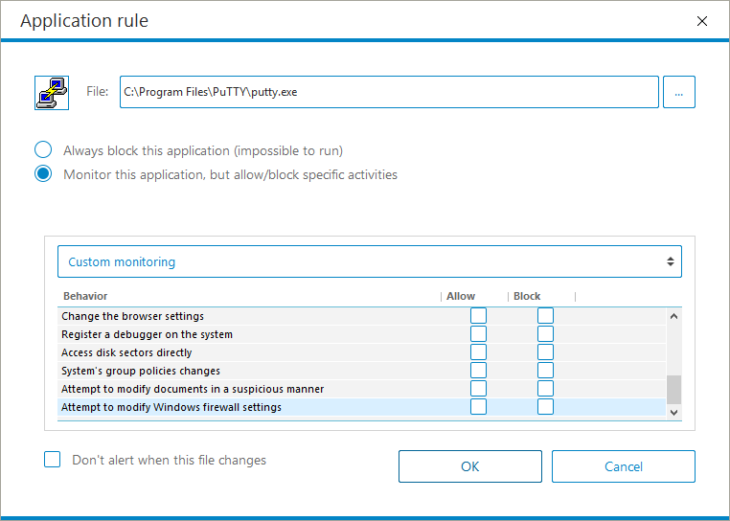
The new options are part of the Emsisoft Anti-Malware Behavior Blocker. As such, you can find them under Protection/Application Rules:
user posted image
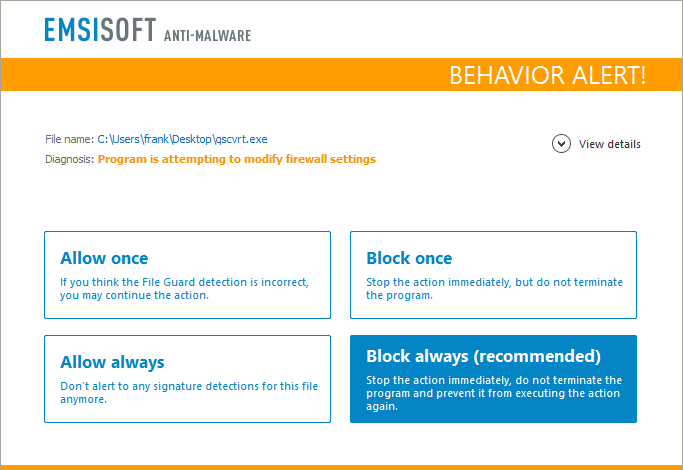
In addition, whenever the Behavior Blocker sees any application it doesn’t know to be trustworthy attempting to create new firewall rules or change the firewall status, it will attempt to auto-resolve the situation by blocking the attempt:
user posted image
Where can I find the “advanced configuration possibilities” you talk about? My Windows Firewall only has a couple of options!
The default dialog to configure the Windows Firewall can be incredibly deceptive at first. The advanced configuration dialog is stashed away behind an innocuous looking link in the normal Windows Firewall configuration dialog:
http://blog.emsisoft.com/wp-content/uploads/2017/09/windows-firewall-advanced-settings-730x551.png
Clicking that link will expose the real configuration of the Windows Firewall where you have full access to all the rules it adheres by.

That looks awfully complicated. Are there easier methods?
There exist a slew of additional applications that sit on top of the Windows Firewall and attempt to enhance it by making rule creation and management easier. Some of the most popular are:

TinyWall (Free) – http://tinywall.pados.hu/
Windows Firewall Control (Freemium) – https://www.binisoft.org/wfc.php
Glasswire (Paid) – https://www.glasswire.com/
That being said, we think that the majority of users probably won’t find these tools to be necessary. That is also why we decided against creating our own Windows Firewall front-end and focus our development efforts on improving the complementary and enhanced technology in our Behavior Blocker instead.

So what do you recommend I should do?
We strongly believe that the combination of Emsisoft Anti-Malware and the Windows Firewall is the best option for almost every user. For the past 12 years while developing our product, we used this exact combination in all of our internal performance evaluations of our technology. Our malware research team works hard to make sure that even the most advanced threats are blocked immediately across all our products.

So yes, Emsisoft Anti-Malware blocks the same malware that Emsisoft Internet Security blocks out of the box – no configuration, paying extra or jumping through hoops needed.

If you do feel the need to make sure that certain legitimate applications can’t access the internet, the Windows Firewall does offer the ability to do so via its Advanced Settings. If you find that method to be too inconvenient, going with one of the many front-ends may be an option for you.

We do know that a small minority of Emsisoft Internet Security users believe that the Windows Firewall must have backdoors implemented by Microsoft to allow them to spy on their users. In all our research, we haven’t found one and neither have hundreds of other security professionals that constantly review Windows for possible backdoors and vulnerabilities.

We also think it is important to keep in mind that every single firewall product for Windows Vista and later uses the very same frameworks to implement packet and application filtering. There is no difference between the Windows Firewall, Emsisoft Internet Security and any other third party firewall from a technical point of view. If Microsoft were to backdoor their products to allow unhindered communication, this backdoor would probably be part of the Windows Filter Platform or the NDIS Lightweight Filter Framework, which are the underlying technologies all firewall products are built upon, and affect every firewall product equally.

If you still prefer to use a firewall product other than the Windows Firewall, we recommend you contact the software company creating your new firewall product of choice beforehand to ask them whether they implement their own firewall or rely on the Windows Firewall as well. Most firewalls and internet security suites dropped their own implementation in favour of the Windows Firewall many years ago. So we suggest you ask them first to make sure you don’t end up with a Windows Firewall front-end instead.

Do you have more questions? Post them in the comments and we’ll answer them.

Have an excellent (malware-free) day!

source: http://blog.emsisoft.com/2017/09/19/emsiso...all-protection/

This post has been edited by perfectgrowwell: Sep 22 2017, 05:44 PM
1kokies
post Oct 9 2017, 02:55 AM

On my way
****
Senior Member
532 posts

Joined: Aug 2011


Not bad, simple interface, the software i got all working quite fine


Change to:
| Lo-Fi Version
0.0150sec    0.51    5 queries    GZIP Disabled
Time is now: 23rd December 2025 - 01:34 PM