Outline ·
[ Standard ] ·
Linear+
Unifi Official TM UniFi High Speed Broadband Thread V32, Enjoy Your Speed Upgrade
|
Chayedan
|
 Oct 10 2017, 09:08 PM Oct 10 2017, 09:08 PM
|
New Member


|
My Unifi 30 mbps just upgraded to 50 mbps 3 days ago. (Thank You Campaign 2017). Based on 3 days speed test result, I only able to get 30/20 mbps on beta.speedtest.net. Download remains as 30 mbps, only upload speed doubled. Even watching 4K video on Youtube, only can reach max bandwidth/speed around 30 mbps. I am using Huawei HG655a with TP-Link Archer C3150 V2, my router has built-in speed test. The built-in speed test shows 50/20 mbps. But I still get 30/20 mbps on 4 desktop/laptop computers in house. Any idea how to solve this problem?  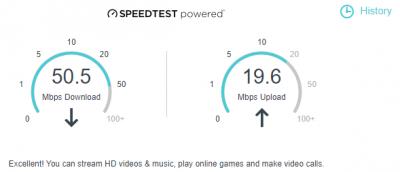 This post has been edited by Chayedan: Oct 10 2017, 09:11 PM
 |
|
|
|
|
|
Chayedan
|
Oct 10 2017, 09:19 PM
|
New Member
|
QUOTE(jusbella @ Oct 10 2017, 09:17 PM) Use lan cable test, not WiFi. LAN Cable/WiFI (2.4g/5g), Mobile/Laptop/Desktop all tested, same result, 30/20 mbps. |
|
|
|
|
|
Chayedan
|
Oct 10 2017, 09:30 PM
|
New Member
|
QUOTE(jusbella @ Oct 10 2017, 09:21 PM) Disable ipv6. If still same try use another router to test. IPv6 not enabled by default in router settings. No other router to test. The current router is a new router bought in Sept, 2017. |
|
|
|
|
|
Chayedan
|
Oct 10 2017, 09:42 PM
|
New Member
|
QUOTE(jusbella @ Oct 10 2017, 09:32 PM) Check you got any qos enabled? Disable it if exist. OMG, it was the QoS that caused the problem. I was using gaming setting, now switching back to standard setting. Finally can get 50/20 mbps on beta.speedtest.net. Thanks for the advice.  |
|
|
|
|
|
Chayedan
|
Oct 10 2017, 09:50 PM
|
New Member
|
QUOTE(jusbella @ Oct 10 2017, 09:46 PM) Glad that helped u. Enjoy~ Learned something today, appreciate. |
|
|
|
|



 Quote
Quote

 0.2399sec
 0.56
0.56
 7 queries
 GZIP Disabled