Attached thumbnail(s)

Unifi Official TM UniFi High Speed Broadband Thread V32, Enjoy Your Speed Upgrade
|
|
 Aug 27 2017, 01:32 PM Aug 27 2017, 01:32 PM
Show posts by this member only | IPv6 | Post
#321
|
 
Junior Member
134 posts Joined: Sep 2016  
|
Anybody experiencing to can't load the TM speedtest webpage?
Attached thumbnail(s)
|
|
|
|
|
|
Aug 27 2017, 02:20 PM
|

Senior Member
3,032 posts Joined: Dec 2011
|
QUOTE(askm @ Aug 27 2017, 01:32 PM) Anybody experiencing to can't load the TM speedtest webpage? Use Internet Explorer. |
|
|
Aug 27 2017, 02:45 PM
Show posts by this member only | IPv6 | Post
#323
|
|
Junior Member
134 posts Joined: Sep 2016
|
Yeah, thank. I think TM already behind the time, still using internet Explorer.
QUOTE(jusbella @ Aug 27 2017, 02:20 PM) Use Internet Explorer. |
|
|
Aug 27 2017, 03:08 PM
|

All Stars
11,456 posts Joined: Oct 2007 From: KL
|
QUOTE(askm @ Aug 27 2017, 01:32 PM) Anybody experiencing to can't load the TM speedtest webpage? Enable Flash in Chrome.chrome://settings/content |
|
|
Aug 27 2017, 03:10 PM
|

Senior Member
2,619 posts Joined: Jan 2005  
|
Just to check, anyone here successfully downgraded from 30mbps to 10mbps (RM129.00) without paying any penalty ?
This post has been edited by doremon: Aug 27 2017, 03:11 PM |
|
|
Aug 27 2017, 03:46 PM
|

Senior Member
766 posts Joined: Oct 2007 From: Penang Island
|
QUOTE(BiNSooN @ Aug 27 2017, 12:16 PM) just got mine upgraded from 50mbps to 100mbps yesterday together with Tp Link C1200. however, weirdly enough wifi speed test upload is 0mbps. guys any idea on this? Disable ipv6 will solve the upload 0Mbps on speedtest issue for your android device.[attachmentid=9080933] This post has been edited by calvinlaw510: Aug 27 2017, 03:47 PM |
|
|
|
|
|
Aug 27 2017, 03:53 PM
Show posts by this member only | IPv6 | Post
#327
|

Senior Member
3,669 posts Joined: Apr 2006
|
QUOTE(doremon @ Aug 27 2017, 03:10 PM) Just to check, anyone here successfully downgraded from 30mbps to 10mbps (RM129.00) without paying any penalty ? There is no penalty for downgrading if contract period is over.TM FAQS: For downgrade, if customers downgrade their package within the contract period, the current contract period will be renewed to 24 months while if customers downgrade after the contract period, there is NO penalty or contract renewal. Should be no penalty for new package (the one with 30Mbps download and 10Mbps upload). However....if your 30Mbps package was from year 2016...... you know, that one package with 30Mbps download and 5Mbps upload..... Then according to TM: -There will be no penalty charge for termination after the minimum contract period (24 months). However, if customer terminates after 12 months, customer will be charged for broadband termination fee of RM500. - If customer terminates before 12 months, customer will be charged a penalty of: i. Broadband termination fee of RM500 and; ii. Remaining months of monthly subscription fee of HyppTV pack. - The monthly subscription fee of HyppTV pack is as below: i. Aneka/Varnam pack: RM30 ii. Ruby pack: RM40 iii. Jumbo pack: RM60 *Notice the upload speed* EDIT: So, based on these faqs....as long as it is not termination....only contract renewal without paying penalty. This post has been edited by JohnLai: Aug 27 2017, 03:55 PM |
|
|
Aug 27 2017, 04:03 PM
|
|
Junior Member
420 posts Joined: May 2010
|
Just chatted with them on live chat, and I asked them to send someone over to change the router as the one I was using (dir 615) is horrible performance wise, but they said I'd be charged RM53 if the problem is not on their side, wth?
 Those of you who've gotten the upgrade, did TM replace your routers for free? Those of you who've gotten the upgrade, did TM replace your routers for free?This post has been edited by ComposMentis: Aug 27 2017, 04:05 PM |
|
|
Aug 27 2017, 04:16 PM
|
|
Newbie
21 posts Joined: Jul 2016
|

Hi everyone. This month I saw TM busying to install this black box on every telephone pole, is it unifi FDP? As some of my neighbour said this is streamyx 8mbs wire.  |
|
|
Aug 27 2017, 04:26 PM
|
|
Junior Member
389 posts Joined: Oct 2016 From: Kota Kinabalu
|
QUOTE(XXX---XXX @ Aug 27 2017, 04:16 PM)
Hi everyone. This month I saw TM busying to install this black box on every telephone pole, is it unifi FDP? As some of my neighbour said this is streamyx 8mbs wire. :confused: :confused: :confused: |
|
|
Aug 27 2017, 04:33 PM
Show posts by this member only | IPv6 | Post
#331
|
|
Senior Member
3,669 posts Joined: Apr 2006
|
QUOTE(XXX---XXX @ Aug 27 2017, 04:16 PM) Hi everyone. This month I saw TM busying to install this black box on every telephone pole, is it unifi FDP? As some of my neighbour said this is streamyx 8mbs wire. The funny news is......he said TM might provide unifi 30 to 50 Mbps using copper for limited residential housing area.  Normally VDSL1/2 is only used for high rise building. |
|
|
Aug 27 2017, 04:38 PM
|
|
Senior Member
3,032 posts Joined: Dec 2011
|
QUOTE(ComposMentis @ Aug 27 2017, 04:03 PM) Just chatted with them on live chat, and I asked them to send someone over to change the router as the one I was using (dir 615) is horrible performance wise, but they said I'd be charged RM53 if the problem is not on their side, wth? Nope, I'm from VIP20 user, they have grey color router same like modem, been upgraded to 50mbps and no new equipment given. Those of you who've gotten the upgrade, did TM replace your routers for free?Get your own router instead get from TM. |
|
|
Aug 27 2017, 04:40 PM
|

Senior Member
1,548 posts Joined: Oct 2006 From: ugly kingdom 
|
QUOTE(XXX---XXX @ Aug 27 2017, 04:16 PM)
Hi everyone. This month I saw TM busying to install this black box on every telephone pole, is it unifi FDP? As some of my neighbour said this is streamyx 8mbs wire. :confused: :confused: :confused: This post has been edited by AjkR06: Aug 27 2017, 04:41 PM |
|
|
|
|
|
Aug 27 2017, 04:47 PM
|
|
Junior Member
9 posts Joined: Dec 2006 From: Shah Alam
|
QUOTE(calvinlaw510 @ Aug 27 2017, 03:46 PM) Disable ipv6 will solve the upload 0Mbps on speedtest issue for your android device. previously didn't have this issue with DIR-615. is this Tp Link C1200 related bug or...? |
|
|
Aug 27 2017, 05:05 PM
|
|
Newbie
21 posts Joined: Jul 2016
|
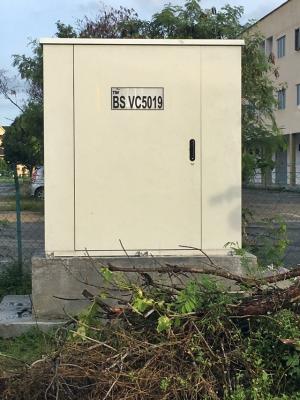
QUOTE(AjkR06 @ Aug 27 2017, 04:40 PM) Nope. It's unifi lite with 'enhanced' dslam and copper wire. Soon they will spray the coding to the dp, starting like this: xxx (exchange name) VC50yy (msan coding) | 0zz (dp number). Eg: BS VC5001 | 001 So my area wont get unifi?  All my nearby area already got unifi... |
|
|
Aug 27 2017, 05:09 PM
|
|
All Stars
11,456 posts Joined: Oct 2007 From: KL
|
QUOTE(ComposMentis @ Aug 27 2017, 04:03 PM) Just chatted with them on live chat, and I asked them to send someone over to change the router as the one I was using (dir 615) is horrible performance wise, but they said I'd be charged RM53 if the problem is not on their side, wth? I think all the people I know who got 30-50 free upgrade did not get a new router. So still using their old ones like DIR-615 or RG4332. Those of you who've gotten the upgrade, did TM replace your routers for free?The DIR-615 doesn't get much love but it can handle 50mbps if there're not too many people on it.  My auntie's house 50mbps & DIR-615. Tested on iPhone 6s. (2.4Ghz N 20Mhz) |
|
|
Aug 27 2017, 06:05 PM
|
|
Senior Member
766 posts Joined: Oct 2007 From: Penang Island
|
QUOTE(BiNSooN @ Aug 27 2017, 04:47 PM) previously didn't have this issue with DIR-615. is this Tp Link C1200 related bug or...? I guess previously you didn't enable IPv6 on your DIR-615. Android devices doesn't work well with IPv6, unless you know how to configure the IPv6 setting properly. So turn off IPv6 will be the easy way. |
|
|
Aug 27 2017, 06:14 PM
|
|
Newbie
21 posts Joined: Jul 2016
|
QUOTE(JohnLai @ Aug 27 2017, 04:33 PM) Nope, heard from my source that TM is just trying to get rid of excess copper wire and ready up VDSL deployment for 'supported' DSLAM. What is DSLAM? Does it support unifi 30mbps ? Actually my house quite near to TM main termination box, less than 20 feet.The funny news is......he said TM might provide unifi 30 to 50 Mbps using copper for limited residential housing area. Normally VDSL1/2 is only used for high rise building.  |
|
|
Aug 27 2017, 06:45 PM
|
|
Senior Member
3,032 posts Joined: Dec 2011
|
QUOTE(XXX---XXX @ Aug 27 2017, 06:14 PM) What is DSLAM? Does it support unifi 30mbps ? Actually my house quite near to TM main termination box, less than 20 feet. https://en.m.wikipedia.org/wiki/Digital_sub...ess_multiplexer Basically it'll use dsl line instead ftth. |
|
|
Aug 27 2017, 07:07 PM
|
|
Senior Member
1,548 posts Joined: Oct 2006 From: ugly kingdom
|
QUOTE(XXX---XXX @ Aug 27 2017, 05:05 PM) So my area wont get unifi? Hey, you're still able to get Unifi, but 'lite' version only All my nearby area already got unifi...  Which with the current package offered by TM, limited to 10Mbps download and 5Mbps upload. It's far a way better than what streamyx offered, just RM129/month! It seems that your area are falls under SUBB (sub urban broadband, which means that TM will setup the new 'huge box' that supports more bandwidth than what Streamyx box have now) but it's weird since all the surrounding area got fiber unifi already as what you said. Anyway, saw your post that mentioned TM 'box' was situated less than 20ft from your house. If you managed to go to the box, you can share here what is the code printed in the box. For SUBB, the code will be either VBxxxx or VCxxxx while for HSBB (Fiber Unifi), the box code will be Cxxx. SUBB box size will be huge than HSBB. » Click to show Spoiler - click again to hide... « |
|
Topic ClosedOptions
|
| Change to: |  0.0188sec 0.0188sec
 0.46 0.46
 6 queries 6 queries
 GZIP Disabled GZIP Disabled
Time is now: 3rd December 2025 - 02:31 AM |
 Quote
Quote