Welcome Guest ( Log In | Register )

Bump Topic Topic Closed RSS Feed

Outline · [ Standard ] · Linear+

Unifi Official TM UniFi High Speed Broadband Thread V32, Enjoy Your Speed Upgrade

views
     
sgpdsmss
post Dec 22 2017, 08:03 AM

Regular
******
Senior Member
1,704 posts

Joined: Jan 2005
QUOTE(SilentVampire @ Dec 21 2017, 10:52 PM)
If you add on powerline or AP, it won't consume much power. It has nothing to do with the router bro. You have one of the best router already. It has more to do with the wireless interference and congestion in your area, which is to be expected, unless you are staying in some high class gated area with only a few houses around you. My advice is to get a powerline or AP if you can, and just configure it to extend 5GHz.
*
detected Max 3 WIFI signal around my house area included my own..consider many or few ?

QUOTE(soonwai @ Dec 21 2017, 11:03 PM)
What device? If the device is single chain wifi then that's quite good. If dual chain then you should be getting 70-90mbps over 2.4Ghz unless there's interference.

Router: Mikrotik RB2011UAS-2HnD
AP: D-Link DIR-868L

Dual chain (2x2 MIMO)
user posted image
iPhone 6s 2.4GHz N 20MHz channel width (Link: 144 mbps)

Single chain, dunno why so slow.
user posted image
Samsung S3 2.4GHz N 20MHz Channel Width (Link speed: 72mbps)
*
ive 868L router ...but this router suddenly the WIFI signal drop to 50% and less signal transmit out ...i don't know what happen to the router ..try Reset default ..flash firmware ..nothing help ..
in the end keep it in store ...
the router from oversea so no warranty ..dlink claim that if send for repair cost about rm250..

your Samsung S3 link speed 72Mbps ..
speed test can get how many ?
sorry i cant see your screen shot ...


sgpdsmss
post Dec 22 2017, 10:27 AM

Regular
******
Senior Member
1,704 posts

Joined: Jan 2005
QUOTE(SilentVampire @ Dec 22 2017, 08:53 AM)
Consider few but there must be some interference somewhere that make you unable to receive the full speed of 2.4GHz. If you want 2.4GHz to get full speed, try to set it to 40MHz and see if that helps.
Just change to C5 V2, or flash your C1200 firmware to EU version. That is it.
*
alright ..will try set it to 40mhz..
the router place in front of me ..still consider have interfere?

QUOTE(christina1 @ Dec 22 2017, 09:17 AM)
100Mbps think you need at least ASUS 68U or Tplink AC3150 to see the difference smile.gif
*
ASUS 68u for me see no different connected 2.4GHz WIFI between 50Mbps VS 100Mbps ...😳😳
sgpdsmss
post Dec 22 2017, 11:59 AM

Regular
******
Senior Member
1,704 posts

Joined: Jan 2005
QUOTE(christina1 @ Dec 22 2017, 10:33 AM)
Strange you should be getting full 100Mbps speed  ? Ur router got problem ?
*
IM not sure ...try play around setting still no change..
maybe need try use back stock TM dlink 850l router see can get full 100MB on 2.4GHz or not ..
sgpdsmss
post Dec 22 2017, 01:37 PM

Regular
******
Senior Member
1,704 posts

Joined: Jan 2005
QUOTE(SzeMeng76 @ Dec 22 2017, 12:12 PM)
It's hard to get full speed on 2.4ghz. Me also cannot. Try connect 5 ghz
*
5GHz get 7x~9x Mbps ...
sgpdsmss
post Dec 22 2017, 01:40 PM

Regular
******
Senior Member
1,704 posts

Joined: Jan 2005
QUOTE(SilentVampire @ Dec 22 2017, 12:56 PM)
Bro, I have told you already that the router location have nothing to do with it. Even if the router is front of you, can you block ALL other wireless signals from other wireless devices, being in your location? Be realistic.

There is clearly interference in your wireless network, especially the 2.4Ghz band in your location, so that’s why you can’t get full speed of 100Mbps. Did you even read the link I posted for you?

See here, and I have even attached more links for you to read. Read the first link as it is more relevant to your situation:

http://pocketnow.com/2014/01/23/5ghz-wifi

https://www.howtogeek.com/222249/whats-the-...should-you-use/

https://www.lifewire.com/is-5-ghz-wifi-bett...-2-4-ghz-818293
*
can i say that if your ISP more than 100Mbps ...2.4GHz is useless caused cant never get full speed ? only Max 50Mbps ..

if ISP 50Mbps no problem to get full 50Mbps ..

thanks ...
sgpdsmss
post Dec 23 2017, 08:30 PM

Regular
******
Senior Member
1,704 posts

Joined: Jan 2005
QUOTE(fruitie @ Dec 22 2017, 10:17 PM)
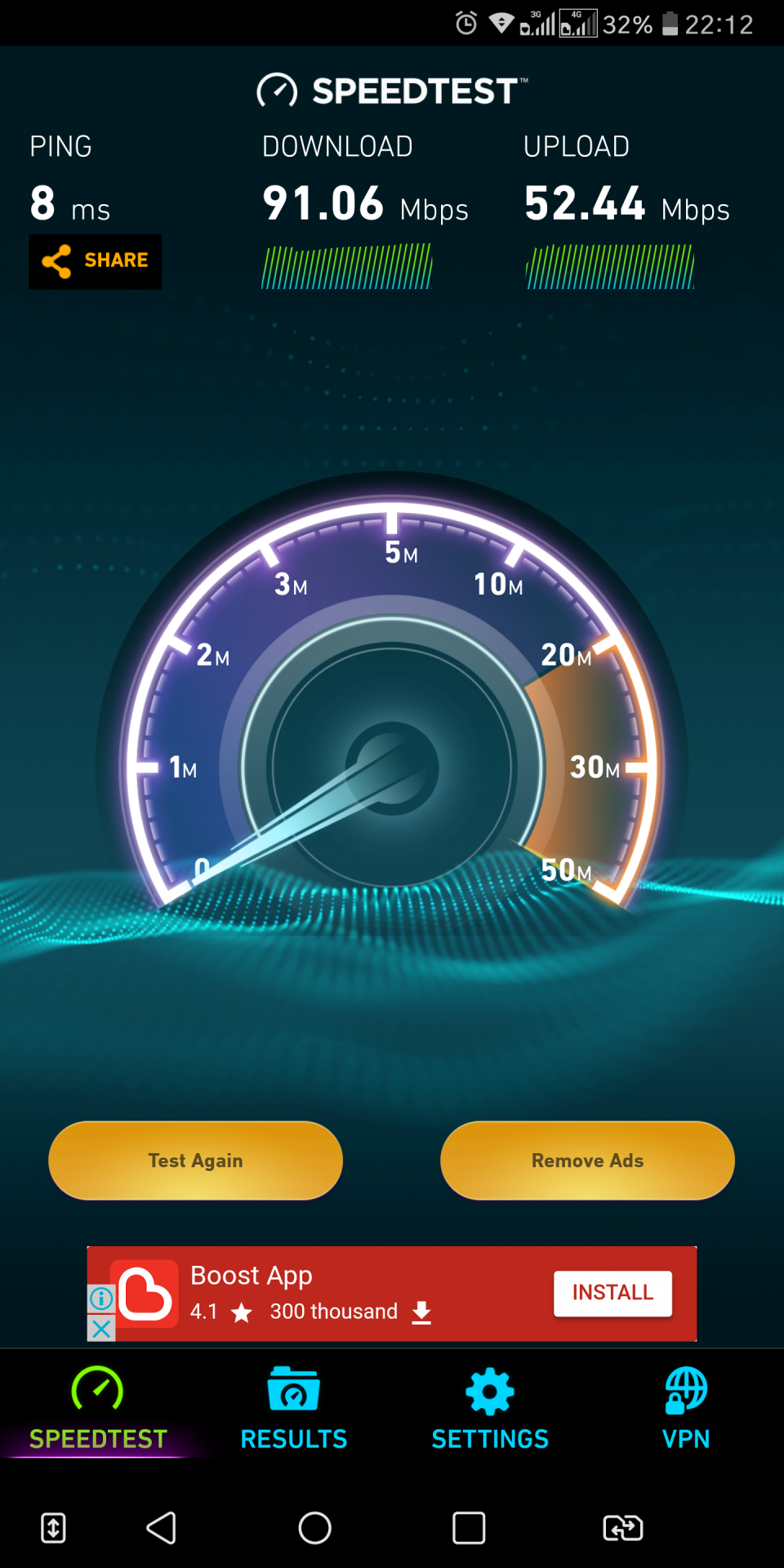
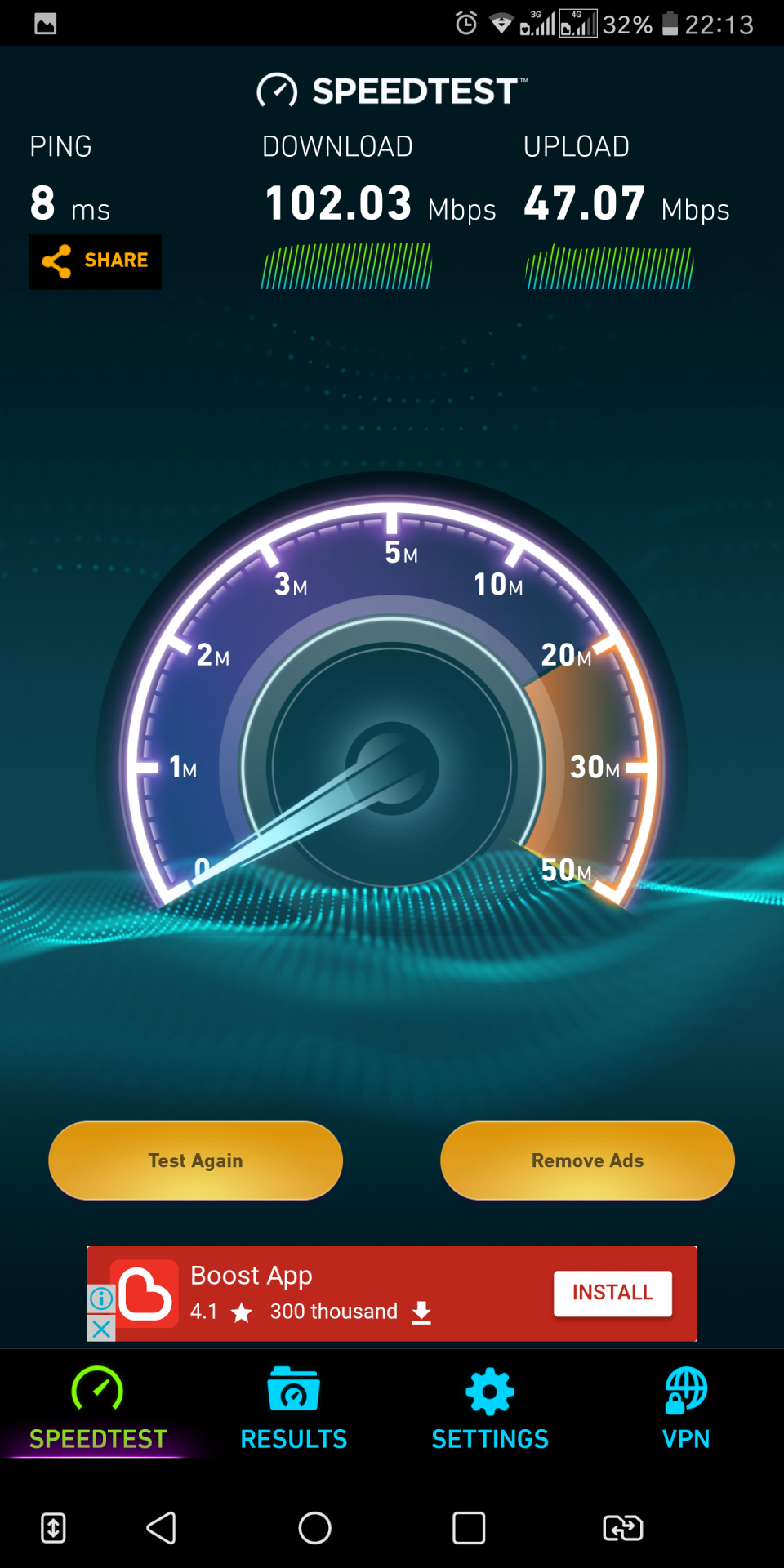
Finally I'm back at home and got to try 100Mbps.

On 2.4GHz:
user posted image
Lower download speed but higher upload speed.

On 5GHz:
user posted image
Higher download speed but lower upload speed.

Both tried at downstairs while router is at upstairs.
*
your 2.4GHz can get so high speed ..
just changed the tx power to half to get the high speed ?
what devices connected to the 2.4GHz ?
what's the link speed ?

thanks ...

sgpdsmss
post Dec 24 2017, 06:03 AM

Regular
******
Senior Member
1,704 posts

Joined: Jan 2005
QUOTE(fruitie @ Dec 24 2017, 12:32 AM)
Yes, changed to half.
Hmm. I think when I tested that time, three phones and two iPads connected to 2.4GHz.

What did you mean by link speed?
*
link speed

link speed under setting..WIFI ..details ...


i changed half also but still Max 60Mbps ...

This post has been edited by sgpdsmss: Dec 24 2017, 06:06 AM
sgpdsmss
post Dec 24 2017, 01:16 PM

Regular
******
Senior Member
1,704 posts

Joined: Jan 2005
QUOTE(fruitie @ Dec 24 2017, 12:18 PM)
I thought link speed changes based on WiFi strength?
Currently in my room at 114Mbps for 2.4 and 130Mbps for 5. Stood near to router 866Mbps for 5 and 144Mbps for 2.4.
*
what's the speed test result for link speed at 114Mbps and 144Mbps ?
Pls try go far far to get less than 100Mbps link speed and speed test again ..see the result ...

i using redmi note 4 ...link speed Max 72Mbps for 2.4GHz..
no matter how close to the router ...

i think i cant get over 70Mbps for speed test under unifi 100Mbps

finalize may due to device limitation on 2.4ghz instead of router issue ...

thanks
sgpdsmss
post Dec 24 2017, 08:04 PM

Regular
******
Senior Member
1,704 posts

Joined: Jan 2005
QUOTE(fruitie @ Dec 24 2017, 02:47 PM)
It seems I cannot get 114Mbps anymore, now 144Mbps.
Sitting at downstairs hall where the router is at upstairs, same position as where I am seated.

user posted image
*
your device's WIFI is good ..no matter upstairs or downstairs constantly get near 9xMbps ...


QUOTE(SilentVampire @ Dec 24 2017, 04:21 PM)
Nothing. Wifi speed depends on many factors such as interference and congestion, and other factors as well.
*
Pls put away all many factors 1ST ...
100Mbps ...new devices connected ..should get nearly 8x~9xMbps.
but now nope..only Max 6xMbps ...

QUOTE(biloxee @ Dec 24 2017, 06:09 PM)
You need to consider how many antennas your device has and/or if it supports MIMO.

Router cannot help if your device cannot support the speeds the router is capable of.
*
@fruitie ...initially cant get the expected speed...but after she did some setting in her router ...finally getting the speed almost matching with the ISP plan speed ...

so for me i did change around setting in the router ..but still cant get what i expected ...
yes ...my device link speed Max 72Mbps only ...no matter i change to high end router still cant get the 100Mbps ...
and yes ..is device limitation ...……i think only 1 antenna for my device ~ redmi note 4..

MIMO still new Tech ...a lot of mobile phones don't have that feature yet ..

QUOTE(AVFAN @ Dec 24 2017, 07:13 PM)
that, everyone knows la...

the big question is what solution(s), not just why "cannot"!

there is interference everywhere, every house, impossible to get rid of everything else so that one device works perfectly.

will be more useful if u can share what u have, what results, what u hv done, how to deal with this interference, tq.
that, people also know to an extent la...

old devices likely not so good, new ones should work fine... but somehow they dun.

i am quite sure the people here struggling to get full 100mbps know this aspect, know how to test old and new devices.
really... it seems to such a hard job to get full 100mbps to work.

it will be hell if one tries to go 500 or 1000mbps then! laugh.gif
*
YES ...Bro...you really understand my feeling...thank you ..appreciated....

sgpdsmss
post Dec 24 2017, 08:51 PM

Regular
******
Senior Member
1,704 posts

Joined: Jan 2005
QUOTE(SilentVampire @ Dec 24 2017, 08:23 PM)
Okay, you want a solution? Solution is confining all Wifi to each person’s house and everyone have their own frequency, and then removing all other wireless devices, leaving only the router in your house as the wireless point. Nothing will interfere with each other then. You have the best and latest devices as well. You will get full speed and everything will be sweet as.

Realistically, that is never going to happen bro. The best way to get the best speed is still by wired LAN connection. It is what it is. Every household is going to struggle for wireless space, and that will be the fact for the coming years, unless all of us move to 5GHz, which has more non-interfering channels, but still not enough for all of us.
You can buy the most expensive router and do whatever settings you want, but if the wireless network in your area is very congested and you have many electrical devices in your house, you will never get the full speed that you want. As you say, the device that you are using also plays a huge role. The strength of the antenna in your device determines how fast your connection will be.
*
bro...your mind always thinking of congested ..interference..
no matter how congested ..interference ..you put your device close to the router should be able to get full speed ...
Pls try and show us ...

yes..now i admit ..my redmi note 4 .link speed connected at Max 72Mbps only ...so that i cant get 8x~9x of 100Mbps on 2.4GHz wifi..

even i bought high end router ..expensive router ..did perfect setting ..link speed Max also 72Mbps ...
even surrounding not congested..without any Electrical devices in my house ..link speed also Max 72Mbps ...

thanks ...

sgpdsmss
post Dec 24 2017, 11:07 PM

Regular
******
Senior Member
1,704 posts

Joined: Jan 2005
QUOTE(SilentVampire @ Dec 24 2017, 09:11 PM)
It is self explanatory and very obvious. If you can’t get full speed on 2.4GHz, there is clearly something that is causing the low speed. It could be congestion, interference, or the phone WiFi adapter itself, or another reason.

It doesn’t mean that if you are right in front of the router, there won’t be any congestion or interference. You can’t block ALL the wireless signals from beaming to your place, and yes, that means right in front of your router as well.
Don’t assume WiFi is similar to IR wireless, where an unobstructed line of sight is needed between the transmitter and receiver. WiFi signals doesn’t work that way. It can if it have a directional antenna attached, but most WiFi APs are omnidirectional anyway.

All wireless signals will overlap and interfere with one another, unless they are on a different frequencies from each other.

See here and read this article. Although this in US, it applies here as well:

https://spectrum.ieee.org/telecom/wireless/...d-how-to-fix-it

If you still want to argue that there is nothing wrong and blame it all on the router, I can’t do anything. Read and educate yourself and stop thinking in simple terms.
*
yes..they are something wrong ...the wrong was the redmi phone max link 72mbps only...now i didnt say, blame it all on the router ...
and yes,,i should educate myself...from this forum i got educated a lot ...especially from expert like you and others...smile.gif

thank you...really appreciate...

QUOTE(biloxee @ Dec 24 2017, 10:10 PM)
user posted image

My old iPhone 4s with single stream antenna, can't even reach 50Mbps on 2.4Ghz even when it is next to the router  biggrin.gif

So, when my Unifi gets upgraded it will probably do 40+Mbps up and down...
*
may i know the link speed on your old iphone 4s for 2.4Ghz wifi?

thanks...
sgpdsmss
post Dec 24 2017, 11:28 PM

Regular
******
Senior Member
1,704 posts

Joined: Jan 2005
QUOTE(SilentVampire @ Dec 24 2017, 11:19 PM)
Don’t mean to come across as being harsh, bro. I apologize if I do. Redmi phone is good, but it only support b/g/n, and not AC, so it won’t hit the max speed, but it is fast enough. 70+ is okay, and more than enough for daily use.
*
yes..redmi note 4 phone not bad...battery can last longer ..

correct...daily usage 50mbps is more more enough...
im thinking n thinking to add on rm10 to get 100mbps or not...in the end i decide to top up...
very sad when redmi cannot get the expected speed on 2.4ghz wifi after upgraded to 100mbps,,,
so seek expert here....asking suggestion..opinion..solution here....
who knows in the end,,,device problem....... doh.gif


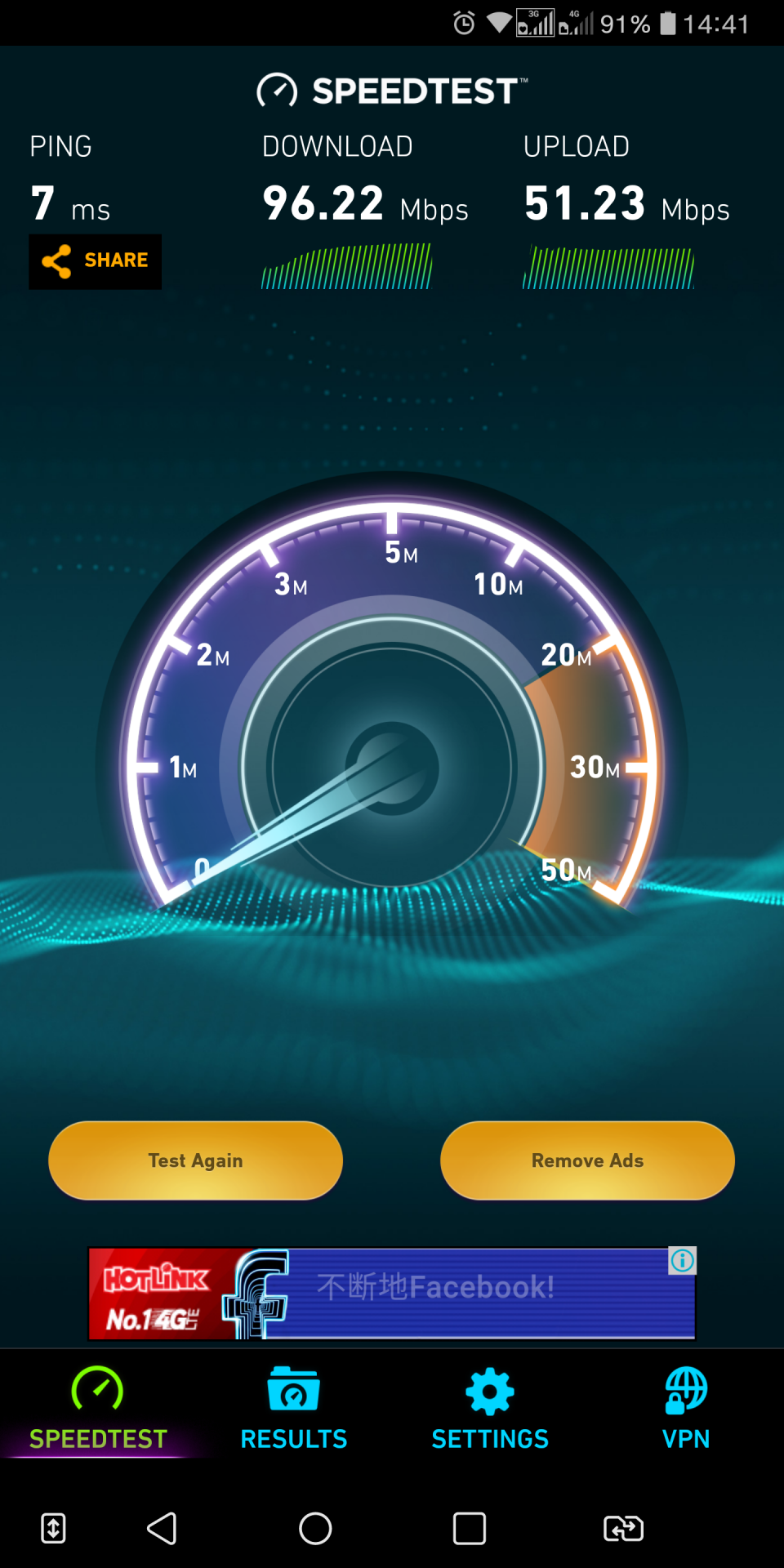
use pc did speedtest via lan cable..at least can up 9xmbps....
user posted image


thanks,,,
sgpdsmss
post Dec 28 2017, 08:57 PM

Regular
******
Senior Member
1,704 posts

Joined: Jan 2005
QUOTE(AVFAN @ Dec 28 2017, 05:27 PM)
Just got my 100mbps today.

Yes... similar result like yours.

Tm supplied tplink 1200.

Ethernet, no sweat... 105mbps.

Wifi 5ghz... 95 at 10ft, 85 at 30ft, 75 at 50ft.

Wifi 2.4ghz... crap...25 to 50 only.

My old asus rtn12hp can do better on wifi 2.4ghz, but only 95 with ethernet.
Will consider new router...

Anyone using asus ac1300uhp... good enough for wifi 2.4ghz?

I got a few old devices that can only run on this freq, wifi.
*
May i know the device connected to 2.4GHz WIFI..the link speed is how many ?

QUOTE(stephantsen @ Dec 28 2017, 06:38 PM)
i wonder why u cannot get full speed on 2.4ghz. i can get 100mbps on the first floor and up to 75 mbps at the second floor
*
May i know the device connected to 2.4GHz WIFI ..the link speed is how many ?

thanks ...
sgpdsmss
post Dec 28 2017, 10:03 PM

Regular
******
Senior Member
1,704 posts

Joined: Jan 2005
QUOTE(AVFAN @ Dec 28 2017, 09:59 PM)
what is LINK speed?
*
the speed connected to WIFI ..


Attached thumbnail(s)
Attached Image
sgpdsmss
post Dec 29 2017, 08:06 AM

Regular
******
Senior Member
1,704 posts

Joined: Jan 2005
QUOTE(AVFAN @ Dec 28 2017, 10:33 PM)
just checked... 72.
*
with this link speed Max can up to 60Mbps only ....
so need change the device that can link more than 100Mbps ..
so that can get up to 8xmbps speed test with interferenced...
changing router no help with link speed 72

thanks ....
sgpdsmss
post Dec 29 2017, 01:24 PM

Regular
******
Senior Member
1,704 posts

Joined: Jan 2005
QUOTE(AVFAN @ Dec 29 2017, 09:31 AM)
Yes... my samsung tab s2 android7 can get good wifi speed at 2.4ghz.

5ghz, maximum speed even at 50ft.

Powerful hardware!

Think u r right... hardware limitations.

For pc, will a 5ghz wifi adaptor help much?
*
its time to change device to support 100Mbps speed ..😛

QUOTE(rhytion @ Dec 29 2017, 09:42 AM)
If your phone is running Qualcomm Snapdragon processor and you're rooted, can try using magisk modules to combine channels. I just did it and now I'm getting 150Mbps link when close to the router.
*
no matter what snapdragon version ?
link for magisk module ?
b4 you did ..your link speed is how many ?
with 150Mbps link ...speed test how many Mbps ?you are on unifi 100Mbps ?

QUOTE(Chrono-Trigger @ Dec 29 2017, 12:57 PM)
hi guys,

Finally decided to take up the offer of upgrade RM10 from 50mbps to 100mbps.

However, I mistakenly told TM staff that my package was RM199 (50mbps free upgrade + residential free calls RM20). 

TM staff photocopy IC and wrote there RM209 + Hyptv + Free calls.

However, when I went back home and checked my bills, my package is actually RM189...

So do I need to go back to TM point to tell them it should be RM199 , not RM209 as written in the photocopied IC + form??
*
your 50Mbps was rm189?
so now add rm10 to 100Mbps ...price become rm199?

thanks ...
sgpdsmss
post Dec 29 2017, 01:36 PM

Regular
******
Senior Member
1,704 posts

Joined: Jan 2005
QUOTE(Chrono-Trigger @ Dec 29 2017, 01:29 PM)
Should be RM199. But the TM staff wrote on the paper RM209...
*
a lot here getting RM189 without gst (50mbps free upgrade + residential free calls RM20)

sgpdsmss
post Dec 29 2017, 01:58 PM

Regular
******
Senior Member
1,704 posts

Joined: Jan 2005
QUOTE(jaijaidin @ Dec 29 2017, 01:54 PM)
the offer is still going on? How to get it?
my package is 179RM+GST with 50mbps internet (initially 30mbps and free upgrade to 50mbps) and one HyppTV package included (thank you gift earlier).
*
yes ...will end 31dec2017

Pls visit TM point for fast process ...else call 100 then press 4

thanks ...
sgpdsmss
post Dec 29 2017, 02:30 PM

Regular
******
Senior Member
1,704 posts

Joined: Jan 2005
QUOTE(rhytion @ Dec 29 2017, 02:19 PM)
It just said in description it's for Snapdragon, working on my Snapdragon 820. Before changing link speed 72Mbps, can't test full speed since I'm on 30Mbps only

The name of the module is called Wifi Bonding (Qualcomm), can be found in the downloads section in Magisk Manager app on Android
*
snd820 link speed only 72 ? this is high end chipset but with lousy 2.4GHz WIFI chip ...
what phone model actually ?

72 can easily reached nearly 30Mbps ..

thanks ...
sgpdsmss
post Dec 31 2017, 06:23 AM

Regular
******
Senior Member
1,704 posts

Joined: Jan 2005
QUOTE(fruitie @ Dec 31 2017, 01:43 AM)
Just noticed your promo discount is only for 24 months while ours is perpetual, better than nothing I guess.  rclxms.gif
*
how is correct discount bill look like for 100Mbps RYE 2017?

thanks ...

3 Pages < 1 2 3 >Top
Topic ClosedOptions
 

Change to:
| Lo-Fi Version
0.2611sec    0.54    7 queries    GZIP Disabled
Time is now: 2nd December 2025 - 07:04 PM