

urghhh called them last Monday to upgrade but till now still no status. Should I call 100 to ask or wait for 1 more day to reach their "7 working days" ?
Unifi Official TM UniFi High Speed Broadband Thread V32, Enjoy Your Speed Upgrade
Unifi Official TM UniFi High Speed Broadband Thread V32, Enjoy Your Speed Upgrade
|
|
 Nov 27 2017, 11:55 PM Nov 27 2017, 11:55 PM
Return to original view | IPv6 | Post
#21
|
 
Senior Member
1,125 posts Joined: Sep 2014 From: Cheras  
|
urghhh called them last Monday to upgrade but till now still no status. Should I call 100 to ask or wait for 1 more day to reach their "7 working days" ?
|
|
|
|
|
|
Nov 28 2017, 02:28 PM
Return to original view | IPv6 | Post
#22
|
|
Senior Member
1,125 posts Joined: Sep 2014 From: Cheras
|
called 100 just now asked for the status and the CS told me that it is still processing and I might have to wait until this week
 |
|
|
Nov 29 2017, 09:37 PM
Return to original view | IPv6 | Post
#23
|
|
Senior Member
1,125 posts Joined: Sep 2014 From: Cheras
|
okay so my RM10 upgrade has been over 7 working days already and still no any update.
|
|
|
Dec 3 2017, 01:31 AM
Return to original view | IPv6 | Post
#24
|
|
Senior Member
1,125 posts Joined: Sep 2014 From: Cheras
|
and me, called 100 last last Monday ( 20 November ) for Rm10 upgrade and till now no status no update. Seriously. Called 100 on last Tuesday and say still in process.
|
|
|
Dec 6 2017, 12:30 PM
Return to original view | IPv6 | Post
#25
|
|
Senior Member
1,125 posts Joined: Sep 2014 From: Cheras
|
finally got the 100Mbps
but my laptop connecting to LAN isn't getting over 100Mbps, what can I do ?  and I am not getting Unifi Special Discount RM50, should I ask them ? 
This post has been edited by Ben Ling: Dec 6 2017, 12:40 PM |
|
|
Dec 6 2017, 12:53 PM
Return to original view | IPv6 | Post
#26
|
|
Senior Member
1,125 posts Joined: Sep 2014 From: Cheras
|
QUOTE(OKLY @ Dec 6 2017, 12:49 PM) Same, I suspect the capping is causing speedtest lower than 100mbps. guess my laptop problem hahaSame thing also on the discount.  my phone and iPad both are getting over 100 but not consistent, sometimes lesser than 80Mbps |
|
|
|
|
|
Dec 6 2017, 01:47 PM
Return to original view | IPv6 | Post
#27
|
|
Senior Member
1,125 posts Joined: Sep 2014 From: Cheras
|
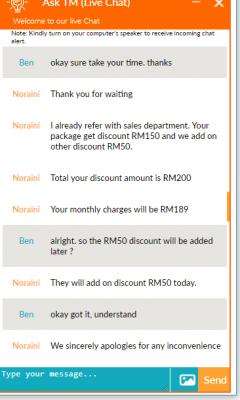
Chat with CS and asked them why not getting the RM50 discount
|
|
|
Dec 6 2017, 01:55 PM
Return to original view | IPv6 | Post
#28
|
|
Senior Member
1,125 posts Joined: Sep 2014 From: Cheras
|
QUOTE(OKLY @ Dec 6 2017, 01:53 PM) Which department? Billing? general enquiryyou just send the picture ( posted by a forummer few pages ago with the RM50 discount ) and ask why that people have but you don't have |
|
|
Dec 6 2017, 02:35 PM
Return to original view | IPv6 | Post
#29
|
|
Senior Member
1,125 posts Joined: Sep 2014 From: Cheras
|
so guys, do you have I need to change the router from TM ( D-Link DIR850L ) to TP-Link Archer C1200?
My DIR850L seems to be having very weak Wi-Fi signal strength and btw is the C1200 better than DIR850L ? |
|
|
Dec 6 2017, 02:40 PM
Return to original view | IPv6 | Post
#30
|
|
Senior Member
1,125 posts Joined: Sep 2014 From: Cheras
|
QUOTE(soonwai @ Dec 6 2017, 02:37 PM) For those going for the RM10 upgrade from RM179 50mbps to RM189 100mbps, the total discount should be RM200 (Promo 150 + Special 50) but so far many or all of us only have the RM150 discount in our package after the upgrade order is complete. Have to call TM to remind them to put in the Special RM50 UniFi discount. I just had a live chat with them and they will add the discount later today |
|
|
Dec 6 2017, 02:56 PM
Return to original view | IPv6 | Post
#31
|
|
Senior Member
1,125 posts Joined: Sep 2014 From: Cheras
|
Had few speed test on my OnePlus 3 for 100Mbps plan
5GHz WiFi, not consistent 
2.4GHz, consistent but not getting over 50Mbps for download, is it normal ? 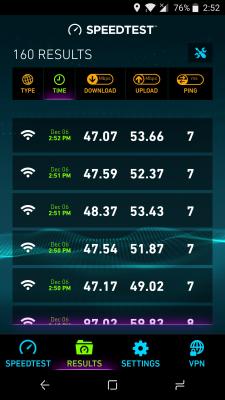
|
|
|
Dec 7 2017, 12:06 PM
Return to original view | IPv6 | Post
#32
|
|
Senior Member
1,125 posts Joined: Sep 2014 From: Cheras
|
QUOTE(OKLY @ Dec 7 2017, 10:08 AM) A ticket was opened yesterday when I reported about the missing special RM50 discount for my RYE 100mbps, today there was another modify order created and currently under processing status, I believe this is related to the report yesterday. told to be added on yesterday but today still no RM50 discount in the portal, gotta ask them again So I guess don’t wait, if there is any missing discount, report it to get it rectified. |
|
|
Dec 7 2017, 10:49 PM
Return to original view | IPv6 | Post
#33
|
|
Senior Member
1,125 posts Joined: Sep 2014 From: Cheras
|
QUOTE(Silver Isle @ Dec 7 2017, 10:46 PM) Hi guys. For UniFi installation, do we need to get ready a laptop at home for the installer to setup or will they bring one? Cause my home only has a desktop quite far away from the port. no need they have their laptop and will setup for you |
|
|
|
|
|
Dec 9 2017, 01:18 PM
Return to original view | IPv6 | Post
#34
|
|
Senior Member
1,125 posts Joined: Sep 2014 From: Cheras
|
Guys, does anyone faced this issue before ?
Using facebook on your phone on Wi-Fi and suddenly it does not load, just like disconnected from internet, then I switch to mobile data it loads and switch back to Wi-Fi then only it continue to work. So is it router problem or unifi problem ? |
|
|
Dec 9 2017, 05:44 PM
Return to original view | Post
#35
|
|
Senior Member
1,125 posts Joined: Sep 2014 From: Cheras
|
QUOTE(winterx001 @ Dec 9 2017, 05:27 PM) My Internet speed capped at 94mbps when using old modem and it is fixed by changing modem, now my Internet speed constantly getting arround 110mbps. which modem you got ? |
|
|
Dec 9 2017, 10:05 PM
Return to original view | Post
#36
|
|
Senior Member
1,125 posts Joined: Sep 2014 From: Cheras
|
guys I just have my router replaced with Archer C1200, seems okay but on LAN still getting only 94Mbps max, should I also change the modem ?
And I just realize download anything from Play Store on my devices have a 1-minute delay before downloading, switching to data will download instantly, any solution ? thanks |
|
|
Dec 9 2017, 10:45 PM
Return to original view | Post
#37
|
|
Senior Member
1,125 posts Joined: Sep 2014 From: Cheras
|
QUOTE(Neptern @ Dec 9 2017, 10:35 PM) Does your ONU have a gigabit ethernet port? Make sure you are using cat5e ethernet cables as least. sorry what is ONU ? Try switching around your dns server. I set back my router to the TM dns server and solved some slowdown issues. I still use google dns on my pc.  I was using DIR-850L router before that and have no Google Play download delay issue, just not getting over 95Mbps on LAN speedtest and yes I am also using TM DNS server for the router and Google DNS on PC |
|
|
Dec 10 2017, 12:16 AM
Return to original view | Post
#38
|
|
Senior Member
1,125 posts Joined: Sep 2014 From: Cheras
|
QUOTE(Neptern @ Dec 9 2017, 10:50 PM) Your Huawei optical network unit where you plug your fiber cable. Which model you using? are you talking about the modem ? I have the Huawei HG8240w |
|
|
Dec 10 2017, 12:20 AM
Return to original view | Post
#39
|
|
Senior Member
1,125 posts Joined: Sep 2014 From: Cheras
|
QUOTE(soonwai @ Dec 9 2017, 10:56 PM) ONU: optional network unit aka ONT: optical network terminal alright thanksTM refers to the above & VDSL modems as BTU: broadband termination unit. anyway any idea what causing Google Play to hv delay download ? It is having delay for each app, like I click Install, it takes 1 min before downloading and the same again for each app I download or update. Felt like regretting to change my DIR850L lol because it does not have this issue. |
|
|
Dec 10 2017, 12:48 AM
Return to original view | Post
#40
|
|
Senior Member
1,125 posts Joined: Sep 2014 From: Cheras
|
QUOTE(Neptern @ Dec 10 2017, 12:40 AM) That btu should be gigabit capable. My only advice is ensure you're using cat 5e cable for your whole network and make sure everything is connected to gigabit ethernet port. it's just over LAN not getting over 100Mbps, highest 95Mbps, on WiFi it does but now after changing to Archer C1200 I am not even getting over 80Mbps on WiFi 5GHz ☹️, tried with OnePlus 3 Oppo R9s iPad mini 2 all not getting more than 80MbpsMaybe your account just capped slightly lower then 100 mbps. Some sifu here can teach how to test the internal network speed? |
|
Topic ClosedOptions
|
| Change to: |  0.0268sec 0.0268sec
 0.91 0.91
 7 queries 7 queries
 GZIP Disabled GZIP Disabled
Time is now: 9th December 2025 - 01:08 PM |
 Quote
Quote