Welcome Guest ( Log In | Register )

289 Pages « < 41 42 43 44 45 > » Bottom

Outline · [ Standard ] · Linear+

Unifi Unifi Lite 10Mbps Brotherhood -- v3.0 --, Incoming RM99 package!? (Put On Hold)

views
     
TOMEI-R
post Sep 8 2017, 01:55 PM

Extraordinaire
*********
All Stars
24,219 posts

Joined: Mar 2007
From: Kuala Lumpur


Just got my Unifi Lite Biz Package installed. Can I start using the VOIP phone by connecting a phone to the modem or do I have to wait for Tm to activate it? Im not too sure because I dont use the VOIP phone for my home Unifi Lite connection. Anybody?
soonwai
post Sep 8 2017, 02:01 PM


********
All Stars
11,458 posts

Joined: Oct 2007
From: KL


QUOTE(TOMEI-R @ Sep 8 2017, 01:55 PM)
Just got my Unifi Lite Biz Package installed. Can I start using the VOIP phone by connecting a phone to the modem or do I have to wait for Tm to activate it? Im not too sure because I dont use the VOIP phone for my home Unifi Lite connection. Anybody?
*
Just connect and try. Should be ready to use if your internet is up already.
TOMEI-R
post Sep 8 2017, 04:31 PM

Extraordinaire
*********
All Stars
24,219 posts

Joined: Mar 2007
From: Kuala Lumpur


QUOTE(soonwai @ Sep 8 2017, 02:01 PM)
Just connect and try. Should be ready to use if your internet is up already.
*
Alright. But ths VOIP light on the modem is still blinking. Installer said to wait until the signal is stable 1st.

This post has been edited by TOMEI-R: Sep 8 2017, 04:55 PM
birain
post Sep 8 2017, 11:56 PM

良い一日を
******
Senior Member
1,448 posts

Joined: Apr 2007
QUOTE(TOMEI-R @ Sep 8 2017, 04:31 PM)
Alright. But ths VOIP light on the modem is still blinking. Installer said to wait until the signal is stable 1st.
*
just plug it in ( tel1 port is for phone, tel2 port is for fax), and wait for the light to stop blinking. you can use a splitter and extend it if you use a corded phone and also a dect wireless phone.

*24 hours to 48 hours wait. thumbsup.gif
TOMEI-R
post Sep 9 2017, 12:05 AM

Extraordinaire
*********
All Stars
24,219 posts

Joined: Mar 2007
From: Kuala Lumpur


QUOTE(birain @ Sep 8 2017, 11:56 PM)
just plug it in ( tel1 port is for phone, tel2 port is for fax), and wait for the light to stop blinking. you can use a splitter and extend it if you use a corded phone and also a dect wireless phone.

*24 hours to 48 hours wait. thumbsup.gif
*
Done....the voip lights become lit and phone line is up. But what if I need to use two phones for Line 1? What type of splitter do I need to use?
birain
post Sep 9 2017, 12:34 AM

良い一日を
******
Senior Member
1,448 posts

Joined: Apr 2007
QUOTE(TOMEI-R @ Sep 9 2017, 12:05 AM)
Done....the voip lights become lit and phone line is up.  But what if I need to use two phones for Line 1?  What type of splitter do I need to use?
*
not sure about that....never try before. blush.gif
soonwai
post Sep 9 2017, 02:17 AM


********
All Stars
11,458 posts

Joined: Oct 2007
From: KL


QUOTE(TOMEI-R @ Sep 9 2017, 12:05 AM)
Done....the voip lights become lit and phone line is up.  But what if I need to use two phones for Line 1?  What type of splitter do I need to use?
*
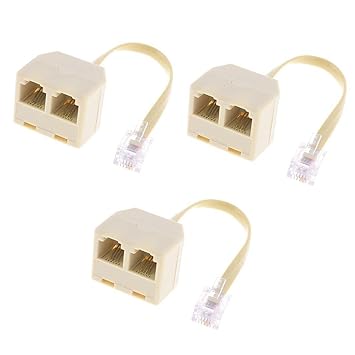
The old skool phone line splitter. Anywhere can get.
user posted image
TOMEI-R
post Sep 9 2017, 10:02 AM

Extraordinaire
*********
All Stars
24,219 posts

Joined: Mar 2007
From: Kuala Lumpur


QUOTE(soonwai @ Sep 9 2017, 02:17 AM)
The old skool phone line splitter. Anywhere can get.
user posted image
*
Yes... But this is cable. Not sure if it will work with VOIP on our modems rolleyes.gif
totally_skint
post Sep 9 2017, 10:19 AM

Regular
******
Senior Member
1,186 posts

Joined: Mar 2007


QUOTE(TOMEI-R @ Sep 9 2017, 10:02 AM)
Yes... But this is cable. Not sure if it will work with VOIP on our modems rolleyes.gif
*
The phone you connect to the BTU is old style analog telephone.
The BTU converts analogue sound from your phone to digital and vice versa.
InSplre
post Sep 9 2017, 10:32 AM

Look at all my stars!!
*******
Senior Member
2,816 posts

Joined: Jan 2003
From: kat situ kat sana


QUOTE(TOMEI-R @ Sep 9 2017, 12:05 AM)
Done....the voip lights become lit and phone line is up.  But what if I need to use two phones for Line 1?  What type of splitter do I need to use?
*
Buy wireless dect phone and pair them.
TOMEI-R
post Sep 9 2017, 12:51 PM

Extraordinaire
*********
All Stars
24,219 posts

Joined: Mar 2007
From: Kuala Lumpur


Done guys. Using the old school splitters as pictured above. laugh.gif

This post has been edited by TOMEI-R: Sep 9 2017, 12:51 PM
kel32
post Sep 9 2017, 03:30 PM

Getting Started
**
Junior Member
205 posts

Joined: Jan 2010


QUOTE(leonnlooi @ Sep 6 2017, 05:29 PM)
for the guys who using archer c1200 have bad performance problem ,
now i have update my c1200 new frimware become smooth..
[attachmentid=9107735]
have unifi setting so dont worry.MTU size default 1480 i change to 1492
and spi firewall / nas sharing / printer sharing i disable..
*
best solution for unifi tplink archer c1200 0 upload from android phone. the last fw from tplink malaysia cant solve the issue. in the setup, need to select tm unifi after selecting ppoe else will fail to setups

TS need to pin to first page as it's really helpful, kudos.

This post has been edited by kel32: Sep 9 2017, 03:32 PM
TSmonkeybeh
post Sep 9 2017, 08:22 PM

On my way
****
Senior Member
572 posts

Joined: Sep 2008


After changing MTU from 1480 to 1492,
did you guys solved 0 upload speed issues entirely?
tested it myself, yep no doubt the problem minimized but still not guaranteed,
on few occasions, maybe 2 out of 10 tries i'm still getting 0 upload speed.

This post has been edited by monkeybeh: Sep 9 2017, 08:23 PM
JohnLai
post Sep 9 2017, 09:03 PM

Skeptical Cat
*******
Senior Member
3,669 posts

Joined: Apr 2006
QUOTE(monkeybeh @ Sep 9 2017, 08:22 PM)
After changing MTU from 1480 to 1492,
did you guys solved 0 upload speed issues entirely?
tested it myself, yep no doubt the problem minimized but still not guaranteed,
on few occasions, maybe 2 out of 10 tries i'm still getting 0 upload speed.
*
Not necessary one must use 1492, sometime 1483, 1472, 1464, 1432, 1426 or 1400 also possible optimal value.

Most of time, setting it to 1492 WILL fix it.
Problem is, nobody know where is the problem occur.

Is it router fault for blocking fragmented packet? Or android OS is blocking FP? Or TM fiber exchange center is blocking it? hmm.gif
kurtkob78
post Sep 9 2017, 09:52 PM

Do your best
*******
Senior Member
3,833 posts

Joined: Oct 2006
From: Shah Alam


hi, i apply unifi lite. why it charge for hypptv everywhere eventhough i dont get the stb
JohnLai
post Sep 9 2017, 10:02 PM

Skeptical Cat
*******
Senior Member
3,669 posts

Joined: Apr 2006
QUOTE(kurtkob78 @ Sep 9 2017, 09:52 PM)
hi, i apply unifi lite. why it charge for hypptv everywhere eventhough i dont get the stb
*
https://www.tm.com.my/hypptv/everywhere/Pages/index.html

....I think you are confused about normal HyppTV and HyppTV Everywhere.

For 30Mbps package above.....subscribers get HyppTV free set-top box as well as access to HyppTV Everywhere apps login.

10Mbps package only get HyppTV Everywhere app which one can install to their android, Iphone and of course.....general web browser in which "HyppTV Player only works on Internet Explorer & Safari browsers."
kurtkob78
post Sep 9 2017, 10:15 PM

Do your best
*******
Senior Member
3,833 posts

Joined: Oct 2006
From: Shah Alam


QUOTE(JohnLai @ Sep 9 2017, 10:02 PM)
https://www.tm.com.my/hypptv/everywhere/Pages/index.html

....I think you are confused about normal HyppTV and HyppTV Everywhere.

For 30Mbps package above.....subscribers get HyppTV free set-top box as well as access to HyppTV Everywhere apps login.

10Mbps package only get HyppTV Everywhere app which one can install to their android, Iphone and of course.....general web browser in which "HyppTV Player only works on Internet Explorer & Safari browsers."
*
ok now i understand. a bit confuse
JohnLai
post Sep 9 2017, 10:23 PM

Skeptical Cat
*******
Senior Member
3,669 posts

Joined: Apr 2006
QUOTE(kurtkob78 @ Sep 9 2017, 10:15 PM)
ok now i understand. a bit confuse
*
Either package = we still get charged RM30 (gst exclusive) bangwall.gif for hypptv we don't even want in first place.


kel32
post Sep 9 2017, 10:47 PM

Getting Started
**
Junior Member
205 posts

Joined: Jan 2010


QUOTE(monkeybeh @ Sep 9 2017, 08:22 PM)
After changing MTU from 1480 to 1492,
did you guys solved 0 upload speed issues entirely?
tested it myself, yep no doubt the problem minimized but still not guaranteed,
on few occasions, maybe 2 out of 10 tries i'm still getting 0 upload speed.
*
i've solved 0mbps upload by using below fw
but it will full reset the router, need fresh setup


Attached thumbnail(s)
Attached Image
JohnLai
post Sep 9 2017, 10:50 PM

Skeptical Cat
*******
Senior Member
3,669 posts

Joined: Apr 2006
QUOTE(kel32 @ Sep 9 2017, 10:47 PM)
i've solved 0mbps upload by using below fw
but it will full reset the router, need fresh setup
*
Didn't I tell you to update firmware earlier before messing with MTU value? bangwall.gif bangwall.gif

So....which one is the actual solution?
Setting MTU or firmware upgrade? hmm.gif or both?

289 Pages « < 41 42 43 44 45 > » Top
 

Change to:
| Lo-Fi Version
0.2548sec    0.27    6 queries    GZIP Disabled
Time is now: 7th December 2025 - 08:22 PM