Welcome Guest ( Log In | Register )

Outline · [ Standard ] · Linear+

 Need recommendation for a router /modem, Linking network

views
     
TSidunnolol
post Jul 26 2017, 01:27 AM, updated 9y ago

Regular
******
Senior Member
1,044 posts

Joined: Jun 2008
So right now i am using the default unifi modem and given router to have internet connection at my house. My brother house is using a range extender to get signal from my connection. His house is about 3 house away so about 20-25 meter away

Right now, We have problem sharing files between our laptop because mine is at a different network than his . We want to set up like a small office so we will have about 4 laptop ,1 printer to be connected at peak hours .

The database is stored at my PC right now but i was thinking of having it stored in USB stick then plugged into a router then so it can easily be shared by all 4 laptops. Will that be a problem?

My budget is about RM 800-1k So i was looking at TP-Link Archer C2600 or Asus RT-AC68U
sHawTY
post Jul 26 2017, 11:40 AM

Frequent Reporter
********
All Stars
14,908 posts

Joined: Jul 2005

If the range between your house and the other house is only 20 ~ 25 meters, why not just use an ethernet cable? Ethernet cable can reach up to 50 meter
Ask nicely with your neighbours about routing the ethernet cable at the back of their house, I'm sure they won't have any issue with that
TSidunnolol
post Jul 26 2017, 11:49 AM

Regular
******
Senior Member
1,044 posts

Joined: Jun 2008
QUOTE(sHawTY @ Jul 26 2017, 11:40 AM)
If the range between your house and the other house is only 20 ~ 25 meters, why not just use an ethernet cable? Ethernet cable can reach up to 50 meter
Ask nicely with your neighbours about routing the ethernet cable at the back of their house, I'm sure they won't have any issue with that
*
Prefer to have it wireless

Cabling for 4 laptop is a hassle. Right now i already have 3 of them linked up with a network,its just that his laptop is on a different network covered under the repeater so he cant see mine and i cant see him

Was thinking to have everything streamlined with 1 long range router
sHawTY
post Jul 26 2017, 11:54 AM

Frequent Reporter
********
All Stars
14,908 posts

Joined: Jul 2005

QUOTE(idunnolol @ Jul 26 2017, 11:49 AM)
Cabling for 4 laptop is a hassle
doh.gif
The ethernet cable that I mentioned earlier is only for connecting 2 routers in each house la, bukan sambung all 4 PC using ethernet cable, that'll be very messy sweat.gif
TSidunnolol
post Jul 26 2017, 11:58 AM

Regular
******
Senior Member
1,044 posts

Joined: Jun 2008
QUOTE(sHawTY @ Jul 26 2017, 11:54 AM)
doh.gif
The ethernet cable that I mentioned earlier is only for connecting 2 routers in each house la, bukan sambung all 4 PC using ethernet cable, that'll be very messy sweat.gif
*
oh sorry,wrong thought

Right now i only got 1 router and he's using a repeater to get my signal. So i was thinking of future proofing my requirement by investing in a router

Original router given by unifi cant even reach all corner of my house,go toilet also no signal haha
sHawTY
post Jul 26 2017, 03:45 PM

Frequent Reporter
********
All Stars
14,908 posts

Joined: Jul 2005

Wireless repeater should never be a permanent solution
Not only does it reduce the internet speed to half, a wireless repeater is also highly affected with the surrounding wireless signal

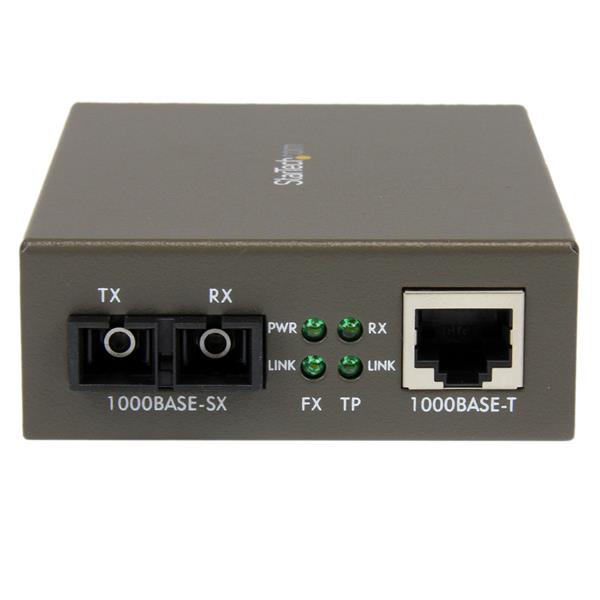
Hence the reason why I've suggested using an ethernet cable to connect the 2 houses. Or better yet, use a Fiber cable as it's a lot thinner than an ethernet cable
But in order to use Fiber cable, you will not only need to buy the fiber cable itself, you will also need to buy 2 units of "Fiber to Ethernet" converter for each house

Back to the main topic, using a physical cable (Ethernet / Fiber), you will get a more stable connection & faster speed between the 2 houses
You will also need 2 wireless router, 1 as the main router and the 2nd router will act as the bridge (disable DHCP on the secondary router)

Below is what Fiber to Ethernet converter looks like:

user posted image

This post has been edited by sHawTY: Jul 26 2017, 03:46 PM
Xefron
post Jul 26 2017, 03:56 PM

Look at all my stars!!
*******
Senior Member
2,507 posts

Joined: Jan 2003


QUOTE(idunnolol @ Jul 26 2017, 01:27 AM)
So right now i am using the default unifi modem and given router to have internet connection at my house. My brother house is using a range extender to get signal from my connection. His house is about 3 house away so about 20-25 meter away

Right now, We have problem sharing files between our laptop because mine is at a different network than his . We want to set up like a small office so we will have about 4 laptop ,1 printer to be connected at peak hours .

The database is stored at my PC right now but i was thinking of having it stored in USB stick then plugged into a router then so it can easily be shared by all 4 laptops. Will that be a problem?

My budget is about RM 800-1k  So i was looking at TP-Link Archer C2600 or Asus RT-AC68U
*
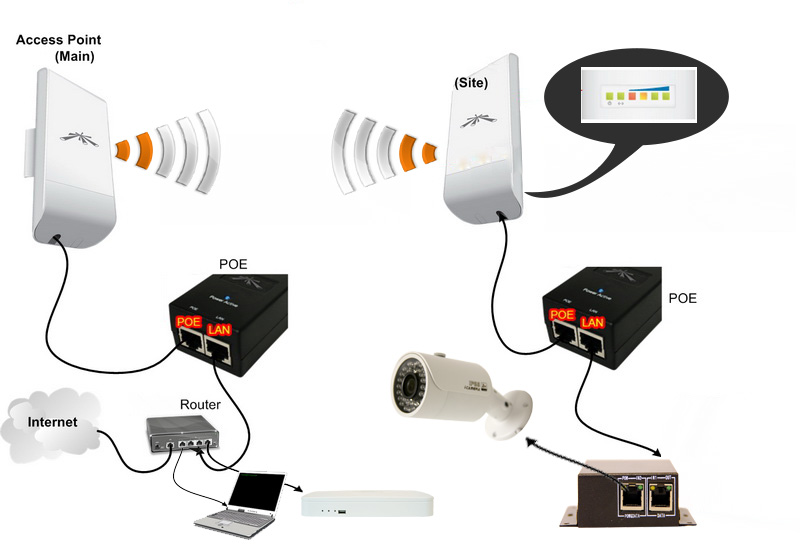
Range extender is a NO NO for your scenario.Either

1)Point to point using ethernet cable RJ45.You need to think how to make the cable across your neighbour invisible as possible and you need some conduit to protect the cable too.

2) Point to point using wireless that uses the directional antenna as the transmitter and another AP as a receiver.

user posted image

xcxa23
post Jul 26 2017, 04:52 PM

Look at all my stars!!
*******
Senior Member
2,649 posts

Joined: Nov 2010


The database is stored at my PC right now but i was thinking of having it stored in USB stick then plugged into a router then so it can easily be shared by all 4 laptops. Will that be a problem?

i jz switch to ac68u
so to answer ur question,
yes u can, via assus ai cloud 2.0

can be access via asuscomm.com or through their app, https://play.google.com/store/apps/details?...asustek.aicloud
TSidunnolol
post Jul 26 2017, 06:16 PM

Regular
******
Senior Member
1,044 posts

Joined: Jun 2008
QUOTE(sHawTY @ Jul 26 2017, 03:45 PM)
Wireless repeater should never be a permanent solution
Not only does it reduce the internet speed to half, a wireless repeater is also highly affected with the surrounding wireless signal

Hence the reason why I've suggested using an ethernet cable to connect the 2 houses. Or better yet, use a Fiber cable as it's a lot thinner than an ethernet cable
But in order to use Fiber cable, you will not only need to buy the fiber cable itself, you will also need to buy 2 units of "Fiber to Ethernet" converter for each house

Back to the main topic, using a physical cable (Ethernet / Fiber), you will get a more stable connection & faster speed between the 2 houses
You will also need 2 wireless router, 1 as the main router and the 2nd router will act as the bridge (disable DHCP on the secondary router)

Below is what Fiber to Ethernet converter looks like:

user posted image
*
QUOTE(Xefron @ Jul 26 2017, 03:56 PM)
Range extender is a NO NO for your scenario.Either

1)Point to point using ethernet cable RJ45.You need to think how to make the cable across your neighbour invisible as possible and you need some conduit to protect the cable too.

2) Point to point using wireless that uses the directional antenna as the transmitter and another AP as a receiver.

user posted image

*
I know ,back then there was no file sharing,just simple web browsing but now we want to share file so have to rework everything back

Would the long range router like RT-AC68U be enough? I think its simpler than having to buy 2 router and run cables
TSidunnolol
post Jul 26 2017, 06:17 PM

Regular
******
Senior Member
1,044 posts

Joined: Jun 2008
QUOTE(xcxa23 @ Jul 26 2017, 04:52 PM)
The database is stored at my PC right now but i was thinking of having it stored in USB stick then plugged into a router then so it can easily be shared by all 4 laptops. Will that be a problem?

i jz switch to ac68u
so to answer ur question,
yes u can, via assus ai cloud 2.0

can be access via asuscomm.com or through their app, https://play.google.com/store/apps/details?...asustek.aicloud
*
is the speed fast enough? Cause we will be reading and writing data constantly to the stick
xcxa23
post Jul 26 2017, 06:32 PM

Look at all my stars!!
*******
Senior Member
2,649 posts

Joined: Nov 2010


QUOTE(idunnolol @ Jul 26 2017, 06:17 PM)
is the speed fast enough? Cause we will be reading and writing data constantly to the stick
*
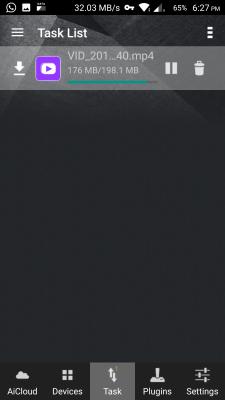
Here is the download speed, can see at the top right
Attached Image

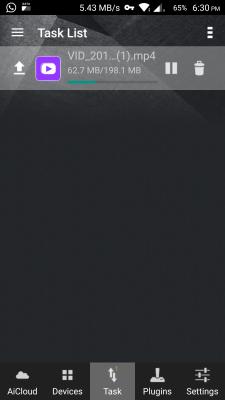
Here is the upload
Attached Image

Add on
U can add network location on ur pc, much easier to access


This post has been edited by xcxa23: Jul 26 2017, 07:26 PM
sHawTY
post Jul 26 2017, 08:43 PM

Frequent Reporter
********
All Stars
14,908 posts

Joined: Jul 2005

QUOTE(idunnolol @ Jul 26 2017, 06:16 PM)
Would the long range router like RT-AC68U be enough?
No
TSidunnolol
post Jul 26 2017, 11:30 PM

Regular
******
Senior Member
1,044 posts

Joined: Jun 2008
QUOTE(sHawTY @ Jul 26 2017, 08:43 PM)
No
*
why not?

20 meter should be adequately be in range of RT-AC68U

Do i need to get a better router?

I spoken with both neighbors, none are keen with me running cables through their backyard and i cant run it on the common linear park against the JMB house rules so wireless is a definite must now


Change to:
| Lo-Fi Version
0.0231sec    0.38    6 queries    GZIP Disabled
Time is now: 3rd December 2025 - 05:48 AM