

QUOTE(joeboto @ Jul 13 2017, 12:26 AM)
samsung galaxy s8 is cat16 capable! mindblowing 1024/150 Mbps. anyone using digi infinite with this s8 or s8+?

Waiting for 128GB 6GB Ram alang2 buy 64GB 4GB Ram. Wish it will release in Malaysia very soon. 
Digi Infinite Fan Club [V3], Infinite 150, 100, 80
|
|
 Jul 13 2017, 10:43 AM Jul 13 2017, 10:43 AM
Return to original view | Post
#1
|
 
Junior Member
55 posts Joined: Sep 2012 
|
QUOTE(joeboto @ Jul 13 2017, 12:26 AM) samsung galaxy s8 is cat16 capable! mindblowing 1024/150 Mbps. anyone using digi infinite with this s8 or s8+? Waiting for 128GB 6GB Ram alang2 buy 64GB 4GB Ram. Wish it will release in Malaysia very soon. |
|
|
|
|
|
Jul 13 2017, 02:31 PM
Return to original view | Post
#2
|
|
Junior Member
55 posts Joined: Sep 2012
|
QUOTE(fruitie @ Jul 13 2017, 01:38 PM) Out of curiosity, I also checked mine. Bersyukurlah.. very happy la if indoor like that 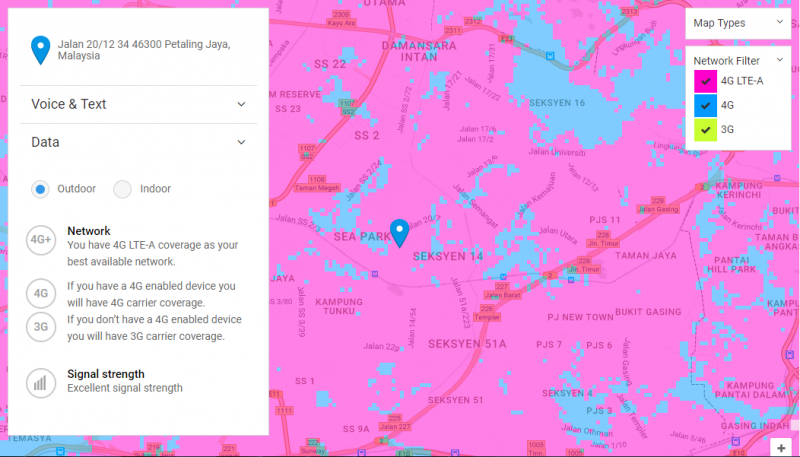 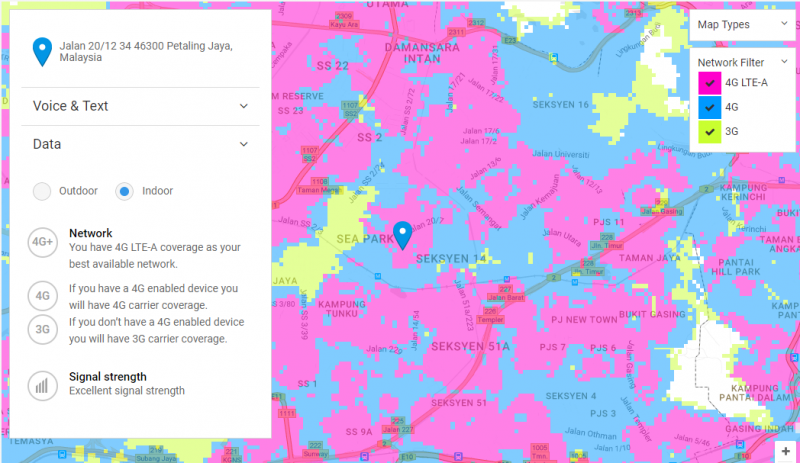  |
|
|
Jul 19 2017, 08:00 AM
Return to original view | Post
#3
|
|
Junior Member
55 posts Joined: Sep 2012
|
QUOTE(Turnip @ Jul 19 2017, 12:54 AM) *finds rabbit ears* can someone put an image what kind of rabbit ear is it? googled but cannot find which one works worse for me. |
|
|
Jul 19 2017, 08:14 AM
Return to original view | Post
#4
|
|
Junior Member
55 posts Joined: Sep 2012
|
QUOTE(cicak.fakir @ Jul 19 2017, 08:09 AM) [attachmentid=8975238] oo.. like this. tq  |
|
|
 Jul 22 2017, 01:31 AM Jul 22 2017, 01:31 AM
Return to original view | Post
#5
|
|
Junior Member
55 posts Joined: Sep 2012
|
QUOTE(CustomKids @ Jul 21 2017, 10:03 PM) Add little bit can buy B618 / M1 d lo...crazy price my M1 is arrived.. so sweat la.. reliable seller with beautiful price |
|
|
 Jul 22 2017, 02:01 PM Jul 22 2017, 02:01 PM
Return to original view | Post
#6
|
|
Junior Member
55 posts Joined: Sep 2012
|
QUOTE(blacktubi @ Jul 22 2017, 12:28 PM) Yes it is totally normal. Cat 9? Or cat 12?The modem in S7 Edge is so much more advanced than E5186. (Cat12 vs Cat6) Edit: May differ by country and carrier. Probably Cat. 10 Ready for Korean editions, Cat. 12 for USA and Chinese variants. -wiki QUOTE(souler_heart @ Jul 22 2017, 02:56 AM) Review pls Maybe next week or next month i wil show speedtest. if i very rajin la.  show us speedtest result  This post has been edited by hapisal: Jul 22 2017, 02:43 PM |
|
|
|
|
|
Jul 22 2017, 02:37 PM
Return to original view | Post
#7
|
|
Junior Member
55 posts Joined: Sep 2012
|
.edit
This post has been edited by hapisal: Jul 22 2017, 02:44 PM |
|
|
Jul 22 2017, 03:57 PM
Return to original view | Post
#8
|
|
Junior Member
55 posts Joined: Sep 2012
|
QUOTE(fadzly @ Jul 22 2017, 03:08 PM) Best. Proven roam free like home[attachmentid=8983538] Aiyo. Rugi not take roaming like home. i tought it daily. my bad. |
|
|
Jul 23 2017, 06:40 AM
Return to original view | Post
#9
|
|
Junior Member
55 posts Joined: Sep 2012
|
QUOTE(fruitie @ Jul 22 2017, 04:13 PM) If you are using Infinite 150 plan, it comes free until end of the year. Just call CS to activate it. i just deactivated it last week before bill recycled.. dont know it free.. i always travel oversea scared bill hit the limit 450 la.. |
|
|
Jul 23 2017, 06:05 PM
Return to original view | Post
#10
|
|
Junior Member
55 posts Joined: Sep 2012
|
QUOTE(fruitie @ Jul 23 2017, 11:51 AM) I always travel too and never bother to turn off any feature. If no Roam Like Home, then just switch off data roaming. Just walked in at dg store to reactivate my roam. feel happy bcoz pay full but new know about roam free end of this year.Anyway, use it for free until end of this year only. After that have to pay RM 30 per month but it's still cheap for frequent travellers. |
|
|
Jul 24 2017, 02:54 PM
Return to original view | Post
#11
|
|
Junior Member
55 posts Joined: Sep 2012
|
QUOTE(CustomKids @ Jul 24 2017, 02:37 PM) Better spend on good antenna rather than unproven solution. Try google Poynting antenna or similar brand. if you can share link is very nice. what kind of mimo is mentionedOnly 1 time cost and u can use for a long time / different modem. And try get the MIMO type  p/s: Buy antenna is u got rather low signal / unstable connection. |
|
|
Jul 24 2017, 04:58 PM
Return to original view | Post
#12
|
|
Junior Member
55 posts Joined: Sep 2012
|
QUOTE(ajoi57 @ Jul 24 2017, 03:28 PM) » Click to show Spoiler - click again to hide... « i dont think about brain cancer lo.. i dont know about it if people tell this is dangerous. but.. its on roof kan.. |
|
|
Jul 26 2017, 07:44 AM
Return to original view | Post
#13
|
|
Junior Member
55 posts Joined: Sep 2012
|
QUOTE(OzzyOzz @ Jul 25 2017, 07:58 PM) wow 1TB 10 days means 100GB a day, 4.2GB an hour..must have been streaming ultra HD movie all the time 24/7 is it?Lol..well done digi throttling all these i150 abuser tru.. bloody big FHD/UHD tv streaming 24/7 is kinda true bro.. |
|
|
|
|
|
Jul 30 2017, 01:47 PM
Return to original view | Post
#14
|
|
Junior Member
55 posts Joined: Sep 2012
|
QUOTE(psjjl @ Jul 30 2017, 01:09 PM) Will stuck at sirim or not? no.. if it under 500myrseller with his brilliant idea will write on postage box us50 or less |
|
|
Jul 31 2017, 07:47 AM
Return to original view | Post
#15
|
|
Junior Member
55 posts Joined: Sep 2012
|
QUOTE(mdnOor @ Jul 30 2017, 11:28 PM) Hey guys, wanna check with some of you guys who's been using phone as modem to tethering to PC and other device. Have you guys experienced like throttled speed in PC but in Phone can get fast speed. Does digi throttle tethering using phone? buy super power mobile hotspot like nighthawk m1 bro.. My speed in phone usually 20 to 50 mbps but while tethering to PC i got less than 5 mbps. But tethering to other phone can get much faster speed but slower 10% from the phone that i tethered. I know the best is to use modem. But anyhow can i fix this? BTW using OP3. before do speedtest firsly clear any background running application on phone/laptop depend on your device.. like mine im using i7 processor laptop with samsung ssd inside. yesterday i went to show off my m1 netgear and try with my friends iphone and tablet .. cannot go la.. only can get 35Mbps.. but im using bloody poor samsung j7 can go 48Mbps.. do it many2 time the result is j7 on top lol.. clear ram, restart and try run speedtest again and again. |
|
|
Jul 31 2017, 04:24 PM
Return to original view | Post
#16
|
|
Junior Member
55 posts Joined: Sep 2012
|
QUOTE(CustomKids @ Jul 31 2017, 11:28 AM) What's your location? The signal i get is 2/3 bar.. really impressive with this m1 router. currently my device only can get 2.4ghz wifi i need to buy 5ghz device soon. Maybe will be better. Put it on the floor and throw the repeater i bought in the river lol I noticed that M1 signal reception is not as strong as those LTE router..going to buy antenna to boost the signal reception. Btw, i'm noticed some performance drop compared to last time...now mostly stable at 50mbps |
|
|
Aug 1 2017, 07:59 AM
Return to original view | Post
#17
|
|
Junior Member
55 posts Joined: Sep 2012
|
QUOTE(tan_aniki @ Jul 31 2017, 01:57 PM) https://social.technet.microsoft.com/Forums...itpronetworking set TTL to what value? im using win 7. mind to share?do this to cheat the telco that you are using a phone instead of pc/laptop mine tooks around 2 weeks. |
|
|
Aug 3 2017, 03:22 PM
Return to original view | Post
#18
|
|
Junior Member
55 posts Joined: Sep 2012
|
QUOTE(tan_aniki @ Aug 3 2017, 10:03 AM) my speed still very fast, didn't set the TTL as well changed TTL but no diffferent hotspot and phone both running fast |
|
|
Aug 3 2017, 04:07 PM
Return to original view | Post
#19
|
|
Junior Member
55 posts Joined: Sep 2012
|
QUOTE(fruitie @ Aug 3 2017, 03:28 PM) The TTL kinda screwed up my half dead laptop. System restored and everything is OK, regardless my speed is still good.  65Mbps. maybe it only work if tower congested 65Mbps. maybe it only work if tower congested |
|
|
Aug 5 2017, 09:50 AM
Return to original view | Post
#20
|
|
Junior Member
55 posts Joined: Sep 2012
|
QUOTE(ckyow1 @ Aug 4 2017, 12:49 PM) Hi Sifu, Using VPN will reduce your speed. If you use firewall monitor u can see there is almost half your speed kena tarik by vpn. For those who expert with VPN to bypass the p2p throttled speed, just curious do you guys facing the facing issue like me ? If I turn off the VPN and perform the speed test, I can get around 10-15Mbps for download & upload. However, when the VPN is on, the speed will be only around 2-4Mbps for download & upload. The only reason why I turn on the VPN now is because I want to download the torrent movie file. By right if I getting full speed, the file download per second should be around 1-2mb per second, but now only 200-600kb per second.. but still, better than if I turn off the VPN, which will be capped at 1-5kbps... I am using FinchVPN Premium by the way... per month is $ 3.86 USD For free version the quota will be 3GB usage per month with limited countries selection.. Dont know la why but im used paid and non paid vpn always the same. |
|
Topic ClosedOptions
|
| Change to: |  0.0947sec 0.0947sec
 0.22 0.22
 7 queries 7 queries
 GZIP Disabled GZIP Disabled
Time is now: 3rd December 2025 - 07:01 AM |
 Quote
Quote


