Welcome Guest ( Log In | Register )

Bump Topic Topic Closed RSS Feed

Outline · [ Standard ] · Linear+

 Digi Infinite Fan Club [V3], Infinite 150, 100, 80

views
     
bjohnxbjohn
post Jan 16 2018, 08:02 PM

Getting Started
**
Junior Member
294 posts

Joined: Sep 2010
QUOTE(alexchew_2020 @ Jan 16 2018, 12:13 PM)
so many streaming site is buffing and loading..ugh... how to use...

but speedtest around 20mbps ~50mbps...wtf has happen.

anyone make complain to digi?
*
I complained. But they sent a SMS said problem resolved without communicating with me and it is still the same. Shithole telco with shithole service.

Keep telling myself what is the point to pay 80 for shithole service? Soon, will port out once free hotspot ended
bjohnxbjohn
post Apr 27 2018, 07:34 AM

Getting Started
**
Junior Member
294 posts

Joined: Sep 2010
QUOTE(wanttobuylaptop @ Apr 27 2018, 05:27 AM)
basically whole RLH FAQ but no6 and 8 are the important one
» Click to show Spoiler - click again to hide... «

*
Free 60 min IDD irrelevant to infinity plan, no?
bjohnxbjohn
post Apr 28 2018, 11:02 PM

Getting Started
**
Junior Member
294 posts

Joined: Sep 2010
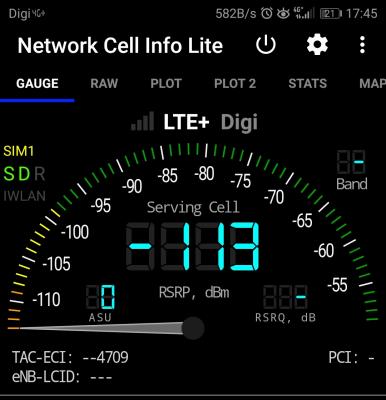
Faint. The connection keep jump up and down.
Past few days really annoying with the shitty service
Huawei Mate 10 at OUG KL area


Attached thumbnail(s)
Attached Image
bjohnxbjohn
post Apr 29 2018, 08:52 AM

Getting Started
**
Junior Member
294 posts

Joined: Sep 2010
QUOTE(alexchew_2020 @ Apr 29 2018, 12:24 AM)
rsrp 113? bad at cell edge sweat.gif
*
Yeah, very bad.

QUOTE(Xaser_3 @ Apr 29 2018, 12:29 AM)
It does seems like it. He definitely need an external antenna to boost signal.
*
Using hand phone. Furthermore, Huawei Mate 10 is quite decent in terms of network connection.

QUOTE(alexchew_2020 @ Apr 29 2018, 01:24 AM)
based on the hp screen shot only 3bar. signal not that good. if put in modem might get better speed.

might only ah....

coz KL might have network congested issue  sweat.gif
*
I am not sure it is network congestion or cell tower's issue.

It happened since earlier of this week, the notification bar shows 4G+ but no data is not running. Then I switch on this app and realize that the bar needle keep jumping between -133 and -89 like roller coaster.

If I switch to H+, the data is working, just that I don't like the upload speed. I am subscribed the i80 btw.
bjohnxbjohn
post Apr 29 2018, 10:32 AM

Getting Started
**
Junior Member
294 posts

Joined: Sep 2010
QUOTE(alexchew_2020 @ Apr 29 2018, 10:43 AM)
if u are using hp as a main modem, u should root in, and make it able to select band 3/7/8. if auto might have network issue as digi auto assign to u randomly band.
*
Just get the phone less than 1 month


bjohnxbjohn
post May 5 2018, 09:45 AM

Getting Started
**
Junior Member
294 posts

Joined: Sep 2010
QUOTE(cassian948 @ May 4 2018, 11:56 PM)
Does anyone know why Digi charged for RLH and then give it a discount afterward, I don't do anything to activate this feature:

user posted image
*
Maybe digi received too many complaints that since it is free for i150, why not activated by default
bjohnxbjohn
post May 28 2018, 05:55 PM

Getting Started
**
Junior Member
294 posts

Joined: Sep 2010
I was having disconnection issue

I'm using Huawei Mate 10 and stay at 26th floor

After I turn off the CA, it's better now.
If I maintain CA, I'll turn off 'Enabke 4G'
bjohnxbjohn
post Jul 2 2018, 07:24 PM

Getting Started
**
Junior Member
294 posts

Joined: Sep 2010
I guess the increase of internet speed is due to Ministry wants Telco to lower the price recently.

If Digi increase the speed, then they have the excuse to maintain the price to maintain the ARPU.

This tactic used by Telco last time to increase the quota but maintain the price when MCMC budget 2016 (or 2017, can't remember) announced to lower broadband price by half.
bjohnxbjohn
post Jul 6 2018, 12:36 AM

Getting Started
**
Junior Member
294 posts

Joined: Sep 2010
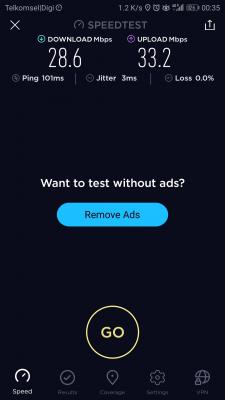
It's started already?
Huawei Mate 10
OUG, KL High Floor Apartment


Attached thumbnail(s)
Attached Image
bjohnxbjohn
post Jul 16 2018, 04:30 PM

Getting Started
**
Junior Member
294 posts

Joined: Sep 2010
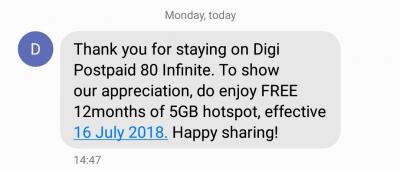
Something good just came to me (i80), happy sharing

This post has been edited by bjohnxbjohn: Jul 16 2018, 04:31 PM


Attached thumbnail(s)
Attached Image
bjohnxbjohn
post Jul 31 2018, 04:30 PM

Getting Started
**
Junior Member
294 posts

Joined: Sep 2010
I just learned, only APN diginet works for RLH. Took me 30 min to figure out what happened to my roaming in TH.
bjohnxbjohn
post Sep 3 2018, 09:35 PM

Getting Started
**
Junior Member
294 posts

Joined: Sep 2010
Agree with Fruities.

In a month, I stepped on Myanmar, Thailand, Singapore and Indonesia without switching the SIM card.

RLH serves me well.
bjohnxbjohn
post Sep 3 2018, 11:59 PM

Getting Started
**
Junior Member
294 posts

Joined: Sep 2010
QUOTE(fruitie @ Sep 3 2018, 10:47 PM)
The only sad part is only 5GB per bill cycle and cannot purchase additional data roaming else I would gladly purchase. sad.gif
*
I am careful with this too. Always monitor the balance quota.
The best arrangement is going to overseas during 2 billing cycle, lol.

As this is only given 5gb, I use RLH + hotel WiFi while travel. General browsing and email by WiFi. Only banking related matters are RLH
bjohnxbjohn
post Sep 4 2018, 08:22 AM

Getting Started
**
Junior Member
294 posts

Joined: Sep 2010
QUOTE(Xaser_3 @ Sep 4 2018, 09:16 AM)
Yes, I experienced this as well and was lucky that I was in Hong Kong and Thailand between 2 billing cycles, hence I had the advantage of having 10GB at my disposal. RLH is excellent and a life saver as I no longer need to acquire international sim cards.
*
The speed is decent too.

Then, when back to Malaysia, 10mbps...... Ha ha ha
(I'm subscribing i80)
bjohnxbjohn
post Sep 4 2018, 12:55 PM

Getting Started
**
Junior Member
294 posts

Joined: Sep 2010
QUOTE(fruitie @ Sep 4 2018, 09:55 AM)
Yes, two cycles will be great. This time my trip didn't manage to spread to following cycle, however I used it to browse net, FB, IG, post photos on these apps and also chatting via WhatsApp/Telegram. Most importantly, used it for my e-wallets, I still manage to utilize within 5GB for 9 days. Precisely around 2.7GB, I only used it when I was outside or if WiFi in hotel is slow as I need to connect to VPN to access blocked sites and apps. laugh.gif
*
I used less than 1GB for about 7 days in Yangon/Bangkok/Singapore/Bali. Mostly used for email in phone and laptop, skype text and call, whatsapp text and call, light FB, banking app, Grabcar, waza. Best part is, can share wifi while RLH biggrin.gif biggrin.gif
bjohnxbjohn
post Sep 5 2018, 12:19 AM

Getting Started
**
Junior Member
294 posts

Joined: Sep 2010
QUOTE(il0ve51 @ Sep 4 2018, 10:54 PM)
i'm i100 user, when oversea use RLH got the limit 10mbps like in malaysia or unlimited?
*
No throttle for speed.

I subscribed i80

This post has been edited by bjohnxbjohn: Sep 5 2018, 12:37 AM


Attached thumbnail(s)
Attached Image
bjohnxbjohn
post Sep 5 2018, 08:48 PM

Getting Started
**
Junior Member
294 posts

Joined: Sep 2010
QUOTE(fruitie @ Sep 5 2018, 11:23 AM)
Make sure your international roaming and RLH are activated. If your RLH is activated, you will see separate data and voice quota in your MyDigi app.

Then, turn on your data roaming and once you arrive in overseas, you can start using it immediately. No SMS is required.
*
Hi sis, when you switch on phone overseas, do you manual choose the carrier or the phone fix it for you?
bjohnxbjohn
post Sep 22 2018, 09:25 AM

Getting Started
**
Junior Member
294 posts

Joined: Sep 2010
Survived 1 month in Bali with RLH.
Instead of buying local SIM card, I used RLH to make and received call for Malaysia and Indonesia and data browsing. Connected to Telkomsel, 3 days having data issue. Indosat data speed is sucks.

Topic ClosedOptions
 

Change to:
| Lo-Fi Version
0.0389sec    0.49    7 queries    GZIP Disabled
Time is now: 5th December 2025 - 12:32 AM