Outline ·
[ Standard ] ·
Linear+
Digi Infinite Fan Club [V3], Infinite 150, 100, 80
|
alvpkl
|
 Jul 14 2017, 11:40 AM Jul 14 2017, 11:40 AM
|
Getting Started


|
QUOTE(tan_aniki @ Jul 14 2017, 11:36 AM) you have to use this method if the router unable to get the remote management option while keep on finding the answer I installed Teamviewer host in Android TVBox and it works just fine. TVBox doesn't consume much power like a PC. |
|
|
|
|
|
alvpkl
|
Jul 14 2017, 11:53 AM
|
Getting Started
|
QUOTE(#Victor @ Jul 14 2017, 11:47 AM) I know can access it with another device that connecting to this router using remote access tools but I'm looking for way to direct remote access to the router without other devices. So I guess this router does not support remote management and no way to do it with this router? Besides the router doesn't support remote access, Digi Infinite 150 also doesn't provide public ip address like Streamyx and Unifi. https://community.digi.com.my/t5/Solution/P...dress/m-p/22593 |
|
|
|
|
|
alvpkl
|
Jul 14 2017, 12:16 PM
|
Getting Started
|
QUOTE(#Victor @ Jul 14 2017, 12:05 PM) Holy...  If I'm using CCTV with Internet access how? Can we request to change to public IP like TM?
Added on Oh no  seems like no luck to change to public IP  I am having the same problem. Thinking of installing the IPCam apk in the TVBox and watch using Teamviewer. |
|
|
|
|
|
alvpkl
|
Jul 19 2017, 10:05 PM
|
Getting Started
|
QUOTE(uhlaw @ Jul 19 2017, 09:42 PM) Just received my MIMO antenna.. and as a result, my rabbit antenna is better than this MIMO antenna in term of speed and signal strength... feel wasted of buying that MIMO antenna  How much the MIMO cost you? |
|
|
|
|
|
alvpkl
|
Aug 1 2017, 10:44 PM
|
Getting Started
|
QUOTE(blacktubi @ Aug 1 2017, 10:07 PM) I upgraded to BV7R2C0update_21.316.01.00.56.gz.bin using the basic method. The logo changed to TELE2 but why the version show 21.302.**.**? It shows a lower version number. Besides, I manually stopped the upgrade process after more than 11 runs, don't know when to stop. This post has been edited by alvpkl: Aug 1 2017, 11:12 PM Attached thumbnail(s)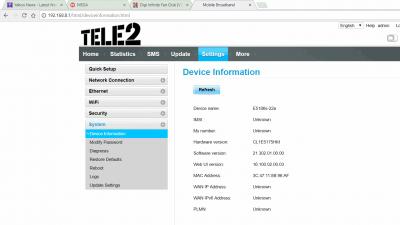
|
|
|
|
|
|
alvpkl
|
Aug 1 2017, 11:25 PM
|
Getting Started
|
QUOTE(godslayer84 @ Aug 1 2017, 11:21 PM) i think digi is throttling my infinite 150... i tried speedtest using my phone can get 19mbps.. but then i hotspot to my pc only get 1mbps... sometimes youtube 480p also cant load smoothly.. sifu here, any solution? thanks. Refer to previous posts about changing TTL to 65 in Windows. |
|
|
|
|
|
alvpkl
|
Aug 3 2017, 09:50 PM
|
Getting Started
|
QUOTE(uhlaw @ Aug 3 2017, 08:55 PM) Tonight i got free time and tried up your advance flashing. It really works!  Last time I only succeeded in flashing its WebUI only  Btw i thought LMT firmware is better than Tele2?  [attachmentid=9014946] I updated to BV7R2C0update_21.310.01.04.418 - LMT.gz using the basic method, the version no does not show the same but the firmware seems perfectly fine. This post has been edited by alvpkl: Aug 3 2017, 09:53 PM Attached thumbnail(s)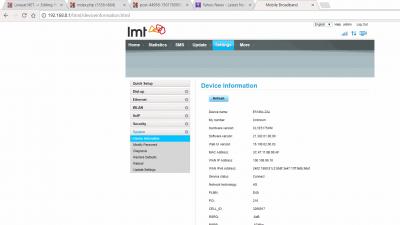
|
|
|
|
|
|
alvpkl
|
Aug 3 2017, 10:02 PM
|
Getting Started
|
QUOTE(uhlaw @ Aug 3 2017, 09:57 PM) I saw your firmware version 21.302.01.00.00 is quite old  It is suppose to be LMT 21.310.01.04.418 but show some weird version number. The original Huawei version was 21.206 before the update, The LMT firmware is working fine though. |
|
|
|
|
|
alvpkl
|
Aug 3 2017, 10:05 PM
|
Getting Started
|
QUOTE(blacktubi @ Aug 3 2017, 10:01 PM) Thanks for helping, guess everyone can proceed to try the advanced flashing with a lot of success. TELE2 got more features than lmt and it is newer at the same time. You can only update the interface with basic flash. The additional features are also available, like the DDNS that was not available in original Huawei firmware. But still to be sure I will try the Advanced method when I am free. This post has been edited by alvpkl: Aug 3 2017, 10:09 PM |
|
|
|
|
|
alvpkl
|
Aug 3 2017, 10:58 PM
|
Getting Started
|
QUOTE(blacktubi @ Aug 3 2017, 10:51 PM) Everyone is different for that I successfully upgraded to TELE2 21.316. So basic method is not complete. |
|
|
|
|
|
alvpkl
|
Aug 3 2017, 11:08 PM
|
Getting Started
|
QUOTE(blacktubi @ Aug 3 2017, 11:01 PM) Basic method only work for certain batch of device. But it will upgrade the webUI for sure. I hope with the latest firmware the internet connection will sustain in 3G during call. Currently the internet access is halted and IPTV hang. No time to test yet. |
|
|
|
|
|
alvpkl
|
Aug 4 2017, 03:12 PM
|
Getting Started
|
QUOTE(Dozz @ Aug 4 2017, 12:58 PM) I upgraded the firmware using Blacktubi's method (Thanks!) to Tele2 version. Everything is working good except telephone. Now telephone no sound no dial tone after upgraded. Any other users here using Tele2 firmware facing the same issue? [attachmentid=9016479] Unfortunately this is true. I called the number and there is no response. |
|
|
|
|
|
alvpkl
|
Aug 4 2017, 03:23 PM
|
Getting Started
|
QUOTE(alvpkl @ Aug 4 2017, 03:12 PM) Unfortunately this is true. I called the number and there is no response. Must try the LMT version. |
|
|
|
|
|
alvpkl
|
Aug 4 2017, 04:15 PM
|
Getting Started
|
QUOTE(fruitie @ Aug 4 2017, 04:07 PM) I want to be more than 100Mbps like your siggy.   Just to confirm your Advance Flashing is to Tele2 or other firmware? Did anyone try the A1T1 firmware? |
|
|
|
|
|
alvpkl
|
Aug 4 2017, 05:53 PM
|
Getting Started
|
QUOTE(fruitie @ Aug 4 2017, 05:37 PM) OK la, I should be contented then. Why wanna be so adventurous? Later your router is bricked, buat susah saje. That's why I want to hear from others.  |
|
|
|
|
|
alvpkl
|
Aug 6 2017, 10:11 PM
|
Getting Started
|
QUOTE(suilow1991 @ Aug 6 2017, 09:59 PM) Let's not get disappointed so early, try it out. Apparently my 61a select LTE-A band when i changed the network band to automatic in the toolbox software.  Not sure where comes the rumor that 61a cannot support CA, may be because most people here are using the 22a variant.  What speed you get? |
|
|
|
|
|
alvpkl
|
Aug 8 2017, 10:19 AM
|
Getting Started
|
Anyone here able to enable PPTP or L2TP connection using another router with i150? The purpose is to get a public IP from VPN.
It seems to be blocked. I tested with Unifi and no problem.
|
|
|
|
|
|
alvpkl
|
Aug 30 2017, 02:01 PM
|
Getting Started
|
QUOTE(#Victor @ Aug 30 2017, 01:02 PM) Unfortunately no, but u can opt to use VPN. Can someone share more details of the VPN method? In VPN there are not many ports opened, 80, 22, 25 only. |
|
|
|
|



 Quote
Quote

 0.2427sec
 0.37
0.37
 7 queries
 GZIP Disabled