

Attached thumbnail(s)
Attached image(s)


Digi Infinite Fan Club [V3], Infinite 150, 100, 80
|
|
 Sep 29 2017, 12:00 AM Sep 29 2017, 12:00 AM
Return to original view | Post
#1
|
 
Junior Member
345 posts Joined: Jul 2005 From: Penang  
|
Dear Sifus, I am a postpaid Digi user who is stuck with Streamyx 2Mbps at home. I checked my place's LTE signal strength which is -103. Is this signal good enough for 20Mbps if I get a Cat6 4G modem and Digi Infinite 150? I checked Speedtest & Opensignal, both gave me different readings.
Attached thumbnail(s)
Attached image(s) |
|
|
|
|
|
Sep 29 2017, 12:16 AM
Return to original view | Post
#2
|
|
Junior Member
345 posts Joined: Jul 2005 From: Penang
|
QUOTE(alexchew_2020 @ Sep 29 2017, 12:07 AM) try fAST.COM Fast.com gives me a inconsistent reading, from 2.6Mbls, 4.3, 6.4 & highest is 8Mbps. What is your LTE signal strength to get >10Mbps?or try download a huge youtube video files... see how many MB/sec it could goes up to. i'm max 4mbps streamyx user on my location... get >10mbps is already satisfy...haha  |
|
|
Sep 29 2017, 12:37 AM
Return to original view | Post
#3
|
|
Junior Member
345 posts Joined: Jul 2005 From: Penang
|
QUOTE(alexchew_2020 @ Sep 29 2017, 12:20 AM) my signal are 4bar. 3bar speed will drop abit compared to 4bar. no LTE-A area... Strange, I am in LTE-A coverage, but my reading is worst than yours. Does iPhone 6+ support LTE-A?getting a cat6 modem is for future use when your area have LTE-A coverage. But so far band3 is only band giving good speed. my speedtest. open signal ping 54ms, DL 24.8mbps, UL8.3mbps fast.com 31mbps speedtest.com ping 24ms, DL 33.76mbps, UL22.30mbps Update: Yep, iPhone 6+ supports LTE-A Cat4 only. This post has been edited by Maestrol: Sep 29 2017, 12:43 AM |
|
|
Sep 29 2017, 10:22 AM
Return to original view | Post
#4
|
|
Junior Member
345 posts Joined: Jul 2005 From: Penang
|
QUOTE(Anime in HD @ Sep 29 2017, 08:12 AM) LTE Cat4 is not 4G+ modem. Thanks! Will get a Cat6 ModemOnly can achieve max speed up to 150Mbps with Cat4 device. Of course, the higher category. Better coverage & speed you get. Got forumer here show Samsung Galaxy S7 can easily get better reception & faster speed because that device use LTE Cat9 modem.  LTE Cat6 is 4G+. |
|
|
Oct 1 2017, 06:54 PM
Return to original view | Post
#5
|
|
Junior Member
345 posts Joined: Jul 2005 From: Penang
|
QUOTE(edwinmiracle @ Oct 1 2017, 02:13 PM) Yesterday tried to apply i150 online and stuck on Supplementary Lines page when i pressed skip this step, keep loading. No more lazada voucher? Me too. Mine is transaction failure after keying in CC and TAC to apply for supplementary infinite plan under my principal postpaid number. After 4 failures, I just change my existing supplementary plan and now I am one of the infinite 150 users. Can't wait for my E5186 to arrive next week!!! until now still stuck! How to apply? -.- |
|
|
Oct 10 2017, 01:17 PM
Return to original view | IPv6 | Post
#6
|
|
Junior Member
345 posts Joined: Jul 2005 From: Penang
|
Just received my Huawei E5186s-22. The speed test with DiGi Infinite 150 is superb for my area, 30Mbps Down, 6Mbps Up. However, the problem is the Huawei router keeps restarting on its own. Is this a common problem? Only 3 clients connected. Will flashing the firmware with the guide by Blacktubi solves the problem? Oh dear.... I bought it from Taobao... I hope I don't have to return it to China.....
|
|
|
|
|
|
Oct 16 2017, 11:00 PM
Return to original view | Post
#7
|
|
Junior Member
345 posts Joined: Jul 2005 From: Penang
|
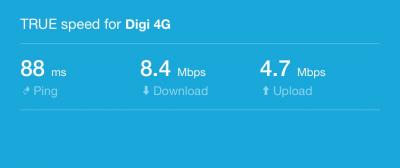
i150 User here, using E5186s-22a, Stock firmware. Tonight's connection has been bad, but I have a regular problem as speedtests on my laptop is always slower than on mobile phones on the same WIFI at the same spot.
On Laptop 
On iPhone 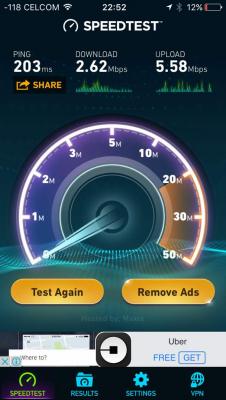
Is this a common problem? |
|
|
Oct 17 2017, 12:23 AM
Return to original view | Post
#8
|
|
Junior Member
345 posts Joined: Jul 2005 From: Penang
|
QUOTE(fruitie @ Oct 16 2017, 11:42 PM) My Digi contact said problem is solved. Please restart your devices. Restarted and still as bad. 115ms ping, 1.5Mbps download, 4Mbps Upload. Reporting in from Penang. |
|
|
Oct 17 2017, 10:17 AM
Return to original view | Post
#9
|
|
Junior Member
345 posts Joined: Jul 2005 From: Penang
|
Speed’s back to normal in the morning. I wonder what happened last night.
|
|
|
Oct 17 2017, 02:15 PM
Return to original view | Post
#10
|
|
Junior Member
345 posts Joined: Jul 2005 From: Penang
|
QUOTE(sidyeah @ Oct 17 2017, 10:41 AM) Man. Ive been trying to subscribe infinite 150 for numerous time since this morning. Keep showing failed payment. Tried to add as supplementary to my existing number and also as new principal line also cannot. Call customer service but they keep me waiting for 8 mins. Live chat also busy. Wth. Same here. And after each payment failure, you need to wait for hours before you can pay again. Even live chat and Digi support couldn’t help. I relented and just change my existing unused supplementary Digi family line to Infinite 150. The change of plan took like only 12 hours. |
|
|
Oct 17 2017, 02:59 PM
Return to original view | Post
#11
|
|
Junior Member
345 posts Joined: Jul 2005 From: Penang
|
QUOTE(Mr Gray @ Oct 17 2017, 02:37 PM) If I were you, I would just buy a dongle. And pair that with the router. Can you suggest a good dongle? |
|
|
Oct 18 2017, 03:26 PM
Return to original view | Post
#12
|
|
Junior Member
345 posts Joined: Jul 2005 From: Penang
|
QUOTE(#Victor @ Oct 18 2017, 01:41 PM) Anyone know what is this DOB for Fortumo charges? You probably accidentally subscribed to some SMS services as I googled and found that Fortumo is some form of SMS service that uses direct carrier biling.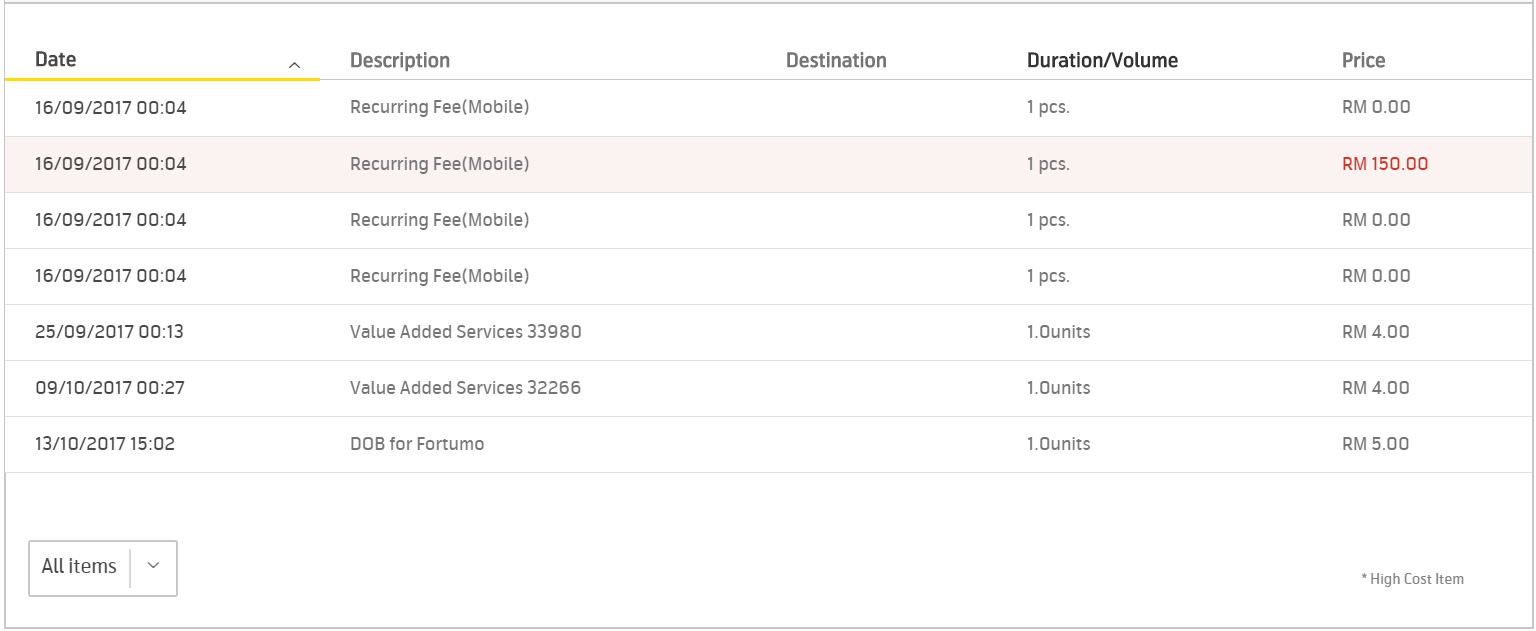 FYI: https://community.digi.com.my/t5/Postpaid/D...vice/td-p/21129 This post has been edited by Maestrol: Oct 18 2017, 03:31 PM |
|
|
Oct 18 2017, 08:49 PM
Return to original view | Post
#13
|
|
Junior Member
345 posts Joined: Jul 2005 From: Penang
|
To all sifus,
I am using E5186s-22a using Huawei firmware version 21.316.01.00.00. I have been getting better speedtest results on my mobile than on my laptop at the same spot. iPhone 5S - (7Mbps Download, 22Mbps Upload) rMBP Late 2013 - (6Mbps Download, 3Mbps Upload) Will updating the firmware get a more even result? Also, will adding an antenna will help to improve my speeds? Envious of ppl getting 50Mbps download speed. This is my LTEWatch screenshot 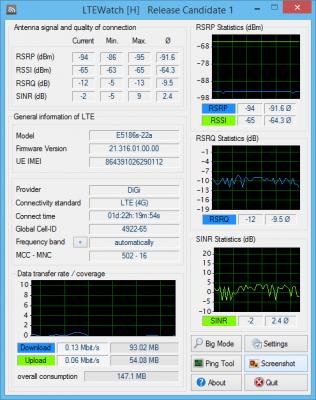
Thanks! |
|
|
|
|
|
Oct 18 2017, 08:53 PM
Return to original view | Post
#14
|
|
Junior Member
345 posts Joined: Jul 2005 From: Penang
|
QUOTE(fruitie @ Oct 18 2017, 08:52 PM) Try connecting to 5GHz. Change the connection to B3 or B7 only rather than LTE-A. My Laptop is on 5Ghz. Can i use LTEWatch to change the setting without upgrading the firmware?This post has been edited by Maestrol: Oct 18 2017, 08:54 PM |
|
|
Oct 18 2017, 09:27 PM
Return to original view | Post
#15
|
|
Junior Member
345 posts Joined: Jul 2005 From: Penang
|
QUOTE(fruitie @ Oct 18 2017, 08:55 PM) I use Huawei Toolbox to change, post 1 has download link. Not sure if LTEWatch can because I didn't download it. Tried all B3, B7 and B3+B7, results are always iPhone better than LaptopHere are the readings on Automatic laptop: ping 40ms D/L 1.29Mbps U/L 3.43Mbps iPhone: ping 32ms D/L 13.87Mbps U/L 23.12Mbps RSRP -89 RSSI -65 RSRQ -9 SINR 3 on B3 laptop: ping 29ms D/L 6.20Mbps U/L 12.79Mbps iPhone: ping 40ms D/L 12.12Mbps U/L 23.55Mbps RSRP -88 RSSI -59 RSRQ -9 SINR 4 on B7 laptop: ping 134ms D/L 1.36Mbps U/L 1.38Mbps iPhone: ping 159ms D/L 8.44Mbps U/L 13.63Mbps RSRP -93 RSSI -65 RSRQ -9 SINR 4 on B3+B7 laptop: ping 29ms D/L 4.47Mbps U/L 15.45Mbps iPhone: ping 40ms D/L 7.43Mbps U/L 21.56Mbps RSRP -94 RSSI -65 RSRQ -12 SINR -2 |
|
|
Oct 19 2017, 10:39 AM
Return to original view | Post
#16
|
|
Junior Member
345 posts Joined: Jul 2005 From: Penang
|
QUOTE(GhostXY @ Oct 19 2017, 07:43 AM) Try to reduse rsrp to -80 and increase the sinr to positive value.. Thanks. Do I have to flash the firmware (eg. LMT) to get better speeds? My E5186 is on original Huawei firmwareuse mimo antenna and put outside of the window and diffirent spot of ur house |
|
|
Oct 27 2017, 09:02 AM
Return to original view | Post
#17
|
|
Junior Member
345 posts Joined: Jul 2005 From: Penang
|
QUOTE(fruitie @ Oct 27 2017, 01:33 AM) I bought from Taobao. Many sellers on Digi Postpaid Infinite Community FB group, you may find from there. Did you buy from Taobao the E5186 original Huawei version or the rebadged one? I bought mine Original Huawei version from Taobao, but it came with OEM packaging and without seal. Actually I don't mind, as long as it works, but it kept restarting on its own every 7 minutes. I suspect it's a faulty one from the beginning. Eventually I bought a second one from Sing4G via Lazada and it came with original packaging and sealed. That is my first and last purchase from Taobao. |
|
|
Oct 29 2017, 01:06 AM
Return to original view | Post
#18
|
|
Junior Member
345 posts Joined: Jul 2005 From: Penang
|
QUOTE(alexchew_2020 @ Oct 28 2017, 09:53 PM) did u flash to others firmware? No. But strangely, the firmware of my E5186 from Taobao is different than my 2nd E5186 from Sing4G. |
|
|
Oct 30 2017, 01:02 AM
Return to original view | Post
#19
|
|
Junior Member
345 posts Joined: Jul 2005 From: Penang
|
QUOTE(blacktubi @ Oct 29 2017, 11:11 PM) The Infinite plan is a principal plan and not a supplementary plan. Nope, Infinite 150 need not be the principle line. I subscribe i150 as my supplementary line to my principle postpaid 80 lineDepending on which plan you signed up, you will probably ended up with 2 principal line with different account. |
|
|
Oct 30 2017, 03:54 PM
Return to original view | Post
#20
|
|
Junior Member
345 posts Joined: Jul 2005 From: Penang
|
QUOTE(blacktubi @ Oct 30 2017, 02:39 AM) Thanks for the clarification. Is there any advantage? For me. My principal line postpaid 80 is my regular mobile number. I just subscribe infinite 150 a dummy number as my supplementary account to use it as wifi at home. Nobody calls me on my new number.What are the advantage with having it on supplementary? |
|
Topic ClosedOptions
|
| Change to: |  0.2638sec 0.2638sec
 0.65 0.65
 7 queries 7 queries
 GZIP Disabled GZIP Disabled
Time is now: 5th December 2025 - 10:13 AM |
 Quote
Quote