

I scared very expensive...
Technical PlayStation 2 Community & Tech Talk | V4, PS2 Community & Technical Discussion
Technical PlayStation 2 Community & Tech Talk | V4, PS2 Community & Technical Discussion
|
|
 Sep 11 2009, 10:05 PM Sep 11 2009, 10:05 PM
|
 
Junior Member
835 posts Joined: Nov 2007 From: Land of Forgotten 
|
I scared very expensive...
|
|
|
|
|
|
Sep 11 2009, 10:06 PM
|

Senior Member
930 posts Joined: Jun 2009 From: Somewhere I Belong...  
|
malach_hamaves83,
today u PM me regarding how to set and use the hdl dumb/dumx...ok just read my instruction the step by step 1 ) Grab yourself a Crosslink Ethernet Cable...it looks the same like LAN cable but this cable is for transfer data purposes, check any computer store and ask for this cable. Length depends on u. 2 ) Download this http://sksapps.com/hd/hdldumpguiv14.zip and this http://sksapps.com/hd/ocxfiles.ZIP and this http://sksapps.com/hd/hdld_svr0.8.5.rar 3 ) Extract hdldumpguiv14.zip and ocxfiles.zip into a same folder (this is the windows program to direct link with PS2). Name the folder if u want. 4 ) Extract hdld_svr0.8.5.rar into ur USB pen drive > INSTALL > 5 ) Boots up PS2, start Ulaunch copy that hdld_svr.elf and paste into Mc0 > BOOT > 6 ) After that, exit Ulaunch and start up the FMCB Configurator, select "Configure OSDSYS option" 7 ) Select Configure Item "choose your own" Put any name as u like, I put HD Server. U can put HDL Server. Then select Path1 and put the short cut to Mc0 > BOOT > hdld_svr.elf 8 ) Once u done remember to save CNF to Mc0 before Select PS2 Browser and exit. 9 ) Once u reboot ur PS2. Select the shortcut that u given for ur hdld_svr.elf and wait till it finish loading. 10 ) Connect the cable to ur Network Adapter and to ur PC/Laptop LAN port. 11 ) Starts up the hdldumpguiv14 and set the IP to 192.168.0.10 12 ) Start enjoy  Added on September 11, 2009, 10:12 pm QUOTE(Omochao @ Sep 11 2009, 10:05 PM) I scared very expensive... check first...maybe its just a kacang puteh like ribbon putus only...who knows...   This post has been edited by Ero-Sennin: Sep 11 2009, 10:12 PM |
|
|
Sep 12 2009, 01:35 AM
|
|
Junior Member
835 posts Joined: Nov 2007 From: Land of Forgotten
|
Wokay bos!
|
|
|
Sep 13 2009, 03:26 AM
|
|
Senior Member
930 posts Joined: Jun 2009 From: Somewhere I Belong...
|
malach_hamaves83,
how dude? solve ur problem? |
|
|
Sep 13 2009, 07:40 AM
|

Junior Member
55 posts Joined: Jan 2009
|
QUOTE(Ero-Sennin @ Sep 13 2009, 03:26 AM) malach_hamaves83, hey Ero-Senninhow dude? solve ur problem? I've done all of the steps but, i have difficulty getting the ps2 network recognize my pc. your step (9 onwards) when i tried to launch the hdld_svr.elf i got this on my tv screen (step 9) http://i76.photobucket.com/albums/j17/mala...83/IMAG0192.jpg connected my ps2 to pc using Crosslink Ethernet Cable (step 10) launch the hdldumpguiv14.exe i got this on my pc screen (step 11) http://i76.photobucket.com/albums/j17/mala...maves83/ps2.jpg so confused rite now...  |
|
|
Sep 13 2009, 01:17 PM
|
|
Senior Member
930 posts Joined: Jun 2009 From: Somewhere I Belong...
|
u try this and see how
set the network connection for ur PS2 > Properties > Internet Protocol IP Address : 192.168.0.1 Subnet Mask : 255.255.255.0 |
|
|
|
|
|
Sep 13 2009, 01:40 PM
|
|
Junior Member
55 posts Joined: Jan 2009
|
QUOTE(Ero-Sennin @ Sep 13 2009, 01:17 PM) u try this and see how what do u mean by that?set it on the pc or on the ps2? how to do it ? set the network connection for ur PS2 > Properties > Internet Protocol IP Address : 192.168.0.1 Subnet Mask : 255.255.255.0  |
|
|
Sep 13 2009, 04:48 PM
|
|
Senior Member
930 posts Joined: Jun 2009 From: Somewhere I Belong...
|
QUOTE(malach_hamaves83 @ Sep 13 2009, 01:40 PM) what do u mean by that?set it on the pc or on the ps2? how to do it ? follow the snapshot below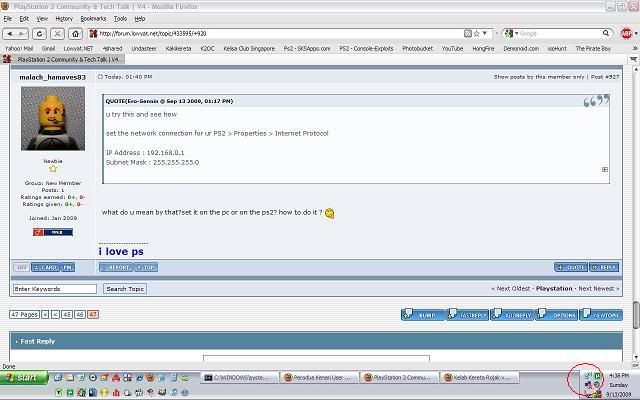  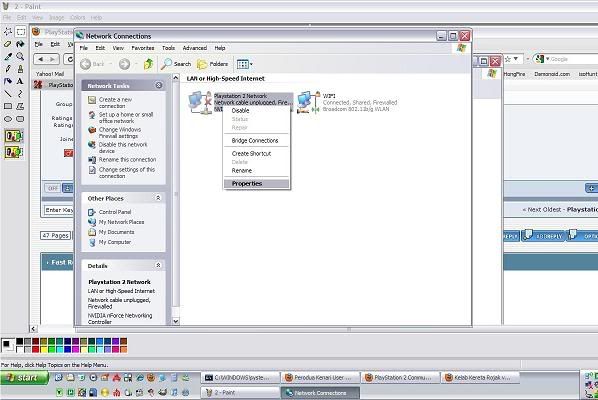 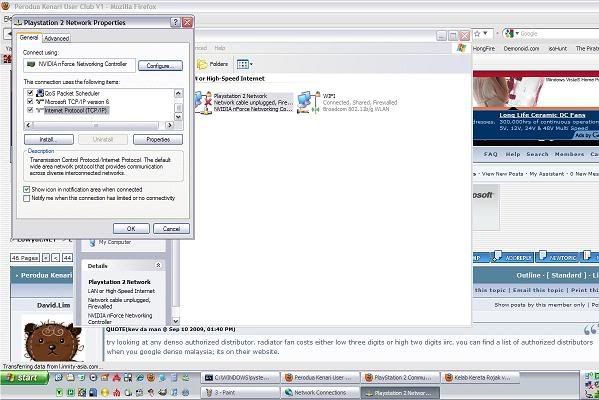 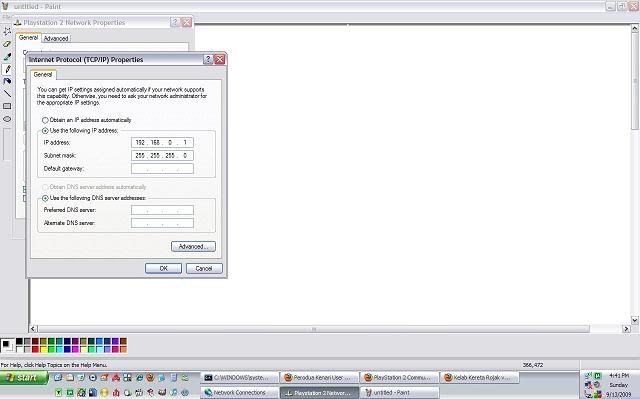 |
|
|
Sep 13 2009, 10:50 PM
|
|
Junior Member
55 posts Joined: Jan 2009
|
hey Ero-Sennin
i got it! thanks for the instructions, but unfortunately i bought a 20m (my com in my room, while my ps3 in tv room)crossover cable thinking that i could the same thing to stream file to my ps3...ermm it can't need to use router. my ps2 works perfectly installing the the game through the pc.  |
|
|
Sep 14 2009, 06:28 PM
|
|
Junior Member
55 posts Joined: Jan 2009
|
hahaa...yup too long
i thought tht i can use it to stream my ps3 using my pc. but it cant coz need to use router |
|
|
Sep 15 2009, 06:01 AM
|

Junior Member
51 posts Joined: Sep 2009
|
I got question about ps2 media player, did anyone ever play .mkv file on ps2? what kind of software can play .mkv file?
|
|
|
Sep 15 2009, 09:01 AM
|
|
Senior Member
930 posts Joined: Jun 2009 From: Somewhere I Belong...
|
QUOTE(bulan_biru98 @ Sep 15 2009, 06:01 AM) I got question about ps2 media player, did anyone ever play .mkv file on ps2? what kind of software can play .mkv file? so far PS2 there's no homebrew media player capable to run MKV format |
|
|
Sep 15 2009, 09:25 AM
|

Senior Member
5,886 posts Joined: Jan 2003 From: BM
|
'guys, wanna ask some opinion..is the 2nd hand package worth AUD110??
Playstation 2 slim, excellent condition in original box, 3 x controllers, 8MB memory card and includes instructions. Includes 10 original games: Jak3 Crash Nitro Kart Legend of Kay Jak and Daxter Pince of Persia Warrior Within TY The Tasmanian Tiger Spyro Enter the Dragonfly Ratchet Clank Locked and Loaded Prince of Persia The Sands of Time Gran Turismo 3 |
|
|
|
|
|
Sep 15 2009, 12:15 PM
|
|
Senior Member
930 posts Joined: Jun 2009 From: Somewhere I Belong...
|
AUD110 = RM how much?
|
|
|
Sep 22 2009, 04:44 PM
|

Junior Member
140 posts Joined: Nov 2007
|
hyep.. i'm new in ps2 console..
i want to ask.. can i on my ps2 slim continue play for 24-48hours? at my ps2 slim also got usb fan.. |
|
|
Sep 22 2009, 10:18 PM
|

Junior Member
309 posts Joined: Dec 2006
|
hi all. i'm thinking of buyin the ps2 lcd screen..the one that attaches behind the console one. any comments on this thing? i don't know the price though.if too expensive maybe i'll just buy a cheap crt v
|
|
|
Sep 23 2009, 10:29 PM
|

Junior Member
79 posts Joined: Nov 2008
|
how much ps2 slim now?
|
|
|
Sep 24 2009, 10:39 PM
|

Junior Member
403 posts Joined: Jul 2005 From: in front of your house.... peeping 
|
QUOTE(mik3r @ Sep 23 2009, 10:29 PM) how much ps2 slim now? Yeah, need to know also.In penang, theres a range from RM450 (20 cd, 1 ori gamepad and 1 local), RM490 and RM530 any updates? |
|
|
Sep 25 2009, 11:27 AM
|
|
Junior Member
140 posts Joined: Nov 2007
|
it's seems everybody not playing ps2 anymore
 |
|
|
Sep 25 2009, 02:24 PM
|

Junior Member
276 posts Joined: Sep 2005
|
QUOTE(ReAcTiVo @ Sep 25 2009, 11:27 AM) it's seems everybody not playing ps2 anymore Still got.....I am waiting the Naruto 4 Accel2 English version.... |
| Change to: |  0.0286sec 0.0286sec
 0.39 0.39
 6 queries 6 queries
 GZIP Disabled GZIP Disabled
Time is now: 2nd December 2025 - 04:47 PM |
 Quote
Quote