Q&A
1. 1st thing to check when received your Samsung Galaxy S8/S8+
» Click to show Spoiler - click again to hide... «
- Make sure it is seal with plastic wrap.
- If no plastic wrap, make sure at least the black sticker is 100% seal.
- As mentioned "Do not accept if seal is broken"
2. Why does my pre-order unit only have 1 year of warranty?
» Click to show Spoiler - click again to hide... «
Wait for an SMS or email in 1-2 weeks that will confirm your 2 years warranty.
3. How to Registered Yourself Samsung Mobile Warranty
» Click to show Spoiler - click again to hide... «
- Launched mySamsung App
- Go to Devices tab and capture your receipt and save it.
- After few days (around 2 to 4 days) you will received your mobile phone is registered.
- Go back to mySamsung App and you will notice the warranty expiration date is record.
mySamsung App will always record Samsung mobile you purchase and registered using it.


4. What is Samsung's response to the red tint issues?
» Click to show Spoiler - click again to hide... «
In a swift move seen to quell doubts over its latest smartphone quality, Samsung Electronics confirmed Friday that it will be upgrading the Galaxy S8 software criticized by some for having red-tinted screens.
“Because there are some complaints about the red-tinted screens, we decided to upgrade the software next week for all Galaxy S8 clients,” a Samsung spokesperson told The Korea Herald.
The tech giant sent an announcement to all of its Samsung Service Centers, saying, “There will be an additional update to make color revisions more minutely at the end of April
The latest measure came after Samsung’s new flagship smartphone Galaxy S8 faced complaints that the display panels have a reddish tint. Some customers who preordered the Galaxy S8 have written via online communities that their new phones have a reddish screen that did not improve even after adjusting the red color to the lowest setting.
The upgrade next week is to expand the color range so that users can make the red color even lower.
Samsung still downplayed the issue, saying, “We will upgrade the software because of some dissatisfied customers although there is no problem in the phone itself.”
Industry watchers said although Samsung may shun it as a non-issue, the red tint may come from a software glitch.
“If clients feel uncomfortable about their phones, they are usually right. It seems there was a problem in the software in setting the color balance,” said a professor at Seoul National University, who declined to be named.
“Still, the problem is expected to be solved with the software upgrade since the problem does not appear to come from hardware,” he added.
On Friday, Galaxy S8 and Galaxy S8 Plus were officially launched in Korea, the US and Canada, 20 days after they were unveiled in New York on Mar. 30. They will go on sale in 50 nations including Europe, Singapore and Hong Kong a week later. They will also be available in 120 nations including the world’s largest smartphone market, China in May.
In Korea, preorder of Galaxy S8 during Apr. 7 to 17 reached around 1 million units, more than five-fold jump from the preorder of its predecessor Galaxy S7.
“The red-tinted display issue does not seem to significantly affect sales of Galaxy S8. The sales of the new handset is expected to reach 500 million units this year to outnumber the figure of Galaxy S7,” said Noh Geun-chang, an analyst at HMC Investment Securities.
By Shin Ji-hye (shinjh@heraldcorp.com)
http://m.koreaherald.com/view.php?ud=201704210002575. After Samsung's latest patch is there a way to remap the Bixby Button?
» Click to show Spoiler - click again to hide... «
Samsung’s somewhat half-baked Bixby assistant, along with the dedicated hardware button devoted to launching it, is one of the few gripes to be had about the otherwise stellar Galaxy S8. Fortunately, a new free utility called BixRemap from developer Dave Bennett (via Phandroid) seems to fix that problem by allowing users to remap the Bixby button to launch any other app. For example, you can have the button trigger Google’s far more useful Assistant instead.
Bennett notes that the app was cobbled together in “20 minutes,” and is meant to serve more as a proof of concept in its current stage, but it does more or less work. There are a couple of caveats to the hack, however. The biggest is that the entire thing is a bit sloppy, with the remapped button still launching Bixby first before then routing you to your desired app. Additionally, BixRemap needs access to usage tracking permissions to function, which is a fairly large amount of data that you’re giving the app. (It’s likely that any Bixby remapping app would need similar access.) Lastly, BixRemap puts a persistent notification in the notification tray when active, although the app does seem to still work if you disable the notification manually
Still, for any Galaxy S8 owners who would prefer to get more utility out of the extra hardware button and are frustrated by Samsung’s firmware update blocking earlier Bixby hacks, BixRemap could serve as some form of relief, even if it’s execution is still a bit sloppy.
But really, at the end of the day it’s frustrating that Samsung is forcing users to go to these lengths at all instead of just allowing them to use their devices the way that they’d like without resorting to weird hacks. But given that the company would like to encourage users to use Bixby as much as possible, it seems unlikely that that policy will change anytime soon.
http://www.theverge.com/2017/4/24/15405790...xremap-hack-app6. XDA - The Power of Root / Custom ROM / Modification.
» Click to show Spoiler - click again to hide... «
7. Where to download Full firmware?
» Click to show Spoiler - click again to hide... «
8. Where to buy accessories for S8/S8+ ?
» Click to show Spoiler - click again to hide... «
9. How to Fixed the Red Tint Issue - Credit to
powerangah » Click to show Spoiler - click again to hide... «
- Turn on your phone
- Type this at your calling screen *#0*# and select LED
- You will see all white background u can check from there whether there is red tint
- If you are satisfied with the tint, then all is well
- If you are unsatisfied, you can consider going into display settings and set up a few adjustments
- Go to the Settings app then Display>Screen Mode
- Screen mode, you can choose from 4 modes, keep in mind only Adaptive Display mode can fine tune
- In Adaptive Display mode, you can choose to make your screen warmer or cooler
- In Adaptive Display mode, you can adjust the red, green, blue color balance of your screen
- In Adaptive Display mode, you can adjust the temperature of the edges of the screen (requires a restart)
- If you are still unsatisfied, you may be able to set the red tint with another solution by dial *#15987#
- You can adjust the tint with values lesser than zero
- If you are still unsatisfied, consider sending your S8/S8+ to a Samsung Authorized Service Centre
10. How to check S8/S8+ purchase not from Samsung Store with Red Tint Check - Credit to
LordDenning» Click to show Spoiler - click again to hide... «
s8 or s8+?
and how much? Is it new set or 2nd hand?
pay attention to the red-tint issue and also physical condition of the phone. Make sure no scuffs/scratches and no red-tint issue. If red-tint is present, depends on how obvious and whether you can accept it or not. I would suggest if you cant accept it, dont take it. If you find it good, then go ahead.
To answer your ques above:
1) go to the dialer, key in *#15987# and set the Reddish to 0.
2) next go to Settings > Display > Adaptive Display and check the RGB sliders, make sure all at MAXIMUM. and all the other sliders are in the Middle.
3) next under Display Settings as well, turn auto-brightness off and set the brightness to anything above 50%, or higher if you dealing under hot sun, etc. Basically just make sure the screen is bright that u can see colours and stuffs properly.
4) next go to dialer again, key in *#7353# and select TSP Dot Mode, it should show u a FULL white screen. Then proceed to check properly for any reddish tint on the white background.. Check the curved edges of the screen as well!
example of what a red-tint on white background look like:
» Click to show Spoiler - click again to hide... «
Ok next steps will depend on whether you can accept the phone condition IF red-tint is present or not-present..
red tint Not present:5) If no red-tint is present or you find the screen acceptable and to your liking, proceed to dialer and dial *#0*# and run ALL the tests available. This tests the hardware to make sure everything is working, the menus should be pretty self-explanatory and easy for u to understand..
6) check for any dead pixels under full Red/Green/Blue/White and Black background. For White it will be "receiver" for Black it will be "Vibration".
7) once done hardware check, exit and go back dialer and type *#06# to check the phone IMEI number, make sure it is the same as the STICKER which should come on the back of the phone.
8) next check the receipt, if it is indeed 2 years Samsung + 1 year senheng, the receipt date should show proof.
9) depending on your deal with the forummer, pre-order set comes with:
a) starter kit (wireless charger, TWO pieces of screen protector and phone case)
b) 5100 mah fast charge usb type-c powerbank
c) samsung protection plus.
if red tint PRESENT:1) before doing steps 5-9 above, go to dialer and key *#15987# and set the Reddish to Level 1 (Reddish at -2 or -3) or Level 2 (Reddish at -4 or -6).
2) I suggest never set it to the last option Level 3 (Reddish at -6 or -9), cause that is too extreme and frankly if the device needs to be at level 3 (-6/-9) to hide the red-tint, its better off going to the bin.
3) I also suggest not touching the RGB sliders under Adaptive mode in Display settings to solve red-tint issue. As it may fuck the other colours balance up..
4) if adjusting the Reddish can solve the red-tint issue, then you are good to go to proceed steps 5-9 above.
5) if still reddish tint present, save yourself the trouble and kindly reject the forummer. Its COD after all, not CONFIRM buying. Thank the seller for his time, but kindly reject it. Its not the same as FFK-ing him.
6) make sure you are not rushed into closing the deal, take the necessary time do the necessary checks. The hype or excitement may get you to not check everything properly and I dont want you to regret anything later. As such, make sure you tell the seller you want to check everything properly so that he can allocate his time for your deal, and not be rushing for either party.
Good luck.
11. How to hide the Navigation Bar - Credit to
eddmecha - No longer required in latest firmware
» Click to show Spoiler - click again to hide... «
12. Games look ugly and not smooth solution
» Click to show Spoiler - click again to hide... «
- Download Samsung Game Tuner - https://play.google.com/store/apps/details?...uner.thin&hl=en
- Change the resolution from Default Balance Quality 75% to Maximum Quality 100%
- I notice Samsung Default Balance Quality 75% not only make certain games look ugly but also less smoother and lagging. Changing to Maximum Quality 100% actually eliminate the lagging issue and maintain the games actual look quality.
13. RRP price of Samsung Screen Protector - RM 39 (inclusive GST 6%)
» Click to show Spoiler - click again to hide... «
14. Case Compatibility with Samsung Screen Protector
---- Credit to
mchjkl benson92 sendoh_7 Ckxiaobao xxdooyo eddmecha» Click to show Spoiler - click again to hide... «
- Samsung Official Casing
- VRS Design Crystal Bumper
- Rock Guard Series
- Rock Pure Series
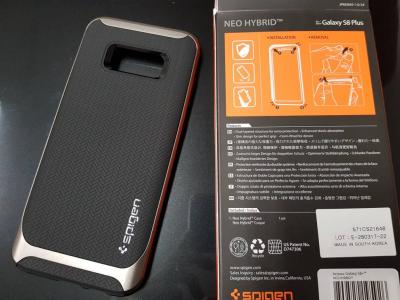
- Spigen Neo Hybrid
- Otterbox Symmetry
- Ringke Slim
- Nilkin Frosted Sheild
15. Case Not Compatibility with Samsung Screen Protector - Credit to
mchjkl» Click to show Spoiler - click again to hide... «
16. My own preset equalizer for better headset sound output. My own preferable
» Click to show Spoiler - click again to hide... «
This preset I find it nice for following headset I own. Without equalizer is way too much treble to me and all the preset sound weird to me.
My preferable always need strong mid, strong bass and fine smooth treble. I hate high treble, flat sound with lousy mid and flat bass, some headset got bass but not strong is where I can't accept. I need strong bass where not overlap the mid as well. Some headset is strong bass but overlap the mid is very unacceptable to me as well. Also I am extremely particular on hissing, noise & distortion sound. I am not audiophile but I believe I am very tricky on my own need preferable sound quality.
- Bose SoundSport Wireless Headset (I use this as based during tuning)
- Mi In-Ear Headphones Pro
- Sennheiser HD518 (Need 100% volume, it is much loud if without equalizer but then a bit too high treble)
- Bundle AKG tunes Headset (finally it is listenable now but don't expect strong bass or very great)

17. Benefits of using S8/S8+ Stock Mobile Samsung Internet - Credit to
squall_kay for additional extension
» Click to show Spoiler - click again to hide... «
- Extremely smooth, no lagging animation.
- Tab a button scroll from bottom to top.
- Support Chrome for PC extension to sync Chrome for PC bookmark to Mobile Samsung Internet.
- Support external ad blocker extension - Sample Extension
18. How to activate 6 months free subscription for iFlix - Credit to
dingz» Click to show Spoiler - click again to hide... «
19. Changes in
Latest Firmware G955FXXU1AQF7 and my own opinion on it.
 No Dot in Stock Home Screen | Dot in apps for immersive mode & White Nav Bar | Full screen without Nav Bar
» Click to show Spoiler - click again to hide... «
- June 2017 Android Security Update.
- Immersive mode - Great function with ability to hide the Navigation bar by added a tiny dot at left side navigation bar. Not showing in default stock Samsung Touchwiz home screen but it is annoying there if you are using 3rd party launcher, for example Nova launcher, can be turn off but this will remove the immersive mode function together.
- Reduce Navigation bar color option - now only have light near white color option or follow themes. This make a lot user that prefer black navigation bar miss the option. For me this is backward the functionality, why Samsung you remove the ability to customize own color option. Very silly move.
- 3rd Party Apps Navigation bar had been change to Default White instead of Default Black in previous firmware. No option to let user pick which color option. Samsung you shall consider do like what LG did which let user pick either black or white instead of fixed the color option. Even though I am very happy as I love and prefer white instead of black but not everyone prefer white but instead prefer black.
- New version of Bixby but still pretty bad performance and no enhancement seen, still no Bixby Voice.
- Don't see any significant performance improvement v/s previous firmware.
20. Solution for Dark Navigation Bar in Latest Firmware Update.
» Click to show Spoiler - click again to hide... «
haziqmck7 yang90 ace-user lookieFor user prefer
dark navigation bar. Here the solution, no root required but need adb shell
https://forum.xda-developers.com/galaxy-s8/...colors-t3622626** for the color value, I had no idea, the person did is very closed to black but still not a black.
*** don't ask me try as I don't care, I prefer white, Haha!
21. Showing off the S8/S8+ HDR Video capability.
» Click to show Spoiler - click again to hide... «
Highly recommended video:
- LG_Cymatic_Jazz_HDR10.mp4
- LG_CHess_HDR1.mp4
- Sony_4K_HDR_Camp.mp4


 Jun 15 2017, 10:26 PM, updated 9y ago




 Quote
Quote












 0.0295sec
 0.97
0.97
 6 queries
 GZIP Disabled