Outline ·
[ Standard ] ·
Linear+
Digital Photography Help !, Bluish Images instead of white !
|
TSsimmytan
|
 Mar 26 2007, 08:28 AM Mar 26 2007, 08:28 AM
|
Getting Started


|
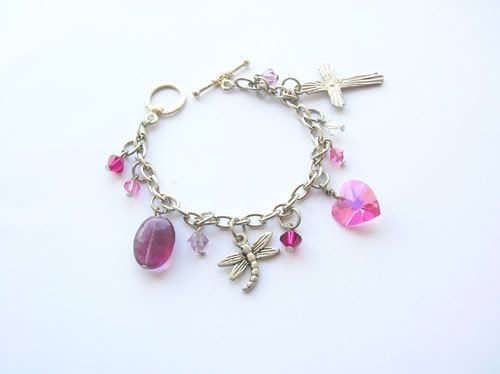
QUOTE(CompMac @ Mar 26 2007, 08:17 AM) Posting a sample image would be a start. thanks for your suggestion, pic uploaded ! |
|
|
|
|
|
TSsimmytan
|
Mar 26 2007, 08:44 AM
|
Getting Started
|
QUOTE(nairud @ Mar 26 2007, 08:40 AM) YOu only have one light source when taking those pics? from your picture, it clearly shows that the bottom part doesnt have enough light. simplest way is to get more lights and place it around so that the shadow is cancelled out. OR  you can buy a light tent/light box. OR you can DIY http://www.pbase.com/wlhuber/light_box_light_tentNairud, i used to have a lightbox built, however i think i didn't have the correct light source so the image always come out yellowish (what the heck is wrong with me?), so i abandoned the light tent and took pictures under sunlight instead (in my balcony, usually around 10-12. I was wondering if i had to use light, what kind of light would you suggest? (i'm flying blind here) thanks in advance |
|
|
|
|
|
TSsimmytan
|
Mar 26 2007, 09:05 AM
|
Getting Started
|
QUOTE(CompMac @ Mar 26 2007, 09:00 AM) Is it possible to have the EXIF data of the picture? I'm guessing that you took that picture at an angle with flash fired. hey compac..i don't know what is EXIF data....  I took the pictures without flash wor... |
|
|
|
|
|
TSsimmytan
|
Mar 26 2007, 09:37 AM
|
Getting Started
|
QUOTE(goldfries @ Mar 26 2007, 09:09 AM) you really need to setup something gives you sufficient lighting. and also what WHITE-BALANCE settings do you use? AUTO? if you are using AUTO, then perhaps it's time for you to customize your WHITE-BALANCE. please check if your camera allows that.
Added on March 26, 2007, 9:11 amsimmy, the details are available if you just right-click and view advanced properties of the image file. if you still donno how to get it, just email it to anyone of us (you can email to me since i'm here now and can check for you) - the original image la, not the resized ones. I preset di, i measured the white balance on a white sheet (with light on) then only take pictures...  but still blueish I right click on the original file also don't have Exif date like you show me...how come??? (i clicked on propertise tab) This post has been edited by simmytan: Mar 26 2007, 09:40 AM |
|
|
|
|
|
TSsimmytan
|
Mar 26 2007, 10:01 AM
|
Getting Started
|
QUOTE(CompMac @ Mar 26 2007, 09:48 AM) What camera are you using? i'm sorry...very cheap black camera... Nikon Coolpix L4 (4.0 megapixel) |
|
|
|
|
|
TSsimmytan
|
Mar 26 2007, 10:38 AM
|
Getting Started
|
QUOTE(CompMac @ Mar 26 2007, 10:25 AM) Maybe you can try this. Stick a small piece of tissue paper or A4 paper that just cover your flash. Using the fill flash and macro mode, take your picture with your camera being upside down. I tried it , still abit bluish, but much better than those i've took. I guess at the end of the day i'll still need to make slight adjustment in PS elements thanks for the help compmac !  |
|
|
|
|



 Quote
Quote

 0.3601sec
 0.76
0.76
 7 queries
 GZIP Disabled