Outline ·
[ Standard ] ·
Linear+
Windows 10, Folder Icon Turn Black
|
TScwteoh1
|
 Jun 2 2017, 11:37 AM, updated 9y ago Jun 2 2017, 11:37 AM, updated 9y ago
|
Getting Started


|
Hi Sifu, want to ask any of Win10 users facing this king of problem as every time get windows update then all the folder become square black in colour just like photo shown below: 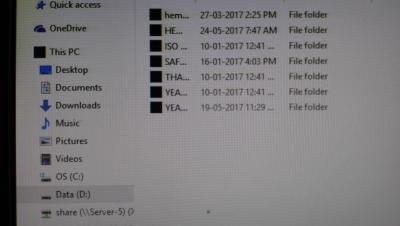
Happen 2 times already. First time happen after uninstall windows update then back to normal but this time not able to do so. any reasons or suggestions on how to fix this? Thanks |
|
|
|
|
|
TScwteoh1
|
Jun 2 2017, 12:57 PM
|
Getting Started
|
QUOTE(matiko95 @ Jun 2 2017, 11:43 AM) Done on it but problem still the same. any other trick to do so? |
|
|
|
|
|
TScwteoh1
|
Jun 2 2017, 01:05 PM
|
Getting Started
|
but after change the folder size to 125% everything look find
thank matiko95 for your help
|
|
|
|
|
|
TScwteoh1
|
Jun 5 2017, 09:11 AM
|
Getting Started
|
QUOTE(cstkl1 @ Jun 2 2017, 07:07 PM) just rebuild your icon cache https://www.tenforums.com/tutorials/5645-re...ndows-10-a.htmlCODE :: Created by: Shawn Brink
:: http://www.sevenforums.com
:: Tutorial: http://www.sevenforums.com/tutorials/49819-icon-cache-rebuild.html
@echo off
set iconcache=%localappdata%\IconCache.db
echo The Explorer process must be killed to delete the Icon DB.
echo.
echo Please SAVE ALL OPEN WORK before continuing.
echo.
pause
echo.
If exist "%iconcache%" goto delID
echo.
echo Icon DB has already been deleted.
echo.
pause
exit /B
:delID
echo Attempting to delete Icon DB...
echo.
taskkill /IM explorer.exe /F
del "%iconcache%" /A
echo.
echo Icon DB has been successfully deleted.
echo.
start explorer.exe
pause
exit /B
Had tried on this matter and will monitor further n see whether it happen back again or not. Thanks |
|
|
|
|



 Quote
Quote

 0.0150sec
 0.45
0.45
 7 queries
 GZIP Disabled