Welcome Guest ( Log In | Register )

249 Pages « < 32 33 34 35 36 > » Bottom

Outline · [ Standard ] · Linear+

 TP-LINK Malaysia Official Thread, Technical Enquiries and Support

views
     
danielSinclair
post Dec 31 2017, 12:27 AM

Casual
***
Junior Member
344 posts

Joined: Nov 2010
QUOTE(SilentVampire @ Dec 31 2017, 12:24 AM)
Newer routers from TP Link that support VDSL have not been released in Malaysia yet. For now, you have to either configure the modem router that you have to be a bridge/modem only for another router or buy two D Link routers that can support VDSL. See here for these two models:

1)  http://www.lazada.com.my/d-link-ac1200-2x9...82d7WuCVf0&mp=1

2) http://www.lazada.com.my/latest-d-link-3x9...82d7ahD03R&mp=1
*
oh okay. I can choose either one or must use two? if i use this thats mean can work with Hypptv Stb and phone line also? thanks for your advice🙂

This post has been edited by danielSinclair: Dec 31 2017, 12:30 AM
SilentVampire
post Dec 31 2017, 08:44 AM

Networking Enthusiast
*******
Senior Member
5,714 posts

Joined: Mar 2007


QUOTE(danielSinclair @ Dec 31 2017, 12:27 AM)
oh okay. I can choose either one or must use two? if i use this thats mean can work with Hypptv Stb and phone line also? thanks for your advice🙂
*
Can choose either one bro.

If you use either one, it can work with HyppTV and phone line. I would recommend the first link that I sent to you though.
neekun
post Dec 31 2017, 03:00 PM

I'm a Mac
*******
Senior Member
2,570 posts

Joined: Jun 2006


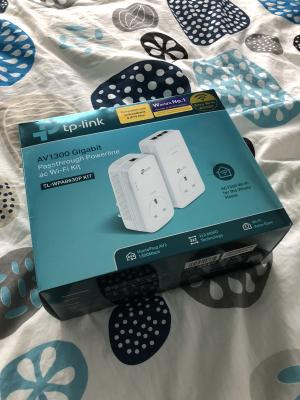
Trying out another power outlet the speed is even better:

Attached Image

I am satisfied with TP-Link power line adaptor biggrin.gif
danielSinclair
post Dec 31 2017, 06:22 PM

Casual
***
Junior Member
344 posts

Joined: Nov 2010
QUOTE(SilentVampire @ Dec 31 2017, 08:44 AM)
Can choose either one bro.

If you use either one, it can work with HyppTV and phone line. I would recommend the first link that I sent to you though.
*
dunno when TPLink model will come to Malaysia 😂 I read TPLink model got guest login portal features? I need that features for my kids🙂
Jjuggler
post Dec 31 2017, 07:49 PM

Narcissistic Genius
******
Senior Member
1,341 posts

Joined: Dec 2016
Those who having problem with your c1200v1 (only) can refer to my blog.

Solutions for TP-LINK Archer c1200v1

Advance Happy New Year all. rclxms.gif
SilentVampire
post Dec 31 2017, 08:02 PM

Networking Enthusiast
*******
Senior Member
5,714 posts

Joined: Mar 2007


QUOTE(danielSinclair @ Dec 31 2017, 06:22 PM)
dunno when TPLink model will come to Malaysia 😂 I read TPLink model got guest login portal features? I need that features for my kids🙂
*
Maybe next year, not sure if guest login portal features exists in the TP Link model, but if you really want that done good, you need enterprise router lol.
barney
post Dec 31 2017, 10:16 PM

Casual
***
Junior Member
329 posts

Joined: Sep 2006
From: Somewhere on Earth


QUOTE(Jjuggler @ Dec 31 2017, 07:49 PM)
Those who having problem with your c1200v1 (only) can refer to my blog.

Solutions for TP-LINK Archer c1200v1

Advance Happy New Year all.  rclxms.gif
*
using your guide, will it not give problems like wireless devices not able to connect after 12 hours of up time? I upgraded to the latest AU firmware and it is still giving me the same problem. after 24 hours of uptime it will get worst where anything connected to the wifi will not be able to surf internet including the LAN. Do you face this problem?
MrSpeedy
post Dec 31 2017, 10:23 PM

Casual
***
Junior Member
460 posts

Joined: Jun 2012


QUOTE(Jjuggler @ Dec 31 2017, 07:49 PM)
Those who having problem with your c1200v1 (only) can refer to my blog.

Solutions for TP-LINK Archer c1200v1

Advance Happy New Year all.  rclxms.gif
*
QUOTE
To overcome high CPU load, you can disable the USB sharing and Print Server.

I only see option to turn off the Print Server.
How do I turn off USB sharing?

This post has been edited by MrSpeedy: Dec 31 2017, 10:23 PM
JohnLai
post Dec 31 2017, 10:28 PM

Skeptical Cat
*******
Senior Member
3,669 posts

Joined: Apr 2006
QUOTE(Jjuggler @ Dec 31 2017, 07:49 PM)
Those who having problem with your c1200v1 (only) can refer to my blog.

Solutions for TP-LINK Archer c1200v1

Advance Happy New Year all.  rclxms.gif
*
-.- Should rename it as reduction of random reboot chance.

Auto reboot still happen even with those settings.
Jjuggler
post Dec 31 2017, 11:24 PM

Narcissistic Genius
******
Senior Member
1,341 posts

Joined: Dec 2016
QUOTE(barney @ Dec 31 2017, 10:16 PM)
using your guide, will it not give problems like wireless devices not able to connect after 12 hours of up time? I upgraded to the latest AU firmware and it is still giving me the same problem. after 24 hours of uptime it will get worst where anything connected to the wifi will not be able to surf internet including the LAN. Do you face this problem?
*
It will not give any problem. Because I test the router before give the suggestion. I did not face such problem, infact, the router does handle the connected device well. (2 PC via lan port, 1 for hypptv). 8 smartphones, 2 wireless printers. The router seems can handle the device connected to it. I never face a single hang at all.

QUOTE(MrSpeedy @ Dec 31 2017, 10:23 PM)
I only see option to turn off the Print Server.
How do I turn off USB sharing?
*
[attachmentid=9472288]
Look at here. If your toggle is on for the sharing access, turn off it, and turn off anything in the page.


QUOTE(JohnLai @ Dec 31 2017, 10:28 PM)
-.- Should rename it as reduction of random reboot chance.

Auto reboot still happen even with those settings.
*
My friend, the solution is to reduce the auto reboot. Once i follow the mentioned settings, my router only reboots once a week (usually wed / thursday 3am to 4am - because usually i stay awake till that time). The solution for the people who don't wish to get an aftermarket router or have budget issue. It is a temporary solution only.

This post has been edited by Jjuggler: Dec 31 2017, 11:26 PM
neekun
post Jan 1 2018, 04:02 PM

I'm a Mac
*******
Senior Member
2,570 posts

Joined: Jun 2006


QUOTE(neekun @ Dec 31 2017, 03:00 PM)
Trying out another power outlet the speed is even better:

Attached Image

I am satisfied with TP-Link power line adaptor  biggrin.gif
*
Money well spent rclxms.gif

Attached Image

Attached Image

blacktubi
post Jan 1 2018, 07:06 PM

-
Group Icon
Elite
8,401 posts

Joined: Jul 2008

QUOTE(neekun @ Jan 1 2018, 04:02 PM)
Money well spent  rclxms.gif

Attached Image

Attached Image
*
One of the best TP-Link products I ever own too. biggrin.gif

Tips: Use the tpPLC app on your phone to view the connectivity speed so you don't need the desktop app.
neekun
post Jan 1 2018, 07:34 PM

I'm a Mac
*******
Senior Member
2,570 posts

Joined: Jun 2006


QUOTE(blacktubi @ Jan 1 2018, 07:06 PM)
One of the best TP-Link products I ever own too. biggrin.gif

Tips: Use the tpPLC app on your phone to view the connectivity speed so you don't need the desktop app.
*
Yea am using the app too. One thing I notice the 5ghz channel is only 36 40 44 and 48. In my AirPort Extreme I see all these channels plus a few more at 100 plus.
barney
post Jan 2 2018, 10:18 AM

Casual
***
Junior Member
329 posts

Joined: Sep 2006
From: Somewhere on Earth


QUOTE(Jjuggler @ Dec 31 2017, 11:24 PM)
It will not give any problem. Because I test the router before give the suggestion. I did not face such problem, infact, the router does handle the connected device well. (2 PC via lan port, 1 for hypptv). 8 smartphones, 2 wireless printers. The router seems can handle the device connected to it. I never face a single hang at all.
i tried your method but same result. i declare c1200 is not usable at all. i am going to complain to tm and see if they can get me another model as in not c1200! Still not satisfied with the wifi router they gave me. my friend gave me a 2013 old wifi router that was given free to TM back then, its the riger model. I test using that no problem at all for 2 days and counting.
SilentVampire
post Jan 2 2018, 10:25 AM

Networking Enthusiast
*******
Senior Member
5,714 posts

Joined: Mar 2007


QUOTE(barney @ Jan 2 2018, 10:18 AM)
i tried your method but same result. i declare c1200 is not usable at all. i am going to complain to tm and see if they can get me another model as in not c1200! Still not satisfied with the wifi router they gave me. my friend gave me a 2013 old wifi router that was given free to TM back then, its the riger model. I test using that no problem at all for 2 days and counting.
*
They will give you the DIR-850L lol, which is slightly better but not by much. Good luck.
Jjuggler
post Jan 2 2018, 10:33 AM

Narcissistic Genius
******
Senior Member
1,341 posts

Joined: Dec 2016
QUOTE(SilentVampire @ Jan 2 2018, 10:25 AM)
They will give you the DIR-850L lol, which is slightly better but not by much. Good luck.
*
QUOTE(barney @ Jan 2 2018, 10:18 AM)
i tried your method but same result. i declare c1200 is not usable at all. i am going to complain to tm and see if they can get me another model as in not c1200! Still not satisfied with the wifi router they gave me. my friend gave me a 2013 old wifi router that was given free to TM back then, its the riger model. I test using that no problem at all for 2 days and counting.
*
Based on SilentVampire bro's explanation, yes you can request to change your router, but you will get the cylindrical shaped router - dlink850l router which slightly better if you patched it to the latest firmware and stuck with suffix ssid "@unifi" or if you didn't patch, your router is vulnerable.


brianklc
post Jan 2 2018, 03:27 PM

Casual
***
Junior Member
372 posts

Joined: Sep 2006
any product that can support wifi vlan tagging? Eg. to have another wifi SSID for VLan 600 (Hypptv)
JohnLai
post Jan 2 2018, 08:03 PM

Skeptical Cat
*******
Senior Member
3,669 posts

Joined: Apr 2006
Nobody wanna contact official TP-Link support via their email on C1200 auto restart issue?
blacktubi
post Jan 2 2018, 10:00 PM

-
Group Icon
Elite
8,401 posts

Joined: Jul 2008

QUOTE(brianklc @ Jan 2 2018, 03:27 PM)
any product that can support wifi vlan tagging? Eg. to have another wifi SSID for VLan 600 (Hypptv)
*
I believe only D-Link routers do that currently.

QUOTE(JohnLai @ Jan 2 2018, 08:03 PM)
Nobody wanna contact official TP-Link support via their email on C1200 auto restart issue?
*
They are already investigating that issue. I not sure when a fix will be released but apparently not all users are affected somehow.

Have anyone tried cooling the router down? I do not have the Unifi version of the C1200.
JohnLai
post Jan 2 2018, 10:47 PM

Skeptical Cat
*******
Senior Member
3,669 posts

Joined: Apr 2006
QUOTE(blacktubi @ Jan 2 2018, 10:00 PM)
I believe only D-Link routers do that currently.
They are already investigating that issue. I not sure when a fix will be released but apparently not all users are affected somehow.

Have anyone tried cooling the router down? I do not have the Unifi version of the C1200.
*
Done that, blower type fan aims directly at heatsink after I open the router up. Still auto-restart. sad.gif

249 Pages « < 32 33 34 35 36 > » Top
 

Change to:
| Lo-Fi Version
0.0271sec    0.66    6 queries    GZIP Disabled
Time is now: 2nd December 2025 - 10:12 AM