

below are my settings, pls see if you can find anything fishy there, thanks
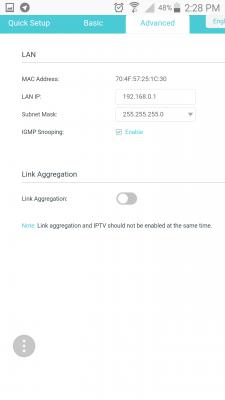
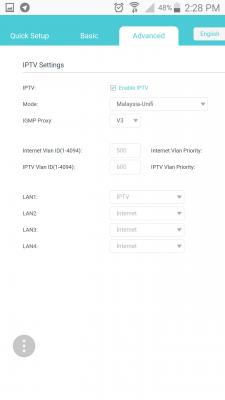

 [attachmentid=9436462] [attachmentid=9436463]
[attachmentid=9436464]
TP-LINK Malaysia Official Thread, Technical Enquiries and Support
|
|
 Dec 16 2017, 03:01 PM Dec 16 2017, 03:01 PM
|
 
Senior Member
600 posts Joined: Oct 2004 
|
SilentVampire darenlks
below are my settings, pls see if you can find anything fishy there, thanks
[attachmentid=9436462] [attachmentid=9436463][attachmentid=9436464] |
|
|
|
|
|
Dec 16 2017, 03:33 PM
|

Senior Member
5,714 posts Joined: Mar 2007  
|
QUOTE(arrsoo @ Dec 16 2017, 03:01 PM) SilentVampire darenlks Bro, I have the exact same router as you as you know and have similar settings, and I have no problems. You should have no problems as well. Maybe you can set the 2.4GHz to 802.11bgn mixed and 5GHz to 802.11AC only.below are my settings, pls see if you can find anything fishy there, thanks
[attachmentid=9436462] [attachmentid=9436463][attachmentid=9436464]  This post has been edited by SilentVampire: Dec 16 2017, 03:37 PM |
|
|
Dec 16 2017, 06:13 PM
|
|
Senior Member
600 posts Joined: Oct 2004
|
QUOTE(SilentVampire @ Dec 16 2017, 03:33 PM) Bro, I have the exact same router as you as you know and have similar settings, and I have no problems. You should have no problems as well. Maybe you can set the 2.4GHz to 802.11bgn mixed and 5GHz to 802.11AC only. bro, can you pls check if I am having the latest firmware? I tried to click the upgrade button but unable to do it as it needs cloud id and I am not able to register for their cloud id, dunno why[attachmentid=9436613] |
|
|
Dec 16 2017, 08:09 PM
|
|
Senior Member
5,714 posts Joined: Mar 2007
|
QUOTE(arrsoo @ Dec 16 2017, 06:13 PM) bro, can you pls check if I am having the latest firmware? I tried to click the upgrade button but unable to do it as it needs cloud id and I am not able to register for their cloud id, dunno why Bro, it is the latest firmware. Register here for Cloud ID and you can use the Tether app anywhere you go to remotely manage your router:[attachmentid=9436613] https://www.tplinkcloud.com/register.php |
|
|
Dec 16 2017, 11:22 PM
|
|
Senior Member
600 posts Joined: Oct 2004
|
QUOTE(SilentVampire @ Dec 16 2017, 08:09 PM) Bro, it is the latest firmware. Register here for Cloud ID and you can use the Tether app anywhere you go to remotely manage your router: thanks for the confirmation bro. I tried to reset the c3150 and re setup again and problem still the same. Switched back to my C5, all back to normal again, no buffering, full speed with 5G. Sighh....dunno whats wrong with the c3150https://www.tplinkcloud.com/register.php |
|
|
Dec 17 2017, 12:45 AM
|
|
Senior Member
5,714 posts Joined: Mar 2007
|
QUOTE(arrsoo @ Dec 16 2017, 11:22 PM) thanks for the confirmation bro. I tried to reset the c3150 and re setup again and problem still the same. Switched back to my C5, all back to normal again, no buffering, full speed with 5G. Sighh....dunno whats wrong with the c3150 Bro, I really don’t know what’s wrong with your C3150. Mine is working very good at the moment, and no problems. I don’t understand why yours is like that  |
|
|
|
|
|
Dec 17 2017, 11:41 AM
|

Senior Member
639 posts Joined: Feb 2009
|
QUOTE(arrsoo @ Dec 16 2017, 11:22 PM) thanks for the confirmation bro. I tried to reset the c3150 and re setup again and problem still the same. Switched back to my C5, all back to normal again, no buffering, full speed with 5G. Sighh....dunno whats wrong with the c3150 Bro, try to test around with wifi mode, channel and width. Try to avoid using auto channel and set channel width for 5G to 80mhz if you have not done so. I'm currently setting my wifi mode to n only for 2.4g and AC only to 5g. I can achieve at least 100Mbps for both wifi modes in speedtest. Also try to detach any external devices to the router first for testing purposes and narrow down the issue |
|
|
Dec 17 2017, 04:20 PM
|
|
Senior Member
600 posts Joined: Oct 2004
|
QUOTE(darenlks @ Dec 17 2017, 11:41 AM) Bro, try to test around with wifi mode, channel and width. Try to avoid using auto channel and set channel width for 5G to 80mhz if you have not done so. I'm currently setting my wifi mode to n only for 2.4g and AC only to 5g. I can achieve at least 100Mbps for both wifi modes in speedtest. Also try to detach any external devices to the router first for testing purposes and narrow down the issue Wifi wise is ok, acceptable, in fact 2.4g gained more speed but problem lies with lan connection, all lan connection (hypptv and andriod box) suffer buffering, cannot even stream movie. Buffering will become worse when wifi is being used. Seriously unacceptable. Not sure if router defective or settings problem....headache! |
|
|
Dec 17 2017, 05:59 PM
|
|
Senior Member
5,714 posts Joined: Mar 2007
|
QUOTE(arrsoo @ Dec 17 2017, 04:20 PM) Wifi wise is ok, acceptable, in fact 2.4g gained more speed but problem lies with lan connection, all lan connection (hypptv and andriod box) suffer buffering, cannot even stream movie. Buffering will become worse when wifi is being used. Seriously unacceptable. Not sure if router defective or settings problem....headache! Bro, I don’t have the problem. I am quite surprised actually you have this problem. Maybe you should consider a replacement. I use mine without any problems. |
|
|
Dec 17 2017, 06:41 PM
|
|
Senior Member
639 posts Joined: Feb 2009
|
QUOTE(arrsoo @ Dec 17 2017, 04:20 PM) Wifi wise is ok, acceptable, in fact 2.4g gained more speed but problem lies with lan connection, all lan connection (hypptv and andriod box) suffer buffering, cannot even stream movie. Buffering will become worse when wifi is being used. Seriously unacceptable. Not sure if router defective or settings problem....headache! I have no issue with HyppTV though but I did encounter streaming issue (keep buffering) with my mibox via USB to LAN cable adapter. I'm now using wifi to stream and no more buffering issue, not sure whether my adapter issue or router Lan port does not work well with Lan connection via adapter |
|
|
Dec 17 2017, 11:23 PM
|
|
Senior Member
600 posts Joined: Oct 2004
|
QUOTE(darenlks @ Dec 17 2017, 06:41 PM) I have no issue with HyppTV though but I did encounter streaming issue (keep buffering) with my mibox via USB to LAN cable adapter. I'm now using wifi to stream and no more buffering issue, not sure whether my adapter issue or router Lan port does not work well with Lan connection via adapter Strange, by right lan connection is very straight forward right? not much to set with compared to wifi. Since all my lan connections has buffering problem, can i assume that my unit cud be defective? I m really at a lost on what to do nowThis post has been edited by arrsoo: Dec 17 2017, 11:25 PM |
|
|
Dec 17 2017, 11:27 PM
|
|
Senior Member
5,714 posts Joined: Mar 2007
|
QUOTE(arrsoo @ Dec 17 2017, 11:23 PM) Strange, by right lan connection is a very straight forward tight? not much settings to set with compared to wifi. Since all my lan connections has buffering problem, can i assume that my unit cud be defective? I m really at a lost on what to do now Just contact Ookas or TP Link Malaysia and tell them your problem and request for the unit to be exchanged, repaired, or checked. See here bro: http://www.tp-link.com.my/support/rma/ |
|
|
Dec 18 2017, 12:33 AM
|
 
Elite
8,413 posts Joined: Jul 2008 
|
QUOTE(arrsoo @ Dec 17 2017, 11:23 PM) Strange, by right lan connection is very straight forward right? not much to set with compared to wifi. Since all my lan connections has buffering problem, can i assume that my unit cud be defective? I m really at a lost on what to do now Streaming rely on Multicast and the multicast traffic seems to be prioritised for HyppTV to ensure the HyppTV stream would stream smoothly on TP-Link firmware but it causes other source to buffer.Maybe try enabling IGMP Proxy and try IGMP V2. |
|
|
|
|
|
Dec 18 2017, 10:27 AM
|

Senior Member
2,570 posts Joined: Jun 2006
|
Is there any mesh wifi router by TP-Link?
I am researching Netgear Orbi AC2200 (RBK40). Currently I am using Apple AirPort Extreme (AC) at ground floor with ethernet connecting to TP Link C5 given by Telekom. At ground floor all wifi signals are perfect, with speed test up to 100mbps ++, my Unifi package is 100mbps. At upstair, I use Apple Airport Express (N, 2nd Gene) to extend the N network signal from ground floor running on 5ghz. I can see sometimes my Airport Express physical mode speed is drops to 78mbps, with max at round 100mbps. Running speedtest on upstair connecting to Airport Express the speed is around 45mbps. I wonder if mesh wifi router can improve my situation. Any comments? |
|
|
Dec 18 2017, 11:04 AM
|
|
Senior Member
639 posts Joined: Feb 2009
|
QUOTE(arrsoo @ Dec 17 2017, 11:23 PM) Strange, by right lan connection is very straight forward right? not much to set with compared to wifi. Since all my lan connections has buffering problem, can i assume that my unit cud be defective? I m really at a lost on what to do now Ya it is strange that your Hypptv is also buffering because it is separated from Internet connection by its own. As what SilentVampire suggested, should try to contact your seller if still eligible for exchange since all possible causes we could think of have been tested out |
 |
Dec 18 2017, 12:40 PM
|

Junior Member
78 posts Joined: May 2017
|
QUOTE(arrsoo @ Dec 18 2017, 12:23 AM) Strange, by right lan connection is very straight forward right? not much to set with compared to wifi. Since all my lan connections has buffering problem, can i assume that my unit cud be defective? I m really at a lost on what to do now Dear Arrsoo, you can send the defective unit to Plaza Low Yat service center for the warranty claim. Remember to bring your purchase receipt along ya. |
|
|
Dec 18 2017, 01:04 PM
|
|
Senior Member
5,714 posts Joined: Mar 2007
|
QUOTE(neekun @ Dec 18 2017, 10:27 AM) Is there any mesh wifi router by TP-Link? Hard to say as mesh wifi router rely on the wireless backhaul system. If one mesh unit is not connecting well to the other unit, the whole system will suffer as a whole.I am researching Netgear Orbi AC2200 (RBK40). Currently I am using Apple AirPort Extreme (AC) at ground floor with ethernet connecting to TP Link C5 given by Telekom. At ground floor all wifi signals are perfect, with speed test up to 100mbps ++, my Unifi package is 100mbps. At upstair, I use Apple Airport Express (N, 2nd Gene) to extend the N network signal from ground floor running on 5ghz. I can see sometimes my Airport Express physical mode speed is drops to 78mbps, with max at round 100mbps. Running speedtest on upstair connecting to Airport Express the speed is around 45mbps. I wonder if mesh wifi router can improve my situation. Any comments? |
|
|
Dec 18 2017, 02:19 PM
|

Senior Member
2,144 posts Joined: Jan 2003 From: Kuching, Sarawak
|
QUOTE(TP-LINK MY @ Dec 18 2017, 12:40 PM) Dear Arrsoo, you can send the defective unit to Plaza Low Yat service center for the warranty claim. Remember to bring your purchase receipt along ya. Dear TP-LINK MY, Shopee reseller don’t provide receipt for online purchase. How do we one get support and RMA if receipts are not provided by reseller? Does serial no of the router can be tracked in your system if the warranty is covered in msia? |
|
|
Dec 18 2017, 03:20 PM
|
|
Senior Member
600 posts Joined: Oct 2004
|
QUOTE(TP-LINK MY @ Dec 18 2017, 12:40 PM) Dear Arrsoo, you can send the defective unit to Plaza Low Yat service center for the warranty claim. Remember to bring your purchase receipt along ya. Thanks for responding, do they give a brand new 1 to 1 exchange? |
|
|
Dec 18 2017, 04:15 PM
|
|
Senior Member
2,570 posts Joined: Jun 2006
|
QUOTE(SilentVampire @ Dec 18 2017, 01:04 PM) Hard to say as mesh wifi router rely on the wireless backhaul system. If one mesh unit is not connecting well to the other unit, the whole system will suffer as a whole. Yea that’s what worry me too since first floor and ground floor is separated by concrete. And I don’t want invest in mesh WiFi only to find out its same or worse than current speed.  |
| Change to: |  0.0247sec 0.0247sec
 1.34 1.34
 6 queries 6 queries
 GZIP Disabled GZIP Disabled
Time is now: 9th December 2025 - 04:48 PM |
 Quote
Quote