Welcome Guest ( Log In | Register )

249 Pages « < 18 19 20 21 22 > » Bottom

Outline · [ Standard ] · Linear+

 TP-LINK Malaysia Official Thread, Technical Enquiries and Support

views
     
eddyann
post Nov 21 2017, 09:35 AM

Gold Miner
******
Senior Member
1,981 posts

Joined: Jan 2003
From: ||| Royal Creek |||


Any good tplink replacement to the tl-wr941hp? The tl-wr941hp is great and cheap too. The only lacking of this router is the wireless AC and gigabit port. The important features I need are the strong wifi transmitter and gigabit port
fx20
post Nov 21 2017, 10:07 AM

Enthusiast
*****
Senior Member
817 posts

Joined: Feb 2010
I loaded AU firmware in my C1200, it has been running fine since last sunday.

I disable USB, printer server, firewall and many others. The CPU load was between 10-66% and most of the time stays at 4x%. Which I think it is still pretty bad.Tonight gonna test it with huge number of connection of download.

Some forumer did mention this firmware is based on open-wrt. I hope there is a custom firmware on this.

In the meantime, I am waiting for my AL68U to replace this crap.


huatty
post Nov 24 2017, 02:03 AM

New Member
*
Junior Member
20 posts

Joined: Jun 2011
Finally, send my C1200 to refund.
Looking to buy C7v2 as replacement.

Any big brother using C7v2 here? mind to share the experience?
My main concern will be stability, Maybe will try to setup file sharing as well.

*i got very bad experience with C1200, auto reboot, hang, wifi lost connection.....hope C7 will be better.
blacktubi
post Nov 24 2017, 02:35 AM

-
Group Icon
Elite
8,401 posts

Joined: Jul 2008

QUOTE(huatty @ Nov 24 2017, 02:03 AM)
Finally, send my C1200 to refund.
Looking to buy C7v2 as replacement.

Any big brother using C7v2 here? mind to share the experience?
My main concern will be stability, Maybe will try to setup file sharing as well.

*i got very bad experience with C1200, auto reboot, hang, wifi lost connection.....hope C7 will be better.
*
Consider the higher end series. I tested C3150, C5400 and AD7200 and they are really good routers.


SilentVampire
post Nov 24 2017, 09:58 AM

Networking Enthusiast
*******
Senior Member
5,714 posts

Joined: Mar 2007


QUOTE(huatty @ Nov 24 2017, 02:03 AM)
Finally, send my C1200 to refund.
Looking to buy C7v2 as replacement.

Any big brother using C7v2 here? mind to share the experience?
My main concern will be stability, Maybe will try to setup file sharing as well.

*i got very bad experience with C1200, auto reboot, hang, wifi lost connection.....hope C7 will be better.
*
Hey bro, Archer C7 v2 has been a pleasure to use, and none of the problems you mentioned about the C1200. Consider the Archer C7 v4 now that you can get from this link: https://www.lazada.com.my/tp-link-ac1750-wi...is-1774185.html
They mention Archer C7 v2 but they will ship Archer C7 v4. It’s a newer version with improved antenna, and firmware is newer as well.

QUOTE(blacktubi @ Nov 24 2017, 02:35 AM)
Consider the higher end series. I tested C3150, C5400 and AD7200 and they are really good routers.
*
Yes, listen to this man. I’m currently using C3150 v2 and it is a much better router than the C7 v2, if you have the budget. The C5400 and C7200 might be a bit overkill but if you have the money and your house have many devices, it is really worth the investment.
huatty
post Nov 24 2017, 10:55 AM

New Member
*
Junior Member
20 posts

Joined: Jun 2011
QUOTE(SilentVampire @ Nov 24 2017, 09:58 AM)
Hey bro, Archer C7 v2 has been a pleasure to use, and none of the problems you mentioned about the C1200. Consider the Archer C7 v4 now that you can get from this link: https://www.lazada.com.my/tp-link-ac1750-wi...is-1774185.html
They mention Archer C7 v2 but they will ship Archer C7 v4. It’s a newer version with improved antenna, and firmware is newer as well.
Yes, listen to this man. I’m currently using C3150 v2 and it is a much better router than the C7 v2, if you have the budget. The C5400 and C7200 might be a bit overkill but if you have the money and your house have many devices, it is really worth the investment.
*
Wow, C3150 look nice!!! but it is double the price for C7, consider out of my current budget biggrin.gif

I use this router for my condo only, most of the time connected with 3-6 devices only (laptop, phone, chromecast).
Initially I think C1200 should be good enough for my little condo, but it truly disappointed me, lucky I still able to make refund, now going to "upgrade" to C7.

TP Link official store having mega sale at Shopee now, selling C7 with extra discount, about RM350 after discount.
https://shopee.com.my/TP-Link-Archer-C7-AC1...15875.402047234

I also check with TP Link, they are selling v4, but this maynot make me happy.

Again, from my experience in C1200, they are many user complain v1 having auto reboot issue, v2 fix most of the thing, i got the product is v3, all issue come back... bangwall.gif
So far I saw many good feedback for C7v2, hopefully v4 will continue working well...

SilentVampire
post Nov 24 2017, 11:54 AM

Networking Enthusiast
*******
Senior Member
5,714 posts

Joined: Mar 2007


QUOTE(huatty @ Nov 24 2017, 10:55 AM)
Wow, C3150 look nice!!! but it is double the price for C7, consider out of my current budget  biggrin.gif

I use this router for my condo only, most of the time connected with 3-6 devices only (laptop, phone, chromecast).
Initially I think C1200 should be good enough for my little condo, but it truly disappointed me, lucky I still able to make refund, now going to "upgrade" to C7.

TP Link official store having mega sale at Shopee now, selling C7 with extra discount, about RM350 after discount.
https://shopee.com.my/TP-Link-Archer-C7-AC1...15875.402047234

I also check with TP Link, they are selling v4, but this maynot make me happy.

Again, from my experience in C1200, they are many user complain v1 having auto reboot issue, v2 fix most of the thing, i got the product is v3, all issue come back... bangwall.gif
So far I saw many good feedback for C7v2, hopefully v4 will continue working well...
*
Thanks for the link bro! I might pick myself a C7 v4 as well just to see the difference between the V2 and V4. C7 v4 should be more than enough for you then. Good luck.
jonuslee
post Nov 25 2017, 11:06 PM

Simple Guy with a Simple Life
******
Senior Member
1,167 posts

Joined: Nov 2006
Hi.Recently I upgrade my unifi to 100mbps.i need some advice where my friend macbook can achieve 100mbps download speed while my mobile phone can only achieve around 50mbps download instead of 100mbps as both connected to 2.4Ghz wifi router but both device upload speed is able to achieve 50mbps.my router is tplink AC1200.need some advice from sifu here.thanks
soonwai
post Nov 26 2017, 12:33 AM


********
All Stars
11,456 posts

Joined: Oct 2007
From: KL


QUOTE(jonuslee @ Nov 25 2017, 11:06 PM)
Hi.Recently I upgrade my unifi to 100mbps.i need some advice where  my friend macbook can achieve 100mbps download speed while my mobile phone can only achieve around 50mbps download instead of 100mbps as both connected to 2.4Ghz wifi router but both device upload speed is able to achieve 50mbps.my router is tplink AC1200.need some advice from sifu here.thanks
*
What phone? It would depend on how many streams the phone has. iPhone 6s, for example, will perform about the same as the MacBook at 2.4GHz.
jonuslee
post Nov 26 2017, 11:44 AM

Simple Guy with a Simple Life
******
Senior Member
1,167 posts

Joined: Nov 2006
QUOTE(soonwai @ Nov 26 2017, 12:33 AM)
What phone? It would depend on how many streams the phone has. iPhone 6s, for example, will perform about the same as the MacBook at 2.4GHz.
*
Xiaomi mi 3 even my Samsung J7prime also the same.but how come my download speed is 50mbps but my upload speed can reach 50mbps? Thanks
chocobo7779
post Nov 26 2017, 08:35 PM

Power is nothing without control
********
All Stars
14,673 posts

Joined: Sep 2010
blacktubi Tried to set up Wake On Lan on my C1200 (the one provided by TM). It worked perfectly when it is on the LAN, but when I tried it outside my LAN (i.e. waking up my PC through my phone via mobile data), it worked briefly and it won't work anymore after some time. Tried setting ARP binding and it still didn't work sweat.gif

I was trying to set up an OpenVPN server on the router to allow my phone to be 'part' of my LAN so that I can send a magic packet to the PC, but it appears that the VPN is assigning a different IP address (10.x.x.x) rather than (192.168.x.x). hmm.gif

Do I need to set some kind of static routing so that I can forward the packet from the 10.x.x.x subnet to the other subnet? Please advise as I'm not too familiar on VPNs and subnets hmm.gif

This post has been edited by chocobo7779: Nov 26 2017, 08:37 PM
Perwaja
post Nov 27 2017, 10:12 PM

Getting Started
**
Junior Member
254 posts

Joined: Jan 2003
From: Kedah


Hi, newbies here wanna ask something, regarding TP-Link AC1200. Just got this router when upgrading my unifi package.

right now using ASUS RT-AC5300 as my main router and thinking to use this new TP-LINK AC1200 as a repeater, google around on tutorial and mostly said that I need to enable WDS function inside

Advanced > System Tools > System Parameter

but inside this screen i cant find any WDS setting. Anyone had any idea
SilentVampire
post Nov 27 2017, 11:00 PM

Networking Enthusiast
*******
Senior Member
5,714 posts

Joined: Mar 2007


QUOTE(Perwaja @ Nov 27 2017, 10:12 PM)
Hi, newbies here wanna ask something, regarding TP-Link AC1200. Just got this router when upgrading my unifi package.

right now using ASUS RT-AC5300 as my main router and thinking to use this new TP-LINK AC1200 as a repeater, google around on tutorial and mostly said that I need to enable WDS function inside

Advanced > System Tools > System Parameter

but inside this screen i cant find any WDS setting. Anyone had any idea
*
You can't use that as a repeater, only as an AP, unless you flash custom firmware, which I don't think can be done on the TP-Link AC1200, if I'm not mistaken. See here for the difference between AP and repeater:

https://purple.ai/repeat-after-me-repeaters...-access-points/

If you are using the Asus RT-AC5300 as your main router, it should be more than enough?
blacktubi
post Nov 28 2017, 12:08 PM

-
Group Icon
Elite
8,401 posts

Joined: Jul 2008

QUOTE(chocobo7779 @ Nov 26 2017, 08:35 PM)
blacktubi Tried to set up Wake On Lan on my C1200 (the one provided by TM).  It worked perfectly when it is on the LAN, but when I tried it outside my LAN (i.e. waking up my PC through my phone via mobile data), it worked briefly and it won't work anymore after some time.  Tried setting ARP binding and it still didn't work  sweat.gif

I was trying to set up an OpenVPN server on the router to allow my phone to be 'part' of my LAN so that I can send a magic packet to the PC, but it appears that the VPN is assigning a different IP address (10.x.x.x) rather than (192.168.x.x).  hmm.gif

Do I need to set some kind of static routing so that I can forward the packet from the 10.x.x.x subnet to the other subnet?  Please advise as I'm not too familiar on VPNs and subnets hmm.gif
*
You couldn't access the LAN network on the 192.168 range when connected to the VPN?
helob
post Nov 28 2017, 02:15 PM

Getting Started
**
Junior Member
265 posts

Joined: Jan 2003
I have a TP-Link W8968 which I intend to use in bridge mode for my 8Mbps streamyx broadband.
Only way to get it in bridge mode is to a reset to factory setting.
However VPI/VCI default to 8/35.
I can't find a way to change it to 0/35.
Please Help
Thank You
pengembara
post Nov 28 2017, 03:27 PM

New Member
*
Junior Member
27 posts

Joined: Jan 2003
Hi
Appreciate your help and advise on this.

I am a Maxis Home Fibre subscriber. As I am not very happy with their Technicolor wifi due to the number of access that my family has, I bought a TPL AC900 (Archer C20) .

With Maxis help I am able to configure the C20 and gain access to the Internet through connecting a RJ45 to the Technicolor which is acting as a bridge.

When I tried to plug the C20 directly to the TM fibre modem I am unable to get any connection to the Internet.

Is there some extra set-ups I need to do or at the telco side?

I noticed the only difference is the access point name.

Many thanks in advance.

rgds
blacktubi
post Nov 28 2017, 04:15 PM

-
Group Icon
Elite
8,401 posts

Joined: Jul 2008

QUOTE(helob @ Nov 28 2017, 02:15 PM)
I have a TP-Link W8968 which I intend to use in bridge mode for my 8Mbps streamyx broadband.
Only way to get it in bridge mode is to a reset to factory setting.
However VPI/VCI default to 8/35.
I can't find a way to change it to 0/35.
Please Help
Thank You
*
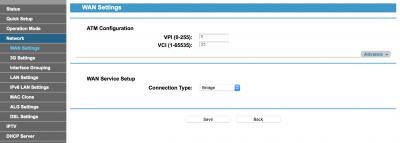
Delete the 8/35 interface and add a new interface with 0/35


Attached thumbnail(s)
Attached Image
blacktubi
post Nov 28 2017, 04:16 PM

-
Group Icon
Elite
8,401 posts

Joined: Jul 2008

QUOTE(pengembara @ Nov 28 2017, 03:27 PM)
Hi
Appreciate your help and advise on this.

I am a Maxis Home Fibre subscriber. As I am not very happy with their Technicolor wifi due to the number of access that my family has, I bought a TPL AC900 (Archer C20) .

With Maxis help I am able to configure the C20 and gain access to the Internet through connecting a RJ45 to the Technicolor which is acting as a bridge.

When I tried to plug the C20 directly to the TM fibre modem I am unable to get any connection to the Internet.

Is there some extra set-ups I need to do or at the telco side?

I noticed the only difference is the access point name.

Many thanks in advance.

rgds
*
You need to retain the Technicolor modem if you use Astro IPTV or the telephone. If you don't care about those then you can proceed with a direct connection.

You will need the PPPOE ID and Password from Maxis, I guess you can retrieve it from the Technicolor router.

Remember to put your Archer C20 on Maxis mode.
Jjuggler
post Nov 28 2017, 04:43 PM

Narcissistic Genius
******
Senior Member
1,341 posts

Joined: Dec 2016
QUOTE(huatty @ Nov 24 2017, 02:03 AM)
Finally, send my C1200 to refund.
Looking to buy C7v2 as replacement.

Any big brother using C7v2 here? mind to share the experience?
My main concern will be stability, Maybe will try to setup file sharing as well.

*i got very bad experience with C1200, auto reboot, hang, wifi lost connection.....hope C7 will be better.
*
C7v4 is your only option. I am an ex-user of C7v2 (i sold to my friend already). Currently, I am using c1200 provided by tm. I didn't face much problem with the c1200 loaded with AU firmware (previously using Malaysian firmware). I've been using this router for a month after speed upgrade to 100mbps, the router only reboots once only. I am a heavy user and total devices connected to the router is 14 including 2 wireless canon printers.

For your question, C7v2 has problem with 5ghz signal stability. Even my current c1200 outperforms C7v2 in terms of wireless connection, to be precisely, 5ghz signal, where my iphone 7 plus can stay connected to 5ghz while previously, my phone automatically shift to 2.4ghz and even that is not stable when I am at outside. fyi, i am staying in double storey house (20 X 70). I heard, C7v4 solves the problem of C7v1 to C7v3. Hope it is not a myth. And that is one of the reason why i sold my c7v2 to my friend.

This post has been edited by Jjuggler: Nov 28 2017, 04:45 PM
razkal
post Nov 28 2017, 04:52 PM

Casual
***
Junior Member
416 posts

Joined: Jul 2009
From: Penang mali


Any thought on TPLINK AC3150. How does it compares with ASUS AC68U? I find asus in on the expensive side. Tq.

249 Pages « < 18 19 20 21 22 > » Top
 

Change to:
| Lo-Fi Version
0.0266sec    0.51    6 queries    GZIP Disabled
Time is now: 2nd December 2025 - 02:05 PM