

sorry double posting
This post has been edited by PenzoilGuy: Jun 20 2017, 12:17 PM
Digi Infinite Fan Club [V2], Infinite 150 and Infinite 80
Digi Infinite Fan Club [V2], Infinite 150 and Infinite 80
|
|
 Jun 20 2017, 12:10 PM Jun 20 2017, 12:10 PM
Return to original view | Post
#1
|
 
Junior Member
192 posts Joined: Aug 2010 
|
sorry double posting
This post has been edited by PenzoilGuy: Jun 20 2017, 12:17 PM |
|
|
|
|
|
Jun 20 2017, 12:15 PM
Return to original view | Post
#2
|
|
Junior Member
192 posts Joined: Aug 2010
|
QUOTE(fruitie @ Jun 20 2017, 10:54 AM) As shared earlier, this is how it looks on mine. bro...do u update your software or does it come like that? mine was 21.302.01.01.418...is there any where i can get the update files?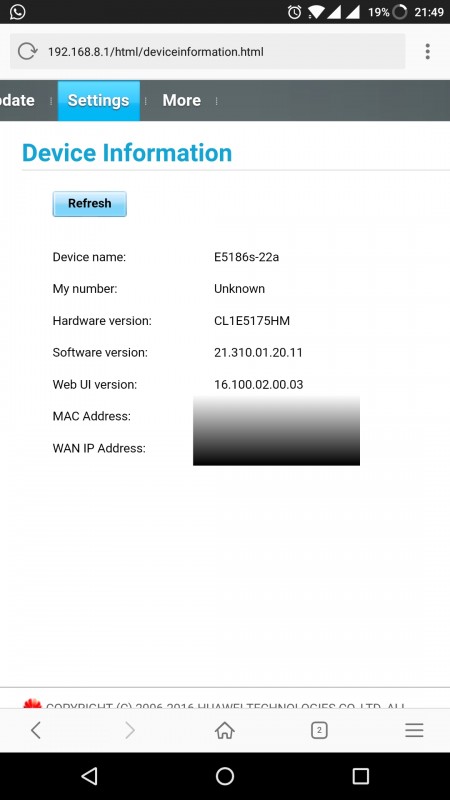  thanks. |
|
|
Jun 20 2017, 01:38 PM
Return to original view | Post
#3
|
|
Junior Member
192 posts Joined: Aug 2010
|
QUOTE(fruitie @ Jun 20 2017, 01:37 PM) I'm not bro. aha...sorry sis  No, it came like that. I didn't do any firmware update. Not Digi Infinite 150 right? ..didnt know that  |
|
|
Jun 20 2017, 01:40 PM
Return to original view | Post
#4
|
|
Junior Member
192 posts Joined: Aug 2010
|
QUOTE(fruitie @ Jun 20 2017, 01:37 PM) I'm not bro. so direct purchase from taobao?No, it came like that. I didn't do any firmware update. Not Digi Infinite 150 right? |
|
|
Jun 21 2017, 03:54 AM
Return to original view | Post
#5
|
|
Junior Member
192 posts Joined: Aug 2010
|
QUOTE(r-care @ Jun 20 2017, 05:21 PM) i dont have screenshot before . but here after flashed. took me 4-5 attempt. bro @r-care and @blacktubi how do u guys manage to view lots of information tabs? like until CA support?mine firmware just update to 21.310.01.20.11 like @fruitie screen shot..would like to have full details like urs..currently didn't sure my e5186s-22a does support CA aggregation support: yes/no. do mind sharing the flash firmware require to do that? Thanks in Advance guys. |
|
|
Jun 21 2017, 04:14 AM
Return to original view | Post
#6
|
|
Junior Member
192 posts Joined: Aug 2010
|
another question is...what does lighting colour represent on the "MODE" icon?
1. Red 2. Light Blue 3. Dark Blue This post has been edited by PenzoilGuy: Jun 21 2017, 04:19 AM |
|
|
|
|
|
Jun 21 2017, 10:02 AM
Return to original view | Post
#7
|
|
Junior Member
192 posts Joined: Aug 2010
|
 (Timedotcom Server) (Timedotcom Server) (Celcom Server) (Celcom Server) (Digi Server) (Digi Server)Newbies Reporting In, 150 Infinite Reporting In from Bandar Baru Bangi.Just completed my setup here with the latest firmware update  This post has been edited by PenzoilGuy: Jun 21 2017, 10:18 AM |
|
|
Jun 21 2017, 10:24 AM
Return to original view | Post
#8
|
|
Junior Member
192 posts Joined: Aug 2010
|
QUOTE(NinjaGaiden @ Jun 21 2017, 10:19 AM) Wowww.....guna modem apa ni? E5186s-22a from andrewshop |
|
|
Jun 21 2017, 11:33 AM
Return to original view | Post
#9
|
|
Junior Member
192 posts Joined: Aug 2010
|
QUOTE(fruitie @ Jun 21 2017, 10:25 AM) Oh you also updated your firmware. sis i just do online update...not reflash like @blacktubi and holy..basically same firmware like u "21.310.01.20.11"..planning to flash..but gonna try first for 1 week I'm still thinking if I should, will read more when I'm more free. For now it serves me well considering my room structure has no way to be exposed to outdoor so I'm contented with my speed around 50Mbps now. |
|
|
Jun 21 2017, 11:34 AM
Return to original view | Post
#10
|
|
Junior Member
192 posts Joined: Aug 2010
|
QUOTE(blacktubi @ Jun 21 2017, 10:31 AM) Cyan = LTE thanks bro...so cyan FTW!! Blue = 3G Green = 2G? Red = Booting/Error |
|
|
Jun 21 2017, 03:54 PM
Return to original view | Post
#11
|
|
Junior Member
192 posts Joined: Aug 2010
|
QUOTE(Dozz @ Jun 21 2017, 11:53 AM) how you upgrade the firmware? what version are you using now? I just update the firmware from the "Update" Tabs then press the "Online Update" section..and press update...previously mine from 21.302.01.00.56 then updated to 21.310.01.20.11 (latest update same as Fruitie)QUOTE(fruitie @ Jun 21 2017, 11:54 AM) Which online update have you done? I just update from the "Update" Tabs...using Online Update. I still didn't do the flash thingy like other sifu...Hmm. The thing is US bands, I'm not convinced. I will avoid. |
|
|
Jun 21 2017, 04:34 PM
Return to original view | Post
#12
|
|
Junior Member
192 posts Joined: Aug 2010
|
 (Timedotcom Server) (Timedotcom Server)this is current during peak hour/congested network for me...so nothing to shout about..50mbps is same as my home unifi surprise upgrade hope this will maintain or will be much better after the lte migration finish after raya in bangi area..  |
|
|
Jun 21 2017, 04:48 PM
Return to original view | Post
#13
|
|
Junior Member
192 posts Joined: Aug 2010
|
QUOTE(r-care @ Jun 21 2017, 04:33 PM) your version got auto & 4g only? I assumed u talking under Setting --> Network Setting --> Preferred Mode:Mine have:- 1. 4G preferred 2. 2G Only 3. 3G Only 4. 4G Only |
|
|
|
|
|
Jun 21 2017, 04:50 PM
Return to original view | Post
#14
|
|
Junior Member
192 posts Joined: Aug 2010
|
QUOTE(fruitie @ Jun 21 2017, 04:38 PM) Just use Huawei Toolbox and you can select any selection you want. I stick to 4G only. have intention to do so "4G Only" but i want to use call option..so maybe if set 4g only while call my internet maybe disconnected. |
|
|
Jun 22 2017, 01:42 PM
Return to original view | Post
#15
|
|
Junior Member
192 posts Joined: Aug 2010
|
QUOTE(KaizokuLuffy @ Jun 22 2017, 09:06 AM) Do you mean direct update as show in the picture looks like ? im planning to do so, but scare cant on9 after update yep just like that. |
|
|
Jun 22 2017, 01:44 PM
Return to original view | Post
#16
|
|
Junior Member
192 posts Joined: Aug 2010
|
QUOTE(Turnip @ Jun 22 2017, 09:33 AM) what seksyen is that? Seksyen 13 Suntrackand does updating firmware increase performance?  slightly better ping and have option to turn off WPS PIN...which i really dislike people hack my router  This post has been edited by PenzoilGuy: Jun 22 2017, 01:47 PM |
|
|
Jun 24 2017, 05:55 PM
Return to original view | Post
#17
|
|
Junior Member
192 posts Joined: Aug 2010
|
guy just curious...is there option to change external antenna in the e5186 menu? or is it automatic choose external antenna when connected?
|
|
|
Jun 25 2017, 02:29 AM
Return to original view | Post
#18
|
|
Junior Member
192 posts Joined: Aug 2010
|
QUOTE(pmg @ Jun 24 2017, 06:25 PM) For a Huawei LTE modem, there could be a setting as shown below. This is for B310 though, not E5186 thanks @pmg QUOTE(blacktubi @ Jun 24 2017, 06:46 PM) This setting is not available on E5186. It is available on B593 though. no worries just asking...thanks @blacktubiThere's no easy way to know whether the E5186 is using the external antenna apart from monitoring the RSRP but that could be small variance as well. |
|
Topic ClosedOptions
|
| Change to: |  0.0728sec 0.0728sec
 0.37 0.37
 7 queries 7 queries
 GZIP Disabled GZIP Disabled
Time is now: 14th December 2025 - 06:44 AM |
 Quote
Quote