

Hey guys, im new in 5186S-22a. Got one noob question, what is the purpose to select API control setting in 5186s toolbox ? I had tried select api/dhcp/settings, but it show error.
Digi Infinite Fan Club [V2], Infinite 150 and Infinite 80
Digi Infinite Fan Club [V2], Infinite 150 and Infinite 80
|
|
 Jun 1 2017, 11:52 AM Jun 1 2017, 11:52 AM
Return to original view | Post
#1
|
 
Junior Member
69 posts Joined: Jun 2017 
|
Hey guys, im new in 5186S-22a. Got one noob question, what is the purpose to select API control setting in 5186s toolbox ? I had tried select api/dhcp/settings, but it show error.
|
|
|
|
|
|
Jun 1 2017, 12:10 PM
Return to original view | Post
#2
|
|
Junior Member
69 posts Joined: Jun 2017
|
QUOTE(HayateAyakasi8 @ Jun 1 2017, 12:02 PM) What error ? Last night i tried select api/dchp/settings, then it show all those commands, the error pop out right after i click write to API. Any step do i missed ? By the way, should i update the firmware as well ?That api/dchp/settings is used to change DNS server  |
|
|
Jun 2 2017, 12:01 AM
Return to original view | Post
#3
|
|
Junior Member
69 posts Joined: Jun 2017
|
i having issue to surfing the website, it keep loading or even the site can’t be reached. However, i able to watch youtube. Anyone facing the same situation like me in Melaka area ? Planning to cut my 1mbs shitmyx, but it seems like Digi is unstable as TM...sigh...
|
|
|
Jun 5 2017, 09:14 AM
Return to original view | Post
#4
|
|
Junior Member
69 posts Joined: Jun 2017
|
Does upgrade the Huawei 5186s-22a firmware will improve the speed ? My area support LTE-A, set CA B3+B7 LTE only, but the speed is not as good as expected. Average 8mbs- 20mbs only.
|
|
|
Jun 5 2017, 11:27 AM
Return to original view | Post
#5
|
|
Junior Member
69 posts Joined: Jun 2017
|
QUOTE(joeboto @ Jun 5 2017, 10:52 AM) how do you check which area using which signal (B3 B7 stuff)? I called cs, he said my area indoor 4G full bar, outdoor LTE-A 3 bar. And i learn to tweak the LTE band from this forum  |
|
|
Jun 6 2017, 09:51 AM
Return to original view | Post
#6
|
|
Junior Member
69 posts Joined: Jun 2017
|
QUOTE(joeboto @ Jun 5 2017, 04:56 PM) ohh! which thread? i also wanna learn that. Please refer to the first page  |
|
|
|
|
|
Jun 7 2017, 10:49 AM
Return to original view | Post
#7
|
|
Junior Member
69 posts Joined: Jun 2017
|
QUOTE(ajoi57 @ Jun 7 2017, 05:17 AM) speed cap same with i80 is a joke from digi Wondering if VPN can bypass the speed limit ? What if using a 4G router enable wifi, consider as hotspot as well ? |
|
|
Jun 7 2017, 04:37 PM
Return to original view | Post
#8
|
|
Junior Member
69 posts Joined: Jun 2017
|
QUOTE(kaatrea @ Jun 7 2017, 04:25 PM) I am using it. Same speed. No cap experienced. But then the max speed I get is only 10MBps even though my area is supposedly LTE-A covered area. Based on what I read in the forum here, I am assuming network congested. I having this kind of weird issue. Normal time i can get download 20-30mbps. But when night time my connection is suck. Check the speedtest , i can barely get 6-10mbps, with high ping and low upload speed or some time zero upload  Tower faulty ? Is totally unusable during night time. Tower faulty ? Is totally unusable during night time. |
|
|
Jun 7 2017, 04:52 PM
Return to original view | Post
#9
|
|
Junior Member
69 posts Joined: Jun 2017
|
QUOTE(kaatrea @ Jun 7 2017, 04:39 PM) Yeah. Night time is terrible. Haihz. But in other areas where it's not my home I can get really good speed (50-70MBps) I dont think is network congestion, it must be something happen to the tower or something else. Previously is super fast and smooth. But now, i cant even wechat or whatsapp. I miss my slowmyx 1mbps  |
|
|
Jun 8 2017, 10:33 AM
Return to original view | Post
#10
|
|
Junior Member
69 posts Joined: Jun 2017
|
QUOTE(mrbs84 @ Jun 7 2017, 10:40 PM) I don't have any experience with other modem, but i use huawei e5186s-22a, connection more better and stable than phone hotspot. Only complaint is wifi signal from that modem is rubbish lol. Cheap adsl dlink wifi range is more better than the huawei. Indeed ! The wifi coverage is a crap, sometime my pc cant even detect the AP. This router is overrated. |
|
|
Jun 8 2017, 10:59 AM
Return to original view | Post
#11
|
|
Junior Member
69 posts Joined: Jun 2017
|
QUOTE(Dozz @ Jun 8 2017, 10:56 AM) I bought these from taobao. Really? my 5186s indoor signal 3 bar, avr 8-20mbps. Will it boost the speed if i use this antenna ?Speed has been improved a lot after using this combo set. External antenna is working and really boost up the speed. Normally i only get 30Mbps (iPhone 7 Plus) but now i got 60Mbps and above! Amazing! [attachmentid=8882216] [attachmentid=8882217] |
|
|
Jun 14 2017, 10:14 AM
Return to original view | Post
#12
|
|
Junior Member
69 posts Joined: Jun 2017
|
Hi Sifu,
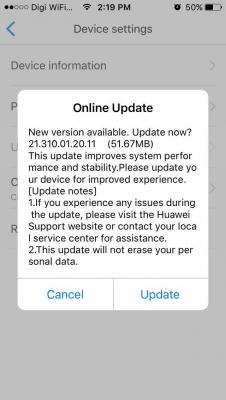
My 5186s router show an firmware update notification. Should I update or ignore it ? |
|
|
Jun 19 2017, 03:06 PM
Return to original view | Post
#13
|
|
Junior Member
69 posts Joined: Jun 2017
|
Should i update this firmware ? Any advise ?
Attached thumbnail(s) 
|
|
|
|
|
|
Jun 19 2017, 03:35 PM
Return to original view | Post
#14
|
|
Junior Member
69 posts Joined: Jun 2017
|
QUOTE(ajoi57 @ Jun 19 2017, 03:28 PM) nope, one must not simply update the firmware. What is your current firmware version ? some said will get improvement in term of speed etc. Mine firmware version perhaps older than yours.i also get the popup, but terus disable it. sked after update then kaput |
|
|
Jun 22 2017, 09:06 AM
Return to original view | Post
#15
|
|
Junior Member
69 posts Joined: Jun 2017
|
QUOTE(PenzoilGuy @ Jun 21 2017, 11:33 AM) sis i just do online update...not reflash like @blacktubi and holy..basically same firmware like u "21.310.01.20.11"..planning to flash..but gonna try first for 1 week Do you mean direct update as show in the picture looks like ? im planning to do so, but scare cant on9 after updateAttached thumbnail(s) 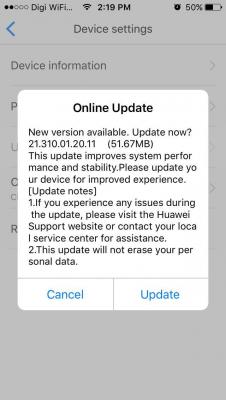
|
|
|
Jun 22 2017, 01:55 PM
Return to original view | Post
#16
|
|
Junior Member
69 posts Joined: Jun 2017
|
QUOTE(PenzoilGuy @ Jun 22 2017, 01:42 PM) yep just like that. Thanks , gonna update tonight  |
|
|
Jun 24 2017, 10:02 AM
Return to original view | Post
#17
|
|
Junior Member
69 posts Joined: Jun 2017
|
LOL, i'm not a hardcore streaming user, but i'm glad to replace my shitmyx to DIGI. although facing network congestion or high ping sometime, but is much much much better than my previous 1mbs shitmyx (which waiting speed upgrade forever
  ). Imaging you driving an old model Kancil 660cc last time and change to drive a Honda civic 1.5 turbo (happy yelling ). Imaging you driving an old model Kancil 660cc last time and change to drive a Honda civic 1.5 turbo (happy yelling  ). Duno how I survive for many years with that Shitmyx which make me want bang my head to the wall most of the time . Hopefully other telco can provide unlimited internet in order reduce the network congestion. ). Duno how I survive for many years with that Shitmyx which make me want bang my head to the wall most of the time . Hopefully other telco can provide unlimited internet in order reduce the network congestion. |
|
|
Jun 30 2017, 10:41 AM
Return to original view | Post
#18
|
|
Junior Member
69 posts Joined: Jun 2017
|
on IF150, facing heavy network congestion 10pm-12am everyday at my living area. Totally not usable even wechating with my darling. Shxt loh....
|
|
|
Jun 30 2017, 11:04 AM
Return to original view | Post
#19
|
|
Junior Member
69 posts Joined: Jun 2017
|
QUOTE(prosibu @ Jun 30 2017, 10:54 AM) klang valley or other place? Melaka areamind share location?  |
|
|
Jun 30 2017, 11:07 AM
Return to original view | Post
#20
|
|
Junior Member
69 posts Joined: Jun 2017
|
QUOTE(WanR @ Jun 30 2017, 10:57 AM) if 4G unusable, switch to 3G mode.. 10mbps is ok rather than cant be used at all.. but if still cant resolve your problem, report to digi. Try already, same slow, get about 1-3mbs speed test, but not usable when facebook or wechat |
|
Topic ClosedOptions
|
| Change to: |  0.1357sec 0.1357sec
 0.65 0.65
 7 queries 7 queries
 GZIP Disabled GZIP Disabled
Time is now: 5th December 2025 - 12:30 PM |
 Quote
Quote