

QUOTE(HolySatan @ Jun 3 2017, 03:12 PM)
no volte for e5186..

Yes, it's not working with router yet. Digi only released to few phone models now. For now I guess you guys can forget to use VoLTE with Digi on this router.Digi Infinite Fan Club [V2], Infinite 150 and Infinite 80
|
|
 Jun 3 2017, 03:23 PM Jun 3 2017, 03:23 PM
|
 
Staff
72,808 posts Joined: Sep 2005 From: KUL  
|
QUOTE(HolySatan @ Jun 3 2017, 03:12 PM) no volte for e5186.. Yes, it's not working with router yet. Digi only released to few phone models now. For now I guess you guys can forget to use VoLTE with Digi on this router. |
|
|
|
|
|
Jun 3 2017, 03:24 PM
|
 
Senior Member
4,454 posts Joined: Apr 2006
|
QUOTE(Alidavidsun @ Jun 3 2017, 02:52 PM) Thanks. Sorry if off topic but may I know what's port forwarding? I need to change some settings before using instead of just turn on the modem and connect it with the cctv. I plan to use xiao fang cameras. 5 of them. If it's xiaomi cameras then no problem to use with digiI'd recommend to get the mijia 720p 360 camera or the mijia 1080p Both are around <rm130 The feature on that xiaofang is incomplete, no specific area for motion detection and still no specific schedule time for motion alerts. |
|
|
Jun 3 2017, 03:26 PM
|

Senior Member
1,116 posts Joined: Dec 2009
|
QUOTE(fruitie @ Jun 3 2017, 03:23 PM) Yes, it's not working with router yet. Digi only released to few phone models now. For now I guess you guys can forget to use VoLTE with Digi on this router. but e5186 dapat digi sms volte   This post has been edited by HolySatan: Jun 3 2017, 03:29 PM |
|
|
Jun 3 2017, 03:59 PM
|

Junior Member
80 posts Joined: Nov 2008
|
QUOTE(blacktubi @ Jun 3 2017, 01:57 PM) Just received my Huawei E5186s-22a. CA supported, phone works and working IPV6. please give tutorial... i pon baru sampai modem...Will provide a firmware update guide if anyone is interested.  Still trying to get VoLTE to work. Currently, the modem will drop back to 3G when I use the phone |
|
|
Jun 3 2017, 04:08 PM
Show posts by this member only | IPv6 | Post
#725
|
 
Elite
8,409 posts Joined: Jul 2008 
|
My findings on the E5186 firmware
Updating the firmware on the E5186 is a very complicated process.  The WebUI and the firmware is 2 different component. If you just want a new WebUI, it is a very easy upgrade. A complete upgrade of the firmware is quite complicated and it involves a bit of luck as well.  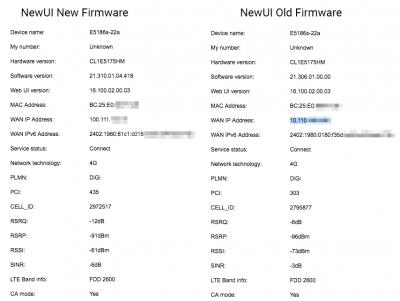
My device comes with 21.306.01.00.00 originally and the 16.100.02.00.03 WebUI. Updating to the new UI display more information such as signal stats, band and CA status. You do not need a third party tool to check signal on the new UI. As for what is the difference in the new firmware? Stability and performance improvements. Edit: I will produce a guide soon when I am free. It is a very complicated process. This post has been edited by blacktubi: Jun 3 2017, 04:08 PM |
|
|
Jun 3 2017, 04:20 PM
|
|
Junior Member
80 posts Joined: Nov 2008
|
please give some guide...
|
|
|
|
|
|
Jun 3 2017, 06:39 PM
|
|
Staff
72,808 posts Joined: Sep 2005 From: KUL
|
QUOTE(HolySatan @ Jun 3 2017, 03:26 PM) but e5186 dapat digi sms volte Oh well, I got the SMS for ny OP3T but it cannot use on my phone.QUOTE(blacktubi @ Jun 3 2017, 04:08 PM) My findings on the E5186 firmware If complicated then I'm not going to do anything.Updating the firmware on the E5186 is a very complicated process. The WebUI and the firmware is 2 different component. If you just want a new WebUI, it is a very easy upgrade. A complete upgrade of the firmware is quite complicated and it involves a bit of luck as well.
My device comes with 21.306.01.00.00 originally and the 16.100.02.00.03 WebUI. Updating to the new UI display more information such as signal stats, band and CA status. You do not need a third party tool to check signal on the new UI. As for what is the difference in the new firmware? Stability and performance improvements. Edit: I will produce a guide soon when I am free. It is a very complicated process. I am interested on the WebUI. |
|
|
Jun 3 2017, 08:55 PM
|

Junior Member
236 posts Joined: Jun 2008 
|
QUOTE(cheesey @ Jun 3 2017, 01:17 PM) Hi is dota 2 good with digi? So far i tried YES and it very stable but too expencive. Have same question as this guyAnyine try playing dota yet with digi 150 |
|
|
Jun 3 2017, 09:13 PM
|

Senior Member
530 posts Joined: Jan 2010 From: South Lehgoland 
|
QUOTE(Lelouch @ Jun 3 2017, 08:55 PM) Have same question as this guy my brother play dota using i150.Anyine try playing dota yet with digi 150 if no one playing video or heavy surfing, usually no problem. that's why i want to set QoS for each user, but still dunno how to do it yet  but it's depend on your place signal too, if got high ping, sure cannot play also. my usual normal ping is 30-50, so no problem la. |
|
|
Jun 3 2017, 09:23 PM
|

Senior Member
2,149 posts Joined: Aug 2005 From: Malaysia
|
QUOTE(blacktubi @ Jun 3 2017, 04:08 PM) My findings on the E5186 firmware I should be receiving the same modem by next week. Looking forward for your guide to update and configuration soon.Updating the firmware on the E5186 is a very complicated process. The WebUI and the firmware is 2 different component. If you just want a new WebUI, it is a very easy upgrade. A complete upgrade of the firmware is quite complicated and it involves a bit of luck as well.
My device comes with 21.306.01.00.00 originally and the 16.100.02.00.03 WebUI. Updating to the new UI display more information such as signal stats, band and CA status. You do not need a third party tool to check signal on the new UI. As for what is the difference in the new firmware? Stability and performance improvements. Edit: I will produce a guide soon when I am free. It is a very complicated process. Thank you very much! |
|
|
Jun 3 2017, 09:59 PM
|

Junior Member
133 posts Joined: Jul 2014
|
QUOTE(blacktubi @ Jun 3 2017, 01:57 PM) Just received my Huawei E5186s-22a. CA supported, phone works and working IPV6. using multicast tools method?Will provide a firmware update guide if anyone is interested. Still trying to get VoLTE to work. Currently, the modem will drop back to 3G when I use the phone |
|
|
Jun 3 2017, 10:16 PM
|

Junior Member
521 posts Joined: Jan 2003
|
QUOTE(ajoi57 @ Jun 3 2017, 09:13 PM) my brother play dota using i150. Is prepaid and postpain i150 same? Because i tested with prepaid its fine. But it will get so sudden high ping for few mins and come back low ping (randomly)if no one playing video or heavy surfing, usually no problem. that's why i want to set QoS for each user, but still dunno how to do it yet but it's depend on your place signal too, if got high ping, sure cannot play also. my usual normal ping is 30-50, so no problem la. |
|
|
Jun 3 2017, 10:27 PM
|

Senior Member
961 posts Joined: Jan 2016
|
 fullbar signal LTE, but download speed worst than streamyx 1mb  This post has been edited by Ebony & Ivory: Jun 3 2017, 10:29 PM |
|
|
|
|
|
Jun 3 2017, 10:31 PM
|
|
Junior Member
236 posts Joined: Jun 2008
|
QUOTE(HolySatan @ May 19 2017, 09:17 PM) Router Modem 4G Buy any modem in the list should work right? I order a prepaid simcard to test speed with my xiaomi rn2D-Link DWR-921 (Internet Only) - cat4 150mbps - 2.4ghz wifi TP-Link MR6400 (Internet Only) - cat4 150mbps - 2.4ghz wifi TP-Link MR200 (Internet Only) - cat4 150mbps - 2.4ghz & 5ghz wifi Huawei B310 (call+Internet) - cat4 150mbps - 32 user - 2.4ghz wifi Huawei B315 (call+Internet) - cat4 150mbps - 32 user - 2.4ghz wifi Huawei B593 (Internet Only) - cat4 150mbps - 32 user - 2.4ghz wifi Huawei E5172 (Internet Only) - cat4 150mbps - 32 user - 2.4ghz wifi Huawei E5180 (Internet Only) - cat4 150mbps - 32 user - 2.4ghz wifi Huawei E5186 (call+Internet) - cat6 300mbps - 64 user - 2.4ghz & 5ghz wifi Alcatel EE60 - CAT4 150mbps - Battery 5150mAh Huawei E5372 - CAT4 150mbps - Battery 1780mAh Huawei E5377 - CAT4 150mbps - Battery 1500mAh Huawei E5573 - CAT4 150mbps - Battery 1500mAh Huawei E5577 - CAT4 150mbps - Battery 3000mAh Huawei E5770 - CAT4 150mbps - Battery 5200mAh | 1 LAN port Huawei E5776 - CAT4 150mbps - Battery 3000mAh Huawei E5786 - CAT6 300mbps - Battery 3000mAh Huawei E5787 - CAT6 300mbps - Battery 3000mAh | touch screen USB Modem Alcatel L800 - CAT3 100mbps Huawei E3372 - CAT4 150mbps Huawei E3276 - CAT4 150mbps Huawei E8372 - CAT4 150mbps - Wifi Hotspot If speed is good will look for a modem |
|
|
Jun 3 2017, 10:33 PM
|
|
Junior Member
236 posts Joined: Jun 2008
|
QUOTE(Ebony & Ivory @ Jun 3 2017, 10:27 PM) fullbar signal LTE, but download speed worst than streamyx 1mb So i can blacklisted it |
|
|
Jun 3 2017, 10:33 PM
|
|
Staff
72,808 posts Joined: Sep 2005 From: KUL
|
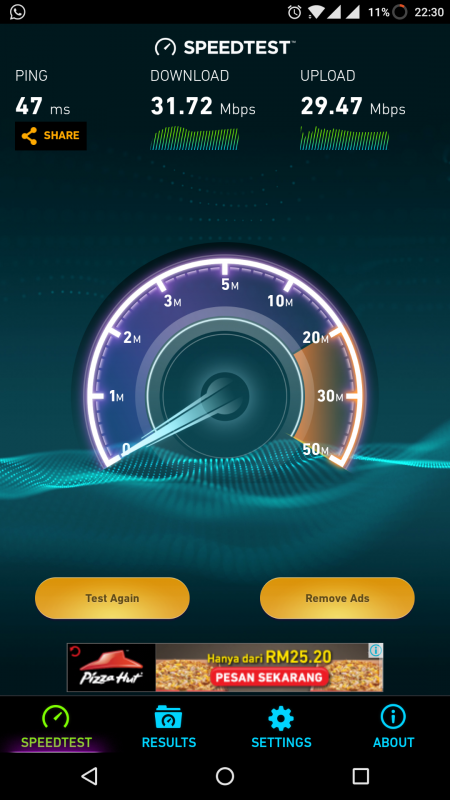
OK la not too bad the speed. Android box is streaming as well.
 |
|
|
Jun 3 2017, 10:38 PM
|
|
Elite
8,409 posts Joined: Jul 2008
|
You can refer on this article to upgrade to the latest WebUI. Most of them is accurate but you can skip the firewall part. I will prepare a more detailed guide when I am free.
https://blog.hqcodeshop.fi/archives/289-Hua...grade-Tool.html I used a firmware from a Latvian carrier as their interface is the most detailed, latest as well. It will change the logo to the lmt logo bust rest assured, just visual changes, nothing is affected. Useful tools and firmware for Huawei E5186 in my shared mega drive: https://mega.nz/#F!wvo3AAQL!DFTXF84VZCJ6CzuXbBD4Zg fruitie Dozz tanjiunnya |
|
|
Jun 3 2017, 10:40 PM
|
|
Senior Member
961 posts Joined: Jan 2016
|
QUOTE(Lelouch @ Jun 3 2017, 10:33 PM) What modem are you using not modem issue, try mifi and phone also same. So i can blacklisted it seriously Digi network has become quite congested due to too many "infinite" user lol  |
|
|
Jun 3 2017, 10:42 PM
|
|
Senior Member
530 posts Joined: Jan 2010 From: South Lehgoland
|
QUOTE(cheesey @ Jun 3 2017, 10:16 PM) Is prepaid and postpain i150 same? Because i tested with prepaid its fine. But it will get so sudden high ping for few mins and come back low ping (randomly) then your connection is not stable enough  need to find place with stronger signal reception |
|
|
Jun 3 2017, 10:44 PM
|
|
Staff
72,808 posts Joined: Sep 2005 From: KUL
|
QUOTE(blacktubi @ Jun 3 2017, 10:38 PM) You can refer on this article to upgrade to the latest WebUI. Most of them is accurate but you can skip the firewall part. I will prepare a more detailed guide when I am free. I will wait for your guide. I checked out the link, it doesn't seem to be so straightforward.https://blog.hqcodeshop.fi/archives/289-Hua...grade-Tool.html I used a firmware from a Latvian carrier as their interface is the most detailed, latest as well. It will change the logo to the lmt logo bust rest assured, just visual changes, nothing is affected. Useful tools and firmware for Huawei E5186 in my shared mega drive: https://mega.nz/#F!wvo3AAQL!DFTXF84VZCJ6CzuXbBD4Zg fruitie Dozz tanjiunnya |
|
Topic ClosedOptions
|
| Change to: |  0.0278sec 0.0278sec
 0.36 0.36
 6 queries 6 queries
 GZIP Disabled GZIP Disabled
Time is now: 8th December 2025 - 01:41 AM |
 Quote
Quote