

Location : SS15, Subang Jaya, Selangor.
Attached thumbnail(s)
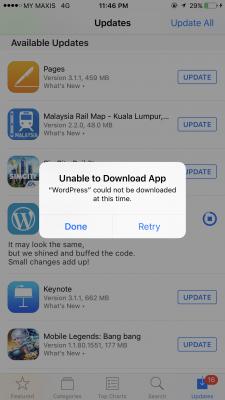
Network Issue
|
|
 May 10 2017, 11:47 PM, updated 9y ago May 10 2017, 11:47 PM, updated 9y ago
Show posts by this member only | Post
#1
|
 
Senior Member
1,368 posts Joined: Aug 2010 
|
Why using Maxis Data update AppStore will fail ?
Location : SS15, Subang Jaya, Selangor. Attached thumbnail(s)
|
|
|
|
|
|
May 11 2017, 07:50 AM
Show posts by this member only | Post
#2
|

Senior Member
1,055 posts Joined: Oct 2016 From: HKG tsai
|
QUOTE(Raymond T. @ May 10 2017, 11:47 PM) Why using Maxis Data update AppStore will fail ? Have you tried to reset your App Store? It works for me most of the time. If that fails, Do a RAM reset. If you not sure how to reset let me know.Location : SS15, Subang Jaya, Selangor.  This post has been edited by HippyTony: May 11 2017, 07:59 AM |
|
|
May 11 2017, 08:55 AM
Show posts by this member only | Post
#3
|
|
Senior Member
1,055 posts Joined: Oct 2016 From: HKG tsai
|
QUOTE(HippyTony @ May 11 2017, 07:50 AM) Have you tried to reset your App Store? It works for me most of the time. If that fails, Do a RAM reset. If you not sure how to reset let me know. If the above fails, use your neighbour, friends or relatives wifi to update. Usually a few days later everything will be back to normal. Apple CS unable to provide a reason why they have this issue. |
|
|
May 11 2017, 02:05 PM
Show posts by this member only | Post
#4
|

Senior Member
3,076 posts Joined: Jan 2008 
|
QUOTE(HippyTony @ May 11 2017, 07:50 AM) Have you tried to reset your App Store? It works for me most of the time. If that fails, Do a RAM reset. If you not sure how to reset let me know. I have one stubborn like that.Can't update from Unifi and Maxis. How to do a RAM reset? |
|
|
May 11 2017, 03:52 PM
Show posts by this member only | Post
#5
|
|
Senior Member
1,055 posts Joined: Oct 2016 From: HKG tsai
|
QUOTE(cucubud @ May 11 2017, 02:05 PM) I have one stubborn like that. I recommend you try App Store reset first. Can't update from Unifi and Maxis. How to do a RAM reset? Open your App Store as you usually do. Tap 10 times at the bottom of the "task" bar on one these (Featured, Catergories, Top Charts....etc). After 10 times the app screen will sort of blink. Try updating again. If the above doesn't solve it then do a RAM reset (aka force restart) Press & hold the home button & on/off simultaneously UNTIL the Apple logo reappear.* *When you press and hold the buttons the screen will go blank, at this stage do NOT release any of the buttons. Just keep holding until the Apple logo appears. Sometimes the RAM reset may not solve the problem immediately but from my experiences 2 or 3 days later everything is ok again. This post has been edited by HippyTony: May 11 2017, 03:56 PM |
|
|
May 11 2017, 04:18 PM
Show posts by this member only | Post
#6
|
|
Senior Member
3,076 posts Joined: Jan 2008
|
QUOTE(HippyTony @ May 11 2017, 03:52 PM) I recommend you try App Store reset first. Thanks for the guide.Open your App Store as you usually do. Tap 10 times at the bottom of the "task" bar on one these (Featured, Catergories, Top Charts....etc). After 10 times the app screen will sort of blink. Try updating again. If the above doesn't solve it then do a RAM reset (aka force restart) Press & hold the home button & on/off simultaneously UNTIL the Apple logo reappear.* *When you press and hold the buttons the screen will go blank, at this stage do NOT release any of the buttons. Just keep holding until the Apple logo appears. Sometimes the RAM reset may not solve the problem immediately but from my experiences 2 or 3 days later everything is ok again. Tap 10 times at the bottom of the "task" bar on one these (Featured, Catergories, Top Charts....etc) does not work. Restart the iphone works.  |
|
|
May 11 2017, 05:12 PM
Show posts by this member only | Post
#7
|
|
Senior Member
1,055 posts Joined: Oct 2016 From: HKG tsai
|
QUOTE(cucubud @ May 11 2017, 04:18 PM) Thanks for the guide. 👍Tap 10 times at the bottom of the "task" bar on one these (Featured, Catergories, Top Charts....etc) does not work. Restart the iphone works. |
| Change to: |  0.0295sec 0.0295sec
 0.36 0.36
 6 queries 6 queries
 GZIP Disabled GZIP Disabled
Time is now: 7th December 2025 - 11:42 AM |
 Quote
Quote