FAQ
1. Will there be additional charges when paying with CC upon preorder collection?
» Click to show Spoiler - click again to hide... «
QUOTE(benson92 @ Apr 26 2017, 10:11 PM)
No extra charge when using cc, insist not to pay even the staff request
2. Is there any other official Samsung promotions other than preorder?
» Click to show Spoiler - click again to hide... «
QUOTE(Max2006 @ Apr 26 2017, 11:57 PM)
Hi TS, please add the following info into the first page for the potential buyers' convenience. Thank you.
1. Samsung Galaxy S8 & S8+ media conference will be held on 4th May. Venue is unknown at this moment, but most likely Sunway Pyramid/Midvalley/KLCC.
2. Roadshow (early birds promotion)
http://www.samsung.com/my/offer/s8-s8plus-roadshows/3. Trade-up campaign
http://www.samsung.com/my/offer/s8-s8plus-tradeup/Not sure why this time KLCC is excluded from the roadshow. It's a bummer since KLCC is much easier for access.
3. What is Samsung's response to the red tint issues?
» Click to show Spoiler - click again to hide... «
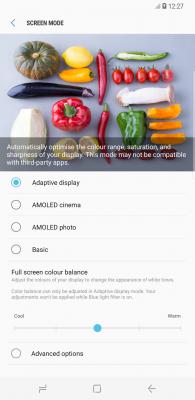
In a swift move seen to quell doubts over its latest smartphone quality, Samsung Electronics confirmed Friday that it will be upgrading the Galaxy S8 software criticized by some for having red-tinted screens.
“Because there are some complaints about the red-tinted screens, we decided to upgrade the software next week for all Galaxy S8 clients,” a Samsung spokesperson told The Korea Herald.
The tech giant sent an announcement to all of its Samsung Service Centers, saying, “There will be an additional update to make color revisions more minutely at the end of April
The latest measure came after Samsung’s new flagship smartphone Galaxy S8 faced complaints that the display panels have a reddish tint. Some customers who preordered the Galaxy S8 have written via online communities that their new phones have a reddish screen that did not improve even after adjusting the red color to the lowest setting.
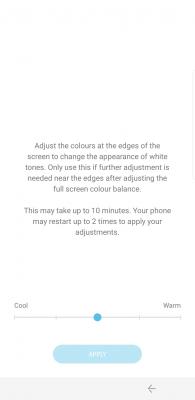
The upgrade next week is to expand the color range so that users can make the red color even lower.
Samsung still downplayed the issue, saying, “We will upgrade the software because of some dissatisfied customers although there is no problem in the phone itself.”
Industry watchers said although Samsung may shun it as a non-issue, the red tint may come from a software glitch.
“If clients feel uncomfortable about their phones, they are usually right. It seems there was a problem in the software in setting the color balance,” said a professor at Seoul National University, who declined to be named.
“Still, the problem is expected to be solved with the software upgrade since the problem does not appear to come from hardware,” he added.
On Friday, Galaxy S8 and Galaxy S8 Plus were officially launched in Korea, the US and Canada, 20 days after they were unveiled in New York on Mar. 30. They will go on sale in 50 nations including Europe, Singapore and Hong Kong a week later. They will also be available in 120 nations including the world’s largest smartphone market, China in May.
In Korea, preorder of Galaxy S8 during Apr. 7 to 17 reached around 1 million units, more than five-fold jump from the preorder of its predecessor Galaxy S7.
“The red-tinted display issue does not seem to significantly affect sales of Galaxy S8. The sales of the new handset is expected to reach 500 million units this year to outnumber the figure of Galaxy S7,” said Noh Geun-chang, an analyst at HMC Investment Securities.
By Shin Ji-hye (shinjh@heraldcorp.com)
http://m.koreaherald.com/view.php?ud=201704210002574. After Samsung's latest patch is there a way to remap the Bixby Button?
» Click to show Spoiler - click again to hide... «
Samsung’s somewhat half-baked Bixby assistant, along with the dedicated hardware button devoted to launching it, is one of the few gripes to be had about the otherwise stellar Galaxy S8. Fortunately, a new free utility called BixRemap from developer Dave Bennett (via Phandroid) seems to fix that problem by allowing users to remap the Bixby button to launch any other app. For example, you can have the button trigger Google’s far more useful Assistant instead.
Bennett notes that the app was cobbled together in “20 minutes,” and is meant to serve more as a proof of concept in its current stage, but it does more or less work. There are a couple of caveats to the hack, however. The biggest is that the entire thing is a bit sloppy, with the remapped button still launching Bixby first before then routing you to your desired app. Additionally, BixRemap needs access to usage tracking permissions to function, which is a fairly large amount of data that you’re giving the app. (It’s likely that any Bixby remapping app would need similar access.) Lastly, BixRemap puts a persistent notification in the notification tray when active, although the app does seem to still work if you disable the notification manually
Still, for any Galaxy S8 owners who would prefer to get more utility out of the extra hardware button and are frustrated by Samsung’s firmware update blocking earlier Bixby hacks, BixRemap could serve as some form of relief, even if it’s execution is still a bit sloppy.
But really, at the end of the day it’s frustrating that Samsung is forcing users to go to these lengths at all instead of just allowing them to use their devices the way that they’d like without resorting to weird hacks. But given that the company would like to encourage users to use Bixby as much as possible, it seems unlikely that that policy will change anytime soon.
http://www.theverge.com/2017/4/24/15405790...xremap-hack-app5. Where and when can we physically use and see the devices?
» Click to show Spoiler - click again to hide... «
Official Samsung Galaxy S8 launch is 5th May in Malaysia, you can go to any Samsung Experience Store now!
6. How do I transfer data from old phone to new phone?
» Click to show Spoiler - click again to hide... «
QUOTE(xDragonZ @ Apr 30 2017, 07:02 PM)
Samsung store whatsapp this
» Click to show Spoiler - click again to hide... «
*Dear valued S8/ S8+ Pre-order Customers,*
Good day.
This is a gently reminder from **
Please be reminded that the pre-order collection date will start from *_4th May 2017 to 7th May 2017_*
Meanwhile, we are pleased to remind you to bring the *3 documents* below upon the Pre-Order collection;
*1) Samsung Malaysia Galaxy Pre-Order Confirmation email* #print out
*2) Ipay 88 e-receipt* #print out
*3) Identification Card@IC / Passport*
Before you come to collect your device, we would like to advise you to backup your old data first.
You may follow the steps below to backup your data;
*_How to Transfer your phone previous Data to your Samsung Galaxy S8/S8+_*
Download Smart Switch from
*Play Store* For android Device
*Galaxy Apps* For the Samsung Device
*Direct Link Mirror*
http://www.apkmirror.com/apk/samsung-elect...d-apk-download/1) *Samsung Galaxy to S8/S8+* with USB Connector :
https://youtu.be/NaU2WHqYzTc2) *Other Android to S8/S8+* with wifi direct :
https://youtu.be/P-ZVqW9KhFg3) *IOS to S8/S8+* with USB Connector :
https://youtu.be/CSLMUgf7vq04) *IOS to S8/S8+* with icloud :
https://youtu.be/W4gDi2sWg_w5) *Backup to SD Card or USB Pendrive* Android only :
https://youtu.be/FSxSMO_QABQ*How to Backup Whatsapp before transfer to new Samsung Galaxy S8/S8+ _Android only_*
https://youtu.be/XnqnxKL60vcThank you.
Regards,
*Samsung Experience Store*
**

7. Where are the roadshow locations?
» Click to show Spoiler - click again to hide... «
Sunway Pyramid, Klang Valley
Queensbay Mall, Penang
Sutera Mall, Johor Bahru
(Thanks to andrewtst for pointing it out
8. Why does my pre-order unit only have 1 year of warranty?
» Click to show Spoiler - click again to hide... «
Wait for an SMS or email in 1-2 weeks that will confirm your 2 years warranty.
This post has been edited by powerangah: May 7 2017, 11:34 AM 

 May 5 2017, 11:44 PM, updated 9y ago


 Quote
Quote





 0.1017sec
 0.46
0.46
 7 queries
 GZIP Disabled