Outline ·
[ Standard ] ·
Linear+
Samsung Samsung Galaxy S8/S8+ discussion thread V4, S8 RM3299/S8+ RM3699
|
Nick Zelos
|
 May 6 2017, 03:04 PM May 6 2017, 03:04 PM
|
Getting Started


|
QUOTE(psyeo @ May 6 2017, 02:57 PM) I believe so, sometimes I'm very sensitive to light, if the lighting is not right I will get migraine. Will try it again soon. Really miss the finger print sensor of s7e, my s8's camera have smudges all over. Haha Iris scanner haha.. love it |
|
|
|
|
|
Nick Zelos
|
May 6 2017, 04:12 PM
|
Getting Started
|
QUOTE(SEP910 @ May 6 2017, 04:03 PM) No problem bro. Burn in or bateri kaboom. I dont care. At least i enjoy having this s8 I second this. |
|
|
|
|
|
Nick Zelos
|
May 6 2017, 08:14 PM
|
Getting Started
|
QUOTE(Ckxiaobao @ May 6 2017, 07:49 PM) I realized this while i was admiring the phone.. It slightly moved and the clock moved as well.. |
|
|
|
|
|
Nick Zelos
|
May 7 2017, 02:20 AM
|
Getting Started
|
QUOTE(silrave @ May 7 2017, 01:39 AM) seem like i am the only one facing the camera issue ? when u guys take pic , press screen to focus 1 place then take pic right ? i find out all the pic i take very bright need to press focus and adjust to brightness to very low only look normal for those photo is it normal? U using auto or pro mode? |
|
|
|
|
|
Nick Zelos
|
May 7 2017, 02:20 AM
|
Getting Started
|
QUOTE(silrave @ May 7 2017, 01:39 AM) seem like i am the only one facing the camera issue ? when u guys take pic , press screen to focus 1 place then take pic right ? i find out all the pic i take very bright need to press focus and adjust to brightness to very low only look normal for those photo is it normal? Edit: double post This post has been edited by Nick Zelos: May 7 2017, 02:21 AM |
|
|
|
|
|
Nick Zelos
|
May 7 2017, 12:45 PM
|
Getting Started
|
QUOTE(Andrewtst @ May 7 2017, 02:37 AM) My Impression of Samsung Galaxy S8+ after a day use. 
- Design - Design is very subjective but I believe this time not much will ever said this phone is ugly. S8/S8+ is the most beauty touch screen phone ever release. 2nd place I give to LG G6. I just can't stop staring at it. Simple beauty, elegance & gorgeous.
- Screen - No doubt it is the best screen I ever use in mobile. You just need to see yourself as word can't describe it. They is some users report have red tint issue, so it is advice proper check during purchase. How many unit got red tint issue I had no idea, as included 9 demo set I molest, I didn't seen any red tint issue in all 10 units from my eye.
- Camera - The front and rear camera is very great and nothing much to complain about. Simply awesome. The rear camera for me is far better than iPhone 7 Plus.
- System UI - The best ever release by Samsung, I must said I am more impress with this UI than vanilla stock, it is so clean and simple but still attractive.
- UI Smoothness - Frank speak all the demo set I touch is not very smooth, even the unit I own also, lucky Samsung had release a new Home Launcher version update in Galaxy Apps Store. All Samsung own apps now is update at Galaxy Apps Store, it is wise don't disable this. After the update, now the UI smoothness is far better, it is not extremely smooth but at least it is in acceptable level now. I wonder why no review mentioned about this, the phone is very fast but the UI smoothness is not top notch.
- Loud Speaker - It is ok for single speaker. I am a bit miss my loud speaker in iPhone 7 Plus now.
- Sound Output - I find my Bose SoundSport sound nicer than pairing with iPhone 7 Plus. It sound much smoother.
- Fingerprint - Whoever does this design and approval is brain broken! The placement at top right back beside the camera is very wrong.
- Iris Scanner - I am actually disappointing with it, it is not working well and slow for user that wear glasses.
- Battery Life - It is very awesome to me and the wireless fast charging also very fast jut it not stopping even full charge. Now I remember back actually wireless charging never ever knew to stop, it is like that since the first time appear in S6 Edge.
- Bixby button - This extra button is really useless, the Bixby is not something everyone fancy about it. Very hope soon can have a proper way to change the button to something else without root. This Bixby is the most lagging apps in S8+, it is not smooth and take few second to fully load.
- Game Launcher - I know this is nothing new as it is long there, Samsung doing this is very welcome, all games now in a proper place instead of everywhere in the app drawer.
- What I miss from iPhone 7 Plus - the double tap at status bar to scroll to top. The extremely smooth UI where also only happen in iOS 10.3.1. The much better loud speaker.
- What I hate in iOS but no longer issue after back to Android - Thanks god I no need to make the screen not sleep or app run in-front when downloading thing from the app. 2nd is they is no more apps that look ugly due to stretching due to the app not FHD support.
Sample Photos taken with Samsung Galaxy S8+   Gotta disagree with u on the iris scanner part.. I am wearing glasses and it works like a charm, never had any issues with it.. |
|
|
|
|
|
Nick Zelos
|
May 7 2017, 05:08 PM
|
Getting Started
|
QUOTE(Andrewtst @ May 7 2017, 01:55 PM) It is working but it is slower than without glasses and take little time when indoor to me. Maybe due to glasses type also. Looks like it haha.. My glasses has blue light and UV protection, so far so good on iris scanner in outdoor/indoor and bright/dark areas.. Walking definitely giving it a hard time to unlock lol.. |
|
|
|
|
|
Nick Zelos
|
May 7 2017, 08:45 PM
|
Getting Started
|
QUOTE(big1 @ May 7 2017, 07:51 PM) since most here has Screen protection, why not try go naked and only put clearcoat/TG after you claim new screen? I am using naked with just SP cuz case haven't arrive yet.. Every time i use the phone is like holding a glass, damn scary lol.. QUOTE(DeepMemory @ May 7 2017, 08:08 PM) Anyone tested hdr on the s8 yet? HDR i leave it at auto for on the go use.. If really taking photos than it will be situational when and where to use HDR.. |
|
|
|
|
|
Nick Zelos
|
May 8 2017, 08:18 PM
|
Getting Started
|
Which shop do u guys visit for clear coat? From what i see from others who uses clear coat, they have custom one for case use right? My UAG case is making the samsung SP peel from the top lol
|
|
|
|
|
|
Nick Zelos
|
May 8 2017, 08:25 PM
|
Getting Started
|
QUOTE(squall_kay @ May 8 2017, 08:22 PM) the case version for clear coat not that really case friendly. works well with samsung case (tested with free clear case and alcantara case), but didnt works well with spigen rugged armor (depends on how they aligned the screen protector), not suitable with ringke fusion (again similar comment as above) and certainly not suitable for ringke onyx. works well with carved case though. Hm icic.. I guess i'll have to do some minor cutting on top and bottom part of the SP and reapply it.. |
|
|
|
|
|
Nick Zelos
|
May 8 2017, 09:30 PM
|
Getting Started
|
QUOTE(sleepz @ May 8 2017, 09:01 PM) hi guys , how to change the clock display on locked screen ? tried to google it but no solution .  In settings, lock screen and security > always on display  |
|
|
|
|
|
Nick Zelos
|
May 8 2017, 11:10 PM
|
Getting Started
|
QUOTE(Andrewtst @ May 8 2017, 11:05 PM) Need more careful I need more careful already since I anti any kind of screen protector include now very famous clear coat. QUOTE(LordDenning @ May 8 2017, 11:08 PM) same, decided to use the phone completely naked. These 2 really hardcore  |
|
|
|
|
|
Nick Zelos
|
May 8 2017, 11:32 PM
|
Getting Started
|
QUOTE(xchaosdragon @ May 8 2017, 11:23 PM) Hi guys, I am going to purchase the Spigen Neo Flex screen protector for my S8. It comes in 2 pieces. So I'm wondering if anyone wants to share the cost = (109 + 7)/2 = RM58 You can read some of the user feedbacks here. Leave me a PM if you are interested  Is it compatible with UAG case? QUOTE(squall_kay @ May 8 2017, 11:29 PM) i have 3 cases right now which are not compatible. this week going to receive UAG Monarch, if this one not compatible, then i guess time to remove out the clear coat and going back to them for custom fit later on. Is the clear coat same size as the starter kit SP? If yes, cannot fit cuz using UAG Plasma here.. |
|
|
|
|
|
Nick Zelos
|
May 8 2017, 11:50 PM
|
Getting Started
|
QUOTE(squall_kay @ May 8 2017, 11:40 PM) looks like same size. you're using naked right now? Using UAG plasma. I attached a photo, have a look. 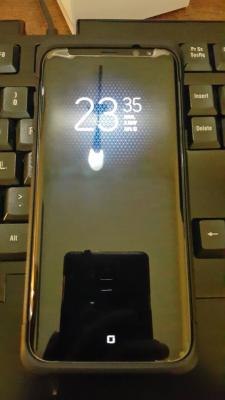 This post has been edited by Nick Zelos: May 8 2017, 11:53 PM
 |
|
|
|
|
|
Nick Zelos
|
May 8 2017, 11:54 PM
|
Getting Started
|
QUOTE(squall_kay @ May 8 2017, 11:52 PM) No problem. I'm gonna bring the extra SP to Samsung and have it cut then reapply it. |
|
|
|
|
|
Nick Zelos
|
May 9 2017, 12:10 AM
|
Getting Started
|
QUOTE(nonameface @ May 9 2017, 12:02 AM) why dont wanna cut it yourself? I can cut but i suck at applying the SP  |
|
|
|
|
|
Nick Zelos
|
May 9 2017, 12:20 AM
|
Getting Started
|
QUOTE(BBXiong @ May 9 2017, 12:17 AM) lol that clear coat being pushed until like that Haha well its the starter kit SP. |
|
|
|
|
|
Nick Zelos
|
May 9 2017, 12:23 AM
|
Getting Started
|
QUOTE(nonameface @ May 9 2017, 12:21 AM)  Nick Zelos Nick Zelos this the result i cut it myself. lol. crooked and maybe ugly. but it works =D Not bad the cutting haha but mine need to have a slight cut at the bottom as well cuz once pressure applies like having it in pocket, bottom part would peel up. U self apply the SP? This post has been edited by Nick Zelos: May 9 2017, 12:30 AM |
|
|
|
|
|
Nick Zelos
|
May 9 2017, 12:36 AM
|
Getting Started
|
QUOTE(nonameface @ May 9 2017, 12:32 AM) yeap. i prioritize the top part, cut off top corners(not the guidance tape), bottom cut fully(with the guidance tape). then have to apply sellotape for the bottom part to guide later. edges quite hard to align as screen blends with the sides. bottom got a bit fingerprint smudges inside, heh. not perfect. Nice! I'll see whether the staff at Samsung can help or not. Worse case, DIY  |
|
|
|
|



 Quote
Quote

 0.0215sec
 0.56
0.56
 7 queries
 GZIP Disabled