

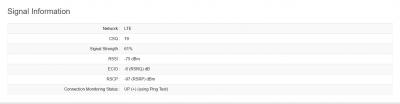
Digi Infinite talk, Digi infinite 80 / 150
Digi Infinite talk, Digi infinite 80 / 150
|
|
 Apr 21 2017, 09:30 AM Apr 21 2017, 09:30 AM
Return to original view | Post
#1
|
 
Junior Member
813 posts Joined: Jul 2008 From: Kota Kinabalu <-> Kuala Lumpur  
|
my huawei e398+tplink tl-wdr3600 flash with rooter firmware using infinite 150
|
|
|
|
|
|
Apr 22 2017, 11:33 AM
Return to original view | Post
#2
|
|
Junior Member
813 posts Joined: Jul 2008 From: Kota Kinabalu <-> Kuala Lumpur
|
which apn you all use when using sim on modem or router? diginet or 3gdgnet?
|
|
|
Apr 26 2017, 11:01 PM
Return to original view | Post
#3
|
|
Junior Member
813 posts Joined: Jul 2008 From: Kota Kinabalu <-> Kuala Lumpur
|
im using this with my tplink router and e398 usb modem
https://www.gargoyle-router.com/ the rooter firmware have some weird bug on my router, which is lan connection is so slow, but connection using wifi is super fast. also, anyone here use lede firmware? This post has been edited by syahpian: Apr 26 2017, 11:02 PM |
|
|
Apr 26 2017, 11:09 PM
Return to original view | Post
#4
|
|
Junior Member
813 posts Joined: Jul 2008 From: Kota Kinabalu <-> Kuala Lumpur
|
QUOTE(fruitie @ Apr 26 2017, 11:05 PM) OK, now it sounds interesting. TP-Link TL-WDR3600 v1 Let me know your finding and I may buy another E5786 later if that works and sell off my E5186. My friend has booked my E5786. By the way way, your router is V1 or V2? Mine is V1 only. Which TP Link router? I had no issue plugging in E398 to my MR3420 previously and was using it happily for few years.  the only downside using gargoyle firmware is cannot lock 4g connection while rooter firmware can. |
|
|
Apr 26 2017, 11:19 PM
Return to original view | Post
#5
|
|
Junior Member
813 posts Joined: Jul 2008 From: Kota Kinabalu <-> Kuala Lumpur
|
QUOTE(fruitie @ Apr 26 2017, 11:14 PM) Hmm. How about locking with MDMA first? I remember it has band locking feature... Or I remember wrongly? no use also because here only have band 3 OK lah, let you try first. Been super busy lately and no luxury like last time where flashing phones and routers firmware was my hobby. These days I just want my stuff to work right away without giving me too much headache. what i mean is force lock 4g connection 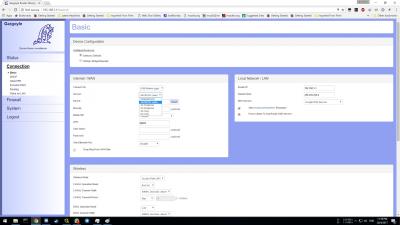
this option actually This post has been edited by syahpian: Apr 26 2017, 11:22 PM |
|
|
Apr 26 2017, 11:24 PM
Return to original view | Post
#6
|
|
Junior Member
813 posts Joined: Jul 2008 From: Kota Kinabalu <-> Kuala Lumpur
|
QUOTE(fruitie @ Apr 26 2017, 11:22 PM) I see. I remember mine was always 4G, maybe due to strong 4G area. yeah, while rooter firmware have option to lock 4g connection, this one dont have,  but if on stability point of view, this firmware is more stable and less bug than rooter firmware  |
|
|
|
|
|
Apr 26 2017, 11:55 PM
Return to original view | Post
#7
|
|
Junior Member
813 posts Joined: Jul 2008 From: Kota Kinabalu <-> Kuala Lumpur
|
QUOTE(alucard89 @ Apr 26 2017, 11:47 PM) What's the maximum speed you can get with gargoyle + 4g usb modem? 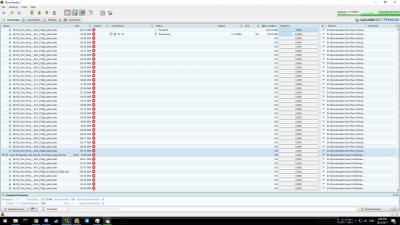
max here i can get 30Mbps depends on time This post has been edited by syahpian: Apr 26 2017, 11:56 PM |
|
|
Apr 27 2017, 12:03 AM
Return to original view | Post
#8
|
|
Junior Member
813 posts Joined: Jul 2008 From: Kota Kinabalu <-> Kuala Lumpur
|
QUOTE(chickenducksoup @ Apr 26 2017, 11:59 PM) Can Pm where u download anime? sure2  or you want me to just post it here? |
|
|
Apr 27 2017, 04:00 PM
Return to original view | Post
#9
|
|
Junior Member
813 posts Joined: Jul 2008 From: Kota Kinabalu <-> Kuala Lumpur
|
QUOTE(alucard89 @ Apr 27 2017, 03:58 PM) What's lowest speed you got so far? lowest for me is around 2-5++Mbps on 4gI think last week got 1 day when got snail speed (50-100kbps) on 4g Which usb modem you're using? using old huawei e398 |
|
|
Apr 27 2017, 04:01 PM
Return to original view | Post
#10
|
|
Junior Member
813 posts Joined: Jul 2008 From: Kota Kinabalu <-> Kuala Lumpur
|
QUOTE(alucard89 @ Apr 27 2017, 04:00 PM) Thanks anyway, I'll probably just go back to gargoyle/ddwrt yup, gargoyle have very simple interface and try to use ddwrt before but my modem cannot connect, that why i use gargoyle right nowInterface a lot easier to use than openwrt haha |
|
|
Apr 27 2017, 11:25 PM
Return to original view | Post
#11
|
|
Junior Member
813 posts Joined: Jul 2008 From: Kota Kinabalu <-> Kuala Lumpur
|
QUOTE(alucard89 @ Apr 27 2017, 11:10 PM) Ok thanks i didnt set the qos option. everytime i try to set it up. the connection become very slow. not sure if i set it up wrong through When you're downloading at max speed, do you set any qos management on your gargoyle for browsing? I noticed it's a lot slower with mobile data. But on home broadband like streamyx, can still browse smoothly while downloading files max speed at same time. Oh, I usually just replied directly Just noticed the multi quote option can go to previous page  |
|
|
Apr 28 2017, 02:52 PM
Return to original view | Post
#12
|
|
Junior Member
813 posts Joined: Jul 2008 From: Kota Kinabalu <-> Kuala Lumpur
|
QUOTE(boombaye @ Apr 28 2017, 01:29 PM) anyone using in Miri or KK? How's ur speeds? from tuaran sabah |
|
|
Apr 28 2017, 10:07 PM
Return to original view | Post
#13
|
|
Junior Member
813 posts Joined: Jul 2008 From: Kota Kinabalu <-> Kuala Lumpur
|
QUOTE(tan_aniki @ Apr 28 2017, 03:19 PM) thanks for the suggestion, but i just stick to mini PC to router method, because my alarm system need to port forward but most of our telco don't have public ip and the configuration of the ddns also failed, therefore what i do is use teamviewer to access my house alarm. why not try pfsense? gearbest sometime can be very fast, within a week but overall less than 3 weeks. https://www.pfsense.org/ https://doc.pfsense.org/index.php/Known_Working_3G-4G_Modems |
|
|
|
|
|
May 2 2017, 03:04 PM
Return to original view | Post
#14
|
|
Junior Member
813 posts Joined: Jul 2008 From: Kota Kinabalu <-> Kuala Lumpur
|
QUOTE(psjjl @ May 2 2017, 08:16 AM) Kota Kinabalu bro. Yes, the network will suddenly down and it will only back to slow speed after few seconds. CS told me that there was no issue in my area. I wonder. mine only down at night.. suddenly no internet around 11pm to 12 am, but network conected after 1am only the speed restore itself.. happen all the night |
|
|
May 4 2017, 01:02 PM
Return to original view | Post
#15
|
|
Junior Member
813 posts Joined: Jul 2008 From: Kota Kinabalu <-> Kuala Lumpur
|
QUOTE(starz92 @ May 4 2017, 12:42 PM) I do not mind capping our speed just please stabilise it...email to Digi on Monday complaining line not stable till now no reply.. jangan capped macam webe sudah..  QUOTE(HolySatan @ May 4 2017, 12:55 PM)  too many people abuse infinite 150.. cybercafe, paid hotspot, etc padan muka semua kena inb4 Digi pentipu scammer  |
|
|
May 4 2017, 01:14 PM
Return to original view | Post
#16
|
|
Junior Member
813 posts Joined: Jul 2008 From: Kota Kinabalu <-> Kuala Lumpur
|
QUOTE(HolySatan @ May 4 2017, 01:08 PM) nope.. unlimited.. 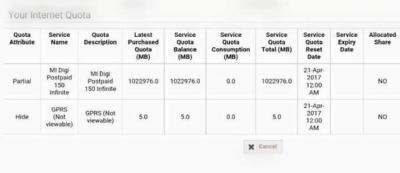
bukan 1tb ke tu? |
|
|
May 7 2017, 02:54 PM
Return to original view | Post
#17
|
|
Junior Member
813 posts Joined: Jul 2008 From: Kota Kinabalu <-> Kuala Lumpur
|
finish flashing my old router to latest ddwrt firmware

seems the connection is more stable than before using huawei e398+TPLINK TL-WDR3600 v1 |
|
|
May 7 2017, 03:47 PM
Return to original view | Post
#18
|
|
Junior Member
813 posts Joined: Jul 2008 From: Kota Kinabalu <-> Kuala Lumpur
|
QUOTE(alucard89 @ May 7 2017, 03:40 PM) Haha, same router like mine but on gargoyle the speed is so far same as before because using the same usb modem. but it more stable since this firmware able to lock 4g connection like rooter How's the speed so far? i use gargoyle also before, but the connection keep jumping from 3g to 4g because the firmware dont have option to lock 4g, only auto 4g/3g/2g |
|
|
May 7 2017, 06:03 PM
Return to original view | Post
#19
|
|
Junior Member
813 posts Joined: Jul 2008 From: Kota Kinabalu <-> Kuala Lumpur
|
QUOTE(chuahcs79 @ May 7 2017, 05:30 PM) Have u try rooter goldenOrb openwrt? yup, rooter is the best firmware when using router with usb modem. but the problem that i have is the speed between lan and wifi.seems like wifi more faster than lan connection. for example wifi can get around 15Mbps but using lan connection only can get around 5-7Mbps. for lan connection to get same 15Mbps, need to run few speedtest using speedtest app on my phone, but that only temporary solution because after few minute it will be back to 5-7Mbps not sure with other router through. maybe need to wait for an new build and test it again. |
|
|
May 7 2017, 10:12 PM
Return to original view | Post
#20
|
|
Junior Member
813 posts Joined: Jul 2008 From: Kota Kinabalu <-> Kuala Lumpur
|
QUOTE(chuahcs79 @ May 7 2017, 09:04 PM) Oh I see. Yeah sometimes rooter have some bug .. yup, that why i currently using ddwrt, just want to see if there any major bug with latest build |
|
Topic ClosedOptions
|
| Change to: |  0.0966sec 0.0966sec
 0.54 0.54
 7 queries 7 queries
 GZIP Disabled GZIP Disabled
Time is now: 10th December 2025 - 04:10 PM |
 Quote
Quote