Welcome Guest ( Log In | Register )

Bump Topic Topic Closed RSS Feed

Outline · [ Standard ] · Linear+

 Digi Infinite talk, Digi infinite 80 / 150

views
     
kaiserreich
post Apr 20 2017, 09:19 AM

Pendekar Papan Kekunci
*******
Senior Member
4,234 posts

Joined: Sep 2006
Running a trial on Digi prepaid daily unlimited before switching to Inifinte 150
Does E5186-61a support 4G+ or E5186-22a is needed for Digi?
I checked the price and it seems like 61a is much much cheaper in TB.


Managed to get my hands on a E5786 and just 1 corner of my house is giving 10Mbps at 3bars, which beats the 4Mbps TM I got right now.
Those using it, this thing easily overheat? found out need to restart after a few hours.


kaiserreich
post Apr 20 2017, 10:30 AM

Pendekar Papan Kekunci
*******
Senior Member
4,234 posts

Joined: Sep 2006
QUOTE(alucard89 @ Apr 20 2017, 09:28 AM)
I think someone mentioned that 61a variant only support cat6 for TDD not FDD.
*
QUOTE(Chriss @ Apr 20 2017, 10:15 AM)
If not mistaken e5186-22a for FDD lte band. U can check it out from their website
*
QUOTE(HolySatan @ Apr 20 2017, 10:20 AM)
use vpn...
seller already confirm 61a cannot lte-a.. cat6 only for TDD.. cat4 FDD
*
Thanks folks.
kaiserreich
post Apr 22 2017, 10:47 PM

Pendekar Papan Kekunci
*******
Senior Member
4,234 posts

Joined: Sep 2006
QUOTE(mastermindsos @ Apr 21 2017, 11:59 AM)
Upstairs is a different house. (imagine a shop house)
I just want to "tumpang" my 4g lte there because it has better signal and speed. So gigabit lan cable is not an option.
I just want all my devices, desktop and server can connect to the internet.

Revised diagram
user posted image
*
Works for me.
Used DD-WRT and configured as Wireless Repeater mode. Connect to E5786.

Configure different subnet between the DD-WRT and the E5786 and turned on DHCP server.
This bypasses the 10 device limit on the E5786 and also loading.

Very simple to configure. I followed this guide.
https://www.dd-wrt.com/wiki/index.php/Repeater

BTW, Tried ASUS-MerlinWRT and had trouble with this setup. Did not try Tomato.
For DD-WRT, if the router is unable to detect your Modem WIFI network, try this.

Go to Status->Wireless, click on 'Site Survey' and then join the SSID of your Modem

This post has been edited by kaiserreich: Apr 22 2017, 10:50 PM
kaiserreich
post Apr 23 2017, 12:12 AM

Pendekar Papan Kekunci
*******
Senior Member
4,234 posts

Joined: Sep 2006
QUOTE(mastermindsos @ Apr 22 2017, 11:46 PM)
Thank you, you gave me some kind of comfort to go ahead with this plan.
The DHCP server is at your ddwrt router correct?
Also, if you ever going to specify a different dns server, it will also be in your ddwrt router correct?
I have not purchased the 4g lte modem yet, however I have tested wireless client mode yesterday with my spare wireless router and it works.
In my network setup, I need the wireless router to be in client mode  smile.gif
*
Dhcp at the ddwrt side.
I can specify the dns also.
kaiserreich
post Apr 27 2017, 04:22 PM

Pendekar Papan Kekunci
*******
Senior Member
4,234 posts

Joined: Sep 2006
QUOTE(Chriss @ Apr 27 2017, 01:12 AM)
If your area & device support lte-a it shouldnt be a problem to get high speed data. Antenna doesnt help u to get lte-a if your area doesnt have lte-a coverage
*
My place is at the edge of LTE-A checking on E5786

B3/B7 mode gets me 10-12Mbps
B7 only gets 10Mbps.
B3 mode.....no need check. is shit.

So even if under LTE-A area, your mileage may vary..
kaiserreich
post May 6 2017, 04:09 PM

Pendekar Papan Kekunci
*******
Senior Member
4,234 posts

Joined: Sep 2006
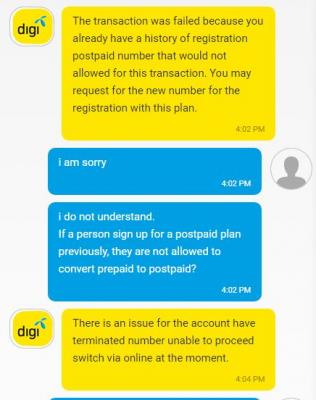
Previously had Digi account but MNP out
Had a spare Digi prepaid around and want convert online to Infinite 150, so that I don't need to pay Rm18 delivery fee.

I could not add to cart because they got this stupid issue?
Sounds like nonsense.

Attached Image

This post has been edited by kaiserreich: May 6 2017, 04:09 PM
kaiserreich
post May 6 2017, 09:58 PM

Pendekar Papan Kekunci
*******
Senior Member
4,234 posts

Joined: Sep 2006
QUOTE(lati0s @ May 6 2017, 05:03 PM)
RM18 delivery fee?

Nonsense. RM300+18 right? That's the GST.

Just apply for new number la
*
QUOTE(HolySatan @ May 6 2017, 05:55 PM)
300 + gst = 318

if got problem.. just sign up new.. settle.. happy..
*
ohh my mistake
kaiserreich
post May 10 2017, 06:09 PM

Pendekar Papan Kekunci
*******
Senior Member
4,234 posts

Joined: Sep 2006
Standing next to station, but internet still slow until repost 3x

rclxs0.gif
kaiserreich
post May 12 2017, 01:50 PM

Pendekar Papan Kekunci
*******
Senior Member
4,234 posts

Joined: Sep 2006
QUOTE(devilaaron @ May 12 2017, 12:35 PM)
It so funny that when i set B3+B7 , i have a result of balanced speed. 6mbps dl 6mbps upload 27ms
It locates me at MIRI sarawak from the speedtest location

Not sure what band should i take now  rclxub.gif  rclxub.gif
PS: i have 3 bar on B3+B7
*
QUOTE(devilaaron @ May 12 2017, 12:37 PM)
Still considering whether it really worth the invest on such unstable speed. Haha
never face 30mbps in this area except head to the cell tower below which i get 80mbps on LTE-A.
*
b310 support LTE-A?

kaiserreich
post May 12 2017, 02:42 PM

Pendekar Papan Kekunci
*******
Senior Member
4,234 posts

Joined: Sep 2006
QUOTE(devilaaron @ May 12 2017, 02:33 PM)
only E5186-22s will support LTE-A, which more expensive than usual modem
*
Then how come your B310 has B3+B7 balanced mode? confused.gif

Also, you say you can get 80Mbps in LTE-A area. I am assuming it is not on B310 right?

This post has been edited by kaiserreich: May 12 2017, 02:42 PM
kaiserreich
post May 15 2017, 11:08 PM

Pendekar Papan Kekunci
*******
Senior Member
4,234 posts

Joined: Sep 2006
QUOTE(rhytion @ May 15 2017, 10:47 PM)
Need help from all sifus here, is this legit 4G+, cuz I just found a way to enable in on my Redmi Note 3 by moding the NVRAM, and the status bar does show a LTE+ icon. All help from sifus to verify it will be greatly appreciated.

» Click to show Spoiler - click again to hide... «

*
Network signal guru will show 2 carrier CA if it works.
For your case, no.
kaiserreich
post May 17 2017, 10:58 PM

Pendekar Papan Kekunci
*******
Senior Member
4,234 posts

Joined: Sep 2006
QUOTE(Ryonegma @ May 17 2017, 07:36 PM)
My "fake" antenna just arrived today, just tested both with and without antenna. Thinking of upgrading my modem soon.

With
user posted image

Without
user posted image
*
This is the '88dbi' antenna right?

Ping improved, which is good.
Any modem stats before and after?


kaiserreich
post May 18 2017, 09:51 PM

Pendekar Papan Kekunci
*******
Senior Member
4,234 posts

Joined: Sep 2006
QUOTE(ajoi57 @ May 18 2017, 09:23 PM)
that is really good enough  biggrin.gif

my place only have b3, so yeah

my antenna for e5186 arrive today,  but then digi here got some maintenance till 20 may(they say)  biggrin.gif

but it's still works for me i guess, 1 bar showing at modem before antenna, 2 bar with antenna  laugh.gif
*
this is with the E5186 antenna or the 88dbi fake antenna?
kaiserreich
post May 19 2017, 06:05 PM

Pendekar Papan Kekunci
*******
Senior Member
4,234 posts

Joined: Sep 2006
QUOTE(joeboto @ May 19 2017, 12:32 PM)
ive been using tp link M7350 for my digi infinite 150. when im at work, its blazing fast around 70mbps (IDM shows 8MB/s shoots to 9MB/s sometimes). however when im at home, fastest i got is only 1MB/s (1 or 2 bar 4g signal). coverage map shows my home area is out of 4G coverage by 100 meters.

my question is, if i grab any huawei mifi with compatible external antenna, will i get better speed at home? because the price for huawei mifi is very very expensive im a bit scared if theres no improvement.
*
Congestion at night time at the base station that you are connected to. Digi is balancing the load.
So theoretically your speed can reach 70mbps, you won't gain much adding an antenna. Unless you are using those yagi type to connect to a different base station.


Topic ClosedOptions
 

Change to:
| Lo-Fi Version
0.0239sec    0.51    7 queries    GZIP Disabled
Time is now: 9th December 2025 - 07:53 PM