Outline ·
[ Standard ] ·
Linear+
Digi 4G and Port Forwarding, basically port forward for RDP and CCTV
|
TSHummingbird
|
  Apr 8 2017, 12:54 PM, updated 9y ago Apr 8 2017, 12:54 PM, updated 9y ago
|

|
Hi,
I would like to check if any of you guys have experience to port forward any network port via Digi's 4G network? I tried to port forward the network port servicing for CCTV as well as RDP service but the attempt was unsuccessful. Does anyone know if port forwarding is disabled by telco side?
Thanks.
|
|
|
|
|
|
alucard89
|
Apr 8 2017, 01:28 PM
|
|
|
I'm curious about this too Can your NVR/Camera connect to cloud? Like with the xmeye nvr, it can connect to xmeye cloud and you can view cameras outside home network From what I've read, you'll need to use VPN that supports portforwarding like the one's listed in this subreddit https://www.reddit.com/r/VPNTorrents/commen...ort_forwarding/ |
|
|
|
|
|
TSHummingbird
|
Apr 8 2017, 02:20 PM
|
|
|
QUOTE(alucard89 @ Apr 8 2017, 01:28 PM) I'm curious about this too Can your NVR/Camera connect to cloud? Like with the xmeye nvr, it can connect to xmeye cloud and you can view cameras outside home network From what I've read, you'll need to use VPN that supports portforwarding like the one's listed in this subreddit https://www.reddit.com/r/VPNTorrents/commen...ort_forwarding/I am currently using streamy 4mbps as my home broadband but the upload speed is too slow to for remote viewing. I am interested in the Digi infinite package to potentially replace my streamyx but before doing so, I get a prepaid and try out. But it turns out that whatever forwarded to the 4G router is not going out and I can't access it via the ddns hostname. So I am not sure whether it is the limitation of the 4G router or Digi is the one blocking any ability to port forward to its network. |
|
|
|
|
|
budi1413
|
Apr 8 2017, 02:33 PM
|
|
|
Your connection NATed already. That's why port forwarding not working.  |
|
|
|
|
|
alucard89
|
Apr 8 2017, 02:34 PM
|
|
|
QUOTE(Hummingbird @ Apr 8 2017, 02:20 PM) I am currently using streamy 4mbps as my home broadband but the upload speed is too slow to for remote viewing. I am interested in the Digi infinite package to potentially replace my streamyx but before doing so, I get a prepaid and try out. But it turns out that whatever forwarded to the 4G router is not going out and I can't access it via the ddns hostname. So I am not sure whether it is the limitation of the 4G router or Digi is the one blocking any ability to port forward to its network. It's digi that's blocking the ports, they don't allow portforwarding like maxis Right now, I'm still learning how to configure openvpn on my router to add the vpn setting My router firmware is already on gargoyle that includes openvpn, so just need to import the config files |
|
|
|
|
|
alucard89
|
Apr 8 2017, 02:35 PM
|
|
|
QUOTE(budi1413 @ Apr 8 2017, 02:33 PM) Your connection NATed already. That's why port forwarding not working. You got portforwarding working on digi? Care to share if you need additional setting/vpn? |
|
|
|
|
|
UN1T3D
|
Apr 8 2017, 02:59 PM
|
|
|
QUOTE(alucard89 @ Apr 8 2017, 02:35 PM) You got portforwarding working on digi? Care to share if you need additional setting/vpn?  What budi1413 meant was that it is common practice for isp to assign each data user an internal ip while sharing a single public ip. Your modem/phone/device assigned network ip is different from the external public ip. This is known as double-NAT or triple-NAT. To understand all this and find a remedy that suits you, please check with uncle goole .....  |
|
|
|
|
|
TSHummingbird
|
Apr 8 2017, 03:05 PM
|
|
|
QUOTE(budi1413 @ Apr 8 2017, 02:33 PM) Your connection NATed already. That's why port forwarding not working. well I know 'double NAT' with the typical home network configuration. I have added my router to the DMZ zone in my modem and it works when the router connects to the TM's modem. But when i swap the modem to 4G modem and also include the router into the 4G modem's DMZ zone, it doesn't work though.  unless you are saying the ip address i get from Digi is not public ip. This post has been edited by Hummingbird: Apr 8 2017, 03:09 PM |
|
|
|
|
|
alucard89
|
Apr 8 2017, 03:20 PM
|
|
|
QUOTE(UN1T3D @ Apr 8 2017, 02:59 PM) What budi1413 meant was that it is common practice for isp to assign each data user an internal ip while sharing a single public ip. Your modem/phone/device assigned network ip is different from the external public ip. This is known as double-NAT or triple-NAT. To understand all this and find a remedy that suits you, please check with uncle goole ..... Haha, not familiar much with network stuff |
|
|
|
|
|
mztang52
|
Apr 8 2017, 04:46 PM
|
|
|
QUOTE(Hummingbird @ Apr 8 2017, 04:05 PM) well I know 'double NAT' with the typical home network configuration. I have added my router to the DMZ zone in my modem and it works when the router connects to the TM's modem. But when i swap the modem to 4G modem and also include the router into the 4G modem's DMZ zone, it doesn't work though. unless you are saying the ip address i get from Digi is not public ip. Digi does not give public IP. This post has been edited by mztang52: Apr 8 2017, 04:46 PM |
|
|
|
|
|
TSHummingbird
|
Apr 9 2017, 01:23 PM
|
|
|
QUOTE(mztang52 @ Apr 8 2017, 04:46 PM) Digi does not give public IP. Ah shag, there isn't any way to port forward with cellular broadband as backbone? |
|
|
|
|
|
mztang52
|
Apr 9 2017, 05:20 PM
|
|
|
QUOTE(Hummingbird @ Apr 9 2017, 02:23 PM) Ah shag, there isn't any way to port forward with cellular broadband as backbone? Maybe you can try Maxis. |
|
|
|
|
|
alucard89
|
Apr 9 2017, 06:34 PM
|
|
|
Just tried one of the vpn listed in reddit
Able to portforward, tested the port on qbittorent got green light. Torrent still shitty speed as confirmed by other user (don't care much for torrent since I rarely use it)
Still figuring out how to set up openvpn directly on my router and how to skip netflix traffic.
This post has been edited by alucard89: Apr 9 2017, 06:36 PM
|
|
|
|
|
|
TSHummingbird
|
Apr 9 2017, 06:59 PM
|
|
|
QUOTE(mztang52 @ Apr 9 2017, 05:20 PM) Well not until the charges of its package reach my comfortable level... Maxis data plan is expensive. |
|
|
|
|
|
mztang52
|
Apr 9 2017, 08:40 PM
|
|
|
QUOTE(Hummingbird @ Apr 9 2017, 07:59 PM) Well not until the charges of its package reach my comfortable level... Maxis data plan is expensive. Just get the VPN then. |
|
|
|
|
|
TSHummingbird
|
Apr 10 2017, 07:51 PM
|
|
|
QUOTE(mztang52 @ Apr 9 2017, 08:40 PM) In this case, all traffic will be going through a third party right? VPN provider has to be trustworthy then? I encountered network attack once, just because I did not set up the DDNS properly and hence my router was bricked. So I am quite sensitive to anything that might be going through a third party intermediary. |
|
|
|
|
|
mztang52
|
Apr 10 2017, 08:39 PM
|
|
|
QUOTE(Hummingbird @ Apr 10 2017, 08:51 PM) In this case, all traffic will be going through a third party right? VPN provider has to be trustworthy then? I encountered network attack once, just because I did not set up the DDNS properly and hence my router was bricked. So I am quite sensitive to anything that might be going through a third party intermediary. Yes, all trafics and data will pass through the VPN server. |
|
|
|
|
|
Zaryl
|
Apr 10 2017, 10:00 PM
|
|
|
what kind of 4G router are you using TS? Mine is using a TPLINK 4G router with sim card enabled that has DDNS capability. No advanced setup/no VPN is needed and I've been using since Oct last year up till today no problem on using Digi 4G. My CCTV works perfectly fine 90% of the time, although on some occasions the camera failed to work due to "network problem" and it said i need to update its firmware which i did.  |
|
|
|
|
|
alucard89
|
Apr 10 2017, 11:40 PM
|
|
|
QUOTE(Zaryl @ Apr 10 2017, 10:00 PM) what kind of 4G router are you using TS? Mine is using a TPLINK 4G router with sim card enabled that has DDNS capability. No advanced setup/no VPN is needed and I've been using since Oct last year up till today no problem on using Digi 4G. My CCTV works perfectly fine 90% of the time, although on some occasions the camera failed to work due to "network problem" and it said i need to update its firmware which i did. The main point is portforwarding which digi blocks I think your camera using cloud which is why you're able to access them on digi line. |
|
|
|
|
|
mazur
|
Apr 11 2017, 12:54 AM
|
New Member

|
hi, anyone puchase fail ??
i port in to infinite 150 but always translaction fail dunno why...
i'm very sure my credit card can use before i just bought something at 11street.
now i stuck at detail page..cant let me try again.
|
|
|
|
|
|
alucard89
|
Apr 18 2017, 10:51 AM
|
|
|
Ok, some update You can portforward using vpn (provided they include portforwarding service like rw4vpn) I was able to monitor my cctv streams, bt, rpi You'll need to use router firmware that has openvpn client (ddwrt,tomato, asuswrt) & admin option to run scripts/command (crucial step for DNAT rules) I followed this guide https://torguard.net/forums/index.php?/topi...port-forwardinghttps://torguard.net/knowledgebase.php?acti...165&useful=voteAfter going through different router and firmware I settled with asuswrt merlin on my huawei ws880 since I get max speed with openvpn. Tested on my other router but only geting 5-7mbps download probably because old hardware and the vpn encryption (256 bit) |
|
|
|
|
|
Angrybirds88
|
Apr 23 2017, 11:36 AM
|
New Member
|
Sifu alucard89,
How to slot in digi simcard?connect to usb ws880?
Can send the equipment pic to use for simcard .
Thks u
|
|
|
|
|
|
alucard89
|
Apr 23 2017, 05:18 PM
|
|
|
QUOTE(Angrybirds88 @ Apr 23 2017, 11:36 AM) Sifu alucard89, How to slot in digi simcard?connect to usb ws880? Can send the equipment pic to use for simcard . Thks u Any 4g usb modem is enough, just make sure it's compatible xwrt (merlin) |
|
|
|
|
|
tan_aniki
|
Apr 25 2017, 09:51 PM
|
|
|
it's very easy to determine whether your ip is public ip or not: type myip in google.com and use another network with internet and ping the ip. if failed means not public ip =end=
|
|
|
|
|
|
manx
|
Jul 15 2017, 09:55 AM
|
|
|
Guys.. i am also digi infinite150 subscriber using E5816 Huawei router. Interested to know the steps to enable port forwarding for my hone alarm system and cctv. Would be okay to use VPN as well but not really sure how to go about it.
Anybody has successfully done it amd get it working? Appreciate your guidance and help.
|
|
|
|
|
|
eddyann
|
Jul 18 2017, 08:47 AM
|
|
|
cloud IP camera and my Synology NAS+Surveillance Station work well
|
|
|
|
|
|
TSHummingbird
|
Jul 18 2017, 10:23 AM
|
|
|
QUOTE(eddyann @ Jul 18 2017, 08:47 AM) cloud IP camera and my Synology NAS+Surveillance Station work well Is the setup going through an intermediate service/server? My setup is a typical peer to peer connection by exposing services to public internet. |
|
|
|
|
|
eddyann
|
Jul 18 2017, 10:30 AM
|
|
|
QUOTE(Hummingbird @ Jul 18 2017, 10:23 AM) Is the setup going through an intermediate service/server? My setup is a typical peer to peer connection by exposing services to public internet. I believe my setup running through its dedicated cloud server. TPLINK cloud for cctv (ip cam) and Synology cloud for NAS. it works well and good and fast enough for me, no need p2p |
|
|
|
|
|
#Victor
|
Jul 18 2017, 11:55 AM
|
|
|
No problem for me using CCTV with Digi 150 + 4G router without any port forwarding nor VPN. Maybe I am lucky enough because the CCTV is using cloud / p2p? 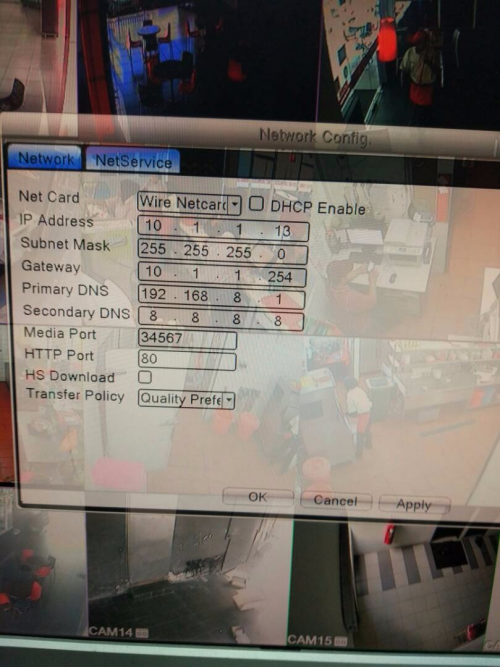 |
|
|
|
|



 Quote
Quote











 0.0622sec
 0.33
0.33
 5 queries
 GZIP Disabled