Welcome Guest ( Log In | Register )

Outline · [ Standard ] · Linear+

Sony Xperia XA Ultra Storage Space, Gradually fills up on its own

views
     
TSLightningChan
post Apr 7 2017, 12:41 PM, updated 9y ago

Casual
***
Junior Member
420 posts

Joined: May 2011


Hi Xperia/Android/Mobile sifus and pros,

First off, 16GB internal storage is a pain to use on an Android 6.0 phone. sweat.gif

My XA Ultra Dual (F3312) internal storage space is always filling on its own. Every time it reaches 90% I will remove apps. Despite that, it will gradually fill up to 90%+ again and I will remove apps again. The process repeats.

Here's what I've done so far :
1) Remove apps. Never reinstalled or installed new apps
2) Ocassionally cleared out apps data
2) Ocassionally clearing out the cache data
3) Ocassionally transferred media files to SD card
4) Delete FB Data, WeChat and Whatsapp chat data after backing up to cloud.
4) Clean storage of duplicate/obsolete/junk files with SD Maid Pro(Paid App) and CCleaner
5) Bought a 32GB high speed Class 10 UHS-3 (R:90/W:80) Micro SD to set up as adoptive storage to store apps.

None of the above seems to help. Some times I even removed most of the apps except FB, Whatsapp, WeChat and all but the storage just gets filled up in time until I have no more space to work with and are forced to factory reset the phone. Adoptive storage doesn't help either as most of the apps can only be installed into the internal storage.

Can anyone tell me what's taking up all the space in my phone's internal storage?.

Thanks for reading. rclxms.gif

This post has been edited by LightningChan: Apr 7 2017, 12:41 PM
abu.shofwan
post Apr 7 2017, 01:09 PM

Regular
******
Senior Member
1,455 posts

Joined: Jan 2015
From: Qatar


Not sure if there is anything peculiar about the android implementation by Sony. Though to be fair, 16gb is already small in the first place, by today's standards

For me, on all my phones, usually it's apps data
Google earth seems to take up/store a lot of offline data
Also Maps, of course
Other apps would be whatsapp and other messaging services that has to store the photos n videos, although nowadays i see that whatsapp can already store them in the external card.
How about your camera? Make sure it stores the video/pics in the sd card also

This post has been edited by abu.shofwan: Apr 7 2017, 01:11 PM
Haters_Gonna_H8
post Apr 7 2017, 01:17 PM

:hehe:
*******
Senior Member
2,663 posts

Joined: Aug 2012


QUOTE(LightningChan @ Apr 7 2017, 12:41 PM)
Hi Xperia/Android/Mobile sifus and pros,

First off, 16GB internal storage is a pain to use on an Android 6.0 phone.  sweat.gif

My XA Ultra Dual (F3312) internal storage space is always filling on its own. Every time it reaches 90% I will remove apps. Despite that, it will gradually fill up to 90%+ again and I will remove apps again. The process repeats.

Here's what I've done so far :
1) Remove apps. Never reinstalled or installed new apps
2) Ocassionally cleared out apps data
2) Ocassionally clearing out the cache data
3) Ocassionally transferred media files to SD card
4) Delete FB Data, WeChat and Whatsapp chat data after backing up to cloud.
4) Clean storage of duplicate/obsolete/junk files with SD Maid Pro(Paid App) and CCleaner
5) Bought a 32GB high speed Class 10 UHS-3 (R:90/W:80) Micro SD to set up as adoptive storage to store apps.

None of the above seems to help. Some times I even removed most of the apps except FB, Whatsapp, WeChat and all but the storage just gets filled up in time until I have no more space to work with and are forced to factory reset the phone. Adoptive storage doesn't help either as most of the apps can only be installed into the internal storage.

Can anyone tell me what's taking up all the space in my phone's internal storage?.

Thanks for reading.  rclxms.gif
*
wechat is the culprit
TSLightningChan
post Apr 7 2017, 03:16 PM

Casual
***
Junior Member
420 posts

Joined: May 2011


QUOTE(abu.shofwan @ Apr 7 2017, 01:09 PM)
Not sure if there is anything peculiar about the android implementation by Sony. Though to be fair, 16gb is already small in the first place,  by today's standards

For me, on all my phones, usually it's apps data
Google earth seems to take up/store a lot of offline data
Also Maps, of course
Other apps would be whatsapp and other messaging services that has to store the photos n videos, although nowadays i see that whatsapp can already store them in the external card.
How about your camera? Make sure it stores the video/pics in the sd card also
*
I did some reading about XA and XA Ultra and seems that they're plagued by bloatware. Only 8.5GB free fresh out of the box and after apps updates and all only some 5GB is available to user.

That 5GB space that will go missing eventually even if I uninstalled all the apps I downloaded except for WeChat, Whatsapp and FB+Messenger. After deleting all the data from those apps the storage space is still 90% full.

In a nutshell : 5GB full with only WeChat, Whatsapp and FB+Messenger with all the apps data cleared. What could be hogging 5GB of storage space.. Hmm.... hmm.gif

Also, I did put in a high speed 32GB Micro SD in 16GB Adoptive storage and 16GB for media configuration.

This post has been edited by LightningChan: Apr 7 2017, 03:20 PM
TSLightningChan
post Apr 7 2017, 03:18 PM

Casual
***
Junior Member
420 posts

Joined: May 2011


QUOTE(Haters_Gonna_H8 @ Apr 7 2017, 01:17 PM)
wechat is the culprit
*
But but... I delete the app data after backing up to PC using WeChat Windows app. sweat.gif
yuhhaur
post Apr 7 2017, 03:28 PM

I came. I saw. I help
*******
Senior Member
3,757 posts

Joined: Jan 2003
From: E A R T H
have you try to look into the Settings > Apps and check which apps is taking up the space? Mine:

Facebook: 500mb
LINE: 1.2GB sweat.gif
Whatsapp: 150mb
Wechat: 350mb
Uber: 120mb
Messenger: 150mb
Google Map: 160mbGoogle Play services: 450mb

all these things add up, koyak my storage. And, not all apps can be move to SD card. Sometimes those after updated it goes back from SD to Main storage, have to manually click again.
Haters_Gonna_H8
post Apr 7 2017, 03:36 PM

:hehe:
*******
Senior Member
2,663 posts

Joined: Aug 2012


QUOTE(LightningChan @ Apr 7 2017, 03:18 PM)
But but... I delete the app data after backing up to PC using WeChat Windows app.  sweat.gif
*
try some cleaning app from playstore. wechat works differently in the background. even if you transfer the app to sdcard, most of the data, pictures, gifs are stored in internal storage.

This post has been edited by Haters_Gonna_H8: Apr 7 2017, 03:37 PM
TSLightningChan
post Apr 7 2017, 03:43 PM

Casual
***
Junior Member
420 posts

Joined: May 2011


QUOTE(yuhhaur @ Apr 7 2017, 03:28 PM)
have you try to look into the Settings > Apps and check which apps is taking up the space? Mine:

Facebook: 500mb
LINE: 1.2GB  sweat.gif
Whatsapp: 150mb
Wechat: 350mb
Uber: 120mb
Messenger: 150mb
Google Map: 160mbGoogle Play services: 450mb

all these things add up, koyak my storage. And, not all apps can be move to SD card. Sometimes those after updated it goes back from SD to Main storage, have to manually click again.
*
Hmm.. Lets see
FB : 341mb
Google App : 185mb
Google Play Services : 126mb
Line : 66.78mb
Maps : 49.64mb
Meitu : 102mb
Messenger(FB) : 188mb
WeChat : 73.32mb
WhatsApp : 54.39mb
YouTube : 35.14mb

The rest either few MB or few hundred KB.
HMMaster
post Apr 7 2017, 03:55 PM

10K Club
Group Icon
Moderator
10,308 posts

Joined: Jan 2003
From: Kuala Lumpur


usually FB, browser (chrome) and whatsapp will fill up the space. try clear the data regularly. All these apps will store image cache which takes a lot of space. Whatsapp use a lot of space for backup. (5 copies of backup)
TSLightningChan
post Apr 7 2017, 04:45 PM

Casual
***
Junior Member
420 posts

Joined: May 2011


QUOTE(Haters_Gonna_H8 @ Apr 7 2017, 03:36 PM)
try some cleaning app from playstore. wechat works differently in the background. even if you transfer the app to sdcard, most of the data, pictures, gifs are stored in internal storage.
*
I bought SD Maid Pro and CCleaner. I din't transfer WeChat app to SDCard but I did backup the data on WeChat on my PC and clear out WeChat data on my phone.
NightFelix
post Apr 7 2017, 04:53 PM

Samsung Exynos
********
All Stars
17,467 posts

Joined: May 2008
From: Lazada


All you need is Adoptable Storage on your XA (MM 6.0)

Tutorial:
https://forum.xda-developers.com/xperia-xa/...torage-t3435493
https://forum.xda-developers.com/z5-compact...age-mm-t3334153
https://forum.xda-developers.com/xperia-z2-...torage-t3361900


PS. Try dig around XDA for more proper tutorial, the above link I simply found on Google. But should work.

This post has been edited by NightFelix: Apr 7 2017, 04:57 PM
TSLightningChan
post Apr 7 2017, 07:58 PM

Casual
***
Junior Member
420 posts

Joined: May 2011


QUOTE(NightFelix @ Apr 7 2017, 04:53 PM)
All you need is Adoptable Storage on your XA (MM 6.0)

Tutorial:
https://forum.xda-developers.com/xperia-xa/...torage-t3435493
https://forum.xda-developers.com/z5-compact...age-mm-t3334153
https://forum.xda-developers.com/xperia-z2-...torage-t3361900
PS. Try dig around XDA for more proper tutorial, the above link I simply found on Google. But should work.
*
I already have a 32GB UHS-3 (R:90/W:80) set up as adoptable storage as mentioned in first post. Haha.
But most of the apps went into the internal storage instead and cannot be transfered to adoptable storage.

Now, internal storage 90% and adoptable storage 15% only lol.
ChuanHong
post Apr 7 2017, 08:06 PM

I <3 Xperia
*******
Senior Member
4,412 posts

Joined: Jan 2013


WeChat will have a lot of data stay in internal storage as others instead of apps data only..
TSLightningChan
post Apr 7 2017, 08:17 PM

Casual
***
Junior Member
420 posts

Joined: May 2011


QUOTE(ChuanHong @ Apr 7 2017, 08:06 PM)
WeChat will have a lot of data stay in internal storage as others instead of apps data only..
*
I shall dig into WeChat more. Haha.. Really unusable now.
Dont know why Sony allow user to remove some bloatware like AVG anti virus, Amazon Shopping etc on their flagship but XA and XA Ultra cannot remove.
NightFelix
post Apr 7 2017, 08:37 PM

Samsung Exynos
********
All Stars
17,467 posts

Joined: May 2008
From: Lazada


QUOTE(LightningChan @ Apr 7 2017, 07:58 PM)
I already have a 32GB UHS-3 (R:90/W:80) set up as adoptable storage as mentioned in first post. Haha.
But most of the apps went into the internal storage instead and cannot be transfered to adoptable storage.

Now, internal storage 90% and adoptable storage 15% only lol.
*
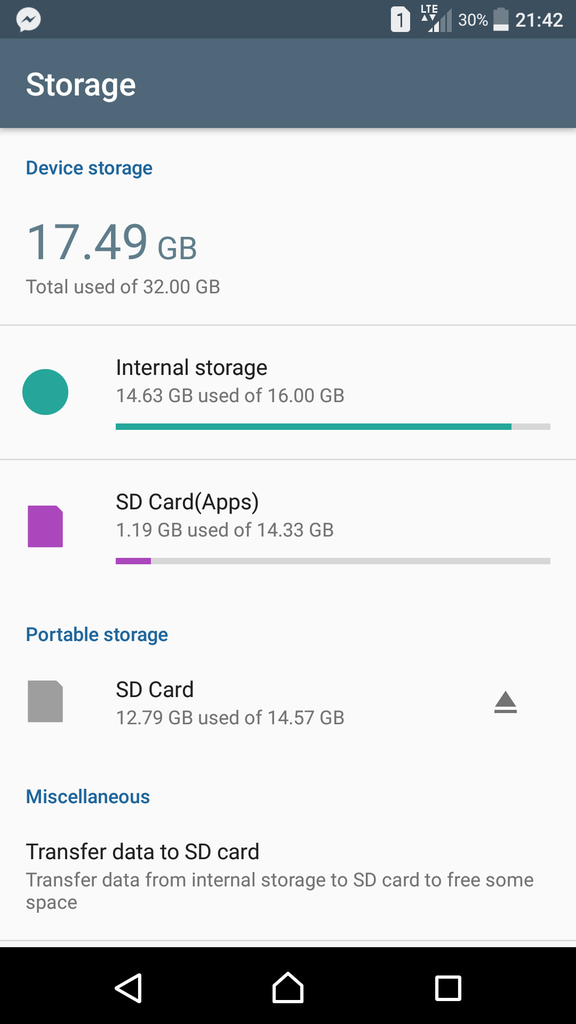
screenshots your storage and post here and see.
TSLightningChan
post Apr 7 2017, 09:45 PM

Casual
***
Junior Member
420 posts

Joined: May 2011


QUOTE(NightFelix @ Apr 7 2017, 08:37 PM)
screenshots your storage and post here and see.
*
user posted image
NightFelix
post Apr 7 2017, 10:00 PM

Samsung Exynos
********
All Stars
17,467 posts

Joined: May 2008
From: Lazada


Looks good to me after you get adoptive storage. Need apps to scan where all those Apps chunk up your storage. Like people mentioned earlier... Usually is WhatsApp or WeChat.
TSLightningChan
post Apr 7 2017, 11:01 PM

Casual
***
Junior Member
420 posts

Joined: May 2011


QUOTE(NightFelix @ Apr 7 2017, 10:00 PM)
Looks good to me after you get adoptive storage. Need apps to scan where all those Apps chunk up your storage. Like people mentioned earlier... Usually is WhatsApp or WeChat.
*
Now I'm really starting to suspect WeChat...
Sigh..if Sony don't release 7.0 update with the capability to remove bloatware I'm gonna root it and remove them all..
Haters_Gonna_H8
post Apr 7 2017, 11:39 PM

:hehe:
*******
Senior Member
2,663 posts

Joined: Aug 2012


QUOTE(LightningChan @ Apr 7 2017, 11:01 PM)
Now I'm really starting to suspect WeChat...
Sigh..if Sony don't release 7.0 update with the capability to remove bloatware I'm gonna root it and remove them all..
*
or get a new phone. nowadays, post marshmellow, the minimum specs for an android phone is at least 32gb internal storage + sd card support, or 64gb without sdcard. min ram should be 3gb. if the phone doesnt meet these minimum criteria, best to avoid.

This post has been edited by Haters_Gonna_H8: Apr 7 2017, 11:39 PM
TSLightningChan
post Apr 8 2017, 12:28 AM

Casual
***
Junior Member
420 posts

Joined: May 2011


QUOTE(Haters_Gonna_H8 @ Apr 7 2017, 11:39 PM)
or get a new phone. nowadays, post marshmellow, the minimum specs for an android phone is at least 32gb internal storage + sd card support, or 64gb without sdcard. min ram should be 3gb. if the phone doesnt meet these minimum criteria, best to avoid.
*
But I just bought the XA Ultra not long ago.. dawwww sad.gif
NightFelix
post Apr 8 2017, 01:09 AM

Samsung Exynos
********
All Stars
17,467 posts

Joined: May 2008
From: Lazada


QUOTE(LightningChan @ Apr 7 2017, 11:01 PM)
Now I'm really starting to suspect WeChat...
Sigh..if Sony don't release 7.0 update with the capability to remove bloatware I'm gonna root it and remove them all..
*
I just walk into SenHeng and check out the XA Ultra demo. 16GB already taken by 8GB of Apps and System. LMAO. Left less than 7GB for Free Apps out of the box.
TSLightningChan
post Apr 8 2017, 02:12 AM

Casual
***
Junior Member
420 posts

Joined: May 2011


QUOTE(NightFelix @ Apr 8 2017, 01:09 AM)
I just walk into SenHeng and check out the XA Ultra demo. 16GB already taken by 8GB of Apps and System. LMAO. Left less than 7GB for Free Apps out of the box.
*
Yeah. 8.5GB out of the box and somewhat just a little over 5GB after the updates and all.

I bought the phone mainly because of the screen and selfie camera. Was using a 16GB Xperia Z running Android 5.1 before this. Din't think XA Ultra on Android 6.0 would be this bad. No thanks to Sony bloatwares.

This post has been edited by LightningChan: Apr 8 2017, 02:13 AM
ChuanHong
post Apr 8 2017, 07:34 AM

I <3 Xperia
*******
Senior Member
4,412 posts

Joined: Jan 2013


QUOTE(LightningChan @ Apr 7 2017, 08:17 PM)
I shall dig into WeChat more. Haha.. Really unusable now.
Dont know why Sony allow user to remove some bloatware like AVG anti virus, Amazon Shopping etc on their flagship but XA and XA Ultra cannot remove.
*
U go to storage setting there, internal storage, and choose others. It should show you in folder view.. search Tencent.. you try select and check the details of this Tencent folder. I did have friends used up 2gb space.

I don't install WeChat because I didn't need that so I can't show you. But I know this is the way to check it out cause I always help my gf parents clean up all these iin their phone cause same problem like urs..

All of these are included with voice message, picture, videos which is not able to clear from apps data.. same to WhatsApp as well.. all WhatsApp images will stay in a WhatsApp images folder.

This post has been edited by ChuanHong: Apr 8 2017, 07:37 AM
acbc
post Apr 8 2017, 08:58 AM

Look at all my stars!!
*******
Senior Member
9,048 posts

Joined: Jan 2003
16GB is not enough these days. Best option is to sell the phone and upgrade to a larger capacity one. Min should be 32GB these days.
TSLightningChan
post Apr 8 2017, 11:44 AM

Casual
***
Junior Member
420 posts

Joined: May 2011


QUOTE(ChuanHong @ Apr 8 2017, 07:34 AM)
U go to storage setting there, internal storage, and choose others. It should show you in folder view.. search Tencent.. you try select and check the details of this Tencent folder. I did have friends used up 2gb space.

I don't install WeChat because I didn't need that so I can't show you. But I know this is the way to check it out cause I always help my gf parents clean up all these iin their phone cause same problem like urs..

All of these are included with voice message, picture, videos which is not able to clear from apps data.. same to WhatsApp as well.. all WhatsApp images will stay in a WhatsApp images folder.
*
THanks the the tips! notworthy.gif
TSLightningChan
post Apr 8 2017, 11:45 AM

Casual
***
Junior Member
420 posts

Joined: May 2011


QUOTE(GBH @ Apr 8 2017, 08:55 AM)
my friend using this phone..and i checked..this phone got no setting to direct it to sd card...even wechat and wats app video all push to internal...gg liao
*
Ya lo.. Only can transfer media to SD Card.
TSLightningChan
post Apr 8 2017, 11:46 AM

Casual
***
Junior Member
420 posts

Joined: May 2011


QUOTE(acbc @ Apr 8 2017, 08:58 AM)
16GB is not enough these days. Best option is to sell the phone and upgrade to a larger capacity one. Min should be 32GB these days.
*
But I like the phone for its screen and selfie camera. sad.gif

Gonna wait for the long awaited Android 7.0 update from Sony. If it doesn't improve I'm gonna root it and remove all the stupid bloatwares.
NightFelix
post Apr 8 2017, 12:34 PM

Samsung Exynos
********
All Stars
17,467 posts

Joined: May 2008
From: Lazada


QUOTE(LightningChan @ Apr 8 2017, 11:46 AM)
But I like the phone for its screen and selfie camera.  sad.gif

Gonna wait for the long awaited Android 7.0 update from Sony. If it doesn't improve I'm gonna root it and remove all the stupid bloatwares.
*
Selfie and Screen, probably just go for OPPO. whistling.gif

You only left one option. Root it and debloat it.
TSLightningChan
post Apr 8 2017, 05:19 PM

Casual
***
Junior Member
420 posts

Joined: May 2011


QUOTE(NightFelix @ Apr 8 2017, 12:34 PM)
Selfie and Screen, probably just go for OPPO. whistling.gif

You only left one option. Root it and debloat it.
*
Nah.. Oppo selfie camera cannot fight this. 16MP large sensor and OIS. haha.
Screen also. This is edge to edge.

And yeah, have to root and remove bloatware if Sony still don't allow removal of those bloatware. Don't know why they include the stupid AVG and Amazon shopping in. sweat.gif
NightFelix
post Apr 10 2017, 11:21 AM

Samsung Exynos
********
All Stars
17,467 posts

Joined: May 2008
From: Lazada


QUOTE(LightningChan @ Apr 8 2017, 05:19 PM)
Nah.. Oppo selfie camera cannot fight this. 16MP large sensor and OIS. haha.
Screen also. This is edge to edge.

And yeah, have to root and remove bloatware if Sony still don't allow removal of those bloatware. Don't know why they include the stupid AVG and Amazon shopping in.  sweat.gif
*
I didn't try this XA selfie before but when I ask those chicks why buy OPPO camera and they straight away demo photo in front of me. Walao. Girl instantly turn Dream girl, me instantly turn korean oppa. laugh.gif And that camera is not 16MP (R9s) is just only 8MP (F1s or something iinm the model) somemore. Really have to admit the Beautify 4.0 are so amazing.
This post has been edited by NightFelix: Apr 10 2017, 11:25 AM
TSLightningChan
post Apr 10 2017, 03:15 PM

Casual
***
Junior Member
420 posts

Joined: May 2011


QUOTE(NightFelix @ Apr 10 2017, 11:21 AM)
I didn't try this XA selfie before but when I ask those chicks why buy OPPO camera and they straight away demo photo in front of me. Walao. Girl instantly turn Dream girl, me instantly turn korean oppa. laugh.gif And that camera is not 16MP (R9s) is just only 8MP (F1s or something iinm the model) somemore. Really have to admit the Beautify 4.0 are so amazing.
*
Haha... gotta love them software enhancements but I'm not that kind of girl. I prefer natural looking sharp selfies.. smile.gif

I was considering XA Ultra and Zenfone 2 Selfie before this but ended with XA Ultra coz I was previously using Xperia Z. Sony fan.. sweat.gif

This post has been edited by LightningChan: Apr 10 2017, 03:16 PM
danielcmugen
post Apr 14 2017, 06:40 PM

Look at all my stars!!
*******
Senior Member
5,538 posts

Joined: Apr 2011


For my HTC, it's similar but it fluctuates. Yours should be same also, so u may wanna monitor it. That day i only got 400+ mb remaining, then i add more stuff so it should decrease somemore, but instead i have 600+ mb free space now. So dont worry too much as i dont think 16gb will finish so fast.
Imbi Plaza Lot 1.28
post Apr 2 2019, 05:05 PM

Getting Started
**
Junior Member
188 posts

Joined: Dec 2017
Increase Internal Memory By Compressing Apps: "Never Uninstall Apps – SpaceUp" app from the Google Play Store.

Download link: https://play.google.com/store/apps/details?id=com.spaceup

The only downside about this amazing App is that compressed Apps cannot be use until you uncompressed it. Read: https://reviewdeeper.com/blog/2017/09/30/in...mpressing-apps/

This post has been edited by Imbi Plaza Lot 1.28: Apr 2 2019, 05:30 PM


Change to:
| Lo-Fi Version
0.0237sec    0.62    5 queries    GZIP Disabled
Time is now: 15th December 2025 - 06:21 PM