Welcome Guest ( Log In | Register )

Bump Topic Topic Closed RSS Feed

Outline · [ Standard ] · Linear+

 Unifi Lite 10Mbps, Newest ripoff by TM - Trolling Master

views
     
cucubud
post Apr 19 2017, 11:59 AM

Super Moderator
*******
Senior Member
3,076 posts

Joined: Jan 2008


QUOTE(tensixteen @ Apr 19 2017, 10:32 AM)
I am still waiting for my thank you surprise upgrade from VIP5 to 10. So, is it confirmed that all the upgrade will be to UnifiLite? If so, can I opt out of Voice std 20 and only pay RM129 or is it for new subscription only?
*
The free upgrade for VIP5 is only to increase the download speed to 10Mbps and they give you HyppTv Everywhere Plan A.
The rest are the same.
cucubud
post Apr 21 2017, 02:03 PM

Super Moderator
*******
Senior Member
3,076 posts

Joined: Jan 2008


QUOTE(spikey2506 @ Apr 21 2017, 12:31 PM)
I talked to a friend of mine who is in TM, she confirmed that not all places with fiber (HSBB) will get UniFi Lite as they wanna push their Advance 30/50. Right now they are in the midst of determining which fiber areas to offer Lite.  I asked about my place, she said they have yet to decide on mine. My guess, if a place has high Advance 30/50 subscribers, they won't offer Lite there.
*
Last time when I want to upgrade Streamyx 4Mbps to 8Mbps, they also said cannot. Can only upgrade to Unifi.
They only want your money.
cucubud
post Apr 21 2017, 02:06 PM

Super Moderator
*******
Senior Member
3,076 posts

Joined: Jan 2008


QUOTE(chingyee79 @ Apr 21 2017, 01:29 PM)
Only 2mb extra...and i don care upload...but have to tied up 2 years..
*
You will be surprise after 2 years you are still on Streamyx 8Mbps. biggrin.gif
cucubud
post May 3 2017, 04:41 PM

Super Moderator
*******
Senior Member
3,076 posts

Joined: Jan 2008


QUOTE(MGM @ May 3 2017, 03:10 PM)
Currently using streamyx. I have registered for Unifi Lite.

Found this t&c
2. How will the all new UniFi benefit me?
The all new UniFi will enhance customer experience by providing faster internet speed, more entertainment options, affordable voice packages and better service stability. The all new UniFi also allows customers to maintain their existing TM Phone number with NO additional fee. For more information, kindly visit your nearest TMpoint.

*
From what I understand, this is to move your existing phone number to Unifi Lite account.

QUOTE(MGM @ May 3 2017, 03:10 PM)

When I refered this t&c to the CS who help me to register She said otherwise but if I want to keep my phone number in my Streamyx plan, what I can do is after the Unifi Lite is installed, go to their office to cancel the streamyx plan but ask to retain the old number but need to pay rm1, any call will be chargable, so I will use this to receive call only.
*
This one is to retain your Streamyx phone number for RM1 per month in addition to the Unifi Lite new phone number.
You will have 2 phone numbers.
cucubud
post May 3 2017, 05:37 PM

Super Moderator
*******
Senior Member
3,076 posts

Joined: Jan 2008


QUOTE(elmond @ May 3 2017, 04:46 PM)
can you plugin two phones to the modem?
*
One phone on Streamyx line and one phone on Unifi Lite line.
cucubud
post May 4 2017, 06:46 AM

Super Moderator
*******
Senior Member
3,076 posts

Joined: Jan 2008


QUOTE(birain @ May 4 2017, 12:50 AM)
RM1 pay to retain number to receive calls? how about to make calls? use voice? or? i'm blur here rclxub.gif
*
You can still make calls but it will be chargeable according to TM rates.
cucubud
post May 6 2017, 05:53 PM

Super Moderator
*******
Senior Member
3,076 posts

Joined: Jan 2008


QUOTE(MGM @ May 6 2017, 12:01 PM)
Installing my RM149 Unifi Lite now, using fibre directly to FWS then BTU. No FTB. No extra charges. I thought installation of 15m LAN cables n 15m of phone cable with 30m casing is FOC but installer said is chargeable. Anyone can quickly confirm on this? So will put all BTU, router n phone together. Will write on the job shéet about this.
*
I don't think it comes with 15m utp cable and 15m phone cable. The router comes with 1.5m utp cable and the phone comes with 1.5m cable.
cucubud
post May 18 2017, 12:10 AM

Super Moderator
*******
Senior Member
3,076 posts

Joined: Jan 2008


QUOTE(totally_skint @ May 17 2017, 10:25 PM)

I assume the last picture (FWS) shows the installer skipping the FTB and wiring the black cable direct from the pole to the FWS?
*
Correct
cucubud
post May 18 2017, 08:19 AM

Super Moderator
*******
Senior Member
3,076 posts

Joined: Jan 2008


QUOTE(MGM @ May 18 2017, 02:15 AM)
So confirm TM is not providing FTB anymore? Then don't need to complain to TM.
*
One year ago when they installed my Unifi also no FTB outside the house.
The outdoor fiber cable (black colour) goes into the house FWS.
From the FWS, the indoor fiber cable (white colour) goes to the BTU (modem).
cucubud
post May 18 2017, 11:06 AM

Super Moderator
*******
Senior Member
3,076 posts

Joined: Jan 2008


QUOTE(westlife @ May 18 2017, 08:48 AM)
My parent house has the FTB. Their distribution point is on the pole.

My is on the ground, but no FTB.
*
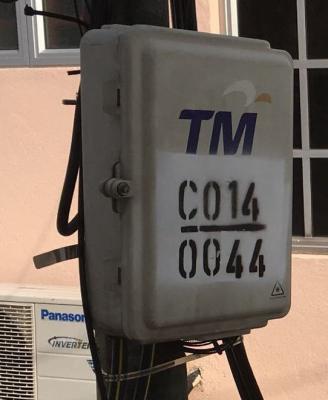
Do you mean this white box? Every pole also got.
Attached Image

There is another box on the outside of your house wall.
No more this white box on the wall.

Edit: I may be wrong on the boxes.
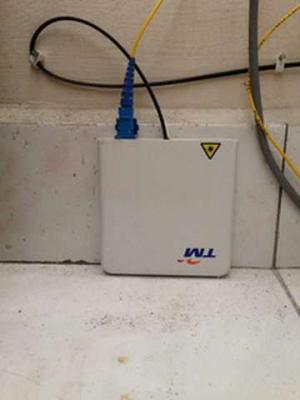
Are these two boxes the same?
One is outside the house and the other is inside the house.
Attached Image Attached Image

This post has been edited by cucubud: May 18 2017, 11:42 AM
cucubud
post May 18 2017, 01:39 PM

Super Moderator
*******
Senior Member
3,076 posts

Joined: Jan 2008


QUOTE(y561994 @ May 18 2017, 12:20 PM)
We are discussing about the white box on the wall outside the house (called Fiber Termination Box, FTB), not the inside one (called Fiber Wall Socket, FWS).

The box inside will surely be given by TM, if not there will be no place for the BTU (aka fiber modem) to plug in.  laugh.gif

The box outside the house, FTB, that might ease future upgrade/ repair, is no longer provided during installation.
*
OK. That means I am in the right track.
One year ago, they don't provide the FTB outside the house.
The outdoor fiber cable (black colour) goes straight into the house and terminate in the FWS.

Looking at the FTB and the FWS, both function the same.
Outdoor fiber goes into the box and indoor fiber cable goes out to the BTU.

cucubud
post May 18 2017, 01:55 PM

Super Moderator
*******
Senior Member
3,076 posts

Joined: Jan 2008


QUOTE(y561994 @ May 18 2017, 12:06 PM)
My new home also have the green distribution point on the ground, and house developer preinstalled fiber cable + Fiber Wall Socket (FWS) in the living room. No outdoor Fiber Termination Box (FTB) given. This is expected since fiber cable all buried underground till the living room, no need for fiber cable to go up the wall.

I am installing for my old home. Fiber cable will come from the Fiber Termination Point on the pole along the lorong behind my house.

If they pull the black outdoor fiber cable into the house, they got to remove the metal wire that support the cable right (for indoor use)? Cause i remember the metal wire that prevent the cable from excessive bending/ breaking is quite stiff.

And BTW, if the fiber cable break (indoor or outdoor due to rat, fox that walk on cable), whos responsible for the repair? TM or me?
*
If I am not mistaken, the black outdoor fiber will reach the first wall only.
They can drill a hole on that wall and terminate it on a FWS on the inside of that wall.
From this TM FWS to your preinstalled FWS, it will be the indoor fiber cable.
TM got provide one indoor fiber cable. Not sure what is the length. (7 or 8 m).
I changed mine.

If the outdoor fiber spoilt, TM responsible to repair it.
If the indoor fiber spoilt, then we have to change it ourselves.

This post has been edited by cucubud: May 18 2017, 01:57 PM

cucubud
post May 18 2017, 02:21 PM

Super Moderator
*******
Senior Member
3,076 posts

Joined: Jan 2008


QUOTE(westlife @ May 18 2017, 01:42 PM)
without the FTB, i think next time want to change location of the wifi router, maybe more troublesome rite? maybe need to relay cable all the from the distribution point?
*
When you change router location, it is only from BTU to router LAN cable need to change. Nothing to do with the FTB or the FWS.
cucubud
post May 18 2017, 02:31 PM

Super Moderator
*******
Senior Member
3,076 posts

Joined: Jan 2008


QUOTE(westlife @ May 18 2017, 02:23 PM)
BTU to connect to wifi router, also need cable sia. u mean to lay the LAN cable from BTU in living to connect all the way to the wifi router putting upstair?

that one also requires a lot of work if u need to conceal the thing. cannot be having the cable seen all over the place rite?

now i am talking about changing the fibre point at home le. means the location of BTU.
*
You mentioned router relocation to another place, BTU not mentioned. sad.gif
If you want to move the BTU, even with the FTB outside the house, you have to lay the fiber cable again from the FTB to the BTU.
Same if you have the FWS only. You have to lay the fiber cable from the FWS to the BTU new location.

cucubud
post May 18 2017, 02:41 PM

Super Moderator
*******
Senior Member
3,076 posts

Joined: Jan 2008


QUOTE(y561994 @ May 18 2017, 02:32 PM)
Really? Do you mean some of the installer use FWS to replace the FTB? (So there will be 2 FWS?) Any charges for that?

Since now there will be only 1 single long fiber cable running from Fiber termination box outside (on the pole/ ground) all the way to the FWS, if the internal one breaks, do we have to pay for the whole length for replacement (since they are one long cable?) Not sure how they will calculate in this case... sweat.gif  sweat.gif
*
There is only one FWS.
From the FWS, the indoor fiber cable goes straight to the BTU port.
Why need another FWS?

FWS is acting as the junction box.
From the pole, the black outdoor fiber cable goes into the FWS.
From the FWS, indoor fiber cable goes directly to the BTU port.

Outdoor cable rosak, call TM.
Indoor cable rosak, pay from own pocket.


Topic ClosedOptions
 

Change to:
| Lo-Fi Version
0.0736sec    0.16    7 queries    GZIP Disabled
Time is now: 9th December 2025 - 06:16 AM