QUOTE(blacktubi @ May 1 2017, 11:00 AM)
HyppTV is on a different VLAN with Internet so it will be either LAN connectivity with Internet VLAN or HyppTV VLAN.
I suggest you try Powerline first, I manage to get around 50Mbps on a good day with Powerline even on different phase.
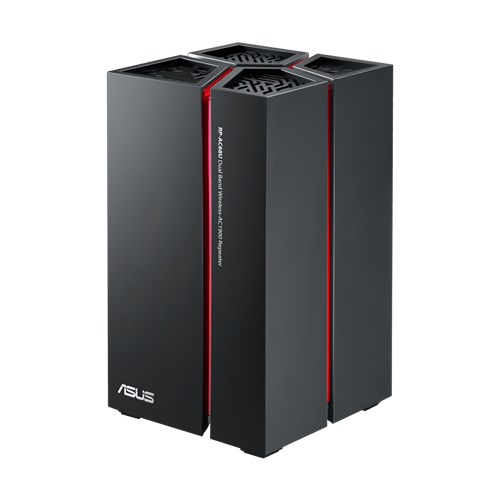
Thanks for the suggestion. I have a pair of Aztech 500mbps homeplugs. Tested between my study room and living room which i can't even connect. I've yet try those newer generation of powerline adapter that can utilize all 3 socket wires. Anyway, I got new idea of putting the Hypptv in master bedroom instead as i can still get weak signals there from my current homeplug. At the moment my priority is to get a good repeater or media bridge to serve tv, soundbar and android box in the living room. Any suggestion of a good repeater? I'm looking at Asus RP-AC68U but wow that thing is expensive.
QUOTE(soonwai @ May 2 2017, 10:12 PM)
This can be done, for example with Mikrotik routers. You'll have 1 Mikrotik router in the study which is configured to trunk both vlan500(internet) and vlan600(hypptv) over a network interface to the Mikrotik router in the living room. The network interface can be either a cable or wireless. I'm doing something like this but with a cable, trunking vlan50 (LAN traffic) and vlan600 from room upstairs (where BTU & router is) to living room downstairs (AP & STB). Another example is my auntie's house where she's trunking only vlan600 over wifi. Here she uses a (illegal) frequency out of the normal channels 1-13 to avoid interference.
One thing about HyppTV streams and wifi is that it's very sensitive. You'll need a good and consistent wifi connection. If not, you'll start getting buffering or loss of signal and it takes ages to re-sync.
Interesting.... i wonder if it works with Asus router/repeater with appropriate configuration. Sounds like i need more technical knowledge to do what you suggested. Anyway, thanks a lot

.


 May 1 2017, 10:26 AM


 Quote
Quote

 0.0658sec
 0.11
0.11
 7 queries
 GZIP Disabled