Welcome Guest ( Log In | Register )

Outline · [ Standard ] · Linear+

 [OFFICIAL]Rig Suggestion Q&A Thread V13!

views
     
westlife
post Aug 22 2025, 03:29 PM

10k Club
********
All Stars
14,257 posts

Joined: Jan 2011
QUOTE(babylon52281 @ Aug 22 2025, 02:38 PM)
LOL Google lar. Lotsa utube videos show how to turn your Pro into LTSC/ IOT but with caveats certain features not included in LTSC.
*
ic. then it actually has no point. might as well switch to windows 11 directly since it is free upgrade anyway.

upgraded mine. so far so good. even on this old PC, the experience so far is quite similarly to windows 10.

will monitor for a while to confirm it is ok overall. before i remove the previous windows 10 related files to save space (as even upgraded to windows 11 now, i can revert back to windows 10 anytime still).

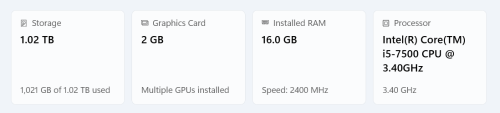
user posted image
babylon52281
post Aug 22 2025, 04:21 PM

Look at all my stars!!
*******
Senior Member
2,681 posts

Joined: Apr 2017
QUOTE(westlife @ Aug 22 2025, 03:29 PM)
ic. then it actually has no point. might as well switch to windows 11 directly since it is free upgrade anyway.

upgraded mine. so far so good. even on this old PC, the experience so far is quite similarly to windows 10.

will monitor for a while to confirm it is ok overall. before i remove the previous windows 10 related files to save space (as even upgraded to windows 11 now, i can revert back to windows 10 anytime still).

user posted image
*
Just upgraded? Heres a pro tip to speed up Win11 (only if you know what your doing)


If you still can dual boot into your Win10, clone backup it to another HDD/SSD just in case shit happens. Also clone your fresh install Win11 just so you have a reference point to return to in case shit happens further down. My fave is Macrorit.

This post has been edited by babylon52281: Aug 22 2025, 04:29 PM
westlife
post Aug 22 2025, 07:54 PM

10k Club
********
All Stars
14,257 posts

Joined: Jan 2011
QUOTE(babylon52281 @ Aug 22 2025, 04:21 PM)
Just upgraded? Heres a pro tip to speed up Win11 (only if you know what your doing)


If you still can dual boot into your Win10, clone backup it to another HDD/SSD just in case shit happens. Also clone your fresh install Win11 just so you have a reference point to return to in case shit happens further down. My fave is Macrorit.
*
No. Not dual boot.

It is an upgrade from existing windows 10 to 11 directly while keeping all the personal files, apps and settings.

So still one system after the upgrade.

However, there is an option to revert to previous system which is windows 10 if I wanted to.

The upgrade is done with no issues, my personal files are still there and all the previously installed software are also still around.

i had done the upgrade on this same pc from windows 10 to 11 previously also but i dislike the windows 11 UI so i reverted back to windows 10.

Now forced to upgrade to windows 11 also becos sooner or later will be forced to do so also becos eventually windows 10 will be totally out of support.

This post has been edited by westlife: Aug 22 2025, 08:47 PM
PJng
post Aug 22 2025, 10:59 PM

10k Club
********
All Stars
12,039 posts

Joined: Oct 2017


QUOTE(westlife @ Aug 22 2025, 07:54 PM)
No. Not dual boot.

It is an upgrade from existing windows 10 to 11 directly while keeping all the personal files, apps and settings.

So still one system after the upgrade.

However, there is an option to revert to previous system which is windows 10 if I wanted to.

The upgrade is done with no issues, my personal files are still there and all the previously installed software are also still around.

i had done the upgrade on this same pc from windows 10 to 11 previously also but i dislike the windows 11 UI so i reverted back to windows 10.

Now forced to upgrade to windows 11 also becos sooner or later will be forced to do so also becos eventually windows 10 will be totally out of support.
*
Last time my old pc, i clean install windows 10, even can direct upgrade from windows update, i prefer clean windows state on new os
westlife
post Aug 22 2025, 11:44 PM

10k Club
********
All Stars
14,257 posts

Joined: Jan 2011
QUOTE(PJng @ Aug 22 2025, 10:59 PM)
Last time my old pc, i clean install windows 10, even can direct upgrade from windows update, i prefer clean windows state on new os
*
clean install is good, but need time to reinstall software, do all the settings and also need to backup data etc..

so i prefer to save time by just doing direct upgrading.

the experience is good, which even updated to windows 11, everything is the same which i can use the pc as usual.
westlife
post Aug 24 2025, 03:37 PM

10k Club
********
All Stars
14,257 posts

Joined: Jan 2011
QUOTE(babylon52281 @ Aug 22 2025, 04:21 PM)
Just upgraded? Heres a pro tip to speed up Win11 (only if you know what your doing)


If you still can dual boot into your Win10, clone backup it to another HDD/SSD just in case shit happens. Also clone your fresh install Win11 just so you have a reference point to return to in case shit happens further down. My fave is Macrorit.
*
bro, thanks. i tried the tips in the video you shared.

by disabling quite a no of useless things which i do not need. the speed of the overall PC can feel faster by a bit.

especially watching youtube video on chome, previously just upgraded, it loads the video very slow. now faster by quite a bit. tongue.gif

dun think there is a need to downgrade back to windows 10.

This post has been edited by westlife: Aug 24 2025, 03:59 PM
babylon52281
post Aug 25 2025, 11:34 AM

Look at all my stars!!
*******
Senior Member
2,681 posts

Joined: Apr 2017
QUOTE(westlife @ Aug 24 2025, 03:37 PM)
bro, thanks. i tried the tips in the video you shared.

by disabling quite a no of useless things which i do not need. the speed of the overall PC can feel faster by a bit.

especially watching youtube video on chome, previously just upgraded, it loads the video very slow. now faster by quite a bit.  tongue.gif

dun think there is a need to downgrade back to windows 10.
*
With Oct dateline coming fast, there really isnt any need for regular PC users to go back to Win10. From security PoV you get full support from MS, other hardwares & softwares are also starting to stop supporting Win10 https://www.techpowerup.com/322495/amd-to-d...processors?cp=4

Theres ways for power users & businesses to maintain with Win10 (ie LTSC/IOT) but thats because they know the risks and know how to fix issues unlike the majority normal users like you and me. Eventually tho they still need upgrade to 11 (or jump to 12 later) and because versions can differ greatly, the sooner you 'jump' to Win11 the lower each incremental steps to learn the new setup.

Just dont install the most latest updates to give it time to 'cook' fully. Recent half bake 24H2 is killing Phison based SSDs.
wch05
post Aug 29 2025, 01:46 PM

New Member
*
Newbie
15 posts

Joined: Apr 2012


looking to upgrade current mid range PC, so far parts that i have secure

CPU need recommend
MOBO need recommend
RAM 32GB ram (haven buy but plan to, existing ram 16gb)
SSD Kingston NV3 M.2 2280 1TB (existing)
GPU MSI Geforce RTX5060Ti 8GB (existing)
PSU 550w Gold (existing)
Casing armaggeddon infineon 1000 MATX (existing)

im hesitating not sure to go for AMD or Intel CPU
i mostly playing dota2 with my frens but sometimes will play some latest AAA game

This post has been edited by wch05: Aug 29 2025, 01:48 PM
TristanX
post Aug 29 2025, 02:22 PM

Where is my stars?
Group Icon
Elite
24,340 posts

Joined: Nov 2004
From: Setapak, Kuala Lumpur


QUOTE(wch05 @ Aug 29 2025, 01:46 PM)
looking to upgrade current mid range PC, so far parts that i have secure

CPU need recommend
MOBO need recommend
RAM 32GB ram (haven buy but plan to, existing ram 16gb)
SSD Kingston NV3 M.2 2280 1TB (existing)
GPU MSI Geforce RTX5060Ti 8GB (existing)
PSU 550w Gold (existing)
Casing armaggeddon infineon 1000 MATX (existing)

im hesitating not sure to go for AMD or Intel CPU
i mostly playing dota2 with my frens but sometimes will play some latest AAA game
*
Gaming only? Or do you work with this PC?

8GB graphic card may have issues for newer AAA games when you increase quality settings.
wch05
post Aug 29 2025, 03:04 PM

New Member
*
Newbie
15 posts

Joined: Apr 2012


i did minimal software coding on this rig, but mainly is for gaming, i dont chase for ultra settings, as long maintain 60fps with mid settings im fine with it
TristanX
post Aug 29 2025, 03:06 PM

Where is my stars?
Group Icon
Elite
24,340 posts

Joined: Nov 2004
From: Setapak, Kuala Lumpur


QUOTE(wch05 @ Aug 29 2025, 03:04 PM)
i did minimal software coding on this rig, but mainly is for gaming, i dont chase for ultra settings, as long maintain 60fps with mid settings im fine with it
*
Just go for these.

Ryzen 5 7500F or 7700 or 7800X3D
Thermalright Peerless Assassin 120 SE
MSI B650M Gaming plus
Acer predator Pallas Ii 32gb DDR5 6000 CL30 kit.

This post has been edited by TristanX: Aug 29 2025, 03:07 PM
wch05
post Aug 29 2025, 03:43 PM

New Member
*
Newbie
15 posts

Joined: Apr 2012


may i ask, why AMD CPU than intel right now ? hmm.gif
babylon52281
post Aug 29 2025, 03:51 PM

Look at all my stars!!
*******
Senior Member
2,681 posts

Joined: Apr 2017
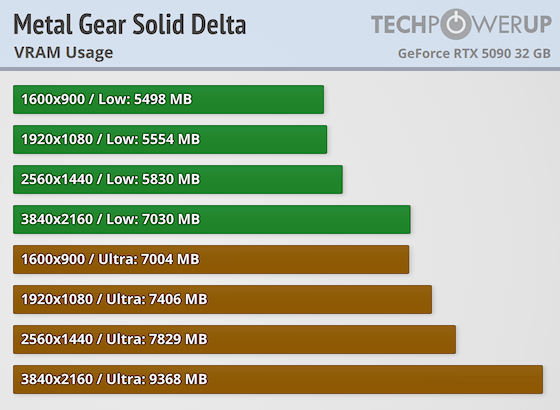
Another optimised game that showed the early demise of 8GB cards have been prematured

user posted image

https://www.techpowerup.com/review/metal-ge...ke-eater/7.html

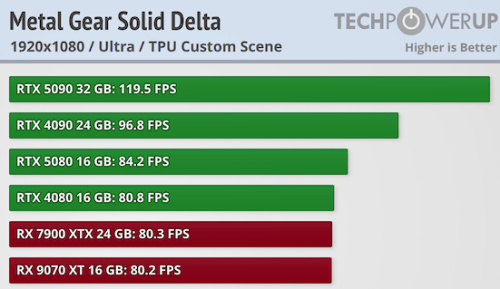
The game is taxing on all GPUS inc even 5090 (120 FPS in native 1080P Ultra!) but it appear VRAM has no bearing on difference in perf (24GB 7900XTX loses to 16GB 9070XT despite being 1 tier higher).

user posted image

The tiers showed raw GPU horsepower difference clearly.

This post has been edited by babylon52281: Aug 29 2025, 10:50 PM
babylon52281
post Aug 29 2025, 03:58 PM

Look at all my stars!!
*******
Senior Member
2,681 posts

Joined: Apr 2017
QUOTE(wch05 @ Aug 29 2025, 03:43 PM)
may i ask, why AMD CPU than intel right now ?  hmm.gif
*
AMD X3D CPUS are king, queen, jack, aces CPUS for gaming. But gaming only, otherwise its quite meh vs Intel.
wch05
post Aug 29 2025, 10:17 PM

New Member
*
Newbie
15 posts

Joined: Apr 2012


thx all sifu for the recommend notworthy.gif
chocobo7779
post Aug 30 2025, 10:09 AM

Power is nothing without control
********
All Stars
14,673 posts

Joined: Sep 2010
QUOTE(babylon52281 @ Aug 29 2025, 03:51 PM)
Another optimised game that showed the early demise of 8GB cards have been prematured

user posted image

https://www.techpowerup.com/review/metal-ge...ke-eater/7.html

The game is taxing on all GPUS inc even 5090 (120 FPS in native 1080P Ultra!) but it appear VRAM has no bearing on difference in perf (24GB 7900XTX loses to 16GB 9070XT despite being 1 tier higher).

user posted image

The tiers showed raw GPU horsepower difference clearly.
*
Again, FPS numbers do not tell the whole story, especially things like missing/downgraded textures are not something you can quantify with benchmark numbers icon_idea.gif

This post has been edited by chocobo7779: Aug 30 2025, 10:12 AM
babylon52281
post Aug 30 2025, 11:17 AM

Look at all my stars!!
*******
Senior Member
2,681 posts

Joined: Apr 2017
QUOTE(chocobo7779 @ Aug 30 2025, 10:09 AM)
Again, FPS numbers do not tell the whole story, especially things like missing/downgraded textures are not something you can quantify with benchmark numbers icon_idea.gif
*
It appears this is not the case otherwise Wizz would have written about it. Missing/downgraded textures would happen if VRAM usage is hitting the 8GB limit but the usage as shown is still below that except for 4K Ultra (I wouldnt be playing at that setting with 8GB midtier GPU tho). Texture pop in was noted but that appears on all GPUS as its a UE5 game engine thing.

Japanese game makers (like all things Japanese) has a sense for quality and wouldnt rush out for the sake of rushing out (unlike the many Western AAA games) so theres more optimised refinement in their creations.
jwgs P
post Sep 3 2025, 06:42 PM

New Member
*
Probation
1 posts

Joined: Sep 2025
Sifus,

Mostly gaming, some video editing:

CPU : Ryzen 7 7800x3d
Mobo: MSI B650 GAMING PLUS
RAM: 2x Acer Predator Pallas II 16GB DDR5-6000 CL30
SSD: Kingston KC3000 2TB
HDD: 1x for storage 3 TB / 4 TB
Cooler: Thermalright Peerless Assassin 140
PSU: Cooler Master MWE Gold 850W V3 ATX 3.1
Casing: Lian Li Lancool 207

GPU: 5070 Ti /9070 XT / 9070 undecided, I am thinking either 5070ti or 9070, is there a brand to avoid or just grab the cheapest? What would be the price range?

I am thinking of buying at the shop
» Click to show Spoiler - click again to hide... «
so they can assemble for me, then GPU on shopee for discount.

Thanks
chocobo7779
post Sep 3 2025, 09:55 PM

Power is nothing without control
********
All Stars
14,673 posts

Joined: Sep 2010
QUOTE(jwgs @ Sep 3 2025, 06:42 PM)
Sifus,

Mostly gaming, some video editing:

CPU : Ryzen 7 7800x3d
Mobo: MSI B650 GAMING PLUS
RAM: 2x Acer Predator Pallas II 16GB DDR5-6000 CL30
SSD: Kingston KC3000 2TB
HDD: 1x for storage 3 TB / 4 TB
Cooler: Thermalright Peerless Assassin 140
PSU: Cooler Master MWE Gold 850W V3 ATX 3.1
Casing: Lian Li Lancool 207

GPU: 5070 Ti /9070 XT / 9070 undecided, I am thinking either 5070ti or 9070, is there a brand to avoid or just grab the cheapest? What would be the price range?

I am thinking of buying at the shop
» Click to show Spoiler - click again to hide... «
so they can assemble for me, then GPU on shopee for discount.

Thanks
*
Using GPU cost per frame metric from Hardware Unboxed and based on Shopee prices:

1. Sapphire RX9070 XT Pulse (https://my.shp.ee/BNi8BES) - RM3099, RM27.67/frame
2. Sapphire RX9070 Pulse (https://my.shp.ee/QvsdY4n) - RM2648, RM25.96/frame
3. Colorful RTX5070 Ti Battle Ax (https://my.shp.ee/QvsdY4n) - RM3559, RM30.42/frame

Relative to each other, the RX9070 offers around 17% better cost per frame over the 5070 Ti, and the XT model is about 10% better in terms of cost per frame icon_idea.gif

If you do go for the Radeon card you will have to deal with the lower ray tracing and video encoding performance (it's still far superior to what the RX7000 series offers though) icon_idea.gif
However, do note that there is a driver update that boosts the Radeon performance quite a bit so keep this in mind icon_idea.gif

On the other hand, the 5070 Ti do offers better ray tracing performance and upscaling, so whether those features do justify the extra spending is up to you icon_idea.gif

P.S. you might want to avoid the MSI Shadow model, if the review of the MSI 5050 Shadow model by Hardware Unboxed is of any indication icon_idea.gif

This post has been edited by chocobo7779: Sep 3 2025, 09:59 PM
Rainings
post Sep 4 2025, 07:21 AM

Regular
******
Senior Member
1,101 posts

Joined: Jul 2008
Okay guys I need some advice here.
Based on all the findings, there's a very high chance that my GPU is cooked, since i don't have spare gpu and psu to test I think i will send it to a shop for further testing to confirm if my GPU is dead.
All my other components seems working fine.
Detailed info: https://forum.lowyat.net/topic/5538275

I'm not really keeping up with the latest GPU price and performance etc. I know that my PC is pretty old now, in an ideal world would be full system upgrade. But full system upgrade is just not possible now due to budget constrain.

If I can confirm my GPU is dead, which GPU model replacement is the most sensible?
And my PSU seems like working fine so if can continue using the 8pin cable so no need to replace the PSU?
Removed 8G GPU from the options:
RTX 3060 ti 8gb
RTX 4060 Ti 8G (Asus Dual EVO OC) RM1524
RTX 5050 8G (MSI ventus 2x OC edition) RM1349
RTX 5060 8G (ZOTAC GAMING GeForce Twin Edge OC) RM1569
RTX 5060 8G (MSI Ventus 2x OCC) RM1579

Updated options:
Nvidia
30 series:
- RTX 3060 12gb (MSI ventus 2x OC dual fan) RM1044

50 series:
- RTX 5060 Ti 16G (Asus dual OC PLUS GDDR7) RM2110
- RTX 5060 Ti 16G (MSI shadow 2x OC PLUS GDDR7) RM2139
- RTX 5060 Ti 16G (MSI ventus 2x OC PLUS GDDR7) RM2299

AMD
RX 9060 XT 16G (Asrock dual fan) RM1684
RX 7800 XT 16G (Asus Dual) RM2181

Note: My case can only fit dual fan, all the price above are from shopee, and i cant seem to find much 40 series card at shopee.

Usage:
- I still game occasionally, but not that frequent like last time.
- I do quite a lot of video editing recently using premier pro, photoshop, lightroom, those common adobe suite
- Still using dual monitors both 1080p, no plan to upgrade, unless either one of the monitor dead, then maybe will upgrade the dead monitor to 1440p.


Current PC Specs
• CPU: Intel i7-8700K
• Motherboard: MSI Z370
• GPU: Zotac GTX 1080 Ti Dual Fan
• PSU: Thermaltake Toughpower GX1 700W (non-modular)
• RAM: 64gb
• OS: Windows 11
• BIOS: bios already update to latest version 7B61v1B when upgrade to windows 11 last year.

This post has been edited by Rainings: Sep 4 2025, 09:23 AM

1384 Pages « < 1365 1366 1367 1368 1369 > » Top
 

Change to:
| Lo-Fi Version
0.0389sec    0.42    6 queries    GZIP Disabled
Time is now: 7th December 2025 - 10:17 AM