

Just got my 1.8 civic yesterday. Very happy with the car so far. No monday blues driving to work today.

Attached thumbnail(s)
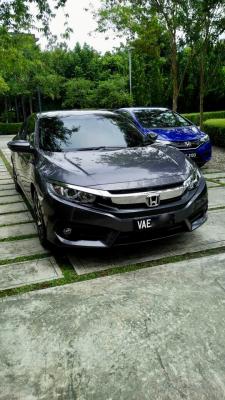
Official Honda Civic 10th Gen Owner/Fans Club V5, Still turning heads!
|
|
 Jun 5 2017, 09:02 PM Jun 5 2017, 09:02 PM
Return to original view | Post
#1
|
 
Newbie
4 posts Joined: Oct 2007 
|
Hi all,
Just got my 1.8 civic yesterday. Very happy with the car so far. No monday blues driving to work today. Attached thumbnail(s)
|
|
|
|
|
|
Jun 5 2017, 09:33 PM
Return to original view | Post
#2
|
|
Newbie
4 posts Joined: Oct 2007
|
QUOTE(angrysnail @ Jun 5 2017, 09:11 PM) congratz bro for your new ride!...How much rebate you got? Only 4k. Saw some got as much as 5k in this thread. Nevertheless, still happy as it took me about 3 weeks from booking and 2 weeks after loan approved. |
|
|
Jun 12 2017, 10:44 AM
Return to original view | Post
#3
|
|
Newbie
4 posts Joined: Oct 2007
|
QUOTE(isr25 @ Jun 7 2017, 06:09 AM) The latest, long overdue and highly anticipated, Waze Android Auto BETA has been leaked by APK Mirror, so if you are not part of the Beta team tester, you can download and try it out from the link below: Hi guys,http://www.apkmirror.com/apk/waze/waze-waze/ Waze - GPS, Maps & Traffic 4.24.0.113 beta Do note it is a BETA version, so download at your own risk! Installation Guide: 1. Install Android Auto (latest v2.3.7166) and Waze beta above on your phone. Delete your current Waze before installing the Beta version. 2. Launch Android Auto and Waze on your phone first - agree to terms of use, rate app etc2. 3. Use a USB Cable (mandatory) to connect your phone to your HU (1.5A on Driver side USB Port). 4. Click on the "Navigation Icon" on the bottom left of Android Auto to change from Google Maps to Waze. Enjoy Waze on Android Auto! If you have any problems to use Waze on Android Auto, try: 1. Restarting both your HU & Phone 2. Close/Stop both Android Auto & Waze. Then launch Android Auto & Waze without connecting to the HU. Might have an uncleared pop up (terms of use, rate app etc). 3. Uninstall both Android Auto and Waze. Follow the above installation steps again. Known Issues (From Beta Forum): 1. Voice commands: Custom Waze voice actions, like “Report Accident”, “Send ETA”, “Stop Navigation” are not yet supported. 2. Waze voice prompts are not muted while Android Auto speaks. 3. Auto zoom issues on high resolution screens 4. Noticeable lag when triggering an Android Auto voice command when Waze is not opened on the head unit yet 5. Waze terms need to be accepted on the phone after each new install (need notice on car screen instead of crash) 6. In some cases of car camera turning on (reverse, etc..) Waze closes and needs to be reopened again. Anyone using Oppo F1 and facing problems even after following the above guide? If anyone with Oppo successfully able to get Android Auto to run on the HU, please do share. Appreciate it much!  How about apple car play, any issues? If I still cant get my Oppo to work, might have to dig my old ipad mini out sigh...  This post has been edited by justng: Jun 12 2017, 10:47 AM |
|
|
Jun 12 2017, 11:23 AM
Return to original view | Post
#4
|
|
Newbie
4 posts Joined: Oct 2007
|
QUOTE(isr25 @ Jun 12 2017, 11:14 AM) Not sure what issue you are having. Did you successfully install Android Auto? Can you open the app on your phone? Successfully installed and even had it connected. But when select a destination, it will black out and says "No device detected". Rebooted and tried again few times, same results. Also with Spotify or Google Music, the sound is distorted.Apple CarPlay is only available on the iPhone ecosystem... https://www.apple.com/ios/carplay/  |
|
|
Jun 12 2017, 02:28 PM
Return to original view | Post
#5
|
|
Newbie
4 posts Joined: Oct 2007
|
QUOTE(isr25 @ Jun 12 2017, 11:50 AM) Sound distortion, if you search Android Auto and Oppo F1, there seems to be a few complaints online on that. So maybe Oppo F1 has problems with Android Auto? But just to confirm, try to: Thanks isr25 and wyk85 will try again as above. If still don't work, I guess a good excuse to change the phone. LOL .. 1. Restarting your device 2. Closing both apps and launching it again 3. Uninstall and reinstalling again both apps 4. Use a different USB cable as wyk85 suggested.  |
|
|
Jun 14 2017, 10:46 PM
Return to original view | Post
#6
|
|
Newbie
4 posts Joined: Oct 2007
|
QUOTE(johnnycp @ Jun 14 2017, 10:45 PM) Cool.. I asked around KL showroom.. roughly 2.3k discount only I got mine 3 weeks ago, RM4k discount + freebies but no 2 years free service. |
|
|
Jun 14 2017, 10:49 PM
Return to original view | Post
#7
|
|
Newbie
4 posts Joined: Oct 2007
|
Has anyone experience static shock after driving when getting out of the car and close the door. Getting it quite frequent. Carpet issue (easy to generate static when feet rub against carpet) or Grounding wire issue?
|
|
|
Jun 14 2017, 11:17 PM
Return to original view | Post
#8
|
|
Newbie
4 posts Joined: Oct 2007
|
QUOTE(DraGoonFly @ Jun 14 2017, 11:08 PM) Is it your car tcp with chrome handle?Previously I have the same issue with my 07 vios where the handle is in chrome. But now no such issue with my 1.8s. No leh, mine also 1.8s.. I kena when open the door from the inside, getting out and when want to close the door.. touch the outer door panel.. will kena shock.. or sometimes getting out, my shoulder too close the B pillar also kena shock. Not painful, but if frequent can be very annoying. Plus I fetch my kids, so not sure if will shock them too. It might just be me.. different static charge to the car.. hoping to see if other owners get it.Btw, does those Pivot Raizin grounding cables work? or myth busted, just gimmick ? |
|
Topic ClosedOptions
|
| Change to: |  0.1151sec 0.1151sec
 0.67 0.67
 7 queries 7 queries
 GZIP Disabled GZIP Disabled
Time is now: 14th December 2025 - 12:50 AM |
 Quote
Quote