

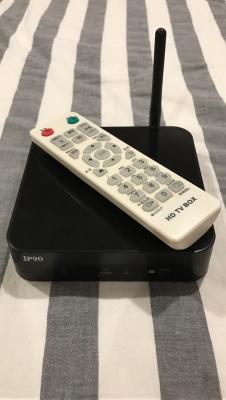
Tried to hold (Power + Menu) and then switch on the device, but it doesn't go to Android System Recovery

Your help would be very much appreciated.
Attached thumbnail(s)
Android / Other TV Box, see Page 1 first... V2
|
|
 May 4 2017, 03:55 PM May 4 2017, 03:55 PM
Return to original view | Post
#1
|
 
Junior Member
323 posts Joined: Jan 2005 From: USJ Subang  
|
Hi guys, anyone here knows how to factory reset this box with its remote?
Tried to hold (Power + Menu) and then switch on the device, but it doesn't go to Android System Recovery Your help would be very much appreciated. Attached thumbnail(s)
|
|
|
|
|
|
May 4 2017, 06:44 PM
Return to original view | Post
#2
|
|
Junior Member
323 posts Joined: Jan 2005 From: USJ Subang
|
QUOTE(GuyM @ May 4 2017, 06:11 PM) Lol! It's not a phone la Sorry my bad, i thought it can be done with its IR remote Find a small pin hole underneath the box or at the back where all the HDMI or ac socket located Then use a needle to poke into to see if you feel or hear a click sound. If yes, off the power first. Insert the needle in until you have click on the button in the hole. Holding it then switch on the power until you see the reboot screen, let go of the needle then you are on your way to reset everything   I couldn't locate the reset button. there is nothing underneath and behind the box. Please refer to the pics  Attached thumbnail(s) 

|
|
|
May 4 2017, 06:52 PM
Return to original view | Post
#3
|
|
Junior Member
323 posts Joined: Jan 2005 From: USJ Subang
|
QUOTE(GuyM @ May 4 2017, 06:48 PM) Side view Both sides also nothing bro  |
|
|
May 4 2017, 06:53 PM
Return to original view | Post
#4
|
|
Junior Member
323 posts Joined: Jan 2005 From: USJ Subang
|
QUOTE(Donphatz @ May 4 2017, 06:52 PM) its hidden in the AV hole. You need to poke using a pin. Tried to insert with a toothpick, it was empty.or do i need a longer tool? |
|
|
May 4 2017, 07:09 PM
Return to original view | Post
#5
|
|
Junior Member
323 posts Joined: Jan 2005 From: USJ Subang
|
QUOTE(dwRK @ May 4 2017, 06:58 PM) Why do you want to wipe/reset? Yea, i would like to wipe/reset it since it cant be boot into OSThe reset switch may or may not be available...unless you folks know for sure... |
|
|
May 4 2017, 09:50 PM
Return to original view | Post
#6
|
|
Junior Member
323 posts Joined: Jan 2005 From: USJ Subang
|
QUOTE(GuyM @ May 4 2017, 08:06 PM) Try use a long needle poke into the AV hole with the power off. You'll know if it's the reset button bcos of clicking sound Disassembled the box and confirmed there is not reset button already..SighAnyone else knows how to reset this box with its IR remote? |
|
|
May 5 2017, 03:46 PM
Return to original view | Post
#7
|
|
Junior Member
323 posts Joined: Jan 2005 From: USJ Subang
|
QUOTE(muncheno @ May 4 2017, 10:06 PM) Can post a picture of the PCB? Noted, i will post the PCB pic later.Maybe can get more info on how to reset it. QUOTE(voncrane @ May 5 2017, 12:50 AM) Have you tried just holding down the power button on the box from a cold boot up? Never tried that, u mean power button on the box or IR remote?QUOTE(Khalid21 @ May 5 2017, 09:46 AM) if dont have reset button .. you need to find on menu itself (sorry you box cannot boot up) It's an old box running Android 4.0 (QNET HD)can list down your box spec.. * lazada got alot http://www.lazada.com.my/shop-consumer-ele...ect=android+box Googled and couldn't find any info about this box |
|
|
May 8 2017, 05:02 PM
Return to original view | Post
#8
|
|
Junior Member
323 posts Joined: Jan 2005 From: USJ Subang
|
QUOTE(muncheno @ May 4 2017, 10:06 PM) Can post a picture of the PCB? Hi there, these are the PCB pics.Maybe can get more info on how to reset it. Pls help Attached thumbnail(s) 


|
| Change to: |  0.0240sec 0.0240sec
 0.36 0.36
 7 queries 7 queries
 GZIP Disabled GZIP Disabled
Time is now: 2nd December 2025 - 07:30 PM |
 Quote
Quote