QUOTE(Invince_Z @ Sep 17 2020, 01:05 AM)
all games. game run properly on landscape, the gamepad however act as if it on potrait doesn't matter what app or games I'm in.
my tx6 is on android 9.
you can view screen record here:
https://drive.google.com/file/d/1EGH6whqm4E...lSiBXzj-E6rJ58Xedit: the gamepad is connected in direct connection in
Shooting Plus v3 app. it say, some chipset are incompatible, require usb debugging and some extra steps to install driver (i think) and need to use pc.
Ah i see... if all games including those with actual dedicated support for gamepads? Then I fear it's an imcompatibility issue either from the firmware or the controller itself. Especially as the controller requires a third party app to function. I prefer the GameSir World App for GameSir controllers. Personally, I'm using the GameSir G4S and recommend getting GameSir controllers if you one is going the third=party route. The SteelSeries Stratus is better but a bit pricey. Ipega also makes decent gamepads too.. Basically, it's either go official with Xbox or PS controllers or get either of those 3 third-party controllers. Their support is great.
What controller are you using though and if confirm it has issues with Gameloft games? Then it really can't be helped. Have to change controllers or consider flashing a different firmware/factory reset. Worst case? different box. I've been using the G4S with PC, Phones and few Beelink boxes.. It works alright.
QUOTE(Scissorshand @ Sep 17 2020, 11:39 AM)
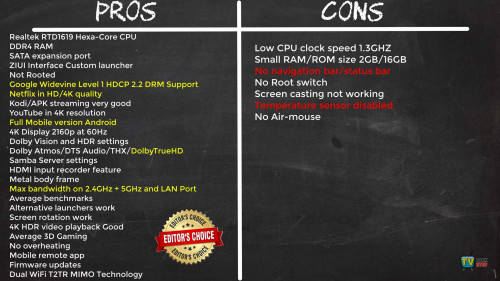
Some of you may know i'm a fan of ATV especially affordable Mecool but has there any user of this model yet?
For full HD Netflix fix is
HERE. I have this fix on KM3 and KM9 Pro which works very well with Unifi PlayTV, Disney+, ESPN+ cos is not rooted, not sure about aotg though cos i don't have access

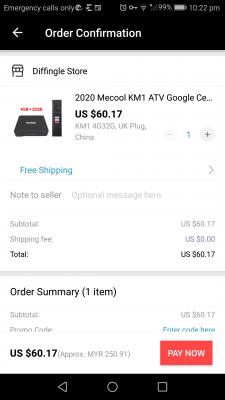
Planning to upgrade to KM1 Deluxe, cheapest i found
KM1 DeluxeATV fan here too.. Had a Mecool KM3 for awhile and it was a small okay-ish device. now used to more powerful stuff, so.......but yeah, need note that these "fixes" depends on Netflix not closing the loophole being exploited. So for those who'd want rest of mind? Go for certified devices.
QUOTE(JetOoi @ Sep 20 2020, 07:54 AM)
So far the tx3 is meeting my expectations. Live tv, movies, series for both English and Chinese language that I need are mostly available, although need to switch across different apps. No overheating issues observed. Hope it can last long. Happy user so far

One question, is it advisable to properly shutdown android tv box every time(like phone), or I can switch off the power supply straight without much concern?
Great...TX3 goes on my happy users list..
Yes, it's advisable ... Same with Kodi. Ideally and to prevent data corruption. Either put the box in sleep mode and wake up when neccessary.. Occasionally performing a full shutdown once or twice per week to "get things sorted" and stored properly.
QUOTE(UserU @ Sep 20 2020, 07:11 PM)
Anyone owning the TX6S here?
I noticed it has doesn't connect to any Wifi networks with DLINK Smart Connect and the menu navigation is laggy.
Looking to flash the firmware fix but I'm not sure if it would wipe everything from the device.
If the fix is contained in an updated firmware file to be flashed via USB burning tool.. Most likely it will require a full wipe. So I would expect it wipe the device. Backup what you can and flash away. Most key apps either have settings backup options or can be easily reinstalled. Just some time required to re-setup. Worth it IMO, for a clean device.
This post has been edited by voncrane: Sep 21 2020, 12:22 PM 

 Aug 26 2020, 05:32 PM


 Quote
Quote




 Enjoy nonetheless as you'll definitely notice some improvement beyond using default settings. I also go into details explaining what some key options in the settings mean and what does what. Which to toggle and which to leave as default.




 0.0420sec
 0.66
0.66
 6 queries
 GZIP Disabled