

QUOTE(voncrane @ Jan 2 2019, 01:23 PM)
Yes it is. This is one of the plus points of the MiBox, it's a verified/certified Google Android TV OS device. So Netflix has no blocks on it.

already certified, cannot go Netflix 4K?Android / Other TV Box, see Page 1 first... V2
|
|
 Jan 2 2019, 05:01 PM Jan 2 2019, 05:01 PM
|
 
Junior Member
460 posts Joined: Jun 2008  
|
QUOTE(voncrane @ Jan 2 2019, 01:23 PM) Yes it is. This is one of the plus points of the MiBox, it's a verified/certified Google Android TV OS device. So Netflix has no blocks on it. already certified, cannot go Netflix 4K? |
|
|
|
|
|
Jan 2 2019, 07:50 PM
Show posts by this member only | IPv6 | Post
#4922
|

Senior Member
7,118 posts Joined: Oct 2011 From: Wakanda
|
QUOTE(szecheng @ Jan 2 2019, 05:01 PM) already certified, cannot go Netflix 4K? Can and I thought that was implied too.. The Xiaomi Mi Box S does support Netflix up to 4K HDR... Whether one actually gets that? I can't verify first hand.. Though, I've read it can be a buggy experience.. Nevertheless, it's an officially certified device. |
|
|
Jan 3 2019, 11:33 AM
Show posts by this member only | IPv6 | Post
#4923
|

Senior Member
4,147 posts Joined: Jan 2003 From: Cheras, KL
|
Best frame rate setting for Minix Neo U1
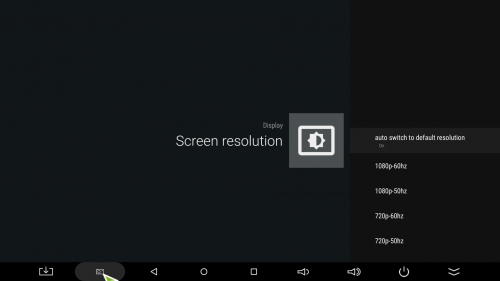 [Android] auto switch to default resolution: on note: if manually set to 1080/50, 1080/60, 4k/50, 4k/60; the HDMI self-adaption Level 2 seems not working, so must set auto switch to default resolution: on. 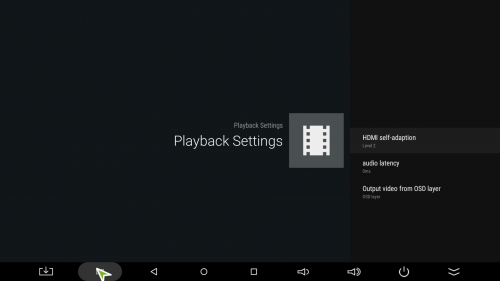 [Android] HDMI self-adaption: Level 2 note: Level 1 = adjust everything to 60 Hz frame rate, Level 2 = set frame rate same as video 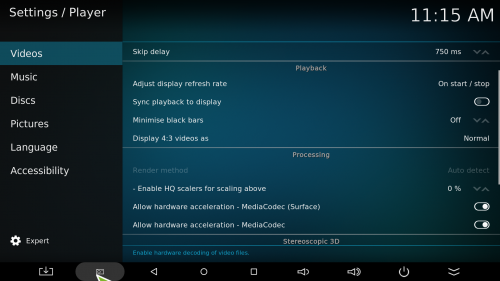 [Kodi] Adjust display refresh rate: On start / stop note: after setting please reboot your tv box. changing the setting on-the-fly doesn't seem working good. This post has been edited by BOTAK_WAI: Jan 3 2019, 11:56 AM |
|
|
Jan 3 2019, 08:40 PM
|
|
Senior Member
7,118 posts Joined: Oct 2011 From: Wakanda
|
QUOTE(BOTAK_WAI @ Jan 3 2019, 11:33 AM) Best frame rate setting for Minix Neo U1 Correct and should work with other boxes with similar settings and or fw.. Been using this settings for long. Along with completely turning off motion blur/control features on the TV.[Android] auto switch to default resolution: on note: if manually set to 1080/50, 1080/60, 4k/50, 4k/60; the HDMI self-adaption Level 2 seems not working, so must set auto switch to default resolution: on. [Android] HDMI self-adaption: Level 2 note: Level 1 = adjust everything to 60 Hz frame rate, Level 2 = set frame rate same as video [Kodi] Adjust display refresh rate: On start / stop note: after setting please reboot your tv box. changing the setting on-the-fly doesn't seem working good. |
|
|
Jan 3 2019, 09:29 PM
Show posts by this member only | IPv6 | Post
#4925
|

Senior Member
826 posts Joined: Oct 2004
|
Anyone interested in getting Mi Box S, can apply Citibank credit card from Ringgit Plus deal
|
|
|
Jan 3 2019, 10:02 PM
|
|
Senior Member
1,691 posts Joined: Nov 2008
|
QUOTE(jhlou @ Jan 3 2019, 09:29 PM) Anyone interested in getting Mi Box S, can apply Citibank credit card from Ringgit Plus deal Thanks!! Applying now |
|
|
|
|
|
Jan 4 2019, 11:47 AM
|
|
Newbie
2 posts Joined: Sep 2012
|
What is the minimum internet speed can support this android tv box?
|
|
|
Jan 4 2019, 11:05 PM
Show posts by this member only | IPv6 | Post
#4928
|
|
Senior Member
7,118 posts Joined: Oct 2011 From: Wakanda
|
QUOTE(azns @ Jan 4 2019, 11:47 AM) What is the minimum internet speed can support this android tv box? Wrong question to ask..  See page one and return.. Ask better questions, such as if I want to watch so and so service, how much stable speeds are needed.. Then can respond well. See page one and return.. Ask better questions, such as if I want to watch so and so service, how much stable speeds are needed.. Then can respond well.This post has been edited by voncrane: Jan 4 2019, 11:06 PM |
|
|
Jan 6 2019, 09:33 PM
|

Junior Member
168 posts Joined: Sep 2012
|
not sure if i should ask here
i cant access into android interface of my skyworth tv when bootup it show animated android logo then nth, only can watch other hdmi source press home or netflix button, no response only happen today, work fine before this anybody know how to factory reset without able to get into android os? |
|
|
Jan 7 2019, 02:35 AM
Show posts by this member only | IPv6 | Post
#4930
|
|
Senior Member
7,118 posts Joined: Oct 2011 From: Wakanda
|
QUOTE(yandebunena @ Jan 6 2019, 09:33 PM) not sure if i should ask here Though inappropriate to ask here.. If your TV is like most of today's, should be able to access the more technical systems settings area, through a specific combination of physical and or remote button presses... In sequence..Try the following methods and hope it works out for you.i cant access into android interface of my skyworth tv when bootup it show animated android logo then nth, only can watch other hdmi source press home or netflix button, no response only happen today, work fine before this anybody know how to factory reset without able to get into android os? To enter factory mode: Open source menu, and then press digital button "3", "1", "9" , "5" in turns to enter the factory menu. Press ↑ and ↓ button to choose the item, press OK button to enter the submenu, press ← and → button to adjust the value. To Leave factory mode: Press menu button to back to upper menu until leave factory mode. However, don't do this yet, cuz we want to factory reset. But always remember to safely back out of this area in future after making any other changes. To factory reset: Enter factory mode, enter "SYSTEM SETTING" item, select "FACRESET DEFAULT" item and press OK button to reset the flash memory. TV set will restart when it is finish. Good luck! |
|
|
Jan 7 2019, 08:28 AM
Show posts by this member only | IPv6 | Post
#4931
|

Senior Member
3,817 posts Joined: May 2008 From: The other side...
|
QUOTE(yandebunena @ Jan 6 2019, 09:33 PM) not sure if i should ask here before u factory reset, mayb you want to try hard reboot...i cant access into android interface of my skyworth tv when bootup it show animated android logo then nth, only can watch other hdmi source press home or netflix button, no response only happen today, work fine before this anybody know how to factory reset without able to get into android os? use ur voice remote, long press POWER ⏻ button to reboot |
|
|
Jan 7 2019, 02:48 PM
|
|
Junior Member
234 posts Joined: Mar 2012
|
My Sony HT-300 soundbar is connected to my Samsung 55MU6100 TV through bluetooth. When watching TV or using native apps found in my TV such as Youtube or Netflix, there is no problem with the synchronization between the sound and the picture. However, when using my Minix Neo U9H, which is connected to my TV through HDMI, there is always a lag between the sound and the picture. The lag is about 0.5 second.
Is there any way to solve this problem? |
|
|
Jan 7 2019, 04:43 PM
Show posts by this member only | IPv6 | Post
#4933
|

Senior Member
736 posts Joined: Jun 2006 From: Ipoh
|
QUOTE(blackie19 @ Jan 7 2019, 02:48 PM) My Sony HT-300 soundbar is connected to my Samsung 55MU6100 TV through bluetooth. When watching TV or using native apps found in my TV such as Youtube or Netflix, there is no problem with the synchronization between the sound and the picture. However, when using my Minix Neo U9H, which is connected to my TV through HDMI, there is always a lag between the sound and the picture. The lag is about 0.5 second. Will this work if HT-300 connected to Minix with BT?Is there any way to solve this problem? |
|
|
|
|
|
Jan 7 2019, 10:33 PM
Show posts by this member only | IPv6 | Post
#4934
|
|
Senior Member
4,147 posts Joined: Jan 2003 From: Cheras, KL
|
i don’t understand why ppl use bt for audio connection...optical way easier and reliable.
|
|
|
Jan 7 2019, 10:36 PM
Show posts by this member only | IPv6 | Post
#4935
|
 
Staff
72,796 posts Joined: Sep 2005 From: KUL 
|
QUOTE(BOTAK_WAI @ Jan 7 2019, 10:33 PM) i don’t understand why ppl use bt for audio connection...optical way easier and reliable. Cable management. |
|
|
Jan 7 2019, 11:09 PM
Show posts by this member only | IPv6 | Post
#4936
|
|
Senior Member
4,147 posts Joined: Jan 2003 From: Cheras, KL
|
QUOTE(fruitie @ Jan 7 2019, 10:36 PM) Cable management. audio not properly sync very potong steam...if not audiophile want for hd multichannel sound track via hdmi, i rather suggest people to use optical cable, don’t have those arc funny problem... |
|
|
Jan 7 2019, 11:11 PM
Show posts by this member only | IPv6 | Post
#4937
|
|
Staff
72,796 posts Joined: Sep 2005 From: KUL
|
QUOTE(BOTAK_WAI @ Jan 7 2019, 11:09 PM) audio not properly sync very potong steam...if not audiophile want for hd multichannel sound track via hdmi, i rather suggest people to use optical cable, don’t have those arc funny problem... Yes, indeed potong steam. So far my BT speaker still syncs well with my shows. |
|
|
Jan 7 2019, 11:22 PM
Show posts by this member only | IPv6 | Post
#4938
|
|
Senior Member
4,147 posts Joined: Jan 2003 From: Cheras, KL
|
QUOTE(fruitie @ Jan 7 2019, 11:11 PM) Yes, indeed potong steam. So far my BT speaker still syncs well with my shows. if those online app not so high quality should be no problem. but those downloaded file with dts-hd soundtrack kenot la... |
|
|
Jan 7 2019, 11:30 PM
Show posts by this member only | IPv6 | Post
#4939
|
|
Staff
72,796 posts Joined: Sep 2005 From: KUL
|
QUOTE(BOTAK_WAI @ Jan 7 2019, 11:22 PM) if those online app not so high quality should be no problem. but those downloaded file with dts-hd soundtrack kenot la... True. Downloaded files will have issue. |
|
|
Jan 7 2019, 11:34 PM
Show posts by this member only | IPv6 | Post
#4940
|
|
Senior Member
4,147 posts Joined: Jan 2003 From: Cheras, KL
|
QUOTE(fruitie @ Jan 7 2019, 11:30 PM) True. Downloaded files will have issue. bt audio connection more useful for watching tv series during late night using bt headphone. u know la..sometimes watch drama will get addicted non stop...lol |
| Change to: |  0.0226sec 0.0226sec
 0.91 0.91
 6 queries 6 queries
 GZIP Disabled GZIP Disabled
Time is now: 2nd December 2025 - 08:08 PM |
 Quote
Quote