Welcome Guest ( Log In | Register )

369 Pages « < 133 134 135 136 137 > » Bottom

Outline · [ Standard ] · Linear+

 Android / Other TV Box, see Page 1 first... V2

views
     
voncrane
post Jan 23 2018, 10:56 AM

Noir et fier!
*******
Senior Member
7,120 posts

Joined: Oct 2011
From: Wakanda


QUOTE(Andrewtst @ Jan 23 2018, 09:47 AM)
YouTube and Netflix is freaking fine playing at 4K in Mi Box in latest version apps without any issue.
*
Good to know it works then.. That's why I put in the disclaimer that I read about it having issues and he should investigate if interested..Not that it does not work.. When I'm in the market to purchase any electronic device, I make sure to rank it's performance based off real world usage and performance of its specs from multiple owners... I do actual research (like what user "writesimply" is doing) and don't simply go out and buy a device, hoping it would do what I want. Here are some of the links that mentioned it had issues, not that I was simply pulling info out from thin air..

Source 1
Source 2
Source 3

This post has been edited by voncrane: Jan 23 2018, 10:59 AM
Andrewtst
post Jan 23 2018, 02:43 PM

Forgiveness is Happiness
*********
All Stars
29,767 posts

Joined: Jan 2009
From: Johor, Malaysia.


QUOTE(voncrane @ Jan 23 2018, 10:56 AM)
Good to know it works then.. That's why I put in the disclaimer that I read about it having issues and he should investigate if interested..Not that it does not work.. When I'm in the market to purchase any electronic device, I make sure to rank it's performance based off real world usage and performance of its specs from multiple owners... I do actual research (like what user "writesimply" is doing) and don't simply go out and buy a device, hoping it would do what I want. Here are some of the links that mentioned it had issues, not that I was simply pulling info out from thin air..

Source 1
Source 2
Source 3
*
First two source they are using beta7 firmware. That is the cause.

3rd they remove the ability to choose resolution, that is correct but not means they not able to play in 4K. This I also dislike but it seems that is their move.

The world not only you and please stop keep assume you yourself that will do homework only before purchase a thing. Plenty people is doing it.

This post has been edited by Andrewtst: Jan 23 2018, 02:52 PM
puchongite
post Jan 23 2018, 02:53 PM

20k VIP Club
*********
All Stars
33,619 posts

Joined: May 2008

A lot of boxes are said to have auto framing rate issue.

I wonder if what is the way to test if a box has auto framing rate issue ?

Just play a few files with different fps ? What to look for if it has problem ? Doesn't it also depending on the TV ?

Is there a website where we can just go and visit and test out auto framing rate issue ?
voncrane
post Jan 23 2018, 03:48 PM

Noir et fier!
*******
Senior Member
7,120 posts

Joined: Oct 2011
From: Wakanda


QUOTE(Andrewtst @ Jan 23 2018, 02:43 PM)
First two source they are using beta7 firmware. That is the cause.

3rd they remove the ability to choose resolution, that is correct but not means they not able to play in 4K. This I also dislike but it seems that is their move.

The world not only you and please stop keep assume you yourself that will do homework only before purchase a thing. Plenty people is doing it.
*
Dude.. Talk a chill pill and don't start.. Seems like you are the one who's more concerned about the world not being about em. Some people do homework and benefit, others don't and complain. I don't want him to fall into the latter category.. Feel free to read my posts again cuz nothing I commented on is wrong. I pointed out strengths and weaknesses of all devices suggested.. As always, leaving the decision up to the buyer... I even added disclaimers too to prevent triggering anyone.. So please ah.. doh.gif

QUOTE(puchongite @ Jan 23 2018, 02:53 PM)
A lot of boxes are said to have auto framing rate issue.

I wonder if what is the way to test if a box has auto framing rate issue ?

Just play a few files with different fps ? What to look for if it has problem ? Doesn't it also depending on the TV ? 

Is there a website where we can just go and visit and test out auto framing rate issue ?
*
This depends mainly on the following factors;
*The TV's capabilities.
*Media file itself
*Media player
*Software included in the box being used to play the content.

Here's an excellent explanation about auto-framerate switching with regards to Kodi.. But is applicable with other media players.
» Click to show Spoiler - click again to hide... «

Do remember that with HDMI Pass-through, it can be problematic to use the "Sync Playback to Display" feature as most likely audio won't be an exact match for what's on the screen because the audio has been sent to a separate processor like an AVR or HT which just plays what it has.

Edit: As for a particular website to go test out such issues.. I'm unaware of one. Because, what we usually do is download the test files and play them on the device on TV and watching for abnormalities...aka, not smooth playback or TV's framerate not changing accordingly.

This post has been edited by voncrane: Jan 23 2018, 03:51 PM
puchongite
post Jan 23 2018, 04:58 PM

20k VIP Club
*********
All Stars
33,619 posts

Joined: May 2008
QUOTE(voncrane @ Jan 23 2018, 03:48 PM)

Edit: As for a particular website to go test out such issues.. I'm unaware of one. Because, what we usually do is download the test files and play them on the device on TV and watching for abnormalities...aka, not smooth playback or TV's framerate not changing accordingly.
*
According to this video, this guy can't even get the TV to display anything when switching frame rate :-


It is not even stuttering !

Based on my setup and TV, I don't even have to adjust the Playback-->HDMI self adaptation, and the playback of different fps video is just smooth. Does it mean my firmware is not having auto frame rate issue ?


voncrane
post Jan 23 2018, 06:23 PM

Noir et fier!
*******
Senior Member
7,120 posts

Joined: Oct 2011
From: Wakanda


QUOTE(puchongite @ Jan 23 2018, 04:58 PM)
According to this video, this guy can't even get the TV to display anything when switching frame rate :-


It is not even stuttering !

Based on my setup and TV, I don't even have to adjust the Playback-->HDMI self adaptation, and the playback of different fps video is just smooth. Does it mean my firmware is not having auto frame rate issue ?
*
TLDR: If it ain't broken, don't go looking for a solution.. smile.gif

I see.. For starters and as per my previous post, just because the auto fps doesn't work, doesn't mean that the file won't still play somewhat smoothly, it just won't be perfect as both the TV, and box tries to do the best the can. Some folks like me are sensitive to such stuffs, my HM couldn't be bothered if she's watching 480p stereo when for a few more minutes, she can get FHD with surround sound.. Some folks are just like that.. Playing a 24hz file on a 50hz only display with no additional processing will look horrible. But playing a 25 or 50hz file without additional processing will turn out okay... Cuz it's a more compatible media to the TV's specs than others..

I noticed he was using MX player... For the Neo U9-H box and MX Player, one needs to go into MX Player setting to disable the option "HW audio track selectable". Restart the player and auto-framerate switching will work using MX player. You can try the same trick on your device. It may work. Bear in mind that Minix firmware ships with what is called "Playback Level 2" in the settings, which was absent in the guy's box in the YouTube video....meaning system-level code, which when used in conjunction with the custom XBMC for Minix app or even SPMC ensures proper auto-framerate switching.

There's a simple test for you to check if your device offers auto switching or not. As per the video, first check the file is confirmed 24hz and your TV shows as 60hz, etc.. Then try playing the file.. Upon playback, if no issues, check your TV info again and you should see it switch to say 1080p 24hz and if it doesn't change.. Then there's an issue. Lastly, with some devices, you can actually force them to connect and permanently maintain a 24hz or 60hz setting with the display..

This post has been edited by voncrane: Jan 23 2018, 06:27 PM
empigid
post Jan 24 2018, 06:05 PM

Getting Started
**
Junior Member
63 posts

Joined: Nov 2008
From: Borneo & KL


This might be abit out of topic, but are we allowed to buy tv box from oversea? I'm scared if i order from china the custom might confiscate the item. I'd like to buy yokatv kb2 pro from china coz it's waaayyy cheaper than malaysia price.

This post has been edited by empigid: Jan 24 2018, 06:06 PM
cyew86
post Jan 24 2018, 06:14 PM

oh my ...
*******
Senior Member
4,251 posts

Joined: Aug 2006
QUOTE(empigid @ Jan 24 2018, 06:05 PM)
This might be abit out of topic, but are we allowed to buy tv box from oversea? I'm scared if i order from china the custom might confiscate the item. I'd like to buy yokatv kb2 pro from china coz it's waaayyy cheaper than malaysia price.
*
I bought 2 units from Lazada, shipped from Shenzhen, no issue. Warranty might be problematic though
empigid
post Jan 24 2018, 06:23 PM

Getting Started
**
Junior Member
63 posts

Joined: Nov 2008
From: Borneo & KL


QUOTE(cyew86 @ Jan 24 2018, 06:14 PM)
I bought 2 units from Lazada, shipped from Shenzhen, no issue. Warranty might be problematic though
*
Thanks so much for the info.. planning to order from lazada too
fruitie
post Jan 24 2018, 06:32 PM

Rise and Shine
Group Icon
Staff
72,807 posts

Joined: Sep 2005
From: KUL

QUOTE(empigid @ Jan 24 2018, 06:23 PM)
Thanks so much for the info.. planning to order from lazada too
*
Lazada will settle custom issue for you if there is, so no worries as a customer.
I bought two boxes from Lazada, shipped from China, all came with no issue. thumbup.gif
voncrane
post Jan 24 2018, 11:46 PM

Noir et fier!
*******
Senior Member
7,120 posts

Joined: Oct 2011
From: Wakanda


QUOTE(empigid @ Jan 24 2018, 06:23 PM)
Thanks so much for the info.. planning to order from lazada too
*
Shouldn't be an issue.. Same with Aliexpress.. Though from lazada as they'll take care of the delivery..
writesimply
post Jan 25 2018, 06:45 PM

Enthusiast
*****
Junior Member
933 posts

Joined: Dec 2009
First of all, thanks for the reply. Secondly, don't fight. biggrin.gif

QUOTE(Andrewtst @ Jan 22 2018, 06:45 PM)
Netflix 4K Only Nvidia Shield, Mi Box, Apple TV and also all the current release smart TV.
Seems to be my conclusion as well. Makes me want to get a NUC instead.

QUOTE
For Dolby Atmos, I think only Nvidia Shield and Apple TV. I not sure on Mi Box because I don't have device to test Dolby Atmos.
I believe - I'm not sure - that the Mi Box can do Dolby Atmos because when installed, Kodi can do bypass if you play Atmos movies.

Some Netflix content does have Dolby Atmos - their own movies or Hollywood movies - so the Netflix app does Dolby Atmos passthrough if the hardware supports it. So I think if the device can do Netflix 4K, it can passthrough Dolby Atmos.

QUOTE
YouTube 4K all 4K capable box can do.
*

Okay. I guess somebody should tell Chigz Tech.


QUOTE(voncrane @ Jan 22 2018, 11:51 PM)
Based on your requirements.. I suggest you throwaway the list as it's not even as accurate. Looks primarily based off benchmark results. The Minix Neo U1 isn't even on there. Yet it does YouTube up to 4K via Kodi addon or YouTube app and it supports HD Audio pass-through via HDMI.. I'm sure of up to Dolby Atmos, not sure of DTS:X cuz don't know anyone who has such a setup to test. The Minix Neo U9-H on the other hand can pass-through all including DTS:X audio.


It see seems that most of the mid-range Android boxes (RM300 and up) can bypass Dolby Atmos and DTS X if the media is being played with Kodi or other players. This means that the hardware supports passthrough of these advanced codec.

QUOTE
As expected no Netflix UHD with Minix devices.. If you've got a Netflix certified 4K TV, best to use the app on it + an Android box for the best of both worlds... You could check out the latest MiBox too as it supports Dolby Atmos, DTS:X, UHD Netflix & YouTube 4K with the old app (read not to update it as the updated app has issues and won't play 4K res)
I've come to some conclusion.

For Netflix 4K and Netflix Atmos, use the Netflix app on your UHD TV, a PC, PS4, Microsoft XB1, Shield, the Roku Express Plus or Ultra, the FireStick, Chromecast, or the Mi Box.

For Dolby Atmos and DTS X, mid-range and up android boxes via Kodi.

For .DSF and .DFF files, use the DSF/DFF capable receiver to retrieve them and stream them from your NAS server. Unless you have a premium networked media player or the Oppo BD players.

QUOTE
..IMO, I ruled it out for several reasons, including it not having an Ethernet Port and it phones home too much.. Or... Just get the Nvidia Shield 2 Box for a confident all-in-one package.
*

The Ethernet port issue can be resolved with buying a USB hub with an Ethernet adapter. The "phone home" thing might be Google/Netflix checking that you didn't root the device or Xiaomi tracking what you're doing. :/


fuad
voncrane
post Jan 26 2018, 01:11 AM

Noir et fier!
*******
Senior Member
7,120 posts

Joined: Oct 2011
From: Wakanda


QUOTE(writesimply @ Jan 25 2018, 06:45 PM)
First of all, thanks for the reply. Secondly, don't fight. biggrin.gif

Seems to be my conclusion as well. Makes me want to get a NUC instead.

I believe - I'm not sure - that the Mi Box can do Dolby Atmos because when installed, Kodi can do bypass if you play Atmos movies.

Some Netflix content does have Dolby Atmos - their own movies or Hollywood movies - so the Netflix app does Dolby Atmos passthrough if the hardware supports it. So I think if the device can do Netflix 4K, it can passthrough Dolby Atmos.

Okay. I guess somebody should tell Chigz Tech.
It see seems that most of the mid-range Android boxes (RM300 and up) can bypass Dolby Atmos and DTS X if the media is being played with Kodi or other players. This means that the hardware supports passthrough of these advanced codec.

I've come to some conclusion.

For Netflix 4K and Netflix Atmos, use the Netflix app on your UHD TV, a PC, PS4, Microsoft XB1, Shield, the Roku Express Plus or Ultra, the FireStick, Chromecast, or the Mi Box.

For Dolby Atmos and DTS X, mid-range and up android boxes via Kodi.

For .DSF and .DFF files, use the DSF/DFF capable receiver to retrieve them and stream them from your NAS server. Unless you have a premium networked media player or the Oppo BD players.

The Ethernet port issue can be resolved with buying a USB hub with an Ethernet adapter. The "phone home" thing might be Google/Netflix checking that you didn't root the device or Xiaomi tracking what you're doing. :/
fuad

*
Good Man!... Pretty much on point. IMO, yes NUCs are tempting.. However, since they are similarly priced, I'd still go with the Nvidia Shield (2017 version/V2) instead.
1. It runs Google's Android TV OS and maintained by Nvidia themselves. So you'll be sure to get regular updates and if the V1's support is anything to go by, I expect V2 to be supported for a long time too.
2. In tech years, It's been an eternity and the device still kicks ass. So those guys know what they are doing.
3. It does all you wanted and more...well gaming.. not for everyone.

Yes, most mid-range boxes might be able to pass-through ATMOS & DTS:X.. BUT, there must be proper code for them to tap into for those capable media players to work. For instance, with the latest Kodi Krypton, every chipset vendor now has to use standard Android Application Programming Interfaces (API's) in their Android OS implementation. This decision was made to ease the burden on Kodi developers with code maintenance. Its all about standardization across the Android Kodi software. Meaning, doesn't matter if the device's hardware can handle it, if the accompanying software isn't present. You'll get zilch..nthg..nada. Hence why some devices perform worse or better than others in the pass-through dept.

The phone home thing.. Google, well I can live with.. Netflix, similarly..Neither of em care if you root your devices.. All my android powered mobile devices are rooted from day one and both Google & Netflix run hiccup-free. Those guys are bad enough.. Xiaomi's phoning home makes those guys look like kids play.. whistling.gif
batman1172
post Jan 28 2018, 09:19 AM

Regular
******
Senior Member
1,362 posts

Joined: Sep 2013
do i have to buy a legal iptv box to avoid the 100k fine?
how do i know its legal?
jhleo1
post Jan 28 2018, 12:35 PM

Look at all my stars!!
*******
Senior Member
4,381 posts

Joined: Jan 2003
Got such legal iptv? So far none in Malaysia is legal unless u subscribe to Astro.

QUOTE(batman1172 @ Jan 28 2018, 09:19 AM)
do i have to buy a legal iptv box to avoid the 100k fine?
how do i know its legal?
*
hellfire_my
post Jan 28 2018, 08:21 PM

On my way
****
Senior Member
540 posts

Joined: Jan 2003
From: Kuala Lumpur


QUOTE(batman1172 @ Jan 28 2018, 09:19 AM)
do i have to buy a legal iptv box to avoid the 100k fine?
how do i know its legal?
*
For me the concept is like, buying a RM8 dvd to watch at home. You wouldn't run on the street to tell everyone you have a lot of RM8 dvd at home wouldn't you. So blue pill or red pill, Neo it's your choice. tongue.gif
puchongite
post Feb 2 2018, 09:41 AM

20k VIP Club
*********
All Stars
33,619 posts

Joined: May 2008
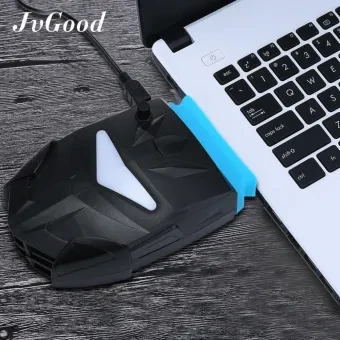
Anybody self-install cooling fan to their tv box ? Any recommendation or things to watch out for ?

Thinking of something like this :-

user posted image

This post has been edited by puchongite: Feb 2 2018, 11:25 AM
voncrane
post Feb 2 2018, 02:13 PM

Noir et fier!
*******
Senior Member
7,120 posts

Joined: Oct 2011
From: Wakanda


QUOTE(puchongite @ Feb 2 2018, 09:41 AM)
Anybody self-install cooling fan to their tv box ? Any recommendation or things to watch out for ?

Thinking of something like this :-

user posted image
*
For some reason, I can't view the image above.. Link problem?

Ideally it's better to be using a device that's already known to run cool or at minimum doesn't overheat so much for hours on end or days on standby... Occasionally shutdown and allow to cool off every few days. Though, there are some devices that do not ship with a heat sink at all. Luckily most processors can take some heavy heat but not for long.. So here are a few things one can do to improve cooling..
*Install or replace the heat sink with a bigger one.
*Separate the covers and drill holes into em.. Especially around the processor area and or places you notice are hotter to touch than normal.
*Same as above but cut out vents instead. With cutting or drilling, be careful about dust. Try including wire meshes.
*Get a decent USB powered laptop cooler. Some can swing both ways. Either push cool air up or sucks out hot air.

Those are a few options.. All depends on your budget and hands-on skills.. nikrizal & BOTAK_WAI do have some real world experience in that department..
puchongite
post Feb 2 2018, 05:18 PM

20k VIP Club
*********
All Stars
33,619 posts

Joined: May 2008
QUOTE(voncrane @ Feb 2 2018, 02:13 PM)
For some reason, I can't view the image above.. Link problem?

Ideally it's better to be using a device that's already known to run cool or at minimum doesn't overheat so much for hours on end or days on standby... Occasionally shutdown and allow to cool off every few days. Though, there are some devices that do not ship with a heat sink at all. Luckily most processors can take some heavy heat but not for long.. So here are a few things one can do to improve cooling..
*Install or replace the heat sink with a bigger one.
*Separate the covers and drill holes into em.. Especially around the processor area and or places you notice are hotter to touch than normal.
*Same as above but cut out vents instead. With cutting or drilling, be careful about dust. Try including wire meshes.
*Get a decent USB powered laptop cooler. Some can swing both ways. Either push cool air up or sucks out hot air.

Those are a few options.. All depends on your budget and hands-on skills.. nikrizal & BOTAK_WAI do have some real world experience in that department..
*
Maybe you are able to view this picture ?

https://my-live-03.slatic.net/p/2/yue-song-...7-webp-zoom.jpg

Quiet operation is important for me. Don't want to video to be spoiled by fan noise.

Have to cut a window from the side of the box.

Power wise, will be plug back into the USB of the tv box. Hope that when the box is in shutdown or suspend mode, the fan will be switch off too.

GuyM
post Feb 2 2018, 06:05 PM

Regular
******
Senior Member
1,787 posts

Joined: Jul 2007
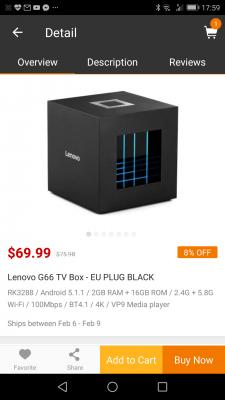
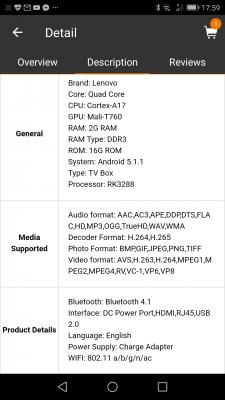
Something fro Lenovo G66 android box but running on Android 5.1 with no miracast


Attached thumbnail(s)
Attached Image Attached Image Attached Image Attached Image

369 Pages « < 133 134 135 136 137 > » Top
 

Change to:
| Lo-Fi Version
0.1767sec    0.42    6 queries    GZIP Disabled
Time is now: 7th December 2025 - 11:42 AM