Welcome Guest ( Log In | Register )

369 Pages « < 90 91 92 93 94 > » Bottom

Outline · [ Standard ] · Linear+

 Android / Other TV Box, see Page 1 first... V2

views
     
puchongite
post Sep 8 2017, 09:34 PM

20k VIP Club
*********
All Stars
33,654 posts

Joined: May 2008
QUOTE(Ckmwpy0370 @ Sep 8 2017, 09:25 PM)
i m shuttting dowm before go to bed biggrin.gif  biggrin.gif
*
The box which I have has a power off button on the remote. Pressing it will put the led from blue to red.

I suspect that's not really a real power off, maybe that's a suspend or something.

This post has been edited by puchongite: Sep 8 2017, 09:35 PM
voncrane
post Sep 8 2017, 09:46 PM

Noir et fier!
*******
Senior Member
7,120 posts

Joined: Oct 2011
From: Wakanda


QUOTE(Ivan_T @ Sep 8 2017, 12:46 PM)
How is the performance of your Alfawise H96 Pro+? Video support HDR10? Can play Dolby Vision file? Kodi support? I'm more concern about HD audio support, can passthrough DTS-HD, DTS-HD MA and Dolby True-HD 5.1 channels or not?
Ship from oversea normally is without warranty and this will be clearly stated in Lazada as well. However, if the box is faulty when you received it, you can always return to Lazada for full refund.
*
Cheap no good.. Good no cheap. Want $50 item and expect the world.. Good luck with that.. Better to spend ONCE for that device that handles all above without question.. Than to buy the good enough one only to run into issue in the future.. Then still end up buying the good stuff.

In my experience, items that ship from overseas and sold on Lazada typically do not have warranties. Hence cheaper in most cases.. Majority of these sub $50 devices are mainly for those who desire a simple device with simple functions. Usually with no AVR/HT demands. Direct plug to TV and chill. Kodi support is also so and so.

QUOTE(longyap @ Sep 8 2017, 09:13 PM)
do you guys shutdown the box often or let it on?
*
A mixture of both... No issues.

QUOTE(puchongite @ Sep 8 2017, 09:34 PM)
The box which I have has a power off button on the remote. Pressing it will put the led from blue to red.

I suspect that's not really a real power off, maybe that's a suspend or something.
*
Blue, red, green or none.. Such states are basically standby/sleep mode.

puchongite
post Sep 9 2017, 08:14 AM

20k VIP Club
*********
All Stars
33,654 posts

Joined: May 2008
QUOTE(galkelly @ Sep 8 2017, 03:22 PM)
how is the wifi reception speed like after u got that stable connection ?
*
This one is the speed on my android phone :-

Attached Image

This one is performed on the mxq pro+ using my phone 5 feet away as wifi extender

Attached Image

The download speed is about halfed, but at least it is stable.
puchongite
post Sep 9 2017, 08:14 AM

20k VIP Club
*********
All Stars
33,654 posts

Joined: May 2008
Double post

This post has been edited by puchongite: Sep 9 2017, 08:16 AM
futra
post Sep 9 2017, 07:45 PM

Regular
******
Senior Member
1,267 posts

Joined: Dec 2006
From: Alor Setar, Kedah.


Ordered the X92 3gb+16gb via Shopee.
RM 265.57 + free shipping + (discount RM 29.00 via HAPPY29 code) = RM 236.57

The code HAPPY29 (discount RM 29.00) only valid for today till 11:59pm.. with a min spend of RM 170.00

Attached Image


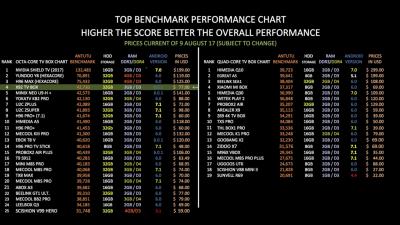
Just to share.. X92 ranked no.4 (based on antutu scores) as per Chigz Tech Reviews..

Attached Image

Chigz Tech Reviews youtube channel : https://www.youtube.com/user/cvyas8

This post has been edited by futra: Sep 9 2017, 11:59 PM
longyap
post Sep 9 2017, 11:09 PM

New Member
*
Newbie
10 posts

Joined: Dec 2016
mxq pro 4k without WiFi extender
unifi 50
user posted image
puchongite
post Sep 10 2017, 02:11 PM

20k VIP Club
*********
All Stars
33,654 posts

Joined: May 2008
QUOTE(longyap @ Sep 9 2017, 11:09 PM)
mxq pro 4k without WiFi extender
unifi 50
user posted image
*
Are you lan connected or wifi connected ?

If wifi, how far away is your router ?

Anyways when I dig the internet about the inside of MXQ pro, it seems to have internal antenna. Sample video shows the inside of the MXQ pro :-


However, my box is a newer version called the MXQ pro plus. Here is how it looks like the inside ( there is a date on the board ).

Attached Image

Obsolutely no antenna cable. Clean looking, does not look like has been damaged or anything.


longyap
post Sep 10 2017, 02:46 PM

New Member
*
Newbie
10 posts

Joined: Dec 2016
QUOTE(puchongite @ Sep 10 2017, 02:11 PM)
Are you lan connected or wifi connected ?

If wifi, how far away is your router ?
WiFi connected
around 3m

This post has been edited by longyap: Sep 10 2017, 02:46 PM
TSdwRK
post Sep 10 2017, 04:07 PM

the consummate chartist
*******
Senior Member
6,230 posts

Joined: Jun 2006


QUOTE(puchongite @ Sep 10 2017, 02:11 PM)
Are you lan connected or wifi connected ?

If wifi, how far away is your router ?

Anyways when I dig the internet about the inside of MXQ pro, it seems to have internal antenna. Sample video shows the inside of the MXQ pro :-


However, my box is a newer version called the MXQ pro plus. Here is how it looks like the inside ( there is a date on the board ).

Attached Image

Obsolutely no antenna cable. Clean looking, does not look like has been damaged or anything.
*
The gold / copper pattern bottom center is antenna... dunno for bt or wifi... if your box got bt... then there should be another...looks something like it...
puchongite
post Sep 10 2017, 04:53 PM

20k VIP Club
*********
All Stars
33,654 posts

Joined: May 2008
QUOTE(dwRK @ Sep 10 2017, 04:07 PM)
The gold / copper pattern bottom center is antenna... dunno for bt or wifi... if your box got bt... then there should be another...looks something like it...
*
Yeah this box has a bluetooth which the previous does not have.

Tested the bluetooth speaker working with the box.


TSdwRK
post Sep 10 2017, 07:44 PM

the consummate chartist
*******
Senior Member
6,230 posts

Joined: Jun 2006


QUOTE(puchongite @ Sep 10 2017, 04:53 PM)
Yeah this box has a bluetooth which the previous does not have.

Tested the bluetooth speaker working with the box.
*
Some pcb got 2-4 layers... see if backside got antenna or not...

If not you can try find the wifi chip and trace the antenna pin...see where it goes...
puchongite
post Sep 11 2017, 08:56 AM

20k VIP Club
*********
All Stars
33,654 posts

Joined: May 2008
QUOTE(dwRK @ Sep 10 2017, 07:44 PM)
Some pcb got 2-4 layers... see if backside got antenna or not...

If not you can try find the wifi chip and trace the antenna pin...see where it goes...
*
Better give up on it, as even if all these available, I would need to solder some cable on to it. That's way beyond something I would be willing to do. As is, I think it could sustain a stable wifi if the router is kind of within 5-10m.

There is an android toast notification with text "WIFI" or something appearing on the screen whenever wifi drops and reconnects, one can check the stability of wifi by looking at the frequency of this message popping out.


TSdwRK
post Sep 11 2017, 10:39 AM

the consummate chartist
*******
Senior Member
6,230 posts

Joined: Jun 2006


QUOTE(puchongite @ Sep 11 2017, 08:56 AM)
Better give up on it, as even if all these available, I would need to solder some cable on to it. That's way beyond something I would be willing to do. As is, I think it could sustain a stable wifi if the router is kind of within 5-10m.

There is an android toast notification with text "WIFI" or something appearing on the screen whenever wifi drops and reconnects, one can check the stability of wifi by looking at the frequency of this message popping out.
*
not asking you to diy...just to confirm not there and return for refund if can...
galkelly
post Sep 11 2017, 11:20 AM

Enthusiast
*****
Junior Member
752 posts

Joined: Jun 2012
QUOTE(puchongite @ Sep 10 2017, 02:11 PM)
Are you lan connected or wifi connected ?

If wifi, how far away is your router ?

Anyways when I dig the internet about the inside of MXQ pro, it seems to have internal antenna. Sample video shows the inside of the MXQ pro :-


However, my box is a newer version called the MXQ pro plus. Here is how it looks like the inside ( there is a date on the board ).

Attached Image

Obsolutely no antenna cable. Clean looking, does not look like has been damaged or anything.
*
that is a very stable connection u having..
still waiting for my MXQ pro+ to arrive...
KateWinslett
post Sep 11 2017, 11:24 AM

New Member
*
Junior Member
24 posts

Joined: Jul 2015
I bought Minix Neo U1 around May and I am happy with it so far, but, I am not been able to detect my bluetooth headphones. I have 2 bluetooth headphones (Aiwa & Sony), both unable to detect. My Minix can detect my Sony tv & my Huawei phone bluetooth but not my headphones.
puchongite
post Sep 12 2017, 10:31 AM

20k VIP Club
*********
All Stars
33,654 posts

Joined: May 2008

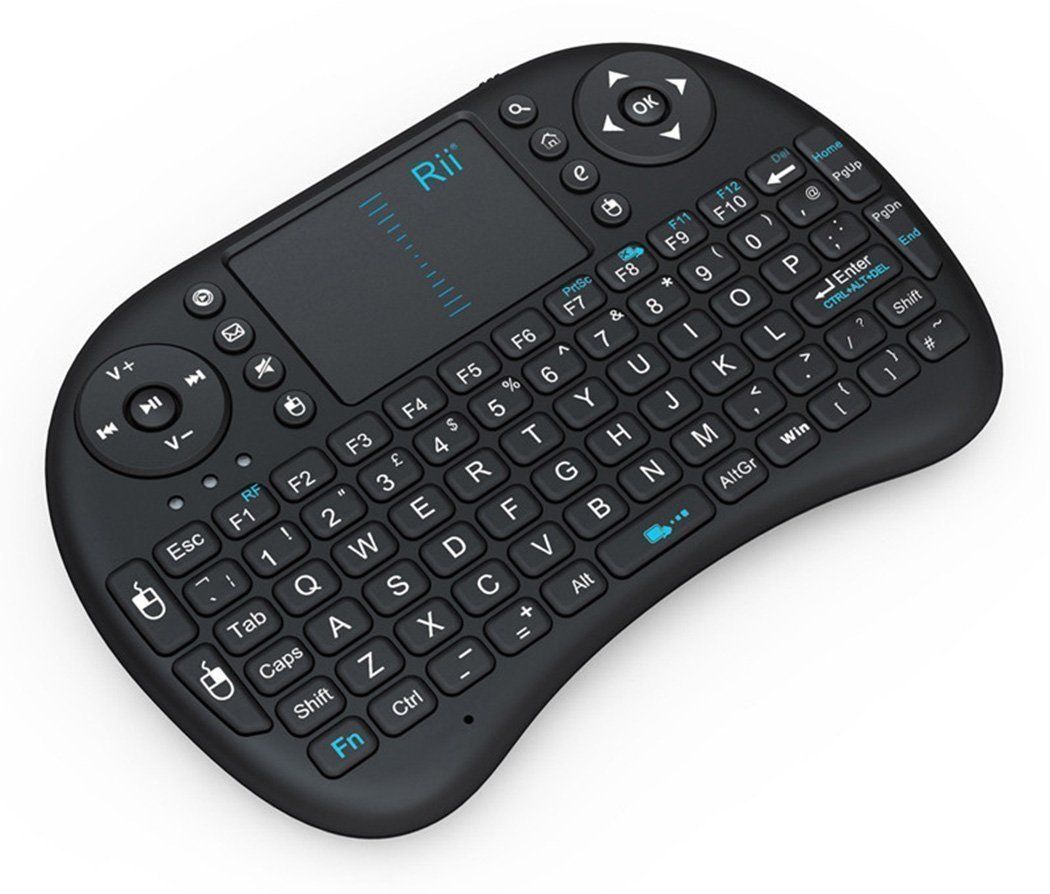
I am using this Rii Mini I8 wireless keyboard with the tvbox.

user posted image

Problem is that I cannot use the keyboard to simulate the android "Menu" button.

I have tried hitting various combination of keys, but none seem to work.

Ctrl+Esc,
e
The key with a home

Ended up I have to still use two remotes.
voncrane
post Sep 12 2017, 11:00 AM

Noir et fier!
*******
Senior Member
7,120 posts

Joined: Oct 2011
From: Wakanda


QUOTE(puchongite @ Sep 12 2017, 10:31 AM)
I am using this Rii Mini I8 wireless keyboard with the tvbox.

user posted image

Problem is that I cannot use the keyboard to simulate the android "Menu" button.

I have tried hitting various combination of keys, but none seem to work.

Ctrl+Esc,
e
The key with a home

Ended up I have to still use two remotes.
*
Couple years back, used a similar remote with a Noontec device and the right-click mouse key did such. Not working with this remote?
^pomen_GTR^
post Sep 12 2017, 07:15 PM

Regular
******
Senior Member
1,077 posts

Joined: Jan 2013
QUOTE(voncrane @ Sep 12 2017, 11:00 AM)
Couple years back, used a similar remote with a Noontec device and the right-click mouse key did such. Not working with this remote?
*
mine too same keyboard design....


mouse right click becomes back button when pressed...


long press mouse left button did nothing....

This post has been edited by ^pomen_GTR^: Sep 12 2017, 07:16 PM
puchongite
post Sep 12 2017, 10:18 PM

20k VIP Club
*********
All Stars
33,654 posts

Joined: May 2008
QUOTE(^pomen_GTR^ @ Sep 12 2017, 07:15 PM)
mine too same keyboard design....
mouse right click becomes back button when pressed...
long press mouse left button did nothing....
*
Looks like there is no solution from the remote keyboard.

The other possibility is remapped on the tvbox.
voncrane
post Sep 12 2017, 10:32 PM

Noir et fier!
*******
Senior Member
7,120 posts

Joined: Oct 2011
From: Wakanda


QUOTE(puchongite @ Sep 12 2017, 10:18 PM)
Looks like there is no solution from the remote keyboard.

The other possibility is remapped on the tvbox.
*
Yup.. Remap... Was going to suggest that.

369 Pages « < 90 91 92 93 94 > » Top
 

Change to:
| Lo-Fi Version
0.0241sec    0.37    6 queries    GZIP Disabled
Time is now: 9th December 2025 - 07:14 PM