Welcome Guest ( Log In | Register )

369 Pages « < 52 53 54 55 56 > » Bottom

Outline · [ Standard ] · Linear+

 Android / Other TV Box, see Page 1 first... V2

views
     
TSdwRK
post May 1 2017, 09:00 PM

the consummate chartist
*******
Senior Member
6,230 posts

Joined: Jun 2006


QUOTE(voncrane @ May 1 2017, 03:50 PM)
Garage sales.. No such promotion allowed in here. As usual, purchase from and use at your own risk.. Besides, look at his post carefully.. tongue.gif
*
Sig don't show on mobile...

QUOTE(Mhymin @ May 1 2017, 07:10 PM)
Been awhile.  smile.gif

I remember the first time I'm fully drawn into this Android TV Box scene was last year - Aug 28 2016 to be exact. Clicky.

Since then I've settled for Beelink GT1, that have serve me well. I'm thinking of giving this box to my girl and get a new set of box for myself preferably an upgrade on what I already have.

Being a cheapskate (as I'm sure you guys already figure it out), the budget remains the same as last year; RM300-RM400 max. I'm setting my eyes upon this 2 option :

A) Alfawise H96 Pro+ - $67.99
B) Beelink GT1 Ultimate - $76.99
So, that's the only difference I can think of.

Accidentally found this Alfawise box while watching Redskull review on youtube saying he preferred Alfawise H96 Pro+ compared to Beelink GT1 Ultimate.

My questions :
Is anyone in here have any experiences regarding both of these box / or either one to shed some light which one is better?
Also I've read somewhere that Alfawise is actually a Beelink product, is that true?
Is Alfawise have the same dark video issue?
Is paying $9 more justify getting the DDR4 if the dark issue still persist on the Beelink product?

My need still the same as last year - Clicky.
Thanks!
*
The Ultimate isn't any much better than the std GT1...and the DDR4 isn't any faster.

The Ultimate is only better in 7.1 pass through via HDMI...if you don't need 7.1, I'd get the H96 Pro+.
GuyM
post May 1 2017, 10:09 PM

Regular
******
Senior Member
1,787 posts

Joined: Jul 2007
QUOTE(Suarez23 @ May 1 2017, 11:11 AM)
But this sports Devil when watching LIVE football will it lag like other? So far i didn't encounter any APPS can watch live football smoothly without lag. I only encounter once without lag when i first bought the BOX. I though is very good and happy cause can watch like normal even is 2mins delay. But after that one times, the rest are all crap LAG or cant stream. mega_shok.gif
*
Have you tried NJM Soccer, under Match Day? Watched few good uninterrupted HD stream yesterday
^pomen_GTR^
post May 2 2017, 03:23 PM

Regular
******
Senior Member
1,077 posts

Joined: Jan 2013
QUOTE(biggie @ Apr 28 2017, 10:51 AM)
ok km8 pro, hypptv cannot be installed not compatible
*
weird because my km8 pro able to install and play...

but not all channel loaded... (most channel would display error 111)
Mhymin
post May 2 2017, 04:14 PM

New Member
*
Junior Member
23 posts

Joined: Jul 2014
QUOTE(dwRK @ May 1 2017, 09:00 PM)
The Ultimate is only better in 7.1 pass through via HDMI...if you don't need 7.1, I'd get the H96 Pro+.
*
Cheers I'm going for H96 Pro+.

One question :
In Expedited Shipping which one should I choose? DHL(SG), DHL(HK), DHL(EU), DHL(EXT), or DHL?

GuyM
post May 2 2017, 06:24 PM

Regular
******
Senior Member
1,787 posts

Joined: Jul 2007
QUOTE(Mhymin @ May 2 2017, 04:14 PM)
Cheers I'm going for H96 Pro+.

One question :
In Expedited Shipping which one should I choose? DHL(SG), DHL(HK), DHL(EU), DHL(EXT), or DHL?
*
Scissorshand posted on post #1047, seems like a good deal too

This post has been edited by GuyM: May 2 2017, 06:25 PM
biggie
post May 2 2017, 08:34 PM

Regular
******
Senior Member
1,291 posts

Joined: Jan 2003
QUOTE(^pomen_GTR^ @ May 2 2017, 03:23 PM)
weird because my km8 pro able to install and play...

but not all channel loaded... (most channel would display error 111)
*
Is it from playstore or sideload ?

Mhymin
post May 2 2017, 10:42 PM

New Member
*
Junior Member
23 posts

Joined: Jul 2014
QUOTE(GuyM @ May 2 2017, 06:24 PM)
Scissorshand posted on post #1047, seems like a good deal too
*
I've looked into it, it is more cheaper, but the cheap looks and Android 7.0 kinda throw me out.

Some data that I gathered : *taken from Redskull

What I have :
QUOTE
Beelink GT1
AnTuTu 39641
Benchmark  548/2415
Ice storm extreme 6206


What I looked into :
QUOTE
Beelink GT1 Ultimate
AnTuTu 39218
Benchmark 451/2074
Ice storm extreme 5607

Alfawise H96 Pro+
AnTuTu 42036
Benchmark 419/2186
Ice storm extreme 6043

M8S
AnTuTu 39316
Benchmark 498/2429
Ice storm extreme 5142

voncrane
post May 2 2017, 11:54 PM

Noir et fier!
*******
Senior Member
7,118 posts

Joined: Oct 2011
From: Wakanda


QUOTE(fantasyisland @ May 2 2017, 08:09 PM)
hi, i just received my box. i check with the 'verify root' from playstore and my box is not rooted. then i downloaded astro on the go, but it said astro on the go doesnt work on jailbroken device?? anyone know how to fix this?
*
It's "Astro Go" now. Same ol, same ol... With that app, it either works on your device or it doesn't ... Ain't nothing you can do except wait and hope they push an update later that allows it to work on your device.

QUOTE(biggie @ May 2 2017, 08:34 PM)
Is it from playstore or sideload ?
*
Same on the Minix Neo U1.. Gotten from the Playstore... Not all channels work.. Personally, I don't care cuz the stock STB is one source-switch away.

QUOTE(Mhymin @ May 2 2017, 10:42 PM)
I've looked into it, it is more cheaper, but the cheap looks and Android 7.0 kinda throw me out.

Some data that I gathered : *taken from Redskull

What I have :
What I looked into :
*
Yup.. now is definitely not the time to be buying a cheap generic box running "Android 7". I'd settle for a superb Lollipop ROM any day.

IMO, benchmark scores are like pissing contests. They are nice to have but don't tell the whole story. A well baked firmware on decent hardware tells a much better story in real world applications..
^pomen_GTR^
post May 3 2017, 11:22 AM

Regular
******
Senior Member
1,077 posts

Joined: Jan 2013
QUOTE(biggie @ May 2 2017, 08:34 PM)
Is it from playstore or sideload ?
*
i forgot.....but u should try sideload if from playstore didnt work...
TSdwRK
post May 3 2017, 05:19 PM

the consummate chartist
*******
Senior Member
6,230 posts

Joined: Jun 2006


QUOTE(GuyM @ May 2 2017, 06:24 PM)
Scissorshand posted on post #1047, seems like a good deal too
*
OK price... OK performance too I guess... I still sad miss out on RM 68 sad.gif

QUOTE(fantasyisland @ May 2 2017, 08:09 PM)
hi, i just received my box. i check with the 'verify root' from playstore and my box is not rooted. then i downloaded astro on the go, but it said astro on the go doesnt work on jailbroken device?? anyone know how to fix this?
*
You can try fake your box to be like a phone, perhaps that may work, but you need root. We got no idea how astro validates...

QUOTE(voncrane @ May 2 2017, 11:54 PM)
Same on the Minix Neo U1.. Gotten from the Playstore... Not all channels work.. Personally, I don't care cuz the stock STB is one source-switch away.
Yup.. now is definitely not the time to be buying a cheap generic box running "Android 7". I'd settle for a superb Lollipop ROM any day.

IMO, benchmark scores are like pissing contests. They are nice to have but don't tell the whole story. A well baked firmware on decent hardware tells a much better story in real world applications..
*
Well...people like their box to play everything even though they don't use everything laugh.gif

Depends on personal priority what benchmark and metrics are important lor... Antutu and the likes do give some ideas how well the firmware is optimized for those respective matrics. For videos and audios playback obviously need other tests...
TSdwRK
post May 4 2017, 09:10 AM

the consummate chartist
*******
Senior Member
6,230 posts

Joined: Jun 2006


Today I learned...

S912 dark screen/video is a color space/8 bit panel issue.

If you have a 4K TV and 10bit panel...you will not see this problem...

I understand Minix has it fixed for next U9-H firmware update.
Khalid21
post May 4 2017, 09:47 AM

Regular
******
Senior Member
1,138 posts

Joined: May 2010
Tested s912 with android 7.1 no more dark screen issue
Niuminoid
post May 4 2017, 03:55 PM

Casual
***
Junior Member
323 posts

Joined: Jan 2005
From: USJ Subang


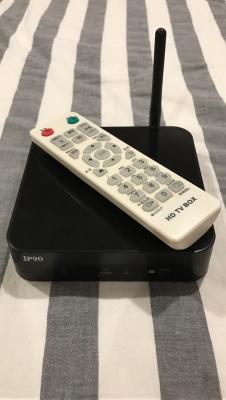
Hi guys, anyone here knows how to factory reset this box with its remote?
Tried to hold (Power + Menu) and then switch on the device, but it doesn't go to Android System Recovery sad.gif
Your help would be very much appreciated.


Attached thumbnail(s)
Attached Image
GuyM
post May 4 2017, 06:11 PM

Regular
******
Senior Member
1,787 posts

Joined: Jul 2007
QUOTE(Niuminoid @ May 4 2017, 03:55 PM)
Hi guys, anyone here knows how to factory reset this box with its remote?
Tried to hold (Power + Menu) and then switch on the device, but it doesn't go to Android System Recovery sad.gif
Your help would be very much appreciated.
*
Lol! It's not a phone la

Find a small pin hole underneath the box or at the back where all the HDMI or ac socket located

Then use a needle to poke into to see if you feel or hear a click sound.

If yes, off the power first. Insert the needle in until you have click on the button in the hole. Holding it then switch on the power until you see the reboot screen, let go of the needle then you are on your way to reset everything
Niuminoid
post May 4 2017, 06:44 PM

Casual
***
Junior Member
323 posts

Joined: Jan 2005
From: USJ Subang


QUOTE(GuyM @ May 4 2017, 06:11 PM)
Lol! It's not a phone la

Find a small pin hole underneath the box or at the back where all the HDMI or ac socket located

Then use a needle to poke into to see if you feel or hear a click sound.

If yes, off the power first. Insert the needle in until you have click on the button in the hole. Holding it then switch on the power until you see the reboot screen, let go of the needle then you are on your way to reset everything
*
Sorry my bad, i thought it can be done with its IR remote confused.gif
I couldn't locate the reset button. there is nothing underneath and behind the box.
Please refer to the pics icon_question.gif


Attached thumbnail(s)
Attached Image Attached Image
GuyM
post May 4 2017, 06:48 PM

Regular
******
Senior Member
1,787 posts

Joined: Jul 2007
Side view
Niuminoid
post May 4 2017, 06:52 PM

Casual
***
Junior Member
323 posts

Joined: Jan 2005
From: USJ Subang


QUOTE(GuyM @ May 4 2017, 06:48 PM)
Side view
*
Both sides also nothing bro bangwall.gif
Donphatz
post May 4 2017, 06:52 PM

Getting Started
**
Junior Member
62 posts

Joined: Jan 2009
From: PJ


QUOTE(Niuminoid @ May 4 2017, 06:44 PM)
Sorry my bad, i thought it can be done with its IR remote  confused.gif
I couldn't locate the reset button. there is nothing underneath and behind the box.
Please refer to the pics  icon_question.gif
*
its hidden in the AV hole. You need to poke using a pin.
Niuminoid
post May 4 2017, 06:53 PM

Casual
***
Junior Member
323 posts

Joined: Jan 2005
From: USJ Subang


QUOTE(Donphatz @ May 4 2017, 06:52 PM)
its hidden in the AV hole. You need to poke using a pin.
*
Tried to insert with a toothpick, it was empty.
or do i need a longer tool?
TSdwRK
post May 4 2017, 06:58 PM

the consummate chartist
*******
Senior Member
6,230 posts

Joined: Jun 2006


QUOTE(Niuminoid @ May 4 2017, 03:55 PM)
Hi guys, anyone here knows how to factory reset this box with its remote?
Tried to hold (Power + Menu) and then switch on the device, but it doesn't go to Android System Recovery sad.gif
Your help would be very much appreciated.
*
Why do you want to wipe/reset?

The reset switch may or may not be available...unless you folks know for sure...

This post has been edited by dwRK: May 4 2017, 07:01 PM

369 Pages « < 52 53 54 55 56 > » Top
 

Change to:
| Lo-Fi Version
0.0219sec    0.52    6 queries    GZIP Disabled
Time is now: 2nd December 2025 - 11:01 AM