Welcome Guest ( Log In | Register )

475 Pages « < 337 338 339 340 341 > » Bottom

Outline · [ Standard ] · Linear+

 AMD Ryzen, AM4 / AM5 Platform

views
     
Bonchi
post Jan 10 2021, 10:19 AM

KittehPowah
******
Senior Member
1,649 posts

Joined: Sep 2008
QUOTE(JohnLai @ Jan 10 2021, 10:12 AM)
Bro, uncle already ran out of fund. Can't afford anything for time being. Need to prepare $$ for upcoming CNY too.
Another reason was uncle got 5600x (at RM1400) for previously purchased MSI B550 Tomahawk (RM750) too.
This funny second set......is using ancient gpu Radeon HD5450 just for display. sweat.gif

Beside, uncle is staying at far away land of Sarawak near to Brunei.
*
Your hyper 212 already on 2 fans right? Now i cant really think of any free method to reduce the temps... Maybe see if amd can disable some cores or not.
JohnLai
post Jan 10 2021, 10:20 AM

Skeptical Cat
*******
Senior Member
3,669 posts

Joined: Apr 2006
QUOTE(Bonchi @ Jan 10 2021, 10:19 AM)
Your hyper 212 already on 2 fans right? Now i cant really think of any free method to reduce the temps... Maybe see if amd can disable some cores or not.
*
Yup, 2 fans
Exactly same as this one https://www.goldfries.com/hardware-reviews/...d-turbo-review/
Bought it years ago.
Bonchi
post Jan 10 2021, 10:24 AM

KittehPowah
******
Senior Member
1,649 posts

Joined: Sep 2008
QUOTE(JohnLai @ Jan 10 2021, 10:20 AM)
Yup, 2 fans
Exactly same as this one https://www.goldfries.com/hardware-reviews/...d-turbo-review/
Bought it years ago.
*
means it’s already maxed out huhu.. ok checked that ryzen master allows you to disable some cores. maybe disable like 4-6 cores first untill you get a better cooler. try to keep the proc under 85C on long loads.
sai86
post Jan 10 2021, 11:25 AM

StilL LearninG
*******
Senior Member
4,934 posts

Joined: Sep 2008
From: Setapak


QUOTE(JohnLai @ Jan 10 2021, 09:10 AM)
Can lah, as long as it can be used and no weird issue happening. nod.gif
Kinda worry on using water cooling due to leaking possibility.
Instead, I shall let the CPU to throttle itself accordingly.
*
DH15 - gonna last you until X gen. just need to get the latest mount if you ever change/upgrade.
i still remember 1st time i boot up my 4770k on intel stock cooler - fking crazy temp sweat.gif

tristanX how is the DC Assassin 3? looks damn badass as well.

anyone tried OCCT stress test PSU before? wanna tried it to determine whether i can reuse this Seasonic 1000W to my new rig bcoz i bought it 2nd hand previously hmm.gif

This post has been edited by sai86: Jan 10 2021, 11:33 AM
TristanX
post Jan 10 2021, 12:05 PM

Where is my stars?
Group Icon
Elite
24,340 posts

Joined: Nov 2004
From: Setapak, Kuala Lumpur


QUOTE(sai86 @ Jan 10 2021, 11:25 AM)
DH15 - gonna last you until X gen. just need to get the latest mount if you ever change/upgrade.
i still remember 1st time i boot up my 4770k on intel stock cooler - fking crazy temp  sweat.gif

tristanX how is the DC Assassin 3? looks damn badass as well.

anyone tried OCCT stress test PSU before? wanna tried it to determine whether i can reuse this Seasonic 1000W to my new rig bcoz i bought it 2nd hand previously  hmm.gif
*
82C top with no air cond for my 5900X so far. Fan at the front is heightened due to tall RAM. Lucky my casing got big CPU cooler clearance.
SSJBen
post Jan 10 2021, 01:28 PM

Stars deez nuts.
*******
Senior Member
4,522 posts

Joined: Apr 2006


@JohnLai
Use a negative voltage offset for time being until you can get a better cooler. Just a -0.1v can bring temps down by 5-8c with no change in perf.
TristanX
post Jan 10 2021, 01:49 PM

Where is my stars?
Group Icon
Elite
24,340 posts

Joined: Nov 2004
From: Setapak, Kuala Lumpur


QUOTE(JohnLai @ Jan 10 2021, 10:12 AM)
Bro, uncle already ran out of fund. Can't afford anything for time being. Need to prepare $$ for upcoming CNY too.
Another reason was uncle got 5600x (at RM1400) for previously purchased MSI B550 Tomahawk (RM750) too.
This funny second set......is using ancient gpu Radeon HD5450 just for display. sweat.gif

Beside, uncle is staying at far away land of Sarawak near to Brunei.
*
You can also try turning on Eco Mode. It caps the power usage. Like 87W for my 5900X.
JohnLai
post Jan 10 2021, 06:43 PM

Skeptical Cat
*******
Senior Member
3,669 posts

Joined: Apr 2006
QUOTE(SSJBen @ Jan 10 2021, 01:28 PM)
@JohnLai
Use a negative voltage offset for time being until you can get a better cooler. Just a -0.1v can bring temps down by 5-8c with no change in perf.
*
Set "CPU Vcore" to "Normal" and "Dynamic Vcore(DVID)" is available for modification.
Put -0.100000v at "Dynamic Vcore(DVID)", correct?
Bootable and running fine.

QUOTE(TristanX @ Jan 10 2021, 01:49 PM)
You can also try turning on Eco Mode. It caps the power usage. Like 87W for my 5900X.
*
Eco mode 65W activated

So, both eco mode and -0.1v are in use and the result is......no difference in idle temp, still 53'C. On full load, temp maxed at 88-90'C compared to 99'C

HWmonitor reports CPU VCORE at min 0.900v and max 1.356v.
EDIT: CPU VDD min 0.881v and max 1.375v

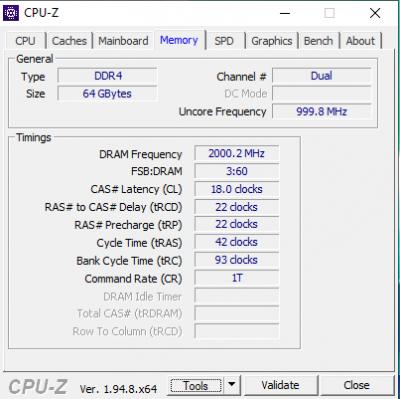
Speaking of which, I attempted to OC my 4 DIMMs of RAM.

Attached Image

Did I mess up? Cause FSB:DRAM isn't 1:1, but 3:60 as indicated in the screenshot.

This post has been edited by JohnLai: Jan 10 2021, 06:46 PM
TristanX
post Jan 10 2021, 06:47 PM

Where is my stars?
Group Icon
Elite
24,340 posts

Joined: Nov 2004
From: Setapak, Kuala Lumpur


QUOTE(JohnLai @ Jan 10 2021, 06:43 PM)
Set "CPU Vcore" to "Normal" and "Dynamic Vcore(DVID)" is available for modification.
Put -0.100000v at "Dynamic Vcore(DVID)", correct?
Bootable and running fine.
Eco mode 65W activated

So, both eco mode and -0.1v are in use and the result is......no difference in idle temp, still 53'C. On full load, temp maxed at 88-90'C compared to 99'C

HWmonitor reports CPU VCORE at min 0.900v and max 1.356V.

Speaking of which, I attempted to OC my 4 DIMMs of RAM.

Attached Image

Did I mess up? Cause FSB:DRAM isn't 1:1, but 3:60 as indicated in the screenshot.
*
Yup. Eco Mode does nothing to idle but helps on load. It caps out total power used to your 65W. It helps with load temperatures. Still an improvement. My Eco mode does 87W.

DDR4-4000 or FCLK 2000 is not easy.
JohnLai
post Jan 10 2021, 06:51 PM

Skeptical Cat
*******
Senior Member
3,669 posts

Joined: Apr 2006
QUOTE(TristanX @ Jan 10 2021, 06:47 PM)
Yup. Eco Mode does nothing to idle but helps on load. It caps out total power used to your 65W. It helps with load temperatures. Still an improvement. My Eco mode does 87W.

DDR4-4000 or FCLK 2000 is not easy.
*
Hmm....where do I find FLCK option at Gigabyte BIOS?
I might as well as attempting FCLCK 2000 right away.
TristanX
post Jan 10 2021, 07:01 PM

Where is my stars?
Group Icon
Elite
24,340 posts

Joined: Nov 2004
From: Setapak, Kuala Lumpur


QUOTE(JohnLai @ Jan 10 2021, 06:51 PM)
Hmm....where do I find FLCK option at Gigabyte BIOS?
I might as well as attempting FCLCK 2000 right away.
*
Its under AMD overclocking. Look for Infinity Fabric Clock
JohnLai
post Jan 10 2021, 07:51 PM

Skeptical Cat
*******
Senior Member
3,669 posts

Joined: Apr 2006
QUOTE(TristanX @ Jan 10 2021, 07:01 PM)
Its under AMD overclocking. Look for Infinity Fabric Clock
*
Found it at "Infinity Fabric Frequency and Dividers", simply select 1900 or 2000Mhz,correct?

Bad news, can't boot the PC with either value, had to reset CMOS. sweat.gif

On the other hand, my 4 dimms can reach 4.1ghz with no issue. sad.gif

edit: Reverted back to 3600Mhz since IF can't be run at 2000Mhz. dry.gif
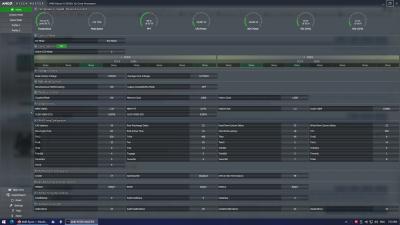
Current settings from RyzenMaster.

Attached Image

This post has been edited by JohnLai: Jan 10 2021, 07:55 PM
TristanX
post Jan 10 2021, 08:00 PM

Where is my stars?
Group Icon
Elite
24,340 posts

Joined: Nov 2004
From: Setapak, Kuala Lumpur


QUOTE(JohnLai @ Jan 10 2021, 07:51 PM)
Found it at "Infinity Fabric Frequency and Dividers", simply select 1900 or 2000Mhz,correct?

Bad news, can't boot the PC with either value, had to reset CMOS. sweat.gif

On the other hand, my 4 dimms can reach 4.1ghz with no issue. sad.gif

edit: Reverted back to 3600Mhz since IF can't be run at 2000Mhz.  dry.gif
Current settings from RyzenMaster.

Attached Image
*
Like I said. Not easy. It may not work until Gigabyte gets AGESA 1.1.9.0.

You also need to pump SOC voltage. May need CCD and IOD voltage too.
JohnLai
post Jan 10 2021, 08:07 PM

Skeptical Cat
*******
Senior Member
3,669 posts

Joined: Apr 2006
QUOTE(TristanX @ Jan 10 2021, 08:00 PM)
Like I said. Not easy. It may not work until Gigabyte gets AGESA 1.1.9.0.

You also need to pump SOC voltage. May need CCD and IOD voltage too.
*
Hmm...even IF clock at 1833Mhz also can't boot just now.
~.~

Anyway, the max RAM frequency I can reach is 4.2Ghz rclxm9.gif for my 4DIMMs , bootable into windows and seems to stable after 10 - 15 minutes of testing (Prime95 with blend test) using same timing.
No WHEA at event viewer.
Can't boot with 4.3Ghz.

Edit:
Question, why is CPUZ showing FSB:DRAM = 3:54 while RyzenMaster is showing Memory Clock 1800 (corresponding to my 3600Mhz at double data rate) and Fabric Clock 1800? confused.gif

This post has been edited by JohnLai: Jan 10 2021, 08:31 PM
sonyfanzz
post Jan 10 2021, 08:40 PM

On my way
****
Senior Member
682 posts

Joined: Mar 2016


QUOTE(JohnLai @ Jan 10 2021, 06:43 PM)
Set "CPU Vcore" to "Normal" and "Dynamic Vcore(DVID)" is available for modification.
Put -0.100000v at "Dynamic Vcore(DVID)", correct?
Bootable and running fine.
Eco mode 65W activated

So, both eco mode and -0.1v are in use and the result is......no difference in idle temp, still 53'C. On full load, temp maxed at 88-90'C compared to 99'C

HWmonitor reports CPU VCORE at min 0.900v and max 1.356v.
EDIT: CPU VDD min 0.881v and max 1.375v

Speaking of which, I attempted to OC my 4 DIMMs of RAM.

Attached Image

Did I mess up? Cause FSB:DRAM isn't 1:1, but 3:60 as indicated in the screenshot.
*
normal ba, my 4000 OC also 3:60. btw the 4 sticks ram OC stable?
JohnLai
post Jan 10 2021, 08:51 PM

Skeptical Cat
*******
Senior Member
3,669 posts

Joined: Apr 2006
QUOTE(sonyfanzz @ Jan 10 2021, 08:40 PM)
normal ba, my 4000 OC also 3:60. btw the 4 sticks ram OC stable?
*
I understand the formula finally.

(100mhz base clock X 54)/3 = 1800mhz -->Referring to memory clock only.

To see the actual Infinity fabric clock, need to use RyzenMaster or HWiNFO to view the FCLK and UCLK.
Both softwares are showing 1800Mhz for FCLK and UCLK.

No idea what goes wrong with CPUZ.
TristanX
post Jan 10 2021, 08:54 PM

Where is my stars?
Group Icon
Elite
24,340 posts

Joined: Nov 2004
From: Setapak, Kuala Lumpur


QUOTE(JohnLai @ Jan 10 2021, 08:07 PM)
Hmm...even IF clock at 1833Mhz also can't boot just now.
~.~

Anyway, the max RAM frequency I can reach is 4.2Ghz  rclxm9.gif for my 4DIMMs , bootable into windows and seems to stable after 10 - 15 minutes of testing (Prime95 with blend test) using same timing.
No WHEA at event viewer.
Can't boot with 4.3Ghz.

Edit:
Question, why is CPUZ showing FSB:DRAM = 3:54 while RyzenMaster is showing Memory Clock 1800 (corresponding to my 3600Mhz at double data rate) and Fabric Clock 1800? confused.gif
*
Update BIOS and it might be able to do 1900mhz. I used SOC voltage 1150 (1.15v), CCD and IOD 1150 (1.15v) for FCLK 1900.

Use Zentimings app.
JohnLai
post Jan 10 2021, 08:59 PM

Skeptical Cat
*******
Senior Member
3,669 posts

Joined: Apr 2006
QUOTE(TristanX @ Jan 10 2021, 08:54 PM)
Update BIOS and it might be able to do 1900mhz. I used SOC voltage 1150 (1.15v), CCD and IOD 1150 (1.15v) for FCLK 1900.

Use Zentimings app.
*
BIOS is up-to-date with F31.

Might play around with the voltage recommendation next time.

Oh ya, since you also use the same mainboard as me, it is weird for the x570 chipset to reach 70'C with silent fan profile? shocking.gif
HWiNFO shows the chipset is basically hovering around 68 - 72'C while my desktop is idling.
TristanX
post Jan 10 2021, 09:03 PM

Where is my stars?
Group Icon
Elite
24,340 posts

Joined: Nov 2004
From: Setapak, Kuala Lumpur


QUOTE(JohnLai @ Jan 10 2021, 08:59 PM)
BIOS is up-to-date with F31.

Might play around with the voltage recommendation next time.

Oh ya, since you also use the same mainboard as me, it is weird for the x570 chipset to reach 70'C with silent fan profile? shocking.gif
HWiNFO shows the chipset is basically hovering around 68 - 72'C while my desktop is idling.
*
X570 chipset is hot. Thats why got fan. There are currently 2 boards with no fan. Asus Crosshair Dark Hero and Gigabyte X570 Aorus Xtreme.
Bonchi
post Jan 10 2021, 09:04 PM

KittehPowah
******
Senior Member
1,649 posts

Joined: Sep 2008
QUOTE(JohnLai @ Jan 10 2021, 08:07 PM)
Hmm...even IF clock at 1833Mhz also can't boot just now.
~.~

Anyway, the max RAM frequency I can reach is 4.2Ghz  rclxm9.gif for my 4DIMMs , bootable into windows and seems to stable after 10 - 15 minutes of testing (Prime95 with blend test) using same timing.
No WHEA at event viewer.
Can't boot with 4.3Ghz.

Edit:
Question, why is CPUZ showing FSB:DRAM = 3:54 while RyzenMaster is showing Memory Clock 1800 (corresponding to my 3600Mhz at double data rate) and Fabric Clock 1800? confused.gif
*
Ram speed dont really matter that much, the FCLK is more important.. in fact if the fclk is too low then the overall performance will be affected.

FSB is not FCLK, mine is 1:1 to the FCLK but it shows 3:54 because the FSB is always 100Mhz.

Overclocking the FCLK depends on lottery. the 2000mhz FCLK on the zen3 is a maximum but not guaranteed. iinm 1800mhz is the guaranteed number on zen3.
plus in most cases, you may need to pump more voltage to the other voltage settings (although most bios does this automatically but very poorly) which will cause your CPU to run hotter than it already is.


you dont use prime95 to test memory, memtest86 at least overnight or 10 hours is what needed to be done... especially for 32GB as a single pass will take very long. 64GB even worse.

This post has been edited by Bonchi: Jan 10 2021, 09:25 PM

475 Pages « < 337 338 339 340 341 > » Top
 

Change to:
| Lo-Fi Version
0.0218sec    0.52    6 queries    GZIP Disabled
Time is now: 7th December 2025 - 05:26 PM