Welcome Guest ( Log In | Register )

Outline · [ Standard ] · Linear+

Hardware Lenovo Miix 510 Review and AMA, Coz there's no actual thread for it lol

views
     
TSEiraku
post Feb 2 2017, 12:55 PM, updated 8y ago

Geeking since 1985!
*******
Senior Member
7,037 posts

Joined: Apr 2006


user posted image

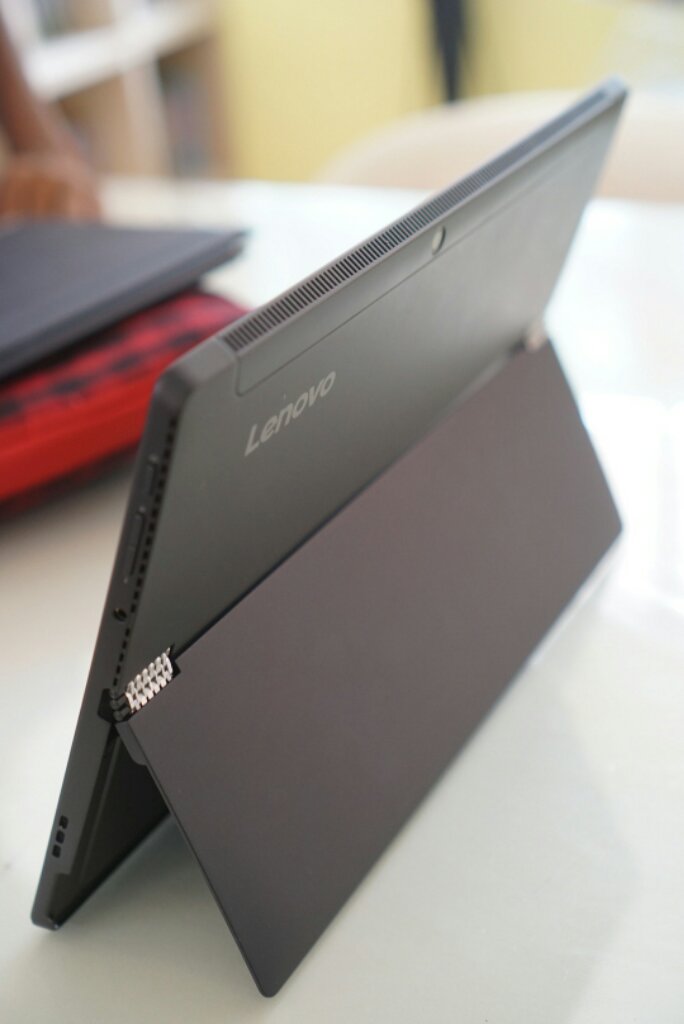
Hey ho folks, here's mah humble rebiu on the i5/8GB Lenovo Miix 510, which should be useful if you guys are, as I was, looking for an "affordable" Surface Pro Clone (Surface gaise please don't flame us poorfags here).

Main points:

- Build Quality almost on par with SP4 (much better built than Switch A12, hinge is slightly superior to the SP4 even).

- Benchmark wise slightly faster than the i5/8GB SP4 (on par with the Switch A12).

- REAL Wacom Pen FTW (AES + Wacom Digitizer - unfortunately not EMR, but better drivers/stylus usability than both Switch A12 or SPs. Slightly crappier physical pen vs the SP4).

- Battery life 5-6 hours nominal (better than Switch A12, worse than SP4).

- Screen is decent (Switch A12 and SP4 brighter and better reso).

- Heat management excellent (though fan runs almost constantly, but for me it's not really noticeable).

- Warranty is 2 years international INCLUDING Accidental Damage Protection for both (confirmed with Lenovo direct)... PLUS it's extendable to 5 years if you want (Switch A12 needs additional purchase for extended warranty, no Accidental Protection. Not sure about SP4).

- Unlike the Lenovo Miix 700, it has been relatively problem free so far (which is admittedly quite rare for a Lenovo product lol). Also Miix 700 had a crappy Elan Digitizer, and this one doesn't.

You can read up on all the nitty-gritty details in the full review on my site/blog here: https://goo.gl/ebQd0N

In conclusion it's an awesome little 12-incher haiburid if you have a need for one and can't afford an SP4. Might sound like I'm shilling but I'm just a really happy user here.

Also it's bound to get better as the IFA announced Miix 720 is gonna be released soon... prices should drop you further for the 510 and - unless you need Kaby Lake, TB3, a Hello Webcam AND a microSD reader - the 510 is really "good enough" already (not to mention the 720 sounds like it will cost a bomb lol).

Not sure if Lenovo's gonna cost cut in other ways and go back to that crappy Elan Digitizer in the 720 though... which might just happen as the 720 (like the 700) has a 3:2 aspect ratio screen, and Wacom doesn't really do 3:2.

Anyway, do sound off if anybody got any questions about the Miix 510. I'll be more than happy to answer if I can.

(EDIT 13/02) Here's a few PSAs for new Miix 510 users BTW:


1) Model Differences:
i3/4GB - 128G SSD, NO YES pen (according to rosihan) W10 Home, 1yr Warranty + ADP.
i5/8GB - 256G SSD, YES pen, W10 Home, 2yr Warranty + ADP. i7/8GB - 256G SSD, YES pen, W10 Pro, 2yr Warranty + ADP.

2) Turn off Fast Startup - The SSD already boots plenty fast without it, and it drains your battery turned on. Steps here: https://goo.gl/tBKxnH

3) Update your Keyboard Folio driver and firmware (from the Lenovo Website). Helps make the KB and touchpad work a lot better. Unfortunately, the touchpad is still VERY sensitive to dodgy AC adapters/plugs, so watch what you're plugging your Miix into.

4) Screen protection - Tempered glass/film SP is readily available from eBay and Lazada, or you can go to Mobile Outfitters (Gurney Plaza, Sunway, BTS) for a custom made SP.

5) ANY Wacom AES Lenovo Active Stylus (and even Dell and HP's) works with the Miix 510, so you can get any one from eBay if you need spares and replacements. I got the Lenovo GX80K32884 (Miix 700/Yoga 900 stylus) as it was the cheapest available, and it works fine.

6) AAAA batteries for the darned things are readily available from Harvey Norman (cheap) or All IT, so you don't need to go hack open 9V cells to find some.

7) The SSD IS upgradable, but it needs a considerable amount of skill, finesse and luck. Get the maintainance manual from the Lenovo support site, the proper tools (plastic prying picks for the screen and thermal paste for the CPU) and take it SLOW prying the screen open, as the screen housing around the screen itself is plastic and chips easily (talking from... sadly... experience).

This post has been edited by Eiraku: Mar 4 2017, 05:19 AM
acbc
post Feb 2 2017, 12:56 PM

Look at all my stars!!
*******
Senior Member
9,050 posts

Joined: Jan 2003
As the battery don't get bloated like my Chuwi Hi12 and price is right, then worth it.
TSEiraku
post Feb 2 2017, 01:01 PM

Geeking since 1985!
*******
Senior Member
7,037 posts

Joined: Apr 2006


QUOTE(acbc @ Feb 2 2017, 12:56 PM)
As the battery don't get bloated like my Chuwi Hi12 and price is right, then worth it.
*
No bloating so far and screen is awesome compared to the Chuwi (methinks at least). Price-wise still cannot compare direct unfortunately... though if you wait for the upcoming Miix 720 the 510 price might just drop low enough to be decently comparable.

It's still a good deal now vs the Acer Switch Alpha 12 though for the non-drifty stylus (Synaptics pen baddddd), the backlighted keyboard, the (slightly better) battery life and warranty alone IMHO.

Also the Sammy (EDIT: after checking, apparently mine's SK Hynix) NVMe SSD Lenovo used on this thing is fassssssst... and upgradable too if you don't mind unscrewing a few screws lol. Similarly the battery is also (kinda) replaceable if it DOES bloat.

This post has been edited by Eiraku: Feb 7 2017, 01:01 PM
10071985
post Feb 2 2017, 05:56 PM

Workaholic
*******
Senior Member
2,744 posts

Joined: Jan 2003
From: Seremban


whats the price for this baby
MaxHW
post Feb 2 2017, 07:06 PM

Getting Started
**
Junior Member
70 posts

Joined: Feb 2017
From: Kuala Lumpur


Interesting device, what is the current retail price?
TSEiraku
post Feb 2 2017, 07:30 PM

Geeking since 1985!
*******
Senior Member
7,037 posts

Joined: Apr 2006


QUOTE(MaxHW @ Feb 2 2017, 07:06 PM)
Interesting device, what is the current retail price?
*
Last I checked it was around RM3.5k for the i5/8GB version (same as mine), 2.4k for the i3/4GB and 4.6k for the i7/8GB. Comes all in with Keyboard Cover AND Wacom stylus (also a nice simple sleeve free in the box).

Expect it to be 100-200 cheaper + freebies on Lazada or through Tech Hypermart... and maybe even cheaper in a few months as we get closer to the launch of the successor 720 model.

Got mine full retail from ThunderMatch Digital Mall just so that I can pay part cash and part EZPay... wasn't sure any of the online retailers can manage such a slipshod method of payment the way physical shops could.

Also, weirdly enough, folks at Lenovo Malaysia aren't trying too hard to push this thing over that funky Yoga Book thing and the rest of the Yoga bunch... when arguably this one is far more practical (at least to me).

Very the fishy indeed.

Maybe Malaysians just like them funky Yogas lol.

This post has been edited by Eiraku: Feb 2 2017, 08:55 PM
shirogawawa
post Feb 2 2017, 10:05 PM

Laptop enthusiast
*******
Senior Member
2,383 posts

Joined: Feb 2015
From: IT wonderland


QUOTE(MaxHW @ Feb 2 2017, 07:06 PM)
Interesting device, what is the current retail price?
*
Latest Jan 2017 pricing

RM 2,649
New Model! With backlit Keyboard
INTEL® CORE™ I3-6100U PROCESSOR
W10 HOME
12.2" FHD (1920 x 1080) IPS, 320 nits, Multi-touch
4GB
128GB SSD PCIE
Integrated
1 x USB 3.0 Type C, 1 x USB 3.0, Audio Jack
"Up to 8 hrs,
900g (Tablet), 1.25kg (with keyboard)"
1 Yr Carry-in + ADP (Accidental Damage Protection) warranty!


RM 3,699
New Model! With backlit Keyboard
INTEL® CORE™ I5-6200U PROCESSOR
W10 HOME
12.2" FHD (1920 x 1080) IPS, 320 nits, Multi-touch
8GB
256GB SSD PCIE
Integrated
1 x USB 3.0 Type C, 1 x USB 3.0, Audio Jack
"Up to 8 hrs,
900g (Tablet), 1.25kg (with keyboard)"
2 Yrs Carry-in + ADP (Accidental Damage Protection)warranty!


RM 4,399 / RM 4,799 ( With LTE Data )
New Model! With backlit Keyboard
INTEL® CORE™ I7-6500U PROCESSOR
W10 PRO
12.2" FHD (1920 x 1080) IPS, 320 nits, Multi-touch
8GB
256GB SSD PCIE
Integrated
1 x USB 3.0 Type C, 1 x USB 3.0, Audio Jack
"Up to 8 hrs,
900g (Tablet), 1.25kg (with keyboard)"
2 Yrs Carry-in + ADP (Accidental Damage Protection) warranty!


MaxHW
post Feb 2 2017, 10:52 PM

Getting Started
**
Junior Member
70 posts

Joined: Feb 2017
From: Kuala Lumpur


QUOTE(Eiraku @ Feb 2 2017, 07:30 PM)
Last I checked it was around RM3.5k for the i5/8GB version (same as mine), 2.4k for the i3/4GB and 4.6k for the i7/8GB. Comes all in with Keyboard Cover AND Wacom stylus (also a nice simple sleeve free in the box).

Expect it to be 100-200 cheaper + freebies on Lazada or through Tech Hypermart... and maybe even cheaper in a few months as we get closer to the launch of the successor 720 model.

Got mine full retail from ThunderMatch Digital Mall just so that I can pay part cash and part EZPay... wasn't sure any of the online retailers can manage such a slipshod method of payment the way physical shops could.

Also, weirdly enough, folks at Lenovo Malaysia aren't trying too hard to push this thing over that funky Yoga Book thing and the rest of the Yoga bunch... when arguably this one is far more practical (at least to me).

Very the fishy indeed.

Maybe Malaysians just like them funky Yogas lol.
*
Did not know you can do part pay cash and part EZPay, is that only on certain retailer like ThunderMatch?
Thanks.
MaxHW
post Feb 2 2017, 10:52 PM

Getting Started
**
Junior Member
70 posts

Joined: Feb 2017
From: Kuala Lumpur


QUOTE(shirogawawa @ Feb 2 2017, 10:05 PM)
Latest Jan 2017 pricing

RM 2,649 
New Model! With backlit Keyboard 
INTEL® CORE™ I3-6100U PROCESSOR
W10 HOME
12.2" FHD (1920 x 1080) IPS, 320 nits, Multi-touch
4GB
128GB SSD PCIE
Integrated
1 x USB 3.0 Type C, 1 x USB 3.0, Audio Jack
"Up to 8 hrs,
900g (Tablet), 1.25kg (with keyboard)"
1 Yr Carry-in + ADP (Accidental Damage Protection) warranty!
RM 3,699 
New Model! With backlit Keyboard 
INTEL® CORE™ I5-6200U PROCESSOR
W10 HOME
12.2" FHD (1920 x 1080) IPS, 320 nits, Multi-touch
8GB
256GB SSD PCIE
Integrated
1 x USB 3.0 Type C, 1 x USB 3.0, Audio Jack
"Up to 8 hrs,
900g (Tablet), 1.25kg (with keyboard)"
2 Yrs Carry-in + ADP (Accidental Damage Protection)warranty!
           
RM 4,399 / RM 4,799 ( With LTE Data )
New Model! With backlit Keyboard 
INTEL® CORE™ I7-6500U PROCESSOR
W10 PRO
12.2" FHD (1920 x 1080) IPS, 320 nits, Multi-touch
8GB
256GB SSD PCIE
Integrated
1 x USB 3.0 Type C, 1 x USB 3.0, Audio Jack
"Up to 8 hrs,
900g (Tablet), 1.25kg (with keyboard)"
2 Yrs Carry-in + ADP (Accidental Damage Protection) warranty!
*
Price is ok i guess, thanks btw smile.gif
TSEiraku
post Feb 2 2017, 11:54 PM

Geeking since 1985!
*******
Senior Member
7,037 posts

Joined: Apr 2006


QUOTE(MaxHW @ Feb 2 2017, 10:52 PM)
Did not know you can do part pay cash and part EZPay, is that only on certain retailer like ThunderMatch?
Thanks.
*
When I checked @DigiMall (for both the Switch 12 and the Miix 510) ThunderMatch, All IT and even the small Acer Store/Booth next to the Entrance was okay with the idea of part cash/part EzPay payment... as long as the EzPay portion was RM1k and above/12 months (as that is the minimum requirement for conversion to EzPay).

That said, the All IT KLCC, when called up to ask, was not keen on the idea, so I'd say it really depends on the retailer and also on how well you discuss it with them.

Also, there might be a one time fee imposed on the transaction (as per the normal retailer CC fees thingy), but otherwise it's the true blue zero interest EzPay installment, at least in the case of Maybank (not sure about the other banks).

This post has been edited by Eiraku: Feb 2 2017, 11:59 PM
MaxHW
post Feb 3 2017, 12:28 AM

Getting Started
**
Junior Member
70 posts

Joined: Feb 2017
From: Kuala Lumpur


QUOTE(Eiraku @ Feb 2 2017, 11:54 PM)
When I checked @DigiMall (for both the Switch 12 and the Miix 510) ThunderMatch, All IT and even the small Acer Store/Booth next to the Entrance was okay with the idea of part cash/part EzPay payment... as long as the EzPay portion was RM1k and above/12 months (as that is the minimum requirement for conversion to EzPay).

That said, the All IT KLCC, when called up to ask, was not keen on the idea, so I'd say it really depends on the retailer and also on how well you discuss it with them.

Also, there might be a one time fee imposed on the transaction (as per the normal retailer CC fees thingy), but otherwise it's the true blue zero interest EzPay installment, at least in the case of Maybank (not sure about the other banks).
*
I see, alright, now got a new way to pay for my devices.
Thanks for the tips thumbup.gif thumbup.gif
sqahmad17
post Feb 3 2017, 07:37 AM

Getting Started
**
Junior Member
73 posts

Joined: Feb 2015
The usb c can be used for charging this laptop/tablet or only for data transfer?
TSEiraku
post Feb 3 2017, 08:38 AM

Geeking since 1985!
*******
Senior Member
7,037 posts

Joined: Apr 2006


QUOTE(sqahmad17 @ Feb 3 2017, 07:37 AM)
The usb c can be used for charging this laptop/tablet or only for data transfer?
*
No PD (Type-C changing), unfortunately. You'll have to wait for the upcoming Miix 720 (PD + Thunderbolt 3) for that. On the other hand, it can be used to charge other devices... while that is of limited value really lol considering the Miix has got limited batt life itself.

On the plus side, the Type-C also works for display out (DP Alt mode) and everything else. I have an incoming Hootoo Shuttle multi-hub (USB+HDMI+SD reader, no PD), will test and report once it arrives.

Also, planning on getting my hands on the cute new PQI Laptop Powerbank soon to supplement the batt life. Pretty interesting gadget in itself that PB.

This post has been edited by Eiraku: Feb 3 2017, 08:43 AM
sqahmad17
post Feb 3 2017, 10:01 AM

Getting Started
**
Junior Member
73 posts

Joined: Feb 2015
QUOTE(Eiraku @ Feb 3 2017, 08:38 AM)
No PD (Type-C changing), unfortunately. You'll have to wait for the upcoming Miix 720 (PD + Thunderbolt 3) for that. On the other hand, it can be used to charge other devices... while that is of limited value really lol considering the Miix has got limited batt life itself.

On the plus side, the Type-C also works for display out (DP Alt mode) and everything else. I have an incoming Hootoo Shuttle multi-hub (USB+HDMI+SD reader, no PD), will test and report once it arrives.

Also, planning on getting my hands on the cute new PQI Laptop Powerbank soon to supplement the batt life. Pretty interesting gadget in itself that PB.
*
Nice one do update how the outcome is 😁
TSEiraku
post Feb 3 2017, 10:26 PM

Geeking since 1985!
*******
Senior Member
7,037 posts

Joined: Apr 2006


QUOTE(sqahmad17 @ Feb 3 2017, 10:01 AM)
Nice one do update how the outcome is 😁
*
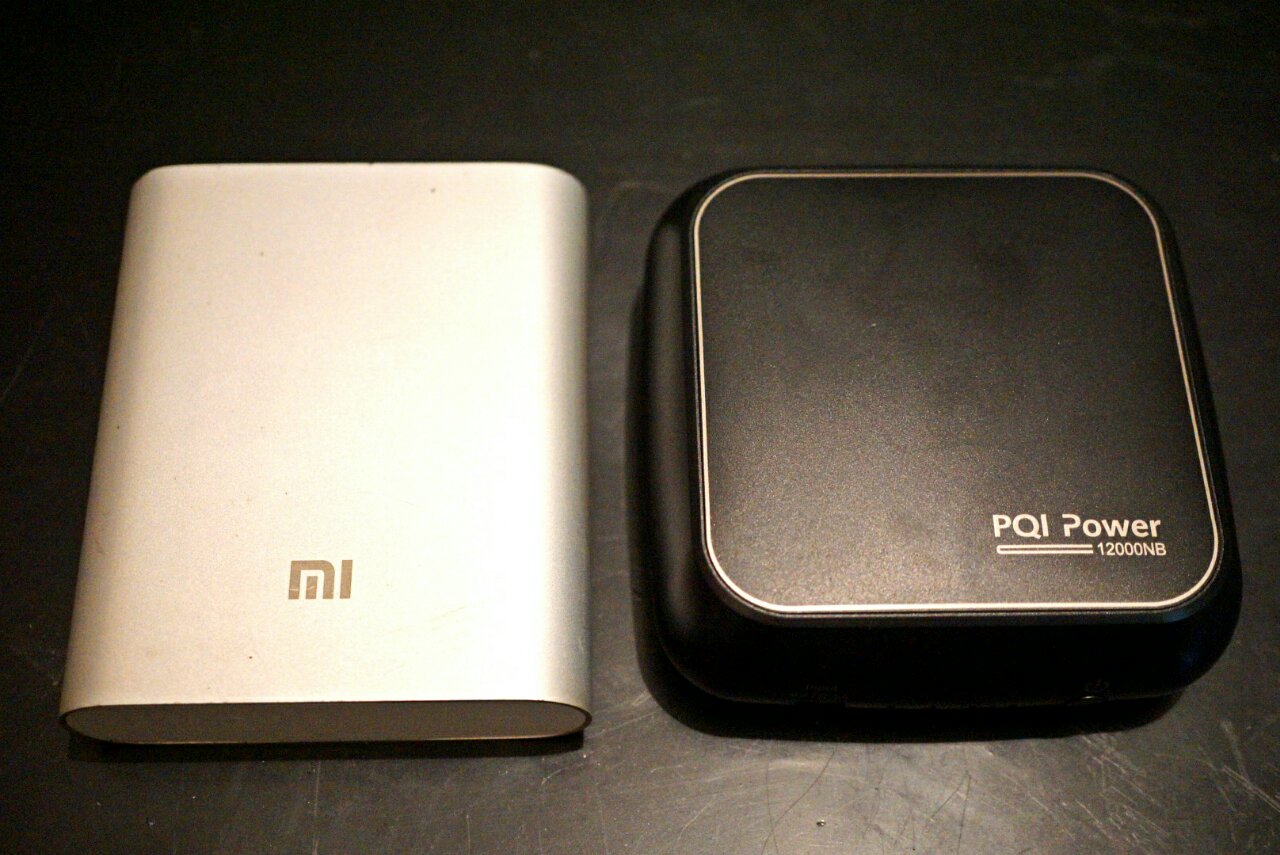
The Hootoo Shuttle is still out there in the void of international shipping so I can't comment much yet lol. But as for the PQI "laptop" powerbank, here's a teaser:

user posted image

It's actually smaller but slightly thicker than an old style Mi 10400mAh PB lol... How it can even do 19V/3.42A I can't even... shocking.gif

This post has been edited by Eiraku: Feb 6 2017, 03:07 AM
willgan
post Feb 5 2017, 11:58 PM

Casual
***
Junior Member
302 posts

Joined: Jan 2003
How much you bought it and from where?

I'm using romoss sofun 6 for my alpha 12.. still looking for usbc power bank

This post has been edited by willgan: Feb 6 2017, 12:00 AM
TSEiraku
post Feb 6 2017, 12:09 AM

Geeking since 1985!
*******
Senior Member
7,037 posts

Joined: Apr 2006


QUOTE(willgan @ Feb 5 2017, 11:58 PM)
How much you bought it and from where?
*
The PB? It's not a Type-C PD PB though, just a normal "laptop" powerbank (that works for everything that charges on 19V/3.42A = 65W).

It's slightly less then RM300 and you can get it either from Lazada or Lelong. Myself I got it from the Brightstar Malaysia online shop, best online price I've seen for it.

There's also the Apacer B222, which is pretty much just a re-labelled PQI. It's slightly more expensive though.

And yes, I just tested it yesterday and it works fine with the Miix. Don't expect it to charge fully from zero though, you'll get more like 30-40% at most... but considering the size of the PB, that's probably enough.

As a bonus, it does come with an Acer tip for it (that looks like it would fit your Switch) so you can use that Type-C for something more productive lol.

» Click to show Spoiler - click again to hide... «


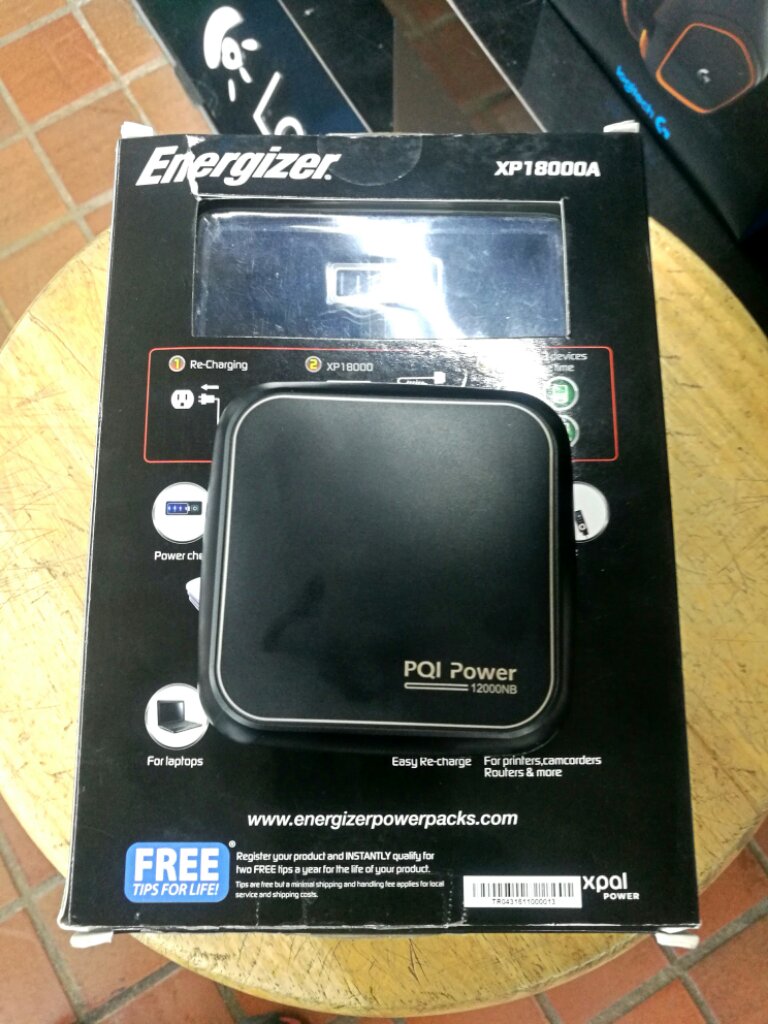
BTW, this is how small it is VS the traditional "laptop" PB, the RM500+ Energizer Xpal:

user posted image

This post has been edited by Eiraku: Feb 6 2017, 03:10 AM
TSEiraku
post Feb 6 2017, 05:31 AM

Geeking since 1985!
*******
Senior Member
7,037 posts

Joined: Apr 2006


Oh mai... suddenly feel that my 256GB SSD is a tad... cramped lol. Now checking the markets for an upgrade, maybe a Samsung PM951 in 512.

Thankfully the Miix, as I mentioned before, is almost as upgradable/repairable as the enterprise grade HP Elite X2 1012... six screws and you're in.

Problem now is to find a good deal on the actual SSD. NVMe summore lol.

EDIT: Found one. Later this week will go get it. Will post up the self-upgrade steps over on the blog and link back here as usual.

This post has been edited by Eiraku: Feb 7 2017, 01:02 PM
SUSgogo2
post Feb 7 2017, 01:42 PM

gogo2
********
All Stars
18,672 posts

Joined: Jan 2003
From: Penang


QUOTE(Eiraku @ Feb 6 2017, 05:31 AM)
Oh mai... suddenly feel that my 256GB SSD is a tad... cramped lol. Now checking the markets for an upgrade, maybe a Samsung PM951 in 512.

Thankfully the Miix, as I mentioned before,  is almost as upgradable/repairable as the enterprise grade HP Elite X2 1012... six screws and you're in.

Problem now is to find a good deal on the actual SSD. NVMe summore lol.

EDIT: Found one. Later this week will go get it. Will post up the self-upgrade steps over on the blog and link back here as usual.
*
Should get LTE version and put in Webe. Winrar.
TSEiraku
post Feb 7 2017, 01:58 PM

Geeking since 1985!
*******
Senior Member
7,037 posts

Joined: Apr 2006


QUOTE(gogo2 @ Feb 7 2017, 01:42 PM)
Should get LTE version and put in Webe. Winrar.
*
Well, can always just get the parts to "make" it the LTE version lol. The modem and SIM slots are there, just unfilled and blanked out with a plastic insert.

Though for my on the move purposes adding those parts will just add to the base battery drain, so no. I always have my phone close by to tether anyway.
SUSgogo2
post Feb 7 2017, 02:14 PM

gogo2
********
All Stars
18,672 posts

Joined: Jan 2003
From: Penang


QUOTE(Eiraku @ Feb 7 2017, 01:58 PM)
Well, can always just get the parts to "make" it the LTE version lol. The modem and SIM slots are there, just unfilled and blanked out with a plastic insert.

Though for my on the move purposes adding those parts will just add to the base battery drain, so no. I always have my phone close by to tether anyway.
*
Webe does not work with Tether.
Imagine you laptop always connected with unlimited data. rclxms.gif Not sure if Webe can detect usb tethering to phone.

TSEiraku
post Feb 7 2017, 02:33 PM

Geeking since 1985!
*******
Senior Member
7,037 posts

Joined: Apr 2006


QUOTE(gogo2 @ Feb 7 2017, 02:14 PM)
Webe does not work with Tether.
Imagine you laptop always connected with unlimited data.  rclxms.gif Not sure if Webe can detect usb tethering to phone.
*
Oh yeaaaaaaaaa. But I guess the infra can detect the fact that your "phone" doesn't have phone capabilites and mark you as tethering anyway lol.

Or do they? How's the peeps with iPads and Webe?
SUSgogo2
post Feb 7 2017, 02:40 PM

gogo2
********
All Stars
18,672 posts

Joined: Jan 2003
From: Penang


QUOTE(Eiraku @ Feb 7 2017, 02:33 PM)
Oh yeaaaaaaaaa. But I guess the infra can detect the fact that your "phone" doesn't have phone capabilites and mark you as tethering anyway lol.

Or do they? How's the peeps with iPads and Webe?
*
In my opinion they don't detect its a phone or not. It just detect whether it is used out the MAC address of the LTE modem. So Lenovo Miix with LTE will work with Webe. But Miix cannot do hotspot to other device with another MAC address else its considered as tether.
TSEiraku
post Feb 7 2017, 04:06 PM

Geeking since 1985!
*******
Senior Member
7,037 posts

Joined: Apr 2006


QUOTE(gogo2 @ Feb 7 2017, 02:40 PM)
In my opinion they don't detect its a phone or not. It just detect whether it is used out the MAC address of the LTE modem. So Lenovo Miix with LTE will work with Webe. But Miix cannot do hotspot to other device with another MAC address else its considered as tether.
*
Meaning tied to one MAC? Hmmm. Quite smart that.

However, that begs the question, do they keep tabs on how much data you use. .. y'know, maybe go pick out people doing exactly THIS?

If they have a fair use clause its a clear violation lol.

Annnnnnnnd, if they have no system in place to track user utilisation... Well, I NEED MY LTE PARTS STAT LENOVO!

Anyway, I also heard Webe needs a specialised slice of the LTE spectrum to work, hence only certain phones can use Webe to begin with. Any truth there? Later I go order LTE parts also kenot use sienz only.

*Besides, I live in a literal jungle 80% of the year anyway... So probably no Webe LTE coverage to begin with lol*

This post has been edited by Eiraku: Feb 7 2017, 04:11 PM
SUSgogo2
post Feb 7 2017, 05:18 PM

gogo2
********
All Stars
18,672 posts

Joined: Jan 2003
From: Penang


QUOTE(Eiraku @ Feb 7 2017, 04:06 PM)
Meaning tied to one MAC? Hmmm. Quite smart that.

However, that begs the question, do they keep tabs on how much data you use. .. y'know, maybe go pick out people doing exactly THIS?

If they have a fair use clause its a clear violation lol.

Annnnnnnnd, if they have no system in place to track user utilisation... Well, I NEED MY LTE PARTS STAT LENOVO!

Anyway, I also heard Webe needs a specialised slice of the LTE spectrum to work, hence only certain phones can use Webe to begin with. Any truth there? Later I go order LTE parts also kenot use sienz only.

*Besides, I live in a literal jungle 80% of the year anyway... So probably no Webe LTE coverage to begin with lol*
*
Only LTE Band 5. I already check Miix LTE which support Band 5. So I assume Miix LTE will work with Webe. drool.gif
TSEiraku
post Feb 7 2017, 08:27 PM

Geeking since 1985!
*******
Senior Member
7,037 posts

Joined: Apr 2006


QUOTE(gogo2 @ Feb 7 2017, 05:18 PM)
Only LTE Band 5. I already check Miix LTE which support Band 5. So I assume Miix LTE will work with Webe.  drool.gif
*
Nice find bro. Like I said, I'm out of coverage idea most of the time so it might not apply to me personally, but might be useful for someone else.

It's really tempting me to start looking for the LTE parts from Lenovo though lol.

BTW folks, remember this little black thang from last page?

user posted image

Apparently it managed to charge my Miix batt from 10% to about 90% in around 3-4 hours. For a dinky thing the size of a Mi PB I'm pretty impressed really... never thought it could even charge the Miix any more than half.

Gonna recharge the thing for further testing, but yeah, I'm liking it so far, especially for the price it's sold at (half what other "Laptop" PBs are going for).

Also, being 19V, there's a good chance that this will work as a battery extender for my Sony mirrorless too, with the correct dummy battery adapter. So yeah, pretty exciting stuff.

Will link back here as usual once I'm done with the full review.

This post has been edited by Eiraku: Feb 7 2017, 11:19 PM
SUStalzer
post Feb 9 2017, 12:49 PM

bagusnya
*****
Senior Member
757 posts

Joined: Mar 2010


can try download photoshop trial and test the pen? any issue such as palm rejection etc.

interested to use it as a drawing tablet haha.

any screen protector or protection case needed? just asking since never use any 2in1 or big tablet like this before.

thanks!
TSEiraku
post Feb 9 2017, 03:53 PM

Geeking since 1985!
*******
Senior Member
7,037 posts

Joined: Apr 2006


QUOTE(talzer @ Feb 9 2017, 12:49 PM)
can try download photoshop trial and test the pen? any issue such as palm rejection etc.

interested to use it as a drawing tablet haha.

any screen protector or protection case needed? just asking since never use any 2in1 or big tablet like this before.

thanks!
*
I have Ps/Ai/Lr CC and let me tell you that for an "optimal" touch experience, you're gonna need CC minimum. CS6 = tiny UI everything, unless you do the manifest hack. Ai/Ps CC even comes with a dedicated "touch" mode that embiggens the buttons even further for finger use, though I often just use them in "normal" mode.

With the manifest hack, CS6 works well enough too, though it's far less touch "aware" then CC which complicates things somewhat.

SAI should also work fine due to the fact that the Miix uses a "full" Wacom setup and runs the same Feel drivers that most drawing tablets do.

That said, I don't really draw (Ps is more my photo editor, and Ai more for logos/typography/publications) but I do take a shit tonne of written notes (Squid on Win10 is so much winz that it's not funny lol).

Also, one of the latest Win10 updates sort of added system-wide palm rejection of sorts, as it disables touch input when the pen is within hover distance EVERYWHERE. Which helps A LOT when I take notes (and should help for folks drawing too).

It's not "perfect" though (sometimes, while resting your palm on the device you pull the pen tip a tad too far from the the surface and your palm starts registering again) but it's much better than the Win 8 days that's for sure.

As for other issues, you need to understand that by nature Wacom AES (Miix) isn't like EMR (Samsung Note). It's more accurate and doesn't suffer from corner issues, but conversely it jitters somewhat if you draw too slowly and hover distance is slightly suckier than EMR.

Otherwise, it's a pretty awesome experience really, and decently comparable to my experiences with my old Note 3, but now with the power of full desktop software.

It's especially good compared to the epileptically jitter happy Synaptic pen on the Switch Alpha 12. I can't even take notes decently with that one, and not being native Wacom, you'll need all sorts of drivers and stuff to make Ps/SAI even notice it's existence.

BTW, I if you haven't figured out by now, I actually picked the Miix 510 over the Switch primarily because of how much better the Wacom pen experience was. So yeah, if you need a pen, get one.

This post has been edited by Eiraku: Feb 9 2017, 04:17 PM
SUStalzer
post Feb 9 2017, 04:13 PM

bagusnya
*****
Senior Member
757 posts

Joined: Mar 2010


QUOTE(Eiraku @ Feb 9 2017, 03:53 PM)
I have Ps/Ai/Lr CC and let me tell you that for an "optimal" touch experience, you're gonna need CC minimum. CS6 = tiny UI everything, unless you do the manifest hack. Ai/Ps CC even comes with a dedicated "touch" mode that embiggens the buttons even further for finger use, though I often just use them in "normal" mode.

With the manifest hack, CS6 works well enough too, though it's far less touch "aware" then CC which complicates things somewhat.

SAI should also work fine due to the fact that the Miix uses a "full" Wacom setup and runs the same Feel drivers that most drawing tablets do.

That said, I don't really draw (Ps is more my photo editor, and Ai more for logos/typography/publications) but I do take a shit tonne of written notes (Squid on Win10 is so much winz that it's not funny lol).

Also, one of the latest Win10 updates sort of added system-wide palm rejection of sorts, as it disables touch input when the pen is within hover distance EVERYWHERE. Which helps A LOT when I take notes (and should help for folks drawing too).

It's not "perfect" though (sometimes, while resting your palm on the device you pull the pen tip a tad too far from the the surface and your palm starts registering again) but it's much better than the Win 8 days that's for sure.

As for other issues, you need to understand that by nature Wacom AES (Miix) isn't like EMR (Samsung Note). It's more accurate and doesn't suffer from corner issues, but conversely it jitters somewhat if you draw too slowly and hover distance is slightly suckier than EMR.

Otherwise, it's a pretty awesome experience really, and decently comparable to my experiences with my old Note 3, but now with the power of full desktop software. 

It's especially good compared to the epileptically jitter happy Synaptic pen on the Switch Alpha 12. I can't even take notes decently with that one, and not being native Wacom, you'll need all sorts of drivers and stuff to make Ps/SAI even notice it's existence.

BTW, I if you haven't figured out by now, I actually picked the Miix 510 over the Switch primarily because of how much better the Wacom pen experience was. So yeah, if you need a pen, get one.
*
thumbs up for the detailed explanation thumbsup.gif

yup they say switch pen was crap. anything with wacom is really reassuring having own a wacom drawing tablet myself (not sure integration for 2in1)
jittering wise will not be an issue. software like Lazy Nezumi pro can address this issue.

overall, thanks for the detailed explanation, will be exploring i5 version or i3 if bajet constraint laugh.gif

TSEiraku
post Feb 9 2017, 04:16 PM

Geeking since 1985!
*******
Senior Member
7,037 posts

Joined: Apr 2006


QUOTE(talzer @ Feb 9 2017, 04:13 PM)
thumbs up for the detailed explanation :thumbsup:

yup they say switch pen was crap. anything with wacom is really reassuring having own a wacom drawing tablet myself (not sure integration for 2in1)
jittering wise will not be an issue. software like Lazy Nezumi pro can address this issue.

overall, thanks for the detailed explanation, will be exploring i5 version or i3 if bajet constraint  laugh.gif
*
And I'm not even finished yet lol.

As for screen protection, I currently have a tempered glass protector I got off the 'Bay. It works very well and doesn't really mess with the pen all that much, but it's slippery and depending on how you draw, you might need to order "matte" protectors for it for better pen "feel".

An alternative is to go to Mobile Outfitters in Times Square/Sunway as they do custom SPs in both matte and glossy, even up to laptop size.

As for cases, I ordered a folio case once, but trashed it soon after getting it - as it just makes the Miix even bulkier and prevents you from using that awesome kickstand.

In the end, I realised that I only really use my Miix as a "laptop" replacement, so I don't think such levels of protection is needed. I settled with wrapping it with some CF vinyl for scratch protection and getting a sleeve for it (as I don't use it with the keyboard cover attached. If you plan to keep the keyboard on, you might not even need a sleeve).

If you're gonna need more protection though, a folio case would be okay probably, or you can even get a full-body silicone protector for the Miix from Gumdrop Cases.

Also Drawing Tabs are primarily EMR, so there will be a sliiiiight difference in operational "feel" when using the Miix's AES pen (as per my EMR/AES explaination before)... just so that you are aware.

So yeah, hope that was helpful for you.

This post has been edited by Eiraku: Feb 9 2017, 04:24 PM
SUStalzer
post Feb 9 2017, 08:01 PM

bagusnya
*****
Senior Member
757 posts

Joined: Mar 2010


QUOTE(Eiraku @ Feb 9 2017, 04:16 PM)
And I'm not even finished yet lol.

As for screen protection, I currently have a tempered glass protector I got off the 'Bay. It works very well and doesn't really mess with the pen all that much, but it's slippery and depending on how you draw, you might need to order "matte" protectors for it for better pen "feel".

An alternative is to go to Mobile Outfitters in Times Square/Sunway as they do custom SPs in both matte and glossy, even up to laptop size.

As for cases, I ordered a folio case once, but trashed it soon after getting it - as it just makes the Miix even bulkier and prevents you from using that awesome kickstand.

In the end, I realised that I only really use my Miix as a "laptop" replacement, so I don't think such levels of protection is needed. I settled with wrapping it with some CF vinyl for scratch protection and getting a sleeve for it (as I don't use it with the keyboard cover attached. If you plan to keep the keyboard on, you might not even need a sleeve).

If you're gonna need more protection though, a folio case would be okay probably, or you can even get a full-body silicone protector for the Miix from Gumdrop Cases.

Also Drawing Tabs are primarily EMR, so there will be a sliiiiight difference in operational "feel" when using the Miix's AES pen (as per my EMR/AES explaination before)... just so that you are aware.

So yeah, hope that was helpful for you.
*
great advice thumbup.gif thumbup.gif
hope your accessories doesn't cost you 10% of your whole unit biggrin.gif
TSEiraku
post Feb 9 2017, 08:37 PM

Geeking since 1985!
*******
Senior Member
7,037 posts

Joined: Apr 2006


QUOTE(talzer @ Feb 9 2017, 08:01 PM)
great advice  thumbup.gif  thumbup.gif
hope your accessories doesn't cost you 10% of your whole unit  biggrin.gif
*
Nah, just got cheap stuff from eBay lol. Thankfully there ARE cheap stuff for the Miix, thank God, considering just how niche it is. With my spare ori Active Stylus included its nearly 10% though... but that's fortunate as most other brands' active styli is sold AT 10% of the Miix price on its own already.

That said, that laptop PB takes it over the edge but considering its a powerbank (and can charge my other laptops/gadgets as well), I'll just turn a blind eye to it lol.

This post has been edited by Eiraku: Feb 9 2017, 08:38 PM
mactreouser
post Feb 10 2017, 10:50 AM

Look at all my stars!!
*******
Senior Member
2,512 posts

Joined: Sep 2007


Hi,
I just walked around in mall, noticed this Miix 5 babe is awesome! In fact, I'm still wondering whether i3 or i5? Perhaps you may give me some advices?

Most Usage:
* Chrome Browsing, Googling, FB, IM,
* Work on Google Docs, Google Drive, PowerPoint Presentation via Google Slides & WPS
* Low YouTube

Still, if the PEN isn't the concern, which mode else should I consider? Yup, love 2 in 1 with Detachable Keyboard, so that I can sometimes use it as a tablet in stead.

Your advices are appreciated!
SUStalzer
post Feb 10 2017, 04:29 PM

bagusnya
*****
Senior Member
757 posts

Joined: Mar 2010


QUOTE(Eiraku @ Feb 9 2017, 08:37 PM)
Nah, just got cheap stuff from eBay lol. Thankfully there ARE cheap stuff for the Miix, thank God, considering just how niche it is. With my spare ori Active Stylus included its nearly 10% though... but that's fortunate as most other brands' active styli is sold AT 10% of the Miix price on its own already.

That said, that laptop PB takes it over the edge but considering its a powerbank (and can charge my other laptops/gadgets as well), I'll just turn a blind eye to it lol.
*
All these details really make me craving for it haha

TSEiraku
post Feb 10 2017, 06:36 PM

Geeking since 1985!
*******
Senior Member
7,037 posts

Joined: Apr 2006


QUOTE(mactreouser @ Feb 10 2017, 10:50 AM)
Hi,
I just walked around in mall, noticed this Miix 5 babe is awesome! In fact, I'm still wondering whether i3 or i5? Perhaps you may give me some advices?

Most Usage:
* Chrome Browsing, Googling, FB, IM,
* Work on Google Docs, Google Drive, PowerPoint Presentation via Google Slides & WPS
* Low YouTube

Still, if the PEN isn't the concern, which mode else should I consider? Yup, love 2 in 1 with Detachable Keyboard, so that I can sometimes use it as a tablet in stead.

Your advices are appreciated!
*
From your usage pattern the i3/4GB seems to be enough. All models of the Miix 510 come with the pen, not sure about the back lighted KB though.

And yes, with Win 10's touch improvements I actually very rarely use the keyboard cover anyway lol. It's like an add on extra I use only when I need to type, otherwise it's full on tablet mode for me (though people keep giving me a second glance looking at how huge the "tablet" is lol).

Unfortunately, use it like I do and you're gonna need a screen cleaning cloth and cleaning solution close at hand lol as the screen gets pretty greasy pretty quick. Also a tempered glass protector just in case.

Additionally, like I said before, warranty coverage is awesome for the 510: You get 2 years WITH accident cover. Meaning even if you DROP your 510, it's still covered under warranty.

This post has been edited by Eiraku: Feb 10 2017, 06:39 PM
MaL
post Feb 10 2017, 07:04 PM

Getting Started
**
Junior Member
130 posts

Joined: Sep 2006
how about this comparing to asus transformer 3?
mactreouser
post Feb 10 2017, 08:47 PM

Look at all my stars!!
*******
Senior Member
2,512 posts

Joined: Sep 2007


QUOTE(MaL @ Feb 10 2017, 07:04 PM)
how about this comparing to asus transformer 3?
*
As well as Acer Alpha 12 rclxms.gif
TSEiraku
post Feb 10 2017, 09:30 PM

Geeking since 1985!
*******
Senior Member
7,037 posts

Joined: Apr 2006


QUOTE(MaL @ Feb 10 2017, 07:04 PM)
how about this comparing to asus transformer 3?
*
I haven't tried yet the Trans3, but I have read some T3 reviews a while back but all I remember was I wasn't really impressed by much. Also, last I checked Asus warranty service was atrocious, not so sure now though.

As for the Switch 12, it's heavier, has a worse pen (much worse), worse battery life (4h vs 5-6h), zero upgradability (by yourself I mean, I can upgrade the SSD on the Miix), worse kickstand, worse chassis (thin metal + plastic vs Miix full aluminum unibody), no keyboard backlighting (at least in some of the stocks) and only a 1 year warranty with no Accident coverage (extendable to 3 years, but still no Accident coverage).

On the plus side, the Switch is smaller, has a sharper, brighter screen; a microSD slot, a USB-C that supports charging and is passively cooled (quieter with no fan but runs hotter).

So yeah. Plusses and minuses.

This post has been edited by Eiraku: Feb 10 2017, 10:27 PM
mactreouser
post Feb 10 2017, 10:46 PM

Look at all my stars!!
*******
Senior Member
2,512 posts

Joined: Sep 2007


QUOTE(Eiraku @ Feb 10 2017, 09:30 PM)
I haven't tried yet the Trans3, but I have read some T3 reviews a while back but all I remember was I wasn't really impressed by much. Also, last I checked Asus warranty service was atrocious, not so sure now though.

As for the Switch 12, it's heavier, has a worse pen (much worse), worse battery life (4h vs 5-6h), zero upgradability (by yourself I mean, I can upgrade the SSD on the Miix), worse kickstand, worse chassis (thin metal + plastic vs Miix full aluminum unibody), no keyboard backlighting (at least in some of the stocks) and only a 1 year warranty with no Accident coverage (extendable to 3 years, but still no Accident coverage).

On the plus side, the Switch is smaller, has a sharper, brighter screen; a microSD slot, a USB-C that supports charging and is passively cooled (quieter with no fan but runs hotter).

So yeah. Plusses and minuses.
*
Wow... you are awesome! Seems Miix 510 still the goal
TSEiraku
post Feb 11 2017, 01:30 AM

Geeking since 1985!
*******
Senior Member
7,037 posts

Joined: Apr 2006


BTW folks... just got my Hootoo annnnnnd it seems that it's actually not the model I wanted do'oh. Rather than the HDMI equipped, no PD one... I got the NO HDMI one.

Was pretty sure I got the right one, according to the pics on the eBay page, but it seems that the listing itself wasn't for what the pics showed. No wonder it was considerably cheaper than your average Hootoo HDMI Type-C.

Not sure if I can open a eBay dispute for something like this though (the listing was clear and the price was about right for the item listed... but the pictures were misleading), so I might just put it up over in Garage Sales.

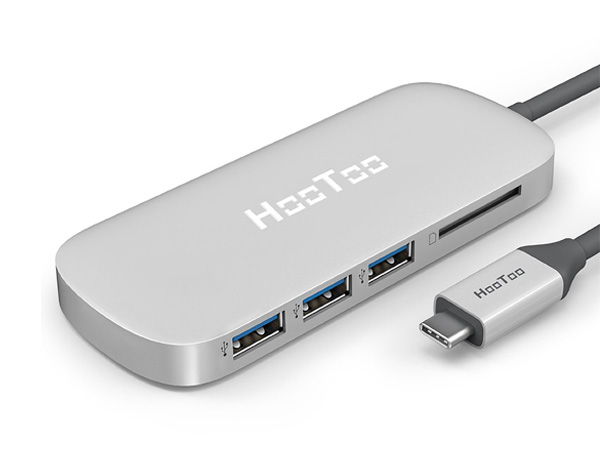
Anybody interested in a brand new Hootoo Type-C, 3x USB + SD card reader hub? PM me, at least before I go put it up on GS. Here's what it looks like:

user posted image

ON THE PLUS SIDE, my new 512GB NVMe SSD is here (an actual Sammy PM961 wooo). Did consider a 1TB disk but was kinda afraid that a dual-sided stick might not fit into the limited space available (plus, y'know, cost).

Currently getting prepared for the surgery: Getting tools (silicone picks and levers), thermal pads (for the SSD, as Sammy disks are well known to run hot), maybe some thermal paste to repaste the proc with, transferring files to external stores, imaging the current SSD for migration...

This is gonna be fun lol... I regularly open up my other laptops for servicing and upgrades, but a 2-in-1? This is gonna be a fresh one for me.

This post has been edited by Eiraku: Feb 11 2017, 01:13 PM
TSEiraku
post Feb 11 2017, 08:30 PM

Geeking since 1985!
*******
Senior Member
7,037 posts

Joined: Apr 2006


user posted image

Dat moment when you freeze up and realise you're gonna soon end up with either an upgraded Miix...

... or a dead Miix.

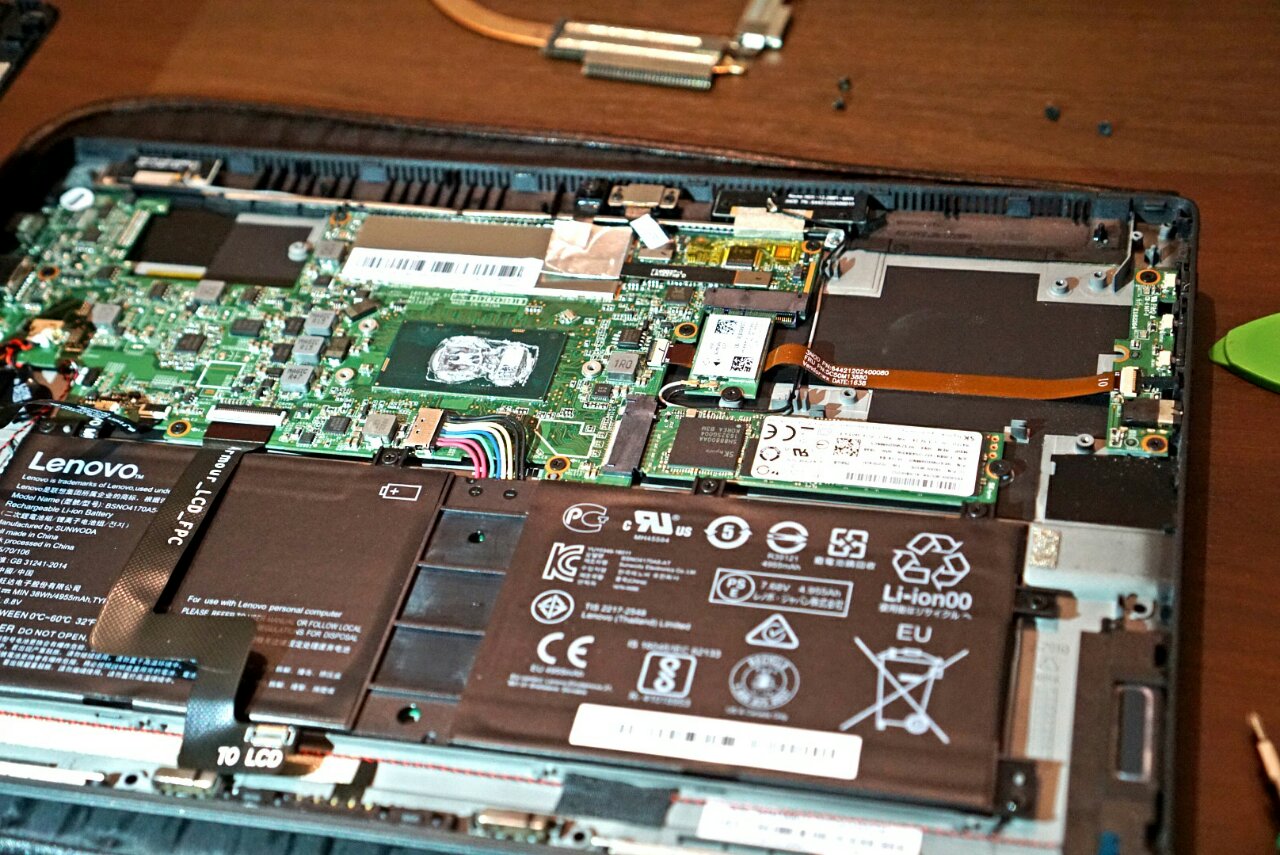
Thankfully, everything went well, and I successfully switched out the SSD, repasted the SoC (you can recycle the old paste but, it's already open so why not), and turns out the copper heatpipe has its own thermal pad for the SSD so I refrained from adding my own (multiple layers of TP lessens its effectiveness).

Now migrating data over with Macrium Reflect Free.

Looking back, I wouldn't really say it was as "easy" as the normal pop-the-hatch-replace-components you normally do with full-sized laptops, but it's "doable" at least with proper precautions taken.

For one, I should have had a printed copy of the service manual close by, as a PDF copy is pretty useless once you need it and you realise the phone that it's on... is video recording your disassembly process lol.

At least replacing the main battery, BIOS clock cell, ventilation fan or WiFi card is much, much easier, without having to pull off the heatsink assembly (as is necessary in this case).

Oh, and there's actually plenty of space for a dual-sided 1TB (and soon, 2TB) SSD. It helps that the other side is covered with TP as well, which is pretty nice.

This post has been edited by Eiraku: Feb 12 2017, 12:51 AM
TSEiraku
post Feb 13 2017, 12:26 PM

Geeking since 1985!
*******
Senior Member
7,037 posts

Joined: Apr 2006


PSAs added to the front page for new users.

This post has been edited by Eiraku: Feb 13 2017, 12:44 PM
outpace
post Feb 17 2017, 11:31 AM

On my way
****
Junior Member
574 posts

Joined: Jan 2011


» Click to show Spoiler - click again to hide... «


Thanks for informative posts.

Miix 720 is selling for S$1,999.00 in Singapore
12QHD2880x1920 400nits
512GB PCIe NVMe SSD
8GB DDR4
i5-7200U (3.1Ghz)
Windows 10 Pro, TPM ready

https://www.hachi.tech/product/019120007979...8gb-ram-512-ssd

In convert it into Malaysia pricing like HP, then it should be about RM5K
X360 Spectre i5 sell for 1999 in Singapore, RM5200 in MY.

TSEiraku
post Feb 17 2017, 11:47 AM

Geeking since 1985!
*******
Senior Member
7,037 posts

Joined: Apr 2006


QUOTE(outpace @ Feb 17 2017, 11:31 AM)
Thanks for informative posts.

Miix 720 is selling for S$1,999.00 in Singapore
12QHD2880x1920 400nits
512GB PCIe NVMe SSD
8GB DDR4
i5-7200U (3.1Ghz)
Windows 10 Pro, TPM ready

https://www.hachi.tech/product/019120007979...8gb-ram-512-ssd

In convert it into Malaysia pricing like HP, then it should be about RM5K
X360 Spectre i5 sell for 1999 in Singapore, RM5200 in MY.
*
Not bad. The 510 with SSD and Win upgrade should only be slightly cheaper, but with no Hello webcam, Kaby Lake Proc, TPM and that QHD screen.

On the other hand, the 510 has a better warranty: Full 2 years international AND ADP. Also, there's the digitizer on that 720. Hopefully it's proper Wacom but Lenovo HAS gone the Elan + Wacom way before (with the 700) so it's a bit suspect unless someone clarifies in a review, or tests it out.

Why is this bad? Elan + Wacom requires saperate drivers and performs slightly worse than full Wacom. It might, or might not, concern you.

Also the 700 is well known for issues (sudden death, battery drain, keyboard folio zonking out), while so far my 500 has been relatively trouble free. God knows how the 720 is gonna be like, but so far folks out of China are reporting about the same level of fan noise as the 510 at least, nothing more yet.

Otherwise it's a toss up really. Upgraded 510 i5 vs 720 i5 for 500-ish more, entirely up to you.

This post has been edited by Eiraku: Feb 17 2017, 11:53 AM
Mystycat
post Feb 17 2017, 01:43 PM

Getting Started
**
Junior Member
82 posts

Joined: May 2013


Hi all, wanted to get a new laptop since the current laptop is dying after 5 years of usage.
First time getting a 2-1 laptop so wanna ask that is it all specs comes with the pen, because I saw online retailers mentioned that i3 also comes with pen and keyboard
TSEiraku
post Feb 17 2017, 04:38 PM

Geeking since 1985!
*******
Senior Member
7,037 posts

Joined: Apr 2006


QUOTE(Mystycat @ Feb 17 2017, 01:43 PM)
Hi all, wanted to get a new laptop since the current laptop is dying after 5 years of usage.
First time getting a 2-1 laptop so wanna ask that is it all specs comes with the pen, because I saw online retailers mentioned that i3 also comes with pen and keyboard
*
That was what I was told too. And then suddenly mactreouser mentioned that it wasn't included with the i3, at least at the shop he went to. Which is rather odd, but considering that the i3/4GB only comes with a 1-year warranty (as mentioned by shirogawawa ), it's not unimaginable that Lenovo might just omit the pen as well.

The Active Stylus itself is readily available from eBay for about 150-200 though (plus a 2 week shipping wait), so it's not a huge loss if you're set on getting the i3 version. The digitizer will all still be there, you'll just need to get the pen.

Anyways, do make sure you confirm the inclusion of the pen with whoever you're buying with before you commit to anything.

Other than that, I've put the other differences between the models in the PSA at the bottom of the First post on Page One, so do check that out. They still all share the same basic chassis though.

This post has been edited by Eiraku: Feb 17 2017, 04:42 PM
rosihan
post Mar 4 2017, 12:22 AM

*\(-_-)/*
******
Senior Member
1,223 posts

Joined: May 2006
From: Klang


just received mine
the i3 model
yep they included stylus and sleeve oso
bbhing98
post Mar 4 2017, 12:50 AM

Getting Started
**
Junior Member
271 posts

Joined: Mar 2015


QUOTE(rosihan @ Mar 4 2017, 12:22 AM)
just received mine
the i3 model
yep they included stylus and sleeve oso
*
Could you provide some review on the performance, screen size,battery life and physical look of the device? Feeling really tempted to buy
TSEiraku
post Mar 4 2017, 01:22 AM

Geeking since 1985!
*******
Senior Member
7,037 posts

Joined: Apr 2006


QUOTE(rosihan @ Mar 4 2017, 12:22 AM)
just received mine
the i3 model
yep they included stylus and sleeve oso
*
Thanks for the confirmation bro. Clears a lot of doubt regarding the status of the pen with the i3 version. Don't be shy to post up here if you have any questions or if you have anything you wanna share.

I gotta ask though, did you get an backlighted keyboard as well? Not sure if the i3 SKU included it or not.

QUOTE(bbhing98 @ Mar 4 2017, 12:50 AM)
Could you provide some review on the performance, screen size,battery life and physical look of the device?  Feeling really tempted to buy
*
Full review you can check out my site: https://goo.gl/VMpmoQ

Got direct size comparison with the Surface Pro 3 as well (sorry no SP4 to compare), and physical characteristics are all exactly the same between the i3 model and the i5 model, so my points would probably be still quite relevant.

As for performance and battery life, however, you need to wait until rosihan chimes in with his impressions. I expect the i3 to have oooookay performance for normal tasks and slightly better battery life compare to the i5, but that's just my assumption.

This post has been edited by Eiraku: Mar 4 2017, 05:16 AM
rosihan
post Mar 4 2017, 07:20 AM

*\(-_-)/*
******
Senior Member
1,223 posts

Joined: May 2006
From: Klang


QUOTE(Eiraku @ Mar 4 2017, 01:22 AM)
Thanks for the confirmation bro. Clears a lot of doubt regarding the status of the pen with the i3 version. Don't be shy to post up here if you have any questions or if you have anything you wanna share.

I gotta ask though, did you get an backlighted keyboard as well? Not sure if the i3 SKU included it or not.
Full review you can check out my site: https://goo.gl/VMpmoQ

Got direct size comparison with the Surface Pro 3 as well (sorry no SP4 to compare), and physical characteristics are all exactly the same between the i3 model and the i5 model, so my points would probably be still quite relevant.

As for performance and battery life, however, you need to wait until rosihan chimes in with his impressions. I expect the i3 to have oooookay performance for normal tasks and slightly better battery life compare to the i5, but that's just my assumption.
*
yup i got the backlighted one thumbup.gif
for battery performance i currently testing it
ive just completed 2hr+ on tablet mode
gt lots of wedding invitation this week dunno got time o not sweat.gif
TSEiraku
post Mar 4 2017, 08:49 AM

Geeking since 1985!
*******
Senior Member
7,037 posts

Joined: Apr 2006


QUOTE(rosihan @ Mar 4 2017, 07:20 AM)
yup i got the backlighted one thumbup.gif
for battery performance i currently testing it
ive just completed 2hr+ on tablet mode
gt lots of wedding invitation this week dunno got time o not  sweat.gif
*
No problem Bro, enjoy your Miix.
outpace
post Mar 5 2017, 12:42 AM

On my way
****
Junior Member
574 posts

Joined: Jan 2011


Miix 510 i5 is with Window 10 Home, the seller said it's rooted, cannot upgrade to Window 10 with purchasing a new software. So those "license keys" that you can purchase from naughty sellers at RM100 would not be viable. Can anyone confirm this?

Tempted to buy the i7 version, might as well just go for i7 LTE for at RM4600 which is 1200 more than the i5 version, get Window Pro 10 and LTE connectivity.

I take note of what @Eiraku mentioned about the unnecessary heat and shorter battery life, 1000 more

bbhing98
post Mar 5 2017, 12:47 AM

Getting Started
**
Junior Member
271 posts

Joined: Mar 2015


QUOTE(outpace @ Mar 5 2017, 12:42 AM)
Miix 510 i5 is with Window 10 Home, the seller said it's rooted, cannot upgrade to Window 10 with purchasing a new software. So those "license keys" that you can purchase from naughty sellers at RM100 would not be viable. Can anyone confirm this?

Tempted to buy the i7 version, might as well just go for i7 LTE for at RM4600 which is 1200 more than the i5 version, get Window Pro 10 and LTE connectivity.

I take note of what @Eiraku mentioned about the unnecessary heat and shorter battery life, 1000 more
*
I wonder if there's LTE on any i5 models? Because i intent to get the i5 specs instead of i7 for the price
outpace
post Mar 5 2017, 01:08 AM

On my way
****
Junior Member
574 posts

Joined: Jan 2011


I don't see any them on lazada or lelong, but it's selling much more expensive in other currency.

http://www3.lenovo.com/sg/en/laptops/ideap...0/p/88EMMX50735

not cheap, S dollars 1400
shirogawawa
post Mar 5 2017, 02:56 AM

Laptop enthusiast
*******
Senior Member
2,383 posts

Joined: Feb 2015
From: IT wonderland


QUOTE(outpace @ Mar 5 2017, 12:42 AM)
Miix 510 i5 is with Window 10 Home, the seller said it's rooted, cannot upgrade to Window 10 with purchasing a new software. So those "license keys" that you can purchase from naughty sellers at RM100 would not be viable. Can anyone confirm this?

Tempted to buy the i7 version, might as well just go for i7 LTE for at RM4600 which is 1200 more than the i5 version, get Window Pro 10 and LTE connectivity.

I take note of what @Eiraku mentioned about the unnecessary heat and shorter battery life, 1000 more
*
rooted windows 10 ? doh.gif sweat.gif rclxms.gif
shirogawawa
post Mar 5 2017, 02:57 AM

Laptop enthusiast
*******
Senior Member
2,383 posts

Joined: Feb 2015
From: IT wonderland


QUOTE(outpace @ Mar 5 2017, 12:42 AM)
Miix 510 i5 is with Window 10 Home, the seller said it's rooted, cannot upgrade to Window 10 with purchasing a new software. So those "license keys" that you can purchase from naughty sellers at RM100 would not be viable. Can anyone confirm this?

Tempted to buy the i7 version, might as well just go for i7 LTE for at RM4600 which is 1200 more than the i5 version, get Window Pro 10 and LTE connectivity.

I take note of what @Eiraku mentioned about the unnecessary heat and shorter battery life, 1000 more
*
wowo, rm 4600 such a high price offered bye.gif
outpace
post Mar 5 2017, 09:21 AM

On my way
****
Junior Member
574 posts

Joined: Jan 2011


QUOTE(shirogawawa @ Mar 5 2017, 02:56 AM)
rooted windows 10 ? doh.gif  sweat.gif  rclxms.gif
*
I don't quite understand that, the shop fella said unlikely i can upgrade to Window 10 Pro from Home, it's installed or "root", something like that..

Anyway I look at Pro and Home difference, not much features that I needed badly, so decided to stick with Miix 510.
kurtkantoi
post Mar 5 2017, 11:59 AM

Regular
******
Senior Member
1,461 posts

Joined: Apr 2005


Is this the cheapest benchmark I can use for i5/8G RAM/256GB? Impress with the review in this thread and Eiraku on tehnomedia.


TSEiraku
post Mar 5 2017, 01:53 PM

Geeking since 1985!
*******
Senior Member
7,037 posts

Joined: Apr 2006


QUOTE(kurtkantoi @ Mar 5 2017, 11:59 AM)
Is this the cheapest benchmark I can use for i5/8G RAM/256GB? Impress with the review in this thread and Eiraku on tehnomedia.
*
I guess, but market price can be kinda... unpredictable... Especially when you factor in physical shop discounts (sometime they suka suka hati give discounts also lol). But that seems to be an okay price if the seller is trustworthy.

Also you can try bodek shirogawawa and see if he can gip you discounts lol.

And thanks for the compliment of Technomadica.com (sorry the name so berbelit one lol). I do aim to please, so do drop in from time to time for more gadget reviews and features if that interests you.

outpace I have never read about rooted Windows either. That said, yes, Win 10 does use a BIOS/UEFI based Key (so yeah, it's rooted in the "ber-akar" sense), but that can be overridden with any other Key you have - naughty or otherwise - as long as it's a VALID Key.

Also, you can always "upgrade" to Pro yourself through the store if you have an extra 400.

This post has been edited by Eiraku: Mar 5 2017, 03:46 PM
outpace
post Mar 5 2017, 04:02 PM

On my way
****
Junior Member
574 posts

Joined: Jan 2011


» Click to show Spoiler - click again to hide... «


If you want touch screen and below 1.3kg, the second closest will be Acer ...... with poorer battery performance, clamshell Asus UX360

Had been reading review and testing for these segment, Eiraku's one is impressive and he knows what he has bought. thumbup.gif
and hope to upgrade the SSD like he does.

» Click to show Spoiler - click again to hide... «


Thanks for enlightenment Sifu

This post has been edited by outpace: Mar 5 2017, 04:03 PM
glauncher
post Mar 11 2017, 03:04 PM

Casual
***
Junior Member
320 posts

Joined: Jan 2013
Hi ts, thanks for your review. I am quite interested in getti ng this model. just would like to know, is it still good after using some time until now? any hard/software issues? also, do you use tablet mode and pen often?

This post has been edited by glauncher: Mar 11 2017, 03:06 PM
TSEiraku
post Mar 11 2017, 04:48 PM

Geeking since 1985!
*******
Senior Member
7,037 posts

Joined: Apr 2006


QUOTE(glauncher @ Mar 11 2017, 03:04 PM)
Hi ts, thanks for your review. I am quite interested in getti ng this model. just would like to know, is it still good after using some time until now? any hard/software issues? also, do you use tablet mode and pen often?
*
No issues up to now, EXCEPT for the fact that the power button is a wee bit easy to "ter-activate" in your bag, especially when packed tightly with no sleeve on.

Have had the 510 baking in my bag due to accidental power-ons twice already due to this. They seriously should have gone for the "slider" type of power button rather than the normal one here.

That said, the 510 handled being baked in its own heat in my bag both times like a champ, and it's chugging along fine even now, with zero heat damage.

Other than that, yeah zero issues so far, even with an upgraded SSD.

Also, I do use it as my primary note taking device so yeah, I pretty much use it in tablet mode (sans KB) almost exclusively. The KB is just like an "extra" accessory I keep around for "serious" typing. Otherwise I just make do with the software keyboard as the Win10 one is actually pretty good.

This post has been edited by Eiraku: Mar 11 2017, 04:53 PM
glauncher
post Mar 11 2017, 09:58 PM

Casual
***
Junior Member
320 posts

Joined: Jan 2013
QUOTE(Eiraku @ Mar 11 2017, 04:48 PM)
No issues up to now, EXCEPT for the fact that the power button is a wee bit easy to "ter-activate" in your bag, especially when packed tightly with no sleeve on.

Have had the 510 baking in my bag due to accidental power-ons twice already due to this. They seriously should have gone for the "slider" type of power button rather than the normal one here.

That said, the 510 handled being baked in its own heat in my bag both times like a champ, and it's chugging along fine even now, with zero heat damage.

Other than that, yeah zero issues so far, even with an upgraded SSD.

Also, I do use it as my primary note taking device so yeah, I pretty much use it in tablet mode (sans KB) almost exclusively. The KB is just like an "extra" accessory I keep around for "serious" typing. Otherwise I just make do with the software keyboard as the Win10 one is actually pretty good.
*
ic, thanks for your info!
GymBoi
post Mar 17 2017, 11:18 PM

Regular
******
Senior Member
1,401 posts

Joined: Feb 2006
Bro, I got this due to your overwhelming support lol. 1 question that even Lenovo can't answer me.

How do i format this thing lol. You know, Windows. Gotta do the formatting once a year. Where is the CD? Heck, where is the serial key for the windows? hmm
TSEiraku
post Mar 18 2017, 12:13 AM

Geeking since 1985!
*******
Senior Member
7,037 posts

Joined: Apr 2006


QUOTE(GymBoi @ Mar 17 2017, 11:18 PM)
Bro, I got this due to your overwhelming support lol. 1 question that even Lenovo can't answer me.

How do i format this thing lol. You know, Windows. Gotta do the formatting once a year. Where is the CD? Heck, where is the serial key for the windows? hmm
*
The "serial" is actually embedded in the UEFI/BIOS. You normally would never need to enter one. But you can always download Nirsoft Produkey to get the serial in numerical format, just in case: https://goo.gl/XYmsZc

So HOW do you clean format a Win 10 device?

You just download the Windows 10 image maker off Microsoft's website, and create an installation image/media on a pendrive and boot off that. The serial should be read off the UEFI and Windows should install fine.

Be ready to plug in a mouse and keyboard IN CASE the system doesn't automatically detect your touchscreen though, as this has already happened to me once back on my Acer W4.

In regards to the serial, keep in mind that "severe" system modifications (Microsoft says changing motherboards falls under this) might make the system key invalid, though this probably doesn't apply to the 510 as the only time we might need a motherboard change is when ours die.

Also, if you trust Microsoft, log in with (or create) a Microsoft account and go to the Microsoft website to "pair" a Windows system key to your account. This works as a "backup" in case the UEFI embedded serial becomes invalid/borked up for some unknown reason. This also applies to authentic Office serials as well, apparently.

And finally, drivers are shipped together with the 510 on one of the SSD partitions, though some of them are prolly out of date. They should be fine to start with post format though.

» Click to show Spoiler - click again to hide... «


This post has been edited by Eiraku: Mar 18 2017, 12:33 AM
GymBoi
post Mar 18 2017, 12:31 AM

Regular
******
Senior Member
1,401 posts

Joined: Feb 2006
QUOTE(Eiraku @ Mar 18 2017, 12:13 AM)
The "serial" is actually embedded in the UEFI/BIOS. You normally would never need to enter one. But you can always download Nirsoft Produkey to get the serial in numerical format, just in case: https://goo.gl/XYmsZc

You just download the Windows 10 image maker off Microsoft's website, and create an installation image/media on a pendrive and boot off that. The serial should be read off the UEFI and Windows should install fine.

Keep in mind that "severe" systems modifications (Microsoft says changing motherboards falls under this) might make the system key invalid, though this probably doesn't apply to the 510.

Also, if you trust Microsoft, log in with (or create) a Microsoft account and go to the Microsoft website to "pair" a Windows system key to your account. This works as a "backup" in case the UEFI embedded serial becomes invalid for some unknown reason.

Drivers are shipped together with the 510 on one of the SSD partitions, though some of them are prolly out of date.

» Click to show Spoiler - click again to hide... «

*
Thanks for your reply bro but I'm a little noob with this so I'm kinda confused. Yes I always do a "refresh" every year. Are you saying I can create some kind of a "image" now (which is perfect because I have not done anything to my mixx yet besides charging and change wallpaper lol). Then place that image into my partition. Every year I just need to launch this "image" and it will go back to "today's state" ? Is that what you're saying? And the software I need is Macrium Reflect + Macrium WinPE recovery ? 2 different software ? freeware ? Thanks man. You're very helpful in this Miix thread ...
TSEiraku
post Mar 18 2017, 12:45 AM

Geeking since 1985!
*******
Senior Member
7,037 posts

Joined: Apr 2006


QUOTE(GymBoi @ Mar 18 2017, 12:31 AM)
Thanks for your reply bro but I'm a little noob with this so I'm kinda confused. Yes I always do a "refresh" every year. Are you saying I can create some kind of a "image" now (which is perfect because I have not done anything to my mixx yet besides charging and change wallpaper lol). Then place that image into my partition. Every year I just need to launch this "image" and it will go back to "today's state" ? Is that what you're saying? And the software I need is Macrium Reflect + Macrium WinPE recovery ? 2 different software ? freeware ? Thanks man. You're very helpful in this Miix thread ...
*
Yes, that's what I mean. It's like creating/flashing TWRP image backups in Android phones (well, actually this was the originator of the idea).

Just get Macrium Reflect Free (it's freeware) and you'll have everything you need to create a REAL system "refresh" solution (the WinPE recovery media creator is a part of Reflect itself).

All you need to do is:

1) Download and install Macrium Reflect Free.

2) Create a WinPE Recovery Media through Macrium Reflect (usually an 8/16GB pendrive, and you should probably keep the Recovery Media separate from the Disk Image aka keep them on different disks as redundancy is a good thing).

3) Prepare your system to be imaged (install whatever software you need and uninstall any bloatware you don't). This is entirely optional though.

4) Using Macrium Reflect, image your system to external media (external HDD/SSD, big pendrive, or a whole stack of DVDs - your choice). Give it a clear name so that you will never mistake it for another Image


And all you need to do to "refresh" later would be:

1) Go into UEFI/BIOS and make sure the USB/Type-C is in a higher boot priority then the internal SSD.

2) Restart with the Recovery Media inserted in your USB/Type-C (it will launch straight into Macrium Reflect).

3) Plug in whatever you stashed your System Image in.

4) In Macrium Reflect, select and restore the System Image to your internal SSD.


All done. System should be returned to Day One condition, or whatever condition the system was in when you told Macrium Reflect to make the Image.

BTW, you can migrate to a larger HDD/SSD using Macrium Reflect as well, and all of the above is applicable to EVERY Windows machine you have, not just the Miix... and not just Win10.

There's a slight learning curve to the whole process, but Macrium Reflect does come with a comprehensive help file plus everything is quite well labeled and explained to begin with so it's really not THAT hard IMHO.

This post has been edited by Eiraku: Mar 18 2017, 12:58 AM
GymBoi
post Mar 18 2017, 12:59 AM

Regular
******
Senior Member
1,401 posts

Joined: Feb 2006
QUOTE(Eiraku @ Mar 18 2017, 12:45 AM)
Yes, that's what I mean. It's like creating/flashing TWRP image backups in Android phones (well, actually this was the originator of the idea).

Just get Macrium Reflect Free (it's freeware) and you'll have everything you need to create a REAL system "refresh" solution (the WinPE recovery media creator is a part of Reflect itself).

All you need to do is:

1) Download and install Macrium Reflect Free.

2) Create a WinPE Recovery Media through Macrium Reflect (usually an 8/16GB pendrive, and as you can do a lot of other stuff to save your system with it as well, you should probably keep the Recovery Media separate from the Disk Image aka keep them on different disks).

3) Prepare your system to be imaged (install whatever software you need and uninstall any bloatware you don't). This is entirely optional though.

4) Using Macrium Reflect, image your system to external media (external HDD/SSD, big pendrive, or a whole stack of DVDs - your choice).


And all you need to do to "refresh" later would be:

1) Go into UEFI/BIOS and make sure the USB/Type-C is in a higher boot priority then the internal SSD.

2) Restart with the Recovery Media inserted in your USB/Type-C (it will launch straight into Macrium Reflect).

3) Plug in whatever you stashed your System Image in.

4) Tell Macrium Reflect to restore the selected System Image to your internal SSD.


All done. System should be returned to Day One condition, or whatever condition the system was in when you told Macrium Reflect to make the Image.

BTW, you can migrate to a larger HDD/SSD using Macrium Reflect as well, and all of the above is applicable to EVERY Windows machine you have, not just the Miix... and not just Win10.

There's a slight learning curve to the whole process, but Macrium Reflect does come with a comprehensive help file plus everything is quite well labeled and explained to begin with.
*
Sounds pretty much like Norton Ghost. I use that alot but still a little confused (sorry)

Backup step 2) WinPE Recovery Media - This act's like a software that will auto boot in recovery step 2 right?
Backup step 4) With this, I should have an image of my laptop, where should i store this image? Is it on the same USB as backup step 2? Or separate USB.

Backup step 2 and 3, are they they same USB? Or different? Step 2 is like a recovery software and step 3 is just a normal USB with my image inside?


TSEiraku
post Mar 18 2017, 01:13 AM

Geeking since 1985!
*******
Senior Member
7,037 posts

Joined: Apr 2006


QUOTE(GymBoi @ Mar 18 2017, 12:59 AM)
Sounds pretty much like Norton Ghost. I use that alot but still a little confused (sorry)

Backup step 2) WinPE Recovery Media - This act's like a software that will auto boot in recovery step 2 right?
Backup step 4) With this, I should have an image of my laptop, where should i store this image? Is it on the same USB as backup step 2? Or separate USB.

Backup step 2 and 3, are they they same USB? Or different? Step 2 is like a recovery software and step 3 is just a normal USB with my image inside?
*
It's exactly like Norton Ghost, only free. I don't have access to paid NG and apparently Macrium Reflect seems to outperform NG anyway on modern systems (at least the Paid Pro version does) so yeah, Macrium Reflect for me.

As for The WinPE recovery media in (2), keep it on a separate USB drive from the System Image. I dunno why, but for me it works better this way.

Also, it actually doesn't auto boot to recovery, its actually its own "recovery" with Macrium Reflect installed in it to help your "install" your backed-up System Image.

As for step (4), save your system image somewhere else.

So you'll have 2 disks. 1 pendrive containing the WinPE recovery (8GB is more than enough and dirt cheap) and 1 external HDD (or a big pendrive) containing your System Image.

How to mount both on the 510 at the same time to allow for all this in the first place? Get a Type-C to USB-A adapter.

Why not save the System Image on your disk itself? Because you can't write the Image onto the disk you're reading the Image from.

You CAN create a separate new partition on your 510 SSD especially for the System Image, and read the image off that... But for backups it's normally safer to put System Recovery Images onto external disks and put them safely out of harms way.

IMHO anyway. As you're familiar with NG you might have your own way of managing image backups so that might work too.

This post has been edited by Eiraku: Mar 18 2017, 01:18 AM
GymBoi
post Mar 18 2017, 01:17 AM

Regular
******
Senior Member
1,401 posts

Joined: Feb 2006
QUOTE(Eiraku @ Mar 18 2017, 01:13 AM)
It's exactly like Norton Ghost, only free.

As for The WinPE recovery media in (2), keep it on a separate USB drive from the System Image. I dunno why but it works better this way.

Also, it actually doesn't auto boot to recovery, its actually its own "recovery" with Macrium Reflect installed in it to help your "install" your backed-up System Image.

As for step (4), save your system image somewhere else.

So you'll have 2 disks. 1 pendrive containing the WinPE recovery (8GB is more than enough and dirt cheap) and 1 external HDD (or a big pendrive) containing your System Image.

How to mount both on the 510 at the same time to allow for all  this in the first place? Get a Type-C to USB-A adapter.

Why not save the System Image on your disk itself? Because you can't write the Image onto the disk you're reading the Image from.

You CAN create a separate new partition especially for the System Image, and read the image off that... But for backups it's normally sager to put System Recovery Images onto external disks.

Normally anyway.
*
Alrighty, gotcha! Just final confirmation, the pendrive containing the WinPE recovery (8GB is more than enough and dirt cheap), this can be used everywhere right? pc, laptop, yadayada. What I need is only appropriate system image to go to the proper hardware right? Coz that WinPE thing is more like a software for it to boot and read the image right?

1 last question, are you using the "skin" from mobileoutfitters? I know them from the guys in Note 7 thread last time, they are pretty expensive ... covering the whole miix might cost a bomb, I just want to make sure the touch and the pen function will not be disturbed ...
TSEiraku
post Mar 18 2017, 01:24 AM

Geeking since 1985!
*******
Senior Member
7,037 posts

Joined: Apr 2006


QUOTE(GymBoi @ Mar 18 2017, 01:17 AM)
Alrighty, gotcha! Just final confirmation, the pendrive containing the WinPE recovery (8GB is more than enough and dirt cheap), this can be used everywhere right? pc, laptop, yadayada. What I need is only appropriate system image to go to the proper hardware right? Coz that WinPE thing is more like a software for it to boot and read the image right?

1 last question, are you using the "skin" from mobileoutfitters? I know them from the guys in Note 7 thread last time, they are pretty expensive ... covering the whole miix might cost a bomb, I just want to make sure the touch and the pen function will not be disturbed ...
*
Yep that's correct. The WinPE Recovery is generic in that sense, as only really exists to read and "flash" the Images.

You're also correct that it's the System Image that needs to correspond to whatever system you're putting it back on (due to drivers and serials and yada yada), hence my suggestion to "properly" name your System Images.

As for skin, actually no. I'm using my own "skin" made out of CF vinyl (yeah I cut it myself lol), with slipshod clear vinyl "plaster" bumpers on each of the 4 corners just in case.

As for the screen, I'm actually using Tempered Glass off eBay and its working pretty well for my needs, even with touch and the Wacom pen... so I see no reason why the clear vinyl Mobile Outfitters seem to be using would fare any worse.

Pen "feel" would be pretty different though between glass and vinyl. I don't really draw so glass is good enough for me but artists on the net seem to either prefer the "tacky" feel of vinyl or the rough feel of a matte screen protector for drawing.

This post has been edited by Eiraku: Mar 18 2017, 01:29 AM
GymBoi
post Mar 18 2017, 01:47 AM

Regular
******
Senior Member
1,401 posts

Joined: Feb 2006
QUOTE(Eiraku @ Mar 18 2017, 01:24 AM)
Yep that's correct. The WinPE Recovery is generic in that sense, as only really exists to read and "flash" the Images.

You're also correct that it's the System Image that needs to correspond to whatever system you're putting it back on (due to drivers and serials and yada yada), hence my suggestion to "properly" name your System Images.

As for skin, actually no. I'm using my own "skin" made out of CF vinyl (yeah I cut it myself lol), with slipshod clear vinyl "plaster" bumpers on each of the 4 corners just in case.

As for the screen, I'm actually using Tempered Glass off eBay and its working pretty well for my needs, even with touch and the Wacom pen... so I see no reason why the clear vinyl Mobile Outfitters seem to be using would fare any worse.

Pen "feel" would be pretty different though between glass and vinyl. I don't really draw so glass is good enough for me but artists on the net seem to either prefer the "tacky" feel of vinyl or the rough feel of a matte screen protector for drawing.
*
Great stuff bro! Thank you so much with your patience !! 1 happy miix user here ... going pyramid tomorrow to protect my baby haha
TSEiraku
post Mar 18 2017, 01:49 AM

Geeking since 1985!
*******
Senior Member
7,037 posts

Joined: Apr 2006


QUOTE(GymBoi @ Mar 18 2017, 01:47 AM)
Great stuff bro! Thank you so much with your patience !! 1 happy miix user here ... going pyramid tomorrow to protect my baby haha
*
Glad to be of service. Do come back and share your experiences with Mobile Outfitters, it would be great info for other would be Miix owners.
glauncher
post Mar 18 2017, 11:48 AM

Casual
***
Junior Member
320 posts

Joined: Jan 2013
QUOTE(GymBoi @ Mar 18 2017, 01:47 AM)
Great stuff bro! Thank you so much with your patience !! 1 happy miix user here ... going pyramid tomorrow to protect my baby haha
*
bro, may I know which version and how much you bought?
GymBoi
post Mar 18 2017, 02:57 PM

Regular
******
Senior Member
1,401 posts

Joined: Feb 2006
QUOTE(Eiraku @ Mar 18 2017, 01:49 AM)
Glad to be of service. Do come back and share your experiences with Mobile Outfitters, it would be great info for other would be Miix owners.
*
For sure .. more than happy to give back ... i;m checking for last minute advice now lol ... i'm going pyramid right after this ...


QUOTE(glauncher @ Mar 18 2017, 11:48 AM)
bro, may I know which version and how much you bought?
*
I got the 8gb/256 from lenovo shop in digital mall ... they got discount .... 3399 IF I'VE NOT MISTAKEN (dont quote me) ... coz i got another usb c to hdmi plus another 3m hdmi cable (both is good brand cable, recommended here before by someone ..j5create).. total price is 3550 (this for sure).... good price as originally i wanted to get surface pro ... screw that lol
GymBoi
post Mar 21 2017, 11:12 PM

Regular
******
Senior Member
1,401 posts

Joined: Feb 2006
Guys im back after few days of using the miix. I must say im super happy with it haha. My desktop is like 10 years old so this will be my desktop replacement and i like how i can type this now on my bed haha.

Anyway some sifu already review the miix so no need for me to do that. i just want to share my experience with mobile outfitters screen protector

So let me first start off by saying they do not support Lenovo Miix lol...they were like wtf is this. But guess what? this is actually good because the full set for surface pro cost like RM 400+ if i didnt remember wrongly lol...so since they have nothing for miix, they just custom cut and charge me RM 170 for tablet price. Super reasonable. So since its custom cut, dont expect it to fit 100%. For me its good enough. If youre a perfectionist, maybe not so happy. Better you go on weekdays and give him more time to slowly do lol. oh btw my price is for matte. normal will be cheaper. i super hate fingerprints so this works really well for me. In case u dont know about matte, it makes your screen darker and also sometimes like blur if look from different angle. Thats expected since i use matte sp on my phone too. Lastly, mo compromise on the touch function at all. really love it.

However i have few question:
1) since i go wrap on my second day, i didnt even notice if the keyboard cover sticks to the screen or not. i know the keyboard snaps in very well bit when you close it like a book, is there magnet too? like if you put it vertical, will the keyboard drop down? mine will. i hope its not the effect of the sp.
2) i dont use the physical keyboard at all, but the on screen keyboard is not the best either. can we install custom keyboards? any keyboard with function like swype?
3) if no third party keyboard, can we make the keyboard smaller?
TSEiraku
post Mar 23 2017, 12:46 AM

Geeking since 1985!
*******
Senior Member
7,037 posts

Joined: Apr 2006


QUOTE(GymBoi @ Mar 21 2017, 11:12 PM)
Guys im back after few days of using the miix. I must say im super happy with it haha. My desktop is like 10 years old so this will be my desktop replacement and i like how i can type this now on my bed haha.

Anyway some sifu already review the miix so no need for me to do that. i just want to share my experience with mobile outfitters screen protector

<snip>

However i have few question:
1) since i go wrap on my second day, i didnt even notice if the keyboard cover sticks to the screen or not. i know the keyboard snaps in very well bit when you close it like a book, is there magnet too? like if you put it vertical, will the keyboard drop down? mine will. i hope its not the effect of the sp.
2) i dont use the physical keyboard at all, but the on screen keyboard is not the best either. can we install custom keyboards? any keyboard with function like swype?
3) if no third party keyboard, can we make the keyboard smaller?
*
Thanks for the review man. Should be helpful for those interested.

Anyway for your questions:

1) Yes it kinda does. It has two positions actually, (a) that lays flat without sticking to a little bit of the screen edge and (b) that DOES stick, therefore angling the KB a bit.

2) There is a few (like touchpal I think) but unfortunately they all hail from the early Windows touch days and suck even harder than the built in keyboard. Try typing "on screen keyboard" into the Start menu search, launch it and THAT is how most of the alternatives look like (aka badddd).

3) There is, if you can live with it floating around. Tap the "resize" button on the left side of the "minimise" button. And unfortunately that's as small as it can go.
rosihan
post Mar 30 2017, 03:14 PM

*\(-_-)/*
******
Senior Member
1,223 posts

Joined: May 2006
From: Klang


just received VINSIC notebook power bank charge my MIIX510 from 17% to 100% and the battery still have 51% thumbup.gif
i bought 250++ after coupon and discounts rclxms.gif
Attached Image
hapa
post Apr 2 2017, 05:18 PM

i kill u!!
*****
Senior Member
828 posts

Joined: Nov 2007
hi guys. just brought the miix 510 with intel 7th gen processor.

I wan wondering is there any battery life preserving features? limiting the maximum charge rate below 100%
hkh m43
post Apr 2 2017, 10:38 PM

Getting Started
**
Junior Member
265 posts

Joined: Aug 2010
QUOTE(hapa @ Apr 2 2017, 05:18 PM)
hi guys. just brought the miix 510 with intel 7th gen processor.

I wan wondering is there any battery life preserving features? limiting the maximum charge rate below 100%
*
7th gen!
Specs/Price?
Where did you buy from?

hapa
post Apr 2 2017, 10:39 PM

i kill u!!
*****
Senior Member
828 posts

Joined: Nov 2007
Got it from digital mall at RM3500 cash. No free gift tho.
TSEiraku
post Apr 3 2017, 09:32 AM

Geeking since 1985!
*******
Senior Member
7,037 posts

Joined: Apr 2006


QUOTE(hapa @ Apr 2 2017, 05:18 PM)
hi guys. just brought the miix 510 with intel 7th gen processor.

I wan wondering is there any battery life preserving features? limiting the maximum charge rate below 100%
*
Wow. Really?

Not sure if Lenovo quietly updated the 510 without releasing the 720 locally (EDIT: Apparently, according to the Singapore site, they did lol... Seriously Lenovo, way to diss the folks who got your Skylake 510s).

Also, not quite sure about battery preservation features other than the built in charge limiter. Personally I need more battery life so I leave it off.

This post has been edited by Eiraku: Apr 3 2017, 10:10 AM
hapa
post Apr 3 2017, 07:48 PM

i kill u!!
*****
Senior Member
828 posts

Joined: Nov 2007
QUOTE(Eiraku @ Apr 3 2017, 09:32 AM)
Wow. Really?

Not sure if Lenovo quietly updated the 510 without releasing the 720 locally (EDIT: Apparently, according to the Singapore site, they did lol... Seriously Lenovo, way to diss the folks who got your Skylake 510s).

Also, not quite sure about battery preservation features other than the built in charge limiter. Personally I need more battery life so I leave it off.
*
Hi, where is the charger limiter feature located? Can't seem to find it.
TSEiraku
post Apr 4 2017, 12:03 AM

Geeking since 1985!
*******
Senior Member
7,037 posts

Joined: Apr 2006


QUOTE(hapa @ Apr 3 2017, 07:48 PM)
Hi, where is the charger limiter feature located? Can't seem to find it.
*
It's in the Lenovo Settings app, under charge behavior or something.

This post has been edited by Eiraku: Apr 4 2017, 12:03 AM
syahnoo
post Apr 4 2017, 07:44 PM

New Member
*
Junior Member
9 posts

Joined: Mar 2015
being owning this thing for about a week, i can say that this is the best tablet i own so far.

actually, my original target is acer switch alpha 12. being eyeing this since 3 months ago after "accidentally" see it in Harvey Norman.

long story cut short, a final moment before i decided to buy the acer, i found this thread and went to buy miix 510 instead (RM 3399 at lenovo shop digital mall)

thank god and thanks to you Eiraku.
TSEiraku
post Apr 4 2017, 08:36 PM

Geeking since 1985!
*******
Senior Member
7,037 posts

Joined: Apr 2006


QUOTE(syahnoo @ Apr 4 2017, 07:44 PM)
being owning this thing for about a week, i can say that this is the best tablet i own so far.

actually, my original target is acer switch alpha 12. being eyeing this since 3 months ago after "accidentally" see it in Harvey Norman.

long story cut short, a final moment before i decided to buy the acer, i found this thread and went to buy miix 510 instead (RM 3399 at lenovo shop digital mall)

thank god and thanks to you Eiraku.
*
Funny that this is actually kinda like my story too lol.

The Switch 12 was the "switch" that turned me towards seriously considering Surface-likes (coz y'know, the real thing was sooo very out of reach). But one final physical test at DigiMall turned me to the 510 instead, if not just due to the Lenovo active pen not being the wavy mess the Switch stylus was.

Plus, so far, the 510 has been and still is a very dependable performer indeed, especially on my travels when I NEED access to a full fledged computer with none of the bulk... and at work as my primary note-taking device.

» Click to show Spoiler - click again to hide... «

And you're welcome, bro.

Do stick around if you have any questions or anything you need help with. Will be happy to assist if it's within my means.

BTW, is your processor a i5 6000-series (Skylake) or 7000-series (Kaby Lake)? I'm asking because one of our comrades seem to have managed to score himself a 510 with a Kaby Lake i5.

This post has been edited by Eiraku: Apr 4 2017, 08:46 PM
syahnoo
post Apr 4 2017, 10:19 PM

New Member
*
Junior Member
9 posts

Joined: Mar 2015
mine is 6th gen. seems that i was a week early otherwise i might using kaby 510 right now.


TSEiraku
post Apr 4 2017, 10:41 PM

Geeking since 1985!
*******
Senior Member
7,037 posts

Joined: Apr 2006


QUOTE(syahnoo @ Apr 4 2017, 10:19 PM)
mine is 6th gen. seems that i was a week early otherwise i might using kaby 510 right now.
*
Oh well, welcome to the Sky clan lol. Thankfully Skylake is the Tock (Architecture revamp) in Intel's TickTock, so we're not missing too much lol, other than some rather nice HEVC/VP9 optimisations in Kaby Lake's new HD 620 iGPU (encoding AND decoding).

Note that Skylake was actually the last Tock now that Intel has moved to a "process-architecture-optimization" cycle, but Kaby is still more a "optimization" update than anything major.

The eternal geek inside of me is still pretty jealous though lol.

This post has been edited by Eiraku: Apr 4 2017, 10:54 PM
syahnoo
post Apr 5 2017, 12:21 AM

New Member
*
Junior Member
9 posts

Joined: Mar 2015
exactly! i don't mind much on other things but if kaby's can tahan abit more 1 or 2 hour on battery life, then i'm pretty jealous.

speaking of battery life, i'm not sure whether you notice this. i see quite a difference when switching power saver mode using windows versus switching power saver mode using lenovo setting. i get much more battery life using lenovo setting which sometimes indicates i have more than 24 hours left lol.

This post has been edited by syahnoo: Apr 5 2017, 12:23 AM
TSEiraku
post Apr 5 2017, 01:27 AM

Geeking since 1985!
*******
Senior Member
7,037 posts

Joined: Apr 2006


QUOTE(syahnoo @ Apr 5 2017, 12:21 AM)
exactly! i don't mind much on other things but if kaby's can tahan abit more 1 or 2 hour on battery life, then i'm pretty jealous.

speaking of battery life, i'm not sure whether you notice this. i see quite a difference when switching power saver mode using windows versus switching power saver mode using lenovo setting. i get much more battery life using lenovo setting which sometimes indicates i have more than 24 hours left lol.
*
Do keep in mind that the Windows battery life estimation can be somewhat... optimistic lol. I haven't really tested both myself to confirm, but 24 hours seems a little bit TOO much IMHO.
syahnoo
post Apr 5 2017, 07:06 AM

New Member
*
Junior Member
9 posts

Joined: Mar 2015
QUOTE(Eiraku @ Apr 5 2017, 01:27 AM)
Do keep in mind that the Windows battery life estimation can be somewhat... optimistic lol. I haven't really tested both myself to confirm, but 24 hours seems a little bit TOO much IMHO.
*
24 hours is of course doesn't make any sense. but i think on lenovo setting, it does the job better and so far i got much more usage time. however, i can "feel" a bit slowness since cpu being throttled down which is noticeable when browsing. certainly that is something i can tolerate.

This post has been edited by syahnoo: Apr 5 2017, 03:17 PM
hapa
post Apr 9 2017, 04:12 PM

i kill u!!
*****
Senior Member
828 posts

Joined: Nov 2007
i just realised the kaby lake version come with micro sd card slot!
Big surprise for me.
TSEiraku
post Apr 9 2017, 10:44 PM

Geeking since 1985!
*******
Senior Member
7,037 posts

Joined: Apr 2006


QUOTE(hapa @ Apr 9 2017, 04:12 PM)
i just realised the kaby lake version come with micro sd card slot!
Big surprise for me.
*
Ehhhhh. Where is it? Is it in the old sim card slot area (under the stand, near the left hinge?)

Man, now that's enviable. I have a couple of 64gb cards lying around too and stuffing another 256gb card in there would have potentially gotten us 1256gb max (1tb SSD + max current mSD cap).

Darn.

Funny that NONE of the normal Tech Sources have picked up that Lenovo refreshed the 510. Most are too busy reporting on the new 720 it seems like.

This post has been edited by Eiraku: Apr 9 2017, 10:49 PM
hapa
post Apr 10 2017, 09:24 AM

i kill u!!
*****
Senior Member
828 posts

Joined: Nov 2007
QUOTE(Eiraku @ Apr 9 2017, 10:44 PM)
Ehhhhh. Where is it? Is it in the old sim card slot area (under the stand, near the left hinge?)

Man, now that's enviable. I have a couple of 64gb cards lying around too and stuffing another 256gb card in there would have potentially gotten us 1256gb max (1tb SSD + max current mSD cap).

Darn.

Funny that NONE of the normal Tech Sources have picked up that Lenovo refreshed the 510. Most are too busy reporting on the new 720 it seems like.
*
Yup. Is underneath the hinge where I suppose where the sim located in the Skylake generation.

One of the reason I'm pulling my decision against miix 510 is because the lack of memory card reader compare to Acer's. I believe even the sales personel have no idea about this as when I made the purchase, he didn't inform me about upgrade.
TSEiraku
post Apr 10 2017, 10:58 AM

Geeking since 1985!
*******
Senior Member
7,037 posts

Joined: Apr 2006


QUOTE(hapa @ Apr 10 2017, 09:24 AM)
Yup. Is underneath the hinge where I suppose where the sim located in the Skylake generation.

One of the reason I'm pulling my decision against miix 510 is because the lack of memory card reader compare to Acer's. I believe even the sales personel have no idea about this as when I made the purchase, he didn't inform me about upgrade.
*
Dang. Now I jeles much. Don't tell me they upgraded the stylus too?

Anyhow, how's KB? Any real discernible difference from Skylake in normal use?
hapa
post Apr 10 2017, 09:35 PM

i kill u!!
*****
Senior Member
828 posts

Joined: Nov 2007
QUOTE(Eiraku @ Apr 10 2017, 10:58 AM)
Dang. Now I jeles much. Don't tell me they upgraded the stylus too?

Anyhow, how's KB? Any real discernible difference from Skylake in normal use?
*
No idea about the pen. Anywhere to differentiate it?

Coming from Haswell 1.5ghz with 4gb ram. This thing really fly, I able to surf the internet with dozen of tabs open and no lag or what so ever.

Battery wise, with the above usage, I'm able to churn out approx. 6 hours with battery saver mode and 25% brightness.


syahnoo
post Apr 12 2017, 01:52 PM

New Member
*
Junior Member
9 posts

Joined: Mar 2015
has anyone tested the simcard slot function? i can't see any WWAN devices in the system.
TSEiraku
post Apr 12 2017, 03:43 PM

Geeking since 1985!
*******
Senior Member
7,037 posts

Joined: Apr 2006


QUOTE(syahnoo @ Apr 12 2017, 01:52 PM)
has anyone tested the simcard slot function? i can't see any WWAN devices in the system.
*
Err, the sim slots are plugged in our versions coz, as you have observed, they did not ship ours with a modem-equipped motherboard.

Even if we unplug it, the actual sim holder is missing AND we still need that modem-equpped motherboard.
outpace
post Apr 13 2017, 02:53 PM

On my way
****
Junior Member
574 posts

Joined: Jan 2011


The keyboard keys F2 F3 F4 F11 are by default not F2 F3 F4 F11, they are instead brightness and etc

Any way for user to use the F kesys without pressing Fn key?
TSEiraku
post Apr 13 2017, 03:36 PM

Geeking since 1985!
*******
Senior Member
7,037 posts

Joined: Apr 2006


QUOTE(outpace @ Apr 13 2017, 02:53 PM)
The keyboard keys F2 F3 F4 F11 are by default not F2 F3 F4 F11, they are instead brightness and etc

Any way for user to use the F kesys without pressing Fn key?
*
You have to install the update to the folio keyboard firmware (available from the Lenovo website under Miix 510 drivers) to enable being able to choose Fn Lock being "default" (or otherwise).

With Fn Lock set as default, the keys "should" function as you mentioned.
outpace
post Apr 13 2017, 06:17 PM

On my way
****
Junior Member
574 posts

Joined: Jan 2011


QUOTE(Eiraku @ Apr 13 2017, 03:36 PM)
You have to install the update to the folio keyboard firmware (available from the Lenovo website under Miix 510 drivers) to enable being able to choose Fn Lock being "default" (or otherwise).

With Fn Lock set as default, the keys "should" function as you mentioned.
*
Thank you and will try.
hapa
post Apr 15 2017, 11:34 AM

i kill u!!
*****
Senior Member
828 posts

Joined: Nov 2007
Hi guys, after 2 week of usage. i would like to share some issues i encounter with the machine.

1. The speaker volume is way too low. i cant really heard anything in a slight noisy environment.
2. Whenever im on battery, i can hear a click noise before any sound coming out from the speaker and the click noise again after the speaker put on idling for a while. I believe this was due to the aggressive battery saving plan turning on and off on the audio card to preserve some extra battery. kinda annoying tho.
3. i hope the battery life can be slightly battery. With my current usage, im only able to stretch about 6 hours of usage. (~8 hours would be good)

Nevertheless, im pretty happy with miix 510. highly recommended to anyone with limited budget.
TSEiraku
post Apr 15 2017, 02:59 PM

Geeking since 1985!
*******
Senior Member
7,037 posts

Joined: Apr 2006


QUOTE(hapa @ Apr 15 2017, 11:34 AM)
Hi guys, after 2 week of usage. i would like to share some issues i encounter with the machine.

1. The speaker volume is way too low. i cant really heard anything in a slight noisy environment.
2. Whenever im on battery, i can hear a click noise before any sound coming out from the speaker and the click noise again after the speaker put on idling for a while. I believe this was due to the aggressive battery saving plan turning on and off on the audio card to preserve some extra battery. kinda annoying tho.
3. i hope the battery life can be slightly battery. With my current usage, im only able to stretch about 6 hours of usage. (~8 hours would be good)

Nevertheless, im pretty happy with miix 510. highly recommended to anyone with limited budget.
*
Battery life has never really been a strong point with the 510, though it's pretty sad to see that the Kaby Lake refresh has not brought any big improvements along that front, considering mine also chugs at around 6 hours tops even on Skylake.

As for the popping/clicking, I haven't noticed that myself. Rather than the speakers, it might be the ventilation fans starting/stopping - they're pretty loud lol.

And for the speakers, I hope you haven't uninstalled the built in Dolby Enhancement software... which might look like a piece of crap bloatware, but it actually works quite well to boost the sound coming out of the tiny speakers.

This post has been edited by Eiraku: Apr 15 2017, 03:00 PM
dpelican
post Apr 19 2017, 10:34 AM

New Member
*
Junior Member
20 posts

Joined: Dec 2005
Quick question:

Have anyone of you bought any good, economical adapter for use with the Miix 510 to connect to projectors?
Appreciate any advice on this.
TSEiraku
post Apr 19 2017, 01:15 PM

Geeking since 1985!
*******
Senior Member
7,037 posts

Joined: Apr 2006


QUOTE(dpelican @ Apr 19 2017, 10:34 AM)
Quick question:

Have anyone of you bought any good, economical adapter for use with the Miix 510 to connect to projectors?
Appreciate any advice on this.
*
Depends, VGA or HDMI? I got a metal Type-C to HDMI and plastic Type-C HDMI/Card Reader/USB 3 multi-adapter and both work well to pipe output out through HDMI.

Both less then RM100 too (the first from Digital Mall and the second from eBay), and unfortunately unbranded IINM.

As for VGA, not so sure but IINM Digimall had some.

This post has been edited by Eiraku: Apr 19 2017, 01:16 PM
dpelican
post Apr 19 2017, 02:02 PM

New Member
*
Junior Member
20 posts

Joined: Dec 2005
QUOTE(Eiraku @ Apr 19 2017, 01:15 PM)
Depends, VGA or HDMI? I got a metal Type-C to HDMI and plastic Type-C HDMI/Card Reader/USB 3 multi-adapter and both work well to pipe output out through HDMI.

Both less then RM100 too (the first from Digital Mall and the second from eBay), and unfortunately unbranded IINM.

As for VGA, not so sure but IINM Digimall had some.
*
Hi Eiraku,
Thanks! I'll check it out at Digital Mall. smile.gif
lionlamb18
post Apr 20 2017, 02:28 PM

New Member
*
Junior Member
13 posts

Joined: Jun 2011
QUOTE(dpelican @ Apr 19 2017, 02:02 PM)
Hi Eiraku,
Thanks! I'll check it out at Digital Mall.  smile.gif
*
lionlamb18
post Apr 20 2017, 02:33 PM

New Member
*
Junior Member
13 posts

Joined: Jun 2011
hi, thanks for all these information. I am interested in the miix 510, saw it two weeks ago at digital mall at RM3399, didnt buy. but i kept on following the news, and this thread really helps me a lot.
i called up lenovo concept store at digital mall today and they are selling the new miix 510 with 7th gen at Rm3699, with ya, sd slot, and mcaffee anti virus for 3 years free. comes with the stylus too.
although i am a wee bit dissapointed that the battery life will still be bad (5 hours for a mobile thingy), but thanks to the sharing from this forum, i can overcome that by buying the laptop battery pack. which can add up to another 5 hours? anyway thanks for all the sharing, i really appreciate them.
Possibly would get to digital mall and buy one miix for myself :-D. my present toshiba netbook is 7 years old (and its just a netbook- but battery life at 7 years is still at 5 hours compared to 11 when young..i mean new..:-P)
TSEiraku
post Apr 21 2017, 12:59 PM

Geeking since 1985!
*******
Senior Member
7,037 posts

Joined: Apr 2006


QUOTE(lionlamb18 @ Apr 20 2017, 02:33 PM)
hi, thanks for all these information. I am interested in the miix 510, saw it two weeks ago at digital mall at RM3399, didnt buy. but i kept on following the news, and this thread really helps me a lot.
i called up lenovo concept store at digital mall today and they are selling the new miix 510 with 7th gen at Rm3699, with ya, sd slot, and mcaffee anti virus for 3 years free. comes with the stylus too.
although i am a wee bit dissapointed that the battery life will still be bad (5 hours for a mobile thingy), but thanks to the sharing from this forum, i can overcome that by buying the laptop battery pack. which can add up to another 5 hours? anyway thanks for all the sharing, i really appreciate them.
Possibly would get to digital mall and buy one miix for myself :-D. my present toshiba netbook is 7 years old (and its just a netbook- but battery life at 7 years is still at 5 hours compared to 11 when young..i mean new..:-P)
*
Just FYI re: PBs, how long additional life will depend on the PB used.

That tiny one I posted back a while ago (the PQI one) will only add about 2-3 hours life max if you use it for inline charging. If you turn your 510 off and charge, you should be able to get to 70-80% from empty IINM.

This post has been edited by Eiraku: Apr 21 2017, 01:05 PM
lionlamb18
post Apr 22 2017, 10:12 AM

New Member
*
Junior Member
13 posts

Joined: Jun 2011
QUOTE(Eiraku @ Apr 21 2017, 12:59 PM)
Just FYI re: PBs, how long additional life will depend on the PB used.

That tiny one I posted back a while ago (the PQI one) will only add about 2-3 hours life max if you use it for inline charging. If you turn your 510 off and charge, you should be able to get to 70-80% from empty IINM.
*
Thank you Eiraku. I bought the miix 510 i5 last Thusday. So far, so good, can last 7 hours. I was busy wifi-ing and downloading many apps for installation. updating and so on but there are times i let it standby and off wifi. i need not charge it until i came back home.
the new set also comes with a pen holder that can slot into the usb slot. but i am not sure whether i want to do that, may cause the usb slot to be loose later if i mishandle it.

The pen is provided but not the AAAA battery. i have to buy it separately. so far, so good , i am happy with the device. and ya, i tend to press PG UP rather than shift ... :-D

TSEiraku
post Apr 22 2017, 10:53 PM

Geeking since 1985!
*******
Senior Member
7,037 posts

Joined: Apr 2006


QUOTE(lionlamb18 @ Apr 22 2017, 10:12 AM)
Thank you Eiraku.  I bought the miix 510 i5 last Thusday. So far, so good, can last 7 hours. I was busy  wifi-ing and downloading many apps for installation. updating and so on but there are times i let it standby and off wifi. i need not charge it until i came back home.
the new set also comes with a pen holder that can slot into the usb slot. but i am not sure whether i want to do that, may cause the usb slot to be loose later if i mishandle it.

The pen is provided but not the AAAA battery. i have to buy it separately. so far, so good , i am happy with the device. and ya, i tend to press PG UP rather than shift ... :-D
*
You can do what I do, buy a pen loop for the pen. It's not too costly everything else considered. You can DIY if you're so inclined but I got mine (Leuchttrum Pen Loop) from eBay and it works very well.

Here's a review of the loop from my site: https://goo.gl/acbw7B

mitodna
post Apr 24 2017, 02:42 PM

Getting Started
********
All Stars
14,039 posts

Joined: Jan 2003
sorry, does Surface Pro 4 pen works on this? Thanks.
TSEiraku
post Apr 24 2017, 03:43 PM

Geeking since 1985!
*******
Senior Member
7,037 posts

Joined: Apr 2006


QUOTE(mitodna @ Apr 24 2017, 02:42 PM)
sorry, does Surface Pro 4 pen works on this? Thanks.
*
Unfortunately no, different tech. SP4 (and SP3) pen is N-trig.

Miix 510 (and new Dell Venue Pro 8, and Yoga 710, and HP X2, and Huawei Matebook) uses Wacom AES (which, BTW isn't compatible with the Samsung S-Pen or SP/SP2 or the China Wacom pens, which are all Wacom EMR).

So yeah, you need Wacom AES pens specifically.

This post has been edited by Eiraku: Apr 24 2017, 03:43 PM
outpace
post Apr 24 2017, 06:54 PM

On my way
****
Junior Member
574 posts

Joined: Jan 2011


Eiraku, what app/program that you recommend for beginner level drawing and note taking?
TSEiraku
post Apr 24 2017, 07:43 PM

Geeking since 1985!
*******
Senior Member
7,037 posts

Joined: Apr 2006


QUOTE(outpace @ Apr 24 2017, 06:54 PM)
Eiraku, what app/program that you recommend for beginner level drawing and note taking?
*
For note taking I think nothing beats Squid/Papyrus right now. It's available on the Windows Store and the ONLY con is that it doesn't sync with the Android version.

If you want something that does sync, there's always the "new" (Metro) One Note. The "old" (Desktop) One Note is wayyy more powerful though but it's somewhat too complex for my needs so I went to Squid.

As for drawing, if proper of course SAI, especially when we're running Wacom. If just for doodling then Wacom Paper from the Store isn't too bad.

IMHO anyway.
lionlamb18
post Apr 24 2017, 08:55 PM

New Member
*
Junior Member
13 posts

Joined: Jun 2011
QUOTE(Eiraku @ Apr 22 2017, 10:53 PM)
You can do what I do, buy a pen loop for the pen. It's not too costly everything else considered. You can DIY if you're so inclined but I got mine (Leuchttrum Pen Loop) from eBay and it works very well.

Here's a review of the loop from my site: https://goo.gl/acbw7B
*
Thanks Eiraku. now i understand why you said we can DIY. Its a rubber band thing. I got a sleeve for the miix for rm28, its a bit big , not actually designed for miix, but just generic tablet and the sleeve has lots of space and i just clip the pen there.
lionlamb18
post Apr 24 2017, 08:57 PM

New Member
*
Junior Member
13 posts

Joined: Jun 2011
QUOTE(Eiraku @ Apr 24 2017, 07:43 PM)
For note taking I think nothing beats Squid/Papyrus right now. It's available on the Windows Store and the ONLY con is that it doesn't sync with the Android version.

If you want something that does sync, there's always the "new" (Metro) One Note. The "old" (Desktop) One Note is wayyy more powerful though but it's somewhat too complex for my needs so I went to Squid.

As for drawing, if proper of course SAI, especially when we're running Wacom. If just for doodling then Wacom Paper from the Store isn't too bad.

IMHO anyway.
*
thanks for tip, just downloaded it, will try. i love to write rather than type.
Neomax3
post Apr 24 2017, 09:32 PM

Enthusiast
*****
Senior Member
981 posts

Joined: Feb 2005


Hi!

Just notice this thread.. tomorrow plan to get one for my boss.. planning to get the lowest spec core i3 with 128gb ssd.. got few questions:

1. how many partitions does this lappy have?
2. does c drive easily filled up? my boss has a bad habit storing all documents at desktop sweat.gif
3. does this ssd is normal sata3 or pcie?
4. how is battery life?
5. keyboard is given or you have to buy it?
6. when connected to keyboard is it comfortable to use it on our lap esp on travel? do the keyboard easily disjointed from the tablet?
7. how long is the warranty?
8. can we connect to projector?

sorry asking so many questions sweat.gif
Hopefully someone can answer me.. Thank You in advance! smile.gif

This post has been edited by Neomax3: Apr 24 2017, 09:33 PM
TSEiraku
post Apr 24 2017, 11:33 PM

Geeking since 1985!
*******
Senior Member
7,037 posts

Joined: Apr 2006


QUOTE(Neomax3 @ Apr 24 2017, 09:32 PM)
Hi!

Just notice this thread.. tomorrow plan to get one for my boss.. planning to get the lowest spec core i3 with 128gb ssd.. got few questions:

1. how many partitions does this lappy have?
2. does c drive easily filled up? my boss has a bad habit storing all documents at desktop  sweat.gif
3. does this ssd is normal sata3 or pcie?
4. how is battery life?
5. keyboard is given or you have to buy it?
6. when connected to keyboard is it comfortable to use it on our lap esp on travel? do the keyboard easily disjointed from the tablet?
7. how long is the warranty?
8. can we connect to projector?

sorry asking so many questions  sweat.gif
Hopefully someone can answer me.. Thank You in advance!  smile.gif
*
I'll try. Hope my answers will be satisfactory.

1. 3 partitions. 2 tiny system partitions, one hidden and one containing the drivers and stuff; and the main C partition.

2. There should be around 80-90GB available on C. Not sure if that's enough, but if you get the latest Kaby Lake version you MIGHT get a microSD slot. Also, the main SSD is upgradable, but ONLY if you have the nerve to DIY and open up your boss' tablet yourself as Lenovo/the shop won't do it for you.

3. The SSD is PCIe, more specifically an m2 NGFF 2280 NVMe. And, like I said before, if you don't mind DIY, it's self upgradable up to 1TB. Even the actual service manual is available from Lenovo support. That said, if you make too much of a mess opening it up, you might void the warranty... so yeah.

It's possible though - I'm personally rocking a 512GB Samsung NVMe right now myself.

4. 5-6 hours nominal. 7 if you really tune stuff down.

5. Keyboard is given. The active pen/stylus should be as well, but I've heard conflicting reports in regards to that for the i3 version - by right it should be included but some have said otherwise.

6. Unfortunately, by design, these Surface Pro alike hybrids aren't quite made to be used as easily on the lap as normal laptops. It can be done (and the Miix 510's strong keyboard magnets help) but it's still quite awkward without an actual table to set it on.

7. Warranty is 1 year including accidental damage protection. The i5/i7 version gets 2 years though.

8. Yea, using the right Type-C converter (Type-C-VGA or Type-C-HDMI). Thankfully converters are easy to find at any computer shops thanks to the Macbooks also going the Type-C way.

And that's about it I think. I'll be around if you have any further questions, so feel free to ask summore.

This post has been edited by Eiraku: Apr 24 2017, 11:33 PM
Neomax3
post Apr 24 2017, 11:47 PM

Enthusiast
*****
Senior Member
981 posts

Joined: Feb 2005


QUOTE(Eiraku @ Apr 24 2017, 11:33 PM)
I'll try. Hope my answers will be satisfactory.

1. 3 partitions. 2 tiny system partitions, one hidden and one containing the drivers and stuff; and the main C partition.

2. There should be around 80-90GB available on C. Not sure if that's enough, but if you get the latest Kaby Lake version you MIGHT get a microSD slot. Also, the main SSD is upgradable, but ONLY if you have the nerve to DIY and open up your boss' tablet yourself as Lenovo/the shop won't do it for you.

3. The SSD is PCIe, more specifically an m2 NGFF 2280 NVMe. And, like I said before, if you don't mind DIY, it's self upgradable up to 1TB. Even the actual service manual is available from Lenovo support. That said, if you make too much of a mess opening it up, you might void the warranty... so yeah.

It's possible though - I'm personally rocking a 512GB Samsung NVMe right now myself.

4. 5-6 hours nominal. 7 if you really tune stuff down.

5. Keyboard is given. The active pen/stylus should be as well, but I've heard conflicting reports in regards to that for the i3 version - by right it should be included but some have said otherwise.

6. Unfortunately, by design, these Surface Pro alike hybrids aren't quite made to be used as easily on the lap as normal laptops. It can be done (and the Miix 510's strong keyboard magnets help) but it's still quite awkward without an actual table to set it on.

7. Warranty is 1 year including accidental damage protection. The i5/i7 version gets 2 years though.

8. Yea, using the right Type-C converter (Type-C-VGA or Type-C-HDMI). Thankfully converters are easy to find at any computer shops thanks to the Macbooks also going the Type-C way.

And that's about it I think. I'll be around if you have any further questions, so feel free to ask summore.
*
Thanks for the reply.. you are really a helper thumbup.gif
Regarding upgrade, any video guides to do it?
I'm a bit concerned bout the storage left.. Am thinking that 256GB is the best option but no choice because my boss limit the budget himself..
Pray hard that it won't easily filled up.. just using this for office works, emails etc and no other that
TSEiraku
post Apr 25 2017, 09:12 AM

Geeking since 1985!
*******
Senior Member
7,037 posts

Joined: Apr 2006


QUOTE(Neomax3 @ Apr 24 2017, 11:47 PM)
Thanks for the reply.. you are really a helper  thumbup.gif 
Regarding upgrade, any video guides to do it?
I'm a bit concerned bout the storage left.. Am thinking that 256GB is the best option but no choice because my boss limit the budget himself..
Pray hard that it won't easily filled up.. just using this for office works, emails etc and no other that
*
Nope no video guides. If you Google "Miix 510 disassembly" there is a site with pictures though. The Service Manual PDF from Lenovo also has diagrams for disassembly.

If storage is more your concern, try discussing with your boss about getting the i5 version, or check if the Kaby Lake i3 version comes with the MicroSD card slot.
Neomax3
post Apr 25 2017, 09:43 AM

Enthusiast
*****
Senior Member
981 posts

Joined: Feb 2005


QUOTE(Eiraku @ Apr 25 2017, 09:12 AM)
Nope no video guides. If you Google "Miix 510 disassembly" there is a site with pictures though. The Service Manual PDF from Lenovo also has diagrams for disassembly.

If storage is more your concern, try discussing with your boss about getting the i5 version, or check if the Kaby Lake i3 version comes with the MicroSD card slot.
*
ya just found out that i3 has 2 models.. one with i3 6100 no micro sd slot and another is 6006 with sd card slot and 4g lte.. which is the best in your opinion?
TSEiraku
post Apr 25 2017, 09:49 AM

Geeking since 1985!
*******
Senior Member
7,037 posts

Joined: Apr 2006


QUOTE(Neomax3 @ Apr 25 2017, 09:43 AM)
ya just found out that i3 has 2 models.. one with i3 6100 no micro sd slot and another is 6006 with sd card slot and 4g lte.. which is the best in your opinion?
*
Wow, got LTE summore. Of course get the one with the slot. At least you can buy him (or he can buy later) an extra 128GB or 200GB microSD if he needs the extra space.

Plus, with a Webe sim, it will pretty much be quota free Internet, all month long.

Wait. The other model got SD slot AND LTE? Together? Dayyum son. Lenovo's really making us early adopters burn lol.

This post has been edited by Eiraku: Apr 25 2017, 09:51 AM
Neomax3
post Apr 25 2017, 10:04 AM

Enthusiast
*****
Senior Member
981 posts

Joined: Feb 2005


QUOTE(Eiraku @ Apr 25 2017, 09:49 AM)
Wow, got LTE summore. Of course get the one with the slot. At least you can buy him (or he can buy later) an extra 128GB or 200GB microSD if he needs the extra space.

Plus, with a Webe sim, it will pretty much be quota free Internet, all month long.

Wait. The other model got SD slot AND LTE? Together? Dayyum son. Lenovo's really making us early adopters burn lol.
*
I really don't sure there is a slot or not but it does says in communication part as: "WiFi 802.11 ac + Bluetooth® 4.0; 4G LTE Category 4"
Hopefully that one is not typo.. anyway gonna call the seller to clarify it

Yes I'm gonna go for this one if the spec fits..
Neomax3
post Apr 25 2017, 03:12 PM

Enthusiast
*****
Senior Member
981 posts

Joined: Feb 2005


QUOTE(Neomax3 @ Apr 25 2017, 10:04 AM)
I really don't sure there is a slot or not but it does says in communication part as: "WiFi 802.11 ac + Bluetooth® 4.0; 4G LTE Category 4"
Hopefully that one is not typo.. anyway gonna call the seller to clarify it

Yes I'm gonna go for this one if the spec fits..
*
Just talk to my seller.. there is micro sd card but unfortunately no sim card slot sad.gif
TSEiraku
post Apr 25 2017, 03:36 PM

Geeking since 1985!
*******
Senior Member
7,037 posts

Joined: Apr 2006


QUOTE(Neomax3 @ Apr 25 2017, 03:12 PM)
Just talk to my seller.. there is micro sd card but unfortunately no sim card slot  sad.gif
*
Well, that's actually good news bro. The one you need IS the SD card slot. So that your boss can be given extra storage space without you having to open the thing up to upgrade the SSD.

The 4G was just a bonus, and won't really be missed if it's not available as you can always use a MiFi... though that also rules the Webe advantage out.

This post has been edited by Eiraku: Apr 25 2017, 03:37 PM
Neomax3
post Apr 25 2017, 04:17 PM

Enthusiast
*****
Senior Member
981 posts

Joined: Feb 2005


QUOTE(Eiraku @ Apr 25 2017, 03:36 PM)
Well, that's actually good news bro. The one you need IS the SD card slot. So that your boss can be given extra storage space without you having to open the thing up to upgrade the SSD.

The 4G was just a bonus, and won't really be missed if it's not available as you can always use a MiFi... though that also rules the Webe advantage out.
*
yup agreed.. I was relieved that it has a micro sd card slot.. hopefully will hear less complaint from my fussy boss smile.gif

This post has been edited by Neomax3: Apr 25 2017, 04:22 PM
lionlamb18
post May 1 2017, 09:03 PM

New Member
*
Junior Member
13 posts

Joined: Jun 2011
hi Eiraku,

After staring a while into the miix screen, i have headache. i read articles and it says that possible I am senstiive to the screen refresh rate of 50hz.
anyway i can increase screen refresh rate? thanks.
lionlamb18
post May 1 2017, 10:48 PM

New Member
*
Junior Member
13 posts

Joined: Jun 2011
QUOTE(lionlamb18 @ May 1 2017, 09:03 PM)
hi Eiraku,

After staring a while into the miix screen, i have headache. i read articles and it says that possible I am senstiive to the screen refresh rate of 50hz.
anyway i can increase screen refresh rate? thanks.
*
i am answering to my own problem. i turned off true type font and got 60Hz. solved my dizziness. !
TSEiraku
post May 2 2017, 07:49 AM

Geeking since 1985!
*******
Senior Member
7,037 posts

Joined: Apr 2006


QUOTE(lionlamb18 @ May 1 2017, 10:48 PM)
i am answering to my own problem. i turned off true type font and got 60Hz. solved my dizziness. !
*
That... isn't actually the problem nor is it the solution. Unfortunately, this ties in with PWM, aka how the Miix turns down brightness.

Some other brands turn down brightness through actual control of the LED lighting of the screen. Lenovo, however, seems to favour a more inexpensive way of doing things, which is PWM. For the 510, the moment you turn brightness anywhere lower than 90% (or is it 80%), the screen starts PWMing to lower brightness. With PWM, the screen flickers to a certain frequency (which is seperate from actual "refresh" frequency that you're talking about) and this sometimes causes headaches in some people.

Maybe you really are just sensitive to changes in actual screen refresh, which is good. To confirm however, try using your Miix at 50% or lower brightness for an extended amount of time. If you start getting headaches, yeah it means you're unfortunately sensitive to the PWM as well.

This is unfortunately an inherent design flaw in MANY of Lenovo's laptops and isn't something we can fix.
lionlamb18
post May 2 2017, 01:18 PM

New Member
*
Junior Member
13 posts

Joined: Jun 2011
QUOTE(Eiraku @ May 2 2017, 07:49 AM)
That... isn't actually the problem nor is it the solution. Unfortunately, this ties in with PWM, aka how the Miix turns down brightness.

Some other brands turn down brightness through actual control of the LED lighting of the screen. Lenovo, however, seems to favour a more inexpensive way of doing things, which is PWM. For the 510, the moment you turn brightness anywhere lower than 90% (or is it 80%), the screen starts PWMing to lower brightness. With PWM, the screen flickers to a certain frequency (which is seperate from actual "refresh" frequency that you're talking about) and this sometimes causes headaches in some people.

Maybe you really are just sensitive to changes in actual screen refresh, which is good. To confirm however, try using your Miix at 50% or lower brightness for an extended amount of time. If you start getting headaches, yeah it means you're unfortunately sensitive to the PWM as well.

This is unfortunately an inherent design flaw in MANY of Lenovo's laptops and isn't something we can fix.
*
i think i am sensitive to everything..ha! PWM , too bright...etc... i went to surf around and saw this https://iristech.co/

am trying it out.
TSEiraku
post May 2 2017, 02:26 PM

Geeking since 1985!
*******
Senior Member
7,037 posts

Joined: Apr 2006


QUOTE(lionlamb18 @ May 2 2017, 01:18 PM)
i think i am sensitive to everything..ha!  PWM , too bright...etc...  i went to surf around and saw this https://iristech.co/

am trying it out.
*
Hmm what does it actually do? The site didn't explain much lol.

If it's just an "anti-bluelight" thing, Lenovo actually has it built into their own support software IINM, as there's an option to gradually turns things less blue according to the time of day buried somewhere in "Lenovo Settings".
lionlamb18
post May 2 2017, 06:04 PM

New Member
*
Junior Member
13 posts

Joined: Jun 2011
QUOTE(Eiraku @ May 2 2017, 02:26 PM)
Hmm what does it actually do? The site didn't explain much lol.

If it's just an "anti-bluelight" thing, Lenovo actually has it built into their own support software IINM, as there's an option to gradually turns things less blue according to the time of day buried somewhere in "Lenovo Settings".
*
i tried with the anti bluelight at lenovo settings, it doesnt help. But i downloaded the iris mini pro (yup, paid for it in USD 5) and it has level of brightness that i can adjust and it didnt cause flicker. not sure whether long term its good for the machine though. i checked flicker using my camera . :-) and you are right, when i set the brightness to low without using iris, the screen flickers. in fact, it flickers at anything below 100 percent.

now with iris installed it didnt flicker, and i am happy with it. less pening lalat and feeling like i am on the boat.


TSEiraku
post May 3 2017, 01:39 AM

Geeking since 1985!
*******
Senior Member
7,037 posts

Joined: Apr 2006


QUOTE(lionlamb18 @ May 2 2017, 06:04 PM)
i tried with the anti bluelight at lenovo settings, it doesnt help. But i downloaded the iris mini pro (yup, paid for it in USD 5) and it has level of brightness that i can adjust and it didnt cause flicker. not sure whether long term its good for the machine though. i checked flicker using my camera . :-) and you are right, when i set the brightness to low without using iris, the screen flickers. in fact, it flickers at anything below 100 percent.

now with iris installed it didnt flicker, and i am happy with it. less pening lalat and feeling like i am on the boat.
*
Wow, now that's quite a find really. I'll check out later to see how it works, even if I personally am not THAT sensitive.

Thanks for sharing however, it should be useful for anyone else that's sensitive to the PWM flicker.
xxboxx
post May 7 2017, 01:12 PM

The mind is for having ideas, not holding them
*******
Senior Member
5,261 posts

Joined: Oct 2004
From: J@Y B33


Just got myself a unit of i3 6006u.
It does come with stylus and micro SD slot.

But I think i3 version doesn't have backlit keyboard?
There's no light icon on the keyboard and nothing happen when press Fn + Space.

Satisfied with the performance, there's no lag for my usage which mostly only consist of using office and browsing the web + YouTube.

Plan to get a tempered glass but will it affect the finger and stylus touch sensitivity?

AAAA battery are nowhere to be found. Butchered my Smart tag Energizer battery only to find it does not use AAAA but instead soft pack battery. Bought few 9v manganese battery but also soft pack. Finally got the AAAA battery from Mr. DIY 9v alkaline.

Tip: read it somewhere that if Energizer 9v with code 6LR61 is using AAAA battery. Mine is 6Fxxx.

To take apart 9v battery is very easy, just use flat-bladed screwdriver to pry open the joining part, starting from the top.
TSEiraku
post May 7 2017, 05:48 PM

Geeking since 1985!
*******
Senior Member
7,037 posts

Joined: Apr 2006


QUOTE(xxboxx @ May 7 2017, 01:12 PM)
Just got myself a unit of i3 6006u.
It does come with stylus and micro SD slot.

But I think i3 version doesn't have backlit keyboard?
There's no light icon on the keyboard and nothing happen when press Fn + Space.

Satisfied with the performance, there's no lag for my usage which mostly only consist of using office and browsing the web + YouTube.

Plan to get a tempered glass but will it affect the finger and stylus touch sensitivity?

AAAA battery are nowhere to be found. Butchered my Smart tag Energizer battery only to find it does not use AAAA but instead soft pack battery. Bought few 9v manganese battery but also soft pack. Finally got the AAAA battery from Mr. DIY 9v alkaline.

Tip: read it somewhere that if Energizer 9v with code 6LR61 is using AAAA battery. Mine is 6Fxxx.

To take apart 9v battery is very easy, just use flat-bladed screwdriver to pry open the joining part, starting from the top.
*
BTW, AAAA Digimall Hypermart and Harvey Norman all also got sell. Price isn't bad too. Thanks for the backlight update on he KabyLake i3 510 though. Glad that they're still keeping the card slot AND stylus even for the lowest end model.

Also, so far tempered glass (using cheapo TG from eBay) hasn't effected my touch nor stylus sensitivity by much if at all. The "feel" of a Wacom nib on TG is something you need to get used though though, as the smooth slickiness isn't for everyone.

This post has been edited by Eiraku: May 7 2017, 05:51 PM
xxboxx
post May 7 2017, 07:35 PM

The mind is for having ideas, not holding them
*******
Senior Member
5,261 posts

Joined: Oct 2004
From: J@Y B33


QUOTE(Eiraku @ May 7 2017, 05:48 PM)
BTW, AAAA Digimall Hypermart and Harvey Norman all also got sell. Price isn't bad too. Thanks for the backlight update on he KabyLake i3 510 though. Glad that they're still keeping the card slot AND stylus even for the lowest end model.

Also, so far tempered glass (using cheapo TG from eBay) hasn't effected my touch nor stylus sensitivity by much if at all. The "feel" of a Wacom nib on TG is something you need to get used though though, as the smooth slickiness isn't for everyone.
*
I'm not in KL so no Harvey Norman.
But hacking 9v battery is much easier and convenience. Any 7-11 or mini market nearby have the battery.

Too bad they decide to take out the backlight, I read on the first page it seems 6100u have backlight.

The card slot already present in first version? for i3-6100u and i5-6200u
I though the second version only started to have card slot.

I use EMR stylus with TG before, for me not a problem for the slickiness.
lionlamb18
post May 7 2017, 10:18 PM

New Member
*
Junior Member
13 posts

Joined: Jun 2011
QUOTE(Eiraku @ May 3 2017, 01:39 AM)
Wow, now that's quite a find really. I'll check out later to see how it works, even if I personally am not THAT sensitive.

Thanks for sharing however, it should be useful for anyone else that's sensitive to the PWM flicker.
*
but after a while using, i still pening lo. maybe there exist some more stuff i didnt detect. maybe some more screen flickering that my camera didnt detect.
TSEiraku
post May 8 2017, 05:09 AM

Geeking since 1985!
*******
Senior Member
7,037 posts

Joined: Apr 2006


QUOTE(xxboxx @ May 7 2017, 07:35 PM)
I'm not in KL so no Harvey Norman.
But hacking 9v battery is much easier and convenience. Any 7-11 or mini market nearby have the battery.

Too bad they decide to take out the backlight, I read on the first page it seems 6100u have backlight.

The card slot already present in first version? for i3-6100u and i5-6200u
I though the second version only started to have card slot.

I use EMR stylus with TG before, for me not a problem for the slickiness.
*
Nah I was just referring that they kept the card slot even in the low end Kaby Lake version. The Skylakes, as you have noticed, never had any card slots lol.
mitodna
post May 8 2017, 05:57 PM

Getting Started
********
All Stars
14,039 posts

Joined: Jan 2003
What is a reasonable price for AAAA battery? Thanks.
xxboxx
post May 8 2017, 07:58 PM

The mind is for having ideas, not holding them
*******
Senior Member
5,261 posts

Joined: Oct 2004
From: J@Y B33


QUOTE(Eiraku @ May 8 2017, 05:09 AM)
Nah I was just referring that they kept the card slot even in the low end Kaby Lake version. The Skylakes, as you have noticed, never had any card slots lol.
*
As much as I want to cheat myself, sadly 6006u is still not kaby lake hahaha..
Heck it's top speed is even lower than 6100u. I guess their objective is for better battery life.

Haven't tried hevc video, heard Skylake suppose to be sort of hybrid system without taxing the cpu much for hevc.
TSEiraku
post May 9 2017, 02:24 PM

Geeking since 1985!
*******
Senior Member
7,037 posts

Joined: Apr 2006


QUOTE(xxboxx @ May 8 2017, 07:58 PM)
As much as I want to cheat myself, sadly 6006u is still not kaby lake hahaha..
Heck it's top speed is even lower than 6100u. I guess their objective is for better battery life.

Haven't tried hevc video, heard Skylake suppose to be sort of hybrid system without taxing the cpu much for hevc.
*
Most of my video files are HEVC/HEVC2 and yes they play with minimal CPU load on my Skylake i5 510 with QuickSync decoding enabled. Thankfully lol, otherwise bungkus battery life coz I only really download HEVC now due to the size.

Supposedly Kaby improves on that though.

mitodna A pack of 4 alkaline AAAA batts is like RM15-20 IINM, which isn't too bad IMHO. Places that have it include most Harvey Norman outlets, most All-It outlets and the big Viewnet place in LowYat.

Haven't stumbled upon rechargeable AAAA yet though.

This post has been edited by Eiraku: May 9 2017, 02:28 PM
xxboxx
post May 10 2017, 11:30 AM

The mind is for having ideas, not holding them
*******
Senior Member
5,261 posts

Joined: Oct 2004
From: J@Y B33


QUOTE(Eiraku @ May 9 2017, 02:24 PM)
Most of my video files are HEVC/HEVC2 and yes they play with minimal CPU load on my Skylake i5 510 with QuickSync decoding enabled. Thankfully lol, otherwise bungkus battery life coz I only really download HEVC now due to the size.

Supposedly Kaby improves on that though.

mitodna A pack of 4 alkaline AAAA batts is like RM15-20 IINM, which isn't too bad IMHO. Places that have it include most Harvey Norman outlets, most All-It outlets and the big Viewnet place in LowYat.

Haven't stumbled upon rechargeable AAAA yet though.
*
Tried 1080p hevc on my i3, around 12% CPU usage. I think not bad.

I got a device with z3735 CPU, running hevc with 100% CPU usage and very laggy. While another device with z8350 can run same hevc smoothly but CPU usage around 60%.

Do you use Intel Extreme Tuning Utility? Last time use on my Core-M device and can save battery quite significantly but so far haven't found any difference on i3, maybe the setting need to tweak some more.
xxboxx
post May 12 2017, 03:04 PM

The mind is for having ideas, not holding them
*******
Senior Member
5,261 posts

Joined: Oct 2004
From: J@Y B33


QUOTE(Eiraku @ Feb 6 2017, 12:09 AM)
The PB? It's not a Type-C PD PB though, just a normal "laptop" powerbank (that works for everything that charges on 19V/3.42A = 65W).

It's slightly less then RM300 and you can get it either from Lazada or Lelong. Myself I got it from the Brightstar Malaysia online shop, best online price I've seen for it.

There's also the Apacer B222, which is pretty much just a re-labelled PQI. It's slightly more expensive though.

And yes, I just tested it yesterday and it works fine with the Miix. Don't expect it to charge fully from zero though, you'll get more like 30-40% at most... but considering the size of the PB, that's probably enough.

As a bonus, it does come with an Acer tip for it (that looks like it would fit your Switch) so you can use that Type-C for something more productive lol.

» Click to show Spoiler - click again to hide... «


BTW, this is how small it is VS the traditional "laptop" PB, the RM500+ Energizer Xpal:

user posted image
*
sweat.gif
I bought the same power bank as I see it now comes with 9 tips. But unfortunately none is compatible with miix...

Do you have the link which adapter have the tip that can be used with this power bank and miix?

The PQI power bank

This post has been edited by xxboxx: May 12 2017, 04:21 PM
TSEiraku
post May 12 2017, 07:24 PM

Geeking since 1985!
*******
Senior Member
7,037 posts

Joined: Apr 2006


QUOTE(xxboxx @ May 12 2017, 03:04 PM)
sweat.gif
I bought the same power bank as I see it now comes with 9 tips. But unfortunately none is compatible with miix...

Do you have the link which adapter have the tip that can be used with this power bank and miix?

The PQI power bank
*
IINM, the Huntkey 40w mini universal adapter has one tip that fits the 510 that you can use with the PQI powerbank. It's a bit awkward though, you have to use the PQI big HP round tip and then slide the Huntkey adapter on that tip before connecting to the 510.

Annnnnnd that 40w adapter barely charges the 510 itself (can but slowly). So yeah. You're basically buying the adapter for the tip... unless you have a family member using an Ultrabook/Netbook you can pawn/gift the thing to.

Unfortunately, that is the ONLY way I know of to get that tip.
You can try contacting Huntkey though. Or PQI.

Really sorry if I missed stating CLEARLY the part that you need to actually get the 510 tips for the PQI PB seperately. I already have the tip from one of my old Huntkey universal adapters myself so it must have slipped my mind.

Again, really sorry.

This post has been edited by Eiraku: May 12 2017, 07:37 PM
xxboxx
post May 13 2017, 09:37 AM

The mind is for having ideas, not holding them
*******
Senior Member
5,261 posts

Joined: Oct 2004
From: J@Y B33


QUOTE(Eiraku @ May 12 2017, 07:24 PM)
IINM, the Huntkey 40w mini universal adapter has one tip that fits the 510 that you can use with the PQI powerbank. It's a bit awkward though, you have to use the PQI big HP round tip and then slide the Huntkey adapter on that tip before connecting to the 510.

Annnnnnd that 40w adapter barely charges the 510 itself (can but slowly). So yeah. You're basically buying the adapter for the tip... unless you have a family member using an Ultrabook/Netbook you can pawn/gift the thing to.

Unfortunately, that is the ONLY way I know of to get that tip.
You can try contacting Huntkey though. Or PQI.

Really sorry if I missed stating CLEARLY the part that you need to actually get the 510 tips for the PQI PB seperately. I already have the tip from one of my old Huntkey universal adapters myself so it must have slipped my mind.

Again, really sorry.
*
Nah, it's not your fault. I see you wrote yours with 6 tips, and the ads is with 9 tips, so I thought maybe the additional 3 tips have sizes for Miix. Too bad none of it have the same tip. From googling it seem miix tip is 4.0mm x 1.7mm, size usually use by netbook.

I check my miix power adapter is 45w (20v 2.25A), same as what written on back of the miix. So a 40w adapter should be theoretically only slower by 12%. I do plan to get additional adapter for travelling while the ori charger use at home. But do you confirm it have same tip with Lenovo? I try to search more about the tip they have but didn't mention on the tip size. Some seller written have 5 tips while some written have 4 tips. rclxub.gif

Lazada have the AC/DC power adapter tips, which have 4.0mm x 1.7mm size.
http://www.lazada.com.my/buyincoins-univer...-8-1967041.html
Only thing is seller from overseas, it take weeks to arrive.

Think today I'll hunt the adapter tip on electrical parts shop and computer shop see if can find it. Otherwise have to buy the mini universal adapter or wait weeks for the adapter tips.

Btw, do your miix power button need to press a bit more when want to wake it from sleep/hibernate/off? Mine need it, unlike when it's ON and want it to sleep, light press of the power button will make it go into sleep. Sometimes a bit frustrating when I thought I press enough and wait but see nothing happen.

LOL just noticed even the original charger charge it very slow. I browsing the web while charging it and after almost an hour it only charge 26%

This post has been edited by xxboxx: May 13 2017, 09:40 AM
TSEiraku
post May 13 2017, 12:49 PM

Geeking since 1985!
*******
Senior Member
7,037 posts

Joined: Apr 2006


QUOTE(xxboxx @ May 13 2017, 09:37 AM)
Nah, it's not your fault. I see you wrote yours with 6 tips, and the ads is with 9 tips, so I thought maybe the additional 3 tips have sizes for Miix. Too bad none of it have the same tip. From googling it seem miix tip is 4.0mm x 1.7mm, size usually use by netbook.

I check my miix power adapter is 45w (20v 2.25A), same as what written on back of the miix. So a 40w adapter should be theoretically only slower by 12%. I do plan to get additional adapter for travelling while the ori charger use at home. But do you confirm it have same tip with Lenovo? I try to search more about the tip they have but didn't mention on the tip size. Some seller written have 5 tips while some written have 4 tips.  rclxub.gif

Lazada have the AC/DC power adapter tips, which have 4.0mm x 1.7mm size.
http://www.lazada.com.my/buyincoins-univer...-8-1967041.html
Only thing is seller from overseas, it take weeks to arrive.

Think today I'll hunt the adapter tip on electrical parts shop and computer shop see if can find it. Otherwise have to buy the mini universal adapter or wait weeks for the adapter tips.

Btw, do your miix power button need to press a bit more when want to wake it from sleep/hibernate/off? Mine need it, unlike when it's ON and want it to sleep, light press of the power button will make it go into sleep. Sometimes a bit frustrating when I thought I press enough and wait but see nothing happen.

LOL just noticed even the original charger charge it very slow. I browsing the web while charging it and after almost an hour it only charge 26%
*
The buyincoins adapters look like they might work. Otherwise it's back to the tiny Huntkey adapter, which BTW looks like this:

user posted image

I can confirm it does have the same tips (and the tip is also usable with the ANOTHER tip on the PQI to allow use) as I've actually opened up one of packages at All-IT to check.
xxboxx
post May 13 2017, 01:20 PM

The mind is for having ideas, not holding them
*******
Senior Member
5,261 posts

Joined: Oct 2004
From: J@Y B33


QUOTE(Eiraku @ May 13 2017, 12:49 PM)
The buyincoins adapters look like they might work. Otherwise it's back to the tiny Huntkey adapter, which BTW looks like this:

user posted image

I can confirm it does have the same tips (and the tip is also usable with the ANOTHER tip on the PQI to allow use) as I've actually opened up one of packages at All-IT to check.
*
The computer shop I visited also have Huntkey 40w, and indeed it is perfect fit for miix.

Afterwards I visited electrical components shop. They do have all those adapter tip, same like buyincoins/huntkey adapter. Buy one for RM3.50 biggrin.gif

A note to anyone else that want to buy the adapter, bring your miix or any other laptop to make sure the tip is correct size, there's tons of tip sizes there. I ask for 4.0 x 1.7mm, but it cannot fit into miix, the staff change to smaller tip which fit in perfectly.

This post has been edited by xxboxx: May 13 2017, 01:22 PM
TSEiraku
post May 13 2017, 02:31 PM

Geeking since 1985!
*******
Senior Member
7,037 posts

Joined: Apr 2006


QUOTE(xxboxx @ May 13 2017, 01:20 PM)
The computer shop I visited also have Huntkey 40w, and indeed it is perfect fit for miix.

Afterwards I visited electrical components shop. They do have all those adapter tip, same like buyincoins/huntkey adapter. Buy one for RM3.50 biggrin.gif

A note to anyone else that want to buy the adapter, bring your miix or any other laptop to make sure the tip is correct size, there's tons of tip sizes there. I ask for 4.0 x 1.7mm, but it cannot fit into miix, the staff change to smaller tip which fit in perfectly.
*
Do make sure of the polarity. Not sure HOW you can confirm that though. I know the Huntkey tip at least is of correct polarity.

BTW, do share the exact details of the electrical components store you went to (name, location) and a pix of the tip itself?More spare tips for me wouldn't hurt either.
xxboxx
post May 13 2017, 03:17 PM

The mind is for having ideas, not holding them
*******
Senior Member
5,261 posts

Joined: Oct 2004
From: J@Y B33


QUOTE(Eiraku @ May 13 2017, 02:31 PM)
Do make sure of the polarity. Not sure HOW you can confirm that though. I know the Huntkey tip at least is of correct polarity.

BTW, do share the exact details of the electrical components store you went to (name, location) and a pix of the tip itself?More spare tips for me wouldn't hurt either.
*
The input and output is same like Huntley adapter, means inner and outer polarity output on the adapter will stay the same according to input.

I'm in JB, the shop called Darson. Not sure KL have it or not.
But I remember KL got 1 place famous for having the most varieties for electrical components. IINM Jalan Pasar?
dpelican
post May 16 2017, 09:55 AM

New Member
*
Junior Member
20 posts

Joined: Dec 2005
Just a slight update on the AAAA battery. Just bought a Mr.DIY brand 9V battery to 'slaughter'. Unfortunately, even they have gone the gel pack type. So no more 6x AAAA battery within. At least I have tried...
dpelican
post May 16 2017, 09:59 AM

New Member
*
Junior Member
20 posts

Joined: Dec 2005
QUOTE(xxboxx @ May 13 2017, 09:37 AM)

Btw, do your miix power button need to press a bit more when want to wake it from sleep/hibernate/off? Mine need it, unlike when it's ON and want it to sleep, light press of the power button will make it go into sleep. Sometimes a bit frustrating when I thought I press enough and wait but see nothing happen.

LOL just noticed even the original charger charge it very slow. I browsing the web while charging it and after almost an hour it only charge 26%
*
I have the same issue too with the power button. It needs to be depressed and hold a wee bit longer to get it wake up vs getting it to go into sleep. So much so that I created a nick on the button already... maybe through the fingernails accidentally...

Another issue that I am facing, not sure whether anyone of you having the same....I noticed it's a bit laggy when running Chrome or Edge....takes a while for pages to load....way too slow for a i5-7200U with 8GB ram...
TSEiraku
post May 16 2017, 12:10 PM

Geeking since 1985!
*******
Senior Member
7,037 posts

Joined: Apr 2006


QUOTE(dpelican @ May 16 2017, 09:59 AM)
I have the same issue too with the power button. It needs to be depressed and hold a wee bit longer to get it wake up vs getting it to go into sleep. So much so that I created a nick on the button already... maybe through the fingernails accidentally...

Another issue that I am facing, not sure whether anyone of you having the same....I noticed it's a bit laggy when running Chrome or Edge....takes a while for pages to load....way too slow for a i5-7200U with 8GB ram...
*
Personally using Waterfox (full 64-bit Firefox port) and Chrome, zero lag or page loading pauses. Not sure why it's laggy for you.

Did you change any network settings? Also, what AV are you using? Coz some AVs can be quite invasive and can slow down page loading to a crawl.

I'm on ESET NOD32 (AV-only, no Internet Security Suite), and it has been ok so far.

This post has been edited by Eiraku: May 16 2017, 12:11 PM
epel
post May 17 2017, 11:52 AM

New Member
*
Junior Member
14 posts

Joined: Mar 2008


QUOTE(lionlamb18 @ May 2 2017, 06:04 PM)
i tried with the anti bluelight at lenovo settings, it doesnt help. But i downloaded the iris mini pro (yup, paid for it in USD 5) and it has level of brightness that i can adjust and it didnt cause flicker. not sure whether long term its good for the machine though. i checked flicker using my camera . :-) and you are right, when i set the brightness to low without using iris, the screen flickers. in fact, it flickers at anything below 100 percent.

now with iris installed it didnt flicker, and i am happy with it. less pening lalat and feeling like i am on the boat.
*
I believe I have sensitivity towards flickering caused by PWM controlling too. This only come to my knowledge after I have bought Miix 510 and I have been searching how to solve the problem.

I came across the iris software and if I am not mistaken the author mentioned how to eliminate the flickering. First the hardware brightness is set at 100% (Windows 10 display setting) then iris will control the brightness according to your preference.

To test this without using iris in Windows 10 follow these steps-:

1) Settings -> Display -> Change brightness to 100%
2) Intel Graphics Settings (in taskbar) -> Display -> Color Settings -> Change the brightness to lower value
3) Using your camera, notice there will be no flickering

In theory, the LED backlight is set at 100% brightness thus no PWM controlling will take place. To reduce the brightness to your comfort level, color correction via software is applied. If this is true, I wonder if constantly set the LED brightness to 100% will have negative impact on the panel life span and other component such as battery.


dpelican
post May 17 2017, 05:35 PM

New Member
*
Junior Member
20 posts

Joined: Dec 2005
QUOTE(Eiraku @ May 16 2017, 12:10 PM)
Personally using Waterfox (full 64-bit Firefox port) and Chrome, zero lag or page loading pauses. Not sure why it's laggy for you.

Did you change any network settings? Also, what AV are you using? Coz some AVs can be quite invasive and can slow down page loading to a crawl.

I'm on ESET NOD32 (AV-only, no Internet Security Suite), and it has been ok so far.
*
I m using Chrome. Bit laggy.

My wifi driver has been buggy for a while...initially, everytime I have rebooted/awaken from sleep for the machine , it will not reconnect. I dug around in the Lenovo forum and found out to be the driver that Lenovo is updating....So I installed the one from Intel and seems to have solved the problem.

As for AV, not using any at all - relying on the good ol' Windows Defender....
xxboxx
post May 18 2017, 12:45 PM

The mind is for having ideas, not holding them
*******
Senior Member
5,261 posts

Joined: Oct 2004
From: J@Y B33


QUOTE(dpelican @ May 16 2017, 09:59 AM)
I have the same issue too with the power button. It needs to be depressed and hold a wee bit longer to get it wake up vs getting it to go into sleep. So much so that I created a nick on the button already... maybe through the fingernails accidentally...

Another issue that I am facing, not sure whether anyone of you having the same....I noticed it's a bit laggy when running Chrome or Edge....takes a while for pages to load....way too slow for a i5-7200U with 8GB ram...
*
Yeah, the power button issue still the same. Now kinda used to wait few seconds after press the button to see if the screen will lit. If not then have to press again.

Edge trying to save battery, hence it seems to be processing things quite slow. Very noticeable when load youtube or when close all tabs.

Chrome you feel laggy when scrolling? Their scrolling only feel smooth if use mouse scroll wheel, and the not smooth very apparent if using touch screen swipe.
dpelican
post May 19 2017, 05:45 PM

New Member
*
Junior Member
20 posts

Joined: Dec 2005
QUOTE(xxboxx @ May 18 2017, 12:45 PM)
Yeah, the power button issue still the same. Now kinda used to wait few seconds after press the button to see if the screen will lit. If not then have to press again.

Edge trying to save battery, hence it seems to be processing things quite slow. Very noticeable when load youtube or when close all tabs.

Chrome you feel laggy when scrolling? Their scrolling only feel smooth if use mouse scroll wheel, and the not smooth very apparent if using touch screen swipe.
*
Mine seems to be the opposite...I use touch to scroll, it's quite responsive. However, using trackpad on attached keyboard or USB wireless mouse, seems extremely laggy....

Update on the AAAA battery: Slaughtered a Tesco 9V Alkaline cell, it's confirmed 6 AAAA battery inside. Unlike other brands, the battery is encased in a plastic casing. The Tesco label is a sticker that you can easily peel off. The plastic case, you need to use a screwdriver and hammer to crack it open. Then the batteries are easily extracted.

TSEiraku
post May 19 2017, 07:54 PM

Geeking since 1985!
*******
Senior Member
7,037 posts

Joined: Apr 2006


QUOTE(dpelican @ May 19 2017, 05:45 PM)
Mine seems to be the opposite...I use touch to scroll, it's quite responsive. However, using trackpad on attached keyboard or USB wireless mouse, seems extremely laggy....

Update on the AAAA battery: Slaughtered a Tesco 9V Alkaline cell, it's confirmed 6 AAAA battery inside. Unlike other brands, the battery is encased in a plastic casing. The Tesco label is a sticker that you can easily peel off. The plastic case, you need to use a screwdriver and hammer to crack it open. Then the batteries are easily extracted.
*
Have you updated the keyboard cover firmware? Seems to help. Also using crappy non-standard AC chargers seems to eff up the keyboard cover touchpad something fierce.
dpelican
post May 24 2017, 11:37 AM

New Member
*
Junior Member
20 posts

Joined: Dec 2005
QUOTE(Eiraku @ May 19 2017, 07:54 PM)
Have you updated the keyboard cover firmware? Seems to help. Also using crappy non-standard AC chargers seems to eff up the keyboard cover touchpad something fierce.
*
Yeah, I have updated the firmware from Lenovo website. I suspected that too earlier....Now, am not sure whether it's the updated firmware that is effing the keyboard.

I am using the ori AC charger that comes with the Miix. Had not gotten any 3rd party charger.
waqqas80
post May 28 2017, 01:31 PM

New Member
*
Junior Member
17 posts

Joined: Jul 2011
Hi all & masta Eiraku.
Been following this thread closely. Very interested in the miix 510 but with the recent price drop for sp4, still undecided. Some questions:
1. Anyone faced any issues with their miix?
2. Anyone used usb-c to hdmi/vga adapter with their miix? Any recommendation of adapter brand?
waqqas80
post May 28 2017, 01:48 PM

New Member
*
Junior Member
17 posts

Joined: Jul 2011
Hi all & masta Eiraku.
Been following this thread closely. Very interested in the miix 510 but with the recent price drop for sp4, still undecided. Some questions:
1. Anyone faced any issues with their miix?
2. Anyone used usb-c to hdmi/vga adapter with their miix? Any recommendation of adapter brand?
TSEiraku
post May 28 2017, 10:16 PM

Geeking since 1985!
*******
Senior Member
7,037 posts

Joined: Apr 2006


QUOTE(waqqas80 @ May 28 2017, 01:31 PM)
Hi all & masta Eiraku.
Been following this thread closely. Very interested in the miix 510 but with the recent price drop for sp4, still undecided. Some questions:
1. Anyone faced any issues with their miix?
2. Anyone used usb-c to hdmi/vga adapter with their miix? Any recommendation of adapter brand?
*
No issues as of yet, except some wonkiness with he KB Cover when used with some third-party AC adapters.

As for adapters, I use a few. No real recommendations either, as most HDMI/VGA adapters work fine, so it depends on you. If you're looking as multi-port adapters though, please be aware that the Type-C PD power passthrough that most of these types of adapters WILL NOT work with the Miix (as the Miix 510 is not PD rated, neither is it TB3).
waqqas80
post May 28 2017, 10:42 PM

New Member
*
Junior Member
17 posts

Joined: Jul 2011
Thanks for your response Eiraku. Really helpful.

waqqas80
post May 30 2017, 07:18 AM

New Member
*
Junior Member
17 posts

Joined: Jul 2011
QUOTE(waqqas80 @ May 28 2017, 10:42 PM)
Thanks for your response Eiraku. Really helpful.
*
Ordered the i5KB for RM3246 from 11 street. Hope to get by Friday.
Also ordered tempered glass + adapters from Lazada.
Fingers crossed.
PadeGP
post May 31 2017, 11:55 AM

Getting Started
**
Junior Member
77 posts

Joined: Jun 2010
i3 version got keyboard backlight or not?

waqqas80
post May 31 2017, 05:23 PM

New Member
*
Junior Member
17 posts

Joined: Jul 2011
QUOTE(PadeGP @ May 31 2017, 11:55 AM)
i3 version got keyboard backlight or not?
*
Last I check at Thundermatch, no keyboard backlight for i3 kaby lake.

This post has been edited by waqqas80: May 31 2017, 05:24 PM
SUStalzer
post May 31 2017, 09:49 PM

bagusnya
*****
Senior Member
757 posts

Joined: Mar 2010


QUOTE(waqqas80 @ May 30 2017, 07:18 AM)
Ordered the i5KB for RM3246 from 11 street. Hope to get by Friday.
Also ordered tempered glass + adapters from Lazada.
Fingers crossed.
*
6th gen processor?
waqqas80
post Jun 2 2017, 04:31 AM

New Member
*
Junior Member
17 posts

Joined: Jul 2011
QUOTE(talzer @ May 31 2017, 09:49 PM)
6th gen processor?
*
Confirm 7th gen. Received the Miix oredi.
Seller's price was RM3346 but I use RM100 11street voucher. Seller is TMT. Invoice/receipt from Thurdermatch actually.

Still cant test the stylus tho. Searched whole ioi city but no shop has stock for 4a battery. Hav to order online.

This post has been edited by waqqas80: Jun 2 2017, 04:33 AM
SUStalzer
post Jun 2 2017, 04:22 PM

bagusnya
*****
Senior Member
757 posts

Joined: Mar 2010


QUOTE(waqqas80 @ Jun 2 2017, 04:31 AM)
Confirm 7th gen. Received the Miix oredi.
Seller's price was RM3346 but I use RM100 11street voucher. Seller is TMT. Invoice/receipt from Thurdermatch actually.

Still cant test the stylus tho. Searched whole ioi city but no shop has stock for 4a battery. Hav to order online.
*
wowww

but now the price is RM3499 before discount? same seller at 11strt
xxboxx
post Jun 2 2017, 05:32 PM

The mind is for having ideas, not holding them
*******
Senior Member
5,261 posts

Joined: Oct 2004
From: J@Y B33


QUOTE(waqqas80 @ May 31 2017, 05:23 PM)
Last I check at Thundermatch, no keyboard backlight for i3 kaby lake.
*
6006u is not kaby lake dry.gif

But yeah no keyboard backlight for the revised i3

QUOTE(waqqas80 @ Jun 2 2017, 04:31 AM)
Confirm 7th gen. Received the Miix oredi.
Seller's price was RM3346 but I use RM100 11street voucher. Seller is TMT. Invoice/receipt from Thurdermatch actually.

Still cant test the stylus tho. Searched whole ioi city but no shop has stock for 4a battery. Hav to order online.
*
You can get 9v alkaline battery of Tesco or Mr. DIY brand. Inside have 6 AAAA battery.

Energizer 9v also have, but check the battery code is 6LR61, otherwise it is of soft pack type.
TSEiraku
post Jun 2 2017, 08:02 PM

Geeking since 1985!
*******
Senior Member
7,037 posts

Joined: Apr 2006


QUOTE(waqqas80 @ Jun 2 2017, 04:31 AM)
Confirm 7th gen. Received the Miix oredi.
Seller's price was RM3346 but I use RM100 11street voucher. Seller is TMT. Invoice/receipt from Thurdermatch actually.

Still cant test the stylus tho. Searched whole ioi city but no shop has stock for 4a battery. Hav to order online.
*
All-IT and Harvey Norman has AAAA in stock, if you don't wanna go all DIY and bust open 9v cells.

But more importantly, there's no AAAA battery in the box? That's strange.
waqqas80
post Jun 2 2017, 08:16 PM

New Member
*
Junior Member
17 posts

Joined: Jul 2011
QUOTE(Eiraku @ Jun 2 2017, 08:02 PM)
All-IT and Harvey Norman has AAAA in stock, if you don't wanna go all DIY and bust open 9v cells.

But more importantly, there's no AAAA battery in the box? That's strange.
*
Yep. Searched All-IT, Harvey Norman & all computer shops in IOI city mall but all no stock. Surprised also the battery was not provided in the box
waqqas80
post Jun 2 2017, 08:18 PM

New Member
*
Junior Member
17 posts

Joined: Jul 2011
QUOTE(xxboxx @ Jun 2 2017, 05:32 PM)
6006u is not kaby lake  dry.gif

But yeah no keyboard backlight for the revised i3
You can get 9v alkaline battery of Tesco or Mr. DIY brand. Inside have 6 AAAA battery.

Energizer 9v also have, but check the battery code is 6LR61, otherwise it is of soft pack type.
*
Sorry my bad biggrin.gif

Ordered the battery from Lelong. Cant wait to test the stylus.
waqqas80
post Jun 2 2017, 08:26 PM

New Member
*
Junior Member
17 posts

Joined: Jul 2011
QUOTE(talzer @ Jun 2 2017, 04:22 PM)
wowww

but now the price is RM3499 before discount? same seller at 11strt
*
Yep. Seems that seller increased price to 3499. Best price Thundermatch physical store offered was RM3600.

The RM100 11-street Tech Deal voucher is now available. Quick2 download.
kyu85
post Jun 3 2017, 12:18 AM

Zzzzzz
******
Senior Member
1,028 posts

Joined: Dec 2006


any1 using the new Miix 510 with 7th gen i5? any complain? still thinking getting Miix or SP4 with m3 core
waqqas80
post Jun 3 2017, 04:32 AM

New Member
*
Junior Member
17 posts

Joined: Jul 2011
QUOTE(kyu85 @ Jun 3 2017, 12:18 AM)
any1 using the new Miix 510 with 7th gen i5? any complain? still thinking getting Miix or SP4 with m3 core
*
Jz bought the Miix i5. So far no complains. Haven't pushed it to the limit tho. B4 bought was comparing with sp4 i5 4gb ram & 128 ssd. Decided not worth to pay RM500 extra for sp4 with lesser spec.

Miix's i5 shd hav more power, plus 8gb ram & 256 ssd. Hav to pay 1k xtra for sp4 with same spec. Plus, I like the miix's black colour biggrin.gif


This post has been edited by waqqas80: Jun 3 2017, 04:37 AM
waqqas80
post Jun 3 2017, 06:32 AM

New Member
*
Junior Member
17 posts

Joined: Jul 2011
Very hard to find 12inch sleeve for Miiix.
Bought this simple A4 size padded sleeve at Daiso for RM5.90. Got diff colors to choose. Jz nice with some extra space to put stylus.

This post has been edited by waqqas80: Jun 3 2017, 06:33 AM


Attached thumbnail(s)
Attached Image
kyu85
post Jun 4 2017, 05:16 PM

Zzzzzz
******
Senior Member
1,028 posts

Joined: Dec 2006


QUOTE(waqqas80 @ Jun 3 2017, 04:32 AM)
Jz bought the Miix i5. So far no complains. Haven't pushed it to the limit tho. B4 bought was comparing with sp4 i5 4gb ram & 128 ssd. Decided not worth to pay RM500 extra for sp4 with lesser spec.

Miix's i5 shd hav more power, plus 8gb ram & 256 ssd. Hav to pay 1k xtra for sp4 with same spec. Plus, I like the miix's black colour biggrin.gif
*
how much u brought?
waqqas80
post Jun 4 2017, 11:20 PM

New Member
*
Junior Member
17 posts

Joined: Jul 2011
QUOTE(kyu85 @ Jun 4 2017, 05:16 PM)
how much u brought?
*
RM3246 with 11street voucher
kyu85
post Jun 4 2017, 11:23 PM

Zzzzzz
******
Senior Member
1,028 posts

Joined: Dec 2006


QUOTE(waqqas80 @ Jun 4 2017, 11:20 PM)
RM3246 with 11street voucher

ic

any1 know where got demo set that i can molest it? tongue.gif tongue.gif
lionlamb18
post Jun 5 2017, 08:04 PM

New Member
*
Junior Member
13 posts

Joined: Jun 2011
anyone knows where to get the active pen? or any usable compatible pens for the miix ? thank you so much
TSEiraku
post Jun 5 2017, 10:57 PM

Geeking since 1985!
*******
Senior Member
7,037 posts

Joined: Apr 2006


QUOTE(lionlamb18 @ Jun 5 2017, 08:04 PM)
anyone knows where to get the active pen? or any usable compatible pens for the miix ? thank you so much
*
Locally not sure. I got my spare unit from eBay.

As for compatible pens, any Wacom AES pens from this gen should work (NOT EMR pens), which includes the NEW Dell AES pen, Yoga 14 pen (or any other Lenovo Pens INCLUDING the Miix 700 pen), HP Elite X2 1012 pen or Wacom's own Bamboo AES pen.

That said, the cheapest available on eBay was the Lenovo pens anyway so yeah.
dlsl
post Jun 10 2017, 06:22 PM

Casual
***
Junior Member
457 posts

Joined: Oct 2005
Anyone with the miix 510-121kb karby lake model can please check weather the wifi is 1x1 qualcomm or intel one?

Does the miix 510 support intel wireless display?

TSEiraku
post Jun 11 2017, 12:26 AM

Geeking since 1985!
*******
Senior Member
7,037 posts

Joined: Apr 2006


QUOTE(dlsl @ Jun 10 2017, 06:22 PM)
Anyone with the miix 510-121kb  karby lake model can please check weather the wifi is 1x1 qualcomm or intel one?

Does the miix 510 support intel wireless display?
*
So far Malaysian models have all gotten the Qualcomm chip, so I don't think it's gonna change in the KB refresh. Also, even the Qualcomm does Miracast/Chromecast at least, not to mention the fact that Intel has actually dropped support for WiDi in their latest drivers anyway.
dlsl
post Jun 11 2017, 05:54 PM

Casual
***
Junior Member
457 posts

Joined: Oct 2005
QUOTE(Eiraku @ Jun 11 2017, 12:26 AM)
So far Malaysian models have all gotten the Qualcomm chip, so I don't think it's gonna change in the KB refresh. Also, even the Qualcomm does Miracast/Chromecast at least, not to mention the fact that Intel has actually dropped support for WiDi in their latest drivers anyway.
*
Thank you for your feed back.

jj_don
post Jun 17 2017, 12:07 PM

New Member
*
Junior Member
13 posts

Joined: Nov 2015


Hello Everyone .... I'm just deciding on which Miix 510 to take...I have the budget to go for the i7 version but is it worth it ? i7 gets the LTE version right ? And does anyone know if the i7 version saves more battery than the i5 version ? Or is it better to go for the i5 version and I've seen someone mention about adapters and stuff. So what do I have to really buy for this Miix other than the battery for the pen tongue.gif

Thanks everyone. Have a great day smile.gif
jj_don
post Jun 17 2017, 12:33 PM

New Member
*
Junior Member
13 posts

Joined: Nov 2015


QUOTE(jj_don @ Jun 17 2017, 12:07 PM)
Hello Everyone .... I'm just deciding on which Miix 510 to take...I have the budget to go for the i7 version but is it worth it ? i7 gets the LTE version right ? And does anyone know if the i7 version saves more battery than the i5 version ? Or is it better to go for the i5 version and I've seen someone mention about adapters and stuff. So what do I have to really buy for this Miix other than the battery for the pen tongue.gif

Thanks everyone. Have a great day smile.gif
*
Or is there a better alternative at that price point wink.gif
lionlamb18
post Jun 17 2017, 01:46 PM

New Member
*
Junior Member
13 posts

Joined: Jun 2011
QUOTE(Eiraku @ Jun 5 2017, 10:57 PM)
Locally not sure. I got my spare unit from eBay.

As for compatible pens, any Wacom AES pens from this gen should work (NOT EMR pens), which includes the NEW Dell AES pen, Yoga 14 pen (or any other Lenovo Pens INCLUDING the Miix 700 pen), HP Elite X2 1012 pen or Wacom's own Bamboo AES pen.

That said, the cheapest available on eBay was the Lenovo pens anyway so yeah.
*
Thank you. :-D
hkh m43
post Jun 23 2017, 11:04 PM

Getting Started
**
Junior Member
265 posts

Joined: Aug 2010
Is 7th gen Kaby Lake available in i3 model?

I'm looking for the cheapest option to get in to the Miix, maybe 2 sets.

Also, is it suitable for children, i.e. not too fragile?

This post has been edited by hkh m43: Jun 24 2017, 01:13 AM
TSEiraku
post Jun 24 2017, 12:15 AM

Geeking since 1985!
*******
Senior Member
7,037 posts

Joined: Apr 2006


QUOTE(jj_don @ Jun 17 2017, 12:07 PM)
Hello Everyone .... I'm just deciding on which Miix 510 to take...I have the budget to go for the i7 version but is it worth it ? i7 gets the LTE version right ? And does anyone know if the i7 version saves more battery than the i5 version ? Or is it better to go for the i5 version and I've seen someone mention about adapters and stuff. So what do I have to really buy for this Miix other than the battery for the pen tongue.gif

Thanks everyone. Have a great day smile.gif
*
i7 is more powerful (duh lol) hence it actually has less battery life. It does have LTE though. As for accessories, I'd reckon you might need:

1) Type-C to HDMI adapter/Type-C USB hub (OR Type-C multi hub that has all of the former).
2) A pen loop (if you wanna use the Miix sans the keyboard cover a lot like me)
3) A laptop powerbank (with the appropriate tip, as Lenovo used a very peculiar AC adapter tip for the Miix)

And that's about it. Unless you also want upgrade the SSD to a 1TB NVMe drive, which is very much possible with the Miix (I'm running on a self-upgraded 512GB SSD myself right now).

This post has been edited by Eiraku: Jun 24 2017, 12:16 AM
dlsl
post Jun 24 2017, 11:22 AM

Casual
***
Junior Member
457 posts

Joined: Oct 2005
i bought a generic Type-C to HDMI adapter but it only sometime detect my monitor.
anyone know why?
any Type-C to HDMI adapter that you have working?
jj_don
post Jun 24 2017, 11:52 AM

New Member
*
Junior Member
13 posts

Joined: Nov 2015


QUOTE(Eiraku @ Jun 24 2017, 12:15 AM)
i7 is more powerful (duh lol) hence it actually has less battery life. It does have LTE though. As for accessories, I'd reckon you might need:

1) Type-C to HDMI adapter/Type-C USB hub (OR Type-C multi hub that has all of the former).
2) A pen loop (if you wanna use the Miix sans the keyboard cover a lot like me)
3) A laptop powerbank (with the appropriate tip, as Lenovo used a very peculiar AC adapter tip for the Miix)

And that's about it. Unless you also want upgrade the SSD to a 1TB NVMe drive, which is very much possible with the Miix (I'm running on a self-upgraded 512GB SSD myself right now).
*
Thanks a lot for the sharing smile.gif I've decided to take a used Miix 510 that runs an i5 6200u with 512GB SSD wink.gif Just need to get the pen from Ebay as it doesn't come with the pen biggrin.gif
TSEiraku
post Jun 24 2017, 03:36 PM

Geeking since 1985!
*******
Senior Member
7,037 posts

Joined: Apr 2006


QUOTE(dlsl @ Jun 24 2017, 11:22 AM)
i bought a generic Type-C to HDMI adapter but it only sometime detect my monitor.
anyone know why?
any Type-C to HDMI adapter that you have working?
*
I think you need to plug the monitor into the adapter FIRST before plugging it into the Type-C port, every time. Has worked OK when done that way for me so far.
lionlamb18
post Jun 24 2017, 11:33 PM

New Member
*
Junior Member
13 posts

Joined: Jun 2011
Not sure whether I am allowed to mention it here :

I am thinking of selling my MIIX 510. Is there anyone who would like to buy off my LENOVO MIIX 510 from me.

Copying the specs from the box :
Intel Core i5-7200U 2.5gHz
On board.8G DDR4 2133 SSD 256G
Display 12.2 ' FHD IPS GL Touch
Battery 2 cell
WLAN WIFI 1x1 AC + BT 4.1 (i wonder what that means)
OS : Windows 10 Home

I bought on 20th April 2017. from Lenovo store itself in PJ Digital Mall. So I guess gerenti not a recond unit, nor a refurbished factory reject but ori .

Condition is 9.9/10. I like everything about it, the unit is perfect condition , no quality issues at all.
Comes with McAffee Internet Security expires in 20/4/2020.
(its complimentary from lenovo store)

and I myself have installed Microsoft Office home and student 2010. so it comes with that as well.
Unit comes with lenovo active pen, and spare AAAA batteries, charger, and lenovo wooven bag (its a small slot type soft bag-complimentary from lenovo)

PM me if you are interested , for more pictures and offer me a price. I bought it at RM3699. (please don’t offer too low ok....)
Terima Kasih

This post has been edited by lionlamb18: Jun 24 2017, 11:33 PM
TSEiraku
post Jun 24 2017, 11:56 PM

Geeking since 1985!
*******
Senior Member
7,037 posts

Joined: Apr 2006


QUOTE(lionlamb18 @ Jun 24 2017, 11:33 PM)
Not sure whether I am allowed to mention it here :

I am thinking of selling my MIIX 510.  Is there anyone who would like to buy off my LENOVO MIIX 510 from me.

Copying the specs from the box :
Intel Core i5-7200U  2.5gHz
On board.8G DDR4 2133 SSD 256G
Display 12.2 ' FHD IPS GL Touch
Battery 2 cell
WLAN WIFI 1x1 AC + BT 4.1 (i wonder what that means)
OS : Windows 10 Home

I bought on 20th April 2017. from Lenovo store itself in PJ Digital Mall. So I guess gerenti not a recond unit, nor a refurbished factory reject but ori .

Condition is 9.9/10. I like everything about it, the unit is perfect condition , no quality  issues at all.
Comes with McAffee Internet Security expires in 20/4/2020.
(its complimentary from lenovo store)

and I myself have installed Microsoft Office home and student 2010. so it comes with that as well.
Unit comes with lenovo active pen, and spare AAAA batteries, charger, and lenovo wooven bag (its a small slot type soft bag-complimentary from lenovo)

PM me if you are interested , for more pictures and offer me a price. I bought it at RM3699. (please don’t offer  too low ok....)
Terima Kasih
*
You'll get better responses if you posted this up on Garage Sales bro, though it's fine to mention here that you intend to sell.

Good luck selling anyway.
dlsl
post Jun 25 2017, 11:56 AM

Casual
***
Junior Member
457 posts

Joined: Oct 2005
QUOTE(Eiraku @ Jun 24 2017, 03:36 PM)
I think you need to plug the monitor into the adapter FIRST before plugging it into the Type-C port, every time. Has worked OK when done that way for me so far.
*
I try that it is still not success every time only occasionally work.
By the way, can you get output to 4k resolution when connect to tv?
I only can get 1080p max. Window complaint about max bandwidth limit to 1080p only. Im not sure it is due to miix 510 or my adapter problem.

This post has been edited by dlsl: Jun 25 2017, 11:59 AM
xxboxx
post Jun 27 2017, 05:51 PM

The mind is for having ideas, not holding them
*******
Senior Member
5,261 posts

Joined: Oct 2004
From: J@Y B33


QUOTE(hkh m43 @ Jun 23 2017, 11:04 PM)
Is 7th gen Kaby Lake available in i3 model?

I'm looking for the cheapest option to get in to the Miix, maybe 2 sets.

Also, is it suitable for children, i.e. not too fragile?
*
This year i3 is still using Skylake, unlike i5 and i7

The cheapest of course is Miix 510 i3 model.
There's Miix 310 too, but meh... You better off buying China's cheap tablet. Also there's no stylus support.
But news mention that Lenovo going to come out with new Miix 320 with stylus support (Current miix 320 doesn't have stylus support)

Your children want to use Windows? Tablet biggest cons will be it's fragile screen, especially when screen size >10"
The cheapest model is 2.5K, don't think that's suitable for kids to play around. Better buy Android or Apple tablet.
hkh m43
post Jun 27 2017, 05:55 PM

Getting Started
**
Junior Member
265 posts

Joined: Aug 2010
QUOTE(xxboxx @ Jun 27 2017, 05:51 PM)
This year i3 is still using Skylake, unlike i5 and i7

The cheapest of course is Miix 510 i3 model.
There's Miix 310 too, but meh... You better off buying China's cheap tablet. Also there's no stylus support.
But news mention that Lenovo going to come out with new Miix 320 with stylus support (Current miix 320 doesn't have stylus support)

Your children want to use Windows? Tablet biggest cons will be it's fragile screen, especially when screen size >10"
The cheapest model is 2.5K, don't think that's suitable for kids to play around. Better buy Android or Apple tablet.
*
Thanks for the tip on the 320.

I want them to learn coding so guess they'd benefit from a proper pc... Will keep thinking...

waqqas80
post Jul 3 2017, 05:53 AM

New Member
*
Junior Member
17 posts

Joined: Jul 2011
Bought a usb-c vga adapter via lazada but my miix can't seem to detect my external display.
How to know whether the adapter is faulty? Don't have the option of testing it with another usb-c device.
Any other advice?
TSEiraku
post Jul 3 2017, 11:52 AM

Geeking since 1985!
*******
Senior Member
7,037 posts

Joined: Apr 2006


QUOTE(waqqas80 @ Jul 3 2017, 05:53 AM)
Bought a usb-c vga adapter via lazada but my miix can't seem to detect my external display.
How to know whether the adapter is faulty? Don't have the option of testing it with another usb-c device.
Any other advice?
*
Try connecting the VGA FIRST before the Type-C. If it still doesn't work, get another one coz it seems that the one you have might be DOA.

By spec the DisplayPort over Type-C (which the 510 HAS) should support VGA, as per here: https://goo.gl/6jaCbg

This post has been edited by Eiraku: Jul 3 2017, 12:06 PM
waqqas80
post Jul 4 2017, 12:41 AM

New Member
*
Junior Member
17 posts

Joined: Jul 2011
QUOTE(Eiraku @ Jul 3 2017, 11:52 AM)
Try connecting the VGA FIRST before the Type-C. If it still doesn't work, get another one coz it seems that the one you have might be DOA.

By spec the DisplayPort over Type-C (which the 510 HAS) should support VGA, as per here: https://goo.gl/6jaCbg
*
Thanks Eiraku.
Followed ur steps but still didnt work.
Need to get hold of another adapter to try.
Seng_Kiat
post Jul 20 2017, 11:38 PM

Look at all my stars!!
*******
Senior Member
5,580 posts

Joined: Jan 2005
I went to lowyat, miix 510 i7 7gen is rm4450. Good price?

This lenovo does not come with battery for pen?
outpace
post Jul 21 2017, 09:52 AM

On my way
****
Junior Member
574 posts

Joined: Jan 2011


QUOTE(Seng_Kiat @ Jul 20 2017, 11:38 PM)
I went to lowyat, miix 510 i7 7gen is rm4450. Good price?

This lenovo does not come with battery for pen?
*
Yes
Pen come with battery
Seng_Kiat
post Jul 21 2017, 10:28 AM

Look at all my stars!!
*******
Senior Member
5,580 posts

Joined: Jan 2005
QUOTE(outpace @ Jul 21 2017, 09:52 AM)
Yes
Pen come with battery
*
I got sealed unit. Everything as describe but no AAAA battery.
TSEiraku
post Jul 21 2017, 10:45 AM

Geeking since 1985!
*******
Senior Member
7,037 posts

Joined: Apr 2006


QUOTE(Seng_Kiat @ Jul 21 2017, 10:28 AM)
I got sealed unit. Everything as describe but no AAAA battery.
*
I think Lenovo got cheap with the new SKUs and removed the batteries (my Skylake i5 WAS actually packaged with a battery, and my eBay spare Stylus pack had a battery in it as well).

Do head up to your nearest All-It or Harvey Norman for some AAAAs (GP and Ansmann respectively) if possible. If not, I think Lelong got some sellers.

In an absolute emergency, some (SOME) 9v batteries can also be "disassembled" to get 6 AAAAs. Which specific brand you'll have to check back a few pages as someone tested already.

This post has been edited by Eiraku: Jul 21 2017, 10:47 AM
jj_don
post Jul 21 2017, 11:33 AM

New Member
*
Junior Member
13 posts

Joined: Nov 2015


Guys can help me ? My laptop has been crashing for the past few days with Blue Screen and this error :
driver irql not less or equal tcpip.sys

I've tried BIOS Update and Audio driver update but still no luck ... How ?
Seng_Kiat
post Jul 21 2017, 03:06 PM

Look at all my stars!!
*******
Senior Member
5,580 posts

Joined: Jan 2005
QUOTE(Eiraku @ Jul 21 2017, 10:45 AM)
I think Lenovo got cheap with the new SKUs and removed the batteries (my Skylake i5 WAS actually packaged with a battery, and my eBay spare Stylus pack had a battery in it as well).

Do head up to your nearest All-It or Harvey Norman for some AAAAs (GP and Ansmann respectively) if possible. If not, I think Lelong got some sellers.

In an absolute emergency, some (SOME) 9v batteries can also be "disassembled" to get 6 AAAAs. Which specific brand you'll have to check back a few pages as someone tested already.
*
yeah probably ... i got i7 7500 gen processor at just Rm4450. it is a bargain i would say comparing it to the surface pro 4.

yeah, i got at AAAA battery at harvey norman today .. thanks mate for the help.. hopefully this laptop serve me well for next few years ... smile.gif ..
TSEiraku
post Jul 21 2017, 07:17 PM

Geeking since 1985!
*******
Senior Member
7,037 posts

Joined: Apr 2006


QUOTE(jj_don @ Jul 21 2017, 11:33 AM)
Guys can help me ? My laptop has been crashing for the past few days with Blue Screen and this error :
driver irql not less or equal tcpip.sys

I've tried BIOS Update and Audio driver update but still no luck ... How ?
*
Tcpip sounds like network card driver issues. Try rolling back and/or updating your WiFi drivers?
Seng_Kiat
post Jul 21 2017, 09:04 PM

Look at all my stars!!
*******
Senior Member
5,580 posts

Joined: Jan 2005
how do i confugure the pen button? i press on the button on pen it is nothing happen ... if one button press open a software for me to take a note would be perfect ... what is software u use for this purpose?

Seng_Kiat
post Jul 21 2017, 09:17 PM

Look at all my stars!!
*******
Senior Member
5,580 posts

Joined: Jan 2005
one more thing ...

i just purchase this yesterday .. but in lenovo companion, the warranty starts on march 23, 2017. but i just got it in sealed unit yesterday .. it looks like i lost 3 months of warranty ..

you guys face the same?

TSEiraku
post Jul 21 2017, 10:27 PM

Geeking since 1985!
*******
Senior Member
7,037 posts

Joined: Apr 2006


QUOTE(Seng_Kiat @ Jul 21 2017, 09:17 PM)
one more thing ...

i just purchase this yesterday .. but in lenovo companion, the warranty starts on march 23, 2017. but i just got it in sealed unit yesterday .. it looks like i lost 3 months of warranty ..

you guys face the same?
*
I did. Sealed unit as well.

I contacted Lenovo support through phone and email and it took a few days (and a few emails back and forth) for them to rectify the issue. Just be ready to provide scans/snaps of your reciept with the purchase date clearly visible.

Just call them up and tell them what's wrong. They should be able to direct you to the correct department to email to solve the warranty date issue.

As for the pen software, there should be a "Wacom Settings" somewhere in the "old" Windows Control Panel. You should be able to setup everything there, including a very useful S-Pen menu like launcher thing.

This post has been edited by Eiraku: Jul 21 2017, 10:29 PM
Seng_Kiat
post Jul 21 2017, 11:32 PM

Look at all my stars!!
*******
Senior Member
5,580 posts

Joined: Jan 2005
QUOTE(Eiraku @ Jul 21 2017, 10:27 PM)
I did. Sealed unit as well.

I contacted Lenovo support through phone and email and it took a few days (and a few emails back and forth) for them to rectify the issue. Just be ready to provide scans/snaps of your reciept with the purchase date clearly visible.

Just call them up and tell them what's wrong. They should be able to direct you to the correct department to email to solve the warranty date issue.

As for the pen software, there should be a "Wacom Settings" somewhere in the "old" Windows Control Panel. You should be able to setup everything there, including a very useful S-Pen menu like launcher thing.
*
Thank you bro for the information.
Seng_Kiat
post Jul 22 2017, 10:05 AM

Look at all my stars!!
*******
Senior Member
5,580 posts

Joined: Jan 2005
guys,

in my miix, i have 2 version of one note ...

1. one note
2. one note 16

are'nt they the same?

Seng_Kiat
post Jul 22 2017, 10:09 AM

Look at all my stars!!
*******
Senior Member
5,580 posts

Joined: Jan 2005
do you guys connect you miix with external monitor? what adaptor you using? type c to hdmi? all can be used or i need to buy certain model for it?

i read some china brand adaptor does not work on miix ..
TSEiraku
post Jul 22 2017, 03:51 PM

Geeking since 1985!
*******
Senior Member
7,037 posts

Joined: Apr 2006


QUOTE(Seng_Kiat @ Jul 22 2017, 10:09 AM)
do you guys connect you miix with external monitor? what adaptor you using? type c to hdmi? all can be used or i need to buy certain model for it?

i read some china brand adaptor does not work on miix ..
*
I'm using a few Type-C connectors (a hub and a direct HDMI connector) and so far I don't have any issues with HDMI out. Someone's HAS had issues though, so look back a few pages to confirm.

As for OneNote, I think one is the Windows App version and the other is a part of Office (if you have it installed).
Seng_Kiat
post Jul 24 2017, 07:44 PM

Look at all my stars!!
*******
Senior Member
5,580 posts

Joined: Jan 2005
QUOTE(Eiraku @ Jul 22 2017, 03:51 PM)
I'm using a few Type-C connectors (a hub and a direct HDMI connector) and so far I don't have any issues with HDMI out. Someone's HAS had issues though, so look back a few pages to confirm.

As for OneNote, I think one is the Windows App version and the other is a part of Office (if you have it installed).
*
thanks bro!
waqqas80
post Jul 27 2017, 08:47 AM

New Member
*
Junior Member
17 posts

Joined: Jul 2011
QUOTE(Seng_Kiat @ Jul 22 2017, 10:09 AM)
do you guys connect you miix with external monitor? what adaptor you using? type c to hdmi? all can be used or i need to buy certain model for it?

i read some china brand adaptor does not work on miix ..
*
I had problem to connect with external monitor using the usb c adapter bought online. Tested the adapter with my friend's acer switch alpha and it worked flawlessly. So ruled out problem with adapter.

After checking with Lenovo online chat, seems that the problem is with the usb-c port itself. Now my miix is at the service center for warranty claim. Supposed to be ready on Monday, but they still cant solve it until today. Very frustrated with such a problem for a 2-month old machine, and I need to use it for outstation work tomorrow...

TSEiraku
post Jul 27 2017, 09:21 AM

Geeking since 1985!
*******
Senior Member
7,037 posts

Joined: Apr 2006


QUOTE(waqqas80 @ Jul 27 2017, 08:47 AM)
I had problem to connect with external monitor using the usb c adapter bought online. Tested the adapter with my friend's acer switch alpha and it worked flawlessly. So ruled out problem with adapter.

After checking with Lenovo online chat, seems that the problem is with the usb-c port itself. Now my miix is at the service center for warranty claim. Supposed to be ready on Monday, but they still cant solve it until today. Very frustrated with such a problem for a 2-month old machine, and I need to use it for outstation work tomorrow...
*
Nature of the beast, bro. Sometimes parts just... don't work. Not much we can do there.

That said, Malaysian service centers are also quite... Malaysian, if you catch my drift. They need to be called up and pressured to do their work quickly (which is unfortunate). Otherwise they will often just take their sweet time to do anything, to the point that I often just give up trying and assume I'm gonna have to wait 1-2 weeks every time I send something in.

Only Dell, and their top-notch warranty (if you pay for it), can be considered as having "good service". Everyone else (at least on the consumer, non-corporate side of things) is at about the same level of mediocrity, at least in terms of speed.

At least this isn't an Asus. I've heard multiple horror stories of even more lengthy delays and (worse) repair mishaps from their service centers.

Keep your spirits up Bro. Hopefully they're taking their sweet time to get things "right", and not because they're just lazing around.

This post has been edited by Eiraku: Jul 27 2017, 09:38 AM
waqqas80
post Jul 27 2017, 12:20 PM

New Member
*
Junior Member
17 posts

Joined: Jul 2011
Thanks Eiraku.
My miix will be delivered later today. Even after chnaged motherboard, they said cannot connect directly to vga monitors using usb-c to vga adapter. Instead need to use usb-c to hdmi, then connect with hdmi to vga adapter. The miix's resolution cant support direct vga. Make sense?

Mind sharing the pic of ur adapter bro Eiraku? I already bought separate usb-c to vga and usb-c to hdmi adapters and they worked fine on my frien's switch alpha..huhu..

This post has been edited by waqqas80: Jul 27 2017, 12:22 PM
TSEiraku
post Jul 27 2017, 03:03 PM

Geeking since 1985!
*******
Senior Member
7,037 posts

Joined: Apr 2006


QUOTE(waqqas80 @ Jul 27 2017, 12:20 PM)
Thanks Eiraku.
My miix will be delivered later today. Even after chnaged motherboard, they said cannot connect directly to vga monitors using usb-c to vga adapter. Instead need to use usb-c to hdmi, then connect with hdmi to vga adapter. The miix's resolution cant support direct vga. Make sense?

Mind sharing the pic of ur adapter bro Eiraku? I already bought separate usb-c to vga and usb-c to hdmi adapters and they worked fine on my frien's switch alpha..huhu..
*
Unfortunately I don't have a direct VGA adapter either, as I'm primarily using HDMI output. Later I'll take a picture for you if I can find it.

Also, I have one of those Dodocool 7-in-1 Type-C adapters incoming to test (as the multi-adapter I DO have right now is kinda built like crap and I'm entirely not satisfied with it - even if it does work well).

As for the "resolution can't support thing", sounds like a lot of flying BS to me, as Type-C DisplayPort Alternate Mode specs SEEMS to support everything INCLUDING VGA.

That said, the FULL spec for DP Alternate Mode is a load of flying BS on its own. See below:

user posted image

Of particular interest is the last part before the diagram: Adapters need to be "active" aka chipped and not just dumb direct adapters/cables.

And how the eff do we know which display adapters are chipped and which are "dumb"? Welcome to the Type-C adapter Wild Wild West, where we actually don't.

So maybe, the direct VGA adapter you have is actually not chipped, when the HDMI one IS.

BTW, the Switch Alpha 12 Type-C is actually a bit different from ours, as it seems to be made NEARLY to Thunderbolt 3 spec (it supports PD when ours don't, so God knows what else it supports even if it's NOT TB3 certified).

And, yes, TB3 supports dumb, unchipped adapters PULAK.

So yeah, the Type-C standard is a total clusterfucuk, I know. So much for "one port to rule them all".

This post has been edited by Eiraku: Jul 27 2017, 03:26 PM
TSEiraku
post Jul 28 2017, 06:08 PM

Geeking since 1985!
*******
Senior Member
7,037 posts

Joined: Apr 2006


BTW, as promised, this is how my standalone HDMI adapter looks like:

user posted image
Seng_Kiat
post Jul 28 2017, 07:07 PM

Look at all my stars!!
*******
Senior Member
5,580 posts

Joined: Jan 2005
QUOTE(Eiraku @ Jul 28 2017, 06:08 PM)
BTW, as promised, this is how my standalone HDMI adapter looks like:

user posted image
*
works well? i just placed an order for this:

http://www.lazada.com.my/dodocool-7-in-1-m...c=MVxC&rb=16988

hopefully it works.

by the way, i need an extra charger. where can I get? what type of it?
Seng_Kiat
post Jul 28 2017, 07:13 PM

Look at all my stars!!
*******
Senior Member
5,580 posts

Joined: Jan 2005
QUOTE(Eiraku @ Jul 27 2017, 03:03 PM)
Unfortunately I don't have a direct VGA adapter either, as I'm primarily using HDMI output. Later I'll take a picture for you if I can find it.

Also, I have one of those Dodocool 7-in-1 Type-C adapters incoming to test (as the multi-adapter I DO have right now is kinda built like crap and I'm entirely not satisfied with it - even if it does work well).

As for the "resolution can't support thing", sounds like a lot of flying BS to me, as Type-C DisplayPort Alternate Mode specs SEEMS to support everything INCLUDING VGA.

That said, the FULL spec for DP Alternate Mode is a load of flying BS on its own. See below:

user posted image

Of particular interest is the last part before the diagram: Adapters need to be "active" aka chipped and not just dumb direct adapters/cables.

And how the eff do we know which display adapters are chipped and which are "dumb"? Welcome to the Type-C adapter Wild Wild West, where we actually don't.

So maybe, the direct VGA adapter you have is actually not chipped, when the HDMI one IS.

BTW, the Switch Alpha 12 Type-C is actually a bit different from ours, as it seems to be made NEARLY to Thunderbolt 3 spec (it supports PD when ours don't, so God knows what else it supports even if it's NOT TB3 certified).

And, yes, TB3 supports dumb, unchipped adapters PULAK.

So yeah, the Type-C standard is a total clusterfucuk, I know. So much for "one port to rule them all".
*
ahh, i just read your post ... seems you have dodocool the one that i ordered yesterday ... works well right? not sure how long it will reach here .. sad.gif
TSEiraku
post Jul 28 2017, 10:20 PM

Geeking since 1985!
*******
Senior Member
7,037 posts

Joined: Apr 2006


QUOTE(Seng_Kiat @ Jul 28 2017, 07:13 PM)
ahh, i just read your post ... seems you have dodocool the one that i ordered yesterday ... works well right? not sure how long it will reach here .. sad.gif
*
Mine was ordered a few hours before I posted that lol. I had the non-HDMI version of the Hootoo Shuttle multi-hub before (sold it off due to not having the HDMI), so I expect the Dodocool to work about the same as that one (only a bit bigger in size).

Later when mine arrives I'll post my impressions here (if yours don't arrive first lol).

As for charger, it's a bit complicated. The Miix uses a non-standard Lenovo charging tip, so even if you see "Lenovo" written on a universal adapter box, it might not be the one for us.

For me, I got myself the Innergie ICE 65 AND THEN contacted Innergie to get the right tip (Tip-"i" to be exact).

You can also ask the staff at a few shops for that particular tip when buying any Energie universal adapters because Innergie actually provides them a box of spare extra adapters (and if you're in luck they should have an extra "i" Tip).

As for specs, our ori one is a 45W adapter so anything 45W+ should work fine (as long as the Voltage/Amperage is within spec, and most Innergie adapters are at least, AFAIK).

Also, you can try contacting Lenovo directly to purchase a spare adapter if you don't want to bother with a universal one. Or you can just punch the adapter model number into eBay and get a spare that way.

This post has been edited by Eiraku: Jul 28 2017, 10:29 PM
Seng_Kiat
post Jul 28 2017, 11:19 PM

Look at all my stars!!
*******
Senior Member
5,580 posts

Joined: Jan 2005
QUOTE(Eiraku @ Jul 28 2017, 10:20 PM)
Mine was ordered a few hours before I posted that lol. I had the non-HDMI version of the Hootoo Shuttle multi-hub before  (sold it off due to not having the HDMI), so I expect the Dodocool to work about the same as that one (only a bit bigger in size).

Later when mine arrives I'll post my impressions here (if yours don't arrive first lol).

As for charger, it's a bit complicated. The Miix uses a non-standard Lenovo charging tip, so even if you see "Lenovo" written on a universal adapter box, it might not be the one for us.

For me, I got myself the Innergie ICE 65 AND THEN contacted Innergie to get the right tip (Tip-"i" to be exact).

You can also ask the staff at a few shops for that particular tip when buying any Energie universal adapters because Innergie actually provides them a box of spare extra adapters (and if you're in luck they should have an extra "i" Tip).

As for specs, our ori one is a 45W adapter so anything 45W+ should work fine (as long as the Voltage/Amperage is within spec, and most Innergie adapters are at least, AFAIK).

Also, you can try contacting Lenovo directly to purchase a spare adapter if you don't want to bother with a universal one. Or you can just punch the adapter model number into eBay and get a spare that way.
*
haha .. i placed almost the same time as yours for dodocool .. haha .. biggrin.gif .. Can't wait connect Miix to 29 monitor!

by the way, Innergie ICE 65 looks nice... how about the size? smaller than original given in the box? free tips program need to pay any postage, etc? Thanks for very helpful in this thread! ..

This post has been edited by Seng_Kiat: Jul 28 2017, 11:38 PM
TSEiraku
post Jul 28 2017, 11:45 PM

Geeking since 1985!
*******
Senior Member
7,037 posts

Joined: Apr 2006


QUOTE(Seng_Kiat @ Jul 28 2017, 11:19 PM)
haha .. i placed almost the same time as yours for dodocool .. haha .. biggrin.gif .. Can't wait connect Miix to 29 monitor!

by the way,  Innergie ICE 65 looks nice... free tips program need to pay any postage, etc? Thanks for very helpful in this thread! ..
*
As I was in direct contact with the local Energie rep though the Energie Malaysia FB (rather than through the website), they posted me the tips (I actually asked for a spare lol) for free... Or at least I don't remember having to pay any postage for it.

And yeah, the ICE is nice, especially with a WizardTip to charge other USB stuff with (considering the Miix only really uses 45W out of the 65). Plus, with the tips included you can use it with other laptops too (at least the ones that needs 65W and below). It's small as well, marginally so than the ori adapter (which is pretty compact to begin with - but it's "only" 45w after all).

Get the "International" version for best value, as then you can use it all over the world by just swapping the plug adapters.

You can see more pics and my full thoughts on the ICE on my site if you're interested: https://goo.gl/hDbN9s

This post has been edited by Eiraku: Jul 29 2017, 01:54 AM
SUStalzer
post Jul 30 2017, 12:12 AM

bagusnya
*****
Senior Member
757 posts

Joined: Mar 2010


can someone confirm if gen-7 version has micro SD slot?

some review say got, some say no, so which is which?
waqqas80
post Aug 3 2017, 05:32 AM

New Member
*
Junior Member
17 posts

Joined: Jul 2011

user posted image
*

[/quote]

Thanks for sharing Eiraku.
After going to multiple shops and testing various various usb-c to vga adapters (including ones that looked like yours) , bought this one from All IT. Worked like a charm. Price is reasonable and comes with 1 year warranty.


Attached thumbnail(s)
Attached Image
jow
post Aug 3 2017, 09:18 AM

New Member
*
Newbie
16 posts

Joined: Jan 2003
Confirmed i7 has MicroSD slot, but I havent test that out. Just got mine i7 last week for RM4380.

Accesories for Miix is rather hard to get in Msia, so I bought all of my accessories from Taobao. Already received my Tempered Glass(free back protection sticker) for RMB48 , and 8 in 1 type c adapter for RMB299, delivery charge is like RMB22 each.

This post has been edited by jow: Aug 3 2017, 09:19 AM
Seng_Kiat
post Aug 3 2017, 08:19 PM

Look at all my stars!!
*******
Senior Member
5,580 posts

Joined: Jan 2005
QUOTE(jow @ Aug 3 2017, 09:18 AM)
Confirmed i7 has MicroSD slot, but I havent test that out. Just got mine i7 last week for RM4380.

Accesories for Miix is rather hard to get in Msia, so I bought all of my accessories from Taobao. Already received my Tempered Glass(free back protection sticker) for RMB48 , and 8 in 1 type c adapter for RMB299, delivery charge is like RMB22 each.
*
That's cheap. I got mine for RM4450.
TSEiraku
post Aug 3 2017, 08:57 PM

Geeking since 1985!
*******
Senior Member
7,037 posts

Joined: Apr 2006


QUOTE(Seng_Kiat @ Aug 3 2017, 08:19 PM)
That's cheap. I got mine for RM4450.
*
Hey Bro, your Dodocool arrived yet? Mine is already at my Homebase so I should be able to play-play with it tomorrow (still at Workbase now).
Seng_Kiat
post Aug 3 2017, 09:07 PM

Look at all my stars!!
*******
Senior Member
5,580 posts

Joined: Jan 2005
QUOTE(Eiraku @ Aug 3 2017, 08:57 PM)
Hey Bro, your Dodocool arrived yet? Mine is already at my Homebase so I should be able to play-play with it tomorrow (still at Workbase now).
*
Really? Mine not yet. Probably tomorrow. Hopefully.
Seng_Kiat
post Aug 4 2017, 09:53 AM

Look at all my stars!!
*******
Senior Member
5,580 posts

Joined: Jan 2005
QUOTE(Eiraku @ Aug 3 2017, 08:57 PM)
Hey Bro, your Dodocool arrived yet? Mine is already at my Homebase so I should be able to play-play with it tomorrow (still at Workbase now).
*
hey bro .. update us on the Dodocool. biggrin.gif .. mine have not arrive yet.. hopefully today given we ordered on the same day. biggrin.gif.
jow
post Aug 4 2017, 10:37 PM

New Member
*
Newbie
16 posts

Joined: Jan 2003
RMB299 All in One Type C adapter works fine with external monitor. I think taobao a good place to get Miix accessories
TSEiraku
post Aug 5 2017, 01:14 PM

Geeking since 1985!
*******
Senior Member
7,037 posts

Joined: Apr 2006


QUOTE(jow @ Aug 4 2017, 10:37 PM)
RMB299 All in One Type C adapter works fine with external monitor. I think taobao a good place to get Miix accessories
*
The Dodocool wasn't actually THAT expensive either, it's only RM105 off Lazada. That said, yeah, most Type-C stuff is overpriced in shops, due to it mostly being targeted to Mac folks lol.

Anyway, the semi-metal Dodocool is surprisingly compact for what it is, here it is compared to my (even cheaper, but entirety cheapo plastic) eBay hub.

user posted image

And so far it works very well indeed.

This post has been edited by Eiraku: Aug 5 2017, 03:32 PM
Seng_Kiat
post Aug 7 2017, 05:57 PM

Look at all my stars!!
*******
Senior Member
5,580 posts

Joined: Jan 2005
QUOTE(Eiraku @ Aug 5 2017, 01:14 PM)
The Dodocool wasn't actually THAT expensive either, it's only RM105 off Lazada. That said, yeah, most Type-C stuff is overpriced in shops, due to it mostly being targeted to Mac folks lol.

Anyway, the semi-metal Dodocool is surprisingly compact for what it is, here it is compared to my (even cheaper, but entirety cheapo plastic) eBay hub.

user posted image

And so far it works very well indeed.
*
bro,
seems we are getting different Dodocool model. mine one is 7in1 which is a bit longer than yours .. i got mine for RM119 .. but there is some issue when connect to external monitor, the external monitor keeps blinking where i tested 2 monitors with different hdmi cable, both the same. aiyaaa!
Seng_Kiat
post Aug 7 2017, 06:24 PM

Look at all my stars!!
*******
Senior Member
5,580 posts

Joined: Jan 2005
by the way, once i change to VGA port, it works fine .. so i think im good using VGA instead of HDMI ..
jow
post Aug 7 2017, 09:29 PM

New Member
*
Newbie
16 posts

Joined: Jan 2003
cons of Miix 510:

1) some of the type-c to HDMI adapter doesn't work
2) Type-c do not support Power Delivery
3) wrong design of Right Shift key (very annoying)

Why 720 still not in Msia yet, since it has been launched in some other countries
TSEiraku
post Aug 7 2017, 11:25 PM

Geeking since 1985!
*******
Senior Member
7,037 posts

Joined: Apr 2006


QUOTE(jow @ Aug 7 2017, 09:29 PM)
cons of Miix 510:

1) some of the type-c to HDMI adapter doesn't work
2) Type-c do not support Power Delivery
3) wrong design of Right Shift key (very annoying)

Why 720 still not in Msia yet, since it has been launched in some other countries
*
Switch 5 I think is here already IINM, if you can stand the wonky stand. The power button fingerprint scanner is genius though.

Otherwise it looks like Lenovo Malaysia doesn't really plan to bring the 720 in - as we're like the only folks who got the 510 "refresh" to Kaby Lake. I've searched high and low and seems like the Internets aren't even aware that the 510 was refreshed.

Also, maybe I'm lucky but all my 3 Type-C HDMI adapters have worked fine so far (including the cheapo plastic God knows what in the pic above next to the Dodocool)... funnily enough.

Seng_Kiat That's sad to hear. Any chance you can try with another device to confirm that it's not the hub that's the problem?

Also, any pics of your Dodocool? Is it the one with Ethernet + VGA?

This post has been edited by Eiraku: Aug 7 2017, 11:27 PM
Seng_Kiat
post Aug 8 2017, 12:06 AM

Look at all my stars!!
*******
Senior Member
5,580 posts

Joined: Jan 2005
QUOTE(Eiraku @ Aug 7 2017, 11:25 PM)
Switch 5 I think is here already IINM, if you can stand the wonky stand. The power button fingerprint scanner is genius though.

Otherwise it looks like Lenovo Malaysia doesn't really plan to bring the 720 in - as we're like the only folks who got the 510 "refresh" to Kaby Lake. I've searched high and low and seems like the Internets aren't even aware that the 510 was refreshed.

Also, maybe I'm lucky but all my 3 Type-C HDMI adapters have worked fine so far (including the cheapo plastic God knows what in the pic above next to the Dodocool)... funnily enough.

Seng_Kiat That's sad to hear. Any chance you can try with another device to confirm that it's not the hub that's the problem?

Also, any pics of your Dodocool? Is it the one with Ethernet + VGA?
*
yeah that's kinda sad but luckily it works fine with VGA. I guess it is just the same. no different in terms of video and i am not transmit any audio. Am I correct. I have no other device currently that has usb type C to test.

yes, my dodocool with ethernet and VGA but no memory reader. i dont know either it not support the hdmi or my usb c port has problem. what do you think?

i am thinking to buy cable, 1 side is hdmi and another end is type C. i saw it is available but seems no different than my current setup with dodocool with VGA.
TSEiraku
post Aug 8 2017, 01:18 AM

Geeking since 1985!
*******
Senior Member
7,037 posts

Joined: Apr 2006


QUOTE(Seng_Kiat @ Aug 8 2017, 12:06 AM)
yeah that's kinda sad but luckily it works fine with VGA. I guess it is just the same. no different in terms of video and i am not transmit any audio. Am I correct. I have no other device currently that has usb type C to test.

yes, my dodocool with ethernet and VGA but no memory reader. i dont know either it not support the hdmi or my usb c port has problem. what do you think?

i am thinking to buy cable, 1 side is hdmi and another end is type C. i saw it is available but seems no different than my current setup with dodocool with VGA.
*
Well, if VGA is OK for you, then why bother with another adapter. Unless you really need HDMI ler. Gotta ask though, have you tried with the he HDMI inserted BEFORE you plug the hub in?

Also, if VGA works, then your Type-C port shouldn't be broken pun. Might just be the Dodocool being wonky.
Seng_Kiat
post Aug 8 2017, 09:59 AM

Look at all my stars!!
*******
Senior Member
5,580 posts

Joined: Jan 2005
QUOTE(Eiraku @ Aug 8 2017, 01:18 AM)
Well, if VGA is OK for you, then why bother with another adapter. Unless you really need HDMI ler. Gotta ask though, have you tried with the he HDMI inserted BEFORE you plug the hub in?

Also, if VGA works, then your Type-C port shouldn't be broken pun. Might just be the Dodocool being wonky.
*
you mean plug the HDMI to hub before plug to USB C? i shall try it but i guess it will be the same. will update once i back to office later today.
jow
post Aug 9 2017, 04:48 PM

New Member
*
Newbie
16 posts

Joined: Jan 2003
really wonder why Miix doesn't works well with any type-c adapter
TSEiraku
post Aug 9 2017, 09:04 PM

Geeking since 1985!
*******
Senior Member
7,037 posts

Joined: Apr 2006


QUOTE(jow @ Aug 9 2017, 04:48 PM)
really wonder why Miix doesn't works well with any type-c adapter
*
Not sure. USB-C spec is all over the place right now, with many manufacturers just slapping stuff into them willy-nilly. For instance, like I said, the Switch Alpha 12 has an "almost" Thunderbolt-3 spec Type-C port (it even has PD and can Be CHARGED from its Type-C), and that's not really fully compliant to "normal" spec either lol.

The Miix 510's own Type-C is ONLY specced up to Displayport Alternate Mode (and if you so some digging, this is clearly mentioned in some reviews) - which, if you read my posts on the previous pages (page 11 to be exact) - means we can't do "dumb" unchipped adapters (which some other Type-C implementations, the Switch Alpha 12 and most Apple laptops included due to TB3 and DP++ mode, CAN do).

Unfortunately, nobody really labels their adapters to be "chipped" or otherwise so it's pretty much a lottery for us. At least I can tell you ALL the adapters I've posted pics of in ALL the previous pages work fine (plus some others to be sure).

But at least we HAVE a Type-C port. The Surface Pro even in its latest version STILL has none lol.

On another note, one thing I really envy about the new Switch 5 is that it as an inert, "touch" power button (or at least a recessed one, I haven't had a chance to confirm yet) with Fingerprint ID... coz IMHO the Miix 510's power button is a TOTAL PITA as it randomly turns the unit on even with a slight bump while inside the sleeve I put it in.

Using an iPod classic style slide button should have solved this issue with minimal cost difference on Lenovo's side.

This post has been edited by Eiraku: Aug 9 2017, 09:19 PM
syahnoo
post Aug 15 2017, 12:27 PM

New Member
*
Junior Member
9 posts

Joined: Mar 2015
do you guys experienced any sudden sleep? i can say that this happen to me everyday multiple times. its very annoying.
TSEiraku
post Aug 15 2017, 12:35 PM

Geeking since 1985!
*******
Senior Member
7,037 posts

Joined: Apr 2006


QUOTE(syahnoo @ Aug 15 2017, 12:27 PM)
do you guys experienced any sudden sleep? i can say that this happen to me everyday multiple times. its very annoying.
*
Define sudden sleep? Like PC going into sleep even while you're using it? If so I haven't seen mine do that so far.

Now, sudden turn ons are another story altogether, thanks to that easily hit spongy power button.
SUSeksk
post Aug 15 2017, 02:22 PM

On my way
****
Junior Member
586 posts

Joined: Oct 2004
how is the miix as an entertainment devise ala ipad, surfing, gaming, media, etc..
TSEiraku
post Aug 15 2017, 03:01 PM

Geeking since 1985!
*******
Senior Member
7,037 posts

Joined: Apr 2006


QUOTE(eksk @ Aug 15 2017, 02:22 PM)
how is the miix as an entertainment devise ala ipad, surfing, gaming, media, etc..
*
In terms of gaming its pretty limited (it runs only Intel graphics after all), though as a media consumption device it's pretty neat once you've got it fully set up for touch (by installing 3rd party gesture software and touch optimised apps/programs).

Myself I actually keep my keyboard folio cover somewhere else and use the Miix almost exclusively as a tablet.

The speakers aren't THAT loud though so you're gonna either need a quiet room, headphones or some external speakers.

Also, it's a tad heavier than an IPad (even the Pro 12.9, which is similar in size to the Miix) so using it in bed can lead to a rather painful experience if you fall asleep and it slams into your face... which HAS happened to me before lol.

This post has been edited by Eiraku: Aug 16 2017, 01:06 PM
syahnoo
post Aug 16 2017, 12:30 PM

New Member
*
Junior Member
9 posts

Joined: Mar 2015
QUOTE(Eiraku @ Aug 15 2017, 12:35 PM)
Define sudden sleep? Like PC going into sleep even while you're using it? If so I haven't seen mine do that so far.

Now, sudden turn ons are another story altogether, thanks to that easily hit spongy power button.
*
yeah, the pc going to sleep while i'm using it. the worst i think is more than 10 times in a row.

TSEiraku
post Aug 16 2017, 01:03 PM

Geeking since 1985!
*******
Senior Member
7,037 posts

Joined: Apr 2006


QUOTE(syahnoo @ Aug 16 2017, 12:30 PM)
yeah, the pc going to sleep while i'm using it. the worst i think is more than 10 times in a row.
*
Call CS and arrange for an immediate RMA. Doesn't sound normal to me at all, unless you've messed with some weird Windows setting or installed some sleep-inducing malware ler.

Or maybe it's that stupid spongy power button being loose and inadvertently activating on its own.

This post has been edited by Eiraku: Aug 16 2017, 01:07 PM
SUStalzer
post Aug 17 2017, 11:04 PM

bagusnya
*****
Senior Member
757 posts

Joined: Mar 2010


any great software recommendation to use with its touch feature?

got my i5 version few weeks ago haha
TSEiraku
post Aug 18 2017, 08:51 AM

Geeking since 1985!
*******
Senior Member
7,037 posts

Joined: Apr 2006


QUOTE(talzer @ Aug 17 2017, 11:04 PM)
any great software recommendation to use with its touch feature?

got my i5 version few weeks ago haha
*
TouchMe Gesture Studio (in Windows Store) or MultiSwipe (check the website) for universal multi-touch gestures. I control almost everything at OS level with multi-touch gestures now (with TouchMe) and it's pretty neat.

For touch video players, try Potplayer. For note taking which syncs between your Android/iOS phone (and you'd rather not use the Universal App version of OneNote), try MetaMoji Note.

This post has been edited by Eiraku: Aug 18 2017, 08:53 AM
SUStalzer
post Aug 21 2017, 11:01 PM

bagusnya
*****
Senior Member
757 posts

Joined: Mar 2010


QUOTE(Eiraku @ Aug 18 2017, 08:51 AM)
TouchMe Gesture Studio (in Windows Store) or MultiSwipe (check the website) for universal multi-touch gestures. I control almost everything at OS level with multi-touch gestures now (with TouchMe) and it's pretty neat.

For touch video players, try Potplayer. For note taking which syncs between your Android/iOS phone (and you'd rather not use the Universal App version of OneNote), try MetaMoji Note.
*
nice, gonna explore them biggrin.gif
jow
post Aug 24 2017, 02:42 PM

New Member
*
Newbie
16 posts

Joined: Jan 2003
my miix suffered unexpected shutdown last week, and RIP. For a unit which less than a month.

Reported online and attended NBD with MB changed.

So guys, please make sure you have your warranty valid.
TSEiraku
post Aug 24 2017, 04:22 PM

Geeking since 1985!
*******
Senior Member
7,037 posts

Joined: Apr 2006


QUOTE(jow @ Aug 24 2017, 02:42 PM)
my miix suffered unexpected shutdown last week, and RIP. For a unit which less than a month.

Reported online and attended NBD with MB changed.

So guys, please make sure you have your warranty valid.
*
Wah that's awful. Did the support folks explain to you any reason why the MB died or it "just died"?

My Miix still fighting the good fight, hopefully for the long haul.
tuo850
post Aug 24 2017, 07:41 PM

Enthusiast
*****
Senior Member
756 posts

Joined: Jan 2003
From: Kuala Lumpur


need opinion, how does the miix 510 compare to this; Dell 12 7000?


TSEiraku
post Aug 24 2017, 11:12 PM

Geeking since 1985!
*******
Senior Member
7,037 posts

Joined: Apr 2006


QUOTE(tuo850 @ Aug 24 2017, 07:41 PM)
need opinion, how does the miix 510 compare to this; Dell 12 7000?
*
The Lat 12 is heavier (the keyboard is a solid slab of plastic) and with 2x USB-C ports (one doubling as the AC). Pen is also Wacom so no issues there. M5 should run slightly slower then the 510's fully fledged i5 but it should have better battery life. Also, apparently it's as easy to maintain as the 510 (screws off and crack open). Finally, it's only got a 1 year warranty (and from the looks of it, just a normal one vs the Accidental Damage Protection one you get with the 510).

Otherwise it's a coin toss IMHO. The extra Type-C port looks interesting, though it's also your charger port so you'll just lose that once you're hooked up to the charger.

However the price is so bloody cheap (that specific Lazada listing you linked) I can't help but wonder why though. Usually Lat 12s run something around 4-5k. Somebody also complained of Win 10 activation issues so I wonder if it's a refurb.

Annnnnnd, seems like the KB AND the pen isn't included too. Fishy.

This post has been edited by Eiraku: Aug 24 2017, 11:17 PM
jow
post Aug 25 2017, 04:40 PM

New Member
*
Newbie
16 posts

Joined: Jan 2003
QUOTE(Eiraku @ Aug 24 2017, 04:22 PM)
Wah that's awful. Did the support folks explain to you any reason why the MB died or it "just died"?

My Miix still fighting the good fight, hopefully for the long haul.
*
MIIX is rather a rare model to these tech supports, but according to him, mine is the 2nd unit he replaced MB.

Good luck folks
xxboxx
post Sep 4 2017, 01:02 AM

The mind is for having ideas, not holding them
*******
Senior Member
5,261 posts

Joined: Oct 2004
From: J@Y B33


QUOTE(Eiraku @ Aug 9 2017, 09:04 PM)
On another note, one thing I really envy about the new Switch 5 is that it as an inert, "touch" power button (or at least a recessed one, I haven't had a chance to confirm yet) with Fingerprint ID... coz IMHO the Miix 510's power button is a TOTAL PITA as it randomly turns the unit on even with a slight bump while inside the sleeve I put it in.
*
Due to worry of accidentally turn on, I place my pen loop just below the power button, so that the pen act as a barrier to avoid the power button accidentally pressed when in my bag. So far manage to avoid accidentally turn on.

QUOTE(Eiraku @ Aug 18 2017, 08:51 AM)
TouchMe Gesture Studio (in Windows Store) or MultiSwipe (check the website) for universal multi-touch gestures. I control almost everything at OS level with multi-touch gestures now (with TouchMe) and it's pretty neat.

For touch video players, try Potplayer. For note taking which syncs between your Android/iOS phone (and you'd rather not use the Universal App version of OneNote), try MetaMoji Note.
*
Any recommendations for touch based file explorer? The default one is just too small and easy to wrongly pressed. I tried the hack to enable touch based file explorer on Creator Update and really like it, but unfortunately the functions is very limited and sometimes auto fc or hang.
TSEiraku
post Sep 4 2017, 04:03 AM

Geeking since 1985!
*******
Senior Member
7,037 posts

Joined: Apr 2006


QUOTE(xxboxx @ Sep 4 2017, 01:02 AM)
Due to worry of accidentally turn on, I place my pen loop just below the power button, so that the pen act as a barrier to avoid the power button accidentally pressed when in my bag. So far manage to avoid accidentally turn on.

Any recommendations for touch based file explorer? The default one is just too small and easy to wrongly pressed. I tried the hack to enable touch based file explorer on Creator Update and really like it, but unfortunately the functions is very limited and sometimes auto fc or hang.
*
That's actually a brilliant idea lol. Have always tought that it might become more of a nuisance placed there, but maybe not.

As for a touch file manager, I've always somehow stuck with Explorer lol, as touchy as it may be lol. Later I'll check out the landscape to see if there's anything good.
mitodna
post Sep 5 2017, 12:01 AM

Getting Started
********
All Stars
14,039 posts

Joined: Jan 2003
MIIX 510 keyboard keep disconnect, not sure why

MIIX 520 is announced, should be here soon
jj_don
post Sep 11 2017, 08:48 AM

New Member
*
Junior Member
13 posts

Joined: Nov 2015


Not sure if this is a problem... Have you guys tried charging the Miix when its shut down. Whenever i turn on my Miix while charging... My wifi will not work... It just disappears away... But a restart would treat it well. And also just got a blue screen with the same tcpip.sys but thats like a first in many2 weeks... Should i be concerned? My warranty is reaching its end.
TSEiraku
post Sep 12 2017, 08:34 AM

Geeking since 1985!
*******
Senior Member
7,037 posts

Joined: Apr 2006


QUOTE(jj_don @ Sep 11 2017, 08:48 AM)
Not sure if this is a problem... Have you guys tried charging the Miix when its shut down. Whenever i turn on my Miix while charging... My wifi will not work... It just disappears away... But a restart would treat it well. And also just got a blue screen with the same tcpip.sys but thats like a first in many2 weeks... Should i be concerned?  My warranty is reaching its end.
*
The tcpip.sys bluescreen (and probably the WiFi not working thing) mostly just indicates that there are issues with the WiFi driver. Try updating the drivers to the latest available, or ROLLING BACK to a previous, more stable one if you're already on the latest version.

I've got WiFi bluescreen issues across many systems before (not just the Miix) and usually it's just this.

This post has been edited by Eiraku: Sep 12 2017, 08:35 AM
chuanwei_93
post Oct 10 2017, 09:56 AM

New Member
*
Newbie
3 posts

Joined: Jan 2017
QUOTE(mitodna @ Sep 5 2017, 12:01 AM)
MIIX 510 keyboard keep disconnect, not sure why

MIIX 520 is announced, should be here soon
*
I think will take months before miix 520 arrived in Malaysia.. 😂😂😂

Any idea what price range it would b for i7 Model?
SUSnoos
post Oct 30 2017, 03:53 PM

On my way
****
Junior Member
577 posts

Joined: Feb 2006


Hi guys~ I just bought a Miix 510 recently
May I know is this machine got GPS built-in? The "location" icon is unable to press...
SUSeksk
post Nov 1 2017, 01:50 PM

On my way
****
Junior Member
586 posts

Joined: Oct 2004
waiting for Miix 520
TSEiraku
post Nov 1 2017, 03:25 PM

Geeking since 1985!
*******
Senior Member
7,037 posts

Joined: Apr 2006


QUOTE(eksk @ Nov 1 2017, 01:50 PM)
waiting for Miix 520
*
Seems Lenovo quite mum about bringing this one in. The 720 should be available already by now (it's been announced for local sales a while ago) but I haven't seen those on sale anywhere either.

Probably local sales of this form factor isn't too encouraging. Which is a shame as Lenovo has got a very good line going as far as Surface alternatives are concerned.

IINM, the Switch 5 is already being locally sold, just in case you're in a hurry.
alvintcn
post Nov 10 2017, 03:52 PM

Getting Started
**
Junior Member
128 posts

Joined: Dec 2005


Miix 520 has just been launched in China. Any chance it is coming here soon? And the price seems lower than the initial announcement.
tuo850
post Nov 10 2017, 04:59 PM

Enthusiast
*****
Senior Member
756 posts

Joined: Jan 2003
From: Kuala Lumpur


QUOTE(alvintcn @ Nov 10 2017, 03:52 PM)
Miix 520 has just been launched in China. Any chance it is coming here soon? And the price seems lower than the initial announcement.
*
rclxub.gif rclxub.gif
issit miix 720 or 520 here???

This post has been edited by tuo850: Nov 10 2017, 05:00 PM
TSEiraku
post Nov 10 2017, 06:59 PM

Geeking since 1985!
*******
Senior Member
7,037 posts

Joined: Apr 2006


QUOTE(tuo850 @ Nov 10 2017, 04:59 PM)
rclxub.gif  rclxub.gif
issit miix 720 or 520 here???
*
The 720 and 520 are different models ler. The 720 has a 3:2 screen while the 520 has a 16:9 like our 510s.

This post has been edited by Eiraku: Nov 10 2017, 07:36 PM
SUStalzer
post Nov 11 2017, 09:27 PM

bagusnya
*****
Senior Member
757 posts

Joined: Mar 2010


How to fully utilise the type-c port? Any recommended port extender?
TSEiraku
post Nov 11 2017, 10:05 PM

Geeking since 1985!
*******
Senior Member
7,037 posts

Joined: Apr 2006


QUOTE(talzer @ Nov 11 2017, 09:27 PM)
How to fully utilise the type-c port? Any recommended port extender?
*
Unfortunately, it's not TB3 so we're stuck with 3.1 options (minus PD), but that already gives us a good array of stuff to work with. Unfortunately, due to the Macbook "dongle life" situation, most are horribly overpriced. And funny that they ALL seem to either come in Silver or Space Grey lol.

But lately more affordable options are hitting the market and most of them work OK... except some weird compatibility issues with SOME passive VGA/HDMI adapters (passive are usually the cheap ones that look like cable converters).

Personally I'm using both a generic plastic "Type-C HUB+" and the slightly better known Dodocool Type-C Hub (both with HDMI, 2x USB and Type-C PD - not working as we don't have PD). They work as expected (even with a HDMI - VGA converter) but finishing is a bit on the dodgy side on the "supposedly" aluminium Dodocool (it's not really).

Also, Aukey seems to have a good quality yet inexpensive hub out recently (the CB-C49), and the updated version of the generic HUB+ (with a flat cable vs mine with a round cable) seems nice as well so there's a lot to choose from.

So yeah, you're spoilt for choice. Just remember that anything TB3 won't work with our Type-C and PD ports aren't worth crap for us.
SUStalzer
post Nov 11 2017, 10:20 PM

bagusnya
*****
Senior Member
757 posts

Joined: Mar 2010


QUOTE(Eiraku @ Nov 11 2017, 10:05 PM)
Unfortunately, it's not TB3 so we're stuck with 3.1 options (minus PD), but that already gives us a good array of stuff to work with. Unfortunately, due to the Macbook "dongle life" situation, most are horribly overpriced. And funny that they ALL seem to either come in Silver or Space Grey lol.

But lately more affordable options are hitting the market and most of them work OK... except some weird compatibility issues with SOME passive VGA/HDMI adapters (passive are usually the cheap ones that look like cable converters).

Personally I'm using both a generic plastic "Type-C HUB+" and the slightly better known Dodocool Type-C Hub (both with HDMI, 2x USB and Type-C PD - not working as we don't have PD). They work as expected (even with a HDMI - VGA converter) but finishing is a bit on the dodgy side on the "supposedly" aluminium Dodocool (it's not really).

Also, Aukey seems to have a good quality yet inexpensive hub out recently (the CB-C49), and the updated version of the generic HUB+ (with a flat cable vs mine with a round cable) seems nice as well so there's a lot to choose from.

So yeah, you're spoilt for choice. Just remember that anything  TB3 won't work with our Type-C and PD ports aren't worth crap for us.
*
Great share thanks. Personally i dont mind spending a little to get some reliable equipment. The aukey cbc49 seems to be on the high side but seems reliable. Im about to buy from lazada but seeing them shipped from oversea with no warranty worries me. Any idea where to get em with warranty? Thanks!
TSEiraku
post Nov 12 2017, 10:41 AM

Geeking since 1985!
*******
Senior Member
7,037 posts

Joined: Apr 2006


QUOTE(talzer @ Nov 11 2017, 10:20 PM)
Great share thanks. Personally i dont mind spending a little to get some reliable equipment. The aukey cbc49 seems to be on the high side but seems reliable. Im about to buy from lazada but seeing them shipped from oversea with no warranty worries me. Any idea where to get em with warranty? Thanks!
*
Not sure, but you can always go get Type-C stuff from a local Apple Store, though they're bound to be slightly overpriced. Also, All IT Hypermart branches normally have Type-C hubs in stock, normally of okay quality at about he price of the Aukey.
shirogawawa
post Nov 12 2017, 01:23 PM

Laptop enthusiast
*******
Senior Member
2,383 posts

Joined: Feb 2015
From: IT wonderland


QUOTE(Eiraku @ Nov 11 2017, 10:05 PM)
Unfortunately, it's not TB3 so we're stuck with 3.1 options (minus PD), but that already gives us a good array of stuff to work with. Unfortunately, due to the Macbook "dongle life" situation, most are horribly overpriced. And funny that they ALL seem to either come in Silver or Space Grey lol.

But lately more affordable options are hitting the market and most of them work OK... except some weird compatibility issues with SOME passive VGA/HDMI adapters (passive are usually the cheap ones that look like cable converters).

Personally I'm using both a generic plastic "Type-C HUB+" and the slightly better known Dodocool Type-C Hub (both with HDMI, 2x USB and Type-C PD - not working as we don't have PD). They work as expected (even with a HDMI - VGA converter) but finishing is a bit on the dodgy side on the "supposedly" aluminium Dodocool (it's not really).

Also, Aukey seems to have a good quality yet inexpensive hub out recently (the CB-C49), and the updated version of the generic HUB+ (with a flat cable vs mine with a round cable) seems nice as well so there's a lot to choose from.

So yeah, you're spoilt for choice. Just remember that anything  TB3 won't work with our Type-C and PD ports aren't worth crap for us.
*
what is PD means ? ohmy.gif
TSEiraku
post Nov 14 2017, 03:23 PM

Geeking since 1985!
*******
Senior Member
7,037 posts

Joined: Apr 2006


QUOTE(shirogawawa @ Nov 12 2017, 01:23 PM)
what is PD means ? ohmy.gif
*
Type-C Power Delivery aka charging the laptop through the USB Type-C. Some hubs have a PD Type-C to charge the laptop while using the hub (ehem Macbook), but it's useless for the Miix and it has its own charging port anyway.

This post has been edited by Eiraku: Nov 14 2017, 03:24 PM
SUStalzer
post Nov 19 2017, 03:29 PM

bagusnya
*****
Senior Member
757 posts

Joined: Mar 2010


Hi all,
would like to recommend this free toolbar that create customized short key.
very useful for photoshop or other task.
you can customize the key size, predefine hotkeys, move it around, hide it when unused.

not much documentation and decent presentation since it is developed by some freelancer.
take some time to get used to it but once you know how to use it, it is damn useful

thanks.

http://forum.tabletpcreview.com/threads/to...download.63014/
jow
post Nov 24 2017, 12:51 PM

New Member
*
Newbie
16 posts

Joined: Jan 2003
just have my LCD panel changed hour ago

2 MB and 1 LCD panel changed ever since my purchased in July bangwall.gif bangwall.gif


Attached thumbnail(s)
Attached Image
SUStalzer
post Nov 24 2017, 02:28 PM

bagusnya
*****
Senior Member
757 posts

Joined: Mar 2010


anyone scratched their screen when using the pen?
TSEiraku
post Nov 24 2017, 06:08 PM

Geeking since 1985!
*******
Senior Member
7,037 posts

Joined: Apr 2006


QUOTE(talzer @ Nov 24 2017, 02:28 PM)
anyone scratched their screen when using the pen?
*
I have a tempered glass protector on my screen to avoid just that. So far it's been working fine without any loss of pen sensitivity, thankfully.
SUStalzer
post Nov 24 2017, 08:52 PM

bagusnya
*****
Senior Member
757 posts

Joined: Mar 2010


QUOTE(Eiraku @ Nov 24 2017, 06:08 PM)
I have a tempered glass protector on my screen to avoid just that. So far it's been working fine without any loss of pen sensitivity, thankfully.
*
My screen protector terus scratched. I wonder without it the glass display itself will get scratched that badly or not
xxboxx
post Jan 5 2018, 12:06 PM

The mind is for having ideas, not holding them
*******
Senior Member
5,261 posts

Joined: Oct 2004
From: J@Y B33


QUOTE(talzer @ Nov 24 2017, 08:52 PM)
My screen protector terus scratched. I wonder without it the glass display itself will get scratched that badly or not
*
Surely will have hairline scratch if use the pen directly on the glass display. My tempered glass have hairline scratch.
TSEiraku
post Jan 5 2018, 10:32 PM

Geeking since 1985!
*******
Senior Member
7,037 posts

Joined: Apr 2006


QUOTE(xxboxx @ Jan 5 2018, 12:06 PM)
Surely will have hairline scratch if use the pen directly on the glass display. My tempered glass have hairline scratch.
*
Funnily enough, it's been so long and no I still have zero hairline scratches. That's probably not the pen and some sand particle or something getting in between the pen and the tempered glass.

But really, better the glass then your screen right?
smallcrab
post Jan 6 2018, 10:35 AM

Getting Started
**
Junior Member
140 posts

Joined: Jul 2007
From: Puchong


Bought my Miix 510 (i5) end Dec 2017.
Received sealed unit.

When i checked the warranty online it started end Oct '17.

If like this I lost 2 month warranty, how do i go about it ???


OTOH still getting used to Win 10, previously Win 8.1 & Win 7 user, damn the Win 10 frequent updates ...
TSEiraku
post Jan 6 2018, 07:32 PM

Geeking since 1985!
*******
Senior Member
7,037 posts

Joined: Apr 2006


QUOTE(smallcrab @ Jan 6 2018, 10:35 AM)
Bought my Miix 510 (i5) end Dec 2017.
Received sealed unit.

When i checked the warranty online it started end Oct '17.

If like this I lost 2 month warranty, how do i go about it ???
OTOH still getting used to Win 10, previously Win 8.1 & Win 7 user, damn the Win 10 frequent updates ...
*
Happened to me too lol.

But it is "fixable", don't worry. Contact the local Lenovo Support email. Tell them your warranty's effed up. Be prepared to supply them with a scan of the sales reciept later along the way.

This post has been edited by Eiraku: Jan 6 2018, 07:36 PM
xxboxx
post Jan 6 2018, 10:18 PM

The mind is for having ideas, not holding them
*******
Senior Member
5,261 posts

Joined: Oct 2004
From: J@Y B33


QUOTE(Eiraku @ Jan 5 2018, 10:32 PM)
Funnily enough, it's been so long and no I still have zero hairline scratches. That's probably not the pen and some sand particle or something getting in between the pen and the tempered glass.

But really, better the glass then your screen right?
*
Maybe my tempered glass is of low quality. Sometimes I do put other thing on the screen, so it might caused the scratch.

But yeah, screen protection is always a worthwhile investment for display, no matter tablet or phone. If the screen is scratched then every time you look at the screen you'll see the scratch. For me that is very annoying.
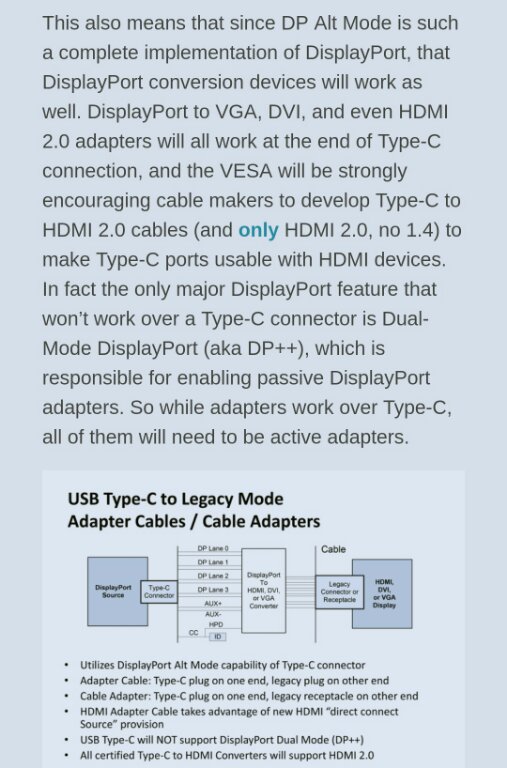
smallcrab
post Jan 6 2018, 10:40 PM

Getting Started
**
Junior Member
140 posts

Joined: Jul 2007
From: Puchong


QUOTE(Eiraku @ Jan 6 2018, 07:32 PM)
Happened to me too lol.

But it is "fixable", don't worry. Contact the local Lenovo Support email. Tell them your warranty's effed up. Be prepared to supply them with a scan of the sales reciept later along the way.
*
Ok noted, thanks a lot !
SUStalzer
post Jan 17 2018, 09:19 PM

bagusnya
*****
Senior Member
757 posts

Joined: Mar 2010


is this compatible with?

https://shopee.com.my/AUKEY-Power-Delivery-...IBoCqaAQAvD_BwE
TSEiraku
post Jan 17 2018, 09:58 PM

Geeking since 1985!
*******
Senior Member
7,037 posts

Joined: Apr 2006


QUOTE(talzer @ Jan 17 2018, 09:19 PM)
It should... as a normal usb hub. PD is worthless to the 510 as the Type-C doesn't support PD.

As such, IMHO there a better hubs out there TBH, especially at that price. But if you like it, why not.

This post has been edited by Eiraku: Jan 17 2018, 09:59 PM
niodenko
post Feb 12 2018, 11:37 AM

New Member
*
Junior Member
18 posts

Joined: Nov 2007


Hi all,

I am wondering has anyone ever installed the Bluestacks software for Android environment in Windows 10 miix? Should there be any issue?

Looking fwd to buy and install some android apps in it.

Thanks for your feedback.
TSEiraku
post Feb 12 2018, 11:56 AM

Geeking since 1985!
*******
Senior Member
7,037 posts

Joined: Apr 2006


QUOTE(niodenko @ Feb 12 2018, 11:37 AM)
Hi all,

I am wondering has anyone ever installed the Bluestacks software for Android environment in Windows 10 miix? Should there be any issue?

Looking fwd to buy and install some android apps in it.

Thanks for your feedback.
*
I haven't tried but I have Bluestacks on my old MSI laptop. Works pretty fine (obviously not "native" smooth but it's works well enough) though IINM there's alternative software that works better (but I forgot what the thing's name is).

This post has been edited by Eiraku: Feb 12 2018, 11:57 AM
niodenko
post Feb 12 2018, 12:23 PM

New Member
*
Junior Member
18 posts

Joined: Nov 2007


QUOTE(Eiraku @ Feb 12 2018, 11:56 AM)
I haven't tried but I have Bluestacks on my old MSI laptop. Works pretty fine (obviously not "native" smooth but it's works well enough) though IINM there's alternative software that works better (but I forgot what the thing's name is).
*
Basically the Windows 10 in the Miix is normal full version for usual laptop, correct? Not lite version for most windows tab.
TSEiraku
post Feb 12 2018, 12:48 PM

Geeking since 1985!
*******
Senior Member
7,037 posts

Joined: Apr 2006


QUOTE(niodenko @ Feb 12 2018, 12:23 PM)
Basically the Windows 10 in the Miix is normal full version for usual laptop, correct? Not lite version for most windows tab.
*
Nope, no Windows RT or Windows S nonsense here. It's full blown Windows 10 Home right off the bat.

That said, right now the S versions can be upgraded for free to Win 10 Pro so that might be an even better deal TBH lol.

This post has been edited by Eiraku: Feb 12 2018, 12:49 PM
GymBoi
post Feb 21 2018, 10:21 PM

Regular
******
Senior Member
1,401 posts

Joined: Feb 2006
Anyone project their screen often? I do coz on top of my bed got a TV then always i hook up my miix to the tv visa USB-C to HDMI cable to watch movie at night. All good for the past 6 months or so then now suddenly it start to act up.

Watch half way loose signal, half way no signal, etc. 2 weeks ago just totally dead. I noticed when I plug in the USBC-HDMI adapter that time, the miix screen not blinking, like not detecting at all. So I bought myself a new adapter. With new adapter, it works but half half also, like watch half way then will loose signal few seconds like that. Then I thought HDMI cable pulak no good. Buy new. Also same. TV I tried to change different HDMI port also same.

I'm worried if it's the USB C port problem itself. How can I check this ah? Also, anyone got any links to update latest graphic card driver or something?

Thanks.
TSEiraku
post Feb 22 2018, 04:27 AM

Geeking since 1985!
*******
Senior Member
7,037 posts

Joined: Apr 2006


QUOTE(GymBoi @ Feb 21 2018, 10:21 PM)
Anyone project their screen often? I do coz on top of my bed got a TV then always i hook up my miix to the tv visa USB-C to HDMI cable to watch movie at night. All good for the past 6 months or so then now suddenly it start to act up.

Watch half way loose signal, half way no signal, etc. 2 weeks ago just totally dead. I noticed when I plug in the USBC-HDMI adapter that time, the miix screen not blinking, like not detecting at all. So I bought myself a new adapter. With new adapter, it works but half half also, like watch half way then will loose signal few seconds like that. Then I thought HDMI cable pulak no good. Buy new. Also same. TV I tried to change different HDMI port also same.

I'm worried if it's the USB C port problem itself. How can I check this ah? Also, anyone got any links to update latest graphic card driver or something?

Thanks.
*
Unfortunately no real way to check, except to wait until it fails completely IINM (considering the built in diagnostics suite only really checks for internal systems related stuff). TBH, I don't really use external displays on the Miix all that often (I have other laptops for that), but when I do, it does work well as long as I plug the HDMI cable into the adapter BEFORE I plug the adapter itself into the Type-C port.

If I plug it in the other way around (adapter first before HDMI), things often don't work as intended for some unknown reason.

As for drivers, I use the drivers provided by Lenovo + whatever Windows Update downloads and that has been working OK so far, considering the I have the Miix set up more for stability rather than all out performance.

Otherwise, best place to search for drivers is probably from Intel themselves, though it might be a tad hard to find. The Miix runs an Intel HD 520 (Skylake) / 620 (Kaby Lake) though if you need something to search with.

This post has been edited by Eiraku: Feb 22 2018, 04:32 AM
GymBoi
post Feb 22 2018, 02:26 PM

Regular
******
Senior Member
1,401 posts

Joined: Feb 2006
QUOTE(Eiraku @ Feb 22 2018, 04:27 AM)
Unfortunately no real way to check, except to wait until it fails completely IINM (considering the built in diagnostics suite only really checks for internal systems related stuff). TBH, I don't really use external displays on the Miix all that often (I have other laptops for that), but when I do, it does work well as long as I plug the HDMI cable into the adapter BEFORE I plug the adapter itself into the Type-C port.

If I plug it in the other way around (adapter first before HDMI), things often don't work as intended for some unknown reason.

As for drivers, I use the drivers provided by Lenovo + whatever Windows Update downloads and that has been working OK so far, considering the I have the Miix set up more for stability rather than all out performance.

Otherwise, best place to search for drivers is probably from Intel themselves, though it might be a tad hard to find. The Miix runs an Intel HD 520 (Skylake) / 620 (Kaby Lake) though if you need something to search with.
*
Thanks for reply ... yeah i also plug cable to adapter first before plugging the whole thing to my mixx.

BTW does the "update driver" in the device manager actually works? =.=" Can I use that.
TSEiraku
post Feb 22 2018, 10:48 PM

Geeking since 1985!
*******
Senior Member
7,037 posts

Joined: Apr 2006


QUOTE(GymBoi @ Feb 22 2018, 02:26 PM)
Thanks for reply ... yeah i also plug cable to adapter first before plugging the whole thing to my mixx.

BTW does the "update driver" in the device manager actually works? =.=" Can I use that.
*
It actually does, but as I mentioned before, it actually takes drivers from Windows Update, which may or may not be the latest (though it should be stable at least). Plus, (rather obvious but I'll say it anyway) it does need an active Internet connection.

So yeah, go search Intel's website for the latest and best (and potentially less stable) drivers or stick with Windows Update for relatively stable ones (that might not be as good performance-wise).

This post has been edited by Eiraku: Feb 22 2018, 10:52 PM
GymBoi
post Feb 23 2018, 12:07 AM

Regular
******
Senior Member
1,401 posts

Joined: Feb 2006
QUOTE(Eiraku @ Feb 22 2018, 10:48 PM)
It actually does, but as I mentioned before, it actually takes drivers from Windows Update, which may or may not be the latest (though it should be stable at least). Plus, (rather obvious but I'll say it anyway) it does need an active Internet connection.

So yeah, go search Intel's website for the latest and best (and potentially less stable) drivers or stick with Windows Update for relatively stable ones (that might not be as good performance-wise).
*
Got it .. thanks bro
madkhaz
post Feb 23 2018, 10:22 PM

New Member
*
Newbie
8 posts

Joined: Jul 2013
Where does miix 510 sold in store now? Have been to few stores in perak, but non avail.

Or maybe i can find in kl store only?
TSEiraku
post Feb 24 2018, 01:52 AM

Geeking since 1985!
*******
Senior Member
7,037 posts

Joined: Apr 2006


QUOTE(madkhaz @ Feb 23 2018, 10:22 PM)
Where does miix 510 sold in store now? Have been to few stores in perak, but non avail.

Or maybe i can find in kl store only?
*
Most authorised Lenovo dealers SHOULD have the 510, though TBH unless you can find one DEEPLY discounted, you're better off searching for the replacement 520, which is pretty much the 510 with Kaby Lake R, an improved Active Stylus and a fingerprint reader.

This post has been edited by Eiraku: Feb 24 2018, 01:53 AM
mitodna
post Feb 24 2018, 06:26 AM

Getting Started
********
All Stars
14,039 posts

Joined: Jan 2003
QUOTE(jow @ Nov 24 2017, 12:51 PM)
just have my LCD panel changed hour ago

2 MB and 1 LCD panel changed ever since my purchased in July bangwall.gif  bangwall.gif
*
hi, recently I have this issue where the system just can't find it boot disk, however, after a few retry it able to boot,

some files seems like corrupt as well, is your similar issue? thanks
madkhaz
post Feb 24 2018, 07:00 PM

New Member
*
Newbie
8 posts

Joined: Jul 2013
QUOTE(Eiraku @ Feb 24 2018, 01:52 AM)
Most authorised Lenovo dealers SHOULD have the 510, though TBH unless you can find one DEEPLY discounted, you're better off searching for the replacement 520, which is pretty much the 510 with Kaby Lake R, an improved Active Stylus and a fingerprint reader.
*
So, 520 is improved much than 510? Tbh, i'm looking for 3k and below, the 510 i3 version seems sufficient for me.

All authorised store in ipoh dont take the miix model. They only have yoga here. So sad 😭
mitodna
post Feb 25 2018, 01:21 AM

Getting Started
********
All Stars
14,039 posts

Joined: Jan 2003
QUOTE(madkhaz @ Feb 24 2018, 07:00 PM)
So, 520 is improved much than 510? Tbh, i'm looking for 3k and below, the 510 i3 version seems sufficient for me.

All authorised store in ipoh dont take the miix model. They only have yoga here. So sad 😭
*
If you trust online, try get it from 11street, try to see if got any discount > RM100, also 11street, do offer 0% instalment for certain bank credit card

I saw Miix 520 below 3k

---

Look like my Miix is giving up. Boot device not found
TSEiraku
post Feb 25 2018, 02:07 AM

Geeking since 1985!
*******
Senior Member
7,037 posts

Joined: Apr 2006


QUOTE(mitodna @ Feb 25 2018, 01:21 AM)
If you trust online, try get it from 11street, try to see if got any discount > RM100, also 11street, do offer 0% instalment for certain bank credit card

I saw Miix 520 below 3k

---

Look like my Miix is giving up. Boot device not found
*
SSD corrupt? It's actually quite easy to change yourself, though if you still have warranty why bother? Send it back to Lenovo ler for repairs.
peterscm
post Feb 28 2018, 10:09 AM

Casual
***
Junior Member
388 posts

Joined: Jun 2006
just found the Lenovo MIIX 520-12IKB / MIIX 520-12IKB LTE Hardware Maintenance Manual from the internet.

hxxps://gzhls.at/blob/ldb/7/f/4/c/56198223b33827d11067484bcb0a8ddfb164.pdf

change hxxps to https

TSEiraku
post Feb 28 2018, 10:44 AM

Geeking since 1985!
*******
Senior Member
7,037 posts

Joined: Apr 2006


QUOTE(peterscm @ Feb 28 2018, 10:09 AM)
just found the Lenovo MIIX 520-12IKB / MIIX 520-12IKB LTE Hardware Maintenance Manual from the internet.

hxxps://gzhls.at/blob/ldb/7/f/4/c/56198223b33827d11067484bcb0a8ddfb164.pdf

change hxxps to https
*
It actually has almost the same innards as the 510. Even the old manual would be enough IMHO if all you want is to disassemble your Miix 520.

That said, many thanks for the link. For one the part numbers should be different if you seriously need to order parts from Lenovo for some unknown reason.

This post has been edited by Eiraku: Feb 28 2018, 11:10 AM
peterscm
post Mar 5 2018, 01:02 AM

Casual
***
Junior Member
388 posts

Joined: Jun 2006
Bought my Miix 520 Silver (8G) from IT Fair @ 3800.

Good price however got two issues:

1. The keyboard, semicolon ; key intermittent 'depress' by itselft. - no good
2. It comes with Active Pen 1 instead of 2.

Can any Miix 520 owner please check whether your Active Pen is version 1 or 2.

Version 1 is with Red color cap and only accept 1 x AAAA battery.

Version 2 is with black cap and accept 1 x AAAA battery + 2 x button cell battery for BT.

TSEiraku
post Mar 5 2018, 10:28 AM

Geeking since 1985!
*******
Senior Member
7,037 posts

Joined: Apr 2006


QUOTE(peterscm @ Mar 5 2018, 01:02 AM)
Bought my Miix 520 Silver (8G) from IT Fair @ 3800.

Good price however got two issues:

1. The keyboard, semicolon ; key intermittent 'depress' by itselft. - no good
2. It comes with Active Pen 1 instead of 2.

Can any Miix 520 owner please check whether your Active Pen is version 1 or 2.

Version 1 is with Red color cap and only accept 1 x AAAA battery.

Version 2 is with black cap and accept 1 x AAAA battery + 2 x button cell battery for BT.
*
Also, AFAIK, version 2 doesn't have the pen clip. Supposedly anyway. As for the KB, try updating the Folio KB Firmware and see if it helps?

peterscm
post Mar 5 2018, 01:47 PM

Casual
***
Junior Member
388 posts

Joined: Jun 2006
QUOTE(Eiraku @ Mar 5 2018, 10:28 AM)
Also, AFAIK, version 2 doesn't have the pen clip. Supposedly anyway. As for the KB, try updating the Folio KB Firmware and see if it helps?
*
Your are right. Btw, there no no replacement tips provided.

Active Pen 2.

Attached Image


Active Pen (version 1)

Attached Image
peterscm
post Mar 6 2018, 02:43 PM

Casual
***
Junior Member
388 posts

Joined: Jun 2006
Just got the keyboard changed. Now it is working fine.

As for the Active Pen, it looks like Malaysia Stock comes with Active Pen as commented by the seller as he opens other new set and discovered Active Pen 1 is inside.

I had an online chat with Lenovo CS and she asked me to email to mycs@lenovo.com to escalate the 'issue'. Will update here once I got a reply.

The main 'issue' is I am not getting what I paid for.

This post has been edited by peterscm: Mar 6 2018, 02:43 PM
peterscm
post Mar 6 2018, 11:27 PM

Casual
***
Junior Member
388 posts

Joined: Jun 2006
ok. here is the reply from mycs@lenovo.com:

QUOTE
Dear .....

Please excuse our late reply.

After investigate with our Malaysia retail manager, the Malaysia Model (MTM: 81CG01L8MJ) comes with Active Pen 1.

Our chat agents handled both Malaysia and Singapore, and they might assume its Singapore’s version for another model (MTM).

Apologize for the misleading message and any inconvenient causes.


Regards,


Conclusion:

Malaysia version of Miix-520 come with Active Pen 1.

Case closed.

This post has been edited by peterscm: Mar 6 2018, 11:29 PM
pml_318
post Mar 7 2018, 03:48 PM

Getting Started
**
Junior Member
231 posts

Joined: Apr 2005
From: KL ---> SH ---> SG Expiry: Mar 3005
can play dota2 with this tablet or not? laugh.gif
TSEiraku
post Mar 7 2018, 04:45 PM

Geeking since 1985!
*******
Senior Member
7,037 posts

Joined: Apr 2006


QUOTE(pml_318 @ Mar 7 2018, 03:48 PM)
can play dota2 with this tablet or not? laugh.gif
*
Probably, but of course with low settings ler.

That said, you might wanna get a proper mouse and keyboard for that as the Folio KB is only decent for work use and nothing more.
GymBoi
post Mar 7 2018, 06:06 PM

Regular
******
Senior Member
1,401 posts

Joined: Feb 2006
Hi guys, don't know where to post this. Search whole forum about Macrium reflect software, only appear on the Updates page only.

Anyway just wondering anyone use that software here? I think I got the recommendation from here. I want to know what are the difference between the diffrent modes of backup? Too many of them:

1) Create bootable rescue media
2) Image selected disks on this computer
3) Backup windows
4) Back up files
5) Create an image of the partitions required to backup and restore windows
6) Add a boot menu option to start the reflect recovery environment

I'm too confused =.=. Basically I just want a ghost. Anyone mind to share with me the differences between the 6 of them? Thanks.
TSEiraku
post Mar 8 2018, 12:04 AM

Geeking since 1985!
*******
Senior Member
7,037 posts

Joined: Apr 2006


QUOTE(GymBoi @ Mar 7 2018, 06:06 PM)
Hi guys, don't know where to post this. Search whole forum about Macrium reflect software, only appear on the Updates page only.

Anyway just wondering anyone use that software here? I think I got the recommendation from here. I want to know what are the difference between the diffrent modes of backup? Too many of them:

1) Create bootable rescue media
2) Image selected disks on this computer
3) Backup windows
4) Back up files
5) Create an image of the partitions required to backup and restore windows
6) Add a boot menu option to start the reflect recovery environment

I'm too confused =.=. Basically I just want a ghost. Anyone mind to share with me the differences between the 6 of them? Thanks.
*
You just need to either to do (2) to clone your disk into a disk image (to wherever, DVDs or external HDDs) and (1) to create a bootable USB (a pen drive of at least 4GB needed) to later restore your disk clone to a new disk (or whatever) AND afterwards to repair the boot image of the disk clone ("repair Windows startup" or something in the menus of the Recovery Disk), which is often needed otherwise the new clone will usually just not start otherwise. At least AFAIK.

Everything else is pretty much fluff. Useful if you need incremental backups or stuff like that, but if you just need to Norton Ghost your disks, (1) and (2) is all you need.

So yeah. Reflect's pretty reliable too, considering ALL of my disk image backups and restores are handled by it. And I don't even have the paid version either, even the free one has been good enough so far.

This post has been edited by Eiraku: Mar 8 2018, 12:11 AM
GymBoi
post Mar 8 2018, 01:59 AM

Regular
******
Senior Member
1,401 posts

Joined: Feb 2006
QUOTE(Eiraku @ Mar 8 2018, 12:04 AM)
You just need to either to do (2) to clone your disk into a disk image (to wherever, DVDs or external HDDs) and (1) to create a bootable USB (a pen drive of at least 4GB needed) to later restore your disk clone to a new disk (or whatever) AND afterwards to repair the boot image of the disk clone ("repair Windows startup" or something in the menus of the Recovery Disk), which is often needed otherwise the new clone will usually just not start otherwise. At least AFAIK.

Everything else is pretty much fluff. Useful if you need incremental backups or stuff like that, but if you just need to Norton Ghost your disks, (1) and (2) is all you need.

So yeah. Reflect's pretty reliable too, considering ALL of my disk image backups and restores are handled by it. And I don't even have the paid version either, even the free one has been good enough so far.
*
Thanks for reply bro ... I'm not sure if I quite get it but ... (2) is for ghosting the hdd into an image ... and (1) is like a usb .. coz touch wood if our hdd kong that means it won't boot at all, so by inserting this "bootable usb" from (1) we can at least start something then be able to use (2) to restore everything ...

Did I get that right?
TSEiraku
post Mar 8 2018, 03:11 AM

Geeking since 1985!
*******
Senior Member
7,037 posts

Joined: Apr 2006


QUOTE(GymBoi @ Mar 8 2018, 01:59 AM)
Thanks for reply bro ... I'm not sure if I quite get it but ... (2) is for ghosting the hdd into an image ... and (1) is like a usb ..  coz touch wood if our hdd kong that means it won't boot at all, so by inserting this "bootable usb" from (1) we can at least start something then be able to use (2) to restore everything ...

Did I get that right?
*
Err yes and no. Firstly we don't actually have a HDD inside bro, but that's probably just picking at straws.

So yeah, number (2) is ghosting the SSD into an image, as per your assumption. But you can't do ANYTHING with this image unless you have (1). It doesn't make self-booting images you can just pop into a USB and start into at boot.

On the other hand, number (1) is PRIMARILY a Boot Environment you have to go into to RESTORE the image. Why would you need this?

A) When you're migrating to a new SSD (using an image you created in (1). And yes you actually can do this on the Miix as you can open it up rather easily (as far as tabs go anyway) to change the SSD.

B) As in your given scenario, when the system refuses to start, and you need to restore an image (from 1 or wherever) or repair the boot image.

BTW, number (2) creates a disk with a Boot Environment that can ONLY be used in the two scenarios above (or something similar). It ONLY contains a simplified version of Windows with Macrium Relflect preinstalled.

It's not like, say, a Windows 10 recovery disk which you can reinstall Windows with.

This post has been edited by Eiraku: Mar 8 2018, 03:13 AM
doggydogg
post Mar 12 2018, 12:02 AM

Got some tomatoes to spare?
*****
Senior Member
838 posts

Joined: Jun 2007
Hi guys, thanks for this topic.

I am currently looking a tablet replacement as I've just sold my pixel c tablet... Android tablet can't do much,... But however after much searching, the most accessible 2in1 in the market is the Lenovo miix 520 & and surface pro.

I would like to know
1.Are you satisfied with the screen quality.?
2.hows the sound quality compared to surface pro? Surface pro speakers have nice hint of bass
3.any issues with the keyboard typing?
4.does the kickstand slide or becomes loose during use?
5.hows the temperature during heavy use?
6.whats the lowest price you've seen so far in the market? I saw 11st selling for 3699 and digital mall 3750 for the i5 8gb ram
TSEiraku
post Mar 12 2018, 01:39 PM

Geeking since 1985!
*******
Senior Member
7,037 posts

Joined: Apr 2006


QUOTE(doggydogg @ Mar 12 2018, 12:02 AM)
Hi guys, thanks for this topic.

I am currently looking a tablet replacement as I've just sold my pixel c tablet... Android tablet can't do much,... But however after much searching, the most accessible 2in1 in the market is the Lenovo miix 520 & and surface pro.

I would like to know
1.Are you satisfied with the screen quality.?
2.hows the sound quality compared to surface pro? Surface pro speakers have nice hint of bass
3.any issues with the keyboard typing?
4.does the kickstand slide or becomes loose during use?
5.hows the temperature during heavy use?
6.whats the lowest price you've seen so far in the market? I saw 11st selling for 3699 and digital mall 3750 for the i5 8gb ram
*
FYI, I'm basing my answers on the 510 that I own, but as they share many parts anyway, it might still be relevant.

1) Screen is decently good (the 520 shares the same screen), but the SP screen shits all over it for sure. Plus, there's Lenovo's obsession with using PWM screen dimming (which doesn't really matter if you don't know what it means).

2) I don't own an SP, so not entirely sure, but from what I've heard the SP can do at store demos, I'd say the SP wins by a sliiiiiight margin here.

3) The Folio KB, at least on the 510, is "serviceable", but not much else. I can for sure punch out documents and PowerPoint slides out of it at a steady pace, but of course the experience is better on a full sized notebook keyboard with some ACTUAL travel (both of which, of course, pales in comparison to an ACTUAL keyboard).

4) This only really happens if you put the kickstand at wierd, neither here nor there angles, and even then I'd say it only "gives" a bit rather then it being "loose".

5) A tad on the toasty side when I game on it, but the fans help, unless you've inadvertently blocked one of the intake or exhaust vents (which is pretty easy when you hold the tab in portrait as they're in the top side of the frame).

6) Can't say as I haven't checked in a while. But yeah, it should be around there.

This post has been edited by Eiraku: Mar 12 2018, 01:48 PM
doggydogg
post Mar 12 2018, 08:38 PM

Got some tomatoes to spare?
*****
Senior Member
838 posts

Joined: Jun 2007
QUOTE(Eiraku @ Mar 12 2018, 01:39 PM)
FYI, I'm basing my answers on the 510 that I own, but as they share many parts anyway, it might still be relevant.

1) Screen is decently good (the 520 shares the same screen), but the SP screen shits all over it for sure. Plus, there's Lenovo's obsession with using PWM screen dimming (which doesn't really matter if you don't know what it means).

2) I don't own an SP, so not entirely sure, but from what I've heard the SP can do at store demos, I'd say the SP wins by a sliiiiiight margin here.

3) The Folio KB, at least on the 510, is "serviceable", but not much else. I can for sure punch out documents and PowerPoint slides out of it at a steady pace, but of course the experience is better on a full sized notebook keyboard with some ACTUAL travel (both of which, of course, pales in comparison to an ACTUAL keyboard).

4) This only really happens if you put the kickstand at wierd, neither here nor there angles, and even then I'd say it only "gives" a bit rather then it being "loose".

5) A tad on the toasty side when I game on it, but the fans help, unless you've inadvertently blocked one of the intake or exhaust vents (which is pretty easy when you hold the tab in portrait as they're in the top side of the frame).

6) Can't say as I haven't checked in a while. But yeah, it should be around there.
*
thanks for the reply Eiraku!
Ive placed my order on 11st!


1. ha! means i can buy the same screen protector. SP nice screen but i can feel the hardware is struggling abit to power it..esp the m3 2017 SP. PWM means the screen will flicker at very low brightness?
2. ok should be good enough...
3. yeah ive tested it... look & feel the same as my 15" lenovo laptop, feels pretty budget to the touch. but should be fine
4. i watched on youtube some say it's pointy for the kickstand...
5. hahaha i saw someone opening it up... the fan looks pretty tiny as well. some youtuber say's it only kicks in at 50c? but in msia our overall temp is much higher means the fan is on most of the time?
6. RM3511 after voucher! haha

7. have you tried to use hdmi dongles to connect to external monitor or projector?

This post has been edited by doggydogg: Mar 12 2018, 08:42 PM
TSEiraku
post Mar 12 2018, 11:51 PM

Geeking since 1985!
*******
Senior Member
7,037 posts

Joined: Apr 2006


QUOTE(doggydogg @ Mar 12 2018, 08:38 PM)
7. have you tried to use hdmi dongles to connect to external monitor or projector?
*
No problem. As for 7) most HDMI Type-C dongles work fine... it's the direct VGA ones that are slightly more problematic.

As for myself, I do Type-C -> HDMI (using few cheapo dongles, and my Dodocool multi-hub) -> VGA converter and it works fine.

This post has been edited by Eiraku: Mar 12 2018, 11:52 PM
mitodna
post Mar 13 2018, 10:34 AM

Getting Started
********
All Stars
14,039 posts

Joined: Jan 2003
QUOTE(Eiraku @ Feb 25 2018, 02:07 AM)
SSD corrupt? It's actually quite easy to change yourself, though if you still have warranty why bother? Send it back to Lenovo ler for repairs.
*
Lenovo repair is fast, the replace it, after i e-mail them next day on site, seems alright

but right now Windows 10 1709 has this powernap issue, need to disable hibernate, if not wake up it will crash

QUOTE(Eiraku @ Mar 12 2018, 11:51 PM)
No problem. As for 7) most HDMI Type-C dongles work fine... it's the direct VGA ones that are slightly more problematic.

As for myself, I do Type-C -> HDMI (using few cheapo dongles,  and my Dodocool multi-hub) -> VGA converter and it works fine.
*
any recommendation on affordable wireless display adapter that work with Windows 10 or cheapo type-c to hdmi? thanks.

This post has been edited by mitodna: Mar 13 2018, 10:38 AM
TSEiraku
post Mar 13 2018, 12:22 PM

Geeking since 1985!
*******
Senior Member
7,037 posts

Joined: Apr 2006


QUOTE(mitodna @ Mar 13 2018, 10:34 AM)
Lenovo repair is fast, the replace it, after i e-mail them next day on site, seems alright

but right now Windows 10 1709 has this powernap issue, need to disable hibernate, if not wake up it will crash
any recommendation on affordable wireless display adapter that work with Windows 10 or cheapo type-c to hdmi? thanks.
*
I have Chromecast for wireless (works OK for slides and stuff), and otherwise your typical cheapo eBay/Lazada Type-C to HDMI SHOULD work fine.
mitodna
post Mar 13 2018, 04:28 PM

Getting Started
********
All Stars
14,039 posts

Joined: Jan 2003
QUOTE(Eiraku @ Mar 13 2018, 12:22 PM)
I have Chromecast for wireless (works OK for slides and stuff), and otherwise your typical cheapo eBay/Lazada Type-C to HDMI SHOULD work fine.
*
Chromecast dongle can use as windows wireless display?
Benefon
post Mar 14 2018, 10:11 AM

Look at all my stars!!
*******
Senior Member
4,800 posts

Joined: Mar 2017


Lenovo Malaysia has selling Miix Series online?
TSEiraku
post Mar 14 2018, 11:22 AM

Geeking since 1985!
*******
Senior Member
7,037 posts

Joined: Apr 2006


QUOTE(mitodna @ Mar 13 2018, 04:28 PM)
Chromecast dongle can use as windows wireless display?
*
Can, but you have to specifically have Chrome running, even to cast the desktop entirely (and not just Chrome).

So for all intents and purposes, it's really Chromecasting rather than wireless displaying.

doggydogg
post Mar 15 2018, 02:05 PM

Got some tomatoes to spare?
*****
Senior Member
838 posts

Joined: Jun 2007
just got my 520.

this fella is toasty! and sucks battery like nobody's business

surprised to see mine comes with fingerprint scanner
msian 520 only comes with active pen 1 sad.gif

This post has been edited by doggydogg: Mar 15 2018, 02:10 PM
peterscm
post Mar 15 2018, 04:38 PM

Casual
***
Junior Member
388 posts

Joined: Jun 2006
QUOTE(doggydogg @ Mar 15 2018, 02:05 PM)
just got my 520.

this fella is toasty! and sucks battery like nobody's business

surprised to see mine comes with fingerprint scanner
msian 520 only comes with active pen 1 sad.gif
*
yes, it can easily reach 90 degree Celsius due to Turbo Boost.

If you don't need Turbo Boost, you can turn it off and the max temp will be 82 degree or below when you stress it.

To turn Turbo Boost off, go to Power Option, Processor Power Management, Maximum processor state,

change On Battery and Plugged in to 99.

After that restart the notebook.

Now my Miix 520 hovering between 40 to 55 Celsius. Play Star Craft II with low setting max is 79 Celsius. Average is around 72 Celsius (play games).


TSEiraku
post Mar 15 2018, 05:02 PM

Geeking since 1985!
*******
Senior Member
7,037 posts

Joined: Apr 2006


QUOTE(peterscm @ Mar 15 2018, 04:38 PM)
yes, it can easily reach 90 degree Celsius due to Turbo Boost.

If you don't need Turbo Boost, you can turn it off and the max temp will be 82 degree or below when you stress it.

To turn Turbo Boost off, go to Power Option, Processor Power Management, Maximum processor state,

change On Battery and Plugged in to 99.

After that restart the notebook.

Now my Miix 520 hovering between 40 to 55 Celsius. Play Star Craft II with low setting max is 79 Celsius. Average is around 72 Celsius (play games).
*
Or you can undervolt + repaste. Mine Turbos and still doesn't reach 90 at full tilt, only a shade below 80 max while benching (and around 70 when gaming).

But of course while a UV is relatively easy (just install ThrottleStop and test UV values for a stable UV), repasting needs you to open the Miix up, which is actually VERY easy as tablets go but it's understandably scary.

That said, mine's only a Skylake i5 so it might be just that.

This post has been edited by Eiraku: Mar 15 2018, 05:04 PM
SUStalzer
post Mar 16 2018, 01:55 AM

bagusnya
*****
Senior Member
757 posts

Joined: Mar 2010


Just found out there is a miix 630, researching its difference with 520
TSEiraku
post Mar 16 2018, 10:32 AM

Geeking since 1985!
*******
Senior Member
7,037 posts

Joined: Apr 2006


QUOTE(talzer @ Mar 16 2018, 01:55 AM)
Just found out there is a miix 630, researching its difference with 520
*
It's a Snapdragon (ARM) driven Windows 10 tab, kinda like the old non-pro Surfaces, but with a slightly improved version of Windows RT with (relatively shitty) x86 emulation.

If you're ONLY gonna run UWP apps (from the store), and can live with slow 32-bit Windows API emu (or the even slow-er 64-bit emu) for everything else, then you're gonna enjoy the extra battery life and superior connected standby afforded by the Snapdragon.

Otherwise, it's crap.

Oh, and it's also a whole lot more expensive.

This post has been edited by Eiraku: Mar 16 2018, 10:37 AM
doggydogg
post Mar 16 2018, 04:43 PM

Got some tomatoes to spare?
*****
Senior Member
838 posts

Joined: Jun 2007
QUOTE(peterscm @ Mar 15 2018, 04:38 PM)
yes, it can easily reach 90 degree Celsius due to Turbo Boost.

If you don't need Turbo Boost, you can turn it off and the max temp will be 82 degree or below when you stress it.

To turn Turbo Boost off, go to Power Option, Processor Power Management, Maximum processor state,

change On Battery and Plugged in to 99.

After that restart the notebook.

Now my Miix 520 hovering between 40 to 55 Celsius. Play Star Craft II with low setting max is 79 Celsius. Average is around 72 Celsius (play games).
*
hmmm, i am following your setting now. also im trying to push everything to lowest hahaha. ideally try to hit under 50c on normal use like web browsing/watching video. trying to keep the fan off if possible, but i understand, our weather here is super hard esp if not in aircon room hahahha.....


QUOTE(Eiraku @ Mar 15 2018, 05:02 PM)
Or you can undervolt + repaste. Mine Turbos and still doesn't reach 90 at full tilt, only a shade below 80 max while benching (and around 70 when gaming).

But of course while a UV is relatively easy (just install ThrottleStop and test UV values for a stable UV), repasting needs you to open the Miix up, which is actually VERY easy as tablets go but it's understandably scary.

That said, mine's only a Skylake i5 so it might be just that.
*
i saw there is a plastic frame around the glass.. is that brittle?
i got think of repasting... but considering the age of the item hmm.gif
ive used XTU to UV.. so far stable at -115v offset, -120v will bsod sometimes... but the temp is really not great.

ive never used throttlestop, ive installed it... u only tweak the FIVR tab? i saw it has multiplier tweak as well.

could you share your screencap of your throttlestop tweaks?

my goal now is lower temp & longer battery life. last night i tried to use it like i used my desktop, multiple stuffs running. 3d software, photoshop & multiple browser tab with youtube running hahaha.. it barely hit the 3 hour mark xD


QUOTE(talzer @ Mar 16 2018, 01:55 AM)
Just found out there is a miix 630, researching its difference with 520
*
uses snapdragon 845 SoC, only runs 32-bit applications.
expensive for sure. perfect if you need it to run office apps on the go? or use it as graphic presentation.


This post has been edited by doggydogg: Mar 16 2018, 04:46 PM
SUStalzer
post Mar 16 2018, 06:37 PM

bagusnya
*****
Senior Member
757 posts

Joined: Mar 2010


QUOTE(Eiraku @ Mar 16 2018, 10:32 AM)
It's a Snapdragon (ARM) driven Windows 10 tab, kinda like the old non-pro Surfaces, but with a slightly improved version of Windows RT with (relatively shitty) x86 emulation.

If you're ONLY gonna run UWP apps (from the store), and can live with slow 32-bit Windows API emu (or the even slow-er 64-bit emu) for everything else, then you're gonna enjoy the extra battery life and superior connected standby afforded by the Snapdragon.

Otherwise, it's crap.

Oh, and it's also a whole lot more expensive.
*
Yup almost about what is reviewed online.

Initially i thought it is a much more improved miix 510/520 but nope its different application

This post has been edited by talzer: Mar 16 2018, 06:38 PM
peterscm
post Mar 16 2018, 07:37 PM

Casual
***
Junior Member
388 posts

Joined: Jun 2006
QUOTE(doggydogg @ Mar 16 2018, 04:43 PM)
hmmm, i am following your setting now. also im trying to push everything to lowest hahaha. ideally try to hit under 50c on normal use like web browsing/watching video. trying to keep the fan off if possible, but i understand, our weather here is super hard esp if not in aircon room hahahha.....
Below is the snapshot of my Miix 520 temp in my room....no aircon. For me, it is acceptable temp.


Attached Image

After played Star Craft II for 1 hour

Attached Image

May be today weather is cooler a bit that's why the temp didn't reached 70

This post has been edited by peterscm: Mar 16 2018, 08:56 PM
GymBoi
post Mar 17 2018, 09:40 PM

Regular
******
Senior Member
1,401 posts

Joined: Feb 2006
QUOTE(Eiraku @ Mar 8 2018, 03:11 AM)
Err yes and no. Firstly we don't actually have a HDD inside bro, but that's probably just picking at straws.

So yeah, number (2) is ghosting the SSD into an image, as per your assumption. But you can't do ANYTHING with this image unless you have (1). It doesn't make self-booting images you can just pop into a USB and start into at boot.

On the other hand, number (1) is PRIMARILY a Boot Environment you have to go into to RESTORE the image. Why would you need this?

A) When you're migrating to a new SSD (using an image you created in (1). And yes you actually can do this on the Miix as you can open it up rather easily (as far as tabs go anyway) to change the SSD.

B) As in your given scenario, when the system refuses to start, and you need to restore an image (from 1 or wherever) or repair the boot image.

BTW, number (2) creates a disk with a Boot Environment that can ONLY be used in the two scenarios above (or something similar). It ONLY contains a simplified version of Windows with Macrium Relflect preinstalled.

It's not like, say, a Windows 10 recovery disk which you can reinstall Windows with.
*
Bro it's me again, I just did the image but wow surprised that the size of the image is almost 1 to 1 haha ... total 175gb ... is there a way to make it smaller =.="
TSEiraku
post Mar 17 2018, 11:47 PM

Geeking since 1985!
*******
Senior Member
7,037 posts

Joined: Apr 2006


QUOTE(GymBoi @ Mar 17 2018, 09:40 PM)
Bro it's me again, I just did the image but wow surprised that the size of the image is almost 1 to 1 haha ... total 175gb ... is there a way to make it smaller =.="
*
Well you can compress the image (there are compression options when you make it) but it's gonna add significantly to your imaging and re-installation time.
GymBoi
post Mar 18 2018, 03:06 PM

Regular
******
Senior Member
1,401 posts

Joined: Feb 2006
QUOTE(Eiraku @ Mar 17 2018, 11:47 PM)
Well you can compress the image (there are compression options when you make it) but it's gonna add significantly to your imaging and re-installation time.
*
I see ... so pros and cons ... ok thanks again bro ... you're always very helpful !
peterscm
post Mar 19 2018, 12:19 AM

Casual
***
Junior Member
388 posts

Joined: Jun 2006
QUOTE(GymBoi @ Mar 17 2018, 09:40 PM)
Bro it's me again, I just did the image but wow surprised that the size of the image is almost 1 to 1 haha ... total 175gb ... is there a way to make it smaller =.="
*
Normally, people bought new notebook and use it as it. if Drive C is 175GB, they just use it as is and fill up whole 175GB.

For some people who have some knowledge and experience in PC configuration, they will partition drive C and make it smaller. Example like 100GB or depends on their preference. Recommended from 70GB to 100GB. Drive C is purely for OS and some standard software like Office, Winzip and so on.

Reason being when do a system backup (Drive C) the backup files will be smaller in size. Games (due to huge installed size) and document will be installed / save to other drive like D or E.

In case of restoration, you don't want your latest document being overwritten by old version or worst case lost it totally. Usually, restoration is done on Drive C (OS) and seldom on Data drive. Data drive normally will backup (copy and paste) to external hard disk.

Downloaded Movies, Songs and etc will be saved to other drive too.

My current setup is C (OS) - 112GB, D (Data) - 100GB, E (Lenovo - original partition, temporary file saved location) - 25GB

I also use 128GB mSD as my download drive - F.

Below is my Miix 520 drive layout. The CD Drive (Y:) is virtual CD drive.

Attached Image


My latest backup of drive C used up 18.5GB disk space in my Drive D. I also copy the backup to external HDD for safe keeping.


I know some will say it is overkill and does not like to have so many Drive to manage. Well, it is personal preference. I did it based on my many years of PC / Notebook setup / configuration experience and I am happy with it.

Btw, normally viruses will always attack Drive C where OS is.


Just my 2 cents.

This post has been edited by peterscm: Mar 19 2018, 12:22 AM
k3v1n
post Mar 23 2018, 08:58 AM

Camouflage Artist
******
Senior Member
1,232 posts

Joined: Dec 2005
From: Kuala Lumpur


Hi all, wanna let go my 1 year old Lenovo Miix 510, still have 1 year warranty. Interested please contact me. Thank you! notworthy.gif
https://forum.lowyat.net/index.php?showtopic=4550076&hl=
madkhaz
post Mar 24 2018, 01:37 AM

New Member
*
Newbie
8 posts

Joined: Jul 2013
what sdcard is best for miix 510? just got my i3 miix 510, comes with sdcard slot.
madkhaz
post Mar 26 2018, 12:27 AM

New Member
*
Newbie
8 posts

Joined: Jul 2013
i currently insert AAAA battery from mrDIY 9V battery, but my pen seems not working. issues with the battery or my active pen is broken?
doggydogg
post Mar 26 2018, 01:54 AM

Got some tomatoes to spare?
*****
Senior Member
838 posts

Joined: Jun 2007
QUOTE(peterscm @ Mar 16 2018, 07:37 PM)
Below is the snapshot of my Miix 520 temp in my room....no aircon. For me, it is acceptable temp.
Attached Image

After played Star Craft II for 1 hour

Attached Image

May be today weather is cooler a bit that's why the temp didn't reached 70
*
64c is pretty good!!!

on off seeing 75c on mine :\

QUOTE(madkhaz @ Mar 24 2018, 01:37 AM)
what sdcard is best for miix 510? just got my i3 miix 510, comes with sdcard slot.
*
depends on how demanding are you regarding speed and what you are doing with it. im currently using sandisk U3 card, it's doing about 100 read / 90 write, which doing pretty well with loading and saving Photoshop file.

if you only need it for basic video storage or work processing, a branded regular class 10 should do fine.
peterscm
post Mar 26 2018, 10:16 AM

Casual
***
Junior Member
388 posts

Joined: Jun 2006
QUOTE(madkhaz @ Mar 26 2018, 12:27 AM)
i currently insert AAAA battery from mrDIY 9V battery, but my pen seems not working. issues with the battery or my active pen is broken?
*
You need two things:

1. A volt meter to determine which end is +ve and -ve and mark the battery using marker pen.
2. An aluminium foil rolled in to a small ball for contact purpose at +ve end.

I got mine from Panasonic Evolta 9V alkaline. The +ve end is flat as per below picture.

Attached Image


peterscm
post Mar 26 2018, 10:21 AM

Casual
***
Junior Member
388 posts

Joined: Jun 2006
QUOTE(doggydogg @ Mar 26 2018, 01:54 AM)
64c is pretty good!!!

on off seeing 75c on mine :\
depends on how demanding are you regarding speed and what you are doing with it. im currently using  sandisk U3 card, it's doing about 100 read / 90 write, which doing pretty well with loading and saving Photoshop file.

if you only need it for basic video storage or work processing, a branded regular class 10 should do fine.
*
I am using the Sandisk A1 card 128GB.

happyking4ever
post Mar 26 2018, 10:29 AM

Casual
***
Junior Member
354 posts

Joined: Feb 2015
anyone tried miix 320 before? it is atom based and also come with a pen. i have powerful laptop already i don't need another portable powerful tablet. but a cool running, long lasting battery tablet for light use can be nice.

TSEiraku
post Mar 26 2018, 10:36 AM

Geeking since 1985!
*******
Senior Member
7,037 posts

Joined: Apr 2006


QUOTE(peterscm @ Mar 26 2018, 10:16 AM)
You need two things:

1. A volt meter to determine which end is +ve and -ve and mark the battery using marker pen.
2. An aluminium foil rolled in to a small ball for contact purpose at +ve end.

I got mine from Panasonic Evolta 9V alkaline. The +ve end is flat as per below picture.

*
BTW, both Harvey Norman and All IT do sell "proper" AAAA batts l if you don't wanna tinker and DIY. That's where I get my supply.

Not sure if 9V disassembly is more cost effective though. Also there's the fact that HV and AIT both don't have branches everywhere, so yeah.

This post has been edited by Eiraku: Mar 26 2018, 10:38 AM
peterscm
post Mar 26 2018, 01:30 PM

Casual
***
Junior Member
388 posts

Joined: Jun 2006
QUOTE(Eiraku @ Mar 26 2018, 10:36 AM)
BTW, both Harvey Norman and All IT do sell "proper" AAAA batts l if you don't wanna tinker and DIY. That's where I get my supply.

Not sure if 9V disassembly is more cost effective though. Also there's the fact that HV and AIT both don't have branches everywhere, so yeah.
*
HV is selling Energizer AAAA x 2 for RM15.90 if not mistaken.

1 pc Panasonic 9V Evolta costs around RM13.00 which contains 6 x AAAA.

I bought AAAA from HV and want to try out DIY AAAA from 9V battery and use it as spare.

DIY from 9V battery is for those place hard to get proper AAAA battery.

madkhaz
post Mar 27 2018, 12:07 AM

New Member
*
Newbie
8 posts

Joined: Jul 2013
QUOTE(peterscm @ Mar 26 2018, 10:16 AM)
You need two things:

1. A volt meter to determine which end is +ve and -ve and mark the battery using marker pen.
2. An aluminium foil rolled in to a small ball for contact purpose at +ve end.

I got mine from Panasonic Evolta 9V alkaline. The +ve end is flat as per below picture.

Attached Image
*
Yes. This is working well for me. Thanks 😄
abcxyz
post Apr 14 2018, 08:19 PM

Getting Started
**
Junior Member
161 posts

Joined: Jan 2003
From: KL, Sarawak


Just install Matte Clear Back cover at HAO Cheras.
RM160.

I like the way it shines a bit ( with subtle glitter effect)
feels like nothing was attached on its surface.

they wrap side and back. except the camera bar and vent on the top.


user posted image
TSEiraku
post Apr 14 2018, 10:38 PM

Geeking since 1985!
*******
Senior Member
7,037 posts

Joined: Apr 2006


QUOTE(abcxyz @ Apr 14 2018, 08:19 PM)
Just install Matte Clear Back cover at HAO Cheras.
RM160.

I like the way it shines a bit ( with subtle glitter effect)
feels like nothing was attached on its surface.

they wrap side and back. except the camera bar and vent on the top.
*
Welcome to the wrap club, nicely done. I've got mine warpped up in red CF, with extra thick clear wrap "bumpers" on the corners, all DIY.
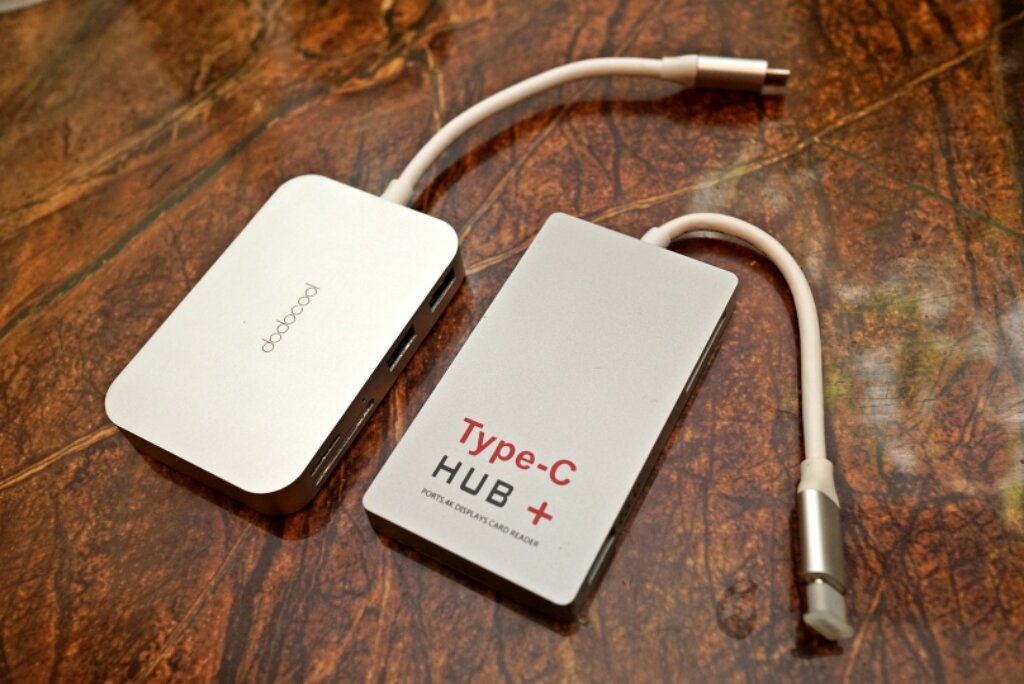
Thanks for the protip about HAO though. Should help those who (unlike me) can't be bothered to DIY.
TeeKanne
post Apr 15 2018, 09:35 AM

Getting Started
**
Junior Member
151 posts

Joined: Sep 2017
parking for future references. interested in 520 and 510.

where did you guys bought it? never seen on display at shops. only sp4.

thanks in advance.
abcxyz
post Apr 17 2018, 08:36 AM

Getting Started
**
Junior Member
161 posts

Joined: Jan 2003
From: KL, Sarawak


QUOTE(Eiraku @ Apr 14 2018, 10:38 PM)
Welcome to the wrap club, nicely done. I've got mine warpped up in red CF, with extra thick clear wrap "bumpers" on the corners, all DIY.

Thanks for the protip about HAO though. Should help those who (unlike me) can't be bothered to DIY.
*
Thanks Bro biggrin.gif

Yeah. they have all the tools and experience. a bit pricey but satisfied.

This post has been edited by abcxyz: Apr 17 2018, 08:38 AM
abcxyz
post Apr 17 2018, 08:37 AM

Getting Started
**
Junior Member
161 posts

Joined: Jan 2003
From: KL, Sarawak


QUOTE(TeeKanne @ Apr 15 2018, 09:35 AM)
parking for future references. interested in 520 and 510.

where did you guys bought it? never seen on display at shops. only sp4.

thanks in advance.
*
I get mine from Lowyat. Saw several shops sell it. Viewnet and several small shop.
If you dont see it, just ask.
happyday119
post Apr 29 2018, 08:00 PM

Casual
***
Junior Member
363 posts

Joined: Mar 2009


Which one is better choice?

Miix 510 or Miix 520?

Miix 510
- 2 years warranty
- RM300 cheaper than Miix 510

Miix 520
- 1 year warranty

The 2 years warranty from Miix 510 seems better as it has 1 year extra warranty.
TSEiraku
post Apr 29 2018, 09:01 PM

Geeking since 1985!
*******
Senior Member
7,037 posts

Joined: Apr 2006


QUOTE(happyday119 @ Apr 29 2018, 08:00 PM)
Which one is better choice?

Miix 510 or Miix 520?

Miix 510
- 2 years warranty
- RM300 cheaper than Miix 510

Miix 520
- 1 year warranty

The 2 years warranty from Miix 510 seems better as it has 1 year extra warranty.
*
Depends, do you need the bells and whistles on the 520?
happyday119
post Apr 29 2018, 09:09 PM

Casual
***
Junior Member
363 posts

Joined: Mar 2009


QUOTE(Eiraku @ Apr 29 2018, 09:01 PM)
Depends, do you need the bells and whistles on the 520?
*
No.

- Fingerprint login
- Better camera
- etc

are not necessary.

And Miix 510 comes with 2 years warranty which seems worth it as Miix 520 only 1 year warranty.
happyday119
post Apr 29 2018, 09:10 PM

Casual
***
Junior Member
363 posts

Joined: Mar 2009


Also guys, which one will you choose?

Miix 510/520 or Surface Pro?

Which one is better in terms of overall?

Is Surface pro pen better than Miix 510/520?
happyday119
post Apr 29 2018, 09:12 PM

Casual
***
Junior Member
363 posts

Joined: Mar 2009


And will you guys get another pen for Miix 510?

I have a friend bought an Active Pen 2 for his Miix.

If yes, which pen will you recommend? In Amazon, there are plenty of pens available.
Are there suitable for Miix 510/520?
TSEiraku
post Apr 29 2018, 09:12 PM

Geeking since 1985!
*******
Senior Member
7,037 posts

Joined: Apr 2006


QUOTE(happyday119 @ Apr 29 2018, 09:10 PM)
Also guys, which one will you choose?

Miix 510/520 or Surface Pro?

Which one is better in terms of overall?

Is Surface pro pen better than Miix 510/520?
*
Different tech, different advantages. The Wacom is more accurate but the N-Trig has tilt (AFAIK).

One big pro for the Miix though, if you're good with DIY, you can easily upgrade your SSD (and clean the fans and repaste and all that sort of jam), because the Miix can rather easily be opened up.

The Surface? It's held together by glue. Lots and lots of glue. So yeah, zero maintainability.

BUT, the battery life and screen on the SurPro is awesome however.

This post has been edited by Eiraku: Apr 29 2018, 09:14 PM
happyday119
post Apr 29 2018, 09:40 PM

Casual
***
Junior Member
363 posts

Joined: Mar 2009


QUOTE(Eiraku @ Apr 29 2018, 09:12 PM)
Different tech, different advantages. The Wacom is more accurate but the N-Trig has tilt (AFAIK).

One big pro for the Miix though, if you're good with DIY, you can easily upgrade your SSD (and clean the fans and repaste and all that sort of jam), because the Miix can rather easily be opened up.

The Surface? It's held together by glue. Lots and lots of glue. So yeah, zero maintainability.

BUT, the battery life and screen on the SurPro is awesome however.
*
If for you, which one will you pick?

Miix 510 or Miix 520 or Surface Pro?
TSEiraku
post Apr 29 2018, 09:41 PM

Geeking since 1985!
*******
Senior Member
7,037 posts

Joined: Apr 2006


QUOTE(happyday119 @ Apr 29 2018, 09:40 PM)
If for you, which one will you pick?

Miix 510 or Miix 520 or Surface Pro?
*
Now? I'd probably go for a 520, and extend the warranty afterwards (I think you can do that with Lenovo, maybe).
happyday119
post Apr 29 2018, 10:05 PM

Casual
***
Junior Member
363 posts

Joined: Mar 2009


QUOTE(Eiraku @ Apr 29 2018, 09:41 PM)
Now? I'd probably go for a 520, and extend the warranty afterwards (I think you can do that with Lenovo, maybe).
*
I did checked with Lenovo customer service. Unfortunately, we can't extend in Malaysia(some other countries - yes)

For the pen, any recommendation for Miix 520 if want to get a spare one?
TSEiraku
post Apr 29 2018, 10:48 PM

Geeking since 1985!
*******
Senior Member
7,037 posts

Joined: Apr 2006


QUOTE(happyday119 @ Apr 29 2018, 10:05 PM)
I did checked with Lenovo customer service. Unfortunately, we can't extend in Malaysia(some other countries - yes)

For the pen, any recommendation for Miix 520 if want to get a spare one?
*
You can search for the old version for the 510 (also the Yoga 900), it works fine with the 520 (and has a clip too) but has less levels of sensitivity. It's also a lot cheaper and easier to find.
peterscm
post Apr 30 2018, 01:06 AM

Casual
***
Junior Member
388 posts

Joined: Jun 2006
QUOTE(happyday119 @ Apr 29 2018, 10:05 PM)
I did checked with Lenovo customer service. Unfortunately, we can't extend in Malaysia(some other countries - yes)
Yes, you can extend the warranty as I had extended mine. However, it is not that simple.

The issue is the Extended Warranty Pack 'does not' officially cover for Miix 520 at the time I purchased it in mid March 2018.

I tried to activate the extended warranty online but fails. So I email to Lenovo customer for help. They need the scan copy of the receipt and info on the extended warranty pack.

It took them about a month to rectify / update my warranty status. Below is my current warranty status.


Attached Image


I do not know whether they have improve the process or not.


happyday119
post Apr 30 2018, 01:16 PM

Casual
***
Junior Member
363 posts

Joined: Mar 2009


QUOTE(peterscm @ Apr 30 2018, 01:06 AM)
Yes, you can extend the warranty as I had extended mine. However, it is not that simple.

The issue is the Extended Warranty Pack 'does not' officially cover for Miix 520 at the time I purchased it in mid March 2018.

I tried to activate  the extended warranty online but fails. So I email to Lenovo customer for help. They need the scan copy of the receipt and info on the extended warranty pack.

It took them about a month to rectify / update my warranty status. Below is my current warranty status.
Attached Image
I do not know whether they have improve the process or not.
*
1) How much do you buy for another year of warranty?

2) Can only extend for another year? Is there any option like extend 2 years?

3) Where do you buy the extended warranty package?


Btw, I saw you stated the Miix 520 comes with Active Pen instead of Active Pen 2? Is it confirmed as it should be Active Pen 2 for Miix 520.

This post has been edited by happyday119: Apr 30 2018, 01:18 PM
peterscm
post Apr 30 2018, 03:08 PM

Casual
***
Junior Member
388 posts

Joined: Jun 2006
QUOTE(happyday119 @ Apr 30 2018, 01:16 PM)
1) How much do you buy for another year of warranty?

2) Can only extend for another year? Is there any option like extend 2 years?

3) Where do you buy the extended warranty package?
Btw, I saw you stated the Miix 520 comes with Active Pen instead of Active Pen 2? Is it confirmed as it should be Active Pen 2 for Miix 520.
*
1. Bought it for RM170 from SNS TWO RETAIL NETWORK @ 2nd Floor, Low Yat Plaza (Lot 2-002)

2. It is only extend to another 1 year. 1 year base warranty (original) + 1 year extended warranty = 2 years warranty

3. Please refer to 1.

As for Active Pen, Malaysia version is only come with Active Pen 1.


abcxyz
post May 2 2018, 11:16 AM

Getting Started
**
Junior Member
161 posts

Joined: Jan 2003
From: KL, Sarawak


Just get this PQI PowerBank to charge my Miix 520. Not working. From other formers post, I assume it works on Miix 510.

I already have the miix 510\520 tips from jalan Pasar. Would like to let go this totally brand new pqi PowerBank together with this tips.

PM me if interested.

QUOTE(Eiraku @ Feb 6 2017, 12:09 AM)
The PB? It's not a Type-C PD PB though, just a normal "laptop" powerbank (that works for everything that charges on 19V/3.42A = 65W).

It's slightly less then RM300 and you can get it either from Lazada or Lelong. Myself I got it from the Brightstar Malaysia online shop, best online price I've seen for it.

There's also the Apacer B222, which is pretty much just a re-labelled PQI. It's slightly more expensive though.

And yes, I just tested it yesterday and it works fine with the Miix. Don't expect it to charge fully from zero though, you'll get more like 30-40% at most... but considering the size of the PB, that's probably enough.

As a bonus, it does come with an Acer tip for it (that looks like it would fit your Switch) so you can use that Type-C for something more productive lol.

» Click to show Spoiler - click again to hide... «


BTW, this is how small it is VS the traditional "laptop" PB, the RM500+ Energizer Xpal:

user posted image
*
GymBoi
post May 11 2018, 12:46 AM

Regular
******
Senior Member
1,401 posts

Joined: Feb 2006
Hmm something really weird happened to my 510 .... wireless seems like suddenly not working ... Tried

1) Connect to my mobile hotspot
2) Restart
3) Airplane mode on off
4) Wifi off on
5) Try again after an hour

All cannot work ... pretty sure my wifi is ok coz my dad's pc is working fine and my mom is streaming android box as usual ...

Then lucky my work got give a usb - ethernet converter, used that and connect with lan cable then ok ...

Today try wifi again then ok .... hmm ... weird
TSEiraku
post May 11 2018, 04:17 AM

Geeking since 1985!
*******
Senior Member
7,037 posts

Joined: Apr 2006


QUOTE(GymBoi @ May 11 2018, 12:46 AM)
Hmm something really weird happened to my 510 .... wireless seems like suddenly not working ... Tried

1) Connect to my mobile hotspot
2) Restart
3) Airplane mode on off
4) Wifi off on
5) Try again after an hour

All cannot work ... pretty sure my wifi is ok coz my dad's pc is working fine and my mom is streaming android box as usual ...

Then lucky my work got give a usb - ethernet converter, used that and connect with lan cable then ok ...

Today try wifi again then ok .... hmm ... weird
*
If it happens again, try reinstalling or updating the WiFi drivers? If that doesn't fix it, then you'll probably need to go to Lenovo.
GymBoi
post May 11 2018, 10:13 PM

Regular
******
Senior Member
1,401 posts

Joined: Feb 2006
QUOTE(Eiraku @ May 11 2018, 04:17 AM)
If it happens again, try reinstalling or updating the WiFi drivers? If that doesn't fix it, then you'll probably need to go to Lenovo.
*
Will do... thanks
epel
post Jul 9 2018, 09:55 AM

New Member
*
Junior Member
14 posts

Joined: Mar 2008


Does anyone know the maximum resolution supported for external display? 4k@60hz?
SUStalzer
post Jul 15 2018, 08:18 PM

bagusnya
*****
Senior Member
757 posts

Joined: Mar 2010


anyone bought locally screen protector?
searching for other sources besides taobao
peterscm
post Jul 16 2018, 08:22 PM

Casual
***
Junior Member
388 posts

Joined: Jun 2006
I bought from Aliexpress @ USD 11.99

Now the price has gone up to USD 12.49

waited 3 weeks to arrive.
GymBoi
post Jul 16 2018, 11:07 PM

Regular
******
Senior Member
1,401 posts

Joined: Feb 2006
QUOTE(talzer @ Jul 15 2018, 08:18 PM)
anyone bought locally screen protector?
searching for other sources besides taobao
*
I got mine from Sunway Pyramid .... suddenly forget the shop name but it's very famous for phone skins ...it's lifetime warranty ... anytime u feel tak syok with the protector, bring back to them and they will change new .... its more like a skin ... of course they do not have anything fitting for Miix (maybe now have i not sure) so they custom cut for me last time .... using since I got my Mixx till now ... so far so good ... i got matte ...

Maybe I say like this then others can remember the shop name .... top floor near the IT area
peterscm
post Jul 16 2018, 11:34 PM

Casual
***
Junior Member
388 posts

Joined: Jun 2006
QUOTE(GymBoi @ Jul 16 2018, 11:07 PM)
I got mine from Sunway Pyramid .... suddenly forget the shop name but it's very famous for phone skins ...it's lifetime warranty ... anytime u feel tak syok with the protector, bring back to them and they will change new .... its more like a skin ... of course they do not have anything fitting for Miix (maybe now have i not sure) so they custom cut for me last time .... using since I got my Mixx till now ... so far so good ... i got matte ...

Maybe I say like this then others can remember the shop name .... top floor near the IT area
*
Is it Mobile Outfitters?

peterscm
post Jul 16 2018, 11:37 PM

Casual
***
Junior Member
388 posts

Joined: Jun 2006
btw, does anyone notice, the Miix-520 keyboard is leaving marks on the screen?

Mine can see clearly the keyboard marking. Need to add around 2 to 3mm 'footer' or bar by the side of the keyboard to prevent the keyboard pressing on the screen.

Still looking for the material for DIY.
SUStalzer
post Jul 16 2018, 11:40 PM

bagusnya
*****
Senior Member
757 posts

Joined: Mar 2010


QUOTE(GymBoi @ Jul 16 2018, 11:07 PM)
I got mine from Sunway Pyramid .... suddenly forget the shop name but it's very famous for phone skins ...it's lifetime warranty ... anytime u feel tak syok with the protector, bring back to them and they will change new .... its more like a skin ... of course they do not have anything fitting for Miix (maybe now have i not sure) so they custom cut for me last time .... using since I got my Mixx till now ... so far so good ... i got matte ...

Maybe I say like this then others can remember the shop name .... top floor near the IT area
*
how much ar like that?

GymBoi
post Jul 21 2018, 09:40 PM

Regular
******
Senior Member
1,401 posts

Joined: Feb 2006
QUOTE(peterscm @ Jul 16 2018, 11:34 PM)
Is it Mobile Outfitters?
*
yes yes

QUOTE(talzer @ Jul 16 2018, 11:40 PM)
how much ar like that?
*
hmm quite expensive ... i can't remember really ... 100+ to 200 like that i think ... but I believe it's lifetime warranty yeah ... anytime u want go change also can .... i see alot ppl go change ... no question asked
SUStalzer
post Aug 4 2018, 11:25 AM

bagusnya
*****
Senior Member
757 posts

Joined: Mar 2010


QUOTE(GymBoi @ Jul 21 2018, 09:40 PM)
yes yes
hmm quite expensive ... i can't remember really ... 100+ to 200 like that i think ... but I believe it's lifetime warranty yeah ... anytime u want go change also can .... i see alot ppl go change ... no question asked
*
Alright mate will check em out, thanksss
Seng_Kiat
post Oct 11 2018, 11:33 AM

Look at all my stars!!
*******
Senior Member
5,580 posts

Joined: Jan 2005
guys,

my bluetooth suddenly missing .. i tried this .. https://www.drivereasy.com/knowledge/best-f...ssing-settings/

but it does not work. do you have other workaround?
doggydogg
post Oct 15 2018, 06:24 PM

Got some tomatoes to spare?
*****
Senior Member
838 posts

Joined: Jun 2007
QUOTE(talzer @ Jul 15 2018, 08:18 PM)
anyone bought locally screen protector?
searching for other sources besides taobao
*
bought locally, no.
but i got mine here Screen Protector
cheapest I could find at that time (March 2018).

Miix 510 = Mixx 520 screen size

This post has been edited by doggydogg: Oct 15 2018, 06:24 PM
doggydogg
post Oct 15 2018, 08:59 PM

Got some tomatoes to spare?
*****
Senior Member
838 posts

Joined: Jun 2007
QUOTE(Seng_Kiat @ Oct 11 2018, 11:33 AM)
guys,

my bluetooth suddenly missing .. i tried this .. https://www.drivereasy.com/knowledge/best-f...ssing-settings/

but it does not work. do you have other workaround?
*
did u happen to install drivers for playstation dualshock 3/4 controller support on it? scpserver or something like that?
Seng_Kiat
post Oct 16 2018, 01:53 AM

Look at all my stars!!
*******
Senior Member
5,580 posts

Joined: Jan 2005
QUOTE(doggydogg @ Oct 15 2018, 08:59 PM)
did u happen to install drivers for playstation dualshock 3/4 controller support on it? scpserver or something like that?
*
Im not.
xxboxx
post Nov 4 2018, 01:08 AM

The mind is for having ideas, not holding them
*******
Senior Member
5,261 posts

Joined: Oct 2004
From: J@Y B33


Can anyone check whether your 510 running as hot as mine?

When cpu idle about 10%, the temp is around 40° in air conditioning room. The fans is running the whole time. When cpu load around 50% , the temp shoot up to around 60°

I feel like previously the fans not running the whole time when idle, and the back case temp now feel much hotter. Not sure if something wrong with the device.
TSEiraku
post Nov 4 2018, 07:07 PM

Geeking since 1985!
*******
Senior Member
7,037 posts

Joined: Apr 2006


QUOTE(xxboxx @ Nov 4 2018, 01:08 AM)
Can anyone check whether your 510 running as hot as mine?

When cpu idle about 10%, the temp is around 40° in air conditioning room. The fans is running the whole time. When cpu load around 50% , the temp shoot up to around 60°

I feel like previously the fans not running the whole time when idle, and the back case temp now feel much hotter. Not sure if something wrong with the device.
*
Imma thinking the thermal paste/TIM has just gone bad probably? I no longer have my 510 but I did repaste it when I still had mine.

Also, the heatsink mounting on the motherboard seems a bit... fragile. Worse case scenario the mounting has detached/loosened itself off the MBB and the heatsink isn't in proper contact to the TIM in the first place.

Or the tiny heat fan inside is just filled with dust ler. Which is pretty minor but still needs to be settled. If you're not comfortable with DIY just send it in to Lenovo and ask them to check.

This post has been edited by Eiraku: Nov 4 2018, 07:08 PM
xxboxx
post Nov 5 2018, 02:28 PM

The mind is for having ideas, not holding them
*******
Senior Member
5,261 posts

Joined: Oct 2004
From: J@Y B33


QUOTE(Eiraku @ Nov 4 2018, 07:07 PM)
Imma thinking the thermal paste/TIM has just gone bad probably? I no longer have my 510 but I did repaste it when I still had mine.

Also, the heatsink mounting on the motherboard seems a bit... fragile. Worse case scenario the mounting has detached/loosened itself off the MBB and the heatsink isn't in proper contact to the TIM in the first place.

Or the tiny heat fan inside is just filled with dust ler. Which is pretty minor but still needs to be settled. If you're not comfortable with DIY just send it in to Lenovo and ask them to check.
*

Hopefully not the thermal paste issue sweat.gif

Now it seem to go back like normal, fans not spinning when idle, or spins slowly. Temp when idle is around 37-40°, and when increase load the temp doesn't so fast shoot up until 60° like last time. I think maybe that time there's a lot background activity, although Task Manager didn't show any increase in CPU usage.

You change to which tablet?
SUStalzer
post Nov 5 2018, 04:18 PM

bagusnya
*****
Senior Member
757 posts

Joined: Mar 2010


QUOTE(Eiraku @ Nov 4 2018, 07:07 PM)
Imma thinking the thermal paste/TIM has just gone bad probably? I no longer have my 510 but I did repaste it when I still had mine.

Also, the heatsink mounting on the motherboard seems a bit... fragile. Worse case scenario the mounting has detached/loosened itself off the MBB and the heatsink isn't in proper contact to the TIM in the first place.

Or the tiny heat fan inside is just filled with dust ler. Which is pretty minor but still needs to be settled. If you're not comfortable with DIY just send it in to Lenovo and ask them to check.
*
whats your main device now?
just asking out of curiosity lol
TSEiraku
post Nov 5 2018, 04:40 PM

Geeking since 1985!
*******
Senior Member
7,037 posts

Joined: Apr 2006


xxboxx talzer Switched to my GPD Win 2 full time for mobile use lol, of course with external screen, keyboard and mouse when I need it for "proper" use.

Just can't justify having two mobile devices that do about the same thing, even when a 8-inch screen and tiny keys are barely fit for "mobile" work lol. But it IS smaller overall (the size of a 3DS) so portability wise it wins hands down.

This post has been edited by Eiraku: Nov 5 2018, 04:42 PM
biggie
post Nov 7 2018, 10:35 PM

Regular
******
Senior Member
1,291 posts

Joined: Jan 2003
Just ordered miix 520. Ijnd muddle up after going through these pages. If anyone have quick suggestions for setup I will really appreciate.
xxboxx
post Feb 27 2019, 08:40 AM

The mind is for having ideas, not holding them
*******
Senior Member
5,261 posts

Joined: Oct 2004
From: J@Y B33


Anyone still using Miix 510? Got any issue with the battery?

On mine the battery sometimes can't be detected. So it can't startup. If I were to left it for tens of minutes and try to start it then only it can detect the battery and start, sometimes have to do it few times. Usually I'll plug in the charger and after few minutes it will detect the battery. Today even after I plug in for an hour it still can't be detected.

Anyone know what's the problem with my Miix?
jow
post Mar 28 2019, 03:30 AM

New Member
*
Newbie
16 posts

Joined: Jan 2003
QUOTE(xxboxx @ Feb 27 2019, 08:40 AM)
Anyone still using Miix 510? Got any issue with the battery?

On mine the battery sometimes can't be detected. So it can't startup. If I were to left it for tens of minutes and try to start it then only it can detect the battery and start, sometimes have to do it few times. Usually I'll plug in the charger and after few minutes it will detect the battery. Today even after I plug in for an hour it still can't be detected.

Anyone know what's the problem with my Miix?
*
Mine having the same issue, bought july 2017. Reported and found out it was due to swollen Battery, and was told battery is not cover by warranty, waiting for quotation from lenovo.

Also, sometime HDD not detected, display black out if temp too high.

Support will come to change part tomorrow.


xxboxx
post Mar 28 2019, 03:29 PM

The mind is for having ideas, not holding them
*******
Senior Member
5,261 posts

Joined: Oct 2004
From: J@Y B33


QUOTE(jow @ Mar 28 2019, 03:30 AM)
Mine having the same issue, bought july 2017. Reported and found out it was due to swollen Battery, and was told battery is not cover by warranty, waiting for quotation from lenovo.

Also, sometime HDD not detected, display black out if temp too high.

Support will come to change part tomorrow.
*

Please update here how much to change the battery. Mine now can start like normal again lol, but sometimes still having battery not detected. I feel like the battery issue will happen when my tablet not using for few days/week.

I read back this thread, yours previously changed MB 2 times and a LCD? And now with SSD problem, you got monitor the temperature? Maybe got too hot it's affected other components? Mine around 40+° C on light usage but sometimes spikes to 58° C when CPU full load.
jow
post Mar 30 2019, 04:26 PM

New Member
*
Newbie
16 posts

Joined: Jan 2003
QUOTE(xxboxx @ Mar 28 2019, 03:29 PM)
Please update here how much to change the battery. Mine now can start like normal again lol, but sometimes still having battery not detected. I feel like the battery issue will happen when my tablet not using for few days/week.

I read back this thread, yours previously changed MB 2 times and a LCD? And now with SSD problem, you got monitor the temperature? Maybe got too hot it's affected other components? Mine around 40+° C on light usage but sometimes spikes to 58° C when CPU full load.
*
BATTERY COST = RM580
DELIVERY + REPAIR = RM305

FYI, You can get the same product from taobao/aliexpress from RM150~RM200
jow
post Mar 30 2019, 04:40 PM

New Member
*
Newbie
16 posts

Joined: Jan 2003
As long as the temp is slightly higher, LCD will black out. Support brought the LCD panel but found out it was cracked, so need to wait for another replacement.

During 2nd support visit, SSD being changed, Heatsink Fan serviced. HDD is ok now but are unable to recover using recovery copy created using windows, support brought over their internal copy which took extremely long time to reload the OS.

BTW, I'm not so sure about their recovery OS version because of Cortana, Malaysia do not have this feature available yet but the restored OS came with this feature, tested and works fine.

Do take note for any parts replacement because they may not use the NEW parts but rather a refurbished part, so make sure you inspect the parts before and after (when the support is around).

xxboxx
post Mar 30 2019, 08:37 PM

The mind is for having ideas, not holding them
*******
Senior Member
5,261 posts

Joined: Oct 2004
From: J@Y B33


QUOTE(jow @ Mar 30 2019, 04:26 PM)
BATTERY COST = RM580
DELIVERY + REPAIR = RM305

FYI, You can get the same product from taobao/aliexpress from RM150~RM200
*

Wow almost RM900 just for battery replacement. Better DIY or send to shop ask them change then.
Thanks for the info.
peterscm
post Mar 31 2019, 10:56 PM

Casual
***
Junior Member
388 posts

Joined: Jun 2006
QUOTE(jow @ Mar 30 2019, 04:26 PM)
BATTERY COST = RM580
DELIVERY + REPAIR = RM305

FYI, You can get the same product from taobao/aliexpress from RM150~RM200
*
May I know the battery part no#? or link to AliExpress?


Thanks

jow
post Apr 30 2019, 02:10 PM

New Member
*
Newbie
16 posts

Joined: Jan 2003
QUOTE(peterscm @ Mar 31 2019, 10:56 PM)
May I know the battery part no#? or link to AliExpress?
Thanks
*
Sorry for the late reply.

The Model of the battery is BSNO4170A5-AT

Update from my previous repair :

1. New LCD and new SSD. Full System recovery. All reported issues solved. But new issues came right after.

2. Erratic mouse cursor. Jumping around

3. Touchscreen not responsive but stylus is working

Reported to Lenovo, 1st action required is to whip out my SDD and perform FULL RECOVERY, what an easy solution provided.
peterscm
post May 1 2019, 12:17 AM

Casual
***
Junior Member
388 posts

Joined: Jun 2006
QUOTE(jow @ Apr 30 2019, 02:10 PM)
Sorry for the late reply.

The Model of the battery is BSNO4170A5-AT

Thanks for the info.


My Miix-520 fan suddenly give out funny sound. Sound like the fan going to K.O. soon. Then I shutdown the tablet. Waited for 1 min and turn it on. Initially the sound come back and then after a while the sound is gone. Called Lenovo CS and was asked to bring the tablet to service center for checking. If really the fan issue then need to order the spare part.


GymBoi
post May 1 2019, 09:15 PM

Regular
******
Senior Member
1,401 posts

Joined: Feb 2006
Seems like power button very unreliable. Mine spoilt and went service centre. Saw another bro same model same issue. Hmm
VireCwx
post May 2 2019, 09:34 AM

Getting Started
**
Junior Member
163 posts

Joined: Jul 2012
From: KL
Interested to get miix 520 8gb. Would like to gather feedback on the performance and quality from user. Greatly appreciate it
biggie
post May 10 2019, 12:17 PM

Regular
******
Senior Member
1,291 posts

Joined: Jan 2003
QUOTE(peterscm @ May 1 2019, 12:17 AM)
Thanks for the info.
My Miix-520 fan suddenly give out funny sound. Sound like the fan going to K.O. soon. Then I shutdown the tablet. Waited for 1 min and turn it on. Initially the sound come back and then after a while the sound is gone. Called Lenovo CS and was asked to bring the tablet to service center for checking. If really the fan issue then need to order the spare part.
*
any update? mine also give loud sound
peterscm
post May 10 2019, 10:06 PM

Casual
***
Junior Member
388 posts

Joined: Jun 2006
not yet send in for repair.. still using it

now no more loud sound but i can hear the fan spinning sound like going to 'kong' soon.
dpelican
post Oct 2 2019, 07:22 PM

New Member
*
Junior Member
20 posts

Joined: Dec 2005
Anyone managed to get a reasonable priced replacement battery for the Miix 510? Mine can only last less than 15 mins before it turns off by itself. Thinking of swapping out the battery with a new one. Seems like no one is selling it locally. Saw AliExpress and Shopee selling the OEM ones - not sure real stuff or not....
Appreciate any advice / experience from those changed DIY before.
jow
post Nov 6 2019, 10:33 PM

New Member
*
Newbie
16 posts

Joined: Jan 2003
QUOTE(dpelican @ Oct 2 2019, 07:22 PM)
Anyone managed to get a reasonable priced replacement battery for the Miix 510? Mine can only last less than 15 mins before it turns off by itself. Thinking of swapping out the battery with a new one. Seems like no one is selling it locally. Saw AliExpress and Shopee selling the OEM ones - not sure real stuff or not....
Appreciate any advice / experience from those changed DIY before.
*
go taobao. search my previous reply for model number.

do not go for over priced battery from lenovo support.

BTW, I really dont think my Miix 510 can last for another year, battery seems to give same issue again. to me the built quality of this model is really unsatisfied.
dpelican
post Dec 2 2019, 02:33 PM

New Member
*
Junior Member
20 posts

Joined: Dec 2005
QUOTE(jow @ Nov 6 2019, 10:33 PM)
go taobao. search my previous reply for model number.

do not go for over priced battery from lenovo support.

BTW, I really dont think my Miix 510 can last for another year, battery seems to give same issue again. to me the built quality of this model is really unsatisfied.
*
Thanks for the info.
Apart from the battery issue (which has konked on me after 1.5 yrs usage), my unit seems to be OK. This is a daily driver for me at work. So far, it's OK. No major issue so far (touchwood!!).

madkhaz
post Dec 5 2019, 02:24 PM

New Member
*
Newbie
8 posts

Joined: Jul 2013
hey anybody still using this model? can i upgrade my 4gb ram miix 510 to 8gb ram?

and also anyone can do it?
snoworm
post Dec 11 2019, 11:55 PM

New Member
*
Junior Member
16 posts

Joined: Apr 2008
From: BM, Penang


QUOTE(madkhaz @ Dec 5 2019, 02:24 PM)
hey anybody still using this model? can i upgrade my 4gb ram miix 510 to 8gb ram?

and also anyone can do it?
*
Just opened my unit to check its wifi card, unable to detect sometimes.
Oh ya, I think the ram is soldered on the board, so no luck with ram upgrade.
xxboxx
post Jan 18 2020, 11:38 AM

The mind is for having ideas, not holding them
*******
Senior Member
5,261 posts

Joined: Oct 2004
From: J@Y B33


So my battery have gone very bad, can only last less than an hour after full charge.

After see few YouTube video on how to open up the tablet, it seems like an easy job to change the battery. Ordered battery online for about RM250 from seller in KL. Need to be careful and slowly when pushing the clips that hold the tablet and screen together as per cautious on YT video, as using force might break the screen. Overall an easy to intermediate job.

My i3 510 already 2.5 years old, it's still smooth for Office usage, browsing the web + YouTube, 1080p h265 video. Got my money worth for it. Now with new battery hopefully can use it for another 2 years.

This post has been edited by xxboxx: Jan 18 2020, 11:38 AM
Seng_Kiat
post Apr 3 2020, 11:59 PM

Look at all my stars!!
*******
Senior Member
5,580 posts

Joined: Jan 2005
guys,

any of you have the miix sudden shutdown when on battery? when on plug in, no issue. Battery is still over 90%
outpace
post Apr 12 2020, 02:33 PM

On my way
****
Junior Member
574 posts

Joined: Jan 2011


QUOTE(Seng_Kiat @ Apr 3 2020, 11:59 PM)
guys,

any of you have the miix sudden shutdown when on battery? when on plug in, no issue. Battery is still over 90%
*
Yes, while it was about 30% juice left and running heavily (can hear the fan noise) backing up my phone, it went off suddenly, just once.
Seng_Kiat
post Apr 14 2020, 07:30 PM

Look at all my stars!!
*******
Senior Member
5,580 posts

Joined: Jan 2005
QUOTE(outpace @ Apr 12 2020, 02:33 PM)
Yes, while it was about 30% juice left and running heavily (can hear the fan noise) backing up my phone, it went off suddenly, just once.
*
so battery problem causing the miix to auto shutdown is it?
outpace
post Apr 16 2020, 04:48 PM

On my way
****
Junior Member
574 posts

Joined: Jan 2011


QUOTE(Seng_Kiat @ Apr 14 2020, 07:30 PM)
so battery problem causing the miix to auto shutdown is it?
*
Not so sure, but the form factor is so small, so wouldn't surprise, I'm very happy to use it like a powerful tablet since day 1

Seng_Kiat
post Apr 16 2020, 05:11 PM

Look at all my stars!!
*******
Senior Member
5,580 posts

Joined: Jan 2005
QUOTE(outpace @ Apr 16 2020, 04:48 PM)
Not so sure, but the form factor is so small, so wouldn't surprise, I'm very happy to use it like a powerful tablet since day 1
*
Yes, it is indeed the best laptop for quite reasonable price back then ... the only thing is its auto shutdown when not on adapter. I guess the battery problem. I run the battery check, the battery was designed to hold 47,000 mah but current is only 25,000.
outpace
post Apr 17 2020, 12:16 AM

On my way
****
Junior Member
574 posts

Joined: Jan 2011


QUOTE(Seng_Kiat @ Apr 16 2020, 05:11 PM)
Yes, it is indeed the best laptop for quite reasonable price back then ... the only thing is its auto shutdown when not on adapter. I guess the battery problem. I run the battery check, the battery was designed to hold 47,000 mah but current is only 25,000.
*
what tool u used to check the battery performance? took how long to test and what method?
yeah, back then, but still a good i5companion for me, especially the rigid stand, still strong for my habit of bending here and there
Seng_Kiat
post Apr 17 2020, 07:23 AM

Look at all my stars!!
*******
Senior Member
5,580 posts

Joined: Jan 2005
QUOTE(outpace @ Apr 17 2020, 12:16 AM)
what tool u used to check the battery performance? took how long to test and what method?
yeah, back then, but still a good i5companion for me, especially the rigid stand, still strong for my habit of bending here and there
*
You can try it here: https://fossbytes.com/powercfg-check-batter...dows-using-cmd/

It is very quick. Less than a minute. I read over the internet, many facing the problem where miix510 shutdown itself while on battery ..
SUStalzer
post Jun 30 2020, 05:23 PM

bagusnya
*****
Senior Member
757 posts

Joined: Mar 2010


anyone got use any screen protector?
peterscm
post Jun 30 2020, 09:16 PM

Casual
***
Junior Member
388 posts

Joined: Jun 2006
QUOTE(talzer @ Jun 30 2020, 05:23 PM)
anyone got use any screen protector?
*
Yes, I am using since 2018. Bought it from AliExpress for USD12.

peterscm
post Jun 30 2020, 09:26 PM

Casual
***
Junior Member
388 posts

Joined: Jun 2006
QUOTE(biggie @ May 10 2019, 12:17 PM)
any update? mine also give loud sound
*
Last year around October sent to Service Center to check because the battery is bloated and pushed the bottom part of the screen away from the casing.

The tech help me to remove the battery and glue back the screen for free. The tech also advise me to get the battery outside because Lenovo price is expensive. Estimated around RM350 to 400 and also need to wait as they don't have stock.

At the same time checked the fan and discovered the fan is dirty. After cleaning then no more noisy sound.

So finally I bought the replacement battery from AliExpress for USB48.75 in November 2019 and it is still working.

Btw, I changed the motherboard this year due to it intermittent unable to detect the SSD. Luckily it is still under warranty.

I also did the SSD upgrade to Samsung 970 EVO Plus 512GB in Jan this year.

user posted image
user posted image
user posted image
user posted image
user posted image

This post has been edited by peterscm: Jun 30 2020, 09:45 PM
biggie
post Jun 30 2020, 10:33 PM

Regular
******
Senior Member
1,291 posts

Joined: Jan 2003
Fan dirty make the noise? Difficult to open? Causing problem now with all the zoom meetings..the fan is loud
SUStalzer
post Jun 30 2020, 10:34 PM

bagusnya
*****
Senior Member
757 posts

Joined: Mar 2010


QUOTE(peterscm @ Jun 30 2020, 09:16 PM)
Yes, I am using since 2018. Bought it from AliExpress for USD12.
*
i have removed it. initially thinking want to replace but fark it just use it naked.
previous matte SP really cause the screen quality drop due to blurriness.

normal SP and tempered glass once scratch also will affect the view.
put trust into its gorilla glass build.


QUOTE(peterscm @ Jun 30 2020, 09:26 PM)
Last year around October sent to Service Center to check because the battery is bloated and pushed the bottom part of the screen away from the casing.

The tech help me to remove the battery and glue back the screen for free. The tech also advise me to get the battery outside because Lenovo price is expensive. Estimated around RM350 to 400 and also need to wait as they don't have stock.

At the same time checked the fan and discovered the fan is dirty. After cleaning then no more noisy sound.

So finally I bought the replacement battery from AliExpress for USB48.75 in November 2019 and it is still working.

Btw, I changed the motherboard this year due to it intermittent unable to detect the SSD. Luckily it is still under warranty.

I also did the SSD upgrade to Samsung 970 EVO Plus 512GB in Jan this year.

user posted image
user posted image
user posted image
user posted image
user posted image
*
i have experienced the same intermittent undetected boot device AKA the SSD and random BSOD frequently.

open up my unit, re-insert the SSD, clean the fan, reapply thermal paste, now seems ok ady.
good to hear you are under warranty. mine happen all right after warranty.


This post has been edited by talzer: Jun 30 2020, 10:37 PM
peterscm
post Jun 30 2020, 11:08 PM

Casual
***
Junior Member
388 posts

Joined: Jun 2006
QUOTE(talzer @ Jun 30 2020, 10:34 PM)
i have removed it. initially thinking want to replace but fark it just use it naked.
previous matte SP really cause the screen quality drop due to blurriness.

normal SP and tempered glass once scratch also will affect the view.
put trust into its gorilla glass build.
I am using tempered glass. So far so good as I hardly use the pen.

Btw, I notice the keyboard will press against the screen when closed and leaving keyboard mark on it.

How about you?
SUStalzer
post Jul 1 2020, 12:00 AM

bagusnya
*****
Senior Member
757 posts

Joined: Mar 2010


QUOTE(peterscm @ Jun 30 2020, 11:08 PM)
I am using tempered glass. So far so good as I hardly use the pen.

Btw, I notice the keyboard will press against the screen when closed and leaving keyboard mark on it.

How about you?
*
Mine the same, but less effect with matte SP.

Cannot avoid since there is no gap between the screen and keyboard when closed.

Moving forward im using it naked free. Anyway already reaching 3 years of using, condition still ok. Coding and photoshop not much issue
smallcrab
post Jul 8 2020, 09:25 PM

Getting Started
**
Junior Member
140 posts

Joined: Jul 2007
From: Puchong


QUOTE(peterscm @ Jun 30 2020, 09:26 PM)
Last year around October sent to Service Center to check because the battery is bloated and pushed the bottom part of the screen away from the casing.

The tech help me to remove the battery and glue back the screen for free. The tech also advise me to get the battery outside because Lenovo price is expensive. Estimated around RM350 to 400 and also need to wait as they don't have stock.

At the same time checked the fan and discovered the fan is dirty. After cleaning then no more noisy sound.

So finally I bought the replacement battery from AliExpress for USB48.75 in November 2019 and it is still working.

Btw, I changed the motherboard this year due to it intermittent unable to detect the SSD. Luckily it is still under warranty.

I also did the SSD upgrade to Samsung 970 EVO Plus 512GB in Jan this year.

user posted image
user posted image
user posted image
user posted image
user posted image
*
damn, i just notice the same bloated issue on the battery, pushing the screen outward
warranty expired last december ...

this Miix 510 is especially problematic, it's my third laptop for spare use, very seldom use
the keyboard kaput, not able to detect

rubbish model

my other 2 laptops no such reliability issues even higher usage than this shit Miix 510, things is this shit laptop my most expensive
peterscm
post Jul 8 2020, 11:34 PM

Casual
***
Junior Member
388 posts

Joined: Jun 2006
QUOTE(smallcrab @ Jul 8 2020, 09:25 PM)
damn, i just notice the same bloated issue on the battery, pushing the screen outward
warranty expired last december ...

this Miix 510 is especially problematic, it's my third laptop for spare use, very seldom use
the keyboard kaput, not able to detect

rubbish model

my other 2 laptops no such reliability issues even higher usage than this shit Miix 510, things is this shit laptop my most expensive
*
Btw, mine is Miix-520
smallcrab
post Jul 11 2020, 04:40 PM

Getting Started
**
Junior Member
140 posts

Joined: Jul 2007
From: Puchong


user posted image

Miix 510 battery, swollen vs new.
followed youtube guide, surprisingly easy to change the battery.
RM240 from Shopee, local seller
peterscm
post Jul 28 2020, 10:30 PM

Casual
***
Junior Member
388 posts

Joined: Jun 2006
The battery in my Miix-520 reported 75.1% wear 3 days again. Yesterday reported 79.5% wear. The battery bought from AliExpress.

It was used for 9 months only however I hardly use the notebook.

Today bought a new one for RM230 from Imbi Plaza. The shop has a Shopee store which selling @ RM240. I also checked @ Low Yat. There is a shop selling @ RM320 excludes installation. They charge RM150 for installation.

Anyway, I just installed the battery myself as I had replaced the battery before.
madkhaz
post Feb 27 2021, 08:52 PM

New Member
*
Newbie
8 posts

Joined: Jul 2013
user posted image

Anybody encounter this kind of issue?
madkhaz
post Feb 27 2021, 09:06 PM

New Member
*
Newbie
8 posts

Joined: Jul 2013
QUOTE(peterscm @ Jun 30 2020, 09:26 PM)
Last year around October sent to Service Center to check because the battery is bloated and pushed the bottom part of the screen away from the casing.

The tech help me to remove the battery and glue back the screen for free. The tech also advise me to get the battery outside because Lenovo price is expensive. Estimated around RM350 to 400 and also need to wait as they don't have stock.

At the same time checked the fan and discovered the fan is dirty. After cleaning then no more noisy sound.

So finally I bought the replacement battery from AliExpress for USB48.75 in November 2019 and it is still working.

Btw, I changed the motherboard this year due to it intermittent unable to detect the SSD. Luckily it is still under warranty.

I also did the SSD upgrade to Samsung 970 EVO Plus 512GB in Jan this year.

user posted image
user posted image
user posted image
user posted image
user posted image
*
How did you upgrade the ssd?

SUStalzer
post Feb 28 2021, 12:33 PM

bagusnya
*****
Senior Member
757 posts

Joined: Mar 2010


Anyone can share where can buy the keypad?

Mine malfunctioned..
peterscm
post Mar 2 2021, 05:24 PM

Casual
***
Junior Member
388 posts

Joined: Jun 2006
QUOTE(madkhaz @ Feb 27 2021, 09:06 PM)
How did you upgrade the ssd?
*


lenovos P
post Feb 24 2023, 08:12 AM

New Member
*
Probation
22 posts

Joined: Feb 2022
Hi my Miix 510 need to change SSD, battery and keyboard
How much would it cost? Or is it better to get a new laptop/tablet?


Change to:
| Lo-Fi Version
0.1825sec    0.60    6 queries    GZIP Disabled
Time is now: 18th December 2025 - 02:38 AM