Welcome Guest ( Log In | Register )

Outline · [ Standard ] · Linear+

Xiaomi Xiaomi Redmi Note 3 Discussion V8, MM stable available

views
     
cactuscch2
post Apr 4 2017, 09:50 AM

Getting Started
**
Junior Member
206 posts

Joined: May 2015
My current MIUI is 8.1.4.0 (MHOMIDI) Stable & rooted using method posted on first page. My phone is RN3 SD 2G RAM/ 16G ROM

I've questions regarding OTA.
1) Can I upgrade when OTA is available?
2) What will happen after OTA in terms of the 'bootloader' & 'root' status?

TQ.


cactuscch2
post Apr 5 2017, 05:34 PM

Getting Started
**
Junior Member
206 posts

Joined: May 2015
QUOTE(n8210 @ Apr 5 2017, 02:43 PM)
http://en.miui.com/download-301.html#449
Download site updated as well.
*
Checked the link
Version: V8.1.6.0.MHOMIDI (MIUI8) is for Redmi Note 3 Qualcomm Global
Version: V8.2.3.0.MHRMIDL (MIUI8) is for Redmi Note 3 Special Edition Global
Version: V8.1.3.0.LHNCNDI (MIUI8) is for Redmi Note 3 MTK China

Let say my RN3 is Malaysia official set, 2G RAM/16GROM... can I upgrade using V8.2.3.0.MHRMIDL (MIUI8) version?


cactuscch2
post Apr 5 2017, 07:25 PM

Getting Started
**
Junior Member
206 posts

Joined: May 2015
thanks for the heads up
cactuscch2
post Apr 6 2017, 08:28 AM

Getting Started
**
Junior Member
206 posts

Joined: May 2015
QUOTE(moon* @ Apr 5 2017, 09:36 PM)
mine is Kenzo, updated OTA.
but mine is 8.2.2.0  blink.gif
*
Dare not to do OTA update yet bcoz my phone is rooted.

Can someone pls guide me?

My current MIUI is 8.1.4.0 (MHOMIDI) Stable & rooted using method posted on first page. My phone is RN3 SD 2G RAM/ 16G ROM. I think mine is Kenzo based on dimension.

I've questions regarding OTA.
1) Can I upgrade when OTA is available? Will OTA brick my rooted phone?
2) What will happen after OTA in terms of the 'bootloader' & 'root' status?

TQ.
cactuscch2
post Apr 6 2017, 04:42 PM

Getting Started
**
Junior Member
206 posts

Joined: May 2015
QUOTE(abubin @ Apr 6 2017, 03:32 PM)
you need to unroot the phone first using SuperSU. Once that is done only you can upgrade the firmware using OTA. After upgrade, you need to re-root the phone. Make sure to use the root guide for the new firmware version. Sometimes old root will cause brick if applied to wrong firmware version.
*
Thank you for the guidance.

2 more questions.
If I wait until the full ROM is available to download, and then I update manually, I don't need to unroot first, right?
After manual installation is completed, the root status will be lost, am I right?


cactuscch2
post Apr 6 2017, 08:24 PM

Getting Started
**
Junior Member
206 posts

Joined: May 2015
Thanks n8210, finally you are the one who has the answers to all my questions!
cactuscch2
post Apr 9 2017, 09:49 PM

Getting Started
**
Junior Member
206 posts

Joined: May 2015
QUOTE(Mr.Docter @ Apr 9 2017, 08:26 PM)
Guys,

I am using Mi4i. Forgot my Mi Account (doesn't utilize that crap) and unable to retrieve.

Now how can I reset/hard reset/factory reset my phone; bypassing that Mi Account?

Is it possible? Damn annoying :\
*
http://www.hardreset.info/devices/xiaomi/xiaomi-mi-4i/

This post has been edited by cactuscch2: Apr 9 2017, 09:50 PM
cactuscch2
post Apr 10 2017, 05:40 PM

Getting Started
**
Junior Member
206 posts

Joined: May 2015
Weird, your updater screenshot showed filesize is 507M, but mine is 1.3GB (upgrade from 8.1.4.0)
cactuscch2
post Dec 8 2018, 01:48 PM

Getting Started
**
Junior Member
206 posts

Joined: May 2015
Any experienced guys here who can help me with RN3 custom ROM?

I rooted my phone 2 years ago with alka TWRP, unlocked bootloader. Still using Official MIUI 8.1.4.0 Stable.

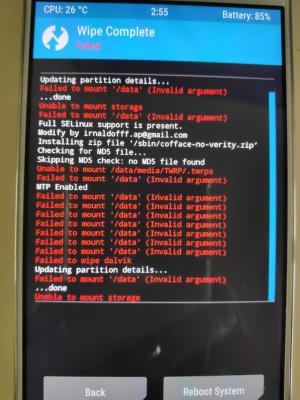
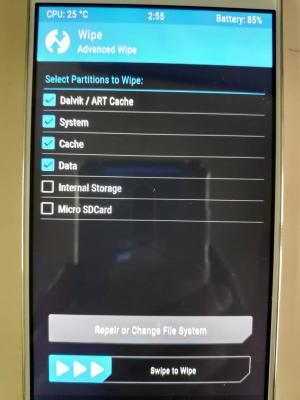
The phone has become very laggy & I'd like to try Lineage OS Nightly, but when I boot into recovery,
- I failed to wipe Dalvik, system, data & cache.
- then I try to do backup to an empty microSD card, failed as well
- I dare not to try 'FORMAT'

Most tutorial is using TWRP BY~XM.

Should I 'uninstall' alka TWRP, and 're-install' TWRP BY~XM? How?

This post has been edited by cactuscch2: Dec 8 2018, 01:49 PM


Attached thumbnail(s)
Attached Image Attached Image
cactuscch2
post Dec 9 2018, 10:38 AM

Getting Started
**
Junior Member
206 posts

Joined: May 2015
QUOTE(freddy manson @ Dec 9 2018, 05:46 AM)
yes get the latest twrp, so it clan flash newer ROMS bro
after that, u backup all internal documents to other places (microSD)
and then make a twrp nandroid backup
after that do a full format (including intrnal storage) and install ur rom
if u r installing LOS make sure u install the correct/latest firmware also
*
Thanks. Finally my RN3 now is now running LineageOS, very clean and simple interface, and quite smooth.
I made a mistake by using GApps 7.0 pico. Reflash with 7.1 micro and all google stuff is back.

Install Adaway and my status is unroot. I downloaded Supersu from playstore but not manage to root. How leh? Lineage got different way to root?

cactuscch2
post Dec 10 2018, 07:46 PM

Getting Started
**
Junior Member
206 posts

Joined: May 2015
QUOTE(freddy manson @ Dec 10 2018, 04:59 PM)
im using magisk since early this year
what i do is boot into twrp, flash magisk and then reboot
install the magisk manager apk and root is achieved

magisk is a better options now, now using SuperSU anymore
magisk got lots of modules and mods to play with
*
oic, I'm really outdated with the ROM flashing trend. Thanks for your guide.


Change to:
| Lo-Fi Version
0.0895sec    0.29    7 queries    GZIP Disabled
Time is now: 11th December 2025 - 12:39 AM