Outline ·
[ Standard ] ·
Linear+
Unifi Official TM UniFi High Speed Broadband Thread V28, Free Upgrade In 2017
|
megahertz
|
 Dec 30 2016, 07:11 PM Dec 30 2016, 07:11 PM
|

|
QUOTE(anip94 @ Dec 30 2016, 06:41 PM) another one? unifi offered free iflix throughout 2016. or is just for new user that hasn't redeem last year offer  iflix extend another 1 year for free. QUOTE(Hornet @ Dec 30 2016, 06:43 PM) In HyppTV, is there a quick way to see what channel is available to me? Instead of trying one by one  channel 100 |
|
|
|
|
|
fruitie
|
Dec 30 2016, 07:20 PM
|
Rise and Shine

|
QUOTE(anip94 @ Dec 30 2016, 06:41 PM) another one? unifi offered free iflix throughout 2016. or is just for new user that hasn't redeem last year offer UniFi has extended until 31st Dec 2017. I just received email about this. |
|
|
|
|
|
jiaen0509
|
Dec 30 2016, 07:20 PM
|
|
|
Actually I dont know how to get the free TM Unifi iFlix...any idea?
|
|
|
|
|
|
fruitie
|
Dec 30 2016, 07:23 PM
|
Rise and Shine
|
QUOTE(jiaen0509 @ Dec 30 2016, 07:20 PM) Actually I dont know how to get the free TM Unifi iFlix...any idea? Just connect to your UniFi connection, browse to iflix page or open iflix apps, that's all. It will detect your UniFi connection and straight free access and you can see all the titles. This post has been edited by fruitie: Dec 30 2016, 07:23 PM |
|
|
|
|
|
winyap991
|
Dec 30 2016, 07:25 PM
|
Getting Started

|
QUOTE(jiaen0509 @ Dec 30 2016, 07:20 PM) Actually I dont know how to get the free TM Unifi iFlix...any idea? 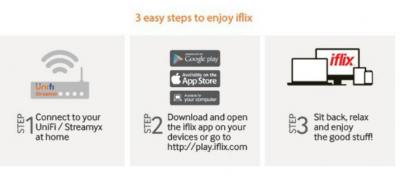
|
|
|
|
|
|
maiffa71
|
Dec 30 2016, 07:34 PM
|
Getting Started
|
Is there any way to change IPTV Lan4 for general use? Not using IPTV at all.
Btw I'm on Asus RT-AC87U router.
This post has been edited by maiffa71: Dec 30 2016, 07:35 PM
|
|
|
|
|
|
pluginbaby
|
Dec 30 2016, 07:47 PM
|
|
|
QUOTE(maiffa71 @ Dec 30 2016, 07:34 PM) Is there any way to change IPTV Lan4 for general use? Not using IPTV at all. Btw I'm on Asus RT-AC87U router. I believe if you're on Asus, u picked unifi preset to auto bind LAN4 for IPTV right. So try to change to a different preset so it no longer tag to LAN4 for IPTV |
|
|
|
|
|
leetan33
|
Dec 30 2016, 08:23 PM
|
|
|
QUOTE(Hornet @ Dec 30 2016, 06:43 PM) In HyppTV, is there a quick way to see what channel is available to me? Instead of trying one by one You may switch to channel 100. |
|
|
|
|
|
thewan
|
Dec 30 2016, 08:42 PM
|
Getting Started
|
QUOTE(maiffa71 @ Dec 30 2016, 07:34 PM) Is there any way to change IPTV Lan4 for general use? Not using IPTV at all. Btw I'm on Asus RT-AC87U router. Assuming its the same as AC68U which I have, go to LAN, then IPTV tab. Set the ISP Profile to Manual Setting, then set the Internet VID to 500. Leave Lan port 3 & 4 VID blank. Leave all the PRIO fields at default which is 0.  This post has been edited by thewan: Dec 30 2016, 08:46 PM This post has been edited by thewan: Dec 30 2016, 08:46 PM |
|
|
|
|
|
maiffa71
|
Dec 30 2016, 09:17 PM
|
Getting Started
|
QUOTE(thewan @ Dec 30 2016, 08:42 PM) Assuming its the same as AC68U which I have, go to LAN, then IPTV tab. Set the ISP Profile to Manual Setting, then set the Internet VID to 500. Leave Lan port 3 & 4 VID blank. Leave all the PRIO fields at default which is 0. Thanks for the tip..  |
|
|
|
|
|
jiaen0509
|
Dec 30 2016, 09:20 PM
|
|
|
QUOTE(fruitie @ Dec 30 2016, 04:30 PM) Yes, all semi-detached and bungalow houses here. Each pole is for two houses, I already checked around and confirmed by the installers too.  They have installed more than 50 poles. But normally is underground right? |
|
|
|
|
|
westlife
|
Dec 30 2016, 09:34 PM
|
|
|
QUOTE(jiaen0509 @ Dec 30 2016, 09:20 PM) But normally is underground right? newer house should be all underground with the green Color DP. If pole it is using the existing telephone line but just added it as DP for unifi. |
|
|
|
|
|
Hornet
|
Dec 30 2016, 09:40 PM
|
|
|
Thanks guys For some reason HyppTV is not stable when used through Homeplug. The channels randomly cannot work. But everything working fine if directly plug through LAN port  |
|
|
|
|
|
fruitie
|
Dec 30 2016, 10:00 PM
|
Rise and Shine
|
QUOTE(jiaen0509 @ Dec 30 2016, 09:20 PM) But normally is underground right? Not for this area, it seems. Quite an old residence area. |
|
|
|
|
|
westlife
|
Dec 30 2016, 11:35 PM
|
|
|
QUOTE(Hornet @ Dec 30 2016, 09:40 PM) Thanks guys For some reason HyppTV is not stable when used through Homeplug. The channels randomly cannot work. But everything working fine if directly plug through LAN port i tried using homeplug before, even my homeplug is not plug into the power socket, but instead plug to a power extension (brick type), it works like charm, no issue. By rite, since i am not connecting it direct to power socket, the performance should be degraded, but it seems no issues at all.  |
|
|
|
|
|
amirudin920927
|
Dec 30 2016, 11:46 PM
|
|
|
|
|
|
|
|
|
Jjuggler
|
Dec 31 2016, 04:28 AM
|
|
|
speedtest result shows 47++Mbps d/l and 20.++Mbps u/l. But when download the files, I get 6.5 MB/s (normal and torrent). Is this normal for 50Mbps users?
This post has been edited by Jjuggler: Dec 31 2016, 04:28 AM
|
|
|
|
|
|
SUSSirmacai
|
Dec 31 2016, 05:33 AM
|
Getting Started
|
QUOTE(Jjuggler @ Dec 31 2016, 04:28 AM) speedtest result shows 47++Mbps d/l and 20.++Mbps u/l. But when download the files, I get 6.5 MB/s (normal and torrent). Is this normal for 50Mbps users? Means u getting higher speed than what u subscribed for. |
|
|
|
|
|
Xefron
|
Dec 31 2016, 07:15 AM
|
|
|
QUOTE(Jjuggler @ Dec 31 2016, 04:28 AM) speedtest result shows 47++Mbps d/l and 20.++Mbps u/l. But when download the files, I get 6.5 MB/s (normal and torrent). Is this normal for 50Mbps users? too good for 50Mbps package.  TM did put a 10% buffer at downstream and upstream This post has been edited by Xefron: Dec 31 2016, 07:16 AM |
|
|
|
|
|
khloh1166
|
Dec 31 2016, 08:08 AM
|
New Member
|
QUOTE(westlife @ Dec 29 2016, 03:08 PM) isn't that when u apply at the portal it will tell u that ur house got coverage or not then u just submit? if it does not have coverage, then u just leave ur contact details (but still no unifi). what apps u installed on ur hypptv box? ya when the time i applied at the portal, system there shown me port full and the system want me to leave my contact details, their sales team will call me but after 3 days but no one contact me then i called 100 and asked, they said if you apply online and the sales team didn't call you within 3 days, that means your area no coverage/port full............................... |
|
|
|
|



 Quote
Quote









 0.0582sec
 0.64
0.64
 6 queries
 GZIP Disabled