Welcome Guest ( Log In | Register )

Bump Topic Topic Closed RSS Feed
126 Pages « < 30 31 32 33 34 > » Bottom

Outline · [ Standard ] · Linear+

Unifi Official TM UniFi High Speed Broadband Thread V28, Free Upgrade In 2017

views
     
calvinlaw510
post Dec 27 2016, 08:39 PM

Enthusiast
*****
Senior Member
766 posts

Joined: Oct 2007
From: Penang Island


QUOTE(akping_1 @ Dec 27 2016, 08:17 PM)
Something weird, my VIP20 just change the router to C7, and this is the speedtest result i get
user posted image

But when using beta.speedtest.net here the results
user posted image
*
speedtest.net been shown the weird result started few weeks ago. beta.speedtest.net and speedtest.tm.com.my get the correct result. Phone speedtest app get the same result as beta.speedtest.net. Something wrong with the speedtest.net i think.

beta.speedtest.net
user posted image


speedtest.net
user posted image

This post has been edited by calvinlaw510: Dec 27 2016, 08:40 PM
cskean
post Dec 27 2016, 08:44 PM

Look at all my stars!!
*******
Senior Member
2,551 posts

Joined: Jan 2003
From: Cheras / Ampang


QUOTE(westlife @ Dec 27 2016, 11:32 AM)
Forget about those wifi extender or repeater, just get the home plug.

My house is 3 phases, I am using home plug, no issues at all.
*
Mind to share what brand of the homeplug you are using? Do u connect those homeplug into same phase of power socket?

QUOTE(westlife @ Dec 27 2016, 12:46 PM)
my ping test does not show difference while connecting directly to wifi router and connecting via home plug wifi.

TP-link one has decent price with good performance.

Single band 2.4Ghz about rm180++ to rm255 for 300Mbps speed
Dual band 2.4Ghz and 5Ghz is close to rm300 for 300Mbps speed also.

802.11ac one can be price around min rm400 and above.
*
My router is a single band, if I use dual band home plug, will I able to get 2.4ghz & 5ghz?

QUOTE(pluginbaby @ Dec 27 2016, 05:47 PM)
Update to my unstable connection after installation on Saturday. Sunday onwards, everything is slick and good.
*
Mind to share what did you do to stable the connection?

miyakochan89
post Dec 27 2016, 08:47 PM

Wut?
*******
Senior Member
6,724 posts

Joined: Aug 2008


QUOTE(Max2006 @ Dec 27 2016, 04:56 PM)
Depends on why brand of router you are using. For example, I am using Asus router. And from my Asus router admin control panel, I can see how many clients are using my Unifi connection.
*
I am using the TM's standard router, it's silver one. It looks like this.

I am a noob in this network thing, i think I manage to go into the control panel with the Unifi IP but I don't know the username and password. blink.gif
LOL!
1tanmee
post Dec 27 2016, 09:08 PM

~noMNom~
*****
Senior Member
970 posts

Joined: Jul 2016
QUOTE(1tanmee @ Dec 26 2016, 10:14 PM)
HyppTV has now come up with 'pay for only what you want'
Link https://www.tm.com.my/hypptv/Pages/about.aspx?id=56#personal

I guess it is now okay now to subscribe to the basic package + only the channels you want.
e.g. no need to subscribe to Jumbo Pack when all you want from it is, say, RTL CBS and al-Jazeera.

Jumbo pack = RM60
RTL CBS + al-Jazeera = RM9 + RM6 = RM15
*
QUOTE(fruitie @ Dec 27 2016, 12:13 PM)
Have you tried before and it works?
*
Haven't the time to do so, will try tomorrow and revert
Jjuggler
post Dec 27 2016, 09:19 PM

Narcissistic Genius
******
Senior Member
1,341 posts

Joined: Dec 2016
QUOTE(lolabunny123 @ Dec 27 2016, 02:56 PM)
Called already. They say need seven working days to complete. Today only 6 working days. So have to wait for tomorrow to see first la.  bangwall.gif
*
for me, it only takes 4 working days to finish my upgrade from 30 to 50.
westlife
post Dec 27 2016, 09:22 PM

10k Club
********
All Stars
14,272 posts

Joined: Jan 2011
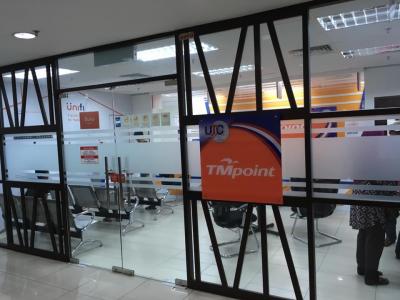
I had just submitted the upgrade application to 50Mbps at UTC tm point. The lady told me the upgrade will normally be done within 24 hours else 3 working days if there is technical issue. I told her I want to be sure the upgrade must be completed by 31 dec 2016. She said she will confirm with me the upgrade by tmr evening whether the upgrade can be done. If not, she will not proceed further with my upgrade. Really cannot resist the rm53 (inc GST) for the 2x more download speed and 2.5x upload speed. Kind of no brainier given that it is just rm53 extra plus already paid so much for the 30Mbps.

The lady has given me her the tmpoint no so I can check with her on the status of upgrade easily plus UTC is operating 10am to 10pm and her shift is at night.

She said for terrace has no problem with the 100Mbps speed. The one that has problem is apartment, condo which it is the same as what I thought too before this due to the limitation of the medium.

She just mentioned that normally before upgrading to 100Mbps, it may have a downtime of 3 days in between.

This post has been edited by westlife: Dec 27 2016, 09:25 PM
fruitie
post Dec 27 2016, 09:28 PM

Rise and Shine
Group Icon
Staff
72,819 posts

Joined: Sep 2005
From: KUL

QUOTE(westlife @ Dec 27 2016, 09:22 PM)
I had just submitted the upgrade application to 50Mbps at UTC tm point. The lady told me the upgrade will normally be done within 24 hours else 3 working days if there is technical issue. I told her I want to be sure the upgrade must be completed by 31 dec 2016. She said she will confirm with me the upgrade by tmr evening whether the upgrade can be done. If not, she will not proceed further with my upgrade. Really cannot resist the rm53 (inc GST) for the 2x more download speed and 2.5x upload speed. Kind of no brainier given that it is just rm53 extra plus already paid so much for the 30Mbps.

The lady has given me her the tmpoint no so I can check with her on the status of upgrade easily plus UTC is operating 10am to 10pm and her shift is at night.

She said for terrace has no problem with the 100Mbps speed. The one that has problem is apartment, condo which it is the same as what I thought too before this due to the limitation of the medium.

She just mentioned that normally before upgrading to 100Mbps, it may have a downtime of 3 days in between.
*
Just to correct some facts here. UTC's branch is no longer a TM Point. It has changed to TM dealer effective 1st Nov. I went there to transfer my UniFi to new place but they cannot do it as they are no longer TM Point. I went to Quill City mall instead.
westlife
post Dec 27 2016, 09:32 PM

10k Club
********
All Stars
14,272 posts

Joined: Jan 2011
QUOTE(fruitie @ Dec 27 2016, 09:28 PM)
Just to correct some facts here. UTC's branch is no longer a TM Point. It has changed to TM dealer effective 1st Nov. I went there to transfer my UniFi to new place but they cannot do it as they are no longer TM Point. I went to Quill City mall instead.
*
Not sure about the one u went. But the one I went is definitely a tm point. Even the stamp of the address she gave clearly stated UTC TM point. And I had all sort of requests here all the time like normal TM point. It is confirmed not a normal dealer.


Attached thumbnail(s)
Attached Image
fruitie
post Dec 27 2016, 09:34 PM

Rise and Shine
Group Icon
Staff
72,819 posts

Joined: Sep 2005
From: KUL

QUOTE(westlife @ Dec 27 2016, 09:32 PM)
Not sure about the one u went. But the one I went is definitely a tm point. Even the stamp of the address she gave clearly stated UTC TM point. And I had all sort of requests here all the time like normal TM point. It is confirmed not a normal dealer.
*
Is that UTC Pudu? That's the one I went before last year and went again last month.
Checked their website, it's already removed as TM Point. smile.gif
westlife
post Dec 27 2016, 09:54 PM

10k Club
********
All Stars
14,272 posts

Joined: Jan 2011
QUOTE(fruitie @ Dec 27 2016, 09:34 PM)
Is that UTC Pudu? That's the one I went before last year and went again last month.
Checked their website, it's already removed as TM Point. smile.gif
*
no.

Maybe indeed the one u went previously UTC tm point now it is not.

But certainly not the case that all utc has no TM point. smile.gif


fruitie
post Dec 27 2016, 09:58 PM

Rise and Shine
Group Icon
Staff
72,819 posts

Joined: Sep 2005
From: KUL

QUOTE(westlife @ Dec 27 2016, 09:54 PM)
no.

Maybe indeed the one u went previously UTC tm point now it is not.

But certainly not the case that all utc has no TM point.  smile.gif
*
Which UTC is this?
TMPoint in KL: https://www.tm.com.my/OnlineHelp/TMPoint/Pages/Home.aspx
pluginbaby
post Dec 27 2016, 11:00 PM

Look at all my stars!!
*******
Senior Member
2,661 posts

Joined: Apr 2007


QUOTE(cskean @ Dec 27 2016, 08:44 PM)
Mind to share what brand of the homeplug you are using? Do u connect those homeplug into same phase of power socket?
My router is a single band, if I use dual band home plug, will I able to get 2.4ghz & 5ghz?
Mind to share what did you do to stable the connection?
*
I didn't do anything except changing to Asus AC55UHP. They did some cable fixes at the DP tho. Probably that's what fixed my blinking Auth issue
feizaiII
post Dec 27 2016, 11:06 PM

***** Genuine? *****
*******
Senior Member
3,310 posts

Joined: Apr 2005
Hi guys, new unifi user here. Apply for parent house and technician came install, found the distribution box(shoukd be..) claimed by technician some kind rating is too high, 27 which normally below 20.. According to he, the line will not stable and might face intermittent.. All this talk thru the phone and I'm not there.

Anyone facing this and can explain more to me? He said required TM come and fix.. But problem is when they will come fix..;(
lyc1982
post Dec 27 2016, 11:08 PM

ExpectNoMercy
*******
Senior Member
2,329 posts

Joined: Jun 2015
looks like my chance of getting 50Mbps at rm179 is nothing but a dream...till now not a single house has unifi installed yet at my area
Hico
post Dec 27 2016, 11:38 PM

Look at all my stars!!
*******
Senior Member
4,709 posts

Joined: Jan 2003
this afternoon i went to tmpoint to upgrade to 50mbps, then at 6pm-8pm my unifi suddenly down after i restart the btu and router.. at around 8pm+ the unifi back to normal and the speed upgraded already..
SilentForever
post Dec 28 2016, 12:12 AM

On my way
****
Junior Member
580 posts

Joined: Oct 2015


QUOTE(Hico @ Dec 27 2016, 11:38 PM)
this afternoon i went to tmpoint to upgrade to 50mbps, then at 6pm-8pm my unifi suddenly down after i restart the btu and router.. at around 8pm+ the unifi back to normal and the speed upgraded already..
*
Mind showing speedtest?
lolabunny123
post Dec 28 2016, 12:15 AM

Casual
***
Junior Member
414 posts

Joined: Dec 2014
From: South Korea


QUOTE(Hico @ Dec 28 2016, 01:38 AM)
this afternoon i went to tmpoint to upgrade to 50mbps, then at 6pm-8pm my unifi suddenly down after i restart the btu and router.. at around 8pm+ the unifi back to normal and the speed upgraded already..
*
So quick one they update. I called 100 today and the ccb lady on the line say only 6 days has passed wait for one day la. damn cb sia calling them to upgrade. vmad.gif
westlife
post Dec 28 2016, 12:15 AM

10k Club
********
All Stars
14,272 posts

Joined: Jan 2011
QUOTE(Hico @ Dec 27 2016, 11:38 PM)
this afternoon i went to tmpoint to upgrade to 50mbps, then at 6pm-8pm my unifi suddenly down after i restart the btu and router.. at around 8pm+ the unifi back to normal and the speed upgraded already..
*
cool. that's fast. think mine will be upgraded tmr as planned too. biggrin.gif

which plan are u in previously before the upgrade? u upgraded to 50Mbps to take advantage of the free upgrade to 100Mbps also rite? tongue.gif actually I felt that the rm53 (inc. GST) to double the speed for both upload and download is no brainer. haha just that I am not sure if it will be over-killed for me. tongue.gif

QUOTE(lolabunny123 @ Dec 28 2016, 12:15 AM)
So quick one they update. I called 100 today and the ccb lady on the line say only 6 days has passed wait for one day la. damn cb sia calling them to upgrade.  vmad.gif
*
seriously how u did the upgrade? via 100 or online?

u should just go any TM point (not dealer one) to do the upgrade, technically if their system is up and running. the upgrade should be able to do within hour. the lady who attended to me cannot do immediately because the tm system is not stable. but if the system is up and running, I am sure that my unifi will be upgraded to 50Mbps no problem.

QUOTE(cskean @ Dec 27 2016, 08:44 PM)
Mind to share what brand of the homeplug you are using? Do u connect those homeplug into same phase of power socket?
My router is a single band, if I use dual band home plug, will I able to get 2.4ghz & 5ghz?
Mind to share what did you do to stable the connection?
*
tp-link. my house is double story, one of my homeplug is downstair one is upstair, my house is 3 phases, i am not sure the plug is on same phase or not, which it just works like charm no matter which powerpoint in my house i plug it just work.

single band to dual band, i never try that, to be frank, the home plug is meant to extend ur wifi, u should change ur wifi router to a better one before u think about buying a home plug that is better than ur wifi router. if u wifi router is single band, just stick to single, if u happened to upgrade to ac wifi router, then by dual band with even ac wifi function of homeplug.

setup of home plug is rather brainless and just a few button clicks. there is no such thing as stabling the connection as u dun have much control over in terms of configuration like ur wifi router. it is making of the house's existing electricity wiring for transmitting data, so technically it works like wired which it should be stable unless ur house electricity circuit is not stable in the first place that it may cause problem.

This post has been edited by westlife: Dec 28 2016, 12:29 AM

lolabunny123
post Dec 28 2016, 12:28 AM

Casual
***
Junior Member
414 posts

Joined: Dec 2014
From: South Korea


QUOTE(westlife @ Dec 28 2016, 02:15 AM)
cool. that's fast. think mine will be upgraded tmr as planned too. biggrin.gif

which plan are u in previously before the upgrade?
seriously how u did the upgrade? via 100 or online?

u should just go any TM point (not dealer one) to do the upgrade, technically if their system is up and running. the upgrade should be able to do within hour. the lady who attended to me cannot do immediately because the tm system is not stable. but if the system is up and running, I am sure that my unifi will be upgraded to 50Mbps no problem.
*
I called 100. Then talked to the sales department. They asked for IC, Acc number and Unifi number. Then once everything settle the person read through the script asking me to confirm that I understand everything. I said ya and then was told to wait 7 days.

Then on the 27th it was day six. I call 100 and asked why haven't kautim yet. The lady said wait 7 days mah now only 6 days. Then I damn dulan lo if 6 days haven't done process then how should I believe that it will be completed on day 7? Damn frustrated. Some more she damn rude sia din say anything after that and terus hang up.

Haih working marh no time to go.

This post has been edited by lolabunny123: Dec 28 2016, 12:28 AM
fruitie
post Dec 28 2016, 12:31 AM

Rise and Shine
Group Icon
Staff
72,819 posts

Joined: Sep 2005
From: KUL

I'm using my connection alone and really doesn't make sense for me to pay additional RM 50 just to get 100M (if free upgrade is granted). sweat.gif

Well, if I'm not travelling every month and sit in my room after work and during weekends just to watch dramas, play my Xbox all the time, I may consider. laugh.gif I even thought of buying a PS4, well perhaps that's a good reason for me to upgrade my speed? laugh.gif

Anyway, I will sit back and relax to see what TM have for us next year. I'm sure I will be called for discounted upgrades if they check their database because I upgraded every time they called. laugh.gif

126 Pages « < 30 31 32 33 34 > » Top
Topic ClosedOptions
 

Change to:
| Lo-Fi Version
0.0285sec    0.46    6 queries    GZIP Disabled
Time is now: 9th December 2025 - 07:49 PM