

some videos on how to use
Setup:
https://www.youtube.com/watch?v=NVm96_BxTJs
How to use :
https://www.youtube.com/watch?v=2DajVfddly4
This post has been edited by wingchiew: Mar 1 2017, 01:51 PM
Samsung Samsung pay beta launched!
Samsung Samsung pay beta launched!
|
|
 Feb 28 2017, 06:43 PM Feb 28 2017, 06:43 PM
Return to original view | Post
#1
|
 
Junior Member
18 posts Joined: Mar 2009 
|
some videos on how to use
Setup: https://www.youtube.com/watch?v=NVm96_BxTJs How to use : https://www.youtube.com/watch?v=2DajVfddly4 This post has been edited by wingchiew: Mar 1 2017, 01:51 PM |
|
|
|
|
|
Nov 24 2017, 12:21 AM
Return to original view | Post
#2
|
|
Junior Member
18 posts Joined: Mar 2009
|
QUOTE(Wind82 @ Nov 23 2017, 12:45 PM) Yesterday wanna use SPAY in Sime Darby hospital. The cashier say need physical card to key in card number. The act of swiping your card again on the POS system after paying with the terminal is called "Double Swiping" and is actually prohibited by BNM. Usually it's because the merchant's POS system is not integrated with the payment terminal, and they do this for both system & terminal to tally.Is it actually legal to keep my CC card number in the system?  You can see it mentioned here at the end of this article : https://www.thestar.com.my/metro/community/...receiving-paym/ Double swiping allows chances for your card to be compromised : https://coconuts.co/singapore/news/why-you-...ur-credit-card/ In any case if the payment is already made with Samsung Pay, providing the physical card will be no use too. Instead, if merchant really needs a number to enter to their system, can provide the last 4 digits as shown in Samsung Pay (Last 4 digits for cashier).  or if really need to swipe on POS, can just tap Samsung Pay on the POS terminal swipe area like this: 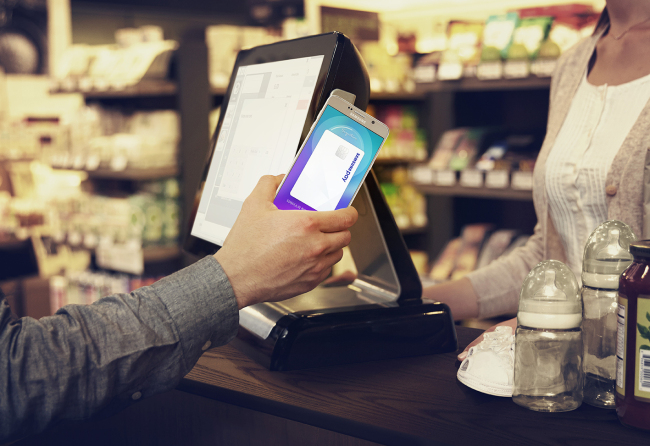 |
|
|
Nov 24 2017, 12:41 AM
Return to original view | Post
#3
|
|
Junior Member
18 posts Joined: Mar 2009
|
QUOTE(boonhan @ Nov 24 2017, 12:32 AM) i do tap at pos system before, the cashier asked me to tap there. If payment is already made on the terminal, I'll just insist saying I didn't bring the physical card out. Not my problem the POS does not tally but in case the cashier asked you to give them physical card, how u tell the cashier can do so?  The receipt printed out by the terminal should also have first 4 digits and last 4 digits. I've seen some merchants enter the first 4 + followed by zeroes + the last 4 digits into their system. Worst case I've had before is the cashier void my payment and asked me to pay again with real card lo. If the cashier insists to not allow to even pay on the terminal then can't do anything....pay by cash/other methods and report to Samsung through the app (Select 3 dots on the main page and select "Contact us") |
|
|
Dec 2 2017, 10:42 AM
Return to original view | Post
#4
|
|
Junior Member
18 posts Joined: Mar 2009
|
QUOTE(CyberKewl @ Dec 2 2017, 10:03 AM) continue to get as many points as you can so that the next item, when arrives you just redeem... Yeah.. I dont think Samsung will just stop there after all the Gear S3s are redeemed.. waiting for the next item |
|
|
Dec 11 2017, 12:11 AM
Return to original view | Post
#5
|
|
Junior Member
18 posts Joined: Mar 2009
|
QUOTE(David83 @ Dec 10 2017, 07:44 PM) For PB terminal, does the light at the blue colour panel on top of the display panel need to be emitted in order to use SPay or Wave with SPay? If not mistaken, the light on the terminal indicates that NFC is ready (See "LEDs for Contactless cards"). If there's light blinking after cashier keys in the amount, means you can use NFC (aka "paywave") and tap your phone at the "contactless card area".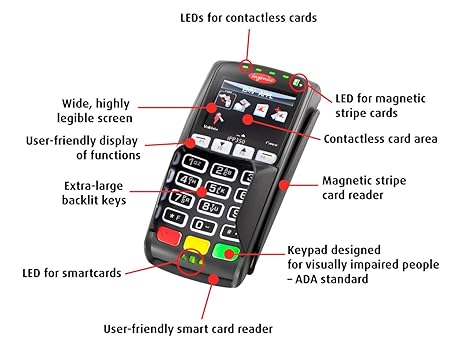 If no light, then you can tap your phone at the "Magnetic stripe card reader" to use MST. At least that's how I differentiate which to use.. |
|
|
Dec 11 2017, 12:19 AM
Return to original view | Post
#6
|
|
Junior Member
18 posts Joined: Mar 2009
|
QUOTE(David83 @ Dec 11 2017, 12:14 AM) But today my friend tried at Sun Global Gurney Plaza. You mean your friend was able to use physical card to tap but not SPay? Hmm That's weird..I told the cashier to light up the blue panel, she failed to do so. My friend can't pay with SPay Wave. The cashier fed up and asked to tap with the physical card. The transaction went through. As I remembered correctly, when I tried at Sushi Zanmai Sunway Velocity and BHS Organic Mytown, the blue panel needs to light up in order to pay with SPay Wave. |
|
|
|
|
|
Dec 13 2017, 09:39 PM
Return to original view | Post
#7
|
|
Junior Member
18 posts Joined: Mar 2009
|
QUOTE(singgung @ Dec 13 2017, 05:17 PM) Anybody using RHB visa debit? This is the 2nd time I faced this issue after 2 and half months using spay. After I tapped at the terminal, it said "received" followed by "do not honor" and transaction canceled. Both times I tried at 2 different merchants and faced the same thing. I needed to use pin & pay, then only can use samsung pay again. I didn't go over the daily limit either. I called rhb they said their only limit is rm250 or 10 times per day. They suggested me to call samsung. Lol. Donno how samsung can help. Any of you know any other limits / restrictions that require pin & pay to be used to reactivate spay? I don't mind if I got a prompt or notification alerting me to reset with pin but as it is now there's none. According to RHB FAQ:Cumulative Samsung Pay Transaction Limit The maximum Samsung Pay transaction(s) for both MST and NFC is cumulatively up to 30 times or a maximum of RM1,000 whichever comes first. When it reach the maximum limit, please make the payment with your physical card and with PIN. You may choose to lower the cumulative transaction limit by contacting RHB Call Centre RHB Samsung Pay FAQ Perhaps you have reached the Cumulative limit. Need to reset with physical card |
|
|
Jan 17 2018, 10:24 PM
Return to original view | Post
#8
|
|
Junior Member
18 posts Joined: Mar 2009
|
QUOTE(David83 @ Jan 17 2018, 08:06 PM) Anybody adds Watson card into SPay? I think if you key in the card number manually into SPay it will not work. Have to add the card by scanning the barcode on the Watson's card(where it auto appends a "991" in front of the card number), then SPay will generate the same barcode that's shown on the card. I always faced problem with the cashier failed to scan the barcode. Sometimes, they don't even know how to input the numbers manually to the cash register. Any enlightenment? Maybe used by the scanner POS to differentiate the membership barcode vs its store items... |
|
|
Jan 21 2018, 10:41 PM
Return to original view | Post
#9
|
|
Junior Member
18 posts Joined: Mar 2009
|
QUOTE(SonnyCooL @ Jan 21 2018, 10:19 PM) yha some merchant required sign .... wonder why Because it is treated as swipe payment just like using foreign cards. Still need to sign as not all foreign cards support chip & pin |
|
|
Feb 3 2018, 12:42 PM
Return to original view | Post
#10
|
|
Junior Member
18 posts Joined: Mar 2009
|
QUOTE(David83 @ Feb 3 2018, 12:14 PM) >RM 250; some terminal will trigger PIN input. Terminals that support NFC, >250 will prompt PIN. Maximum limit per day is subjected to Bank's limit. Different bank has different limit. I used CIMB CC with SPay on CIMB terminal; Amount > RM 250; PIN input required. Terminals that dont have NFC, using MST, 250 is the limit. |
|
|
Feb 3 2018, 01:32 PM
Return to original view | Post
#11
|
|
Junior Member
18 posts Joined: Mar 2009
|
QUOTE(dr2k3 @ Feb 3 2018, 01:04 PM) i think we have 2 limitation....atleast that is what i experience in overseas. Yes, 2 layers of limit(merchant terminal & card).1 is credit card itself, and 1 is merchant credit card terminal, whichever is lower first my card itself can SPay more than RM250 in value, but softly rejected by the credit card terminal without ever prompt me for pin, after inquire the related merchant bank, they told me limit is (this this amount), which is actually still way lower than my own setup limit. 1st layer limit is configured on the terminal. NFC terminals are configured to prompt PIN if >250. MST is not configured to prompt pin yet and will block at 250. This only happens to terminals in Malaysia as this is Bank Negara's requirements(pin & pay). 2nd layer limit(if the terminal allows through), is card limit. Different banks set different limits (according to risk factors and security measures). Most have a cumulative daily limit and can reset by using physical card once. This post has been edited by wingchiew: Feb 3 2018, 06:07 PM |
|
Topic ClosedOptions
|
| Change to: |  0.1806sec 0.1806sec
 0.25 0.25
 7 queries 7 queries
 GZIP Disabled GZIP Disabled
Time is now: 7th December 2025 - 06:21 PM |
 Quote
Quote