Welcome Guest ( Log In | Register )

Outline · [ Standard ] · Linear+

PC Audio Creative X-Fi club!, X-Fi owners and fanclub!

views
     
myhotgary2
post Jun 30 2008, 12:20 PM

Joined: Yesterday
****
Senior Member
617 posts

Joined: Apr 2007
From: You Kay?


hi i just bought an xtreme gamer from allngap...
my question is...
i have a 4.1 speakers (AL ADA885) with green / yellow / black connectors...
but on my sound card, all i get is green/ blue / orange /white
where do my yellow/black go?


Added on June 30, 2008, 12:20 pmsorry total noob here

This post has been edited by myhotgary2: Jun 30 2008, 12:20 PM
myhotgary2
post Jun 30 2008, 03:52 PM

Joined: Yesterday
****
Senior Member
617 posts

Joined: Apr 2007
From: You Kay?


QUOTE(coolkwc @ Jun 30 2008, 12:26 PM)
on sound card, green is for front stereo, blue for real surround, orange is for X.1 subwoofer connector...

since your speaker is 4.1 only, either yellow or black 3.5mm head should got 2 segments only(surround and front should be 3 segments on it)...so just connect the 2 segments connector to the orange jack on the sound card.
*
huh?u mean i dun use real surround?
4.1 cannot do surround meh?
how do i connect both yellow and black both into the orange jack?
i tot orange as u said is subwoofer jack, how come black (rear out, i thought) goes into the subwoofer jack?

sorry...i'm not questioning u...i really dun understand here...
trying to get this whole thing work
myhotgary2
post Jun 30 2008, 04:10 PM

Joined: Yesterday
****
Senior Member
617 posts

Joined: Apr 2007
From: You Kay?


QUOTE(coolkwc @ Jun 30 2008, 03:58 PM)
lol laugh.gif ,you don't understood what i said....

i didn't mean connect both yellow and black into the orange jack, i just said look for your speaker cable, either black or yellow got 2 segments in that head(i guess only, cause i don't know which cable is subwoofer and which one is real surround for your speaker)....

conclusion....connect your real surround into blue jack, subwoofer into orange jack.. nod.gif  clear now? unsure.gif
*
OHHH~now i get it...
haha...okok...my yellow cable has 2 segments...
so my yellow into orange, my black into blue...hehe
wait, that 2 segment thingey, one is plugged into the sound card...the other end i left it hanging oni wat, nothing to connect into oso?rite?
or am i missing something here? something that i'm supposed to plug in here?

damn this card...4 jacks oni...even my previous audigy live have 6 ports...


Added on June 30, 2008, 4:12 pmand what is white jack for?

This post has been edited by myhotgary2: Jun 30 2008, 04:12 PM
myhotgary2
post Jun 30 2008, 06:01 PM

Joined: Yesterday
****
Senior Member
617 posts

Joined: Apr 2007
From: You Kay?


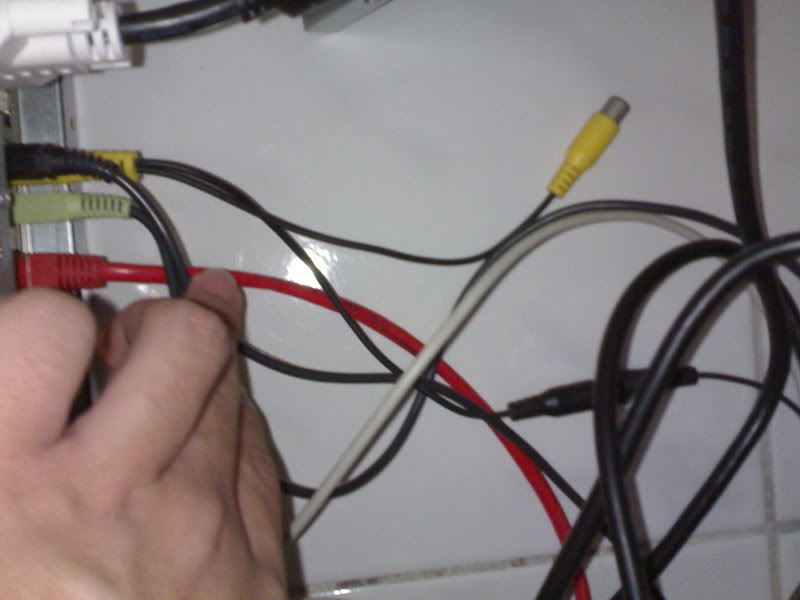
» Click to show Spoiler - click again to hide... «


see?
the yellow one, it splits into two, one yellow head which i left it hanging, another black one, which i connect to the speaker...

is it supposed to be hanging like this?

i'm using this speakers btw
» Click to show Spoiler - click again to hide... «

Altec Lansing ADA885

This post has been edited by myhotgary2: Jun 30 2008, 06:02 PM
myhotgary2
post Jun 30 2008, 09:35 PM

Joined: Yesterday
****
Senior Member
617 posts

Joined: Apr 2007
From: You Kay?


QUOTE(coolkwc @ Jun 30 2008, 08:43 PM)
yap, if you already connected all the appropriate connectors to the speaker terminals respectively and it sound correctly, then that means left it hanging is doesn't matter....from your pic, i guess the hanging yellow cable if for extra front center(if your black is for subwoofer)...
*
wow cool...which mean i can just find myself one speaker and connect it there, and i get 5.1???


Added on June 30, 2008, 9:41 pm
QUOTE(wen9x88 @ Jun 30 2008, 08:08 PM)
that mean X-Fi XtremeGamer Fatal1ty Pro Series only work for game?
useless for listen music?
*
Its not useless for listening to music...
Its just that, this card is specially built for games...Playing as many eax modules possible..The surround and all..
but if u listen to music with it...it doesn't mean it'll suck..
its actually pretty good...giving richer audio...ur music will sound nicer..
provided u have good speakers, may it be 2.1, 5.1 or 7.1...
On board audio processor doesn't even come close..


Added on June 30, 2008, 9:41 pmpros, correct me if i am wrong

This post has been edited by myhotgary2: Jun 30 2008, 09:41 PM

myhotgary2
post Jul 19 2008, 04:31 PM

Joined: Yesterday
****
Senior Member
617 posts

Joined: Apr 2007
From: You Kay?


hey guys...
i am using an xtreme gamer...
I din realize this earlier...
But today when i was listening to music while doing assignments, i realize there are random pauses...
long apart but obvious and irritating enough...
Its like each song, i might randomly get 0-3 pauses...
I use windows xp, and winamp to listen to mp3s...
Is this the card problem?
Or driver problem?

This post has been edited by myhotgary2: Jul 19 2008, 04:31 PM


Change to:
| Lo-Fi Version
0.0399sec    0.44    7 queries    GZIP Disabled
Time is now: 2nd December 2025 - 07:58 PM