Welcome Guest ( Log In | Register )

21 Pages « < 7 8 9 10 11 > » Bottom

Outline · [ Standard ] · Linear+

PC Audio Creative X-Fi club!, X-Fi owners and fanclub!

views
     
coolkwc
post Jun 10 2008, 11:36 PM

Fall in love with audio again.
*******
Senior Member
3,112 posts

Joined: Jul 2006
QUOTE(Najmods @ Jun 10 2008, 11:00 PM)
Never experienced it before. Very weird that most of you guys having problem with Creative products, I have none, even my old SB Live! have none my current X-Fi work like clockwork even when I messed up the left channel and doesn't need to change driver or anything
*
actually X-FI also trouble free for me except the ASIO...about the incorrect pitch and slow restart can solved if i matched the player sampling rate with Creative Audio Creation Mode Master sampling rate, that means if i set the master sampling as 96khz, in foobar i need to use resampler and set it as 96khz, same as others player such as TTplayer...

anyway, for ASIO, the latest official is the best...i will try to test this beta thoroughly...

This post has been edited by coolkwc: Jun 10 2008, 11:37 PM
coolkwc
post Jun 11 2008, 11:45 AM

Fall in love with audio again.
*******
Senior Member
3,112 posts

Joined: Jul 2006
QUOTE(kerollowyat @ Jun 11 2008, 01:42 AM)
Hi, X-Fi user here.

I have X-Fi Xtreme Music. Quick question. How am I supposed to install the latest creative driver.
I have installed X-Fi driver from installation CD. Been very good playing games.

Now playing GRID game. Can run fine, except I have to turn off hardware sound acceleration in dxdiag.
If paly DIRT, have to set full hardware acceleration. If not, can not launch.  rclxub.gif

I tried to install the latest driver for X-Fi, but ended mess up with current driver. Not improving, rather causing more problem.
Rear and center speaker do not ouptut sound. Retried and reinstall many times.

Using XP.
So, how is exactly to install the latest firmware?

Thanks a lot  notworthy.gif
*
you said which latest driver? official 2.15.006 or Beta 2.18.000? anyway, if you are using latest official 2.15.006 driver, they are different from the ori driver came from CD....in latest driver, you will get one more function in the windows volume mixer as circled below...
Attached Image

click on it and you will open the windows below...
Attached Image

Channel 5 = Real left, channel 6 = Real right, channel 7 = Center, default if you control the volume through the Creative volume knob, this 3 channels will be closed, so no sound will be heard even you are in 5.1 setup, you need to adjust it manually for everytime you adjust volume knob in Creative console, this was known bug from this driver....for latest beta, the problem solved...

in order to uninstall the driver completely, use the exe file from your CD, the path is <drive>:\Audio\drivers\setup.exe....double click it and select as shown Attached Image , this should uninstall well, no need to use any other 3rd party uninstaller/registry cleaner as many users done, overkill adi...

This post has been edited by coolkwc: Jun 11 2008, 11:51 AM
coolkwc
post Jun 11 2008, 06:15 PM

Fall in love with audio again.
*******
Senior Member
3,112 posts

Joined: Jul 2006
» Click to show Spoiler - click again to hide... «


no, why you need to install official then follow by beta? if you want to install any version of driver, no need to install the driver from CD then follow by that, no need, just straight away uninstall the old one and install the latest new one...
coolkwc
post Jun 13 2008, 08:46 PM

Fall in love with audio again.
*******
Senior Member
3,112 posts

Joined: Jul 2006
QUOTE(Najmods @ Jun 13 2008, 08:33 PM)
Hmm, why is this thread is dying? Where is the modder and user?

I get annoyed by the left channel distortion, so I looking what causing it, by nook or by crook, I check where is the problem by shorting some part of the PCB, first try is after decoupling to opamp (my first guess is the small resistor after the decoupling), but its not it, the problem still there. Then I try straight from opamp out to RCA jack bypassing everything after that (my 2nd guess), yeah I hit the jackpot thumbup.gif !

Now it sounds much clearer, and furthermore it fixed the DC offset voltage problem, now its 19mV on both channel rclxm9.gif
*
lol, modder actually only got you, me and UNDERGROUND, where got others adi?haha rclxm9.gif i'm always here to wait you make this thread alive tongue.gif ...i also wonder the function of those component after the opamp....

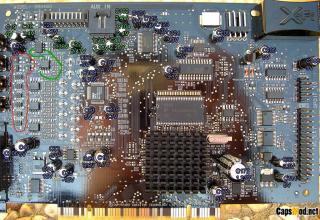
how about bypass the input opamp as shown? hmm.gif brows.gif try it, no try no gain... tongue.gif rclxm9.gif
Attached Image

This post has been edited by coolkwc: Jun 13 2008, 08:51 PM
coolkwc
post Jun 13 2008, 09:14 PM

Fall in love with audio again.
*******
Senior Member
3,112 posts

Joined: Jul 2006
QUOTE(Najmods @ Jun 13 2008, 09:11 PM)
Yeah there is only 3 modders here  laugh.gif  tongue.gif

Well, I don't know what are those resistor or whatever there is for, don't know much about electronics. I'm more street smart than book smart tongue.gif

Its simple, just run a small wire from opamp output, then connect it to RCA or 3.5mm jack output, you can't bypass it with internal 3.5mm though

Further checking, I read the DC offset wrongly, its 190mV not 19mV doh.gif  rclxub.gif  whistling.gif
*
No, i means when you do RMAA test, you can bypass the input opamps, maybe it can show the real potential of your LME49720... brows.gif
coolkwc
post Jun 13 2008, 09:18 PM

Fall in love with audio again.
*******
Senior Member
3,112 posts

Joined: Jul 2006
QUOTE(ah_heng @ Jun 13 2008, 09:14 PM)
Ok.. since i'm new in this thread. Let me ask some stupid questions wink.gif

I'm using macbook and would like you guys to recommend a good external soundcard. Should I go for 2.1/2.0 or 5.1? wink.gif
*
Najmods you bring a new user here successfully... rclxm9.gif

focus on your question....

you can try Creative Xmod...2 channel but can upgrade to 8 channel by using external I/O..

EDIT: what is your main purpose for sound card?

This post has been edited by coolkwc: Jun 13 2008, 09:20 PM
coolkwc
post Jun 13 2008, 09:25 PM

Fall in love with audio again.
*******
Senior Member
3,112 posts

Joined: Jul 2006
QUOTE(ah_heng @ Jun 13 2008, 09:22 PM)
Hey coolkwc,

thanks thanks... will check it out. Main usage is more for music. Using headphones now but at the volume that i'm listening, I'll be deaf soon wink.gif)) so thought of getting a proper speaker and probably the external soundcard. Btw, any recommendation for a good pair of speaker for music? I was looking at this gigaworks T-20 wink.gif

thx...
*
for speaker you can ask HERE... nod.gif
coolkwc
post Jun 13 2008, 10:05 PM

Fall in love with audio again.
*******
Senior Member
3,112 posts

Joined: Jul 2006
QUOTE(Najmods @ Jun 13 2008, 09:43 PM)
oh I see, well I'm to lazy to do RMAA. Never bother much about it. But if I do so people will drool with the result I think biggrin.gif
*
lol, laugh.gif don't be lazy, without RMAA, you also won't know got high spikes on your left channel... icon_idea.gif

This post has been edited by coolkwc: Jun 13 2008, 10:05 PM
coolkwc
post Jun 14 2008, 01:18 AM

Fall in love with audio again.
*******
Senior Member
3,112 posts

Joined: Jul 2006
QUOTE(Najmods @ Jun 13 2008, 09:11 PM)
Yeah there is only 3 modders here  laugh.gif  tongue.gif

Well, I don't know what are those resistor or whatever there is for, don't know much about electronics. I'm more street smart than book smart tongue.gif

Its simple, just run a small wire from opamp output, then connect it to RCA or 3.5mm jack output, you can't bypass it with internal 3.5mm though

Further checking, I read the DC offset wrongly, its 190mV not 19mV doh.gif  rclxub.gif  whistling.gif

Without opamp, the DC offset is staggering 6.9V shocking.gif
*
According to Head-fi, those component you bypassed were muting transistor...
coolkwc
post Jun 14 2008, 06:19 PM

Fall in love with audio again.
*******
Senior Member
3,112 posts

Joined: Jul 2006
You are happy with the test, i'm struggle with it... sad.gif

Attached Image

RMAA test for not-muting transistor bypass
Attached Image Attached Image

RMAA test for output directed from pin1 & pin7 of opamp
Attached Image Attached Image

from the results, i concluded that the distortion i mentioned before was totally cause by the left channel SMD resistor, after i bypassed it, it shows very good results, i should be happy with it, but i'm not....i noticed the hissing sound after bypass it, and after tested repeatedly, i concluded that the output SMD resistor after the opamp(as red circle) actually put there to reduce the hissing sound
Attached Image

i did 2 bypass method just now...
1. bypass the whole thing after opamp, hissing sound noticed, minimized distortion in RMAA test.
2. only bypass those muting transistor, minimum hissing sound, but the distortion in RMAA same as before.

so i can confirm that the distortion was actually caused by the left channel SMD resistor...

now i don't know whether to bypass or not...bypass i will reduce the distortion that i can't actually heard but increase the hissing sound level which can detected by my ears.... sad.gif

This post has been edited by coolkwc: Jun 14 2008, 06:27 PM
coolkwc
post Jun 14 2008, 06:48 PM

Fall in love with audio again.
*******
Senior Member
3,112 posts

Joined: Jul 2006
QUOTE(Najmods @ Jun 14 2008, 06:37 PM)
Hmm, that's weird. I just redone the mod, now I removed the transistro and bypass them (means I use 3.5mm for RMAA) and it returned slightly better result than totally bypass them, but still I tap from 3.5mm to RCA since I don't like to use adapter to connect to my amp

Its up to you, really. Bypass or not, your ear mostly can't hear much difference, trust me smile.gif But the last resort, you should clean your mod area thoroughly, I messed up my mod when I bypass the muting transistor just now, I just noticed that there is a stupid solder stuck on those small SMD resistor shorting them and mess up the sound
My left channel distortion is even worse than yours but I don't save the result to compare, but all I remember is the THD and IMD is around the same as yours
*
After 2 hours of listening, sorry to tell that i removed the bypass cable finally because i can't withstand the hissing sound(i'm using earphone currently, so can hear it)...

i saw from your RMAA results, the reason of better results because you reduced the hissing sound when you only bypass the transistor, thats why your noise level and dynamic range should be better...

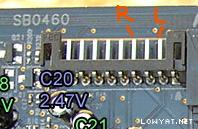
EDIT: actually you no need to remove the transistor to bypass it, since you are using RCA, just solder at the socket besides that AUX IN...
Attached Image

This post has been edited by coolkwc: Jun 14 2008, 09:08 PM
coolkwc
post Jun 14 2008, 08:28 PM

Fall in love with audio again.
*******
Senior Member
3,112 posts

Joined: Jul 2006
QUOTE(Najmods @ Jun 14 2008, 08:01 PM)
So its pin 2 for right and pin 4 for left?
*
Sorry bro, my bad doh.gif , PIN 2 is LEFT, PIN 4 is RIGHT.... i tested today...this pin just after the opamp SMD resistor and before muting transistor.. nod.gif

This post has been edited by coolkwc: Jun 14 2008, 09:05 PM
coolkwc
post Jun 15 2008, 12:25 AM

Fall in love with audio again.
*******
Senior Member
3,112 posts

Joined: Jul 2006
QUOTE(Najmods @ Jun 15 2008, 12:22 AM)
Oh I forgot, I removed some capacitor render those pins unusable. Anyway I don't think I needed those to use that pins anyway, I just fine with what I done now wink.gif
*
nope, remove those cap won't affect that pin, the signal path just from SMD resistor to that pin, no cap along that path... but is up to you whether want to use it... nod.gif
coolkwc
post Jun 15 2008, 12:40 AM

Fall in love with audio again.
*******
Senior Member
3,112 posts

Joined: Jul 2006
QUOTE(Najmods @ Jun 15 2008, 12:32 AM)
That's weird, when I used it there is no sound at all unsure.gif
*
if you are interested enough, you can use multimeter to test the connectivity of pin1 opamp-->pin4 socket and pin7 opamp-->pin2 socket...

This post has been edited by coolkwc: Jun 15 2008, 12:40 AM
coolkwc
post Jun 15 2008, 12:55 AM

Fall in love with audio again.
*******
Senior Member
3,112 posts

Joined: Jul 2006
QUOTE(Pepperboy @ Jun 15 2008, 12:46 AM)
Yo guys, just wanna ask if u all using modded drivers or official Creative?
And is there anyway to get the fanciful Audio Console (the one to switch between Entertainment Mode, Game Mode, and Audio Creation Mode) with Vista? I heard Vista only got plain drivers, no fanciful control panel applications...
*
i'm using Official Creative driver in XP and Vista, Creative just released the beta driver which gave back the Dolby Digital and DTS in Vista, you can go and download from Creative site here

about the 'fanciful Audio Console' is call Creative Console Launcher, included at that site as well... nod.gif

EDIT: which card you using now?

This post has been edited by coolkwc: Jun 15 2008, 12:57 AM
coolkwc
post Jun 15 2008, 01:03 AM

Fall in love with audio again.
*******
Senior Member
3,112 posts

Joined: Jul 2006
QUOTE(Pepperboy @ Jun 15 2008, 01:00 AM)
I just bought an XtremeGamer FPS smile.gif So u're using the Creative Console Launcher in Vista? Is the volume loud enough in Vista (I also heard volume problems under Vista)?
*
the loudness should be the same as in XP, no problem for me... nod.gif

EDIT: Creative Console Launcher not new in vista, existed long time adi..

This post has been edited by coolkwc: Jun 15 2008, 01:06 AM
coolkwc
post Jun 15 2008, 01:18 AM

Fall in love with audio again.
*******
Senior Member
3,112 posts

Joined: Jul 2006
QUOTE(Pepperboy @ Jun 15 2008, 01:15 AM)
Oh... I thought got some modded drivers (PAX) which lets Vista users use the Creative Console Launcher...

BTW, is the Creative Console Launcher the one with the blue graphical interface and volume knobs? I could be mistaken here...
*
You are right, that blue interface is Creative Console Launcher....modded drivers lets Vista users use the Dolby as mentioned before...but now the beta driver included that function adi, so no point to use modded driver..
coolkwc
post Jun 15 2008, 01:26 AM

Fall in love with audio again.
*******
Senior Member
3,112 posts

Joined: Jul 2006
QUOTE(Pepperboy @ Jun 15 2008, 01:21 AM)
Ok, thanks coolkwc for the heads-up... So to enable EAX in certain games, we just install Alchemy over the standard drivers (which one to install first?)?
*
which one to installed first is up to you, doesn't matter... nod.gif


Added on June 15, 2008, 1:29 am
QUOTE(Oxburg @ Jun 15 2008, 01:25 AM)
Is this card good for audio?I meant X-FI FPS.Previously i using Creative SB live ! Value 4.1 . But vista not supporting it so i using on board.Hmm how much this card could improve compare SB live ..Your help needed thank you!
*
enough but not perfect for audio....Najmods, lets poison him...

EDIT: no one can tell you how much could improve, but sure got improvement, just try yourself..

This post has been edited by coolkwc: Jun 15 2008, 01:30 AM
coolkwc
post Jun 15 2008, 01:31 AM

Fall in love with audio again.
*******
Senior Member
3,112 posts

Joined: Jul 2006
QUOTE(Pepperboy @ Jun 15 2008, 01:30 AM)
I saw some reviews they say music quality is good, and also optimized for gaming due to 64MB of X-RAM which helps a little during gaming (that's y it's called XtremeGamer) wink.gif
*
to be honest, X-RAM is useless until today...

EDIT: for audio quality, all are same except ElitePro...

This post has been edited by coolkwc: Jun 15 2008, 01:34 AM
coolkwc
post Jun 15 2008, 01:59 AM

Fall in love with audio again.
*******
Senior Member
3,112 posts

Joined: Jul 2006
QUOTE(Najmods @ Jun 15 2008, 01:55 AM)
True, the only games that I see that uses that X-RAM is Battlefield 2 and 2142

And yeah, basically anything below Elite Pro is the same (same DAC, same layout, opamp etc.), except for XtremeAudio that is
*
you not said i also don't know Battlefield using X-RAM...but the card without X-RAM haven't suffer any performance issue also... flex.gif

EDIT: lol, still only 3 of us keep posting here... blush.gif

This post has been edited by coolkwc: Jun 15 2008, 02:01 AM

21 Pages « < 7 8 9 10 11 > » Top
 

Change to:
| Lo-Fi Version
0.0419sec    0.45    7 queries    GZIP Disabled
Time is now: 7th December 2025 - 09:24 AM