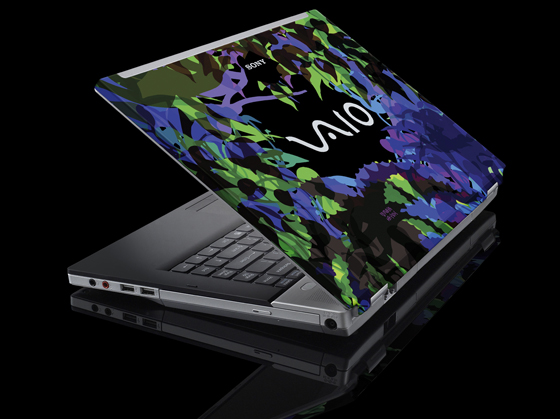
Club VAIO
Club VAIO
|
|
 Sep 25 2007, 08:51 PM Sep 25 2007, 08:51 PM
|
 
Senior Member
1,536 posts Joined: Jan 2005 
|
meet my vaio hackintosh
|
|
|
|
|
|
Sep 25 2007, 09:49 PM
|

Senior Member
1,592 posts Joined: Jul 2005 From: Poland
|
lol nice one, ezinger ;P
|
|
|
Sep 25 2007, 09:52 PM
|
 
Elite
417 posts Joined: Aug 2007 From: Malaysia  
|
Wow... VAIO HACKintosh...
 Very nice. Very nice. |
|
|
Sep 26 2007, 11:23 PM
|

Junior Member
151 posts Joined: Nov 2005 
|
i am vaio c25 user :
I just installed Windows XP on the laptop because windows Vista was way too slow, and now my problem is that I can't find all of the drivers for Windows XP originally there was a folder called Drivers on C drive, I copied that to other computer before formatting and the only working drivers for windows XP are Bluetooth, Memory Stick and Intel chipset drivers.. Need driver for -ethernet controller -mass storage controller -network controller -pci device -video controller (VGA compatible) -WLAN (i cant connet to net also T_T ) Anyone can help me ??.. |
|
|
Sep 26 2007, 11:33 PM
|

Senior Member
2,158 posts Joined: Jan 2003 From: Why Am I Here?? Status: --- 
|
QUOTE(squrce @ Sep 26 2007, 11:23 PM) i am vaio c25 user : http://www.sony-asia.com/support/download/...site=hp_en_AP_iI just installed Windows XP on the laptop because windows Vista was way too slow, and now my problem is that I can't find all of the drivers for Windows XP originally there was a folder called Drivers on C drive, I copied that to other computer before formatting and the only working drivers for windows XP are Bluetooth, Memory Stick and Intel chipset drivers.. Need driver for -ethernet controller -mass storage controller -network controller -pci device -video controller (VGA compatible) -WLAN (i cant connet to net also T_T ) Anyone can help me ??..  |
|
|
Sep 27 2007, 12:47 AM
|

Junior Member
85 posts Joined: Aug 2007 From: Malaysia 
|
QUOTE(ezinger @ Sep 25 2007, 08:51 PM) meet my vaio hackintosh Bro... Nice hackintosh there...  |
|
|
|
|
|
Sep 27 2007, 08:44 PM
|

Senior Member
2,021 posts Joined: Dec 2006 From: Malaysia
|
|
|
|
Sep 27 2007, 08:48 PM
|
|
Elite
417 posts Joined: Aug 2007 From: Malaysia
|
QUOTE(EmperorMeng @ Sep 27 2007, 08:44 PM) Ooh la la  Wish I could skin my VAIO though, but the logo proves to be a bit tricky... but on second thought sometimes I don't think I want to skin it because leaving it "original" looks more elegant Wish I could skin my VAIO though, but the logo proves to be a bit tricky... but on second thought sometimes I don't think I want to skin it because leaving it "original" looks more elegant |
|
|
Oct 1 2007, 11:53 PM
|

Junior Member
413 posts Joined: Nov 2006
|
Just got my first Vaio today. VGN-CR13W. Cool!! But updates very slowly... any idea or anything i should know bout it? Manged to update my vista successfully....
|
|
|
Oct 2 2007, 12:14 AM
|
|
Elite
417 posts Joined: Aug 2007 From: Malaysia
|
Congrats on getting a VAIO!
 Do you mean Windows Update? Could possibly be the internet connection or the server... don't seem to have any problems with updating mine Do you mean Windows Update? Could possibly be the internet connection or the server... don't seem to have any problems with updating mine  |
|
|
Oct 2 2007, 01:08 AM
|

Senior Member
1,300 posts Joined: Oct 2006 From: Pee Jay
|
i m using VGN-S48GP, and i went reinstalled win xp without backup my drivers..
i m missing on ethernet, mass storage controller and vga card drivers.. anyone can provide me these?? or else i need to send it back to the service center.. i check the online support website.. i installed all the drivers provided. but still there is a few missing... really need HELP desperately |
|
|
Oct 2 2007, 08:54 AM
|
|
Junior Member
413 posts Joined: Nov 2006
|
QUOTE(Yukaeshi @ Oct 2 2007, 12:14 AM) Congrats on getting a VAIO! No, the vaio updates... extremely slow.. not sure if it was the server or what... will try again later today.. i haven had any time to read the manuals.. anything in particular i need to know? Do you mean Windows Update? Could possibly be the internet connection or the server... don't seem to have any problems with updating mine |
|
|
Oct 2 2007, 12:26 PM
|
|
Senior Member
1,592 posts Joined: Jul 2005 From: Poland
|
^ dont forget to create the dvd/cd recovery once you first switch on your vaio
|
|
|
|
|
|
Oct 2 2007, 02:09 PM
|
|
Junior Member
413 posts Joined: Nov 2006
|
QUOTE(Miyabi @ Oct 2 2007, 12:26 PM) ^ dont forget to create the dvd/cd recovery once you first switch on your vaio Opss.. haven done it yet.. will do it tonight... need 2 dvds right? using one of those softwares provided by vaio right.. |
|
|
Oct 3 2007, 02:53 PM
|
|
Elite
417 posts Joined: Aug 2007 From: Malaysia
|
Oh, yeah. Sometimes VAIO Updates are slow for me too. It takes two DVD-Rs or DVD+Rs for the recovery discs BTW. Very, very helpful if your laptop needs a reformat
 Basically that's the most important thing to do with your VAIO. As for the rest- it's basic care and maintanence. Basically that's the most important thing to do with your VAIO. As for the rest- it's basic care and maintanence. |
|
|
Oct 3 2007, 10:28 PM
|
|
Junior Member
413 posts Joined: Nov 2006
|
Anybody has a CR13G? One of the features is the illuminated light just at the bottom tip at the front... Basically i donno what it does except it comes on when you shut down the Vaio and during startup... Apart from this.. does it do anything else?
|
|
|
Oct 3 2007, 11:07 PM
|

Senior Member
1,176 posts Joined: Aug 2007
|
Hi Squrce n Mugenz,
Have u checked ur hardware under My Computer -> Properties? U can find what driver has not been installed and download them separately from their individual manufacturer websites |
|
|
Oct 4 2007, 12:21 PM
|

Junior Member
266 posts Joined: Nov 2005
|
hello guys,
having some problem here with the built in motion eye and live messenger. ever since i was forced to update to 8.1, messenger says the camera will not be detected or its in use by another program it works in vaio camera capture utility... but after launching live messenger, it doesnt work in any program anymore. need help. using SZ series. |
|
|
Oct 4 2007, 10:17 PM
|
|
Senior Member
2,158 posts Joined: Jan 2003 From: Why Am I Here?? Status: ---
|
QUOTE(alimony @ Oct 4 2007, 12:21 PM) hello guys, i think is the window vista problem... i have this problem also, but now i reinstall my SZ with window XP no more this problem already...having some problem here with the built in motion eye and live messenger. ever since i was forced to update to 8.1, messenger says the camera will not be detected or its in use by another program it works in vaio camera capture utility... but after launching live messenger, it doesnt work in any program anymore. need help. using SZ series. |
|
|
Oct 5 2007, 03:33 AM
|
|
Senior Member
1,592 posts Joined: Jul 2005 From: Poland
|
just finish up watching resident evil extinction today. you can see alot of vaio's use by the umbrella corp. ;P
|
|
Topic ClosedOptions
|
| Change to: |  0.0160sec 0.0160sec
 0.53 0.53
 6 queries 6 queries
 GZIP Disabled GZIP Disabled
Time is now: 8th December 2025 - 07:19 AM |
 Quote
Quote